 Runemoro
- runemoro
- runemoro
- Europe/Stockholm
- Yes
- No
 Normal
 Low
Low MCL-9187
 MC-128953
![[Mojang] Nathan Adams](../../../data/assets/gravatar/dinnerbone.png)




But it stays that way even after the block was removed, fences update their direction.
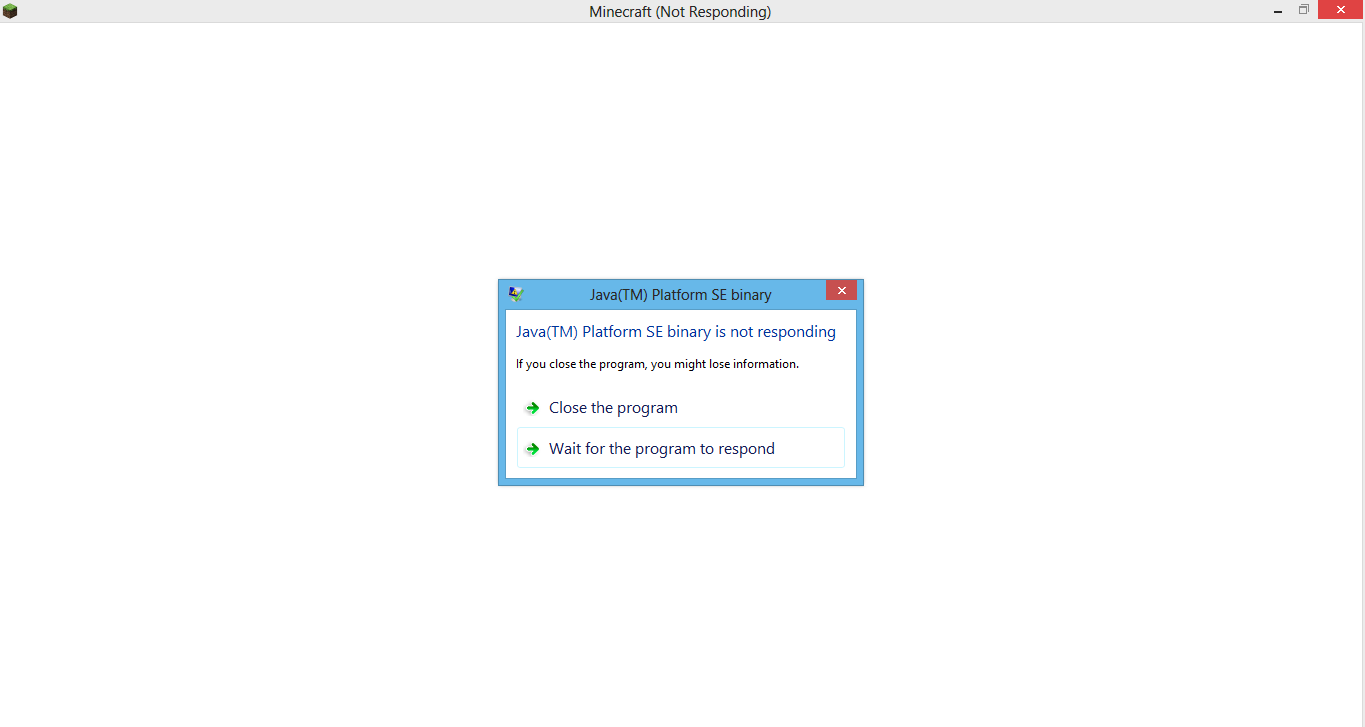
When the screen goes black(but not in sleep mode), minecraft freezes(Minecraft(Not Responding)) on a white screen
This happens also on other windows, but they come back in 2-3 seconds
I don't need to be in the game for this to happen
When the screen goes black(but not in sleep mode), minecraft freezes(Minecraft(Not Responding)) on a white screen
This happens also on other windows, but they come back in 2-3 seconds
I don't need to be in the game for this to happen
The window's bar crashes too(I can't move it or close it)
Also, the end portals seem to be using an invulnerableDimensionChange flag to skip the anti-cheat for the rest of the player's move. Doing the checks before the end portal collision code is triggered would remove the need for this and simplify things.
In the issue, I said that the client should check that the new position is valid, and only then accept the move. That's not necessary though, because `Entity.move(xDiff, yDiff, zDiff)` already makes sure that it won't move the player through a solid block. In my mod VanillaFix, I solve both this issue and
MC-98153by ignoring the packet's position after Entity.move is called if `invulnerableDimensionChange` is true and instead just syncing the new position to the client: https://github.com/DimensionalDevelopment/VanillaFix/tree/0757aeb6735aef974b1c1ce6e7b81d19b92636d0/src/main/java/org/dimdev/vanillafix/bugs/mixins/MixinNetHandlerPlayServer.java#L198
It is impossible for a block in the game to be fully white. The brightest color it can have is 0xFCFCFC.
To reproduce: Set glowstone's texture to be completely white, place it in the world, and take a screenshot. Get the color of the the glowstone block, you'll notice that it is 0xFCFCFC rather than 0xFFFFFF.
Disabling ambient occlusion or shading on the block model doesn't fix this. I need to make a fully-white block to my mod, but can't due to this bug. This is caused by lines 911-913 of the EntityRenderer class:
f8 = f8 * 0.96F + 0.03F;f9 = f9 * 0.96F + 0.03F;f10 = f10 * 0.96F + 0.03F;which sets red, green, and blue to 0.99 (0xFCFCFC) even if they were 1.
It is impossible for a block in the game to be fully white. The brightest color it can have is 0xFCFCFC.
To reproduce: Set glowstone's texture to be completely white, place it in the world, and take a screenshot. Get the color of the the glowstone block, you'll notice that it is 0xFCFCFC rather than 0xFFFFFF.
Disabling ambient occlusion or shading on the block model doesn't fix this. I need to make a fully-white block to my mod, but can't due to this bug. This is caused by lines 911-913 of the EntityRenderer (MCP name) class:
f8 = f8 * 0.96F + 0.03F; f9 = f9 * 0.96F + 0.03F; f10 = f10 * 0.96F + 0.03F;which sets red, green, and blue to 0.99 (0xFCFCFC) even if they were 1.
It is impossible for a block in the game to be fully white. The brightest color it can have is 0xFCFCFC.
To reproduce: Set glowstone's texture to be completely white, place it in the world, and take a screenshot. Get the color of the the glowstone block, you'll notice that it is 0xFCFCFC rather than 0xFFFFFF.
Disabling ambient occlusion or shading on the block model doesn't fix this. I need to make a fully-white block to my mod, but can't due to this bug. This is caused by lines 911-913 and 984-986 of the EntityRenderer (MCP name) class:
f8 = f8 * 0.96F + 0.03F; f9 = f9 * 0.96F + 0.03F; f10 = f10 * 0.96F + 0.03F;which sets red, green, and blue to 0.99 (0xFCFCFC) even if they were 1.
1. Make a NTFS junction from one drive to another using mklink /J C:\...\folder1 D:\...\folder2 (I'm using this to store my user folder on another partition)
2. Start the launcher, and set your .minecraft folder to folder1 (or a subdirectory of it). The launcher hangs as soon as you start the profile
3. Launcher hangs with 12.5% (100% usage on one core) CPU usage and 2 MB/s disk usageStack trace of the hung thread:
0, ntdll.dll!NtQueryAttributesFile+0xa
1, wow64.dll+0x9f76
2, wow64.dll!Wow64SystemServiceEx+0xfb
3, wow64cpu.dll!TurboDispatchJumpAddressEnd+0xb
4, wow64.dll!Wow64LdrpInitialize+0x23a
5, wow64.dll!Wow64LdrpInitialize+0x172
6, ntdll.dll!LdrInitShimEngineDynamic+0x23d5
7, ntdll.dll!memset+0xde1e
8, ntdll.dll!LdrInitializeThunk+0xe
9, ntdll.dll!ZwQueryAttributesFile+0xc (No unwind info)
10, launcher.dll!SetBootstrapVersionInfo+0x3253c (No unwind info)
11, launcher.dll+0x11504 (No unwind info)
12, launcher.dll!SetBootstrapVersionInfo+0x32d84 (No unwind info)
13, launcher.dll+0x44b39 (No unwind info)
14, launcher.dll+0x39d2a (No unwind info)
15, launcher.dll!SetBootstrapVersionInfo+0x18ec2 (No unwind info)
16, libcef.dll!cef_browser_view_get_for_browser+0x1b19 (No unwind info)
17, libcef.dll!cef_string_multimap_key+0xaea6 (No unwind info)
18, libcef.dll!IsSandboxedProcess+0x5dd58e (No unwind info)
19, libcef.dll!IsSandboxedProcess+0x375f04 (No unwind info)
20, libcef.dll!IsSandboxedProcess+0x375f51 (No unwind info)
21, libcef.dll!cef_string_multimap_key+0x4a4a (No unwind info)
22, libcef.dll!cef_string_multimap_key+0xad34 (No unwind info)
23, libcef.dll!cef_zip_reader_create+0x2fbfbc (No unwind info)
24, libcef.dll!cef_zip_reader_create+0x2fc9d6 (No unwind info)
25, libcef.dll!cef_zip_reader_create+0x27f631 (No unwind info)
26, libcef.dll!cef_zip_reader_create+0x284734 (No unwind info)
27, libcef.dll!cef_zip_reader_create+0x27a27b (No unwind info)
28, libcef.dll!cef_time_to_timet+0x251f16 (No unwind info)
29, libcef.dll!RelaunchChromeBrowserWithNewCommandLineIfNeeded+0x377e45 (No unwind info)
30, libcef.dll!GetHandleVerifier+0x3f2c9 (No unwind info)
31, libcef.dll+0x6ad137 (No unwind info)
32, libcef.dll+0x6ade4e (No unwind info)
33, libcef.dll!GetHandleVerifier+0x3f9cf (No unwind info)
34, libcef.dll!GetHandleVerifier+0x3f5f5 (No unwind info)
35, libcef.dll!GetHandleVerifier+0x12e19 (No unwind info)
36, libcef.dll+0x6ac601 (No unwind info)
37, libcef.dll!cef_string_list_value+0x6fdb (No unwind info)
38, launcher.dll!RunLauncher+0xacc (No unwind info)
39, MinecraftLauncher.exe+0x14635 (No unwind info)
40, MinecraftLauncher.exe+0x145a3 (No unwind info)
41, MinecraftLauncher.exe+0x14428 (No unwind info)
42, MinecraftLauncher.exe+0x8981 (No unwind info)
43, MinecraftLauncher.exe+0x50d08 (No unwind info)
44, MinecraftLauncher.exe+0x5851a (No unwind info)
45, MinecraftLauncher.exe+0x5143c (No unwind info)
46, MinecraftLauncher.exe+0x32400 (No unwind info)
47, kernel32.dll!BaseThreadInitThunk+0x24 (No unwind info)
48, ntdll.dll!RtlInitializeExceptionChain+0x8f (No unwind info)
49, ntdll.dll!RtlInitializeExceptionChain+0x5a (No unwind info)
1. Make a NTFS junction from one drive to another using mklink /J C:\...\folder1 D:\...\folder2 (I'm using this to store my user folder on another partition)
2. Start the launcher, and set your .minecraft folder to folder1 (or a subdirectory of it). The launcher hangs as soon as you start the profile
3. Launcher hangs with 12.5% (100% usage on one core) CPU usage and 2 MB/s disk usageStack trace of the hung thread:
0, ntdll.dll!NtQueryAttributesFile+0xa
1, wow64.dll+0x9f76
2, wow64.dll!Wow64SystemServiceEx+0xfb
3, wow64cpu.dll!TurboDispatchJumpAddressEnd+0xb
4, wow64.dll!Wow64LdrpInitialize+0x23a
5, wow64.dll!Wow64LdrpInitialize+0x172
6, ntdll.dll!LdrInitShimEngineDynamic+0x23d5
7, ntdll.dll!memset+0xde1e
8, ntdll.dll!LdrInitializeThunk+0xe
9, ntdll.dll!ZwQueryAttributesFile+0xc (No unwind info)
10, launcher.dll!SetBootstrapVersionInfo+0x3253c (No unwind info)
11, launcher.dll+0x11504 (No unwind info)
12, launcher.dll!SetBootstrapVersionInfo+0x32d84 (No unwind info)
13, launcher.dll+0x44b39 (No unwind info)
14, launcher.dll+0x39d2a (No unwind info)
15, launcher.dll!SetBootstrapVersionInfo+0x18ec2 (No unwind info)
16, libcef.dll!cef_browser_view_get_for_browser+0x1b19 (No unwind info)
17, libcef.dll!cef_string_multimap_key+0xaea6 (No unwind info)
18, libcef.dll!IsSandboxedProcess+0x5dd58e (No unwind info)
19, libcef.dll!IsSandboxedProcess+0x375f04 (No unwind info)
20, libcef.dll!IsSandboxedProcess+0x375f51 (No unwind info)
21, libcef.dll!cef_string_multimap_key+0x4a4a (No unwind info)
22, libcef.dll!cef_string_multimap_key+0xad34 (No unwind info)
23, libcef.dll!cef_zip_reader_create+0x2fbfbc (No unwind info)
24, libcef.dll!cef_zip_reader_create+0x2fc9d6 (No unwind info)
25, libcef.dll!cef_zip_reader_create+0x27f631 (No unwind info)
26, libcef.dll!cef_zip_reader_create+0x284734 (No unwind info)
27, libcef.dll!cef_zip_reader_create+0x27a27b (No unwind info)
28, libcef.dll!cef_time_to_timet+0x251f16 (No unwind info)
29, libcef.dll!RelaunchChromeBrowserWithNewCommandLineIfNeeded+0x377e45 (No unwind info)
30, libcef.dll!GetHandleVerifier+0x3f2c9 (No unwind info)
31, libcef.dll+0x6ad137 (No unwind info)
32, libcef.dll+0x6ade4e (No unwind info)
33, libcef.dll!GetHandleVerifier+0x3f9cf (No unwind info)
34, libcef.dll!GetHandleVerifier+0x3f5f5 (No unwind info)
35, libcef.dll!GetHandleVerifier+0x12e19 (No unwind info)
36, libcef.dll+0x6ac601 (No unwind info)
37, libcef.dll!cef_string_list_value+0x6fdb (No unwind info)
38, launcher.dll!RunLauncher+0xacc (No unwind info)
39, MinecraftLauncher.exe+0x14635 (No unwind info)
40, MinecraftLauncher.exe+0x145a3 (No unwind info)
41, MinecraftLauncher.exe+0x14428 (No unwind info)
42, MinecraftLauncher.exe+0x8981 (No unwind info)
43, MinecraftLauncher.exe+0x50d08 (No unwind info)
44, MinecraftLauncher.exe+0x5851a (No unwind info)
45, MinecraftLauncher.exe+0x5143c (No unwind info)
46, MinecraftLauncher.exe+0x32400 (No unwind info)
47, kernel32.dll!BaseThreadInitThunk+0x24 (No unwind info)
48, ntdll.dll!RtlInitializeExceptionChain+0x8f (No unwind info)
49, ntdll.dll!RtlInitializeExceptionChain+0x5a (No unwind info)
1. Make a NTFS junction from one drive to another using mklink /J C:\...\folder1 D:\...\folder2 (I'm using this to store my
userfolder on another partition)
2. Start the launcher, and set your .minecraft folder to folder1 (or a subdirectory of it). The launcher hangs as soon as you startthe profile
3. Launcher hangs with 12.5% (100% usage on one core) CPU usage and 2 MB/s disk usageStack trace of the hung thread:
0, ntdll.dll!NtQueryAttributesFile+0xa 1, wow64.dll+0x9f76 2, wow64.dll!Wow64SystemServiceEx+0xfb 3, wow64cpu.dll!TurboDispatchJumpAddressEnd+0xb 4, wow64.dll!Wow64LdrpInitialize+0x23a 5, wow64.dll!Wow64LdrpInitialize+0x172 6, ntdll.dll!LdrInitShimEngineDynamic+0x23d5 7, ntdll.dll!memset+0xde1e 8, ntdll.dll!LdrInitializeThunk+0xe 9, ntdll.dll!ZwQueryAttributesFile+0xc (No unwind info) 10, launcher.dll!SetBootstrapVersionInfo+0x3253c (No unwind info) 11, launcher.dll+0x11504 (No unwind info) 12, launcher.dll!SetBootstrapVersionInfo+0x32d84 (No unwind info) 13, launcher.dll+0x44b39 (No unwind info) 14, launcher.dll+0x39d2a (No unwind info) 15, launcher.dll!SetBootstrapVersionInfo+0x18ec2 (No unwind info) 16, libcef.dll!cef_browser_view_get_for_browser+0x1b19 (No unwind info) 17, libcef.dll!cef_string_multimap_key+0xaea6 (No unwind info) 18, libcef.dll!IsSandboxedProcess+0x5dd58e (No unwind info) 19, libcef.dll!IsSandboxedProcess+0x375f04 (No unwind info) 20, libcef.dll!IsSandboxedProcess+0x375f51 (No unwind info) 21, libcef.dll!cef_string_multimap_key+0x4a4a (No unwind info) 22, libcef.dll!cef_string_multimap_key+0xad34 (No unwind info) 23, libcef.dll!cef_zip_reader_create+0x2fbfbc (No unwind info) 24, libcef.dll!cef_zip_reader_create+0x2fc9d6 (No unwind info) 25, libcef.dll!cef_zip_reader_create+0x27f631 (No unwind info) 26, libcef.dll!cef_zip_reader_create+0x284734 (No unwind info) 27, libcef.dll!cef_zip_reader_create+0x27a27b (No unwind info) 28, libcef.dll!cef_time_to_timet+0x251f16 (No unwind info) 29, libcef.dll!RelaunchChromeBrowserWithNewCommandLineIfNeeded+0x377e45 (No unwind info) 30, libcef.dll!GetHandleVerifier+0x3f2c9 (No unwind info) 31, libcef.dll+0x6ad137 (No unwind info) 32, libcef.dll+0x6ade4e (No unwind info) 33, libcef.dll!GetHandleVerifier+0x3f9cf (No unwind info) 34, libcef.dll!GetHandleVerifier+0x3f5f5 (No unwind info) 35, libcef.dll!GetHandleVerifier+0x12e19 (No unwind info) 36, libcef.dll+0x6ac601 (No unwind info) 37, libcef.dll!cef_string_list_value+0x6fdb (No unwind info) 38, launcher.dll!RunLauncher+0xacc (No unwind info) 39, MinecraftLauncher.exe+0x14635 (No unwind info) 40, MinecraftLauncher.exe+0x145a3 (No unwind info) 41, MinecraftLauncher.exe+0x14428 (No unwind info) 42, MinecraftLauncher.exe+0x8981 (No unwind info) 43, MinecraftLauncher.exe+0x50d08 (No unwind info) 44, MinecraftLauncher.exe+0x5851a (No unwind info) 45, MinecraftLauncher.exe+0x5143c (No unwind info) 46, MinecraftLauncher.exe+0x32400 (No unwind info) 47, kernel32.dll!BaseThreadInitThunk+0x24 (No unwind info) 48, ntdll.dll!RtlInitializeExceptionChain+0x8f (No unwind info) 49, ntdll.dll!RtlInitializeExceptionChain+0x5a (No unwind info)1. Make a NTFS junction from one drive to another using mklink /J C:\...\folder1 D:\...\folder2 (I'm using this to store my desktop folder on another partition)
2. Start the launcher, and set your .minecraft folder to folder1 (or a subdirectory of it). The launcher hangs as soon as you save the profile
3. Launcher hangs with 12.5% (100% usage on one core) CPU usage and 2 MB/s disk usageStack trace of the hung thread:
0, ntdll.dll!NtQueryAttributesFile+0xa
1, wow64.dll+0x9f76
2, wow64.dll!Wow64SystemServiceEx+0xfb
3, wow64cpu.dll!TurboDispatchJumpAddressEnd+0xb
4, wow64.dll!Wow64LdrpInitialize+0x23a
5, wow64.dll!Wow64LdrpInitialize+0x172
6, ntdll.dll!LdrInitShimEngineDynamic+0x23d5
7, ntdll.dll!memset+0xde1e
8, ntdll.dll!LdrInitializeThunk+0xe
9, ntdll.dll!ZwQueryAttributesFile+0xc (No unwind info)
10, launcher.dll!SetBootstrapVersionInfo+0x3253c (No unwind info)
11, launcher.dll+0x11504 (No unwind info)
12, launcher.dll!SetBootstrapVersionInfo+0x32d84 (No unwind info)
13, launcher.dll+0x44b39 (No unwind info)
14, launcher.dll+0x39d2a (No unwind info)
15, launcher.dll!SetBootstrapVersionInfo+0x18ec2 (No unwind info)
16, libcef.dll!cef_browser_view_get_for_browser+0x1b19 (No unwind info)
17, libcef.dll!cef_string_multimap_key+0xaea6 (No unwind info)
18, libcef.dll!IsSandboxedProcess+0x5dd58e (No unwind info)
19, libcef.dll!IsSandboxedProcess+0x375f04 (No unwind info)
20, libcef.dll!IsSandboxedProcess+0x375f51 (No unwind info)
21, libcef.dll!cef_string_multimap_key+0x4a4a (No unwind info)
22, libcef.dll!cef_string_multimap_key+0xad34 (No unwind info)
23, libcef.dll!cef_zip_reader_create+0x2fbfbc (No unwind info)
24, libcef.dll!cef_zip_reader_create+0x2fc9d6 (No unwind info)
25, libcef.dll!cef_zip_reader_create+0x27f631 (No unwind info)
26, libcef.dll!cef_zip_reader_create+0x284734 (No unwind info)
27, libcef.dll!cef_zip_reader_create+0x27a27b (No unwind info)
28, libcef.dll!cef_time_to_timet+0x251f16 (No unwind info)
29, libcef.dll!RelaunchChromeBrowserWithNewCommandLineIfNeeded+0x377e45 (No unwind info)
30, libcef.dll!GetHandleVerifier+0x3f2c9 (No unwind info)
31, libcef.dll+0x6ad137 (No unwind info)
32, libcef.dll+0x6ade4e (No unwind info)
33, libcef.dll!GetHandleVerifier+0x3f9cf (No unwind info)
34, libcef.dll!GetHandleVerifier+0x3f5f5 (No unwind info)
35, libcef.dll!GetHandleVerifier+0x12e19 (No unwind info)
36, libcef.dll+0x6ac601 (No unwind info)
37, libcef.dll!cef_string_list_value+0x6fdb (No unwind info)
38, launcher.dll!RunLauncher+0xacc (No unwind info)
39, MinecraftLauncher.exe+0x14635 (No unwind info)
40, MinecraftLauncher.exe+0x145a3 (No unwind info)
41, MinecraftLauncher.exe+0x14428 (No unwind info)
42, MinecraftLauncher.exe+0x8981 (No unwind info)
43, MinecraftLauncher.exe+0x50d08 (No unwind info)
44, MinecraftLauncher.exe+0x5851a (No unwind info)
45, MinecraftLauncher.exe+0x5143c (No unwind info)
46, MinecraftLauncher.exe+0x32400 (No unwind info)
47, kernel32.dll!BaseThreadInitThunk+0x24 (No unwind info)
48, ntdll.dll!RtlInitializeExceptionChain+0x8f (No unwind info)
49, ntdll.dll!RtlInitializeExceptionChain+0x5a (No unwind info)
After an OutOfMemoryError in the client, you are given the option to
"Returnto title screen" and keep playing. However, the client does not close the connection to the server.This means that if Minecraft runs out of memory while playing on a server and you keep playing and join another server or single player world, you will still receive the chat messages and time updates of the first server. The log will be spammed with errors trying to handle other packets.
After an OutOfMemoryError in the client, you are given the option to go "Back to title screen" and keep playing. However, the client does not close the connection to the server.
This means that if Minecraft runs out of memory while playing on a server and you keep playing and join another server or single player world, you will still receive the chat messages and time updates of the first server. The log will be spammed with errors trying to handle other packets.
After an OutOfMemoryError in the client, you are given the option to go "Back to title screen" and keep playing. However, the client does not close the connection to the server.
This means that if Minecraft runs out of memory while playing on a server and you keep playing and join another server or single player world, you will still receive the chat messages and time updates of the first server. The log will be spammed with errors trying to handle other packets. Also, the F3 pie chart is not closed, and music from the game keeps playing.
After an OutOfMemoryError in the client, you are given the option to go "Back to title screen" and keep playing. However, the client does not close the connection to the server.
This means that if Minecraft runs out of memory while playing on a server and you keep playing and join another server or single player world, you will still receive the chat messages and time updates of the first server. The log will be spammed with errors trying to handle other packets.
Also, the F3 pie chart is not closed, and music from the game keeps playing.After an OutOfMemoryError in the client, you are given the option to go "Back to title screen" and keep playing. However, the client does not close the connection to the server.
This means that if Minecraft runs out of memory while playing on a server and you keep playing and join another server or single player world, you will still receive the chat messages and time updates of the first server. The log will be spammed with errors trying to handle other packets.
Also, the F3 pie chart is not closed, and music from the game keeps playing.
After an OutOfMemoryError in the client, you are given the option to go "Back to title screen" and keep playing. However, the client does not close the connection to the server.
This means that if Minecraft runs out of memory while playing on a server and you keep playing and join another server or single player world, you will still receive the chat messages and time updates of the first server. The log will be spammed with errors trying to handle other packets.
Also, the F3 pie chart is not closed, chat messages are not cleared, and music from the game keeps playing.
The "root.tick.textures" textures profiler section is not ended until the "mouse" section starts. But in between, there is a lot of GUI logic (for example, `this.currentScreen.handleInput();`, `this.currentScreen.updateScreen();`), so if a GUI is lagging, it would show up as "root.tick.textures" rather than "root.tick.gui":
In Minecraft.runTick:
this.mcProfiler.endStartSection("textures");

if (this.world != null)
{
 this.renderEngine.tick();
}

if (this.currentScreen == null && this.player != null)
{
 if (this.player.getHealth() <= 0.0F && !(this.currentScreen instanceof GuiGameOver))
 {
 this.displayGuiScreen((GuiScreen)null);
 }
// ... much more GUI logic
The "root.tick.textures" textures profiler section is not ended until the "mouse" section starts. But in between, there is a lot of GUI logic (for example, `this.currentScreen.handleInput();`, `this.currentScreen.updateScreen();`), so if a GUI is lagging, it would show up as "root.tick.textures" rather than "root.tick.gui":
In Minecraft.runTick:
this.mcProfiler.endStartSection("textures");

if (this.world != null)
{
 this.renderEngine.tick();
}

if (this.currentScreen == null && this.player != null)
{
 if (this.player.getHealth() <= 0.0F && !(this.currentScreen instanceof GuiGameOver))
 {
 this.displayGuiScreen((GuiScreen)null);
 }
// ... much more GUI logic
The "root.tick.textures" textures profiler section is not ended until the "mouse" section starts. But in between, there is a lot of GUI logic (for example, `this.currentScreen.handleInput();`, `this.currentScreen.updateScreen();`), so if a GUI is lagging, it would show up as "root.tick.textures" rather than "root.tick.gui":
In Minecraft.runTick:
this.mcProfiler.endStartSection("textures"); if (this.world != null) { this.renderEngine.tick(); }if(this.currentScreen == null && this.player != null) { if (this.player.getHealth() <= 0.0F && !(this.currentScreen instanceof GuiGameOver)) { this.displayGuiScreen((GuiScreen)null); } // ... much more GUI logicThe "root.tick.textures" textures profiler section is not ended until the "mouse" section starts. But in between, there is a lot of GUI logic (for example, `this.currentScreen.handleInput();`, `this.currentScreen.updateScreen();`), so if a GUI is lagging, it would show up as "root.tick.textures" rather than "root.tick.gui":
In Minecraft.runTick:
this.mcProfiler.endStartSection("textures");

if (this.world != null)
{
 this.renderEngine.tick();
}

// Section should end here

if (this.currentScreen == null && this.player != null)
{
 if (this.player.getHealth() <= 0.0F && !(this.currentScreen instanceof GuiGameOver))
 {
 this.displayGuiScreen((GuiScreen)null);
 }
// ... much more GUI logic
The "root.tick.textures" textures profiler section is not ended until the "mouse" section starts. But in between, there is a lot of GUI logic (for example, `this.currentScreen.handleInput();`, `this.currentScreen.updateScreen();`), so if a GUI is lagging, it would show up as "root.tick.textures" rather than "root.tick.gui":
In Minecraft.runTick:
this.mcProfiler.endStartSection("textures");

if (this.world != null)
{
 this.renderEngine.tick();
}

// Section should end here

if (this.currentScreen == null && this.player != null)
{
 if (this.player.getHealth() <= 0.0F && !(this.currentScreen instanceof GuiGameOver))
 {
 this.displayGuiScreen((GuiScreen)null);
 }
// ... much more GUI logic
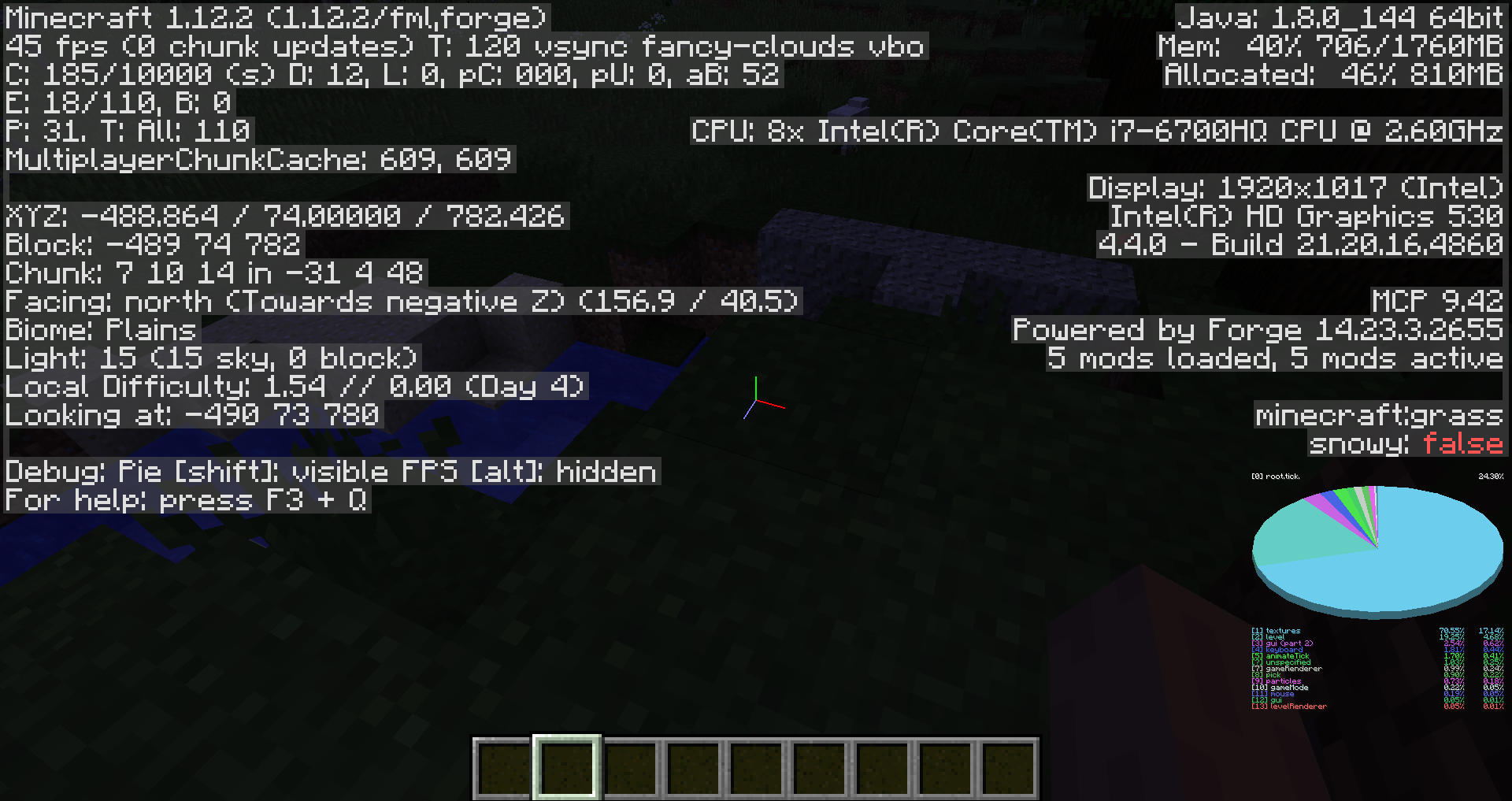
Screenshot (after spamming the esc key to open and close the ingame menu) showing the importance of this ("gui (part 2)" is what was being included in "textures"):
The "root.tick.textures" textures profiler section is not ended until the "mouse" section starts. But in between, there is a lot of GUI logic (for example, `this.currentScreen.handleInput();`, `this.currentScreen.updateScreen();`), so if a GUI is lagging, it would show up as "root.tick.textures" rather than "root.tick.gui":
In Minecraft.runTick:
this.mcProfiler.endStartSection("textures");

if (this.world != null)
{
 this.renderEngine.tick();
}

// Section should end here

if (this.currentScreen == null && this.player != null)
{
 if (this.player.getHealth() <= 0.0F && !(this.currentScreen instanceof GuiGameOver))
 {
 this.displayGuiScreen((GuiScreen)null);
 }
// ... much more GUI logic
Screenshot (after spamming the esc key to open and close the ingame menu) showing the importance of this ("gui (part 2)" is what was being included in "textures"):
The "root.tick.textures" textures profiler section is not ended until the "mouse" section starts. But in between, there is a lot of GUI logic (for example, `this.currentScreen.handleInput();`, `this.currentScreen.updateScreen();`), so if a GUI is lagging, it would show up as "root.tick.textures" rather than "root.tick.gui":
In Minecraft.runTick:
this.mcProfiler.endStartSection("textures");

if (this.world != null)
{
 this.renderEngine.tick();
}

// Section should end here

if (this.currentScreen == null && this.player != null)
{
 if (this.player.getHealth() <= 0.0F && !(this.currentScreen instanceof GuiGameOver))
 {
 this.displayGuiScreen((GuiScreen)null);
 }
// ... much more GUI logic
Screenshot (after spamming the esc key to open and close the ingame menu) showing the importance of this ("gui (part 2)" is what was being included in "textures"):
Note: I'm using Forge just to inject the `endStartSection("gui (part 2)")`, this is a vanilla bug.
The "root.tick.textures" textures profiler section is not ended until the "mouse" section starts. But in between, there is a lot of GUI logic (for example, `this.currentScreen.handleInput();`, `this.currentScreen.updateScreen();`), so if a GUI is lagging, it would show up as "root.tick.textures" rather than "root.tick.gui":
In Minecraft.runTick:
this.mcProfiler.endStartSection("textures");

if (this.world != null)
{
 this.renderEngine.tick();
}

// Section should end here

if (this.currentScreen == null && this.player != null)
{
 if (this.player.getHealth() <= 0.0F && !(this.currentScreen instanceof GuiGameOver))
 {
 this.displayGuiScreen((GuiScreen)null);
 }
// ... much more GUI logic
Screenshot (after spamming the esc key to open and close the ingame menu) showing the importance of this ("gui (part 2)" is what was being included in "textures"):
Note: I'm using Forge just to inject the
`endStartSection("gui (part 2)")`, this is a vanilla bug.The "root.tick.textures" textures profiler section is not ended until the "mouse" section starts. But in between, there is a lot of GUI logic (for example, this.currentScreen.handleInput();, this.currentScreen.updateScreen()
, so if a GUI is lagging, it would show up as "root.tick.textures" rather than "root.tick.gui":
In Minecraft.runTick:
this.mcProfiler.endStartSection("textures");

if (this.world != null)
{
 this.renderEngine.tick();
}

// Section should end here

if (this.currentScreen == null && this.player != null)
{
 if (this.player.getHealth() <= 0.0F && !(this.currentScreen instanceof GuiGameOver))
 {
 this.displayGuiScreen((GuiScreen)null);
 }
// ... much more GUI logic
Screenshot (after spamming the esc key to open and close the ingame menu) showing the importance of this ("gui (part 2)" is what was being included in "textures"):
Note: I'm using Forge just to inject the endStartSection("gui (part 2)"), this is a vanilla bug.
The updateFallState does not add -y to the fall distance on the last tick of the block, when the player touches the ground, causing the fall distance to be slightly less than it actually is:
protected void updateFallState(double y, boolean onGroundIn, IBlockState state, BlockPos pos) { if (onGroundIn) { if (this.fallDistance > 0.0F) { state.getBlock().onFallenUpon(this.world, pos, this, this.fallDistance); } this.fallDistance = 0.0F; } else if (y < 0.0D) { this.fallDistance = (float)((double)this.fallDistance - y); } }The "else if (y < 0.0D)" should instead be an if statement and moved to the start of the method.
The updateFallState does not add -y to the fall distance on the last tick of the block, when the player touches the ground, causing the fall distance to be slightly less than it actually is:
protected void updateFallState(double y, boolean onGroundIn, IBlockState state, BlockPos pos) { if (onGroundIn) { if (this.fallDistance > 0.0F) { state.getBlock().onFallenUpon(this.world, pos, this, this.fallDistance); } this.fallDistance = 0.0F; } else if (y < 0.0D) { this.fallDistance = (float)((double)this.fallDistance - y); } }The "else if (y < 0.0D)" should instead be an if statement and moved to the start of the method.
Currently (in 1.12.2 and 1.13-pre5), all animated textures are updated every tick, which can decrease the framerate by a lot. This can be seen by looking at the 'root.tick.textures' profiler section, which often uses around 30% of the game loop time.
With very little effort, the code can be changed to tick only visible textures. This is what I did in my mod VanillaFix, and it led to framerate increases of between 10-30% in vanilla Minecraft, and up to 500% in large modpacks with many animated blocks (which applies to vanilla too, a texture pack could decide to have animated textures for every single block, or have very large textures).
Here's how it works (source code here):
I added a 'needsAnimationUpdate' to the 'TextureAtlasSprite', and changed the 'TextureMap.update' method to only tick the textures which need to be ticked (source).
That boolean gets set to true in several places, such as the item renderer, block-in-hand renderer, fire-on-entity renderer, etc., and gets set to false each time the animation is ticked.
I also added a 'visibleTextures' set to each CompiledChunk, and the 'visibleTextures' in visible CompiledChunks also get ticked (source). The set is updated every time the chunk is compiled (block renderer, fluid renderer).
This simple optimization has led to large framerate increases for many players, so it would be nice to have it in vanilla 1.13.
Currently (in 1.12.2 and 1.13-pre5), all animated textures are updated every tick, which can decrease the framerate by a lot. This can be seen by looking at the 'root.tick.textures' profiler section, which often uses around 30% of the game loop time.
With very little effort, the code can be changed to tick only visible textures. This is what I did in my mod VanillaFix, and it led to framerate increases of between 10-30% in vanilla Minecraft, and up to 500% in large modpacks with many animated blocks (which applies to vanilla too, a texture pack could decide to have animated textures for every single block, or have very large textures).
Here's how it works (source code here):
I added a 'needsAnimationUpdate' to the 'TextureAtlasSprite', and changed the 'TextureMap.update' method to only tick the textures which need to be ticked (source). That boolean gets set to true in several places, such as the item renderer, block-in-hand renderer, fire-on-entity renderer, etc., and gets set to false each time the animation is ticked.
I also added a 'visibleTextures' set to each CompiledChunk, and the 'visibleTextures' in visible CompiledChunks also get ticked (source). The set is updated every time the chunk is compiled (block renderer, fluid renderer).
This simple optimization has led to large framerate increases for many players, so it would be nice to have it in vanilla 1.13.
Currently (in 1.12.2 and 1.13-pre5), all animated textures are updated every tick, which can decrease the framerate by a lot. This can be seen by looking at the 'root.tick.textures' profiler section, which often uses around 30% of the game loop time.
With very little effort, the code can be changed to tick only visible textures. This is what I did in my mod VanillaFix, and it led to framerate increases of between 10-30% in vanilla Minecraft, and up to 500% in large modpacks with many animated blocks (which applies to vanilla too, a texture pack could decide to have animated textures for every single block, or have very large textures).
Here's how it works (source code here):
I added a 'needsAnimationUpdate' to the 'TextureAtlasSprite', and changed the 'TextureMap.update' method to only tick the textures which need to be ticked (
source). That boolean gets set to true in several places, such as the item renderer, block-in-hand renderer, fire-on-entity renderer, etc., and gets set to false each time the animation is ticked.I also added a 'visibleTextures' set to each CompiledChunk, and the 'visibleTextures' in visible CompiledChunks also get ticked (source). The set is updated every time the chunk is compiled (block renderer, fluid renderer).
This simple optimization has led to large framerate increases for many players, so it would be nice to have it in vanilla 1.13.
Currently (in 1.12.2 and 1.13-pre5), all animated textures are updated every tick, which can decrease the framerate by a lot. This can be seen by looking at the 'root.tick.textures' profiler section, which often uses around 30% of the game loop time.
With very little effort, the code can be changed to tick only visible textures. This is what I did in my mod VanillaFix, and it led to framerate increases of between 10-30% in vanilla Minecraft, and up to 500% in large modpacks with many animated blocks (which applies to vanilla too, a texture pack could decide to have animated textures for every single block, or have very large textures).
Here's how it works (source code here):
I added a 'needsAnimationUpdate' to the 'TextureAtlasSprite', and changed the 'TextureMap.update' method to only tick the textures which need to be ticked (texture map, texture atlas sprite). That boolean gets set to true in several places, such as the item renderer, block-in-hand renderer, fire-on-entity renderer, etc., and gets set to false each time the animation is ticked.
I also added a 'visibleTextures' set to each CompiledChunk, and the 'visibleTextures' in visible CompiledChunks also get ticked (source). The set is updated every time the chunk is compiled (block renderer, fluid renderer).
This simple optimization has led to large framerate increases for many players, so it would be nice to have it in vanilla 1.13.
Currently (in 1.12.2 and 1.13-pre5), all animated textures are updated every tick, which can decrease the framerate by a lot. This can be seen by looking at the 'root.tick.textures' profiler section, which
often usesaround 30% of the game loop time.With very little effort, the code can be changed to tick only visible textures. This is what I did in my mod VanillaFix, and it led to framerate increases of between 10-30% in vanilla Minecraft, and up to 500% in large modpacks with many animated blocks (which applies to vanilla too, a texture pack could decide to have animated textures for every single block, or have very large textures).
Here's how it works (source code here):
I added a 'needsAnimationUpdate' to the 'TextureAtlasSprite', and changed the 'TextureMap.update' method to only tick the textures which need to be ticked (texture map, texture atlas sprite). That boolean gets set to true in several places, such as the item renderer, block-in-hand renderer, fire-on-entity renderer, etc., and gets set to false each time the animation is ticked.
I also added a 'visibleTextures' set to each CompiledChunk, and the 'visibleTextures' in visible CompiledChunks also get ticked (source). The set is updated every time the chunk is compiled (block renderer, fluid renderer).
This simple optimization has led to large framerate increases for many players, so it would be nice to have it in vanilla 1.13.
Currently (in 1.12.2 and 1.13-pre5), all animated textures are updated every tick, which can decrease the framerate by a lot. This can be seen by looking at the 'root.tick.textures' profiler section, which can use up to around 30% of the game loop time in large texture packs.
With very little effort, the code can be changed to tick only visible textures. This is what I did in my mod VanillaFix, and it led to framerate increases of between 10-30% in vanilla Minecraft, and up to 500% in large modpacks with many animated blocks (which applies to vanilla too, a texture pack could decide to have animated textures for every single block, or have very large textures).
Here's how it works (source code here):
I added a 'needsAnimationUpdate' to the 'TextureAtlasSprite', and changed the 'TextureMap.update' method to only tick the textures which need to be ticked (texture map, texture atlas sprite). That boolean gets set to true in several places, such as the item renderer, block-in-hand renderer, fire-on-entity renderer, etc., and gets set to false each time the animation is ticked.
I also added a 'visibleTextures' set to each CompiledChunk, and the 'visibleTextures' in visible CompiledChunks also get ticked (source). The set is updated every time the chunk is compiled (block renderer, fluid renderer).
This simple optimization has led to large framerate increases for many players, so it would be nice to have it in vanilla 1.13.
Currently (in 1.12.2 and 1.13-pre5), all animated textures are updated every tick, which can decrease the framerate by a lot. This can be seen by looking at the 'root.tick.textures' profiler section, which can use up to around 30% of the game loop time
in large texture packs.With very little effort, the code can be changed to tick only visible textures. This is what I did in my mod VanillaFix, and it led to framerate increases of between 10-30% in vanilla Minecraft, and up to 500% in large modpacks with many animated blocks (which applies to vanilla too, a texture pack could decide to have animated textures for every single block, or have very large textures).
Here's how it works (source code here):
I added a 'needsAnimationUpdate' to the 'TextureAtlasSprite', and changed the 'TextureMap.update' method to only tick the textures which need to be ticked (texture map, texture atlas sprite). That boolean gets set to true in several places, such as the item renderer, block-in-hand renderer, fire-on-entity renderer, etc., and gets set to false each time the animation is ticked.
I also added a 'visibleTextures' set to each CompiledChunk, and the 'visibleTextures' in visible CompiledChunks also get ticked (source). The set is updated every time the chunk is compiled (block renderer, fluid renderer).
This simple optimization has led to large framerate increases for many players, so it would be nice to have it in vanilla 1.13.
Currently (in 1.12.2 and 1.13-pre5), all animated textures are updated every tick, which can decrease the framerate by a lot. This can be seen by looking at the 'root.tick.textures' profiler section, which can use up to around 30% of the game loop time with some texture packs.
With very little effort, the code can be changed to tick only visible textures. This is what I did in my mod VanillaFix, and it led to framerate increases of between 10-30% in vanilla Minecraft, and up to 500% in large modpacks with many animated blocks (which applies to vanilla too, a texture pack could decide to have animated textures for every single block, or have very large textures).
Here's how it works (source code here):
I added a 'needsAnimationUpdate' to the 'TextureAtlasSprite', and changed the 'TextureMap.update' method to only tick the textures which need to be ticked (texture map, texture atlas sprite). That boolean gets set to true in several places, such as the item renderer, block-in-hand renderer, fire-on-entity renderer, etc., and gets set to false each time the animation is ticked.
I also added a 'visibleTextures' set to each CompiledChunk, and the 'visibleTextures' in visible CompiledChunks also get ticked (source). The set is updated every time the chunk is compiled (block renderer, fluid renderer).
This simple optimization has led to large framerate increases for many players, so it would be nice to have it in vanilla 1.13.
Currently (in 1.12.2 and 1.13-pre5), all animated textures are updated every tick, which can decrease the framerate by a lot. This can be seen by looking at the 'root.tick.textures' profiler section, which can use up to around 30% of the game loop time with some
texture packs.With very little effort, the code can be changed to tick only visible textures. This is what I did in my mod VanillaFix, and it led to framerate increases of between 10-30% in vanilla Minecraft, and up to 500% in large modpacks with many animated blocks (which applies to vanilla too, a texture pack could decide to have animated textures for every single block, or have very large textures).
Here's how it works (source code here):
I added a 'needsAnimationUpdate' to the 'TextureAtlasSprite', and changed the 'TextureMap.update' method to only tick the textures which need to be ticked (texture map, texture atlas sprite). That boolean gets set to true in several places, such as the item renderer, block-in-hand renderer, fire-on-entity renderer, etc., and gets set to false each time the animation is ticked.
I also added a 'visibleTextures' set to each CompiledChunk, and the 'visibleTextures' in visible CompiledChunks also get ticked (source). The set is updated every time the chunk is compiled (block renderer, fluid renderer).
This simple optimization has led to large framerate increases for many players, so it would be nice to have it in vanilla 1.13.
Currently (in 1.12.2 and 1.13-pre5), all animated textures are updated every tick, which can decrease the framerate by a lot. This can be seen by looking at the 'root.tick.textures' profiler section, which can use up to around 30% of the game loop time with some high resolution texture packs or animations for many blocks.
With very little effort, the code can be changed to tick only visible textures. This is what I did in my mod VanillaFix, and it led to framerate increases of between 10-30% in vanilla Minecraft, and up to 500% in large modpacks with many animated blocks (which applies to vanilla too, a texture pack could decide to have animated textures for every single block, or have very large textures).
Here's how it works (source code here):
I added a 'needsAnimationUpdate' to the 'TextureAtlasSprite', and changed the 'TextureMap.update' method to only tick the textures which need to be ticked (texture map, texture atlas sprite). That boolean gets set to true in several places, such as the item renderer, block-in-hand renderer, fire-on-entity renderer, etc., and gets set to false each time the animation is ticked.
I also added a 'visibleTextures' set to each CompiledChunk, and the 'visibleTextures' in visible CompiledChunks also get ticked (source). The set is updated every time the chunk is compiled (block renderer, fluid renderer).
This simple optimization has led to large framerate increases for many players, so it would be nice to have it in vanilla 1.13.
In MinecraftClient.render(), the pausedTickDelta (yarn names) field is being updated when the game is unpaused rather than paused:
boolean paused = isIntegratedServerRunningAndNonNull() && currentGui != null && currentGui.isPauseScreen() && !server.isRemote(); if (this.paused != paused) { if (this.paused) { pausedTickDelta = renderTickCounter.tickDelta; } else { renderTickCounter.tickDelta = pausedTickDelta; } this.paused = paused; }pausedTickDelta is used here:
worldRenderer.render(paused ? pausedTickDelta : renderTickCounter.tickDelta, startTime, tick);
This looks like a bug. When the game is paused, the rendering should be using the tick delta from when it was paused, not from when it was last unpaused.
In MinecraftClient.render(), the pausedTickDelta (yarn names) field is being updated when the game is unpaused rather than paused:
boolean paused = isIntegratedServerRunningAndNonNull() && currentGui != null && currentGui.isPauseScreen() && !server.isRemote(); if (this.paused != paused) { if (this.paused) { pausedTickDelta = renderTickCounter.tickDelta; } else { renderTickCounter.tickDelta = pausedTickDelta; } this.paused = paused; }pausedTickDelta is used here:
worldRenderer.render(paused ? pausedTickDelta : renderTickCounter.tickDelta, startTime, tick);This looks like a bug. When the game is paused, the rendering should be using the tick delta from when it was paused, not from when it was last unpaused.
In MinecraftClient.render(), the pausedTickDelta (yarn names) field is being updated when the game is unpaused rather than paused:
boolean paused = isIntegratedServerRunningAndNonNull() && currentGui != null && currentGui.isPauseScreen() && !server.isRemote(); if (this.paused != paused) { if (this.paused) { pausedTickDelta = renderTickCounter.tickDelta; } else { renderTickCounter.tickDelta = pausedTickDelta; } this.paused = paused; }pausedTickDelta is used here:
worldRenderer.render(paused ? pausedTickDelta : renderTickCounter.tickDelta, startTime, tick);This looks like a bug. When the game is paused, the rendering should be using the tick delta from when it was paused, not from when it was last unpaused.
Also happens when flying right after sprinting
Works with any item, it usually happens when throwing the item on the edge of the hopper. No chest is needed.
This is NOT the same ticket,
MC-5998needs a chest to work, and works only with the clock. This happens when an item is thrown on the edge of a hopper.For this one it's only ONE hopper and any item, not a clock and a chest under the hopper.
Ok then.
I did. Also, you have to re-join the game to see the blocks glitch
Ok
Ok, it's fixed
Yes, I just figured it out how to do it:
1. Build this:
2. Stand on the block right next to the corner of the end portal
3. Place a bed on the block you're standing on (so that its corner touches the corner of the end portal), and you should be inside the bed block (this is another bug, I'm guessing)
4. Sneak to the left edge (in the image) of the block the bed is on
5. Once you're right at the edge, try going back into the bed block, still sneaking. You should see your player jumping backwards while you hold W as the server cancels the move events.
6. Move along the bed's edge towards the portal (at an approximately 10-20 degree angle towards the bed). Make sure you keep getting the jumps back as you move which show the collision checking code is being activated.
7. When you eventually reach the portal block, you should get teleported into the end, but at your current coordinates. It might not happen on the first attempt.
From NetHandlerPlayServer:
The position seems to get reverted right after the teleport: this.player.setPositionAndRotation(d4, d5, d6, f, f1); Removing that line fixes the problem. Disconnecting right after changeDimension (by setting a breakpoint) causes the player to have the dimension changed but not the position, which could even be abused intentionally by some players.
I think this was accidentally set as a duplicate of
MC-5294rather thanMCL-5294. In any case, I don't want to change the working directory of the launcher.I had recently moved my whole Desktop to a different partition and made a hard link from the old Desktop to the new partition to avoid breaking things. This resulted in minecraft freezing with high CPU usage.
MCL-5294seems to be about Minecraft ignoring the APPDATA variable, which was marked as "Works as Intended". This bug is about minecraft freezing when the game (not .minecraft) directory is a cross-partition NTFS junction.This is a bug, not a suggestion. I am simply suggesting a fix for this bug.
The Crtl-F3-C key combination doesn't work on all keyboards. This seems to be a keyboard limitation, and not a Minecraft bug. Try checking if you're able to press all three keys at the same time using this tool: http://keyboardchecker.com/. I'm not.