 MC-123703
White colored blocks cannot be fully white
The bug
It is impossible for a block in the game to be fully white, the brightest color is 0xFCFCFC.
Disabling ambient occlusion or shading on the block model doesn't fix this.
How to reproduce
- Load MC-123703(unzip).zip
 texture pack into the game.
 - Take a screenshot, and get the color of the the glowstone block.
→ You'll notice that the color code is 0xFCFCFC rather than 0xFFFFFF.
Code analysis / Fix
This is caused by lines 911-913 and 984-986 of the EntityRenderer (MCP name) class:
f8 = f8 * 0.96F + 0.03F;
f9 = f9 * 0.96F + 0.03F;
f10 = f10 * 0.96F + 0.03F;
Which sets red, green, and blue to 0.99 (0xFCFCFC) even if they were 1.
Linked Issues

![[Mod] Michael Wobst](../../../data/avatars/users/37868.png)


 Low
LowCreated Issue:
White is not white
It is impossible for a block in the game to be fully white. The brightest color it can have is 0xFCFCFC.
To reproduce: Set glowstone's texture to be completely white, place it in the world, and take a screenshot. Get the color of the the glowstone block, you'll notice that it is 0xFCFCFC rather than 0xFFFFFF.
Disabling ambient occlusion or shading on the block model doesn't fix this. I need to make a fully-white block to my mod, but can't due to this bug. This is caused by lines 911-913 of the EntityRenderer class:
f8 = f8 * 0.96F + 0.03F; f9 = f9 * 0.96F + 0.03F; f10 = f10 * 0.96F + 0.03F;which sets red, green, and blue to 0.99 (0xFCFCFC) even if they were 1.
It is impossible for a block in the game to be fully white. The brightest color it can have is 0xFCFCFC.
To reproduce: Set glowstone's texture to be completely white, place it in the world, and take a screenshot. Get the color of the the glowstone block, you'll notice that it is 0xFCFCFC rather than 0xFFFFFF.
Disabling ambient occlusion or shading on the block model doesn't fix this. I need to make a fully-white block to my mod, but can't due to this bug. This is caused by lines 911-913 of the EntityRenderer class:
f8 = f8 * 0.96F + 0.03F;f9 = f9 * 0.96F + 0.03F;f10 = f10 * 0.96F + 0.03F;which sets red, green, and blue to 0.99 (0xFCFCFC) even if they were 1.
It is impossible for a block in the game to be fully white. The brightest color it can have is 0xFCFCFC.
To reproduce: Set glowstone's texture to be completely white, place it in the world, and take a screenshot. Get the color of the the glowstone block, you'll notice that it is 0xFCFCFC rather than 0xFFFFFF.
Disabling ambient occlusion or shading on the block model doesn't fix this. I need to make a fully-white block to my mod, but can't due to this bug. This is caused by lines 911-913 of the EntityRenderer (MCP name) class:
f8 = f8 * 0.96F + 0.03F; f9 = f9 * 0.96F + 0.03F; f10 = f10 * 0.96F + 0.03F;which sets red, green, and blue to 0.99 (0xFCFCFC) even if they were 1.
It is impossible for a block in the game to be fully white. The brightest color it can have is 0xFCFCFC.
To reproduce: Set glowstone's texture to be completely white, place it in the world, and take a screenshot. Get the color of the the glowstone block, you'll notice that it is 0xFCFCFC rather than 0xFFFFFF.
Disabling ambient occlusion or shading on the block model doesn't fix this. I need to make a fully-white block to my mod, but can't due to this bug. This is caused by lines 911-913 and 984-986 of the EntityRenderer (MCP name) class:
f8 = f8 * 0.96F + 0.03F; f9 = f9 * 0.96F + 0.03F; f10 = f10 * 0.96F + 0.03F;which sets red, green, and blue to 0.99 (0xFCFCFC) even if they were 1.
It is impossible for a block in the game to be fully white. The brightest color it can have is 0xFCFCFC.
To reproduce: Set glowstone's texture to be completely white, place it in the world, and take a screenshot. Get the color of the the glowstone block, you'll notice that it is 0xFCFCFC rather than 0xFFFFFF.
Disabling ambient occlusion or shading on the block model doesn't fix this. I need to make a fully-white block to my mod, but can't due to this bug.This is caused by lines 911-913 and 984-986 of the EntityRenderer (MCP name) class:f8 = f8 * 0.96F + 0.03F; f9 = f9 * 0.96F + 0.03F; f10 = f10 * 0.96F + 0.03F;
which sets red, green, and blue to 0.99 (0xFCFCFC) even if they were 1.The bug
It is impossible for a block in the game to be fully white, the brightest color is 0xFCFCFC.
Disabling ambient occlusion or shading on the block model doesn't fix this.How to reproduce
- Load MC-123703(unzip).zip
- Take a screenshot, and get the color of the the glowstone block.
→Code analysis / Fix
This is caused by lines 911-913 and 984-986 of the EntityRenderer (MCP name) class:
f8 = f8 * 0.96F + 0.03F; f9 = f9 * 0.96F + 0.03F; f10 = f10 * 0.96F + 0.03F;Which sets red, green, and blue to 0.99 (0xFCFCFC) even if they were 1.
![[Mojang] Nathan Adams](../../../data/assets/gravatar/dinnerbone.png)

![[Helper] Jack McKalling](../../../data/avatars/users/92859.png)
![[Mod] markderickson](../../../data/avatars/users/18946.svg)
Whiteis notwhiteWhite coloured blocks cannot be fully white
![[Mod] Les3awe](../../../data/avatars/users/79847.png)
![[Mojang] Adrian Östergård](../../../data/assets/gravatar/nighter.jpeg)
![[Mod] tryashtar](../../../data/avatars/users/41963.png)
is duplicated by
![[Bot] Arisa](../../../data/avatars/users/43007.png)
![[Mod] ampolive](../../../data/avatars/users/18949.svg)
![[Mod] bemoty](../../../data/avatars/users/50554.png)
is duplicated by
relates to
![[Mod] LateLag](../../../data/avatars/users/92884.png)
![[Mojang] slicedlime](../../../data/assets/gravatar/slicedlime.jpeg)
![[Mod] Avoma](../../../data/avatars/users/86198.png)
White coloured blocks cannot be fully white
Relates to MC-123703?
In that case, that is the minor darkening of MC-123703 (which affects more than just blocks), if the additional, older specific darkening is no longer the case
It seems as though light-emitting blocks did actually have this dark shading in prior versions, so I was likely misremembering. Comparison between 1.7.9 and 1.8.1 (before resource pack models vs. after):
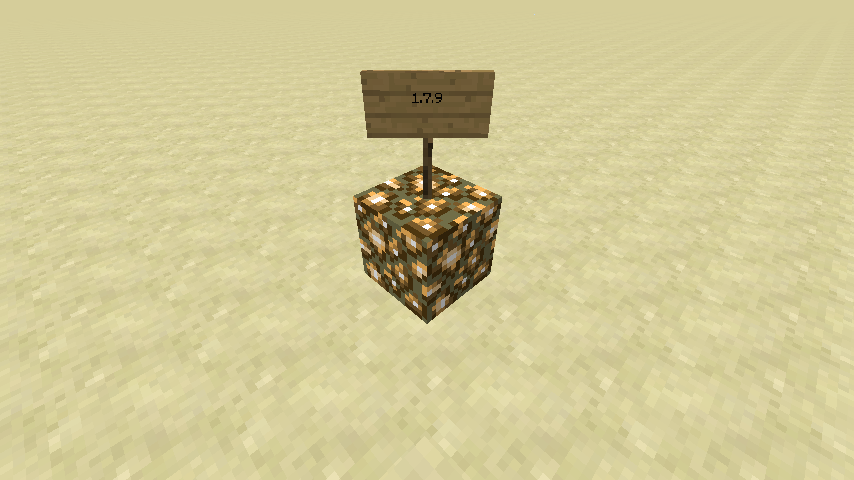
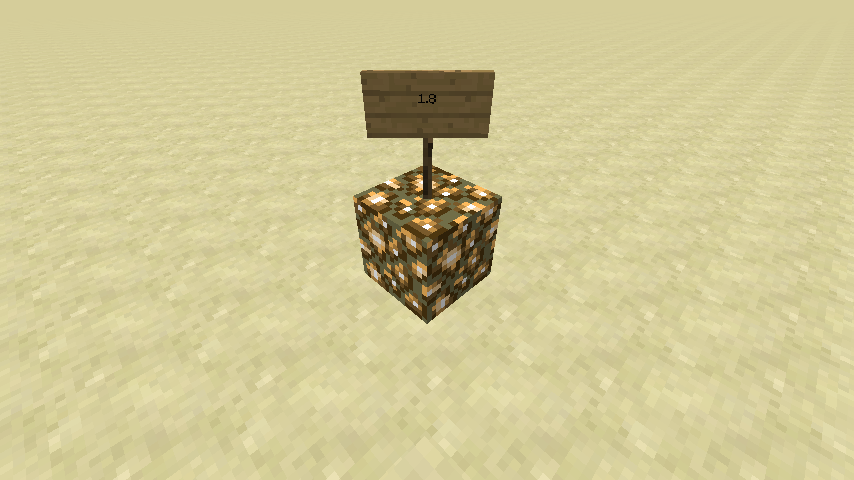
I still think this report is distinct enough from what it was resolved into to be reopened. There's some other potentially related tickets out there, such as MC-123703, MC-233461 and MC-213446.
Thank you for your report!
We're tracking this issue in MC-123703, so this ticket is being resolved and linked as a duplicate.
If you would like to add a vote and any extra information to the main ticket it would be appreciated.
Quick Links:
📓 Bug Tracker Guidelines – 💬 Community Support – 📧 Mojang Support
📓 Project Summary – ✍️ Feedback and Suggestions – 📖 Game Wiki
Arguably, it is very hard to get an L of 100 in real life.
For that matter, it's very hard to get L's below 50 as I understand it also.
Maybe this is the point where Minecraft could add a "black level" – just as bright white is made a little less than bright white, so to a dark black object could be raised up to the monitor's Black level so that dark objects that are supposed to be dark but visible do not disappear completely.
It's not the applications role to make assumptions about the capabilities of the display hardware. If Minecraft takes an interest in color management it should respect the color profile installed by the OS by not resetting it or changing it. Many games do this, and there's even dedicated software to detect when games do this and set it back. There's an excellent write up about this here: https://forums.guru3d.com/threads/games-color-profiles.387074/
At the very most Minecraft should detect when alternate color spaces are reported by the OS such as Rec. 2020 when rendering to a display device compliant with HDR10. It can then adjust the texture colors so that they are displayed properly assuming the textures target something like sRGB.
No I think the java and open gl should determine what colors can and cannot be displayed mc shouldn't be limiting any colors
Confirmed for 1.13.1. Attached a resource pack that will turn glowstone white for easy reproduce.
Confirmed for 19w41a. Wouldn't mind to get ownership of this report
Can confirm in 21w15a.
Can the summary of this please be changed? "White is not white" is very vague.
Can confirm in 1.17.1.
Relates to MC-50734 and
MC-93919.