Cannot set other AppData directory
We always intended you to use --workDir /path/to/wherever, I didn't know so many people were using the APPDATA workaround. We can't support that going forward, so you'll just have to use the command line argument sorry!
I have been running Minecraft with a changed appdata directory for ages now as I don't want it to store settings, worlds and other data on the normal AppData folder of my system drive. This doesn't seem to be possible anymore, it simply ignores the changing of the variable.
Batch script used:
set "APPDATA=%~dp0"
start MinecraftLauncher.exe
Where %~dp0 automatically gets replaced with the current directory that the batch file resides in but it doesn't work with a full path either.
I've reported that error before when the testing launcher was released but it seems that it went below the radar.
Environment
Windows 7 Professional (64-bit)
Linked Issues
is duplicated by22
 MC-144373minecraft Launcher not worked in Japanese ← I'm sorry, I will correct this. Symbolic link has a problem. Duplicate
 MCL-5385'Game directory is invalid or inaccessible' when a junction is used or an appdata environment path is usedDuplicateMCL-5399Launcher doesn't support different installation directory anymoreDuplicateMCL-5412New Launcher doesn't respect changes to APPDATA locationDuplicateMCL-5528Can't use hard-linked .minecraft directoryDuplicateMCL-5612New Launcher: "The game directory is invalid or inaccessible" without changing path of .minecraft folderDuplicateMCL-5728Unable to Load Mod VersionsDuplicateMCL-5761Game directory is invalidDuplicateMCL-5784Changing native launcher locationDuplicateMCL-5829MC Launcher not accessing/writing to .minecraft folder but AppData/Roaming instead.DuplicateMCL-5840"The game directory is invalid or inaccessible" when using symbolic linkDuplicateMCL-5989The game launcher it's no longer working with junctions on WindowsDuplicateMCL-6079Launcher errorsDuplicateMCL-6491Launcher no longer accepts network path for game directoryDuplicateMCL-6602AppData\Roaming\.minecraft not foundDuplicateMCL-7349Every launcher update causes .minecraft folder deleting (with all content)DuplicateMCL-7528Minecraft fails with new launcherDuplicateMCL-8824Launcher gives 'game directory invalid' if path contains a JunctionDuplicateMCL-8970Game won't Launch - Failed to locate Java RuntimeDuplicateMCL-9187Hang when .minecraft folder is a cross-partition NTFS junctionDuplicateMCL-10524MCL will not launch when the .minecraft folder is already existent.DuplicateMCL-10527.exe wont start the launcher if .minecraft folder is moved using a symbolic linkFixed
Created Issue:
Cannot set other AppData directory
I have been running Minecraft with a changed appdata directory for ages now as I don't want it to store settings, worlds and other data on the normal AppData folder of my system drive. This doesn't seem to be possible anymore, it simply ignores the changing of the variable.
Batch script used:
Minecraft.batset "APPDATA=%~dp0" start MinecraftLauncher.exeWhere %~dp0 automatically gets replaced with the current directory that the batch file resides in but it doesn't work with a full path either.
I've reported that error before when the testing launcher was released but it seems that it went below the radar.
Environment
Windows 7 Professional (64-bit)
![[Bot] Arisa](../../../data/assets/gravatar/mustek2.png)

![[Mojang] Nathan Adams](../../../data/assets/gravatar/dinnerbone.png) [Mojang] Nathan Adams
[Mojang] Nathan Adamsis duplicated by
is duplicated by
![[Mod] Neko](../../../data/avatars/users/92901.png)
relates to

is duplicated by
is duplicated by
is duplicated by
relates to
is duplicated by
is duplicated by
is duplicated by
is duplicated by
is duplicated by
is duplicated by
relates to
is duplicated by
is duplicated by
is duplicated by
![[Mod] violine1101](../../../data/avatars/users/92858.png)
Mod EditWe always intended you to use --workDir /path/to/wherever, I didn't know so many people were using the APPDATA workaround. We can't support that going forward, so you'll just have to use the command line argument sorry!
I have been running Minecraft with a changed appdata directory for ages now as I don't want it to store settings, worlds and other data on the normal AppData folder of my system drive. This doesn't seem to be possible anymore, it simply ignores the changing of the variable.
Batch script used:
Minecraft.batset "APPDATA=%~dp0" start MinecraftLauncher.exeWhere %~dp0 automatically gets replaced with the current directory that the batch file resides in but it doesn't work with a full path either.
I've reported that error before when the testing launcher was released but it seems that it went below the radar.
is duplicated by
is duplicated by
is duplicated by
![[Mod] Pokechu22](../../../data/avatars/users/92931.png)
relates to
is duplicated by
is duplicated by
is duplicated by
relates to
is duplicated by
is duplicated by
is duplicated by
is duplicated by
See MCL-5294 for solution.
The new launcher does not support appdata location change anymore. Use the --workDir argument instead.
See MCL-5294.
Duplicate of MCL-5294
You are simply using the wrong method to relocate the folder.
Does this report explain your issue?: MCL-5294
Does this describe your issue?: MCL-5294
Duplicate of MCL-5294

Probably a duplicate of MCL-5294
Does this ticket explain your problem?: MCL-5294
Please read the dev comments on MCL-5294 for further information.
Please check MCL-5294 to see if this fixes the issue.
Do the developer comments in MCL-5294 help with your issue?
Duplicate of MCL-5294
![[Mod] Urielsalis](../../../data/assets/gravatar/urielsalis.jpeg)
Related to MCL-5294?
Todd B, using junctions is, as far as I know, no longer possible; for technical reasons. I'm not sure why, but the Mojang devs know of this; they are not changing this back.
We always intended you to use --workDir /path/to/wherever, I didn't know so many people were using the APPDATA workaround. We can't support that going forward, so you'll just have to use the command line argument sorry!
For all further information about this bug report, go here please: MCL-5294
To everyone else: If you got any issues like The game has stopped working, we're sorry for the inconvenience, then that's a game crash, not a launcher issue. You can find a detailed report about the crash at minecraft/crash-reports/crash-<DATE>-client.txt (click the link to find out more). Your crash probably has already been reported here, search for it.
Also, please keep in mind that the lingua franca for Minecraft development is English; hence bug or crash reports are accepted in English only, sorry.
Quick Links:
📓 Issue Guidelines – 💬 Community Support – 📧 Customer Support – 📖 Game Wiki
Thank you for your report!
However, this issue is a Duplicate of MCL-5294.
It has been linked to this report. If you have additional information, please add it to that report.
Please search before reporting, as it's likely that one exists already.
Quick Links:
📓 Issue Guidelines – 💬 Community Support – 📧 Customer Support – 📖 Game Wiki
Thank you for your report!
However, this issue is a Duplicate of MCL-5294.
If you have additional information, please add it to that report.
Please search before reporting, as it's likely that one exists already.
Quick Links:
📓 Issue Guidelines – 💬 Community Support – 📧 Customer Support – 📖 Game Wiki
The native launcher doesn't work well with junctions, see MCL-5294 (via MCL-8824); IIRC this is a boost issue but it's not my area of expertise. But this does seem very odd, and I feel like that should only matter for things that the launcher manages, not the game directory (which the launcher shouldn't need to mess with)...
Sorry, MCL-5294
See explanation by devs in MCL-5294
Have you tried using the solutions posted in MCL-5294? Because the only supported ways of changing the working directory are listed in the developer comments in that ticket.
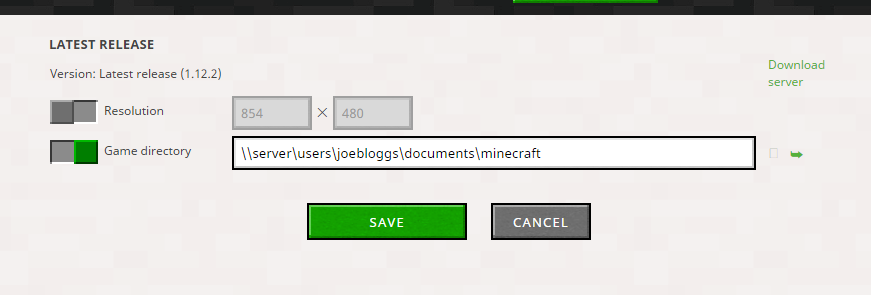 Ahh MCL not MC. That bug report is much closer to this problem but still not quite.
The users in MCL-5294 seem to be using a batch script, command line switch or junctionpoint to change the game directory. Im not.
I'm trying to enter a UNC path into the Launcher options. Additional Screenshot attached. This stopped working at v2 of the Launcher
At first i thought this was related to DFS but further tests show it actually effects any UNC path. So any network path you enter, will not persist. It now has to be a local path or mapped drive.
I think this was accidentally set as a duplicate of MC-5294 rather than MCL-5294. In any case, I don't want to change the working directory of the launcher.
I had recently moved my whole Desktop to a different partition and made a hard link from the old Desktop to the new partition to avoid breaking things. This resulted in minecraft freezing with high CPU usage. MCL-5294 seems to be about Minecraft ignoring the APPDATA variable, which was marked as "Works as Intended". This bug is about minecraft freezing when the game (not .minecraft) directory is a cross-partition NTFS junction.
Junctions aren't supported by the Minecraft launcher, see MCL-5294. Please check if setting --workDir to a path to an existing folder (without a junction) fixes the issue.
Symbolic links not working is a known behavior (MCL-5294 is the ticket for that and manually changing the APPDATA variable I think); you can specify a --workDir argument to change the location in a way that is supported.
See MCL-5294.
Please do not mark unreleased versions as affected.
You don't have access to them yet.
Version 2.0.700 was released today, get your stuff together, bot
Please do not mark unreleased versions as affected.
You don't have access to them yet.
Please do not mark unreleased versions as affected.
You don't have access to them yet.
Just ignore the bot for now.
Please wait until it's actually marked as released. The bot takes that info from Jira.
We always intended you to use `--workDir /path/to/wherever`, I didn't know so many people were using the APPDATA workaround. We can't support that going forward, so you'll just have to use the command line argument sorry!
Thank you for that info, that's all I really need. Is there some official place where one can get all command line options? (Because neither -help nor --help do output anything)
Right now there's --workDir /foo/bar, --lockDir /foo/bar (for portable installs, require all game directories be in that folder) and we just added --config foobar (request the specific game configuration by name or ID, instead of picking the last used)
Adding a --help is on my todo list!
So using this clue from Nathan I was able to get mine working. So let me share:
I'm using Win10 and Minecraft installed on C: (ssd) and my folder 'roaming/.minecraft' is a Junction point (aka Link) to 'D:/Minecraft/.minecraft'
With the 2.0 Launcher this stopped working, To get around this...
Right click the Minecraft tile or menu and choose More and choose Open File Location.
Right click the Minecraft shortcut and choose properties.
In the Target box, after the MinecraftLauncher.exe" I added the --workDir option. So my Target is now:
"C:\Program Files (x86)\Minecraft\MinecraftLauncher.exe" --workDir G:\Minecraft\.minecraft
This seems to work fine with out the lockDir nor config options needed.
yeah, i'm also having issues with junction points. literally no other programs i use have an issue with junction points. the old launcher works fine. i see no point in upgrading until this is fixed.
I suggest you open an extra ticket for that issue as this was about the set "APPDATA=%~dp0" method, not the --workDir parameter.
If anyone is viewing this bug due to issues with a junction / hardlinked .minecraft directory, you may be able to work around it simply by changing the launch options for "game directory" within the launcher (to the real location instead of the AppData/.minecraft) without using --workdir. (Worked for me; YMMV.)