 Austen Pelt
- ShinyMooTank
- shinymootank
- America/Chicago
- Yes
- No
 MCPE-56174
Xbox one x
I’m using a 64bit texture pack and everything far away with the new render engine looks terrible. The only thing you can see is circles. It’s honestly unplayable with a texture pack.

iPad Pro
The same texture pack on the same Minecraft version. The texture pack looks way better on my tablet then my Xbox one x. It’s something with the new render dragon?

Xbox one x
I’m using a 64bit texture pack and everything far away with the new render engine looks terrible. The only thing you can see is circles. It’s honestly unplayable with a texture pack.
iPad Pro
The same texture pack on the same Minecraft version. The texture pack looks way better on my tablet then my Xbox one x. It’s something with the new render dragon?
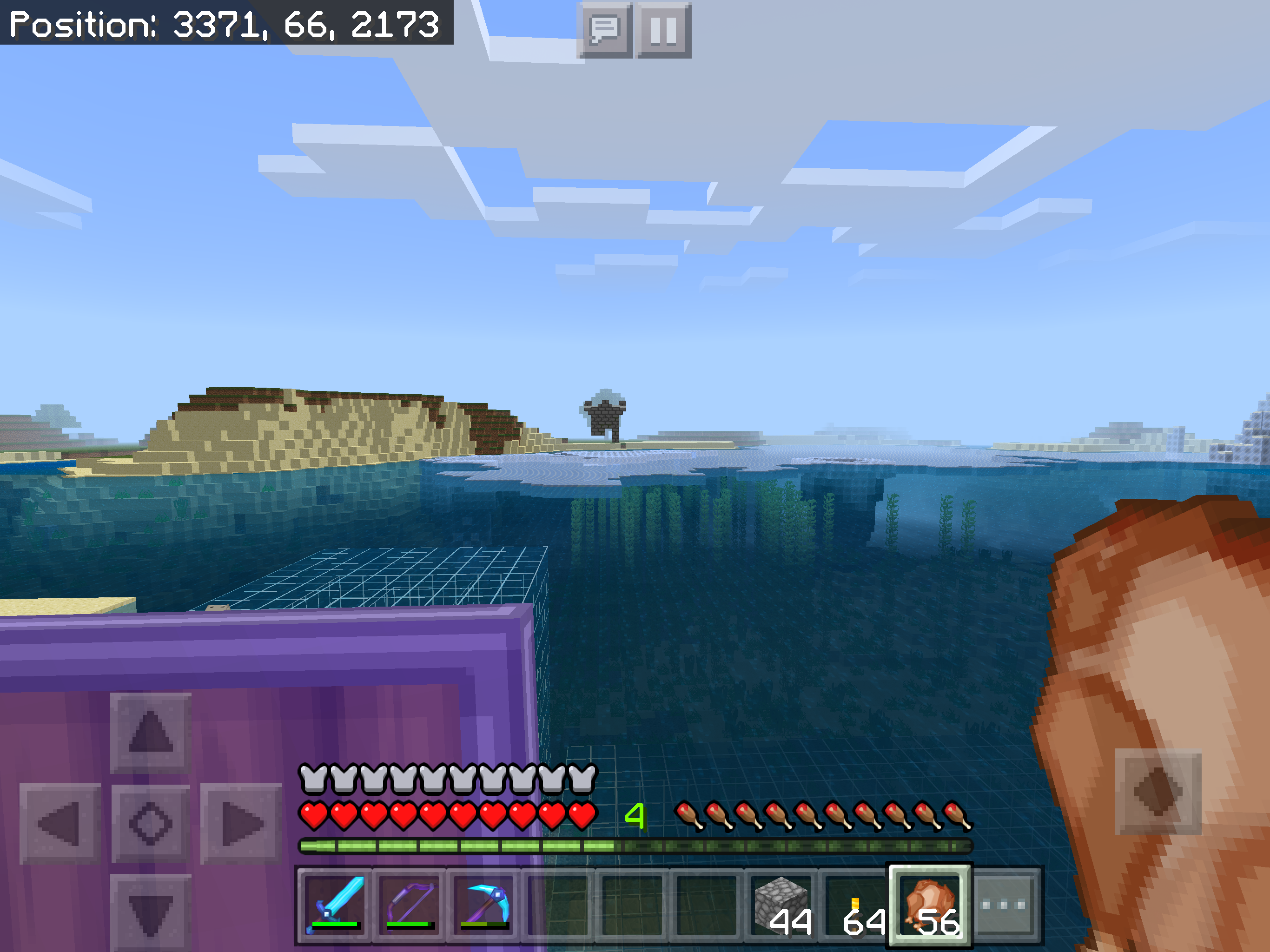
Edit: Fixed Ipad picture. I accidentally put same picture for both
8562D7C8-9333-40A7-B7DC-AB4CB5874107.png
OpenXR / VR Memory Leak Crash
After changing Minecraft URL to get VR working via "minecraft://mode/?OpenXR=true". The game will crash after a few mins of playing in a single player world due to a massive memory leak. I got to play for about 5 - 10 mins until all 32Gb of my system ram was filled up and crashed.
Specs:
VR: Valve Index
CPU: AMD Ryzen 9 5900x
GPU: Nvidia RTX 3080
Memory: 32Gbs @3600 MHz
Storage: Sumsung 980 Pro NVME 1TB
OpenXR / Valve Index VR Memory Leak Crash
After changing Minecraft URL to get VR working via "minecraft://mode/?OpenXR=true". The game will crash after a few mins of playing in a single player world due to a massive memory leak. I got to play for about 5 - 10 mins until all 32Gb of my system ram was filled up and crashed.
This has nothing to do with Oculus home/store version of minecraft. Im talking about Steam VR with OpenXR so don't mention this is the same problem as
MCPE-16946https://bugs.mojang.com/browse/MCPE-16946The game opens just fine but once you open a single player world. The memory usage will just keep going up until you run out of system memory. Then everything crashes due to the memory leak.
Specs:
VR: Valve Index
CPU: AMD Ryzen 9 5900x
GPU: Nvidia RTX 3080
Memory: 32Gbs @3600 MHz
Storage: Sumsung 980 Pro NVME 1TB
After changing Minecraft URL to get VR working via "minecraft://mode/?OpenXR=true". The game will crash after a few mins of playing in a single player world due to a massive memory leak. I got to play for about 5 - 10 mins until all 32Gb of my system ram was filled up and crashed.
This has nothing to do with Oculus home/store version of minecraft. Im talking about Steam VR with OpenXR so don't mention this is the same problem as
MCPE-16946https://bugs.mojang.com/browse/MCPE-16946The game opens just fine but once you open a single player world. The memory usage will just keep going up until you run out of system memory. Then everything crashes due to the memory leak.
Specs:
VR: Valve Index
CPU: AMD Ryzen 9 5900x
GPU: Nvidia RTX 3080
Memory: 32Gbs @3600 MHz
Storage: Sumsung 980 Pro NVME 1TBAfter changing Minecraft URL to get VR working via "minecraft://mode/?OpenXR=true". The game will crash after a few mins of playing in a single player world due to a massive memory leak. I got to play for about 5 - 10 mins until all 32Gb of my system ram was filled up and crashed.
This has nothing to do with Oculus home/store version of minecraft. Im talking about Steam VR with OpenXR so don't mention this is the same problem as
MCPE-16946. TheMCPE-16946Talks about the game not opening and a completely different VR Store and a Different VR headset. I doubt Oculus Version of minecraft from the Oculus store even uses OpenXR and Stream VRThe game opens just fine but once you open a single player world. The memory usage will just keep going up until you run out of system memory. Then everything crashes due to the memory leak.
Specs:
VR: Valve Index
CPU: AMD Ryzen 9 5900x
GPU: Nvidia RTX 3080
Memory: 32Gbs @3600 MHz
Storage: Sumsung 980 Pro NVME 1TB
OpenXR / Valve IndexVRMemory Leak CrashOpenXR / Valve Index / Steam VR - Memory Leak Crash
After changing Minecraft URL to get VR working via "minecraft://mode/?OpenXR=true". The game will crash after a few mins of playing in a single player world due to a massive memory leak. I got to play for about 5 - 10 mins until all 32Gb of my system ram was filled up and crashed.
This has nothing to do with Oculus home/store version of minecraft. Im talking about Steam VR with OpenXR so don't mention this is the same problem as
MCPE-16946. TheMCPE-16946Talks about the game not opening and a completely different VR Store and a Different VR headset. I doubt Oculus Version of minecraft from the Oculus store even uses OpenXR and Stream VRThe game opens just fine but once you open a single player world. The memory usage will just keep going up until you run out of system memory. Then everything crashes due to the memory leak.
Specs:
VR: Valve Index
CPU: AMD Ryzen 9 5900x
GPU: Nvidia RTX 3080
Memory: 32Gbs @3600 MHz
Storage: Sumsung 980 Pro NVME 1TBAfter changing Minecraft URL to get VR working via "minecraft://mode/?OpenXR=true". The game will crash after a few mins of playing in a single player world due to a massive memory leak. I got to play for about 5 - 10 mins until all 32Gb of my system ram was filled up and crashed.
This has nothing to do with Oculus home/store version of minecraft. Im talking about Steam VR with OpenXR so don't mention this is the same problem as
MCPE-16946. TheMCPE-16946Talks about the game not opening and a completely different VR Store and a Different VR headset. I doubt Oculus Version of minecraft from the Oculus store even uses OpenXR and Stream VRThe game opens just fine but once you open a single player world. The memory usage will just keep going up until you run out of system memory. Then everything crashes due to the memory leak.
Specs:
VR: Valve Index
CPU: AMD Ryzen 9 5900x
GPU: Nvidia RTX 3080
Memory: 32Gbs @3600 MHz
Storage: Samsung 980 Pro NVME 1TB
After changing Minecraft URL to get VR working via "minecraft://mode/?OpenXR=true". The game will crash after a few mins of playing in a single player world due to a massive memory leak. I got to play for about 5 - 10 mins until all 32Gb of my system ram was filled up and crashed.
This has nothing to do with Oculus home/store version of minecraft. Im talking about Steam VR
with OpenXRso don't mention this is the same problem asMCPE-16946. TheMCPE-16946Talks about the game not opening and a completely differentVR Store and a Different VR headset. I doubt Oculus Version of minecraft from the Oculus store even uses OpenXR and Stream VRThe game opens just fine but once you open a single player world. The memory usage will just keep going up until you run out of system memory. Then everything crashes due to the memory leak.
Specs:
VR: Valve Index
CPU: AMD Ryzen 9 5900x
GPU: Nvidia RTX 3080
Memory: 32Gbs @3600 MHz
Storage: Samsung 980 Pro NVME 1TBAfter changing Minecraft URL to get VR working via "minecraft://mode/?OpenXR=true". The game will crash after a few mins of playing in a single player world due to a massive memory leak. I got to play for about 5 - 10 mins until all 32Gb of my system ram was filled up and crashed.
This has nothing to do with Oculus home/store version of minecraft. Im talking about Steam VR/OpenXR with memory leak. so don't mention this is the same problem as
MCPE-16946. TheMCPE-16946Talks about the game not opening and a completely different than a memory leak crash.The game opens just fine but once you open a single player world. The memory usage will just keep going up until you run out of system memory. Then everything crashes due to the memory leak.
Specs:
VR: Valve Index
CPU: AMD Ryzen 9 5900x
GPU: Nvidia RTX 3080
Memory: 32Gbs @3600 MHz
Storage: Samsung 980 Pro NVME 1TB
After changing Minecraft URL to get VR working via "minecraft://mode/?OpenXR=true". The game will crash after a few mins of playing in a single player world due to a massive memory leak. I got to play for about 5 - 10 mins until all 32Gb of my system ram was filled up and crashed.
This has nothing to do with Oculus
home/storeversion of minecraft. Im talking about Steam VR/OpenXR with memory leak. so don't mention this is the same problem asMCPE-16946. TheMCPE-16946Talks about the game not opening and a completely different than a memory leak crash.The game opens just fine but once you open a single player world. The memory usage will just keep going up until you run out of system memory. Then everything crashes due to the memory leak.
Specs:
VR: Valve Index
CPU: AMD Ryzen 9 5900x
GPU: Nvidia RTX 3080
Memory: 32Gbs @3600 MHz
Storage: Samsung 980 Pro NVME 1TBAfter changing Minecraft URL to get VR working via "minecraft://mode/?OpenXR=true". The game will crash after a few mins of playing in a single player world due to a massive memory leak. I got to play for about 5 - 10 mins until all 32Gb of my system ram was filled up and crashed.
This has nothing to do with Oculus version of minecraft. Im talking about Steam VR/OpenXR with memory leak. so don't mention this is the same problem as
MCPE-16946. TheMCPE-16946Talks about the game not opening and a completely different than a memory leak crash.The game opens just fine but once you open a single player world. The memory usage will just keep going up until you run out of system memory. Then everything crashes due to the memory leak.
Specs:
VR: Valve Index
CPU: AMD Ryzen 9 5900x
GPU: Nvidia RTX 3080
Memory: 32Gbs @3600 MHz
Storage: Samsung 980 Pro NVME 1TBEdit: Still Memory Leak Crash in the latest beta build 1.17.10.20
After changing Minecraft URL to get VR working via "minecraft://mode/?OpenXR=true". The game will crash after a few mins of playing in a single player world due to a massive memory leak. I got to play for about 5 - 10 mins until all 32Gb of my system ram was filled up and crashed.
This has nothing to do with Oculus version of minecraft. Im talking about Steam VR/OpenXR with memory leak. so don't mention this is the same problem as
MCPE-16946. TheMCPE-16946Talks about the game not opening and a completely different than a memory leak crash.The game opens just fine but once you open a single player world. The memory usage will just keep going up until you run out of system memory. Then everything crashes due to the memory leak.
Proof -> https://www.youtube.com/watch?v=DkrkdnC1X_I
Specs:
VR: Valve Index
CPU: AMD Ryzen 9 5900x
GPU: Nvidia RTX 3080
Memory: 32Gbs @3600 MHz
Storage: Samsung 980 Pro NVME 1TBEdit: Still Memory Leak Crash in the latest beta build 1.17.10.20
After changing Minecraft URL to get VR working via "minecraft://mode/?OpenXR=true". The game will crash after a few mins of playing in a single player world due to a massive memory leak. I got to play for about 5
- 10mins until all 32Gb of my system ram was filled up and crashed.This has nothing to do with Oculus version of
minecraft. Im talking about Steam VR/OpenXR with memory leak. so don't mention this is the same problem asMCPE-16946. TheMCPE-16946Talks about the game not opening and a completely different than a memory leak crash.The game opens just fine but once you
open a single player world. The memory usage will just keep going up until you run out of system memory. Then everything crashes due to the memory leak.Proof -> https://www.youtube.com/watch?v=DkrkdnC1X_I
Specs:
VR: Valve Index
CPU: AMD Ryzen 9 5900x
GPU: Nvidia RTX 3080
Memory: 32Gbs @3600 MHz
Storage: Samsung 980 Pro NVME 1TBEdit: Still Memory Leak Crash in the latest beta build 1.17.10.20
After changing Minecraft URL to get VR working via "minecraft://mode/?OpenXR=true". The game will crash after a few mins of playing in a single player world due to a massive memory leak. I got to play for about 5 mins until all 32Gb of my system ram was filled up and crashed.
This has nothing to do with Oculus version of Minecraft. I'm talking about Steam VR/OpenXR with memory leak. so don't mention this is the same problem as
MCPE-16946. TheMCPE-16946Talks about the game not opening and a completely different than a memory leak crash.The game opens just fine but once your in the main menu of Minecraft. The memory usage will just keep going up until you run out of system memory. Then everything crashes due to the memory leak. I made a video showing the crash and have an on screen resource manger to watch the ram keep going up and up until the game crashes due to memory leak.
Proof -> https://www.youtube.com/watch?v=DkrkdnC1X_I
Specs:
VR: Valve Index
CPU: AMD Ryzen 9 5900x
GPU: Nvidia RTX 3080
Memory: 32Gbs @3600 MHz
Storage: Samsung 980 Pro NVME 1TBEdit: Still Memory Leak Crash in the latest beta build 1.17.10.20
OpenXR / Valve Index / Steam VR- Memory Leak CrashMemory Leak Crash: OpenXR / Valve Index / Steam VR
After changing Minecraft URL to get VR working via "minecraft://mode/?OpenXR=true". The game will crash after a few mins of playing in a single player world due to a massive memory leak. I got to play for about 5 mins until all 32Gb of my system ram was filled up and crashed.
This has nothing to do with Oculus version of Minecraft. I'm talking about Steam VR/OpenXR with memory leak. so don't mention this is the same problem as
MCPE-16946. TheMCPE-16946Talks about the game not opening and a completely different than a memory leak crash.The game opens just fine but once your in the main menu of Minecraft. The memory usage will just keep going up until you run out of system memory. Then everything crashes due to the memory leak. I made a video showing the crash and have an on screen resource manger to watch the ram keep going up and up until the game crashes due to memory leak.
Proof -> https://www.youtube.com/watch?v=DkrkdnC1X_I
Specs:
VR: Valve Index
CPU: AMD Ryzen 9 5900x
GPU: Nvidia RTX 3080
Memory: 32Gbs @3600 MHz
Storage: Samsung 980 Pro NVME 1TBEdit: Still Memory Leak Crash in the latest beta build 1.17.10.2
0After changing Minecraft URL to get VR working via "minecraft://mode/?OpenXR=true". The game will crash after a few mins of playing in a single player world due to a massive memory leak. I got to play for about 5 mins until all 32Gb of my system ram was filled up and crashed.
This has nothing to do with Oculus version of Minecraft. I'm talking about Steam VR/OpenXR with memory leak. so don't mention this is the same problem as
MCPE-16946. TheMCPE-16946Talks about the game not opening and a completely different than a memory leak crash.The game opens just fine but once your in the main menu of Minecraft. The memory usage will just keep going up until you run out of system memory. Then everything crashes due to the memory leak. I made a video showing the crash and have an on screen resource manger to watch the ram keep going up and up until the game crashes due to memory leak.
Proof -> https://www.youtube.com/watch?v=DkrkdnC1X_I
Specs:
VR: Valve Index
CPU: AMD Ryzen 9 5900x
GPU: Nvidia RTX 3080
Memory: 32Gbs @3600 MHz
Storage: Samsung 980 Pro NVME 1TBEdit: Still Memory Leak Crash in the latest beta build 1.17.10.21
After changing Minecraft URL to get VR working via "minecraft://mode/?OpenXR=true". The game will crash after a few mins
of playing in a single player worlddue to a massive memory leak. I got to play for about 5 mins until all 32Gb of my system ram was filled up and crashed.This has nothing to do with Oculus version of Minecraft. I'm talking about Steam VR/OpenXR with memory leak. so don't mention this is the same problem as
MCPE-16946. TheMCPE-16946Talks about the game not opening and a completely different than a memory leak crash.The game opens just fine but once your in the main menu of Minecraft. The memory usage will just keep going up until you run out of system memory. Then everything crashes due to the memory leak. I made a video showing the crash and have an on screen resource manger to watch the ram keep going up and up until the game crashes
due to memory leak.Proof -> https://www.youtube.com/watch?v=DkrkdnC1X_I
Specs:
VR: Valve Index
CPU: AMD Ryzen 9 5900x
GPU: Nvidia RTX 3080
Memory: 32Gbs @3600 MHz
Storage: Samsung 980 Pro NVME 1TBEdit: Still Memory Leak Crash in the latest beta build 1.17.10.2
1After changing Minecraft URL to get VR working via "minecraft://mode/?OpenXR=true". The game will crash after a few mins in the main menu due to a massive memory leak. I got to play for about 5 mins until all 32Gb of my system ram was filled up and crashed.
This has nothing to do with Oculus version of Minecraft. I'm talking about Steam VR/OpenXR with memory leak. so don't mention this is the same problem as
MCPE-16946. TheMCPE-16946Talks about the game not opening and a completely different than a memory leak crash.The game opens just fine but once your in the main menu of Minecraft. The memory usage will just keep going up until you run out of system memory. Then everything crashes due to the memory leak. I made a video showing the crash and have an on screen resource manger to watch the ram keep going up and up until the game crashes.
Proof -> https://www.youtube.com/watch?v=DkrkdnC1X_I
Specs:
VR: Valve Index
CPU: AMD Ryzen 9 5900x
GPU: Nvidia RTX 3080
Memory: 32Gbs @3600 MHz
Storage: Samsung 980 Pro NVME 1TBEdit: Still Memory Leak Crash in the latest beta build 1.17.10.22
After changing Minecraft URL to get VR working via "minecraft://mode/?OpenXR=true". The game will crash after a few mins in the main menu due to a massive memory leak. I got to play for about 5 mins until all 32Gb of my system ram was filled up and crashed.
This has nothing to do with Oculus version of Minecraft. I'm talking about Steam VR/OpenXR with memory leak. so don't mention this is the same problem as
MCPE-16946. TheMCPE-16946Talks about the game not opening and a completely different than a memory leak crash.The game opens just fine but once your in the main menu of Minecraft. The memory usage will just keep going up until you run out of system memory. Then everything crashes due to the memory leak. I made a video showing the crash and have an on screen resource manger to watch the ram keep going up and up until the game crashes.
Proof -> https://www.youtube.com/watch?v=DkrkdnC1X_I
Specs:
VR: Valve Index
CPU: AMD Ryzen 9 5900x
GPU: Nvidia RTX 3080
Memory: 32Gbs @3600 MHz
Storage: Samsung 980 Pro NVME 1TBEdit: Still Memory Leak Crash in the latest beta build 1.17.10.2
2After changing Minecraft URL to get VR working via "minecraft://mode/?OpenXR=true". The game will crash after a few mins in the main menu due to a massive memory leak. I got to play for about 5 mins until all 32Gb of my system ram was filled up and crashed.
This has nothing to do with Oculus version of Minecraft. I'm talking about Steam VR/OpenXR with memory leak. so don't mention this is the same problem as
MCPE-16946. TheMCPE-16946Talks about the game not opening and a completely different than a memory leak crash.The game opens just fine but once your in the main menu of Minecraft. The memory usage will just keep going up until you run out of system memory. Then everything crashes due to the memory leak. I made a video showing the crash and have an on screen resource manger to watch the ram keep going up and up until the game crashes.
Proof -> https://www.youtube.com/watch?v=DkrkdnC1X_I
Specs:
VR: Valve Index
CPU: AMD Ryzen 9 5900x
GPU: Nvidia RTX 3080
Memory: 32Gbs @3600 MHz
Storage: Samsung 980 Pro NVME 1TBEdit: Still Memory Leak Crash in the latest beta build 1.17.10.23
After changing Minecraft URL to get VR working via "minecraft://mode/?OpenXR=true". The game will crash after a few mins in the main menu due to a massive memory leak. I got to play for about 5 mins until all 32Gb of my system ram was filled up and crashed.
This has nothing to do with Oculus version of Minecraft. I'm talking about Steam VR/OpenXR with memory leak. so don't mention this is the same problem as
MCPE-16946. TheMCPE-16946Talks about the game not opening and a completely different than a memory leak crash.The game opens just fine but once your in the main menu of Minecraft. The memory usage will just keep going up until you run out of system memory. Then everything crashes due to the memory leak. I made a video showing the crash and have an on screen resource manger to watch the ram keep going up and up until the game crashes.
Proof -> https://www.youtube.com/watch?v=DkrkdnC1X_I
Specs:
VR: Valve Index
CPU: AMD Ryzen 9 5900x
GPU: Nvidia RTX 3080
Memory: 32Gbs @3600 MHz
Storage: Samsung 980 Pro NVME 1TBEdit: Still Memory Leak Crash in the latest beta build 1.17.
10.23After changing Minecraft URL to get VR working via "minecraft://mode/?OpenXR=true". The game will crash after a few mins in the main menu due to a massive memory leak. I got to play for about 5 mins until all 32Gb of my system ram was filled up and crashed.
This has nothing to do with Oculus version of Minecraft. I'm talking about Steam VR/OpenXR with memory leak. so don't mention this is the same problem as
MCPE-16946. TheMCPE-16946Talks about the game not opening and a completely different than a memory leak crash.The game opens just fine but once your in the main menu of Minecraft. The memory usage will just keep going up until you run out of system memory. Then everything crashes due to the memory leak. I made a video showing the crash and have an on screen resource manger to watch the ram keep going up and up until the game crashes.
Proof -> https://www.youtube.com/watch?v=DkrkdnC1X_I
Specs:
VR: Valve Index
CPU: AMD Ryzen 9 5900x
GPU: Nvidia RTX 3080
Memory: 32Gbs @3600 MHz
Storage: Samsung 980 Pro NVME 1TBEdit: Still Memory Leak Crash in the latest beta build 1.17.20.20
After changing Minecraft URL to get VR working via "minecraft://mode/?OpenXR=true". The game will crash after a few mins in the main menu due to a massive memory leak. I got to play for about 5 mins until all 32Gb of my system ram was filled up and crashed.
This has nothing to do with Oculus version of Minecraft. I'm talking about Steam VR/OpenXR with memory leak. so don't mention this is the same problem as
MCPE-16946. TheMCPE-16946Talks about the game not opening and a completely different than a memory leak crash.The game opens just fine but once your in the main menu of Minecraft. The memory usage will just keep going up until you run out of system memory. Then everything crashes due to the memory leak. I made a video showing the crash and have an on screen resource manger to watch the ram keep going up and up until the game crashes.
Proof -> https://www.youtube.com/watch?v=DkrkdnC1X_I
Specs:
VR: Valve Index
CPU: AMD Ryzen 9 5900x
GPU: Nvidia RTX 3080
Memory: 32Gbs @3600 MHz
Storage: Samsung 980 Pro NVME 1TBEdit: Still Memory Leak Crash in the latest beta build 1.17.20.20
After changing Minecraft URL to get VR working via "minecraft://mode/?OpenXR=true". The game will crash after a few mins in the main menu due to a massive memory leak. I got to play for about 5 mins until all 32Gb of my system ram was filled up and crashed.
This has nothing to do with Oculus version of Minecraft. I'm talking about Steam VR/OpenXR with memory leak. so don't mention this is the same problem as
MCPE-16946. TheMCPE-16946Talks about the game not opening and a completely different than a memory leak crash.The game opens just fine but once your in the main menu of Minecraft. The memory usage will just keep going up until you run out of system memory. Then everything crashes due to the memory leak. I made a video showing the crash and have an on screen resource manger to watch the ram keep going up and up until the game crashes.
Proof -> https://www.youtube.com/watch?v=DkrkdnC1X_I
Specs:
VR: Valve Index
CPU: AMD Ryzen 9 5900x
GPU: Nvidia RTX 3080
Memory: 32Gbs @3600 MHz
Storage: Samsung 980 Pro NVME 1TBEdit: Still Memory Leak Crash in the latest beta build 1.17.20.21
Edit 2: Also show some love toMCPE-128724for Valve index knuckles/controller support!
After changing Minecraft URL to get VR working via "minecraft://mode/?OpenXR=true". The game will crash after a few mins in the main menu due to a massive memory leak. I got to play for about 5 mins until all 32Gb of my system ram was filled up and crashed.
This has nothing to do with Oculus version of Minecraft. I'm talking about Steam VR/OpenXR with memory leak. so don't mention this is the same problem as
MCPE-16946. TheMCPE-16946Talks about the game not opening and a completely different than a memory leak crash.The game opens just fine but once your in the main menu of Minecraft. The memory usage will just keep going up until you run out of system memory. Then everything crashes due to the memory leak. I made a video showing the crash and have an on screen resource manger to watch the ram keep going up and up until the game crashes.
Proof -> https://www.youtube.com/watch?v=DkrkdnC1X_I
Specs:
VR: Valve Index
CPU: AMD Ryzen 9 5900x
GPU: Nvidia RTX 3080
Memory: 32Gbs @3600 MHz
Storage: Samsung 980 Pro NVME 1TBEdit: Still Memory Leak Crash in the latest beta build 1.17.20.2
1
Edit 2: Also show some love toMCPE-128724for Valve index knuckles/controller support!After changing Minecraft URL to get VR working via "minecraft://mode/?OpenXR=true". The game will crash after a few mins in the main menu due to a massive memory leak. I got to play for about 5 mins until all 32Gb of my system ram was filled up and crashed.
This has nothing to do with Oculus version of Minecraft. I'm talking about Steam VR/OpenXR with memory leak. so don't mention this is the same problem as
MCPE-16946. TheMCPE-16946Talks about the game not opening and a completely different than a memory leak crash.The game opens just fine but once your in the main menu of Minecraft. The memory usage will just keep going up until you run out of system memory. Then everything crashes due to the memory leak. I made a video showing the crash and have an on screen resource manger to watch the ram keep going up and up until the game crashes.
Proof -> https://www.youtube.com/watch?v=DkrkdnC1X_I
Specs:
VR: Valve Index
CPU: AMD Ryzen 9 5900x
GPU: Nvidia RTX 3080
Memory: 32Gbs @3600 MHz
Storage: Samsung 980 Pro NVME 1TBEdit: Still Memory Leak Crash in the latest beta build 1.17.20.22
Edit 2: Also show some love toMCPE-128724for Valve index knuckles/controller support!
Edit 3: Seems Fixed with the latest beta or changing SteamVR to beta version fixed my memory leak issue.
After changing Minecraft URL to get VR working via "minecraft://mode/?OpenXR=true". The game will crash after a few mins in the main menu due to a massive memory leak. I got to play for about 5 mins until all 32Gb of my system ram was filled up and crashed.
This has nothing to do with Oculus version of Minecraft. I'm talking about Steam VR/OpenXR with memory leak. so don't mention this is the same problem as
MCPE-16946. TheMCPE-16946Talks about the game not opening and a completely different than a memory leak crash.The game opens just fine but once your in the main menu of Minecraft. The memory usage will just keep going up until you run out of system memory. Then everything crashes due to the memory leak. I made a video showing the crash and have an on screen resource manger to watch the ram keep going up and up until the game crashes.
Proof -> https://www.youtube.com/watch?v=DkrkdnC1X_I
Specs:
VR: Valve Index
CPU: AMD Ryzen 9 5900x
GPU: Nvidia RTX 3080
Memory: 32Gbs @3600 MHz
Storage: Samsung 980 Pro NVME 1TBEdit: Still Memory Leak Crash in the latest beta build 1.17.20.22
Edit 2: Also show some love toMCPE-128724for Valve index knuckles/controller support!
Edit 3: Seems Fixed with the latest beta or changing SteamVR to beta version fixed my memory leak issue.
Edit 4: Now I'm crashing when loading into my singleplayer world. atleast its not a memory leak at this point...

Austen Pelt yep , true story :'( from Valve Index Player .
and Vivecraft have only 1.16 :'(
I’m having the same issue on Xbox version of bedrock. I lit up a skeleton spawner and they still spawn mobs
I had a similar issue where a wave started and the Pillager couldn’t reach the village due to some fences so the Pillager went in to a cave to get closer to them... it took me so long to find them... thankfully they blow their horn a lot. I was using their horn to find them in the deep cave system
I had the same thing happen to me on Xbox Bedrock edition. I blocked the village off with fences and the Pillagers went into a near by cave to get “closer to the village”. I spent a lot of time searching for them in the caves. A temporary fix is to block the caves entrances with fences and if you want you could also light up the caves below the village.
I’m having the same problem. I generated a new world for the new update (1.11). Cats keep spawning under dirt path blocks. It quite annoying when they cry non stop...
It does it for cats too but you can’t see them under the grass path... you just here them keep meowing until you find them under the grass path...
Cats are annoyingly spawning under grass path in my world too.... you can’t see them, but you can ear them meow. I was looking for a cave or something but they were under grass path blocks...
This still happens in 1.11.4
I have noted the same thing on my realm (free trial). There a group of us trying to get charged creepers but it never thunderstorm. I have been playing for hours... it rained a few times but no thunderstorm.
It been running for the last hour with 2 mob spawners and even stressed it with a dispenser full of zombie eggs...(almost lagged out my game by not picking up exp oops) All the tridents stayed on the hopper platform because nothing sticks to terracotta blocks and those blocks keep the tridents from getting off the platform. When the tridents get pushed around by the piston platform. It will push the platform into the terracotta wall which re-centers the tridents on the platform.
I’m not saying they shouldn’t fix the tridents. I’m just saying this method works until they patch it. The simple trident killer is easy to make and this method is little harder to make than the original trident killer. This trident killer may even use more game performance since it’s moving 12 blocks instead of 2-4 blocks like the old trident killer. It’s not better than the original trident killer but it will work until they patch the game.
Edit: If you want to see it in person you more than welcome to join my creative world where I test my RedStone. My gamer tag on Xbox is “ShinyMooTank”
I have the same issue. Every since they added PS4/Bee update I’m missing all my marketplace purchases on every platform. Some how my account was corrupted and I’m now missing hundred dollars worth of content. My stuff has been gone since middle of December. I will not play Minecraft or spend any more money until my content is returned to me. I have sent a support ticket in a month ago and I still haven’t heard back from them.
I have the same issue. Every since they added PS4/Bee update I’m missing all my marketplace purchases on every platform. Some how my account was corrupted and I’m now missing hundred dollars worth of content. My stuff has been gone since middle of December. I will not play Minecraft or spend any more money until my content is returned to me. I have sent a support ticket in a month ago and I still haven’t heard back from them.
I have the same issue. Every since they added PS4/Bee update I’m missing all my marketplace purchases on every platform. Some how my account was corrupted and I’m now missing hundred dollars worth of content. My stuff has been gone since middle of December. I will not play Minecraft or spend any more money until my content is returned to me. I have sent a support ticket in a month ago and I still haven’t heard back from them.
There is dozens of people that I have seen on social media and in Minecraft support missing the account content. It’s been a month and Minecraft still hasn’t said anything about this...
I have the same issue. Every since they added PS4/Bee update I’m missing all my marketplace purchases on every platform. Some how my account was corrupted and I’m now missing hundred dollars worth of content. My stuff has been gone since middle of December. I will not play Minecraft or spend any more money until my content is returned to me. I have sent a support ticket in a month ago and I still haven’t heard back from them.
I have the same issue. Every since they added PS4/Bee update I’m missing all my marketplace purchases on every platform. Some how my account was corrupted and I’m now missing hundred dollars worth of content. My stuff has been gone since middle of December. I will not play Minecraft or spend any more money until my content is returned to me. I have sent a support ticket in a month ago and I still haven’t heard back from them.
I have the same issue. Every since they added PS4/Bee update I’m missing all my marketplace purchases on every platform. Some how my account was corrupted and I’m now missing hundred dollars worth of content. My stuff has been gone since middle of December. I will not play Minecraft or spend any more money until my content is returned to me. I have sent a support ticket in a month ago and I still haven’t heard back from them.
I have the same issue. Every since they added PS4/Bee update I’m missing all my marketplace purchases on every platform. Some how my account was corrupted and I’m now missing hundred dollars worth of content. My stuff has been gone since middle of December. I will not play Minecraft or spend any more money until my content is returned to me. I have sent a support ticket in a month ago and I still haven’t heard back from them.
I have the same issue. Every since they added PS4/Bee update I’m missing all my marketplace purchases on every platform. Some how my account was corrupted and I’m now missing hundred dollars worth of content. My stuff has been gone since middle of December. I will not play Minecraft or spend any more money until my content is returned to me. I have sent a support ticket in a month ago and I still haven’t heard back from them.
I have the same issue. Every since they added PS4/Bee update I’m missing all my marketplace purchases on every platform. Some how my account was corrupted and I’m now missing hundred dollars worth of content. My stuff has been gone since middle of December. I will not play Minecraft or spend any more money until my content is returned to me. I have sent a support ticket in a month ago and I still haven’t heard back from them.
I'm having the same issue. When I tried to join a dedicated server hosted by GGServers that runs Nukkit with no pluggin installed yet and it crashes when i try joining it.
@christofin keep in mind not everyone own a VR headset. Its a very small percent of people. Steam Hardware Survey only shows 2.2% of the steam user have a VR headset. Within that 2% the most popular VR headset is Oculus with 58% of Steam VR and Valve index with 16%.
Minecraft may not fix this bug right away since its cost money to fix bugs and VR is a very small portion of the community that not one cares about.
If you really want Mojang attention on fixing the bug try to get a social movement or get someone on YT like silentwhisper to blast the bug.
If your Minecraft VR opens and doesn't crash while launching the game and lets you play for a few minutes until the memory leak crashes your game please check out
MCPE-128562.Edit: I Added a video of the Memory Leak Crashing the game. Hopefully this will help speed up the process.
proof - https://www.youtube.com/watch?v=DkrkdnC1X_I
@Mulelish
Hopefully they will fix it soon. I Added a Youtube video to the main post showing the game crashing and memory usage just going up and up and up and away. Lets hope the video proof helps speed up the process with Mojang on fixing it.
https://www.youtube.com/watch?v=DkrkdnC1X_I
I'm still having problems with the memory leak with the Valve Index and I also don't have any Valve index/knuckles controller support. When the game does load for the 4 mins before crashing because of the memory leak I use my Xbox controller and it feels lacking not being able to use my Index/Knuckles controller for Minecraft. You can't use a keyboard and mouse while wearing a VR headset, so having official support for the Valve Index/Knuckles Controller would be great.
Make sure you give a like to
MCPE-128724for Valve Index Controller Support.@kiizde you really think VR bugs get fixed that fast? There still a massive memory leak for VR that hasn't been fixed in months... I doubt Mojang will fix controller support first when the game doesn't even open for valve index users... Crashes are more important and they still aren't fixed. People with 16gb of ram cant even open VR Minecraft. That's how bad the memory leak is. My 32gb of ram and the game crashes in about 4 mins....
MCPE-128562Massive memory leak and game crashes in the main menu unless you have 32 gb of ram to brute force yourself into the game for a few mins than crash because your out of memoryMCPE-16946-> Created 08/Sep/16 and still isn't fixed correctlyMCPE-128724-> No controller support. Have to go buy a $60-80 USD controller and an extra 16gb of ram just to get 4 mins of gameplay.VR community doesn't have the massive amount of players so bugs usually sit at the bottom of the list and are less likely will be fixed. Out of all the Steam users in the world. VR only makes up 2% and Valve Index is only 15% within that tiny 2%. That's not even counting how many of those Valve index owners even play Minecraft so the number is even smaller than that or even counting if those Valve index owners prefer Java edition with VR mods... ETA of VR Minecraft opening correctly or any kind of controller support is never and VR community is upset with Minecraft.
Seems fixed with the latest beta version of minecraft or changing SteamVR to the beta version fixed the memory leak!
I'm also having issues with spawners not working on realms. For some reason they will spawn for a few mins then completely stop spawning. It might be a realm bug. The spawning room is completely dark with no lights and not glass. Im standing inside the spawning room and nothing spawns at all. Its kinda random when it works. I don't know how to reproduce it but ever since 1.17.30 officially released spawners just straight up bug out.
Still in issue in 1.17.30 on xbox series x and on a realm (Idk about singleplayer). When I was looking through my Ender chest full of shulker boxes and those shulker boxes are also full. There so major lag moving those shulkers around the Ender chest.
This was an issue and Minecraft Support team completely missed it and they weren't even trying hard enough to reproduce the bug ;/ I made videos, had list of hardware and explained specifically what platform it affected which was "OpenXR & SteamVR" in the title of the bug report. Not to mention the other players also saying its not working. As you can see this was an issue with SteamVR and OpenXR running Directx12. If you notice the bug fix in SteamVR changelog under OpenXR it says "OpenXR: Fix for DirectX 12 memory leak." Minecraft Support team should have done a better job. There was nothing special todo to reproduce this bug. This affected every Minecraft player who used SteamVR and OpenXR. All Minecrfat support team had to do was OPEN the GAME on the VR platform said ABOVE. I would love to leave feedback to your employers on this so called "Resolving as Cannot Reproduce."
Proof - https://store.steampowered.com/news/app/250820/view/2969548216412141656
Still broken in 1.17.32. The valve index controller still don't work in minecraft.
Elytra/Cape is still bugged in Realms. Player one forces everyone on the server to use the same cape as player one even though other players have different capes.
Edit Also effects 1.20.12