 Skelepound
- Skelepound
- skelepound
- America/Edmonton
- Yes
- No
 MC-102237
 Low
Low

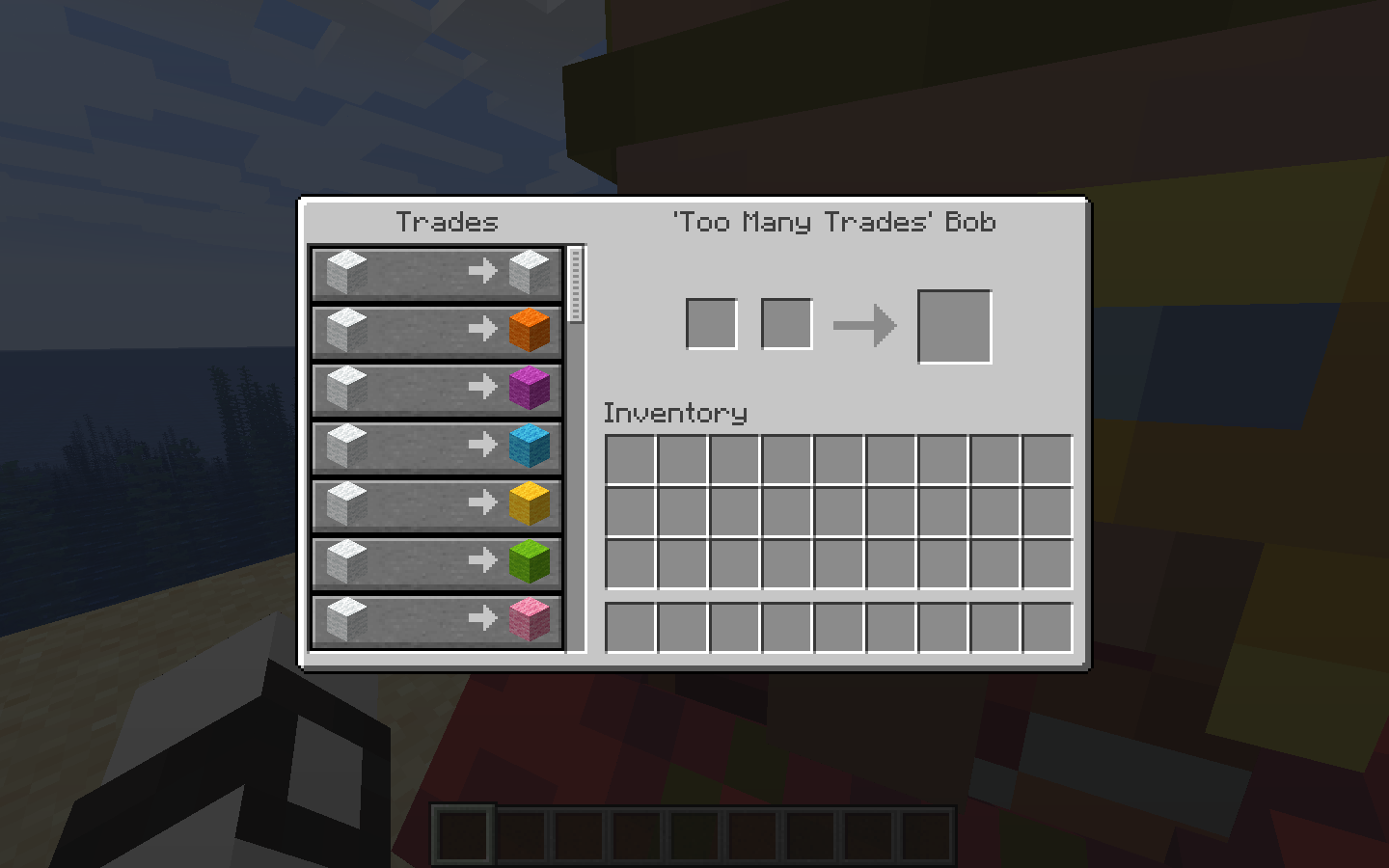


In Custom Villagers summoned with lots of trades, the scroll bar reaches the bottom way too early. It seems this is caused by a related issue (
MC-147819) which was patched in 1.14.1, but it seems that this patch simply capped the scroll bar at the bottom rather than fixing the root problem (That it just goes down too fast and too much)The command I used is stored in lotsoftrades.txt (attached because it exceeds the character limit) for if you want to try
Some screenshots to demonstrate the problem:
In Custom Villagers summoned with lots of trades, the scroll bar reaches the bottom way too early. It seems this is caused by a related issue (
MC-147819) which was patched in 1.14.1, but it seems that this patch simply capped the scroll bar at the bottom rather than fixing the root problem. (That it just goes down too fast and too much)The command I used is stored in lotsoftrades.txt (attached because it exceeds the character limit) for if you want to try.
Note: This appears to be a purely visual bug, as when scrolling halfway using the mouse cursor, the trade window scrolls halfway down as expected; only the scroll bar is in an incorrect position.
Blocked Chests cannot be opened in Spectator Mode
Model Optimizations 1.16.2.zip
![[Mod] Sonicwave](../../../data/avatars/users/94627.png)
Skelepound: The behavior while underwater is the same as with Night Vision (at least for me); having blindness while underwater turns the screen black.

Thanks Skelepound, I have reopened MC-167763 and confirmed it myself.
I have 16 of these for various degrees,
{Small:1b,Invulnerable:1b,Invisible:1b,Rotation:[0:-180.0f,1:0.0f],CustomName:Sight}/execute @a ~0 ~0 ~0 execute @e[type=Zombie,r=15,ry=-90,rym=90] ~0 ~0 ~0 summon ArmorStand ~0 ~1 ~0
and 16 of these for moving the armorstands.
{Motion:[0.0,0.0,-1.0]}/entitydata @e[type=ArmorStand,name=Sight,ry=-179,rym=-181]
However, upon further inspection of my commands and how they worked, I am starting to think it actually might be with the armorstand rotation.
Update: It is definitely with the zombie and not the armorstands. However, I noticed that when I teleported the zombie to face a certain direction, THEN the direction updated. However, when the zombie began to look around, the direction stayed the same again.
Ok, I found that if I constantly teleport the zombie to itself then I can get my map to work. Still, I am pretty sure I shouldn't have to do that.
crash-2017-05-17_22.27.46-client.txt
Confirmed to be still in both the Latest Release (1.15.2) and Latest Snapshot (20w19a)
I've also added a bit more information to help fix the bug.
Confirmed to be still in both the Latest Release (1.15.2) and Latest Snapshot (20w19a)
Confirmed to still be in 1.16 Pre-release 1
Confirmed to still be in 1.16 Pre-release 1
Hello, I also made a model optimization resource pack and thought it might be useful here...
Also, while making it I found a few extra things that I fixed in the pack:
- Fence Gates don't cull the top part when a block is above them
- The Fence Gate model (Closed) took 8 cubes when it could've used only 5 (By joining each gate)
- The Fence Gate UV was visually inconsistent when it opened and closed (This isn't an optimization thing but it mildly annoyed me so I fixed that too)
- Parts of Repeaters, Comparators, Tripwire Hooks, Fence Gates, Beacons, and Dragon Eggs had faces that would never be visible anywhere except in Spectator Mode (Like, they were inside other parts of the model)
- Dragon Eggs have an unnecessary cube (Kind of like Fence Gates)
- Flower Pots have a few unnecessary cubes as well
Model Optimizations 1.16.2.zip <- Just reuploaded it because I put it in the .zip wrong
P.S. I did not add culling to Glass Panes and Iron Bars because that causes other issues
I've recently found that my computer has this bug, (Night Vision / Underwater + Blindness / Void turning everything black) but only when on its power saving mode. (Likely due to the graphics card not being used when saving power)
This, as well as the features in 20w28a allowing me to change the fog color for custom biomes, has allowed me to find some things that should help to fix this bug (As well as the one in
MC-165208, which is why I'm putting this comment there too)Basically, Night Vision (and being underwater) divides the fog color's RGB values (assuming they're 0 - 1) by the largest value out of R, G, or B; effectively making the fog color as bright as it can be. This works fine for most colors, but if the fog color is exactly (0, 0, 0) then the largest value in the color is 0, resulting in the color being (0 / 0, 0 / 0, 0 / 0). This calculation is why the glitch only happens on some graphics cards, as while some of them (I believe the NVIDIA ones) will set the fog color to (0, 0, 0) others may return a NaN value, resulting in (NaN, NaN, NaN). The NaN values echo through the shaders and rendering code, resulting in a ton of stuff rendering completely black.
The reason why the glitch occurs when in the void or under the Blindness effect is because both make your fog color completely black. The same effect can be achieved by making a custom biome where the fog color is 0, also showing this. A potential fix for the bug may be to add a special case in the fog rendering code to skip any fog brightening effects if the fog color is completely black.
Another thing I've noticed: This bug report appears to contain two mostly unrelated bugs, those being the Night Vision rendering bug and the weakened Blindness effect while underwater. As for the second bug, I believe it to be caused by both Blindness and water changing your fog distance; the slightly reduced fog distance of water appears to override the greatly reduced fog distance of the Blindness effect. I believe this too could be fixed if Mojang adds a special case to the code reducing the fog distance while underwater where if the fog distance is already less than the underwater fog distance then to not change the fog distance.I've recently found that my computer has this bug, (Night Vision + Blindness / Void turning everything black) but only when on its power saving mode. (Likely due to the graphics card not being used when saving power)
This, as well as the features in 20w28a allowing me to change the fog color for custom biomes, has allowed me to find some things that should help to fix this bug (As well as the one in
MC-4647, which is why I'm putting this comment there too)Basically, Night Vision divides the fog color's RGB values (assuming they're 0 - 1) by the largest value out of R, G, or B; effectively making the fog color as bright as it can be. This works fine for most colors, but if the fog color is exactly (0, 0, 0) then the largest value in the color is 0, resulting in the color being (0 / 0, 0 / 0, 0 / 0). This calculation is why the glitch only happens on some graphics cards, as while some of them (I believe the NVIDIA ones) will set the fog color to (0, 0, 0) others may return a NaN value, resulting in (NaN, NaN, NaN). The NaN values echo through the shaders and rendering code, resulting in a ton of stuff rendering completely black.
The reason why the glitch occurs when in the void or under the Blindness effect is because both make your fog color completely black. The same effect can be achieved by making a custom biome where the fog color is 0, also showing this. A potential fix for the bug may be to add a special case in the Night Vision fog rendering code to skip the fog brightening effect if the fog color is completely black.
I just tested it for myself, and it seems like you're right; being underwater seems to brighten the fog just like Night Vision does, leading to all terrain and text rendering completely black when under Blindness / in a custom biome with black fog / in the void (I didn't test the void though since you can't put water there)
I also found why I, and a few others in the comments, may have been a bit confused regarding which issues this report is tracking;
MC-167763, a report tracking the unrelated 'weakened underwater blindness' bug (Easier to see when using a graphics card not affected by the Night Vision bug) was marked as a duplicate of this one, leading to this report about Night Vision / Underwater + Blindness / Void turning everything black containing a lot of comments about the other bug.I'll update the comments I made earlier to reflect the new information. Also, I think
MC-167763should be reopened to avoid future confusion, as it is a different bug thanMC-4647.