 Vytenis Narušis
- svajoklis_
- svajoklis_
- Europe/Helsinki
- Yes
- No
 MC-122
![[Mojang] Grum (Erik Broes)](../../../data/assets/gravatar/grum.png)




Changed Description:
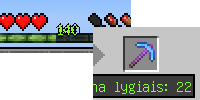
The level cost label in the anvil GUI is more visible but looks out of place with it's darker background and black border.The
xplevel counter effect is distroted still.Everything applies while using the unicode (multilanguage) font.
The level cost label in the anvil GUI is more visible but looks out of place with it's darker background and black border.
The xp level counter effect is distroted still.
Added Security Level: Public
Added Attachments:
Added Affects Versions: 13w02b
Added Affects Versions: 13w06a
Added Affects Versions: 13w09b
Changed Environment:
Windows 7 x64, Java 7u9
Changed Description:
To reproduce:
go into a game, go to options, change texture pack, go back.Fixes itself after breaking a block or using a pressure plate on a door.
Evetything else aboutt the font is ok, what I'm talking about is the shadow effect on the level counter and the anvil message. It happened to me on a clean install of windows and java, I always remove all previous versions of java before installing the new one and I have an updated lwjgl.
As you can see the text is normal otherwise
Oh, yeah,
MC-856is the one I'm talking about.Maybe it's locale that has to be changed for these namings to work
While on a Lithuanian locale russian characters show up as ? marks, same with other non latin characters.
Maybe the system locale has to bes to the correct one for the characters to show up (i.e. if I turned on Russian locale it would show the characters), some reported that above.
Latest one, 2.8.5
Still a problem in 13w04a
Text shadow is now fixed, great. The XP counter and anvil are still not however
You can fix reconnecting by deleting the "Riding" folder with a NBT editor from your /players/ file in the server's world.
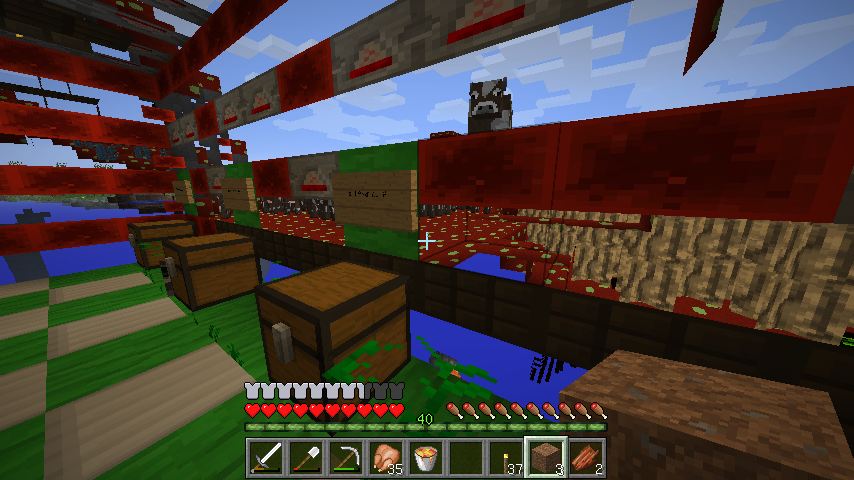
How in the hell this is "invalid". The cursor gets distorted when an item is in the hotbar!
It happens only when using a resource pack that has the crosshair changed, so no. But isn't that an issue with resource packs in general then? The .png file is changed ONLY by deleting some pixels (making them completely transparent) and saving it back in the same format. No other GUI elements are distorted. The only distorted element from that .png is the crosshair.
Ok, I have reloaded the game and then removed res-packs from the 'using' list. I loaded them back up and now the crosshair works correctly. Even when using shaders!
Perhaps it was fixed in the b version. EDIT: Just checked it, it was fixed in the 14w25b version.
I can confirm this. If you have any stack of more than 1 item then crosshair is normal, if you have only tools and/or stacks of 1 item then crosshair is distorted.
The original icons.png is in 32-bit format.
Aren't we supposed to make resource packs work too? Oh hurr it works on the default, let's call it a day. Oh lol you can't draw a proper crosshair. What a fine attitude!
I extracted the original icons.png, opened it up in photoshop, deleted some pixels off of the image, saved it in place (didn't have to select any settings) and for some reason now it reverts to the original (the pixels I deleted return). I changed some more pixels and it got more distorted (I am using a brush that's (255,255,255). It works when the bar is clear or there are stacks of 2 items, doesn't work when there's only stacks of 1 item and/or tools.
I used a pixel style eraser that is at 100% opacity. It made the alpha channel completely clear. And it's my own choice if I want to remove the crosshair, it makes no sense.
Did you even try it yourself or do you just blame everything on the imcompetence of the user?
Here's one, the cursor is changed to be a little sun thing. The only file changed is the icons.png
https://drive.google.com/file/d/0BxTOjO65cgphb1VvSy1ONEdseEE/edit?usp=sharing
THANK YOU ))))))))
You should post this on the MCPE tracker, this one is for Minecraft for PC
This is NOT fixed yet (as of 14w26a)
Fixed, yay!!
Not fixed in 14w33c