 MC-122
Unicode font text shadow misaligned
Everything applies while using the unicode (multilanguage) font.
The level cost label in the anvil GUI is more visible but looks out of place with it's darker background and black border.
The xp level counter effect is distroted still.
Environment
Windows 7 x64, Nvidia 630m, Java 7u9
Linked Issues
 Normal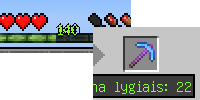


Created Issue:
Unicode font text effect misaligned
The level cost label in the anvil GUI is more visible but looks out of place with it's darker background and black border.
The xp level counter effect is distroted still.
Environment
Windows 7 x64, Nvidia 630m, Java 7u9
Attachments1
The level cost label in the anvil GUI is more visible but looks out of place with it's darker background and black border.The
xplevel counter effect is distroted still.Everything applies while using the unicode (multilanguage) font.
The level cost label in the anvil GUI is more visible but looks out of place with it's darker background and black border.
The xp level counter effect is distroted still.


Unicode font texteffectmisalignedUnicode font text shadow misaligned
relates to
![[Mojang] Nathan Adams](../../../data/assets/gravatar/dinnerbone.png)
![[Mojang] Grum (Erik Broes)](../../../data/assets/gravatar/grum.png) [Mojang] Grum (Erik Broes)
[Mojang] Grum (Erik Broes)relates to
relates to
relates to
The unicode font doesn't look nearly as distorted to me as it appears on your screen, it looks normal. I have to assume this is something specific to your system.
Evetything else aboutt the font is ok, what I'm talking about is the shadow effect on the level counter and the anvil message. It happened to me on a clean install of windows and java, I always remove all previous versions of java before installing the new one and I have an updated lwjgl.
As you can see the text is normal otherwise
Is this still a concern in the current Minecraft version? If so, please update the affected versions in order to best aid Mojang ensuring bugs are still valid in the latest releases/pre-releases.
Fixed'n'stuffs.
Text shadow is now fixed, great. The XP counter and anvil are still not however
Since you have fixed the problem, the texts are unreadable :/ It would be better to cancel your changes, no?