 Will S.
- TheMasterfulDork
- themasterfuldork
- Europe/Stockholm
- Yes
- No
 MC-88390
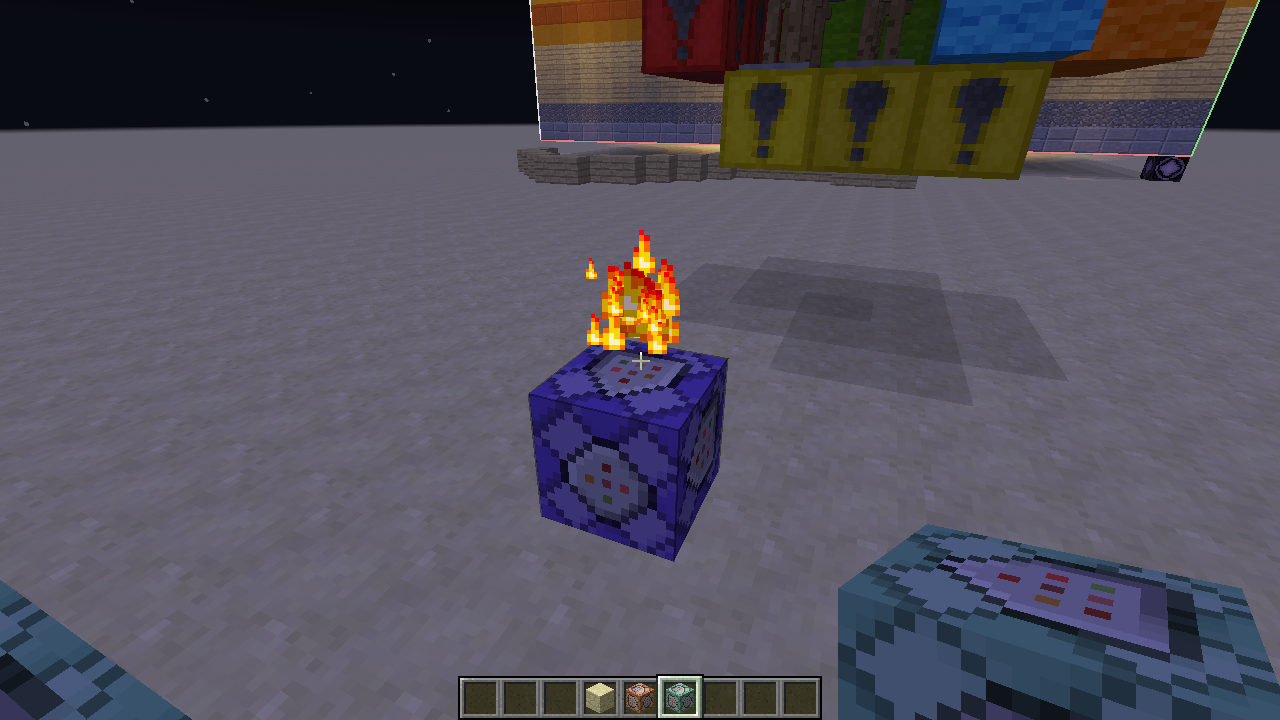

Using the execute command to setworldspawn around an entity, teleporting away from said entity will delete it.
To Replicate:
1) Create a new superflat creative world.
2) Give yourself a repeating command block and place it down.
3) Put in '/execute @e[type=ArmorStand] ~ ~ ~ /setworldspawn ~ ~ ~' the command block, and apply any kind of redstone.
4) Summon an ArmorStand at your feet.
5) Run in chat '/tp @e[type=ArmorStand] ~400 ~ ~', followed by '/tp ~400 ~ ~'.
6) Armorstand should still be there.
7) Run in chat '/tp ~-400 ~ ~', and '/tp ~400 ~ ~' to teleport away and back.
8) ArmorStand will be gone, nowhere to be found.The superflat world is just to guarantee you'll be on the ground. This still happens in default world type too. I hope you can get this solved, and I thank you for your time.
Using the execute command to setworldspawn around an entity, teleporting away from said entity will delete it.
To Replicate:
1) Create a new superflat creative world.
2) Give yourself a repeating command block and place it down.
3) Put in '/execute @e[type=ArmorStand] ~ ~ ~ /setworldspawn ~ ~ ~' the command block, and apply any kind of redstone.
4) Summon an ArmorStand at your feet.
5) Run in chat '/tp @e[type=ArmorStand] ~400 ~ ~', followed by '/tp ~400 ~ ~'.
6) Armorstand should still be there.
7) Run in chat '/tp ~-400 ~ ~', and '/tp ~400 ~ ~' to teleport away and back.
8) ArmorStand will be gone, nowhere to be found.The superflat world is just to guarantee you'll be on the ground. This still happens in default world type too. I hope you can get this solved, and I thank you for your time.
Edit: Bug not existent in 15w36d.
Using the execute command to setworldspawn around an entity, teleporting away from said entity will delete it.
To Replicate:
1) Create a new superflat creative world.
2) Give yourself a repeating command block and place it down.
3) Put in '/execute @e[type=ArmorStand] ~ ~ ~ /setworldspawn ~ ~ ~' the command block, and apply any kind of redstone.
4) Summon an ArmorStand at your feet.
5) Run in chat '/tp @e[type=ArmorStand] ~400 ~ ~', followed by '/tp ~400 ~ ~'.
6) Armorstand should still be there.
7) Run in chat '/tp ~-400 ~ ~', and '/tp ~400 ~ ~' to teleport away and back.
8) ArmorStand will be gone, nowhere to be found.The superflat world is just to guarantee you'll be on the ground. This still happens in default world type too. Even running an /execute command doesn't work. I hope you can get this solved, and I thank you for your time.
Edit: Bug not existent in 15w36d.
Using the execute command to setworldspawn around an entity, teleporting away from said entity will delete it.
To Replicate:
1) Create a new superflat creative world.
2) Give yourself a repeating command block and place it down.
3) Put in '/execute @e[type=ArmorStand] ~ ~ ~ /setworldspawn ~ ~ ~' the command block, and apply any kind of redstone.
4) Summon an ArmorStand at your feet.
5) Run in chat '/tp @e[type=ArmorStand] ~400 ~ ~', followed by '/tp ~400 ~ ~'.
6) Armorstandshould still be there.
7) Run in chat '/tp ~-400 ~ ~', and '/tp ~400 ~ ~' to teleport away and back.
8) ArmorStand will be gone, nowhere to be found.The superflat world is just to guarantee you'll be on the ground. This still happens in default world type too. Even running an /execute command doesn't work. I hope you can get this solved, and I thank you for your time.
Edit: Bug not existent in 15w36d.
Using the execute command to setworldspawn around an entity, teleporting away from said entity will delete it.
To Replicate:
1) Create a new superflat creative world.
2) Give yourself a repeating command block and place it down.
3) Put in '/execute @e[type=ArmorStand] ~ ~ ~ /setworldspawn ~ ~ ~' the command block, and apply any kind of redstone.
4) Summon an ArmorStand at your feet.
5) Run in chat '/tp @e[type=ArmorStand] ~2000 ~ ~', followed by '/tp ~2000 ~ ~'.
6) Armorstand is nowhere to be found.The superflat world is just to guarantee you'll be on the ground. This still happens in default world type too. Even running an /execute command doesn't work. I hope you can get this solved, and I thank you for your time.
Edit: Bug not existent in 15w36d.
Using the execute command to setworldspawn around an entity, teleporting away from said entity will delete it.
To Replicate:
1) Create a new superflat creative world.
2) Give yourself a repeating command block and place it down.
3) Put in '/execute @e[type=ArmorStand] ~ ~ ~ /setworldspawn ~ ~ ~' the command block, and apply any kind of redstone.
4) Summon an ArmorStand at your feet.
5) Run in chat '/tp @e[type=ArmorStand] ~2000 ~ ~', followed by '/tp ~2000 ~ ~'.
6) Armorstand is nowhere to be found.The superflat world is just to guarantee you'll be on the ground. This still happens in default world type too. Even running an /execute command doesn't work. I hope you can get this solved, and I thank you for your time.
Edit: Bug not existent in 15w36d.
Two glitches:
1) If you run a clock to execute /setworldspawn around an entity, teleport the entity into ungenerated chunks, then teleport to the entity, it will delete said entity.
2) Previous to 15w39a/b, teleporting away and back to the entity would have the same effect.To Replicate:
1) Create a new superflat creative world.
2) Give yourself a repeating command block and place it down.
3) Put in '/execute @e[type=ArmorStand] ~ ~ ~ /setworldspawn ~ ~ ~' the command block, and apply any kind of redstone.
4) Summon an ArmorStand at your feet.
5) Run in chat '/tp @e[type=ArmorStand] ~2000 ~ ~', followed by '/tp ~2000 ~ ~'.
6) Armorstand is nowhere to be found.The superflat world is just to guarantee you'll be on the ground. This still happens in default world type too. Even running an /execute command doesn't work. I hope you can get this solved, and I thank you for your time.
Edit: Bug not existent in 15w36d.
Execute With Setworldspawn Unusual Bugs
Two glitches:
1) If you run a clock to execute /setworldspawn around an entity, teleport the entity into ungenerated chunks, then teleport to the entity, it will delete said entity.
2) Previous to 15w39a/b/c, teleporting away and back to the entity would have the same effect.To Replicate:
1) Create a new superflat creative world.
2) Give yourself a repeating command block and place it down.
3) Put in '/execute @e[type=ArmorStand] ~ ~ ~ /setworldspawn ~ ~ ~' the command block, and apply any kind of redstone.
4) Summon an ArmorStand at your feet.
5) Run in chat '/tp @e[type=ArmorStand] ~2000 ~ ~', followed by '/tp ~2000 ~ ~'.
6) Armorstand is nowhere to be found.The superflat world is just to guarantee you'll be on the ground. This still happens in default world type too. Even running an /execute command doesn't work. I hope you can get this solved, and I thank you for your time.
Edit: Bug not existent in 15w36d.
Two glitches:
1) If you run a clock to execute /setworldspawn around an entity, teleport the entity into ungenerated chunks, then teleport to the entity, it will delete said entity.
2) Previous to 15w39a/b/c, teleporting away and back to the entity would have the same effect.To Replicate:
1) Create a new superflat creative world.
2) Give yourself a repeating command block and place it down.
3) Put in '/execute @e[type=ArmorStand] ~ ~ ~ /setworldspawn ~ ~ ~' the command block, and apply any kind of redstone.
4) Summon an ArmorStand at your feet.
5) Run in chat '/tp @e[type=ArmorStand] ~2000 ~ ~', followed by '/tp ~2000 ~ ~'.
6) Armorstand is nowhere to be found.The superflat world is just to guarantee you'll be on the ground. This still happens in default world type too. Even running an /execute command doesn't work. I hope you can get this solved, and I thank you for your time.
Edit: Bug not existent in 15w36d.
Teleporting ArmorStandto Playermakes ArmorStand InvisibleTeleporting Player to Armor Stand makes ArmorStand Invisible
I've created a TARDIS in Minecraft, and I'm using an ArmorStand with a block on it's head for the exterior. When a person exits the TARDIS, an armorstand is summoned, and teleported to the proper spot. However, you can't see the armorstand until you relog the world (and it does have the invisible flag on, so only the bedrock will show).
I have attached the world download. This will show you what I'm talking about.I've created a TARDIS in Minecraft, and I'm using an ArmorStand with a block on it's head for the exterior. When a person exits the TARDIS, an armorstand is summoned, and teleported to the proper spot. However, you can't see the armorstand until you relog the world (and it does have the invisible flag on, so only the bedrock will show)
I've created a TARDIS in Minecraft, and I'm using an ArmorStand with a block on it's head for the exterior. When a person exits the TARDIS, an armorstand is summoned, and teleported to the proper spot. However, you can't see the armorstand until you relog the world (and it does have the invisible flag on, so only the bedrock will show)
The problem is what the title says, though it only seem to happen in unloaded chunks. Summon an armor stand, and teleport it into unloaded chunks, probably a far distance away. Then run "/tp @p @e [type=armor_stand] " (assuming you don't have other armor stands), and it will teleport you to as normal. The armor stand, however will be invisible
Doctor Who Survival.zip

@Will S.: At least your graphics card drivers are outdated, please download & install http://www.geforce.com/drivers/results/90494 and report if the issue persists.

@Will S. I made the report a little bit more generic and replaced the reproduction steps. I hope you are fine with that.
No, I teleported it using the chat.
They don't become invisible. They stop existing. I've tried running /execute on the armorstand, but I get nothing.
I didn't know that was out yet. I'll check.
Now it's worse... The armorstand disappears on the first teleportation.
Blank. There's nothing. Even after reloading the map.
Where are those? In .Minecraft/logs I assume?
[08:32:27] [Client thread/INFO]: [CHAT] Command set: /execute @e[type=ArmorStand] ~ ~ ~ /setworldspawn ~ ~ ~
[08:32:29] [Client thread/INFO]: [CHAT] Object successfully summoned
[08:32:44] [Client thread/INFO]: [CHAT] Teleported Armor Stand to -683.5, 4.0, 684.5
[08:32:48] [Client thread/INFO]: [CHAT] Teleported Armor Stand to -283.5, 4.0, 684.5
[08:32:56] [Client thread/INFO]: [CHAT] Teleported playername to -287.5, 4.0, 684.5
[08:33:07] [Client thread/INFO]: [CHAT] Found Armor Stand
[08:33:16] [Client thread/INFO]: [CHAT] Teleported Armor Stand to 116.5, 4.0, 684.5
[08:33:20] [Client thread/INFO]: [CHAT] Teleported playername to 112.5, 4.0, 684.5
I tested for the Armorstand after, but got nothing. Doesn't say anything.
I think you have to teleport it out of loaded chunks. Try 1000 blocks, or more.
---- Minecraft Crash Report ----
// Why is it breaking
Time: 9/21/15 8:44 AM
Description: Manually triggered debug crash
java.lang.Throwable
at bab.s(SourceFile:1625)
at bab.as(SourceFile:928)
at bab.a(SourceFile:377)
at net.minecraft.client.main.Main.main(SourceFile:125)
A detailed walkthrough of the error, its code path and all known details is as follows:
---------------------------------------------------------------------------------------
– Head –
Stacktrace:
at bih.a(SourceFile:361)
– Affected level –
Details:
Level name: MpServer
All players: 1 total; [bkg['Dorkaloonies'/0, l='MpServer', x=-93.74, y=4.00, z=906.27]]
Chunk stats: MultiplayerChunkCache: 25, 25
Level seed: 0
Level generator: ID 01 - flat, ver 0. Features enabled: false
Level generator options:
Level spawn location: World: (-93,4,906), Chunk: (at 3,0,10 in -6,56; contains blocks -96,0,896 to -81,255,911), Region: (-1,1; contains chunks -32,32 to -1,63, blocks -512,0,512 to -1,255,1023)
Level time: 2365 game time, 2365 day time
Level dimension: 0
Level storage version: 0x00000 - Unknown?
Level weather: Rain time: 0 (now: false), thunder time: 0 (now: false)
Level game mode: Game mode: creative (ID 1). Hardcore: false. Cheats: false
Forced entities: 9 total; [yp['Slime'/122561, l='MpServer', x=-121.50, y=4.00, z=892.50], bkg['Dorkaloonies'/0, l='MpServer', x=-93.74, y=4.00, z=906.27], vm['Rabbit'/114279, l='MpServer', x=-118.50, y=4.00, z=936.50], vl['Pig'/114281, l='MpServer', x=-66.75, y=4.00, z=913.06], vm['Rabbit'/114280, l='MpServer', x=-116.50, y=4.00, z=936.50], vl['Pig'/114283, l='MpServer', x=-64.00, y=4.00, z=913.03], vl['Pig'/114282, l='MpServer', x=-71.34, y=4.00, z=911.16], vl['Pig'/114284, l='MpServer', x=-63.50, y=4.00, z=918.50], yp['Slime'/121656, l='MpServer', x=-114.50, y=4.00, z=889.50]]
Retry entities: 0 total; []
Server brand: vanilla
Server type: Integrated singleplayer server
Stacktrace:
at bih.a(SourceFile:361)
at bab.b(SourceFile:2369)
at bab.a(SourceFile:386)
at net.minecraft.client.main.Main.main(SourceFile:125)
– System Details –
Details:
Minecraft Version: 15w39a
Operating System: Windows 7 (amd64) version 6.1
Java Version: 1.8.0_25, Oracle Corporation
Java VM Version: Java HotSpot(TM) 64-Bit Server VM (mixed mode), Oracle Corporation
Memory: 128920736 bytes (122 MB) / 265687040 bytes (253 MB) up to 1060372480 bytes (1011 MB)
JVM Flags: 6 total; -XX:HeapDumpPath=MojangTricksIntelDriversForPerformance_javaw.exe_minecraft.exe.heapdump -Xmx1G -XX:+UseConcMarkSweepGC -XX:+CMSIncrementalMode -XX:-UseAdaptiveSizePolicy -Xmn128M
IntCache: cache: 0, tcache: 0, allocated: 0, tallocated: 0
Launched Version: 15w39a
LWJGL: 2.9.4
OpenGL: GeForce GT 610/PCIe/SSE2 GL version 4.5.0 NVIDIA 347.09, NVIDIA Corporation
GL Caps: Using GL 1.3 multitexturing.
Using GL 1.3 texture combiners.
Using framebuffer objects because OpenGL 3.0 is supported and separate blending is supported.
Shaders are available because OpenGL 2.1 is supported.
VBOs are available because OpenGL 1.5 is supported.
Using VBOs: No
Is Modded: Probably not. Jar signature remains and client brand is untouched.
Type: Client (map_client.txt)
Resource Packs: Doctor Who (incompatible)
Current Language: English (US)
Profiler Position: N/A (disabled)
CPU: 4x AMD A6-3620 APU with Radeon(tm) HD Graphics
Here's the report, not sure if there's anything that will help.
And it still was there?
Still disappears, but the strange thing is that I saw it for one tick before it disappeared.
It seems it disappears one tick after I teleport to it, except when I run the testfor command on it. The normal bug is still there, though. So, now we've found two...
Doing it now, but it also happens on my other computer as well.
Still disappears. I'm not the only one with this problem, right?
I create a new world every time I test it out.
I've attached a file that should show you the bug in action. Just press the buttons from closest to farthest from the repeating commandblock.
You didn't misunderstand. From what I see, it gets deleted completely.
Still happening in 16w04a.
Yes, it's still confirmed. Sorry, I've been in active for a long time. This still happens in 1.12-pre6. I'll post a video of this happening soon.
I should also mention that I titled the issue wrong. My bad.
The issue has been resolved. Thanks!
Perfect, thanks!