 TheMrZZ
- TheMrZZ
- themrzz
- Europe/Stockholm
- Yes
- No
![[Mojang] Grum (Erik Broes)](../../../data/assets/gravatar/grum.png)
 MC-87776
 Low
Low


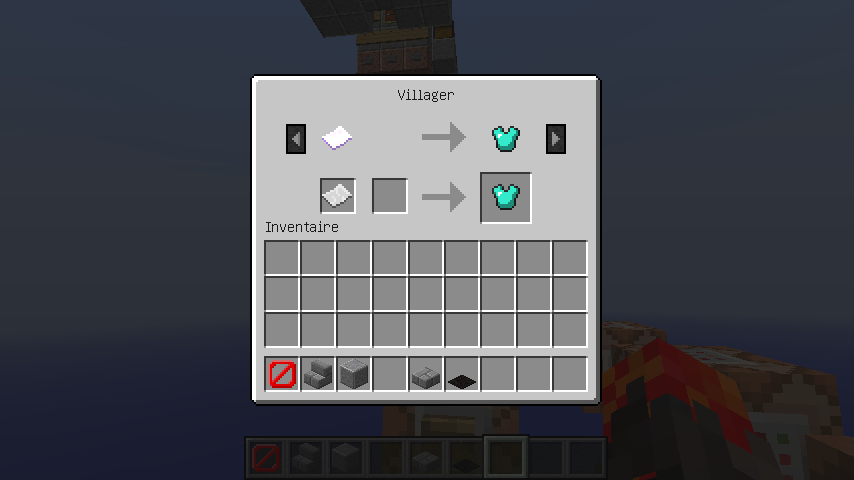


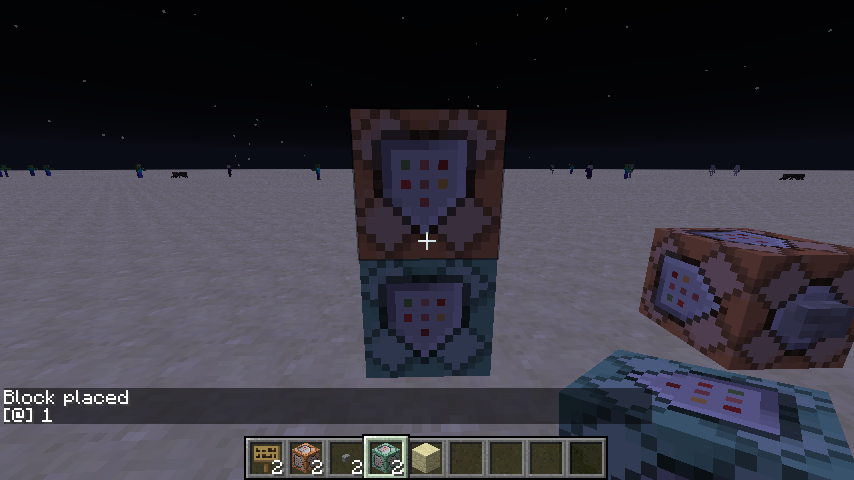











It's an old bug, it came with /summon
So when I create via /summon a Villager who buys a paper with the enchant 30 lvl 30, with a name & with a Lore, and give a diamond chestplate, he can buy any paper. He can buy a paper without anything special.
Look at the screens !
It's an old bug, it came with /summon
So when I create via /summon a Villager who buys a paper with the enchant 30 lvl 30, with a name & with a Lore, and give a diamond chestplate, he can buy any paper. He can buy a paper without anything special.
I don't know if it's realy a bug, but it's sometime a problems.Look at the screens !
~~~Thanks~~~
It's an old bug, it came with /summon
So when I create via /summon a Villager who buys a paper with the enchant 30 lvl 30, with a name & with a Lore, and give a diamond chestplate, he can buy any paper. He can buy a paper without anything special.
I don't know if it's realy a bug, but it's sometime a problems.Look at the screens !
~~~Thanks~~~
Place a command block (Impulse, Unconditionnal, Needs Redstone).
{\"text\":\"Hey\"}
Enter this command :
"setblock ~ ~1 ~ standing_sign 0 replace {Text1:"[]"}"
Place a redstone_block next to this command block. Now everyone near this command_block is getting kicked from the server, with this error :
Internal Exeption: io.netty.handler.codec.DecoderExeption:
com.google.gson.JsonSyntaxExeption:
com.google.gson.stream.MalformedJsonExeption: Use JsonReader.setLenient(true) to accept malformed JSON at line 1 column 1
Place a command block (Impulse, Unconditionnal, Needs Redstone).
{\"text\":\"Hey\"}
Enter this command :
"setblock ~ ~1 ~ standing_sign 0 replace {Text1:"[]"}
"Place a redstone_block next to this command block. Now everyone near this command_block is getting kicked from the server, with this error :
Internal Exeption: io.netty.handler.codec.DecoderExeption:
com.google.gson.JsonSyntaxExeption:
com.google.gson.stream.MalformedJsonExeption: Use JsonReader.setLenient(true) to accept malformed JSON at line 1 column 1
Place a command block (Impulse, Unconditionnal, Needs Redstone).
{\"text\":\"Hey\"}
Enter this command :
setblock ~ ~1 ~ standing_sign 0 replace {Text1:"[]"}
Place a redstone
_block next to this command block. Now everyone near this command_block is getting kicked from the server, with this error :
Internal Exeption: io.netty.handler.codec.DecoderExeption:
com.google.gson.JsonSyntaxExeption:
com.google.gson.stream.MalformedJsonExeption: Use JsonReader.setLenient(true) to accept malformed JSON at line 1 column 1Place a command block (Impulse, Unconditionnal, Needs Redstone).
{\"text\":\"Hey\"}
Enter this command :
setblock ~ ~1 ~ standing_sign 0 replace {Text1:"[]"}
Place a redstone block next to this command block. Now everyone near this command_block is getting kicked from the server, with this error :
Internal Exeption: io.netty.handler.codec.DecoderExeption:
com.google.gson.JsonSyntaxExeption:
com.google.gson.stream.MalformedJsonExeption: Use JsonReader.setLenient(true) to accept malformed JSON at line 1 column 1
Place a command block (Impulse, Unconditionnal, Needs Redstone).
{\"text\":\"Hey\"}
Enter this command :
setblock ~ ~1 ~ standing_sign 0 replace {Text1:"[]"}
Place a redstone block next to this command block. Now everyone near this command_block is getting kicked from the server, with this error :
Internal Exeption: io.netty.handler.codec.DecoderExeption:
com.google.gson.JsonSyntaxExeption:
com.google.gson.stream.MalformedJsonExeption: Use JsonReader.setLenient(true) to accept malformed JSON at line 1 column 1Happens when alimented with a lever, a button (stone & wood), a repeater, a comparator, a redstone wire (any kind of alimentation works).
Place a command block (Impulse, Unconditionnal, Needs Redstone).
{\"text\":\"Hey\"}
Enter this command :
setblock ~ ~1 ~ standing_sign 0 replace {Text1:"[]"}
Place a redstone block next to this command block. Now everyone near this command_block is getting kicked from the server, with this error :
Internal Exeption: io.netty.handler.codec.DecoderExeption:
com.google.gson.JsonSyntaxExeption:
com.google.gson.stream.MalformedJsonExeption: Use JsonReader.setLenient(true) to accept malformed JSON at line 1 column 1H
appens when alimented with a lever, a button (stone & wood), a repeater, a comparator, a redstone wire (any kind of alimentation works).Place a command block (Impulse, Unconditionnal, Needs Redstone).
{\"text\":\"Hey\"}
Enter this command :
setblock ~ ~1 ~ standing_sign 0 replace {Text1:"[]"}
Place a redstone block next to this command block. Now everyone near this command_block is getting kicked from the server, with this error :
Internal Exeption: io.netty.handler.codec.DecoderExeption:
com.google.gson.JsonSyntaxExeption:
com.google.gson.stream.MalformedJsonExeption: Use JsonReader.setLenient(true) to accept malformed JSON at line 1 column 1Here is the consol log : TheMrZZ lost connection: TextComponent{text='Disconnected', siblings=[], style=Style{hasParent=false, color=null, bold=null, italic=null, underlined=null, obfuscated=null, clickEvent=null, hoverEvent=null, insertion=null}}
Happens when alimented with a lever, a button (stone & wood), a repeater, a comparator, a redstone wire (any kind of alimentation works).
Place a command block (Impulse, Unconditionnal, Needs Redstone).
{\"text\":\"Hey\"}
Enter this command :
setblock ~ ~1 ~ standing_sign 0 replace {Text1:"[]"}
Place a redstone block next to this command block. Now everyone near this command_block is getting kicked from the server, with this error :
Internal Exeption: io.netty.handler.codec.DecoderExeption:
com.google.gson.JsonSyntaxExeption:
com.google.gson.stream.MalformedJsonExeption: Use JsonReader.setLenient(true) to accept malformed JSON at line 1 column 1Here is the consol log : TheMrZZ lost connection: TextComponent{text='Disconnected', siblings=[], style=Style{hasParent=false, color=null, bold=null, italic=null, underlined=null, obfuscated=null, clickEvent=null, hoverEvent=null, insertion=null}}
Happens when alimented with a lever, a button (stone & wood), a repeater, a comparator, a redstone wire (any kind of alimentation works).
BIGGEST PROBLEM : If you do this in a spawn chunk, you can't come back, except if someone put a command like /tp PLAYER @p in a repeating command block.
Place a command block (Impulse, Unconditionnal, Needs Redstone).
{\"text\":\"Hey\"}
Enter this command :
setblock ~ ~1 ~ standing_sign 0 replace {Text1:"[]"}
Place a redstone block next to this command block. Now everyone near this command_block is getting kicked from the server, with this error :
Internal Exeption: io.netty.handler.codec.DecoderExeption:
com.google.gson.JsonSyntaxExeption:
com.google.gson.stream.MalformedJsonExeption: Use JsonReader.setLenient(true) to accept malformed JSON at line 1 column 1Here is the consol log : TheMrZZ lost connection: TextComponent{text='Disconnected', siblings=[], style=Style{hasParent=false, color=null, bold=null, italic=null, underlined=null, obfuscated=null, clickEvent=null, hoverEvent=null, insertion=null}}
Happens when alimented with a lever, a button (stone & wood), a repeater, a comparator, a redstone wire (any kind of alimentation works).
BIGGEST PROBLEM : If you do this in a spawn chunk, you can't come back, except if someone put a command like /tp PLAYER @p in a repeating command block.
Place a command block (Impulse, Unconditionnal, Needs Redstone).
Enter this command :setblock ~ ~1 ~ standing_sign 0 replace {Text1:"[
Unknown macro: {"text"}]"}
Place a redstone block next to this command block. Now everyone near this command_block is getting kicked from the server, with this error :
Internal Exeption: io.netty.handler.codec.DecoderExeption:
com.google.gson.JsonSyntaxExeption:
com.google.gson.stream.MalformedJsonExeption: Use JsonReader.setLenient(true) to accept malformed JSON at line 1 column 1Here is the consol log : TheMrZZ lost connection: TextComponent{text='Disconnected', siblings=[], style=Style{hasParent=false, color=null, bold=null, italic=null, underlined=null, obfuscated=null, clickEvent=null, hoverEvent=null, insertion=null}}
Happens when alimented with a lever, a button (stone & wood), a repeater, a comparator, a redstone wire (any kind of alimentation works).
BIGGEST PROBLEM : If you do this in a spawn chunk, you can't come back, except if someone put a command like /tp PLAYER @p in a repeating command block.
Place a command block (Impulse, Unconditionnal, Needs Redstone).
Enter this command :setblock ~ ~1 ~ standing_sign 0 replace {Text1:"[
Unknown macro: {"text"}]"}
Place a redstone block next to this command block. Now everyone near this command_block is getting kicked from the server, with this error :
Internal Exeption: io.netty.handler.codec.DecoderExeption:
com.google.gson.JsonSyntaxExeption:
com.google.gson.stream.MalformedJsonExeption: Use JsonReader.setLenient(true) to accept malformed JSON at line 1 column 1Here is the consol log : TheMrZZ lost connection: TextComponent{text='Disconnected', siblings=[], style=Style{hasParent=false, color=null, bold=null, italic=null, underlined=null, obfuscated=null, clickEvent=null, hoverEvent=null, insertion=null}}
Happens when alimented with a lever, a button (stone & wood), a repeater, a comparator, a redstone wire (any kind of alimentation works).
BIGGEST PROBLEM : If you do this in a spawn chunk, you can't come back, except if someone put a command like /tp PLAYER @p in a repeating command block.
Place a command block (Impulse, Unconditionnal, Needs Redstone).
Enter this command :setblock ~ ~1 ~ standing_sign 0 replace {Text1:"[{\"text\":\"Hey\"}]"}Place a redstone block next to this command block. Now everyone near this command_block is getting kicked from the server, with this error :
Internal Exeption: io.netty.handler.codec.DecoderExeption:
com.google.gson.JsonSyntaxExeption:
com.google.gson.stream.MalformedJsonExeption: Use JsonReader.setLenient(true) to accept malformed JSON at line 1 column 1Here is the consol log : TheMrZZ lost connection: TextComponent{text='Disconnected', siblings=[], style=Style{hasParent=false, color=null, bold=null, italic=null, underlined=null, obfuscated=null, clickEvent=null, hoverEvent=null, insertion=null}}
Happens when alimented with a lever, a button (stone & wood), a repeater, a comparator, a redstone wire (any kind of alimentation works).
BIGGEST PROBLEM : If you do this in a spawn chunk, you can't come back, except if someone put a command like /tp PLAYER @p in a repeating command block.
Place a command block (Impulse, Unconditionnal, Needs Redstone).
Enter this command :setblock ~ ~1 ~ standing_sign 0 replace {Text1:"[{\"text\":\"Hey\"}]"}Place a redstone block next to this command block. Now everyone near this command_block is getting kicked from the server, with this error :
Internal Exeption: io.netty.handler.codec.DecoderExeption:
com.google.gson.JsonSyntaxExeption:
com.google.gson.stream.MalformedJsonExeption: Use JsonReader.setLenient(true) to accept malformed JSON at line 1 column 1Here is the consol log : TheMrZZ lost connection: TextComponent{text='Disconnected', siblings=[], style=Style{hasParent=false, color=null, bold=null, italic=null, underlined=null, obfuscated=null, clickEvent=null, hoverEvent=null, insertion=null}}
Happens when alimented with a lever, a button (stone & wood), a repeater, a comparator, a redstone wire (any kind of alimentation works).
BIGGEST PROBLEM : If you do this in a spawn chunk, you can't come back, except if someone put a command like /tp PLAYER @p in a repeating command block.
Place a command block (Impulse, Unconditionnal, Needs Redstone).
Enter this command :setblock ~ ~1 ~ standing_sign 0 replace {Text1:"[{\"text\":\"Hey\"}]"}Place a redstone block next to this command block. Now everyone near this command_block is getting kicked from the server, with this error :
Internal Exeption: io.netty.handler.codec.DecoderExeption: com.google.gson.JsonSyntaxExeption: com.google.gson.stream.MalformedJsonExeption: Use JsonReader.setLenient(true) to accept malformed JSON at line 1 column 1Here is the consol log : TheMrZZ lost connection: TextComponent{text='Disconnected', siblings=[], style=Style{hasParent=false, color=null, bold=null, italic=null, underlined=null, obfuscated=null, clickEvent=null, hoverEvent=null, insertion=null}}
Happens when alimented with a lever, a button (stone & wood), a repeater, a comparator, a redstone wire (any kind of alimentation works).
BIGGEST PROBLEM : If you do this in a spawn chunk, you can't come back, except if someone put a command like /tp PLAYER @p in a repeating command block.
Place a command block (Impulse, Unconditionnal, Needs Redstone).
Enter this command :setblock ~ ~1 ~ standing_sign 0 replace {Text1:"[{\"text\":\"Hey\"}]"}Place a redstone block next to this command block. Now everyone near this command_block is getting kicked from the server, with this error :
Internal Exeption: io.netty.handler.codec.DecoderExeption: com.google.gson.JsonSyntaxExeption: com.google.gson.stream.MalformedJsonExeption: Use JsonReader.setLenient(true) to accept malformed JSON at line 1 column 1Here is the consol log : TheMrZZ lost connection: TextComponent{text='Disconnected', siblings=[], style=Style{hasParent=false, color=null, bold=null, italic=null, underlined=null, obfuscated=null, clickEvent=null, hoverEvent=null, insertion=null}}
Happens when alimented with a lever, a button (stone & wood), a repeater, a comparator, a redstone wire (any kind of alimentation works).
BIGGEST PROBLEM : If you do this in a spawn chunk, you can't come back, except if someone put a command like /tp PLAYER @p in a repeating command block.
Place a command block (Impulse, Unconditionnal, Needs Redstone).
Enter this command :setblock ~ ~1 ~ standing_sign 0 replace {Text1:"[{\"text\":\"Hey\"}]"}Place a redstone block next to this command block. Now everyone near this command_block is getting kicked from the server, with this error :
Internal Exeption: io.netty.handler.codec.DecoderExeption: com.google.gson.JsonSyntaxExeption: com.google.gson.stream.MalformedJsonExeption: Use JsonReader.setLenient(true) to accept malformed JSON at line 1 column 1Here is the consol log :
TheMrZZ lost connection: TextComponent{text='Disconnected', siblings=[], style=Style{hasParent=false, color=null, bold=null, italic=null, underlined=null, obfuscated=null, clickEvent=null, hoverEvent=null, insertion=null}}Happens when alimented with a lever, a button (stone & wood), a repeater, a comparator, a redstone wire (any kind of alimentation works).
BIGGEST PROBLEM : If you do this in a spawn chunk, you can't come back, except if someone put a command like /tp PLAYER @p in a repeating command block.
Place a command block (Impulse, Unconditionnal, Needs Redstone).
Enter this command :setblock ~ ~1 ~ standing_sign 0 replace {Text1:"[{\"text\":\"Hey\"}]"}Place a redstone block next to this command block. Now everyone near this command_block is getting kicked from the server, with this error :
Internal Exeption: io.netty.handler.codec.DecoderExeption: com.google.gson.JsonSyntaxExeption: com.google.gson.stream.MalformedJsonExeption: Use JsonReader.setLenient(true) to accept malformed JSON at line 1 column 1Here is the consol log :
TheMrZZ lost connection: TextComponent{text='Disconnected', siblings=[], style=Style{hasParent=false, color=null, bold=null, italic=null, underlined=null, obfuscated=null, clickEvent=null, hoverEvent=null, insertion=null}}Happens when alimented with a lever, a button (stone & wood), a repeater, a comparator, a redstone wire (any kind of alimentation works).
BIGGEST PROBLEM : If you do this in a spawn chunk, you can't come back because it seems to instant-kick every player near the CM, except if someone put a command like /tp PLAYER @p in a repeating command block.
JSON error -kick from the serverJsonReader.setLenient(true) : a setblock wich kick you from the server.
Warning: this bug is server-only.
Place a command block (Impulse, Unconditionnal, Needs Redstone).
Enter this command :setblock ~ ~1 ~ standing_sign 0 replace {Text1:"[{\"text\":\"Hey\"}]"}Place a redstone block next to this command block. Now everyone near this command_block is getting kicked from the server, with this error :
Internal Exeption: io.netty.handler.codec.DecoderExeption: com.google.gson.JsonSyntaxExeption: com.google.gson.stream.MalformedJsonExeption: Use JsonReader.setLenient(true) to accept malformed JSON at line 1 column 1Here is the consol log :
TheMrZZ lost connection: TextComponent{text='Disconnected', siblings=[], style=Style{hasParent=false, color=null, bold=null, italic=null, underlined=null, obfuscated=null, clickEvent=null, hoverEvent=null, insertion=null}}Happens when alimented with a lever, a button (stone & wood), a repeater, a comparator, a redstone wire (any kind of alimentation works).
BIGGEST PROBLEM : If you do this in a spawn chunk, you can't come back because it seems to instant-kick every player near the CM, except if someone put a command like /tp PLAYER @p in a repeating command block.
Minecraft 1
5w35eserver. Vanilla - no command blocks running.Minecraft 16w04a server. Vanilla - no command blocks running.
Fixed in 16w03a - or maybe earlier.
[color:red]Warning: this bug is server-only.[color]
Place a command block (Impulse, Unconditionnal, Needs Redstone).
Enter this command :setblock ~ ~1 ~ standing_sign 0 replace {Text1:"[{\"text\":\"Hey\"}]"}Place a redstone block next to this command block. Now everyone near this command_block is getting kicked from the server, with this error :
Internal Exeption: io.netty.handler.codec.DecoderExeption: com.google.gson.JsonSyntaxExeption: com.google.gson.stream.MalformedJsonExeption: Use JsonReader.setLenient(true) to accept malformed JSON at line 1 column 1Here is the consol log :
TheMrZZ lost connection: TextComponent{text='Disconnected', siblings=[], style=Style{hasParent=false, color=null, bold=null, italic=null, underlined=null, obfuscated=null, clickEvent=null, hoverEvent=null, insertion=null}}Happens when alimented with a lever, a button (stone & wood), a repeater, a comparator, a redstone wire (any kind of alimentation works).
BIGGEST PROBLEM : If you do this in a spawn chunk, you can't come back because it seems to instant-kick every player near the CM, except if someone put a command like /tp PLAYER @p in a repeating command block.
[color:red]Warning: this bug is server-only.[color]
Place a command block (Impulse, Unconditionnal, Needs Redstone).
Enter this command :setblock ~ ~1 ~ standing_sign 0 replace {Text1:"[{\"text\":\"Hey\"}]"}Place a redstone block next to this command block. Now everyone near this command_block is getting kicked from the server, with this error :
Internal Exeption: io.netty.handler.codec.DecoderExeption: com.google.gson.JsonSyntaxExeption: com.google.gson.stream.MalformedJsonExeption: Use JsonReader.setLenient(true) to accept malformed JSON at line 1 column 1Here is the consol log :
TheMrZZ lost connection: TextComponent{text='Disconnected', siblings=[], style=Style{hasParent=false, color=null, bold=null, italic=null, underlined=null, obfuscated=null, clickEvent=null, hoverEvent=null, insertion=null}}Happens when alimented with a lever, a button (stone & wood), a repeater, a comparator, a redstone wire (any kind of alimentation works).
BIGGEST PROBLEM : If you do this in a spawn chunk, you can't come back because it seems to instant-kick every player near the CM, except if someone put a command like /tp PLAYER @p in a repeating command block.
Warning: this bug is server-only.
Place a command block (Impulse, Unconditionnal, Needs Redstone).
Enter this command :setblock ~ ~1 ~ standing_sign 0 replace {Text1:"[{\"text\":\"Hey\"}]"}Place a redstone block next to this command block. Now everyone near this command_block is getting kicked from the server, with this error :
Internal Exeption: io.netty.handler.codec.DecoderExeption: com.google.gson.JsonSyntaxExeption: com.google.gson.stream.MalformedJsonExeption: Use JsonReader.setLenient(true) to accept malformed JSON at line 1 column 1Here is the consol log :
TheMrZZ lost connection: TextComponent{text='Disconnected', siblings=[], style=Style{hasParent=false, color=null, bold=null, italic=null, underlined=null, obfuscated=null, clickEvent=null, hoverEvent=null, insertion=null}}Happens when alimented with a lever, a button (stone & wood), a repeater, a comparator, a redstone wire (any kind of alimentation works).
BIGGEST PROBLEM : If you do this in a spawn chunk, you can't come back because it seems to instant-kick every player near the CM, except if someone put a command like /tp PLAYER @p in a repeating command block.
Warning: this bug is server-only.
Place a command block (Impulse, Unconditionnal, Needs Redstone).
Enter this command :setblock ~ ~1 ~ standing_sign 0 replace {Text1:"[{\"text\":\"Hey\"}]"}Place a redstone block next to this command block. Now everyone near this command_block is getting kicked from the server, with this error :
Internal Exeption: io.netty.handler.codec.DecoderExeption: com.google.gson.JsonSyntaxExeption: com.google.gson.stream.MalformedJsonExeption: Use JsonReader.setLenient(true) to accept malformed JSON at line 1 column 1Here is the consol log :
TheMrZZ lost connection: TextComponent{text='Disconnected', siblings=[], style=Style{hasParent=false, color=null, bold=null, italic=null, underlined=null, obfuscated=null, clickEvent=null, hoverEvent=null, insertion=null}}Happens when alimented with a lever, a button (stone & wood), a repeater, a comparator, a redstone wire (any kind of alimentation works).
BIGGEST PROBLEM : If you do this in a spawn chunk, you can't come back because it seems to instant-kick every player near the CM, except if someone put a command like /tp PLAYER @p in a repeating command block.
Warning: this bug is server-only.
Place a command block (Impulse, Unconditionnal, Needs Redstone).
Enter this command :setblock ~ ~1 ~ standing_sign 0 replace {Text1:"[{\"text\":\"Hey\"}]"}Place a redstone block next to this command block. Now everyone near this command_block is getting kicked from the server, with this error :
Internal Exeption: io.netty.handler.codec.DecoderExeption: com.google.gson.JsonSyntaxExeption: com.google.gson.stream.MalformedJsonExeption: Use JsonReader.setLenient(true) to accept malformed JSON at line 1 column 1Here is the consol log :
TheMrZZ lost connection: TextComponent{text='Disconnected', siblings=[], style=Style{hasParent=false, color=null, bold=null, italic=null, underlined=null, obfuscated=null, clickEvent=null, hoverEvent=null, insertion=null}}Happens when alimented with a lever, a button (stone & wood), a repeater, a comparator, a redstone wire (any kind of alimentation works).
BIGGEST PROBLEM : If you do this in a spawn chunk, you can't come back because it seems to instant-kick every player near the CM, except if someone put a command like /tp PLAYER @p in a repeating command block.
Summon any entity with an ArmorStand entity riding it (for example a Zombie with an ArmorStand as passengers).
When you change the first entity's rotation, the second entity do rotate, but not as much as the first.
Steps to reproduce :
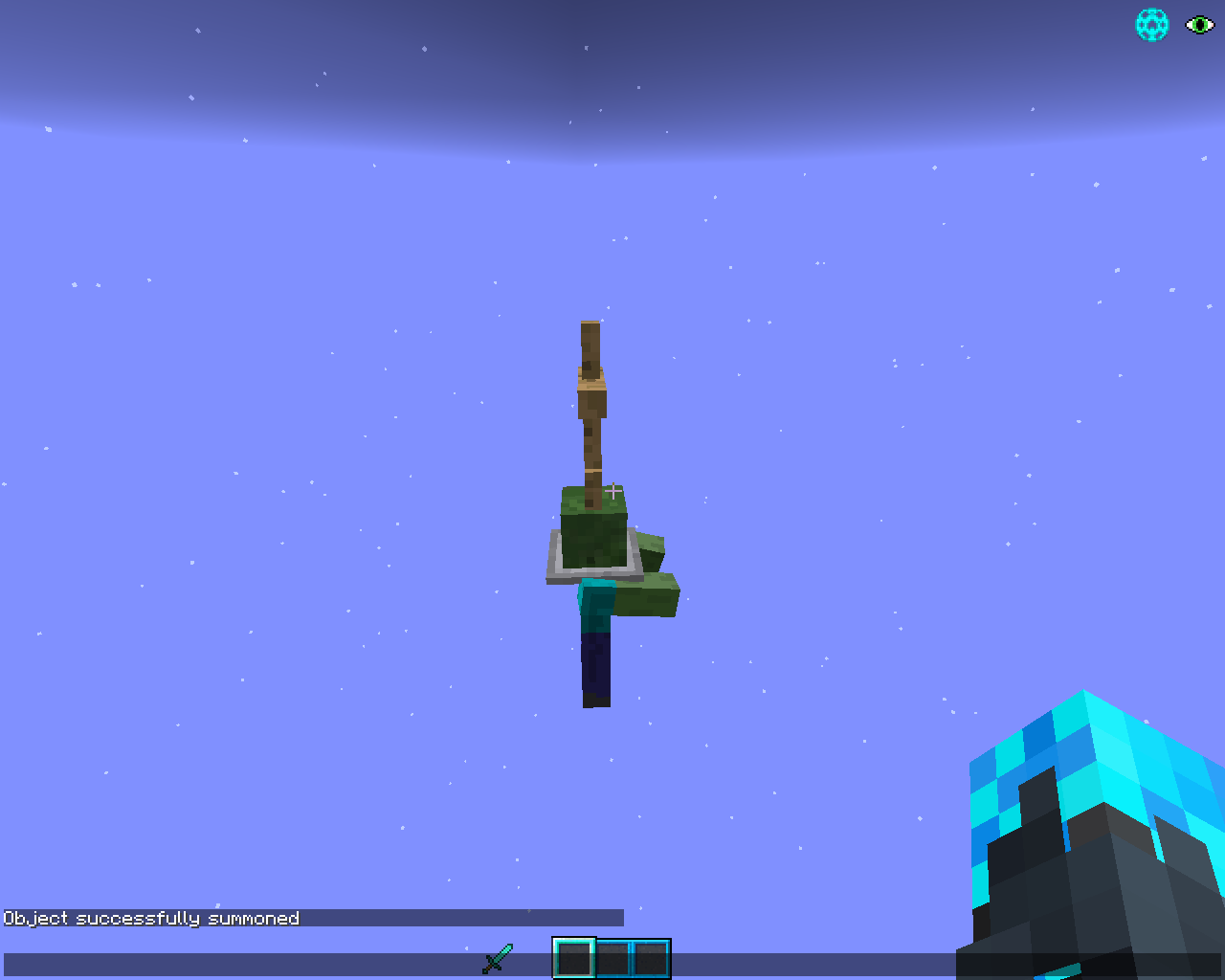
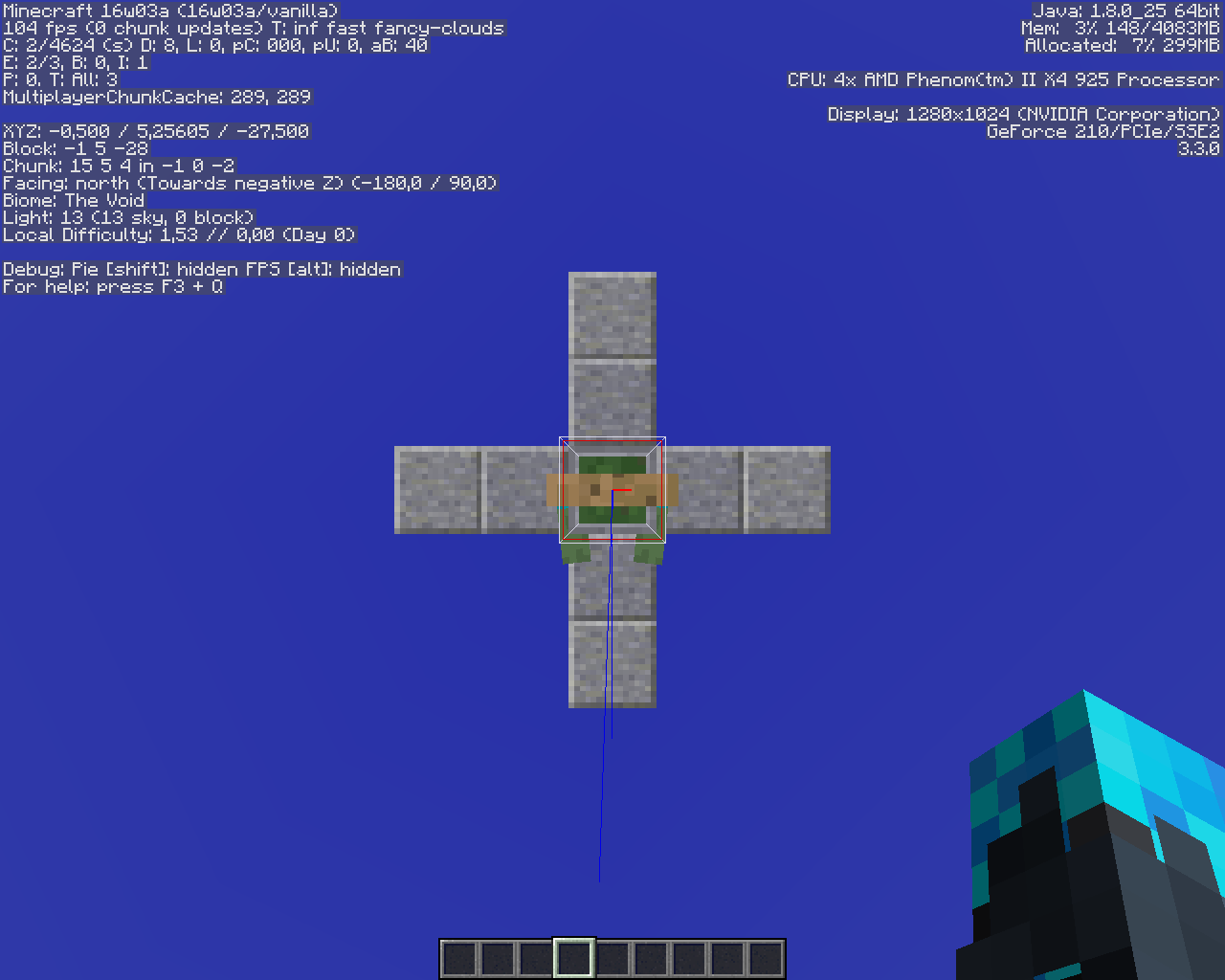
-First, summon a Zombie with an ArmorStand as Passengers :/summon Zombie ~ ~ ~ {NoAI:1,Passengers:[{id:ArmorStand}]}
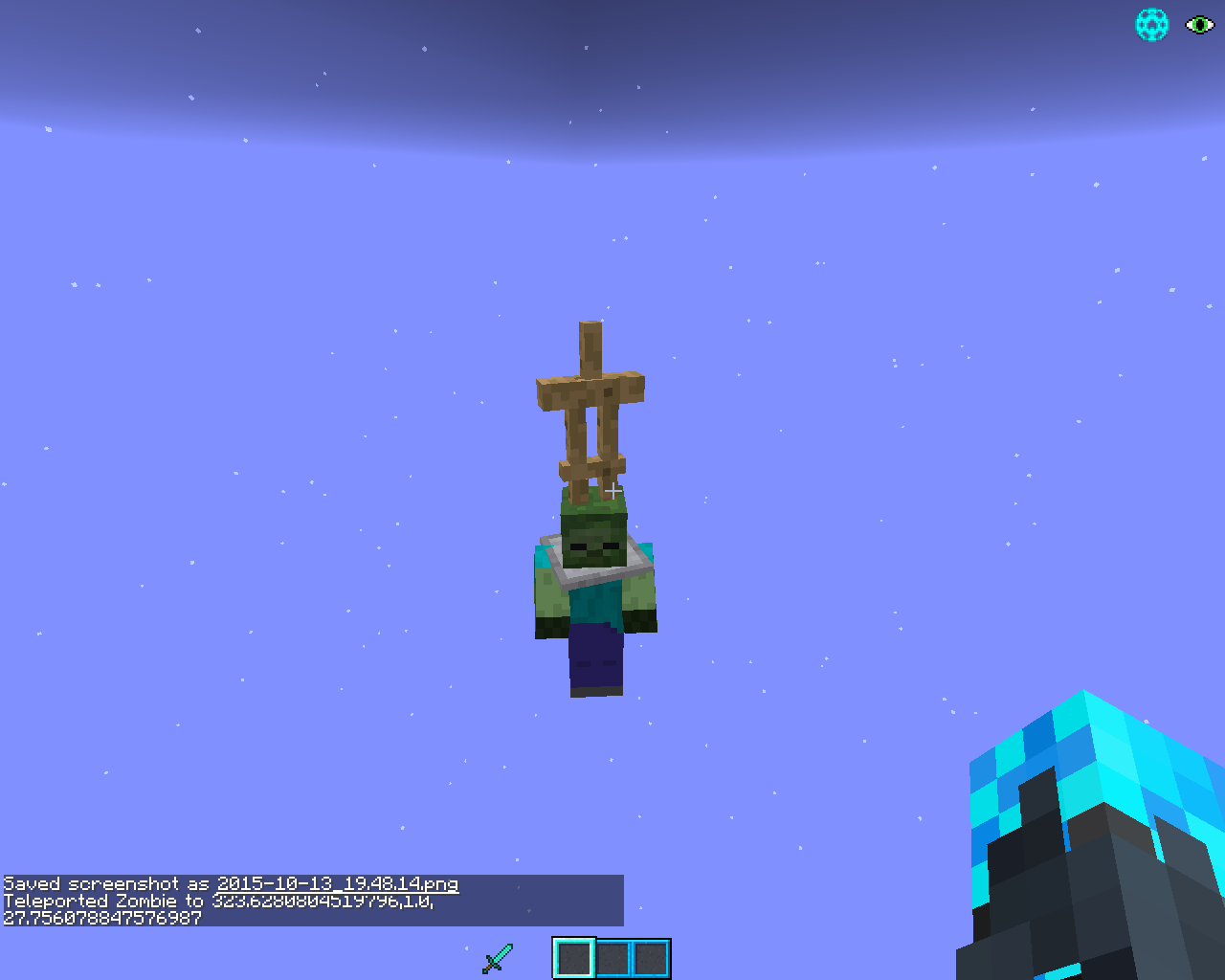
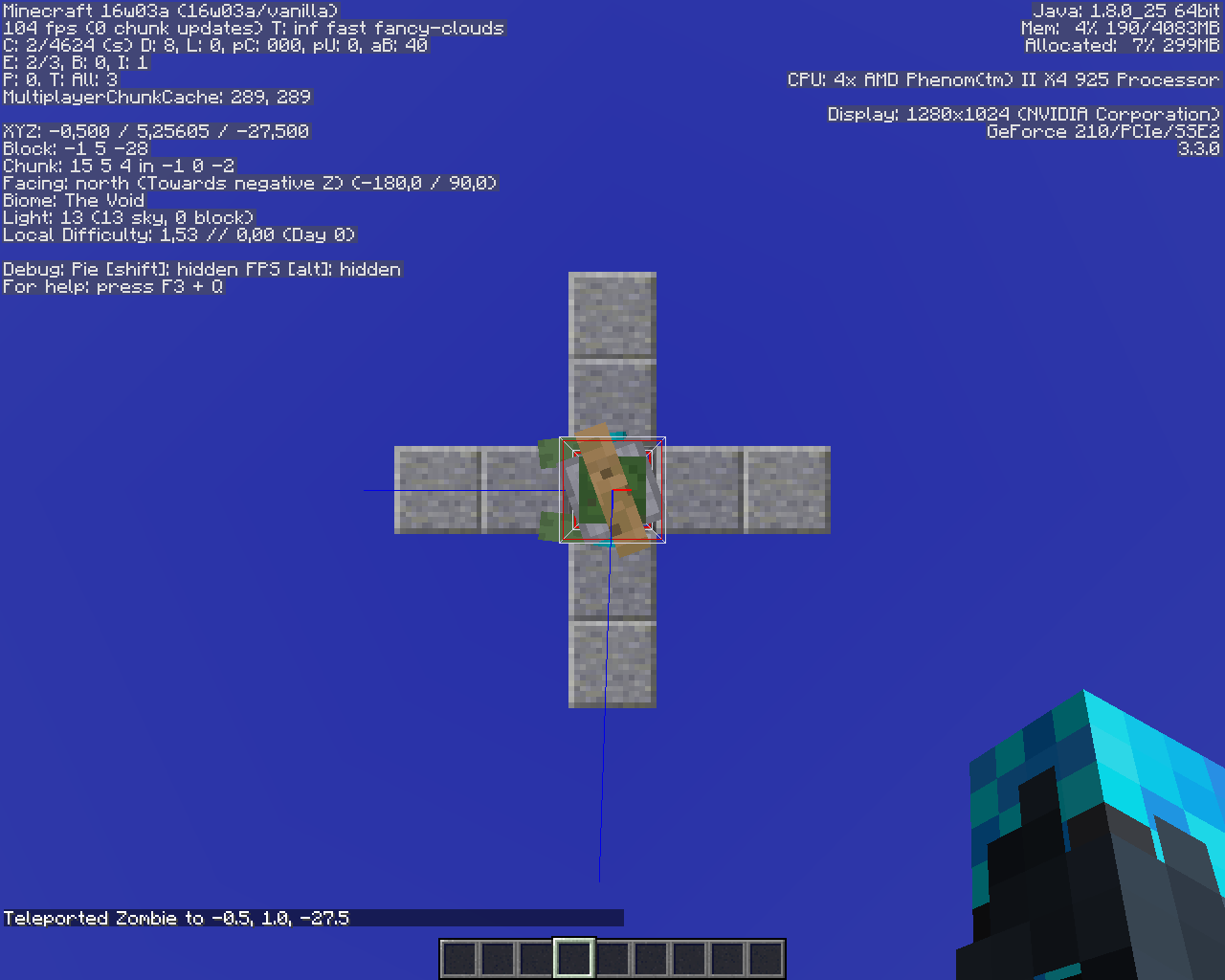
-TP the Zombie at the same place but with a different orientation :tp @e[type=Zombie,c=1] ~ ~ ~ 90 0
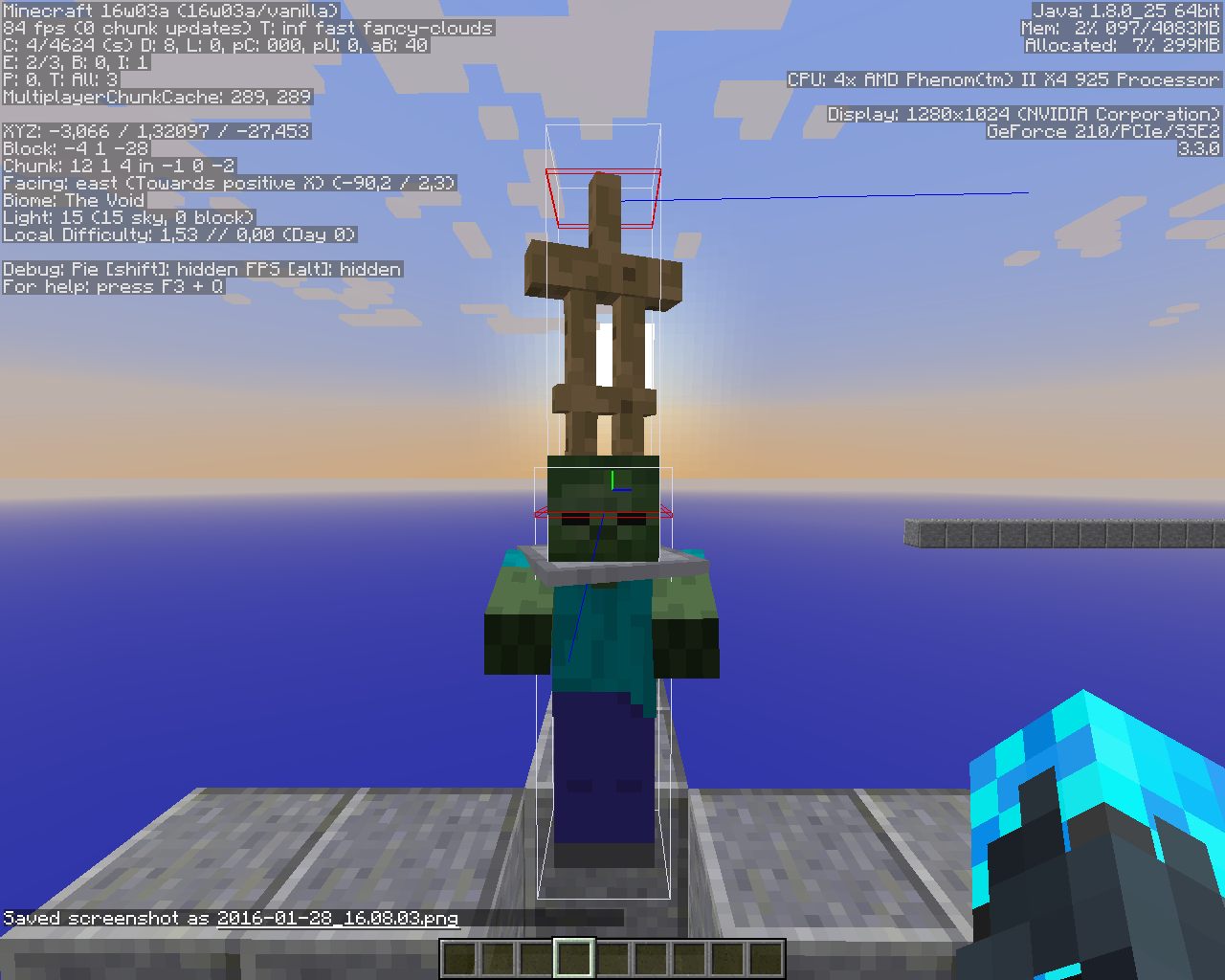
-The Zombie has the correct rotation, but the ArmorStand does not. Its orientation changed a little bit but not fully.Even if it would be really useful to have a NBT wich make the Passengers entity turn with the "rided" entity, this bug is annoying because it's glitchy.
Here it is ! You can see the different steps in the screenshots.
Summon any entity with an ArmorStand entity riding it (for example a Zombie with an ArmorStand as passengers).
When you change the first entity's rotation, the second entity do rotate, but not as much as the first.
Steps to reproduce :
*First, summon a Zombie with an ArmorStand as Passengers :/summon Zombie ~ ~ ~ {NoAI:1,Passengers:[{id:ArmorStand}]}*TP the Zombie at the same place but with a different orientation :
tp @e[type=Zombie,c=1] ~ ~ ~ 90 0*The Zombie has the correct rotation, but the ArmorStand does not. Its orientation changed a little bit but not fully.
Even if it would be really useful to have a NBT wich make the Passengers entity turn with the "rided" entity, this bug is annoying because it's glitchy.
Here it is ! You can see the different steps in the screenshots.
Summon any entity with an ArmorStand entity riding it (for example a Zombie with an ArmorStand as passengers).
When you change the first entity's rotation, the second entity do rotate, but not as much as the first.
Steps to reproduce :
*First, summon a Zombie with an ArmorStand as Passengers :/summon Zombie ~ ~ ~ {NoAI:1,Passengers:[{id:ArmorStand}]}
*TP the Zombie at the same place but with a different orientation :tp @e[type=Zombie,c=1] ~ ~ ~ 90 0
*The Zombie has the correct rotation, but the ArmorStand does not. Its orientation changed a little bit but not fully.Even if it would be really useful to have a NBT wich make the Passengers entity turn with the "rided" entity, this bug is annoying because it's glitchy.
Here it is ! You can see the different steps in the screenshots.
Summon any entity with an ArmorStand entity riding it (for example a Zombie with an ArmorStand as passengers).
When you change the first entity's rotation, the second entity do rotate, but not as much as the first.
Steps to reproduce :
● First, summon a Zombie with an ArmorStand as Passengers :/summon Zombie ~ ~ ~ {NoAI:1,Passengers:[{id:ArmorStand}]}● Then TP the Zombie at the same place but with a different orientation :
tp @e[type=Zombie,c=1] ~ ~ ~ 90 0● The Zombie has the correct rotation, but the ArmorStand does not. Its orientation changed a little bit but not fully.
Even if it would be really useful to have a NBT wich make the Passengers entity turn with the "rided" entity, this bug is annoying because it's glitchy.
Here it is ! You can see the different steps in the screenshots.
Summon any entity with an ArmorStand entity riding it (for example a Zombie with an ArmorStand as passengers).
When you change the first entity's rotation, the second entity do rotate, but not as much as the first.
Steps to reproduce :
● First, summon a Zombie with an ArmorStand as Passengers :/summon Zombie ~ ~ ~ {NoAI:1,Passengers:[{id:ArmorStand}]}● Then TP the Zombie at the same place but with a different orientation :
tp @e[type=Zombie,c=1] ~ ~ ~ 90 0● The Zombie has the correct rotation, but the ArmorStand does not. Its orientation changed a little bit but not fully.
Even if it would be really useful to have a NBT wich make the Passengers entity turn with the "rided" entity, this bug is annoying because it's glitchy.
Here it is ! You can see the different steps in the screenshots.
Summon any entity with an ArmorStand entity riding it (for example a Zombie with an ArmorStand as passengers).
When you change the first entity's rotation, the second entity do rotate, but not as much as the first.
Steps to reproduce :
● First, summon a Zombie with an ArmorStand as Passengers :/summon Zombie ~ ~ ~ {NoAI:1,Passengers:[{id:ArmorStand}]}● Then TP the Zombie at the same place but with a different orientation :
tp @e[type=Zombie,c=1] ~ ~ ~ 90 0● The Zombie has the correct rotation, but the ArmorStand does not. Its orientation changed a little bit but not fully.
Even if it would be really useful to have a NBT wich make the Passengers entity turn with the "rided" entity, this bug is annoying because it's glitchy.Here it is ! You can see the different steps in the screenshots.
Summon any entity with an ArmorStand entity riding it (for example a Zombie with an ArmorStand as passengers).
When you change the first entity's rotation, the second entity do rotate, but not as much as the first.
Steps to reproduce :
● First, summon a Zombie with an ArmorStand as Passengers :/summon Zombie ~ ~ ~ {NoAI:1,Passengers:[{id:ArmorStand}]}● Then TP the Zombie at the same place but with a different orientation :
tp @e[type=Zombie,c=1] ~ ~ ~ 90 0● The Zombie has the correct rotation, but the ArmorStand does not. Its orientation changed a little bit but not fully.
Even if it would be really useful to have a NBT wich make the Passengers entity turn with the "rided" entity, this bug is annoying because it's glitchy.Here it is ! You can see the different steps in the screenshots.
Summon any entity with an ArmorStand entity riding it (for example a Zombie with an ArmorStand as passengers).
When you change the first entity's rotation, the second entity do rotate, but not as much as the first.
Steps to reproduce :
● First, summon a Zombie with an ArmorStand as Passengers :/summon Zombie ~ ~ ~ {NoAI:1,Passengers:[{id:ArmorStand}]}● Then TP the Zombie at the same place but with a different orientation :
tp @e[type=Zombie,c=1] ~ ~ ~ 90 0● The Zombie has the correct rotation, but the ArmorStand does not. Its orientation changed a little bit but not fully.
Even if it would be really useful to have a NBT wich make the Passengers entity turn with the "rided" entity, this bug is annoying because it's glitchy.
Here it is ! You can see the different steps in the screenshots.
Summon any entity with an ArmorStand entity riding it (for example a Zombie with an ArmorStand as passengers).
When you change the first entity's rotation, the second entity do rotate, but not as much as the first.
Steps to reproduce :
● First, summon a Zombie with an ArmorStand as Passengers :/summon Zombie ~ ~ ~ {NoAI:1,Passengers:[{id:ArmorStand}]}● Then TP the Zombie at the same place but with a different orientation :
tp @e[type=Zombie,c=1] ~ ~ ~ 90 0● The Zombie has the correct rotation, but the ArmorStand does not. Its orientation changed a little bit but not fully.
Even if it would be really useful to have a NBT wich make the Passengers entity turn with the "rided" entity, this bug is annoying because it's glitchy.
Finally, we can see in the last screenshot that the NBT of the ArmorStand do not change. The rotation of the ArmorStand is only a visual glitch - wich come back even after deco/reco.
Here it is ! You can see the different steps in the screenshots.
Summon any entity with an ArmorStand entity riding it (for example a Zombie with an ArmorStand as passengers).
When you change the first entity's rotation, the second entity do rotate, but not as much as the first.
Steps to reproduce :
● First, summon a Zombie with an ArmorStand as Passengers :/summon Zombie ~ ~ ~ {NoAI:1,Passengers:[{id:ArmorStand}]}● Then TP the Zombie at the same place but with a different orientation :
tp @e[type=Zombie,c=1] ~ ~ ~ 90 0● The Zombie has the correct rotation, but the ArmorStand does not. Its orientation changed a little bit but not fully.
Even if it would be really useful to have a NBT wich make the Passengers entity turn with the "rided" entity, this bug is annoying because it's glitchy.
Finally, we can see in the last screenshot that the NBT of the ArmorStand do not change. The rotation of the ArmorStand is only a visual glitch - wich come back even after deco/reco.
Here it is ! You can see the different steps in the screenshots.
Summon any entity with an ArmorStand entity riding it (for example a Zombie with an ArmorStand as passengers).
When you change the first entity's rotation, the second entity do rotate, but not as much as the first.
Steps to reproduce :
● First, summon a Zombie with an ArmorStand as Passengers :/summon Zombie ~ ~ ~ {NoAI:1,Passengers:[{id:ArmorStand}]}● Then TP the Zombie at the same place but with a different orientation :
tp @e[type=Zombie,c=1] ~ ~ ~ 90 0● The Zombie has the correct rotation, but the ArmorStand does not. Its orientation changed a little bit but not fully.
Even if it would be really useful to have a NBT wich make the Passengers entity turn with the "rided" entity, this bug is annoying because it's glitchy.
Finally, we can see in the last screenshot that the Rotation NBT of the ArmorStand do not change. The rotation of the ArmorStand is only a visual glitch - wich come back even after deco/reco.
Here it is ! You can see the different steps in the screenshots.
Summon any entity with an ArmorStand entity riding it (for example a Zombie with an ArmorStand as passengers).
When you change the first entity's rotation, the second entity do rotate, but not as much as the first.
Steps to reproduce :
● First, summon a Zombie with an ArmorStand as Passengers :/summon Zombie ~ ~ ~ {NoAI:1,Passengers:[{id:ArmorStand}]}● Then TP the Zombie at the same place but with a different orientation :
tp @e[type=Zombie,c=1] ~ ~ ~ 90 0● The Zombie has the correct rotation, but the ArmorStand does not. Its orientation changed a little bit but not fully.
Even if it would be really useful to have a NBT wich make the Passengers entity turn with the "rided" entity, this bug is annoying because it's glitchy.
Finally, we can see in the last screenshot that the Rotation NBT of the ArmorStand do not change. The rotation of the ArmorStand is only a visual glitch - wich come back even after deco/reco.
Here it is ! You can see the different steps in the screenshots.
Summon any entity with an ArmorStand entity riding it (for example a Zombie with an ArmorStand as passengers).
When you change the first entity's rotation, the second entity's rotation change, but not as much as the first ; and this is only visual, because according to the NBT, the second entity's rotation did not change.
Steps to reproduce :
● First, summon a Zombie with an ArmorStand as Passengers :/summon Zombie ~ ~ ~ {NoAI:1,Passengers:[{id:ArmorStand}]}● Then TP the Zombie at the same place but with a different orientation :
tp @e[type=Zombie,c=1] ~ ~ ~ 90 0● The Zombie has the correct rotation, but the ArmorStand does not. Its orientation changed a little bit but not fully.
Even if it would be really useful to have a NBT wich make the Passengers entity turn with the "rided" entity, this bug is annoying because it's glitchy.
Finally, we can see in the last screenshot that the Rotation NBT of the ArmorStand do not change. The rotation of the ArmorStand is only a visual glitch - wich come back even after deco/reco.
Here it is ! You can see the different steps in the screenshots.
Summon any entity with an ArmorStand entity riding it (for example a Zombie with an ArmorStand as passengers).
When you change the first entity's rotation, the second entity's rotation change, but not as much as the first ; and this is only visual, because according to the NBT, the second entity's rotation did not change.
Steps to reproduce :
● First, summon a Zombie with an ArmorStand as Passengers :/summon Zombie ~ ~ ~ {NoAI:1,Passengers:[{id:ArmorStand}]}● Then TP the Zombie at the same place but with a different orientation :
tp @e[type=Zombie,c=1] ~ ~ ~ 90 0● The Zombie has the correct rotation, but the ArmorStand does not. Its orientation changed a little bit but not fully.
Even if it would be really useful to have a NBT wich make the Passengers entity turn with the "rided" entity, this bug is annoying because it's glitchy.
Finally, we can see in the last screenshot that the Rotation NBT of the ArmorStand do not change. The rotation of the ArmorStand is only a visual glitch - wich come back even after deco/reco.
Here it is ! You can see the different steps in the screenshots.
Summon any entity with an ArmorStand entity riding it (for example a Zombie with an ArmorStand as passengers).
When you change the first entity's rotation, the second entity's rotation change, but not as much as the first.This is only visual, because according to the NBT, the second entity's rotation did not change.
Steps to reproduce :● First, summon a Zombie with an ArmorStand as Passengers :
/summon Zombie ~ ~ ~ {NoAI:1,Passengers:[{id:ArmorStand}]}● Then TP the Zombie at the same place but with a different orientation :
tp @e[type=Zombie,c=1] ~ ~ ~ 90 0● The Zombie has the correct rotation, but the ArmorStand does not. Its orientation changed a little bit but not fully.
Even if it would be really useful to have a NBT wich make the Passengers entity turn with the "rided" entity, this bug is annoying because it's glitchy.
Finally, we can see in the last screenshot that the Rotation NBT of the ArmorStand do not change. The rotation of the ArmorStand is only a visual glitch - wich come back even after deco/reco.
Here it is ! You can see the different steps in the screenshots.
In the last snapshot, clearing player's items creates ghost items.
What I was expecting to happen:
Clearing a player clears his items.
What happened:
It creates ghost items. You can move them in your inventory if you're in creative, you can right click on it and it plays the animation - even if nothing happen (for example, you can try to drink a potion, the animation will play BUT you won't receive the effect.)
You can equip fantom armors ; you can break blocks in creative with the ghost sword (even if it won't make the sound, wich is weird).Steps to reproduce
● First, create a flat new world.
● Give yourself a repeating command block :/give @p minecraft:repeating_command_block● Enter the following command in the command block :
clear @a● Change the command block settings to : Always Active
● Now leave the command block & take items from your inventory.A message should display (your inventory was cleared) but the item is still here, as a ghost item.
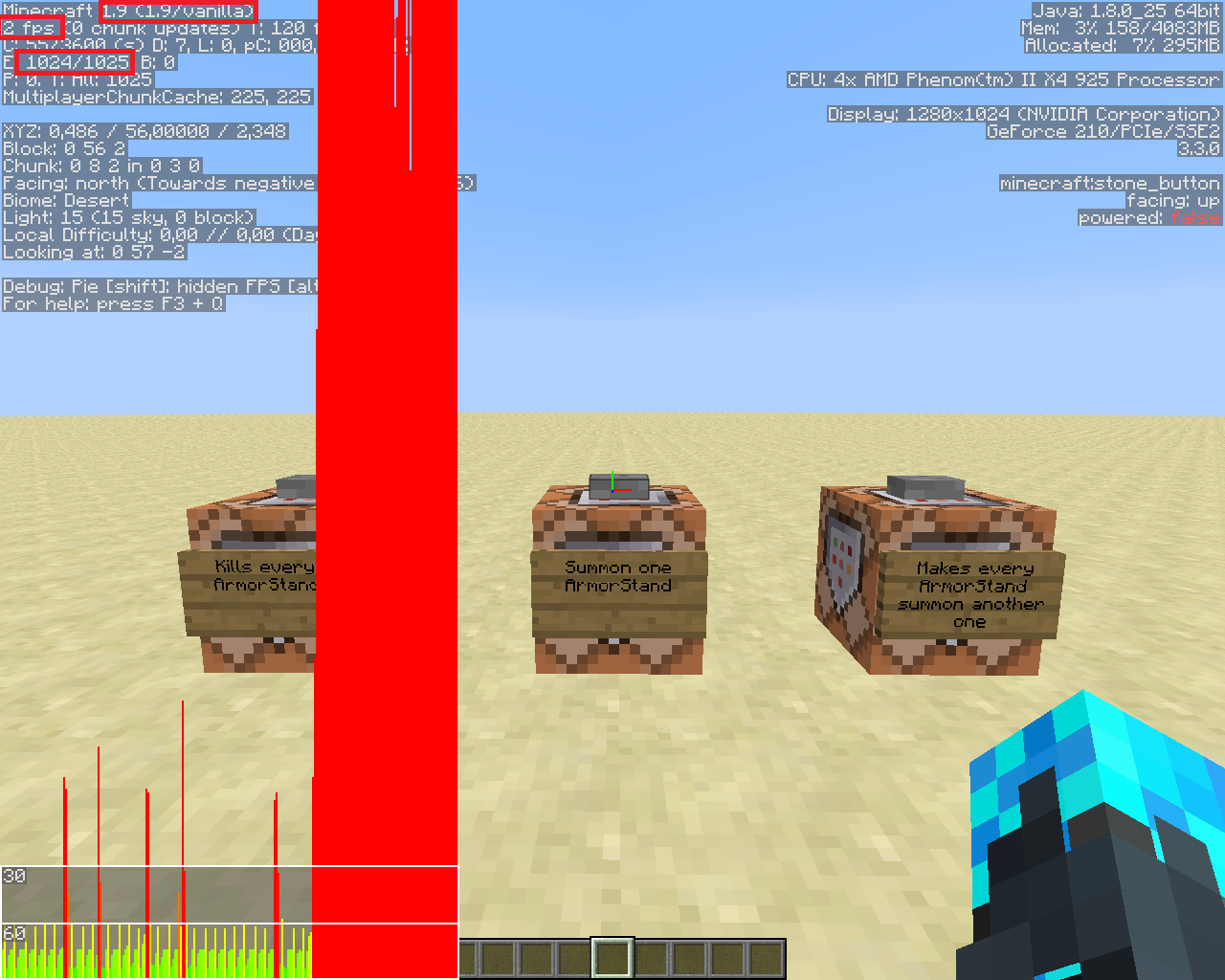
Here is a comparison bewteen huge amount of entities in 1.8.9 & in 1.9.
To compare the two version I use the following setup with 3 command blocks :
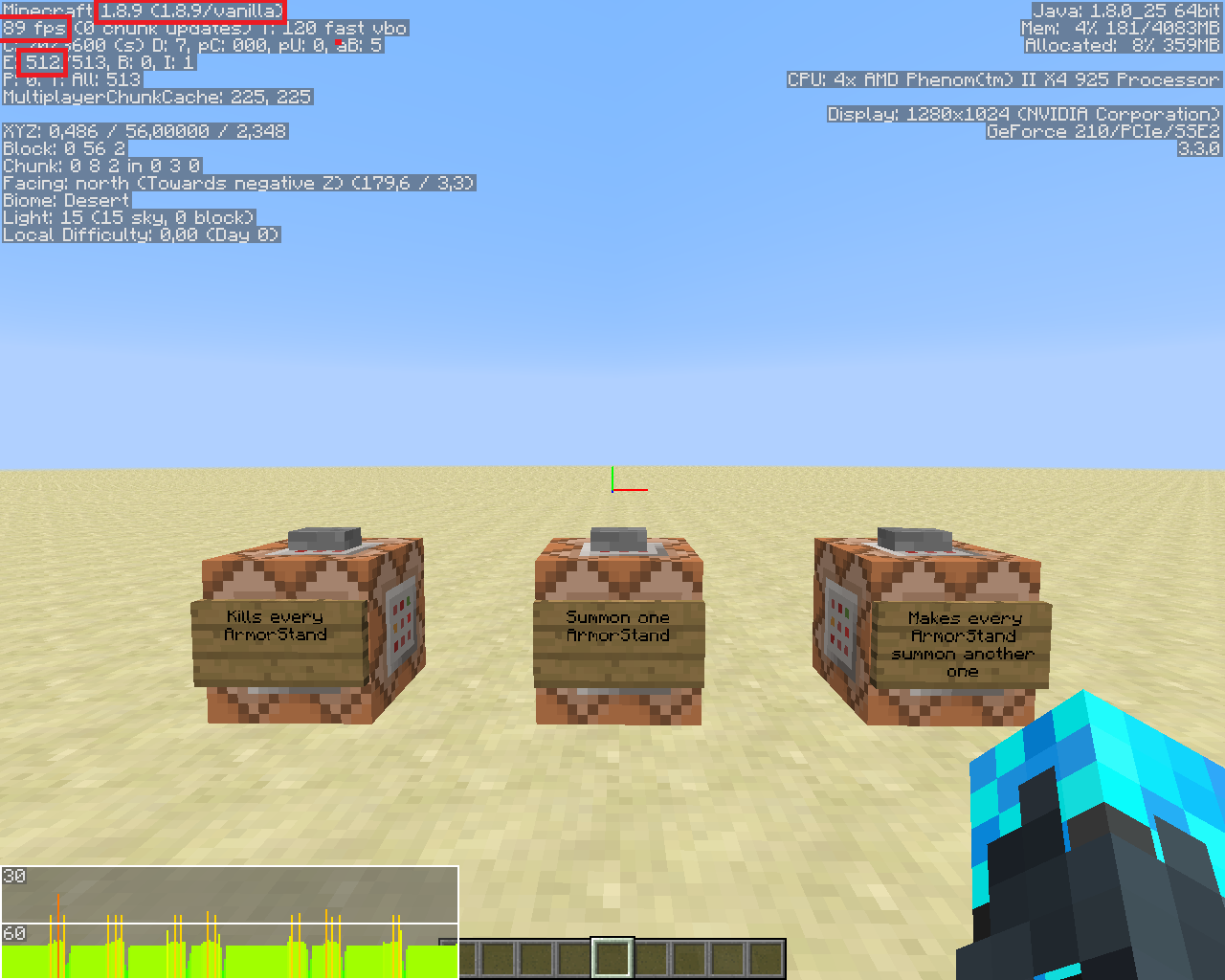
First Command Block/kill @e[type=ArmorStand]Second Command Block/summon ArmorStand ~ ~1 ~ {Invulnerable:1b,Marker:1b,NoGravity:1b,Invisible:1b,Team:"TEST"}Third Command Block/execute @e[type=ArmorStand] ~ ~ ~ summon ArmorStand ~ ~ ~ {Invulnerable:1b,Marker:1b,NoGravity:1b,Invisible:1b,Team:"TEST"}See the Setup picture below.
So for each version, I first activate the second Command Block (so 1 ArmorStand spawn). After what I activate the third Command Block many times, so the number of ArmorStand increase like 2^n.
When I arrive at 512 ArmorStands, I take a screenshot with the debug pie on (Alt+F3). Same for 1024, 2048 & 4096 ArmorStands.
Before making the 1.9 test, I activate the first command block to kill every ArmorStand. After opening the world in 1.9 I do the following command : /scoreboard teams option TEST collisionRule never. It's very important.PS : I define "lag" with the color & the height of the debug pie.
Here are the results :
1.8.9 :
- 512 : 89 FPS ; No lag.
- 1024 : 84 FPS ; A few lag.
- 2048 : 40 FPS ; Definitely becoming laggy.
- 4096 : 15 FPS ; Very laggy.
1.9 :
- 512 : 82 FPS ; Very few lag.
- 1024 : 2 FPS ; Unplayable, I can't even see the top of the debug pie.
- 2048 or higher : Minecraft crash, so I can't even take a screenshot.
See the screenshots for each step
It seems to grow exponentially, because for 512 AS there is no real difference, but for 1024 AS in 1.8.9 there's no problem when in 1.9 it's horrible. I think this is due to the new collision of entities. But this doesn't make sense because the ArmorStand are in Marker mode & are in a team without collision.
I think the way it's calculated doesn't care if the entity should take collision or not - it calculates the collision anyway, and then don't apply it if the entity do not take collisions.
Here is a comparison bewteen huge amount of entities in 1.8.9 & in 1.9.
To compare the two version I use the following setup with 3 command blocks :
First Command Block/kill @e[type=ArmorStand]Second Command Block/summon ArmorStand ~ ~1 ~ {Invulnerable:1b,Marker:1b,NoGravity:1b,Invisible:1b,Team:"TEST"}Third Command Block/execute @e[type=ArmorStand] ~ ~ ~ summon ArmorStand ~ ~ ~ {Invulnerable:1b,Marker:1b,NoGravity:1b,Invisible:1b,Team:"TEST"}See the Setup picture below.
So for each version, I first activate the second Command Block (so 1 ArmorStand spawn). After what I activate the third Command Block many times, so the number of ArmorStand increase like 2^n.
When I arrive at 512 ArmorStands, I take a screenshot with the debug pie on (Alt+F3). Same for 1024, 2048 & 4096 ArmorStands.
Before making the 1.9 test, I activate the first command block to kill every ArmorStand. After opening the world in 1.9 I do the following command : /scoreboard teams option TEST collisionRule never. It's very important.PS : I define "lag" with the color & the height of the debug pie.
Here are the results :
1.8.9 :
- 512 : 89 FPS ; No lag.
- 1024 : 84 FPS ; A few lag.
- 2048 : 40 FPS ; Definitely becoming laggy.
- 4096 : 15 FPS ; Very laggy.
1.9 :
- 512 : 82 FPS ; Very few lag.
- 1024 : 2 FPS ; Unplayable, I can't even see the top of the debug pie.
- 2048 or higher : Minecraft crash, so I can't even take a screenshot.
See the screenshots for each step
It seems to grow exponentially, because for 512 AS there is no real difference, but for 1024 AS in 1.8.9 there's no problem when in 1.9 it's horrible. I think this is due to the new collision of entities. But this doesn't make sense because the ArmorStand are in Marker mode & are in a team without collision.
I think the way it's calculated doesn't care if the entity should take collision or not - it calculates the collision anyway, and then don't apply it if the entity do not take collisions.
Here is a comparison bewteen huge amount of entities in 1.8.9 & in 1.9.
To compare the two version I use the following setup with 3 command blocks :
First Command Block/kill @e[type=ArmorStand]Second Command Block/summon ArmorStand ~ ~1 ~ {Invulnerable:1b,Marker:1b,NoGravity:1b,Invisible:1b,Team:"TEST"}Third Command Block/execute @e[type=ArmorStand] ~ ~ ~ summon ArmorStand ~ ~ ~ {Invulnerable:1b,Marker:1b,NoGravity:1b,Invisible:1b,Team:"TEST"}See the Setup picture below.
So for each version, I first activate the second Command Block (so 1 ArmorStand spawn). After what I activate the third Command Block many times, so the number of ArmorStand increase like 2^n.
When I arrive at 512 ArmorStands, I take a screenshot with the debug pie on (Alt+F3). Same for 1024, 2048 & 4096 ArmorStands.
Before making the 1.9 test, I activate the first command block to kill every ArmorStand. After opening the world in 1.9 I do the following command : /scoreboard teams option TEST collisionRule never. It's very important.PS : I define "lag" with the color & the height of the debug pie.
Here are the results :
1.8.9 :
- 512 : 89 FPS ; No lag.
- 1024 : 84 FPS ; A few lag.
- 2048 : 40 FPS ; Definitely becoming laggy.
- 4096 : 15 FPS ; Very laggy.
1.9 :
- 512 : 82 FPS ; Very few lag.
- 1024 : 2 FPS ; Unplayable, I can't even see the top of the debug pie.
- 2048 or higher : Minecraft crash, so I can't even take a screenshot.
See the screenshots for each step
It seems to grow exponentially, because for 512 AS there is no real difference, but for 1024 AS in 1.8.9 there's no problem when in 1.9 it's horrible. I think this is due to the new collision of entities. But this doesn't make sense because the ArmorStand are in Marker mode & are in a team without collision.
I think the way it's calculated doesn't care if the entity should take collision or not - it calculates the collision anyway, and then don't apply it if the entity do not take collisions.
Here is a comparison bewteen lag caused by huge amounts of entities in 1.8.9 & in 1.9.
To compare the two version I use the following setup with 3 command blocks :
First Command Block/kill @e[type=ArmorStand]Second Command Block/summon ArmorStand ~ ~1 ~ {Invulnerable:1b,Marker:1b,NoGravity:1b,Invisible:1b,Team:"TEST"}Third Command Block/execute @e[type=ArmorStand] ~ ~ ~ summon ArmorStand ~ ~ ~ {Invulnerable:1b,Marker:1b,NoGravity:1b,Invisible:1b,Team:"TEST"}See the Setup picture below.
So for each version, I first activate the second Command Block (so 1 ArmorStand spawn). After what I activate the third Command Block many times, so the number of ArmorStand increase like 2^n.
When I arrive at 512 ArmorStands, I take a screenshot with the debug pie on (Alt+F3). Same for 1024, 2048 & 4096 ArmorStands.
Before making the 1.9 test, I activate the first command block to kill every ArmorStand. After opening the world in 1.9 I do the following command : /scoreboard teams option TEST collisionRule never. It's very important.PS : I define "lag" with the color & the height of the debug pie.
Here are the results :
1.8.9 :
- 512 : 89 FPS ; No lag.
- 1024 : 84 FPS ; A few lag.
- 2048 : 40 FPS ; Definitely becoming laggy.
- 4096 : 15 FPS ; Very laggy.
1.9 :
- 512 : 82 FPS ; Very few lag.
- 1024 : 2 FPS ; Unplayable, I can't even see the top of the debug pie.
- 2048 or higher : Minecraft crash, so I can't even take a screenshot.
See the screenshots for each step
It seems to grow exponentially, because for 512 AS there is no real difference, but for 1024 AS in 1.8.9 there's no problem when in 1.9 it's horrible. I think this is due to the new collision of entities. But this doesn't make sense because the ArmorStand are in Marker mode & are in a team without collision.
I think the way it's calculated doesn't care if the entity should take collision or not - it calculates the collision anyway, and then don't apply it if the entity do not take collisions.
Here is a comparison bewteen lag caused by huge amounts of entities in 1.8.9 & in 1.9.
To compare the two version I use the following setup with 3 command blocks :
First Command Block/kill @e[type=ArmorStand]Second Command Block/summon ArmorStand ~ ~1 ~ {Invulnerable:1b,Marker:1b,NoGravity:1b,Invisible:1b,Team:"TEST"}Third Command Block/execute @e[type=ArmorStand] ~ ~ ~ summon ArmorStand ~ ~ ~ {Invulnerable:1b,Marker:1b,NoGravity:1b,Invisible:1b,Team:"TEST"}See the Setup picture below.
So for each version, I first activate the second Command Block (so 1 ArmorStand spawn). After what I activate the third Command Block many times, so the number of ArmorStand increase like 2^n.
When I arrive at 512 ArmorStands, I take a screenshot with the debug pie on (Alt+F3). Same for 1024, 2048 & 4096 ArmorStands.
Before making the 1.9 test, I activate the first command block to kill every ArmorStand. After opening the world in 1.9 I do the following command : /scoreboard teams option TEST collisionRule never. It's very important.PS : I define "lag" with the color & the height of the debug pie.
Here are the results :
1.8.9 :
- 512 : 89 FPS ; No lag.
- 1024 : 84 FPS ; A few lag.
- 2048 : 40 FPS ; Definitely becoming laggy.
- 4096 : 15 FPS ; Very laggy.
1.9 :
- 512 : 82 FPS ; Very few lag.
- 1024 : 2 FPS ; Unplayable, I can't even see the top of the debug pie.
- 2048 or higher : Minecraft crash, so I can't even take a screenshot.
See the screenshots for each step
Itseems to grow exponentially, because for 512 AS there is no real difference, but for 1024 AS in 1.8.9 there's no problem when in 1.9 it's horrible. I think this is due to the new collision of entities. But this doesn't make sense because the ArmorStand are in Marker mode & are in a team without collision.I think the way it's calculated doesn't care if the entity should take collision or not - it calculates the collision anyway, and then don't apply it if the entity do not take collisions.
Here is a comparison bewteen lag caused by huge amounts of entities in 1.8.9 & in 1.9.
To compare the two version I use the following setup with 3 command blocks :
First Command Block/kill @e[type=ArmorStand]Second Command Block/summon ArmorStand ~ ~1 ~ {Invulnerable:1b,Marker:1b,NoGravity:1b,Invisible:1b,Team:"TEST"}Third Command Block/execute @e[type=ArmorStand] ~ ~ ~ summon ArmorStand ~ ~ ~ {Invulnerable:1b,Marker:1b,NoGravity:1b,Invisible:1b,Team:"TEST"}See the Setup picture below.
So for each version, I first activate the second Command Block (so 1 ArmorStand spawn). After what I activate the third Command Block many times, so the number of ArmorStand increase like 2^n.
When I arrive at 512 ArmorStands, I take a screenshot with the debug pie on (Alt+F3). Same for 1024, 2048 & 4096 ArmorStands.
Before making the 1.9 test, I activate the first command block to kill every ArmorStand. After opening the world in 1.9 I do the following command : /scoreboard teams option TEST collisionRule never. It's very important.PS : I define "lag" with the color & the height of the debug pie.
Here are the results :
1.8.9 :
- 512 : 89 FPS ; No lag.
- 1024 : 84 FPS ; A few lag.
- 2048 : 40 FPS ; Definitely becoming laggy.
- 4096 : 15 FPS ; Very laggy.
1.9 :
- 512 : 82 FPS ; Very few lag.
- 1024 : 2 FPS ; Unplayable, I can't even see the top of the debug pie.
- 2048 or higher : Minecraft crash, so I can't even take a screenshot.
See the screenshots for each step
*Conclusion : *The lag seems to grow exponentially, because for 512 AS there is no real difference, but for 1024 AS in 1.8.9 there's no problem when in 1.9 it's horrible. I think this is due to the new collision of entities. But this doesn't make sense because the ArmorStand are in Marker mode & are in a team without collision.
I think the way it's calculated doesn't care if the entity should take collision or not - it calculates the collision anyway, and then don't apply it if the entity do not take collisions.
Here is a comparison bewteen lag caused by huge amounts of entities in 1.8.9 & in 1.9.
To compare the two version I use the following setup with 3 command blocks :
First Command Block/kill @e[type=ArmorStand]Second Command Block/summon ArmorStand ~ ~1 ~ {Invulnerable:1b,Marker:1b,NoGravity:1b,Invisible:1b,Team:"TEST"}Third Command Block/execute @e[type=ArmorStand] ~ ~ ~ summon ArmorStand ~ ~ ~ {Invulnerable:1b,Marker:1b,NoGravity:1b,Invisible:1b,Team:"TEST"}See the Setup picture below.
So for each version, I first activate the second Command Block (so 1 ArmorStand spawn). After what I activate the third Command Block many times, so the number of ArmorStand increase like 2^n.
When I arrive at 512 ArmorStands, I take a screenshot with the debug pie on (Alt+F3). Same for 1024, 2048 & 4096 ArmorStands.
Before making the 1.9 test, I activate the first command block to kill every ArmorStand. After opening the world in 1.9 I do the following command : /scoreboard teams option TEST collisionRule never. It's very important.PS : I define "lag" with the color & the height of the debug pie.
Here are the results :
1.8.9 :
- 512 : 89 FPS ; No lag.
- 1024 : 84 FPS ; A few lag.
- 2048 : 40 FPS ; Definitely becoming laggy.
- 4096 : 15 FPS ; Very laggy.
1.9 :
- 512 : 82 FPS ; Very few lag.
- 1024 : 2 FPS ; Unplayable, I can't even see the top of the debug pie.
- 2048 or higher : Minecraft crash, so I can't even take a screenshot.
See the screenshots for each step
*Conclusion : *The lag seems to grow exponentially, because for 512 AS there is no real difference, but for 1024 AS in 1.8.9 there's no problem when in 1.9 it's horrible.I think this is due to the new collision of entities. But this doesn't make sense because the ArmorStand are in Marker mode & are in a team without collision.I think the way it's calculated doesn't care if the entity should take collision or not - it calculates the collision anyway, and then don't apply it if the entity do not take collisions.
Here is a comparison bewteen lag caused by huge amounts of entities in 1.8.9 & in 1.9.
To compare the two version I use the following setup with 3 command blocks :
First Command Block/kill @e[type=ArmorStand]Second Command Block/summon ArmorStand ~ ~1 ~ {Invulnerable:1b,Marker:1b,NoGravity:1b,Invisible:1b,Team:"TEST"}Third Command Block/execute @e[type=ArmorStand] ~ ~ ~ summon ArmorStand ~ ~ ~ {Invulnerable:1b,Marker:1b,NoGravity:1b,Invisible:1b,Team:"TEST"}See the Setup picture below.
So for each version, I first activate the second Command Block (so 1 ArmorStand spawn). After what I activate the third Command Block many times, so the number of ArmorStand increase like 2^n.
When I arrive at 512 ArmorStands, I take a screenshot with the debug pie on (Alt+F3). Same for 1024, 2048 & 4096 ArmorStands.
Before making the 1.9 test, I activate the first command block to kill every ArmorStand. After opening the world in 1.9 I do the following command : /scoreboard teams option TEST collisionRule never. It's very important.PS : I define "lag" with the color & the height of the debug pie.
Here are the results :
1.8.9 :
- 512 : 89 FPS ; No lag.
- 1024 : 84 FPS ; A few lag.
- 2048 : 40 FPS ; Definitely becoming laggy.
- 4096 : 15 FPS ; Very laggy.
1.9 :
- 512 : 82 FPS ; Very few lag.
- 1024 : 2 FPS ; Unplayable, I can't even see the top of the debug pie.
- 2048 or higher : Minecraft crash, so I can't even take a screenshot.
See the screenshots for each step
Conclusion : The lag seems to grow exponentially, because for 512 AS there is no real difference, but for 1024 AS in 1.8.9 there's no problem when in 1.9 it's horrible.
I think this is due to the new collision of entities. But this doesn't make sense because the ArmorStand are in Marker mode & are in a team without collision.
I think the way it's calculated doesn't care if the entity should take collision or not - it calculates the collision anyway, and then don't apply it if the entity do not take collisions.
Here is a comparison bewteen lag caused by huge amounts of entities in 1.8.9 & in 1.9.
To compare the two version I use the following setup with 3 command blocks :
First Command Block/kill @e[type=ArmorStand]Second Command Block/summon ArmorStand ~ ~1 ~ {Invulnerable:1b,Marker:1b,NoGravity:1b,Invisible:1b,Team:"TEST"}Third Command Block/execute @e[type=ArmorStand] ~ ~ ~ summon ArmorStand ~ ~ ~ {Invulnerable:1b,Marker:1b,NoGravity:1b,Invisible:1b,Team:"TEST"}See the Setup picture below.
So for each version, I first activate the second Command Block (so 1 ArmorStand spawn). After what I activate the third Command Block many times, so the number of ArmorStand increase like 2^n.
When I arrive at 512 ArmorStands, I take a screenshot with the debug pie on (Alt+F3). Same for 1024, 2048 & 4096 ArmorStands.
Before making the 1.9 test, I activate the first command block to kill every ArmorStand. After opening the world in 1.9 I do the following command : /scoreboard teams option TEST collisionRule never. It's very important.PS : I define "lag" with the color & the height of the debug pie.
Here are the results :
1.8.9 :
- 512 : 89 FPS ; No lag.
- 1024 : 84 FPS ; A few lag.
- 2048 : 40 FPS ; Definitely becoming laggy.
- 4096 : 15 FPS ; Very laggy.
1.9 :
- 512 : 82 FPS ; Very few lag.
- 1024 : 2 FPS ; Unplayable, I can't even see the top of the debug pie.
- 2048 or higher : Minecraft crash, so I can't even take a screenshot.
See the screenshots for each step
Conclusion : The lag seems to grow exponentially, because for 512 AS there is no real difference, but for 1024 AS
in 1.8.9there's no problem when in 1.9 it'shorrible.I think this is due to the new collision of entities. But this doesn't make sense because the ArmorStand are in Marker mode & are in a team without collision.
I think the way it's calculated doesn't care if the entity should take collision or not - it calculates the collision anyway, and then don't apply it if the entity do not take collisions.
Here is a comparison bewteen lag caused by huge amounts of entities in 1.8.9 & in 1.9.
To compare the two version I use the following setup with 3 command blocks :
First Command Block/kill @e[type=ArmorStand]Second Command Block/summon ArmorStand ~ ~1 ~ {Invulnerable:1b,Marker:1b,NoGravity:1b,Invisible:1b,Team:"TEST"}Third Command Block/execute @e[type=ArmorStand] ~ ~ ~ summon ArmorStand ~ ~ ~ {Invulnerable:1b,Marker:1b,NoGravity:1b,Invisible:1b,Team:"TEST"}See the Setup picture below.
So for each version, I first activate the second Command Block (so 1 ArmorStand spawn). After what I activate the third Command Block many times, so the number of ArmorStand increase like 2^n.
When I arrive at 512 ArmorStands, I take a screenshot with the debug pie on (Alt+F3). Same for 1024, 2048 & 4096 ArmorStands.
Before making the 1.9 test, I activate the first command block to kill every ArmorStand. After opening the world in 1.9 I do the following command : /scoreboard teams option TEST collisionRule never. It's very important.PS : I define "lag" with the color & the height of the debug pie.
Here are the results :
1.8.9 :
- 512 : 89 FPS ; No lag.
- 1024 : 84 FPS ; A few lag.
- 2048 : 40 FPS ; Definitely becoming laggy.
- 4096 : 15 FPS ; Very laggy.
1.9 :
- 512 : 82 FPS ; Very few lag.
- 1024 : 2 FPS ; Unplayable, I can't even see the top of the debug pie.
- 2048 or higher : Minecraft crash, so I can't even take a screenshot.
See the screenshots for each step
*Conclusion : The lag caused by entities in 1.9 seems to grow exponentially, because for 512 AS there is no real difference, but for 1024 AS there's no problem in 1.8.9 when in 1.9 it's unplayable. *
I think this is due to the new collision of entities. But this doesn't make sense because the ArmorStand are in Marker mode & are in a team without collision.
I think the way it's calculated doesn't care if the entity should take collision or not - it calculates the collision anyway, and then don't apply it if the entity do not take collisions.
Here is a comparison bewteen lag caused by huge amounts of entities in 1.8.9 & in 1.9.
To compare the two version I use the following setup with 3 command blocks :
First Command Block/kill @e[type=ArmorStand]Second Command Block/summon ArmorStand ~ ~1 ~ {Invulnerable:1b,Marker:1b,NoGravity:1b,Invisible:1b,Team:"TEST"}Third Command Block/execute @e[type=ArmorStand] ~ ~ ~ summon ArmorStand ~ ~ ~ {Invulnerable:1b,Marker:1b,NoGravity:1b,Invisible:1b,Team:"TEST"}See the Setup picture below.
So for each version, I first activate the second Command Block (so 1 ArmorStand spawn). After what I activate the third Command Block many times, so the number of ArmorStand increase like 2^n.
When I arrive at 512 ArmorStands, I take a screenshot with the debug pie on (Alt+F3). Same for 1024, 2048 & 4096 ArmorStands.
Before making the 1.9 test, I activate the first command block to kill every ArmorStand. After opening the world in 1.9 I do the following command : /scoreboard teams option TEST collisionRule never. It's very important.PS : I define "lag" with the color & the height of the debug pie.
Here are the results :
1.8.9 :
- 512 : 89 FPS ; No lag.
- 1024 : 84 FPS ; A few lag.
- 2048 : 40 FPS ; Definitely becoming laggy.
- 4096 : 15 FPS ; Very laggy.
1.9 :
- 512 : 82 FPS ; Very few lag.
- 1024 : 2 FPS ; Unplayable, I can't even see the top of the debug pie.
- 2048 or higher : Minecraft crash, so I can't even take a screenshot.
See the screenshots for each step
*Conclusion : The lag caused by entities in 1.9 seems to grow exponentially, because for 512 AS there is no real difference, but for 1024 AS there's no problem in 1.8.9 when in 1.9 it's unplayable. *
I think this is due to the new collision of entities. But this doesn't make sense because the ArmorStand are in Marker mode & are in a team without collision.
I think the way it's calculated doesn't care if the entity should take collision or not - it calculates the collision anyway, and then don't apply it if the entity do not take collisions.
Here is a comparison bewteen lag caused by huge amounts of entities in 1.8.9 & in 1.9.
To compare the two version I use the following setup with 3 command blocks :
First Command Block/kill @e[type=ArmorStand]Second Command Block/summon ArmorStand ~ ~1 ~ {Invulnerable:1b,Marker:1b,NoGravity:1b,Invisible:1b,Team:"TEST"}Third Command Block/execute @e[type=ArmorStand] ~ ~ ~ summon ArmorStand ~ ~ ~ {Invulnerable:1b,Marker:1b,NoGravity:1b,Invisible:1b,Team:"TEST"}See the Setup picture below.
So for each version, I first activate the second Command Block (so 1 ArmorStand spawn). After what I activate the third Command Block many times, so the number of ArmorStand increase like 2^n.
When I arrive at 512 ArmorStands, I take a screenshot with the debug pie on (Alt+F3). Same for 1024, 2048 & 4096 ArmorStands.
Before making the 1.9 test, I activate the first command block to kill every ArmorStand. After opening the world in 1.9 I do the following command : /scoreboard teams option TEST collisionRule never. It's very important.PS : I define "lag" with the color & the height of the debug pie.
Here are the results :
1.8.9 :
- 512 : 89 FPS ; No lag.
- 1024 : 84 FPS ; A few lag.
- 2048 : 40 FPS ; Definitely becoming laggy.
- 4096 : 15 FPS ; Very laggy.
1.9 :
- 512 : 82 FPS ; Very few lag.
- 1024 : 2 FPS ; Unplayable, I can't even see the top of the debug pie.
- 2048 or higher : Minecraft crash, so I can't even take a screenshot.
See the screenshots for each step
Conclusion : *The lag caused by entities in 1.9 seems to grow exponentially, because for 512 AS there is no real difference, but for 1024 AS there's no problem in 1.8.9 when in 1.9 it's unplayable. *
I think this is due to the new collision of entities. But this doesn't make sense because the ArmorStand are in Marker mode & are in a team without collision.
I think the way it's calculated doesn't care if the entity should take collision or not - it calculates the collision anyway, and then don't apply it if the entity do not take collisions.
Here is a comparison bewteen lag caused by huge amounts of entities in 1.8.9 & in 1.9.
To compare the two version I use the following setup with 3 command blocks :
First Command Block/kill @e[type=ArmorStand]Second Command Block/summon ArmorStand ~ ~1 ~ {Invulnerable:1b,Marker:1b,NoGravity:1b,Invisible:1b,Team:"TEST"}Third Command Block/execute @e[type=ArmorStand] ~ ~ ~ summon ArmorStand ~ ~ ~ {Invulnerable:1b,Marker:1b,NoGravity:1b,Invisible:1b,Team:"TEST"}See the Setup picture below.
So for each version, I first activate the second Command Block (so 1 ArmorStand spawn). After what I activate the third Command Block many times, so the number of ArmorStand increase like 2^n.
When I arrive at 512 ArmorStands, I take a screenshot with the debug pie on (Alt+F3). Same for 1024, 2048 & 4096 ArmorStands.
Before making the 1.9 test, I activate the first command block to kill every ArmorStand. After opening the world in 1.9 I do the following command : /scoreboard teams option TEST collisionRule never. It's very important.PS : I define "lag" with the color & the height of the debug pie.
Here are the results :
1.8.9 :
- 512 : 89 FPS ; No lag.
- 1024 : 84 FPS ; A few lag.
- 2048 : 40 FPS ; Definitely becoming laggy.
- 4096 : 15 FPS ; Very laggy.
1.9 :
- 512 : 82 FPS ; Very few lag.
- 1024 : 2 FPS ; Unplayable, I can't even see the top of the debug pie.
- 2048 or higher : Minecraft crash, so I can't even take a screenshot.
See the screenshots for each step
Conclusion :
*The lag caused by entities in 1.9 seems to grow exponentially, because for 512 AS there is no real difference, but for 1024 AS there's no problem in 1.8.9 when in 1.9 it's unplayable.*I think this is due to the new collision of entities. But this doesn't make sense because the ArmorStand are in Marker mode & are in a team without collision.
I think the way it's calculated doesn't care if the entity should take collision or not - it calculates the collision anyway, and then don't apply it if the entity do not take collisions.
Here is a comparison bewteen lag caused by huge amounts of entities in 1.8.9 & in 1.9.
To compare the two version I use the following setup with 3 command blocks :
First Command Block/kill @e[type=ArmorStand]Second Command Block/summon ArmorStand ~ ~1 ~ {Invulnerable:1b,Marker:1b,NoGravity:1b,Invisible:1b,Team:"TEST"}Third Command Block/execute @e[type=ArmorStand] ~ ~ ~ summon ArmorStand ~ ~ ~ {Invulnerable:1b,Marker:1b,NoGravity:1b,Invisible:1b,Team:"TEST"}See the Setup picture below.
So for each version, I first activate the second Command Block (so 1 ArmorStand spawn). After what I activate the third Command Block many times, so the number of ArmorStand increase like 2^n.
When I arrive at 512 ArmorStands, I take a screenshot with the debug pie on (Alt+F3). Same for 1024, 2048 & 4096 ArmorStands.
Before making the 1.9 test, I activate the first command block to kill every ArmorStand. After opening the world in 1.9 I do the following command : /scoreboard teams option TEST collisionRule never. It's very important.PS : I define "lag" with the color & the height of the debug pie.
Here are the results :
1.8.9 :
- 512 : 89 FPS ; No lag.
- 1024 : 84 FPS ; A few lag.
- 2048 : 40 FPS ; Definitely becoming laggy.
- 4096 : 15 FPS ; Very laggy.
1.9 :
- 512 : 82 FPS ; Very few lag.
- 1024 : 2 FPS ; Unplayable, I can't even see the top of the debug pie.
- 2048 or higher : Minecraft crash, so I can't even take a screenshot.
See the screenshots for each step
Conclusion : The lag caused by entities in 1.9 seems to grow exponentially, because for 512 AS there is no real difference, but for 1024 AS there's no problem in 1.8.9 when in 1.9 it's unplayable.
I think this is due to the new collision of entities. But this doesn't make sense because the ArmorStand are in Marker mode & are in a team without collision.
I think the way it's calculated doesn't care if the entity should take collision or not - it calculates the collision anyway, and then don't apply it if the entity do not take collisions.
Hugelag because of entities in 1.9Exponential lag because of entities in 1.9
Here is a comparison bewteen lag caused by huge amounts of entities in 1.8.9 & in 1.9.
To compare the two version I use the following setup with 3 command blocks :
First Command Block/kill @e[type=ArmorStand]Second Command Block/summon ArmorStand ~ ~1 ~ {Invulnerable:1b,Marker:1b,NoGravity:1b,Invisible:1b,Team:"TEST"}Third Command Block/execute @e[type=ArmorStand] ~ ~ ~ summon ArmorStand ~ ~ ~ {Invulnerable:1b,Marker:1b,NoGravity:1b,Invisible:1b,Team:"TEST"}See the Setup picture below.
So for each version, I first activate the second Command Block (so 1 ArmorStand spawn). After what I activate the third Command Block many times, so the number of ArmorStand increase like 2^n.
When I arrive at 512 ArmorStands, I take a screenshot with the debug pie on (Alt+F3). Same for 1024, 2048 & 4096 ArmorStands.
Before making the 1.9 test, I activate the first command block to kill every ArmorStand. After opening the world in 1.9 I do the following command : /scoreboard teams option TEST collisionRule never. It's very important.PS : I define "lag" with the color & the height of the debug pie.
Here are the results :
1.8.9 :
- 512 : 89 FPS ; No lag.
- 1024 : 84 FPS ; A few lag.
- 2048 : 40 FPS ; Definitely becoming laggy.
- 4096 : 15 FPS ; Very laggy.
1.9 :
- 512 : 82 FPS ; Very few lag.
- 1024 : 2 FPS ; Unplayable, I can't even see the top of the debug pie.
- 2048 or higher : Minecraft crash, so I can't even take a screenshot.
See the screenshots for each step
Conclusion : The lag caused by entities in 1.9 seems to grow exponentially, because for 512 AS there is no real difference, but for 1024 AS there's no problem in 1.8.9 when in 1.9 it's unplayable.
I think this is due to the new collision of entities. But this doesn't make sense because the ArmorStand are in Marker mode & are in a team without collision.
I think the way it's calculated doesn't care if the entity should take collision or not - it calculates the collision anyway, and then don't apply it if the entity do not take collisions.
EDIT World download are now in Attachments files.
Here is a comparison bewteen lag caused by huge amounts of entities in 1.8.9 & in 1.9.
To compare the two version I use the following setup with 3 command blocks :
First Command Block/kill @e[type=ArmorStand]Second Command Block/summon ArmorStand ~ ~1 ~ {Invulnerable:1b,Marker:1b,NoGravity:1b,Invisible:1b,Team:"TEST"}Third Command Block/execute @e[type=ArmorStand] ~ ~ ~ summon ArmorStand ~ ~ ~ {Invulnerable:1b,Marker:1b,NoGravity:1b,Invisible:1b,Team:"TEST"}See the Setup picture below.
So for each version, I first activate the second Command Block (so 1 ArmorStand spawn). After what I activate the third Command Block many times, so the number of ArmorStand increase like 2^n.
When I arrive at 512 ArmorStands, I take a screenshot with the debug pie on (Alt+F3). Same for 1024, 2048 & 4096 ArmorStands.
Before making the 1.9 test, I activate the first command block to kill every ArmorStand. After opening the world in 1.9 I do the following command : /scoreboard teams option TEST collisionRule never. It's very important.PS : I define "lag" with the color & the height of the debug pie.
Here are the results :
1.8.9 :
- 512 : 89 FPS ; No lag.
- 1024 : 84 FPS ; A few lag.
- 2048 : 40 FPS ; Definitely becoming laggy.
- 4096 : 15 FPS ; Very laggy.
1.9 :
- 512 : 82 FPS ; Very few lag.
- 1024 : 2 FPS ; Unplayable, I can't even see the top of the debug pie.
- 2048 or higher : Minecraft crash, so I can't even take a screenshot.
See the screenshots for each step
Conclusion : The lag caused by entities in 1.9 seems to grow exponentially, because for 512 AS there is no real difference, but for 1024 AS there's no problem in 1.8.9 when in 1.9 it's unplayable.
I think this is due to the new collision of entities. But this doesn't make sense because the ArmorStand are in Marker mode & are in a team without collision.
I think the way it's calculated doesn't care if the entity should take collision or not - it calculates the collision anyway, and then don't apply it if the entity do not take collisions.
EDIT: World download are now in Attachments files.
Here is a comparison bewteen lag caused by huge amounts of entities in 1.8.9 & in 1.9.
To compare the two version I use the following setup with 3 command blocks :
First Command Block/kill @e[type=ArmorStand]Second Command Block/summon ArmorStand ~ ~1 ~ {Invulnerable:1b,Marker:1b,NoGravity:1b,Invisible:1b,Team:"TEST"}Third Command Block/execute @e[type=ArmorStand] ~ ~ ~ summon ArmorStand ~ ~ ~ {Invulnerable:1b,Marker:1b,NoGravity:1b,Invisible:1b,Team:"TEST"}See the Setup picture below.
So for each version, I first activate the second Command Block (so 1 ArmorStand spawn). After what I activate the third Command Block many times, so the number of ArmorStand increase like 2^n.
When I arrive at 512 ArmorStands, I take a screenshot with the debug pie on (Alt+F3). Same for 1024, 2048 & 4096 ArmorStands.
Before making the 1.9 test, I activate the first command block to kill every ArmorStand. After opening the world in 1.9 I do the following command : /scoreboard teams option TEST collisionRule never. It's very important.PS : I define "lag" with the color & the height of the debug pie.
Here are the results :
1.8.9 :
- 512 : 89 FPS ; No lag.
- 1024 : 84 FPS ; A few lag.
- 2048 : 40 FPS ; Definitely becoming laggy.
- 4096 : 15 FPS ; Very laggy.
1.9 :
- 512 : 82 FPS ; Very few lag.
- 1024 : 2 FPS ; Unplayable, I can't even see the top of the debug pie.
- 2048 or higher : Minecraft crash, so I can't even take a screenshot.
See the screenshots for each step
Conclusion : The lag caused by entities in 1.9 seems to grow exponentially, because for 512 AS there is no real difference, but for 1024 AS there's no problem in 1.8.9 when in 1.9 it's unplayable.
I think this is due to the new collision of entities. But this doesn't make sense because the ArmorStand are in Marker mode & are in a team without collision.
I think the way it's calculated doesn't care if the entity should take collision or not - it calculates the collision anyway, and then don't apply it if the entity do not take collisions.
EDIT : World download are now in Attachments files.
Here is a comparison bewteen lag caused by huge amounts of entities in 1.8.9 & in 1.9.
To compare the two version I use the following setup with 3 command blocks :
First Command Block/kill @e[type=ArmorStand]Second Command Block/summon ArmorStand ~ ~1 ~ {Invulnerable:1b,Marker:1b,NoGravity:1b,Invisible:1b,Team:"TEST"}Third Command Block/execute @e[type=ArmorStand] ~ ~ ~ summon ArmorStand ~ ~ ~ {Invulnerable:1b,Marker:1b,NoGravity:1b,Invisible:1b,Team:"TEST"}See the Setup picture below.
So for each version, I first activate the second Command Block (so 1 ArmorStand spawn). After what I activate the third Command Block many times, so the number of ArmorStand increase like 2^n.
When I arrive at 512 ArmorStands, I take a screenshot with the debug pie on (Alt+F3). Same for 1024, 2048 & 4096 ArmorStands.
Before making the 1.9 test, I activate the first command block to kill every ArmorStand. After opening the world in 1.9 I do the following command : /scoreboard teams option TEST collisionRule never. It's very important.PS : I define "lag" with the color & the height of the debug pie.
Here are the results :
1.8.9 :
- 512 : 89 FPS ; No lag.
- 1024 : 84 FPS ; A few lag.
- 2048 : 40 FPS ; Definitely becoming laggy.
- 4096 : 15 FPS ; Very laggy.
1.9 :
- 512 : 82 FPS ; Very few lag.
- 1024 : 2 FPS ; Unplayable, I can't even see the top of the debug pie.
- 2048 or higher : Minecraft crash, so I can't even take a screenshot.
See the screenshots for each step
Conclusion : The lag caused by entities in 1.9 seems to grow exponentially, because for 512 AS there is no real difference, but for 1024 AS there's no problem in 1.8.9 when in 1.9 it's unplayable.
I think this is due to the new collision of entities. But this doesn't make sense because the ArmorStand are in Marker mode & are in a team without collision.
I think the way it's calculated doesn't care if the entity should take collision or not - it calculates the collision anyway, and then don't apply it if the entity do not take collisions.
EDIT : World download are now in Attachments files.
Code analysis by Marcono1234 can be found in this comment.
Possible fix made by https://bugs.mojang.com/browse/MC-98822?focusedCommentId=299847&page=com.atlassian.jira.plugin.system.issuetabpanels:comment-tabpanel#comment-299847
Here is a comparison bewteen lag caused by huge amounts of entities in 1.8.9 & in 1.9.
To compare the two version I use the following setup with 3 command blocks :
First Command Block/kill @e[type=ArmorStand]Second Command Block/summon ArmorStand ~ ~1 ~ {Invulnerable:1b,Marker:1b,NoGravity:1b,Invisible:1b,Team:"TEST"}Third Command Block/execute @e[type=ArmorStand] ~ ~ ~ summon ArmorStand ~ ~ ~ {Invulnerable:1b,Marker:1b,NoGravity:1b,Invisible:1b,Team:"TEST"}See the Setup picture below.
So for each version, I first activate the second Command Block (so 1 ArmorStand spawn). After what I activate the third Command Block many times, so the number of ArmorStand increase like 2^n.
When I arrive at 512 ArmorStands, I take a screenshot with the debug pie on (Alt+F3). Same for 1024, 2048 & 4096 ArmorStands.
Before making the 1.9 test, I activate the first command block to kill every ArmorStand. After opening the world in 1.9 I do the following command : /scoreboard teams option TEST collisionRule never. It's very important.PS : I define "lag" with the color & the height of the debug pie.
Here are the results :
1.8.9 :
- 512 : 89 FPS ; No lag.
- 1024 : 84 FPS ; A few lag.
- 2048 : 40 FPS ; Definitely becoming laggy.
- 4096 : 15 FPS ; Very laggy.
1.9 :
- 512 : 82 FPS ; Very few lag.
- 1024 : 2 FPS ; Unplayable, I can't even see the top of the debug pie.
- 2048 or higher : Minecraft crash, so I can't even take a screenshot.
See the screenshots for each step
Conclusion : The lag caused by entities in 1.9 seems to grow exponentially, because for 512 AS there is no real difference, but for 1024 AS there's no problem in 1.8.9 when in 1.9 it's unplayable.
I think this is due to the new collision of entities. But this doesn't make sense because the ArmorStand are in Marker mode & are in a team without collision.
I think the way it's calculated doesn't care if the entity should take collision or not - it calculates the collision anyway, and then don't apply it if the entity do not take collisions.
EDIT : World download are now in Attachments files.
Code analysis by Marcono1234 can be found in this comment.
Possible fix made by
https://bugs.mojang.com/browse/MC-98822?focusedCommentId=299847&page=com.atlassian.jira.plugin.system.issuetabpanels:comment-tabpanel#comment-299847Here is a comparison bewteen lag caused by huge amounts of entities in 1.8.9 & in 1.9.
To compare the two version I use the following setup with 3 command blocks :
First Command Block/kill @e[type=ArmorStand]Second Command Block/summon ArmorStand ~ ~1 ~ {Invulnerable:1b,Marker:1b,NoGravity:1b,Invisible:1b,Team:"TEST"}Third Command Block/execute @e[type=ArmorStand] ~ ~ ~ summon ArmorStand ~ ~ ~ {Invulnerable:1b,Marker:1b,NoGravity:1b,Invisible:1b,Team:"TEST"}See the Setup picture below.
So for each version, I first activate the second Command Block (so 1 ArmorStand spawn). After what I activate the third Command Block many times, so the number of ArmorStand increase like 2^n.
When I arrive at 512 ArmorStands, I take a screenshot with the debug pie on (Alt+F3). Same for 1024, 2048 & 4096 ArmorStands.
Before making the 1.9 test, I activate the first command block to kill every ArmorStand. After opening the world in 1.9 I do the following command : /scoreboard teams option TEST collisionRule never. It's very important.PS : I define "lag" with the color & the height of the debug pie.
Here are the results :
1.8.9 :
- 512 : 89 FPS ; No lag.
- 1024 : 84 FPS ; A few lag.
- 2048 : 40 FPS ; Definitely becoming laggy.
- 4096 : 15 FPS ; Very laggy.
1.9 :
- 512 : 82 FPS ; Very few lag.
- 1024 : 2 FPS ; Unplayable, I can't even see the top of the debug pie.
- 2048 or higher : Minecraft crash, so I can't even take a screenshot.
See the screenshots for each step
Conclusion : The lag caused by entities in 1.9 seems to grow exponentially, because for 512 AS there is no real difference, but for 1024 AS there's no problem in 1.8.9 when in 1.9 it's unplayable.
I think this is due to the new collision of entities. But this doesn't make sense because the ArmorStand are in Marker mode & are in a team without collision.
I think the way it's calculated doesn't care if the entity should take collision or not - it calculates the collision anyway, and then don't apply it if the entity do not take collisions.
EDIT : World download are now in Attachments files.
Code analysis by Marcono1234 can be found in this comment.
Possible fix made by Nasm Nasmus can be found in this comment
A repeating command block in conditional mode (let's call it B) is placed after another command block with the SuccessCount set on 0 (this one is A).
When the command inside A is successfully executed, B do not activate. But if the command inside A is successfully executed the next tick, the command inside B is activated.SETUP : A repeating command block in Need Redstone mode, with the command 'say 0'. In front of him, a repeating command block in Need Redstone + Conditional mode, with the command 'say 1'.. A button on top of the first command block.
What I expected to happen was...:
When I trigger the button, the following numbers appears in the chat :
[@] 0 [@] 1 [@] 0 [@] 1 [@] 0 [@] 1 etc...Because the first command block successfully executed its 'say 0' command, the following command block executes its 'say 1' command.
What actually happened was...:
The following numbers appeared in the chat :
[@] 0 [@] 0 [@] 1 [@] 0 [@] 1 [@] 0 [@] 1 etc...Steps to Reproduce:
1. Place two repeating command blocks, both in "Need redstone" mode. The first one should point toward the back of the second.
2. Change the second command block's mode to "Conditonal" mode.
3. Enter the command 'say 0' in the first command block and 'say 1' in the second.
4. Place a button on one of the command block. Trigger it and watch the chat.If you need to repeat this experiment, you need to remember that the first command block needs to has SuccessCount set on 0.
If you don't want to remember it, place a chain command block after the second command block, in "Always Active", "Unconditional" mode. Enter the following command inside :
blockdata x y z {SuccessCount:0}with x, y and z the coordinates of the first command block.
If you don't want to set it up, take the World Download in the Attachments section.
SETUP.png
A repeating command block in conditional mode (let's call it B) is placed after another command block with the SuccessCount set on 0 (this one is A).
When the command inside A is successfully executed, B do not activate. But if the command inside A is successfully executed the next tick, the command inside B is activated.SETUP : A repeating command block in Need Redstone mode, with the command 'say 0'. In front of him, a repeating command block in Need Redstone + Conditional mode, with the command 'say 1'.. A button on top of the first command block.
What I expected to happen was...:
When I trigger the button, the following numbers appears in the chat :
[@] 0 [@] 1 [@] 0 [@] 1 [@] 0 [@] 1 etc...Because the first command block successfully executed its 'say 0' command, the following command block executes its 'say 1' command.
What actually happened was...:
The following numbers appeared in the chat :
[@] 0 [@] 0 [@] 1 [@] 0 [@] 1 [@] 0 [@] 1 etc...Steps to Reproduce:
1. Place two repeating command blocks, both in "Need redstone" mode. The first one should point toward the back of the second.
2. Change the second command block's mode to "Conditonal" mode.
3. Enter the command 'say 0' in the first command block and 'say 1' in the second.
4. Place a button on one of the command block. Trigger it and watch the chat.If you need to repeat this experiment, you need to remember that the first command block needs to has SuccessCount set on 0.
If you don't want to remember it, place a chain command block after the second command block, in "Always Active", "Unconditional" mode. Enter the following command inside :
blockdata x y z {SuccessCount:0}with x, y and z the coordinates of the first command block.
If you don't want to set it up, take the World Download in the Attachments section.
EDIT* : This works in every direction. The block powered by the button doesn't matter while both command blocks are powered the same time.*
A repeating command block in conditional mode (let's call it B) is placed after another command block with the SuccessCount set on 0 (this one is A).
When the command inside A is successfully executed, B do not activate. But if the command inside A is successfully executed the next tick, the command inside B is activated.SETUP : A repeating command block in Need Redstone mode, with the command 'say 0'. In front of him, a repeating command block in Need Redstone + Conditional mode, with the command 'say 1'.. A button on top of the first command block.
What I expected to happen was...:
When I trigger the button, the following numbers appears in the chat :
[@] 0 [@] 1 [@] 0 [@] 1 [@] 0 [@] 1 etc...Because the first command block successfully executed its 'say 0' command, the following command block executes its 'say 1' command.
What actually happened was...:
The following numbers appeared in the chat :
[@] 0 [@] 0 [@] 1 [@] 0 [@] 1 [@] 0 [@] 1 etc...Steps to Reproduce:
1. Place two repeating command blocks, both in "Need redstone" mode. The first one should point toward the back of the second.
2. Change the second command block's mode to "Conditonal" mode.
3. Enter the command 'say 0' in the first command block and 'say 1' in the second.
4. Place a button on one of the command block. Trigger it and watch the chat.If you need to repeat this experiment, you need to remember that the first command block needs to has SuccessCount set on 0.
If you don't want to remember it, place a chain command block after the second command block, in "Always Active", "Unconditional" mode. Enter the following command inside :
blockdata x y z {SuccessCount:0}with x, y and z the coordinates of the first command block.
If you don't want to set it up, take the World Download in the Attachments section.
EDIT* : This works in every direction. The block powered by the button doesn't matter while both command blocks are powered the same time.*
A repeating command block in conditional mode (let's call it B) is placed after another command block with the SuccessCount set on 0 (this one is A).
When the command inside A is successfully executed, B do not activate. But if the command inside A is successfully executed the next tick, the command inside B is activated.SETUP : A repeating command block in Need Redstone mode, with the command 'say 0'. In front of him, a repeating command block in Need Redstone + Conditional mode, with the command 'say 1'.. A button on top of the first command block.
What I expected to happen was...:
When I trigger the button, the following numbers appears in the chat :
[@] 0 [@] 1 [@] 0 [@] 1 [@] 0 [@] 1 etc...Because the first command block successfully executed its 'say 0' command, the following command block executes its 'say 1' command.
What actually happened was...:
The following numbers appeared in the chat :
[@] 0 [@] 0 [@] 1 [@] 0 [@] 1 [@] 0 [@] 1 etc...Steps to Reproduce:
1. Place two repeating command blocks, both in "Need redstone" mode. The first one should point toward the back of the second.
2. Change the second command block's mode to "Conditonal" mode.
3. Enter the command 'say 0' in the first command block and 'say 1' in the second.
4. Place a button on one of the command block. Trigger it and watch the chat.If you need to repeat this experiment, you need to remember that the first command block needs to has SuccessCount set on 0.
If you don't want to remember it, place a chain command block after the second command block, in "Always Active", "Unconditional" mode. Enter the following command inside :
blockdata x y z {SuccessCount:0}with x, y and z the coordinates of the first command block.
If you don't want to set it up, take the World Download in the Attachments section.
EDIT* : This works in every direction. The block powered by the button doesn't matter while both command blocks are powered the same time.*
A repeating command block in conditional mode (let's call it B) is placed after another command block with the SuccessCount set on 0 (this one is A).
When the command inside A is successfully executed, B do not activate. But if the command inside A is successfully executed the next tick, the command inside B is activated.SETUP : A repeating command block in Need Redstone mode, with the command 'say 0'. In front of him, a repeating command block in Need Redstone + Conditional mode, with the command 'say 1'.. A button on top of the first command block.
What I expected to happen was...:
When I trigger the button, the following numbers appears in the chat :
[@] 0 [@] 1 [@] 0 [@] 1 [@] 0 [@] 1 etc...Because the first command block successfully executed its 'say 0' command, the following command block executes its 'say 1' command.
What actually happened was...:
The following numbers appeared in the chat :
[@] 0 [@] 0 [@] 1 [@] 0 [@] 1 [@] 0 [@] 1 etc...Steps to Reproduce:
1. Place two repeating command blocks, both in "Need redstone" mode. The first one should point toward the back of the second.
2. Change the second command block's mode to "Conditonal" mode.
3. Enter the command 'say 0' in the first command block and 'say 1' in the second.
4. Place a button on one of the command block. Trigger it and watch the chat.If you need to repeat this experiment, you need to remember that the first command block needs to has SuccessCount set on 0.
If you don't want to remember it, place a chain command block after the second command block, in "Always Active", "Unconditional" mode. Enter the following command inside :
blockdata x y z {SuccessCount:0}with x, y and z the coordinates of the first command block.
If you don't want to set it up, take the World Download in the Attachments section.
EDIT
*: This works in every direction. The block powered by the button doesn't matter while both command blocks are powered the same time.*A repeating command block in conditional mode (let's call it B) is placed after another command block with the SuccessCount set on 0 (this one is A).
When the command inside A is successfully executed, B do not activate. But if the command inside A is successfully executed the next tick, the command inside B is activated.SETUP : A repeating command block in Need Redstone mode, with the command 'say 0'. In front of him, a repeating command block in Need Redstone + Conditional mode, with the command 'say 1'.. A button on top of the first command block.
What I expected to happen was...:
When I trigger the button, the following numbers appears in the chat :
[@] 0 [@] 1 [@] 0 [@] 1 [@] 0 [@] 1 etc...Because the first command block successfully executed its 'say 0' command, the following command block executes its 'say 1' command.
What actually happened was...:
The following numbers appeared in the chat :
[@] 0 [@] 0 [@] 1 [@] 0 [@] 1 [@] 0 [@] 1 etc...Steps to Reproduce:
1. Place two repeating command blocks, both in "Need redstone" mode. The first one should point toward the back of the second.
2. Change the second command block's mode to "Conditonal" mode.
3. Enter the command 'say 0' in the first command block and 'say 1' in the second.
4. Place a button on one of the command block. Trigger it and watch the chat.If you need to repeat this experiment, you need to remember that the first command block needs to has SuccessCount set on 0.
If you don't want to remember it, place a chain command block after the second command block, in "Always Active", "Unconditional" mode. Enter the following command inside :
blockdata x y z {SuccessCount:0}with x, y and z the coordinates of the first command block.
If you don't want to set it up, take the World Download in the Attachments section.
EDIT : This works in every direction. The block powered by the button doesn't matter while both command blocks are powered the same time.
A repeating command block in conditional mode (let's call it B) is placed after another command block with the SuccessCount set on 0 (this one is A).
When the command inside A is successfully executed, B do not activate. But if the command inside A is successfully executed the next tick, the command inside B is activated.SETUP : A repeating command block in Need Redstone mode, with the command 'say 0'. In front of him, a repeating command block in Need Redstone + Conditional mode, with the command 'say 1'.. A button on top of the first command block.
What I expected to happen was...:
When I trigger the button, the following numbers appears in the chat :
[@] 0 [@] 1 [@] 0 [@] 1 [@] 0 [@] 1 etc...Because the first command block successfully executed its 'say 0' command, the following command block executes its 'say 1' command.
What actually happened was...:
The following numbers appeared in the chat :
[@] 0 [@] 0 [@] 1 [@] 0 [@] 1 [@] 0 [@] 1 etc...Steps to Reproduce:
1. Place two repeating command blocks, both in "Need redstone" mode. The first one should point toward the back of the second.
2. Change the second command block's mode to "Conditonal" mode.
3. Enter the command 'say 0' in the first command block and 'say 1' in the second.
4. Place a button on one of the command block. Trigger it and watch the chat.If you need to repeat this experiment, you need to remember that the first command block needs to has SuccessCount set on 0.
If you don't want to remember it, place a chain command block after the second command block, in "Always Active", "Unconditional" mode. Enter the following command inside :
blockdata x y z {SuccessCount:0}with x, y and z the coordinates of the first command block.
If you don't want to set it up, take the World Download in the Attachments section.
EDIT : This works in every direction. The block powered by the button doesn't matter while both command blocks are powered the same time.
See this comment from
A repeating command block in conditional mode (let's call it B) is placed after another command block with the SuccessCount set on 0 (this one is A).
When the command inside A is successfully executed, B do not activate. But if the command inside A is successfully executed the next tick, the command inside B is activated.SETUP : A repeating command block in Need Redstone mode, with the command 'say 0'. In front of him, a repeating command block in Need Redstone + Conditional mode, with the command 'say 1'.. A button on top of the first command block.
What I expected to happen was...:
When I trigger the button, the following numbers appears in the chat :
[@] 0 [@] 1 [@] 0 [@] 1 [@] 0 [@] 1 etc...Because the first command block successfully executed its 'say 0' command, the following command block executes its 'say 1' command.
What actually happened was...:
The following numbers appeared in the chat :
[@] 0 [@] 0 [@] 1 [@] 0 [@] 1 [@] 0 [@] 1 etc...Steps to Reproduce:
1. Place two repeating command blocks, both in "Need redstone" mode. The first one should point toward the back of the second.
2. Change the second command block's mode to "Conditonal" mode.
3. Enter the command 'say 0' in the first command block and 'say 1' in the second.
4. Place a button on one of the command block. Trigger it and watch the chat.If you need to repeat this experiment, you need to remember that the first command block needs to has SuccessCount set on 0.
If you don't want to remember it, place a chain command block after the second command block, in "Always Active", "Unconditional" mode. Enter the following command inside :
blockdata x y z {SuccessCount:0}with x, y and z the coordinates of the first command block.
If you don't want to set it up, take the World Download in the Attachments section.
EDIT : This works in every direction. The block powered by the button doesn't matter while both command blocks are powered the same time.
See this comment from Skyl
A repeating command block in conditional mode (let's call it B) is placed after another command block with the SuccessCount set on 0 (this one is A).
When the command inside A is successfully executed, B do not activate. But if the command inside A is successfully executed the next tick, the command inside B is activated.SETUP : A repeating command block in Need Redstone mode, with the command 'say 0'. In front of him, a repeating command block in Need Redstone + Conditional mode, with the command 'say 1'.. A button on top of the first command block.
What I expected to happen was...:
When I trigger the button, the following numbers appears in the chat :
[@] 0 [@] 1 [@] 0 [@] 1 [@] 0 [@] 1 etc...Because the first command block successfully executed its 'say 0' command, the following command block executes its 'say 1' command.
What actually happened was...:
The following numbers appeared in the chat :
[@] 0 [@] 0 [@] 1 [@] 0 [@] 1 [@] 0 [@] 1 etc...Steps to Reproduce:
1. Place two repeating command blocks, both in "Need redstone" mode. The first one should point toward the back of the second.
2. Change the second command block's mode to "Conditonal" mode.
3. Enter the command 'say 0' in the first command block and 'say 1' in the second.
4. Place a button on one of the command block. Trigger it and watch the chat.If you need to repeat this experiment, you need to remember that the first command block needs to has SuccessCount set on 0.
If you don't want to remember it, place a chain command block after the second command block, in "Always Active", "Unconditional" mode. Enter the following command inside :
blockdata x y z {SuccessCount:0}with x, y and z the coordinates of the first command block.
If you don't want to set it up, take the World Download in the Attachments section.
EDIT : This works in every direction. The block powered by the button doesn't matter while both command blocks are powered the same time.
See this commentfrom SkylA repeating command block in conditional mode (let's call it B) is placed after another command block with the SuccessCount set on 0 (this one is A).
When the command inside A is successfully executed, B do not activate. But if the command inside A is successfully executed the next tick, the command inside B is activated.SETUP : A repeating command block in Need Redstone mode, with the command 'say 0'. In front of him, a repeating command block in Need Redstone + Conditional mode, with the command 'say 1'.. A button on top of the first command block.
What I expected to happen was...:
When I trigger the button, the following numbers appears in the chat :
[@] 0 [@] 1 [@] 0 [@] 1 [@] 0 [@] 1 etc...Because the first command block successfully executed its 'say 0' command, the following command block executes its 'say 1' command.
What actually happened was...:
The following numbers appeared in the chat :
[@] 0 [@] 0 [@] 1 [@] 0 [@] 1 [@] 0 [@] 1 etc...Steps to Reproduce:
1. Place two repeating command blocks, both in "Need redstone" mode. The first one should point toward the back of the second.
2. Change the second command block's mode to "Conditonal" mode.
3. Enter the command 'say 0' in the first command block and 'say 1' in the second.
4. Place a button on one of the command block. Trigger it and watch the chat.If you need to repeat this experiment, you need to remember that the first command block needs to has SuccessCount set on 0.
If you don't want to remember it, place a chain command block after the second command block, in "Always Active", "Unconditional" mode. Enter the following command inside :
blockdata x y z {SuccessCount:0}with x, y and z the coordinates of the first command block.
If you don't want to set it up, take the World Download in the Attachments section.
EDIT : This works in every direction. The block powered by the button doesn't matter while both command blocks are powered the same time.
See this comment from Skylinerw to see a possible resolution.
A repeating command block in conditional mode (let's call it B) is placed after another command block with the SuccessCount set on 0 (this one is A).
When the command inside A is successfully executed, B do not activate. But if the command inside A is successfully executed the next tick, the command inside B is activated.SETUP : A repeating command block in Need Redstone mode, with the command 'say 0'. In front of him, a repeating command block in Need Redstone + Conditional mode, with the command 'say 1'.. A button on top of the first command block.
What I expected to happen was...:
When I trigger the button, the following numbers appears in the chat :
[@] 0 [@] 1 [@] 0 [@] 1 [@] 0 [@] 1 etc...Because the first command block successfully executed its 'say 0' command, the following command block executes its 'say 1' command.
What actually happened was...:
The following numbers appeared in the chat :
[@] 0 [@] 0 [@] 1 [@] 0 [@] 1 [@] 0 [@] 1 etc...Steps to Reproduce:
1. Place two repeating command blocks, both in "Need redstone" mode. The first one should point toward the back of the second.
2. Change the second command block's mode to "Conditonal" mode.
3. Enter the command 'say 0' in the first command block and 'say 1' in the second.
4. Place a button on one of the command block. Trigger it and watch the chat.If you need to repeat this experiment, you need to remember that the first command block needs to has SuccessCount set on 0.
If you don't want to remember it, place a chain command block after the second command block, in "Always Active", "Unconditional" mode. Enter the following command inside :
blockdata x y z {SuccessCount:0}with x, y and z the coordinates of the first command block.
If you don't want to set it up, take the World Download in the Attachments section.
EDIT : This works in every direction. The block powered by the button doesn't matter while both command blocks are powered the same time.
See this comment from Skylinerw to see a possibleresolution.A repeating command block in conditional mode (let's call it B) is placed after another command block with the SuccessCount set on 0 (this one is A).
When the command inside A is successfully executed, B do not activate. But if the command inside A is successfully executed the next tick, the command inside B is activated.SETUP : A repeating command block in Need Redstone mode, with the command 'say 0'. In front of him, a repeating command block in Need Redstone + Conditional mode, with the command 'say 1'.. A button on top of the first command block.
What I expected to happen was...:
When I trigger the button, the following numbers appears in the chat :
[@] 0 [@] 1 [@] 0 [@] 1 [@] 0 [@] 1 etc...Because the first command block successfully executed its 'say 0' command, the following command block executes its 'say 1' command.
What actually happened was...:
The following numbers appeared in the chat :
[@] 0 [@] 0 [@] 1 [@] 0 [@] 1 [@] 0 [@] 1 etc...Steps to Reproduce:
1. Place two repeating command blocks, both in "Need redstone" mode. The first one should point toward the back of the second.
2. Change the second command block's mode to "Conditonal" mode.
3. Enter the command 'say 0' in the first command block and 'say 1' in the second.
4. Place a button on one of the command block. Trigger it and watch the chat.If you need to repeat this experiment, you need to remember that the first command block needs to has SuccessCount set on 0.
If you don't want to remember it, place a chain command block after the second command block, in "Always Active", "Unconditional" mode. Enter the following command inside :
blockdata x y z {SuccessCount:0}with x, y and z the coordinates of the first command block.
If you don't want to set it up, take the World Download in the Attachments section.
EDIT : This works in every direction. The block powered by the button doesn't matter while both command blocks are powered the same time.
See this comment from Skylinerw to see a possible fix.
A repeating command block in conditional mode (let's call it B) is placed after another command block with the SuccessCount set on 0 (this one is A).
When the command inside A is successfully executed, B do not activate. But if the command inside A is successfully executed the next tick, the command inside B is activated.SETUP : A repeating command block in Need Redstone mode, with the command 'say 0'. In front of him, a repeating command block in Need Redstone + Conditional mode, with the command 'say 1'.. A button on top of the first command block.
What I expected to happen was...:
When I trigger the button, the following numbers appears in the chat :
[@] 0 [@] 1 [@] 0 [@] 1 [@] 0 [@] 1 etc...Because the first command block successfully executed its 'say 0' command, the following command block executes its 'say 1' command.
What actually happened was...:
The following numbers appeared in the chat :
[@] 0 [@] 0 [@] 1 [@] 0 [@] 1 [@] 0 [@] 1 etc...Steps to Reproduce:
1. Place two repeating command blocks, both in "Need redstone" mode. The first one should point toward the back of the second.
2. Change the second command block's mode to "Conditonal" mode.
3. Enter the command 'say 0' in the first command block and 'say 1' in the second.
4. Place a button on one of the command block. Trigger it and watch the chat.If you need to repeat this experiment, you need to remember that the first command block needs to has SuccessCount set on 0.
If you don't want to remember it, place a chain command block after the second command block, in "Always Active", "Unconditional" mode. Enter the following command inside :
blockdata x y z {SuccessCount:0}with x, y and z the coordinates of the first command block.
If you don't want to set it up, take the World Download in the Attachments section.
EDIT : This works in every direction. The block powered by the button doesn't matter while both command blocks are powered the same time.
See this comment from Skylinerwto seea possible fix.A repeating command block in conditional mode (let's call it B) is placed after another command block with the SuccessCount set on 0 (this one is A).
When the command inside A is successfully executed, B do not activate. But if the command inside A is successfully executed the next tick, the command inside B is activated.SETUP : A repeating command block in Need Redstone mode, with the command 'say 0'. In front of him, a repeating command block in Need Redstone + Conditional mode, with the command 'say 1'.. A button on top of the first command block.
What I expected to happen was...:
When I trigger the button, the following numbers appears in the chat :
[@] 0 [@] 1 [@] 0 [@] 1 [@] 0 [@] 1 etc...Because the first command block successfully executed its 'say 0' command, the following command block executes its 'say 1' command.
What actually happened was...:
The following numbers appeared in the chat :
[@] 0 [@] 0 [@] 1 [@] 0 [@] 1 [@] 0 [@] 1 etc...Steps to Reproduce:
1. Place two repeating command blocks, both in "Need redstone" mode. The first one should point toward the back of the second.
2. Change the second command block's mode to "Conditonal" mode.
3. Enter the command 'say 0' in the first command block and 'say 1' in the second.
4. Place a button on one of the command block. Trigger it and watch the chat.If you need to repeat this experiment, you need to remember that the first command block needs to has SuccessCount set on 0.
If you don't want to remember it, place a chain command block after the second command block, in "Always Active", "Unconditional" mode. Enter the following command inside :
blockdata x y z {SuccessCount:0}with x, y and z the coordinates of the first command block.
If you don't want to set it up, take the World Download in the Attachments section.
EDIT : This works in every direction. The block powered by the button doesn't matter while both command blocks are powered the same time.
See this comment from Skylinerw for a possible fix.
A repeating command block in conditional mode (let's call it B) is placed after another command block with the SuccessCount set on 0 (this one is A).
When the command inside A is successfully executed, B do not activate. But if the command inside A is successfully executed the next tick, the command inside B is activated.SETUP : A repeating command block in Need Redstone mode, with the command 'say 0'. In front of him, a repeating command block in Need Redstone + Conditional mode, with the command 'say 1'.. A button on top of the first command block.
What I expected to happen was...:
When I trigger the button, the following numbers appears in the chat :
[@] 0 [@] 1 [@] 0 [@] 1 [@] 0 [@] 1 etc...Because the first command block successfully executed its 'say 0' command, the following command block executes its 'say 1' command.
What actually happened was...:
The following numbers appeared in the chat :
[@] 0 [@] 0 [@] 1 [@] 0 [@] 1 [@] 0 [@] 1 etc...Steps to Reproduce:
1. Place two repeating command blocks, both in "Need redstone" mode. The first one should point toward the back of the second.
2. Change the second command block's mode to "Conditonal" mode.
3. Enter the command 'say 0' in the first command block and 'say 1' in the second.
4. Place a button on one of the command block. Trigger it and watch the chat.If you need to repeat this experiment, you need to remember that the first command block needs to has SuccessCount set on 0.
If you don't want to remember it, place a chain command block after the second command block, in "Always Active", "Unconditional" mode. Enter the following command inside :
blockdata x y z {SuccessCount:0}with x, y and z the coordinates of the first command block.
If you don't want to set it up, take the World Download in the Attachments section.
EDIT : This works in every direction. The block powered by the button doesn't matter while both command blocks are powered the same time.
See this comment from Skylinerw for a possible fix.EDIT 2 *: Check this link
A repeating command block in conditional mode (let's call it B) is placed after another command block with the SuccessCount set on 0 (this one is A).
When the command inside A is successfully executed, B do not activate. But if the command inside A is successfully executed the next tick, the command inside B is activated.SETUP : A repeating command block in Need Redstone mode, with the command 'say 0'. In front of him, a repeating command block in Need Redstone + Conditional mode, with the command 'say 1'.. A button on top of the first command block.
What I expected to happen was...:
When I trigger the button, the following numbers appears in the chat :
[@] 0 [@] 1 [@] 0 [@] 1 [@] 0 [@] 1 etc...Because the first command block successfully executed its 'say 0' command, the following command block executes its 'say 1' command.
What actually happened was...:
The following numbers appeared in the chat :
[@] 0 [@] 0 [@] 1 [@] 0 [@] 1 [@] 0 [@] 1 etc...Steps to Reproduce:
1. Place two repeating command blocks, both in "Need redstone" mode. The first one should point toward the back of the second.
2. Change the second command block's mode to "Conditonal" mode.
3. Enter the command 'say 0' in the first command block and 'say 1' in the second.
4. Place a button on one of the command block. Trigger it and watch the chat.If you need to repeat this experiment, you need to remember that the first command block needs to has SuccessCount set on 0.
If you don't want to remember it, place a chain command block after the second command block, in "Always Active", "Unconditional" mode. Enter the following command inside :
blockdata x y z {SuccessCount:0}with x, y and z the coordinates of the first command block.
If you don't want to set it up, take the World Download in the Attachments section.
EDIT : This works in every direction. The block powered by the button doesn't matter while both command blocks are powered the same time.
See this comment from Skylinerw for a possible fix.EDIT 2 *: Check this link if you think there is no bug. It will probably change your mind.
A repeating command block in conditional mode (let's call it B) is placed after another command block with the SuccessCount set on 0 (this one is A).
When the command inside A is successfully executed, B do not activate. But if the command inside A is successfully executed the next tick, the command inside B is activated.SETUP : A repeating command block in Need Redstone mode, with the command 'say 0'. In front of him, a repeating command block in Need Redstone + Conditional mode, with the command 'say 1'.. A button on top of the first command block.
What I expected to happen was...:
When I trigger the button, the following numbers appears in the chat :
[@] 0 [@] 1 [@] 0 [@] 1 [@] 0 [@] 1 etc...Because the first command block successfully executed its 'say 0' command, the following command block executes its 'say 1' command.
What actually happened was...:
The following numbers appeared in the chat :
[@] 0 [@] 0 [@] 1 [@] 0 [@] 1 [@] 0 [@] 1 etc...Steps to Reproduce:
1. Place two repeating command blocks, both in "Need redstone" mode. The first one should point toward the back of the second.
2. Change the second command block's mode to "Conditonal" mode.
3. Enter the command 'say 0' in the first command block and 'say 1' in the second.
4. Place a button on one of the command block. Trigger it and watch the chat.If you need to repeat this experiment, you need to remember that the first command block needs to has SuccessCount set on 0.
If you don't want to remember it, place a chain command block after the second command block, in "Always Active", "Unconditional" mode. Enter the following command inside :
blockdata x y z {SuccessCount:0}with x, y and z the coordinates of the first command block.
If you don't want to set it up, take the World Download in the Attachments section.
EDIT : This works in every direction. The block powered by the button doesn't matter while both command blocks are powered the same time.
See this comment from Skylinerw for a possible fix.EDIT 2 *: Check this link if you think there is no bug. It will probably change your mind.
A repeating command block in conditional mode (let's call it B) is placed after another command block with the SuccessCount set on 0 (this one is A).
When the command inside A is successfully executed, B do not activate. But if the command inside A is successfully executed the next tick, the command inside B is activated.SETUP : A repeating command block in Need Redstone mode, with the command 'say 0'. In front of him, a repeating command block in Need Redstone + Conditional mode, with the command 'say 1'.. A button on top of the first command block.
What I expected to happen was...:
When I trigger the button, the following numbers appears in the chat :
[@] 0 [@] 1 [@] 0 [@] 1 [@] 0 [@] 1 etc...Because the first command block successfully executed its 'say 0' command, the following command block executes its 'say 1' command.
What actually happened was...:
The following numbers appeared in the chat :
[@] 0 [@] 0 [@] 1 [@] 0 [@] 1 [@] 0 [@] 1 etc...Steps to Reproduce:
1. Place two repeating command blocks, both in "Need redstone" mode. The first one should point toward the back of the second.
2. Change the second command block's mode to "Conditonal" mode.
3. Enter the command 'say 0' in the first command block and 'say 1' in the second.
4. Place a button on one of the command block. Trigger it and watch the chat.If you need to repeat this experiment, you need to remember that the first command block needs to has SuccessCount set on 0.
If you don't want to remember it, place a chain command block after the second command block, in "Always Active", "Unconditional" mode. Enter the following command inside :
blockdata x y z {SuccessCount:0}with x, y and z the coordinates of the first command block.
If you don't want to set it up, take the World Download in the Attachments section.
EDIT : This works in every direction. The block powered by the button doesn't matter while both command blocks are powered the same time.
See this comment from Skylinerw for a possible fix.EDIT 2 : Check this link if you think there is no bug. It will probably change your mind.
When you teleport an entity using the /tp or the /teleport command, its Motion is reset to Motion:[0.0d,0.0d,0.0d].
It happens with absolute and with relative coordinates.
For example, put this command :/tp @e[type=Zombie] ~ ~ ~1or
/execute @e[type=Zombie] ~ ~ ~ /teleport @e[c=1] ~ ~ ~1in a repeating command block.
What I expected to happen was...:
The Zombie should be teleported 1 block further, then go down because of the gravity, then be teleported again, then go down etc...What actually happened was...:
The Zombieis going in straight line without going down.It is the same if the Zombie has a levitation effect, he won't go up because the teleportation resets its Motion.
What could be done:
I think it's an interesting new feature, but it brokes the backward compatibility.
I think the /tp command should not reset the Motion, but the /teleport should. It would offer new possibilities without breaking existing contraptions.When you teleport an entity using the /tp or the /teleport command, its Motion is reset to Motion:[0.0d,0.0d,0.0d].
It happens with absolute and with relative coordinates.
For example, put this command :/tp @e[type=Zombie] ~ ~ ~1or
/execute @e[type=Zombie] ~ ~ ~ /teleport @e[c=1] ~ ~ ~1in a repeating command block.
What I expected to happen was...:
The Zombie should be teleported 1 block further, then go down because of the gravity, then be teleported again, then go down etc...What actually happened was...:
The Zombie was going in straight line without going down.It is the same if the Zombie has a levitation effect, he won't go up because the teleportation resets its Motion.
What could be done:
I think it's an interesting new feature, but it brokes the backward compatibility.
I think the /tp command should not reset the Motion, but the /teleport should. It would offer new possibilities without breaking existing contraptions.
It is now impossible to create new scoreboard objectives linked to stats: what was "stat.use
dItem.minecraft.carrot" is now returning an error message : this criteria is unknown.Normal stats can't be made either : they autocomplete as "minecraft.custom:minecraft.the_stat", but this criteria is unknown too.
Thanks & sorry I didn't see it :/
Can confirm for minecraft snapshot (1.9) 15w32c.
Stanting near a mob (only tested with NoAI mobs) still increase the score stat.walkOneCm
This bug still need to be resolved, but thanks for giving me a fix !
Absolutely not fix, sorry. I forgot that I needed to be on a server.
confirmed for 16w04a
Confirmed for 16w05a
World Download for 1.8.9 & 1.9 now available.
And confirmed for Pre-Release 1.9.1
It works in every direction ; It works when the button is on the second command block (no matter the direction) too.
So it looks like there's an order, if the direction and the "powered direction" doesn't change it
Here is why this is a bug. Not only a missing feature, but a real bug.
So you think removing the feature will solve the problem ? Seems the easy & useless solution for me.
Actually, this is very useful for some special contraptions. And if the bug is fixed, it won't break anything : it will just remove the useless tick between the check & the activation of the command blocks.
Confirmed for 1.9.1-pre3.
Confirmed for 1.9.2.
Confirm for 1.9.3-pre2.
Confirmed for 1.9.3 & 1.10 Pre-1
Confirmed for 1.10.2
Confirmed for 1.11.2
There's no mention about this in the changelog. How did it change ? How are we supposed to create objectives now ?
@FVbico, can you provide a working command, creating an objective related to a statistic ? For example "minecraft.used:minecraft.sand" (wich doesn't work) !
If you can't, then there is now way to create statistics-related objectives now. So i wouldn't count this issue as "Invalid". This seems to be a very valid bug in my opinion.