 Nasm Nasmus
- inasm
- inasm
- Europe/Stockholm
- Yes
- No
 MC-67533
![[Mojang] Searge (Michael Stoyke)](../../../data/assets/gravatar/searge.png)
 Normal



Overworld spawn stops being loadedin singleplayerwhen in the nether.
When in a singleplayer or multiplayer world, the spawn chunks in the overworld stop being loaded after a minute or so. This has always been the case. It used to be possible to force the chunks to stay loaded by dropping an item in an ender portal.
Since the latest snapshot, this is no longer possible. I'm not sure if it's a bug or a bugfix, but I do know that it's extremely useful to have some way of keeping chunks loaded, for example when using command blocks.
When using a fill command, if an extended piston facing either north, west or down is present in the area, it will drop a piston item.
I presume it's because the fill command uses lots of setblock commands. I feel like using the setblock command on an extended piston should not make a piston item drop either, but I can see how that would be possibly wanted.
How to recreate the problem:
place a command block with the command "fill ~1 ~ ~1 ~5 ~ ~5 air"
place a piston in the area to be filled facing either north or west.
place a redstone block next to the piston, making it extended.
place a redstone block next to the command block.
a piston item will now drop.
Using/fill while extended pistons are in the area causes a piston todropusing setblock or fill a piston extension leaves an item drop
When using
a fill command, if an extended piston facing either north, west or down is present in the area, it will drop a piston item.I presume it's because the fill command uses lots of setblock commands. I feel like using the setblock command on an extended piston should not make a piston item drop either, but I can see how that would be possibly wanted.
How to recreate the problem:
place a command block with the command "fill ~1 ~ ~1 ~5 ~ ~5 air"
place a piston in the area to be filled facing either north or west.
place a redstone block next to the piston, making it extended.
place a redstone block next to the command block.
a piston item will now drop.When using setblock on the piston extension of an extended piston, a piston item is dropped.
This also happens when using the fill command when pistons are facing certain ways(due to the nature of the fill command using multiple setblock commands)
When using a fill command, if an extended piston facing either north, west or down is present in the area, it will drop a piston item.How to recreate the problem:
place a command block with the command "fill ~1 ~ ~1 ~5 ~ ~5 air"
place a piston in the area to be filled facing either north or west.
place a redstone block next to the piston, making it extended.
place a redstone block next to the command block.
a piston item will now drop.
using setblock or fill on a piston extension leaves an item drop
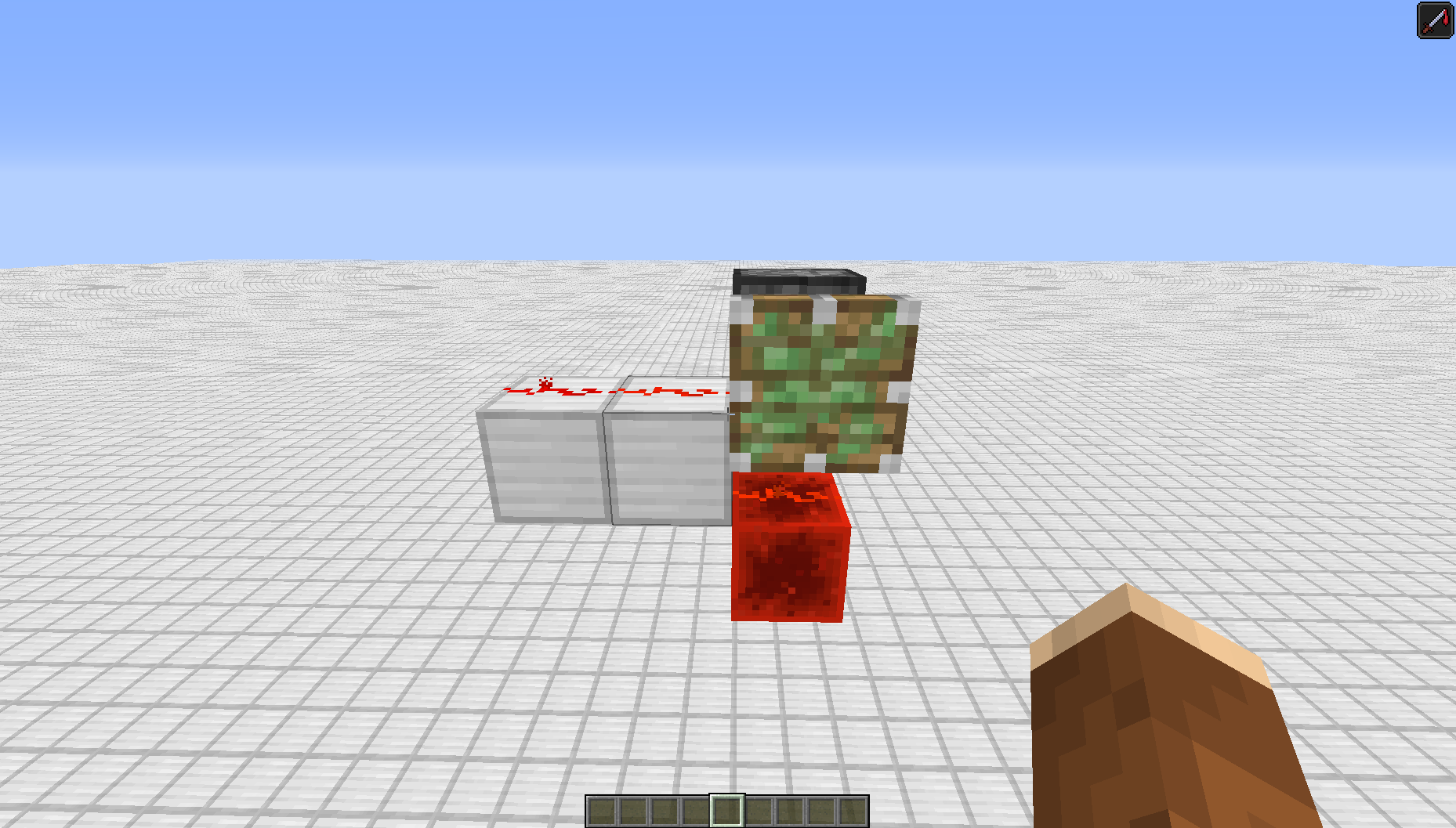
When there is a piston pointing up with a redstone dust on a half slab next to it, it will not extend when a redstone block is placed on top of it even though it looks like redstone is pointing into it. Updating the piston doesn't change this.
This is what happens when there are two pieces of redstone dust pointing into the piston. It also happens when the second piece of redstone is replaced with a repeater/lever/button.
I am assuming this is because the redstone block does not make the redstone dust point into itself, even though it looks like it does. I assume it goes from the middle to the right, even though it shows that it is going from left to right.
*[b]What I expected to happen:[/b]*
The piston to either extend or not extend in both cases:
*[b]What happened:[/b]*
The piston extended in in one case, but not in the other.
When there is a piston pointing up with a redstone dust on a half slab next to it, it will not extend when a redstone block is placed on top of it even though it looks like redstone is pointing into it. Updating the piston doesn't change this.
This is what happens when there are two pieces of redstone dust pointing into the piston. It also happens when the second piece of redstone is replaced with a repeater/lever/button.
I am assuming this is because the redstone block does not make the redstone dust point into itself, even though it looks like it does. I assume it goes from the middle to the right, even though it shows that it is going from left to right.
What I expected to happen:
The piston to either extend or not extend in both cases:
What happened:
The piston extended in in one case, but not in the other.

@Nasm Nasmus: Done.
Mobs will no longer randomly spawn if either the block being spawned in or the block above that contains any of the following: buttons, tripwire hooks, pressure plates, levers, redstone torches, redstone repeaters, comparators, redstone dust.
It's not clear whether this was an accidental change with the other changes to mob spawning, and it breaks some things, so filing it to be looked at.
Reasoning it might be accidental: in MCP terms, the old logic allowed spawning if !isNormalCube(), which expands to !(isOpaque() && isFullCube() && !canProvidePower()). New logic is !isSolidFullCube() && !canProvidePower(), which expands to !(blocksMovement() && isFullCube()) && !canProvidePower(). They might have meant that to be !(blocksMovement() && isFullCube() && !canProvidePower()) (note moved paren), just swapping the isOpaque() for blocksMovement(), and got confused like I initially did with the double-negative on canProvidePower().
Code analysis by Nasm Nasmus can be found in this comment.
Here is a comparison bewteen lag caused by huge amounts of entities in 1.8.9 & in 1.9.
To compare the two version I use the following setup with 3 command blocks :
/kill @e[type=ArmorStand]
/summon ArmorStand ~ ~1 ~ {Invulnerable:1b,Marker:1b,NoGravity:1b,Invisible:1b,Team:"TEST"}
/execute @e[type=ArmorStand] ~ ~ ~ summon ArmorStand ~ ~ ~ {Invulnerable:1b,Marker:1b,NoGravity:1b,Invisible:1b,Team:"TEST"}
See the Setup picture below.
So for each version, I first activate the second Command Block (so 1 ArmorStand spawn). After what I activate the third Command Block many times, so the number of ArmorStand increase like 2^n.
When I arrive at 512 ArmorStands, I take a screenshot with the debug pie on (Alt+F3). Same for 1024, 2048 & 4096 ArmorStands.
Before making the 1.9 test, I activate the first command block to kill every ArmorStand. After opening the world in 1.9 I do the following command : /scoreboard teams option TEST collisionRule never. It's very important.
PS : I define "lag" with the color & the height of the debug pie.
Here are the results :
1.8.9 :
- 512 : 89 FPS ; No lag.
- 1024 : 84 FPS ; A few lag.
- 2048 : 40 FPS ; Definitely becoming laggy.
- 4096 : 15 FPS ; Very laggy.
1.9 :
- 512 : 82 FPS ; Very few lag.
- 1024 : 2 FPS ; Unplayable, I can't even see the top of the debug pie.
- 2048 or higher : Minecraft crash, so I can't even take a screenshot.
See the screenshots for each step
Conclusion : The lag caused by entities in 1.9 seems to grow exponentially, because for 512 AS there is no real difference, but for 1024 AS there's no problem in 1.8.9 when in 1.9 it's unplayable.
I think this is due to the new collision of entities. But this doesn't make sense because the ArmorStand are in Marker mode & are in a team without collision.
I think the way it's calculated doesn't care if the entity should take collision or not - it calculates the collision anyway, and then don't apply it if the entity do not take collisions.
EDIT : World download are now in Attachments files.
Code analysis by Marcono1234 can be found in this comment.
Possible fix made by Nasm Nasmus can be found in this comment

Nasm Nasmus I just asked Spire (RedstoneSpire) to be so kind to reply to that, he setup that contraption and is more suited than I could ever be regarding redstone };]
He'll get back to you asap.
sorry for meta-discussing @mods
Marker-AS should also in my personal opinion definitely not be pushable upwards by pistons (MC-100398) or interfere with any entities/minecarts, like Nasm Nasmus said.
Back when Marker-AS rendered itself incl. their equipment (MC 1.8.1 iirc, was a bug) invisible, they also vanished from the rendered entity count, which helped with lag, as the majority of lag came from the rendered entity count, comparably less from the overall entity amount itself (at some point it also does, of course).
Added the command to be used and a way to recreate it completely.
Not a bug.
Use /title nielsie33 "can use spaces".
Mistyped previous command and can't figure out how to edit comment.
Use /title nielsie33 title "can use spaces".
Thank you, edited the title and description.
I did indeed use a second command block that replaces sticky_piston with air already.
Heh. I didn't even read it correctly, should be better now.
Works with this command:
/setblock ~ ~ ~-1 standing_sign 0 replace {Text1:"{color:red,text:'click to respawn',clickEvent:{action:run_command,value:'/kill @p'}}"}
True, but that doesn't work for the use I have for it.
In my specific case I want the command block to destroy itself and an area around it. I would need multiple extra command blocks to make it work. Filling the pistons with air before filling the rest with air only requires one extra command block.
The escape character has nothing to do with it.
It's only making part of the text clickable that doesn't work.
Alt + V isn't supposed to type the @ afaik.
Maybe you're confusing it with Ctrl + V, which pastes whatever you copied on your clipboard.
Apologies, searching for WitherSkull didn't show it in the top result, I forgot to order by created date.
It does look similar, like the top commenter said the root.tick.keyboard lags a lot.
I was assuming it had to do with block updates, because it's only when it's a block part of a largely filled area.
It's most definitely the same issue, glass does not generate the same problem.
Still an issue in the current version, updated the ticket.
Dinnerbone disagrees with you XeroOI:
https://gist.github.com/Dinnerbone/3736487
fuj1n, I don't think this is a duplicate of that. That bug report is about mining fatigue, the hunger command works as expected until level 223, but not after that.
Ah I see. I found a comment from Dinnerbone on another issue for anyone that might find this bug report:
"Any effect outside of those provided in vanilla circumstances should be considered unsupported officially and may or may not work as you'd expect."
MC-32172@Mustek
This is not a duplicate of that bug. In fact, I don't think this has to do with quasi-connectivity at all. The only thing that has to do with quasi-connectivity is the last piston not retracting, but that is not what this bug report is explaining.
This has been done on purpose to fix a security bug in the game. It doesn't work in 1.8.6 and probably won't work ever again.
This is NOT a duplicate of
MC-108. This is assumingMC-108works as intended. What would be the reason of the pistons NOT extending?But a piston does not need to receive direct power. If it would, the piston at the bottom shouldn't extend.
Is it possible to select either this one or
MC-79103(which is mine) as a duplicate? Mine was earlier, but this one appears to be better. If possible, please selectMC-79103as a duplicate of this one.I can't reproduce it with the attached command(although I know it's a real issue). Does it happen for you with the above command in 1.8.7? If so, what OS/java version/whatever are you using?
Interesting. Perhaps this specific command only crashes on OS X? I couldn't reproduce it on windows 7.
Yes, I've also experienced this error, but this command doesn't crash it for me. I was trying to find out what was causing it, and that's quite hard without a command that causes the issue
Apologies, I did indeed turn particles to minimal recently. My bad, can be marked as resolved.
Sounds like MC-72774
I agree that this is the better bug report, there's more information here, and finding the issue is easier using this(only a summon command with just one effect).
I have no problem replacing this one with a better one, but is
MC-81075really better? There is a lot more commands in there to reproduce the same thing. What information is in that report that is not in this?I have no problem with it if all the example commands are replaced by the two commands I put in this report. I think that having so many code in there will make it less likely to be fixed. If the developers see 6 commands, they first have to research what the actual problem is, here the problem is obvious.
It's your call, but a screen full of commands of which only 2 lines are the root of the problem is daunting in my opinion. If they don't require any inspection, why would they be there at all?
Also, there's no wiring up the commands, or anything of that sort. It's literally just pasting in two command blocks next to each other, and putting a button on the first.
In what way is this a dupe of
MC-108? There is literally no quasi-connectivity going on here at all.Can you recreate that without the other redstone dust?
I wanted to add that it still happens in 15w44a, and that it is actually quite possible to lock it up using normal use as well, not just using the way described by Panda.
A very easy solution would be to refresh all trades of a villager when all trades are locked. Having villagers lock up all their trades does not seem like intended behaviour.
I think the explanation in this bug report is incorrect.
The difference between a user input and a repeater input is that a repeater input lets a second repeater have a 2 game-tick delay, while a user input causes it to have a 1 game-tick delay. This is because user actions are processed before anything else (including increasing the world tick count).
The bottom two levers act the same because they are both directly connected to the same redstone.
The one that activates a repeater, then the rest of the circuit causes the piston to be extended in 2 game ticks, and the repeaters to be extended in 2 game ticks as well.
The one that activates a repeater, then a piston, and then the rest of the circuit, causes the second piston to be extended in 3 game ticks. The repeaters are still turned on after 2 game ticks.
Therefore, I would expect the bottom piston to extend later when the left most repeater is powered first compared to when the top most repeater is powered first.
When the redstone is directly powered, the top piston should extend sooner than both of these cases, since the piston will then be extended in 2 game ticks, while the repeater will be extended in 1 game tick.
It happens because user events are processed before the world tick is increased. The world tick is also what is used by pistons/repeaters and everything. This is also what is used if you want to create a door that can only be opened by a player standing on a pressure plate for example.
What you have there is a lot of bugs in one picture. Lets look at it not as bugs, but as the way the game works(which is pretty much the case anyway):
Piston powering piston(via converting block 36): the second piston has a 3gtick delay before it is extended.
Player powering piston: the piston has a 2 gtick delay before it is extended.
Repeater/comparator powering piston: the piston has a 2 gtick delay before it is extended.
Piston powering repeater: the repeater has a 2 gtick delay.
Player powering repeater: the repeater has a 1 gtick delay.
Repeater/comparator powering repeater: the second repeater has a 2 gtick delay.
If something should be happening in the same gametick, it comes down to update order, which is way more complicated still.
If you want to know exactly what happens when and why, take a look at the videos in this post: https://www.reddit.com/r/technicalminecraft/comments/39d013/the_precise_timings_of_repeaters_pistons_and/
It can take a few hours to understand it though, but the basics is what I explained above.
Not really the place for it, but that most definitely looks to be because of lag, but I see not reason to assume it's just because of the redstone. I'd think there's something else going on on that server, or they just decided to take the 10 dollar option this time. Anyway, no real point in thinking about what could be the cause on someone else's server with many other things going on.
There is no reason to think this has changed from 1.8 to 1.9. This isn't the place for baseless assumptions.
@Meri Diana
There is a bug report for lag created by huge lighting updates
MC-11571, but not one specifically for 1.9.The only source of light reaching the pistons in that video is the redstone torch, right? Does the lag disappear if you remove it(and power the pistons differently)?
I made an incredibly simple fix for this in MCP.
I am by no means saying this is the perfect fix, but there definitely is way less lag(16k ArmorStands is decently possible for me now, instead of 1k). I added three if statements to check if an armor stand is a marker armor stand. I'm not 100% sure this has no other implications, but I don't see how it could.
All changes I made were in EntityArmorStand.
In "isInRangeToRenderDist" I simply added:
to the beginning of the function.
In "collideWithNearbyEntities" I put everything inside:
In "onUpdate" I also put everything inside:
I think the impact of marker ArmorStands can be decreased even further, since they seem to have even less of an impact when you are very far away(and they are in spawn chunks).
This bug has been marked as Resolved, but I do not understand why.
Using the setup in the description of this bug report, the results are identical to me when using 1.9.2 versus using 16w15b. For me, the tps is still decent at 1024 armorstands(albeit noticeably lower), but becomes unplayable at 2048 armor stands.
Also, with F3 open, looking at the amount of entities, it shows them as still being "rendered". With the suggested code in my previous comment, they did not show up there anymore, just in the total entity count.
Perhaps the patch for this bugfix was not applied?
Ah of course, that is correct. I had assumed marker armor stands were supposed to be always invisible, unaffected by gravity, etc. I feel like they should be, but that's more of a feature request than anything.
I assume they should still not push entities/get in minecarts though, which should increase performance a lot.
If someone from Mojang is interested, this is where it happens in the code(looking at MCP1.9.2):
In WorldEntitySpawner.java there is the function func_185331_a at line 196.
This function does:
The p_185331_0_.canProvidePower() part is what is causing this bug. It could be fixed by changing this into:
Still happens in 1.9.4, but the title is kind of misleading(unintentionally of course), since entities do still despawn in the next tick, it is just the F3 screen that is not clearing its value.
Random:
https://gfycat.com/EnragedBackAustraliankestrel
Lever:
https://gfycat.com/TenseMatureGemsbuck