 ThothofMythos
- thothofmythos
- thothofmythos
- America/Denver
- Yes
- No
 MC-102364
![[Mojang] Jeb (Jens Bergensten)](../../../data/assets/gravatar/jeb.jpeg)

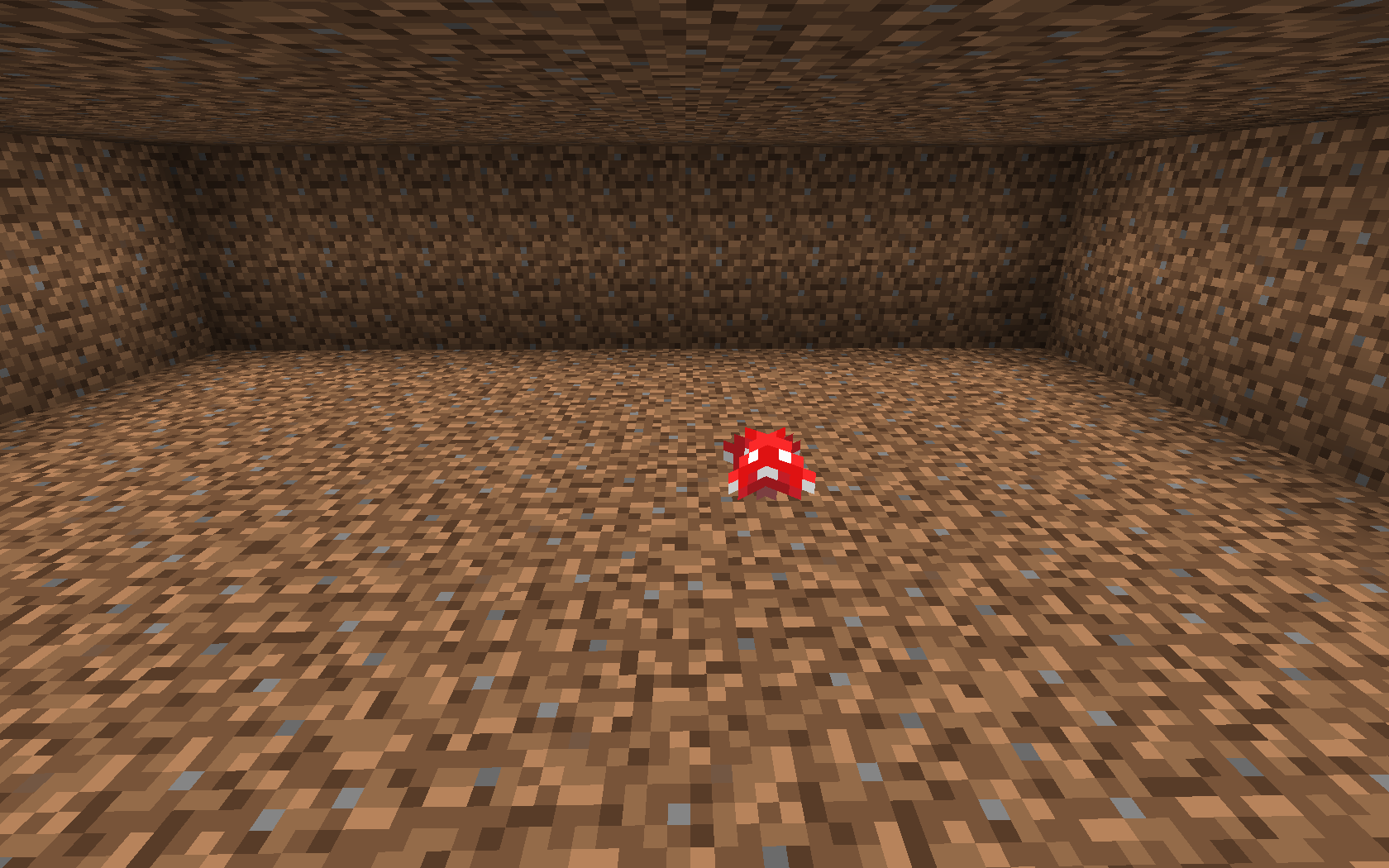
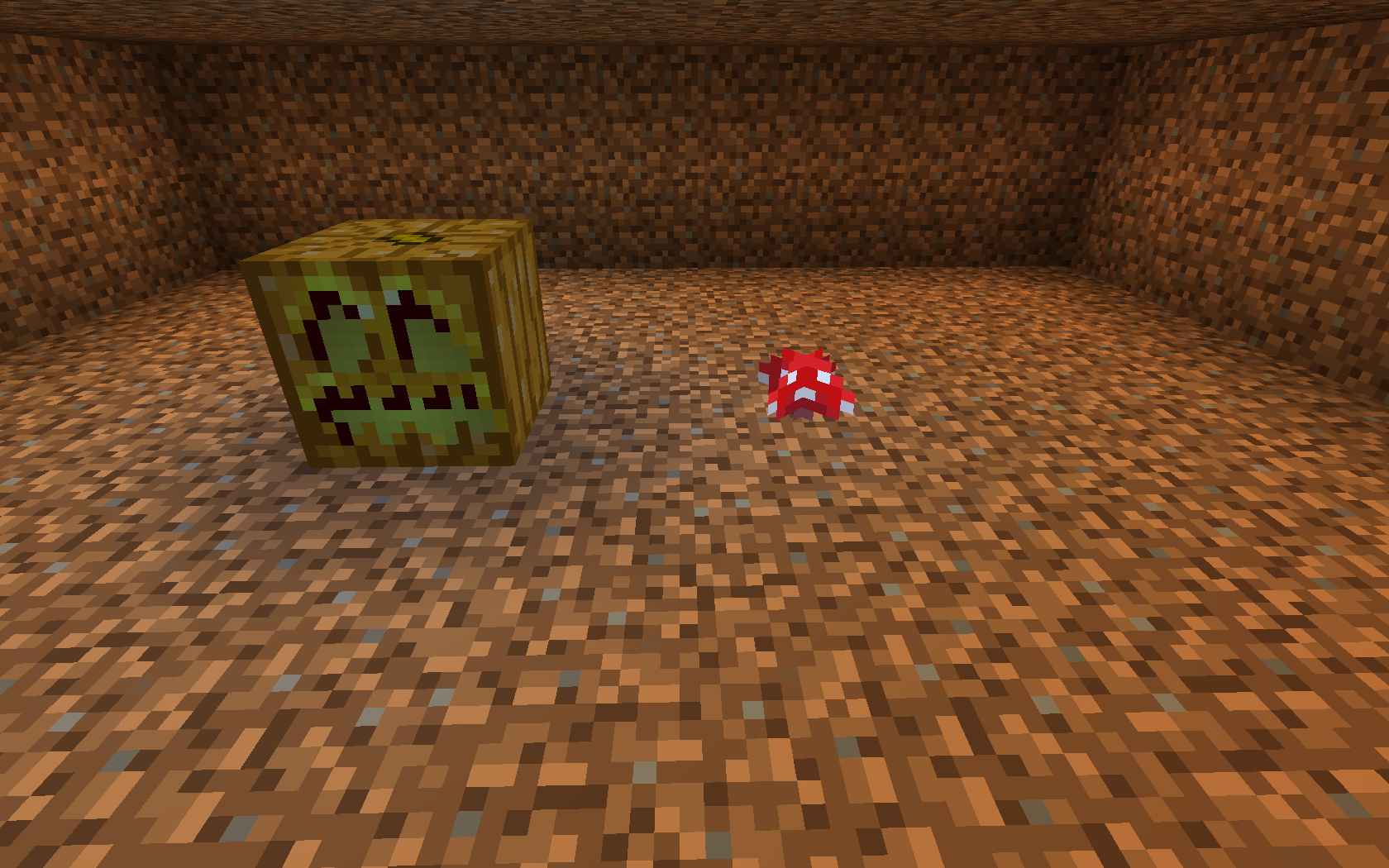

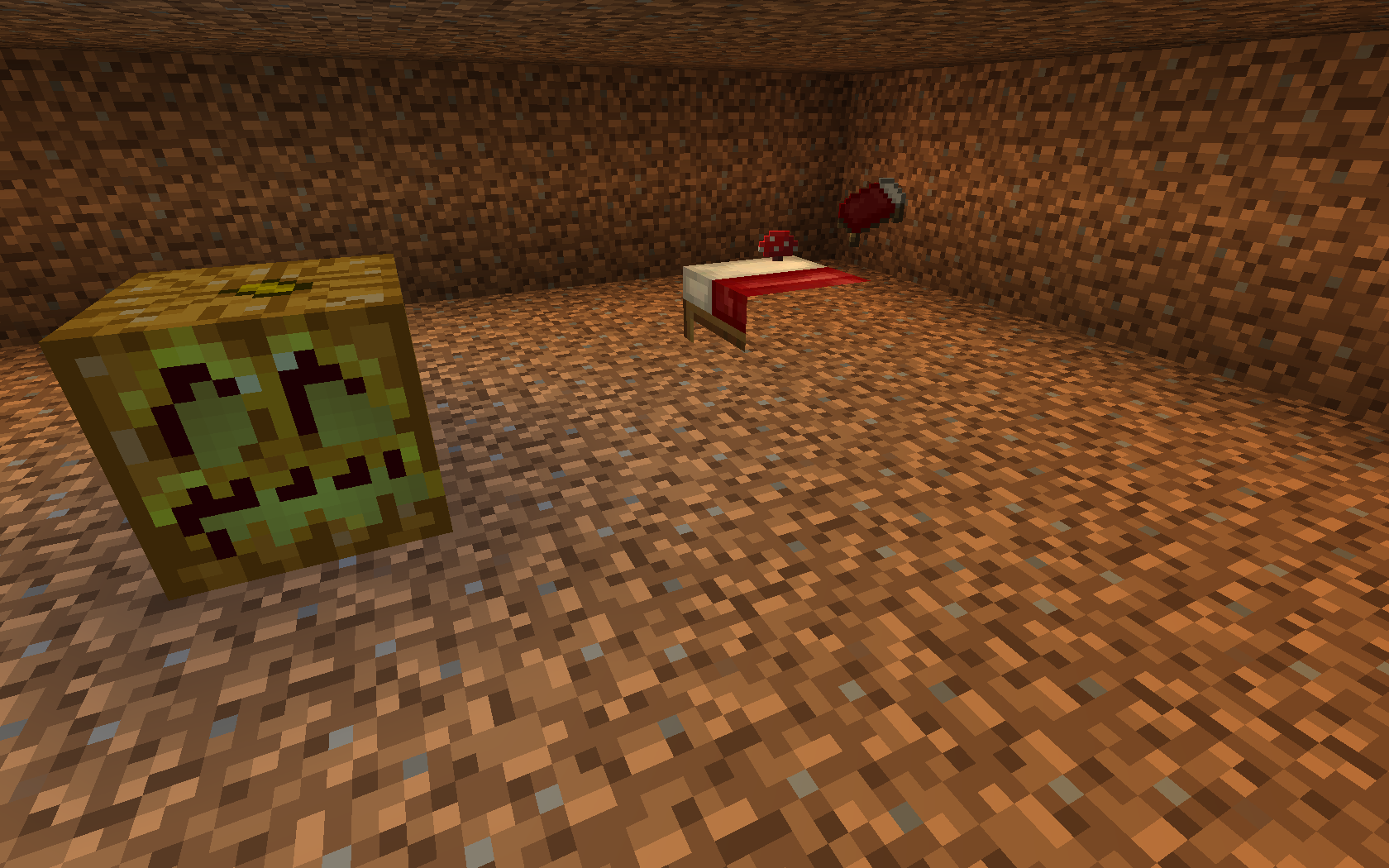

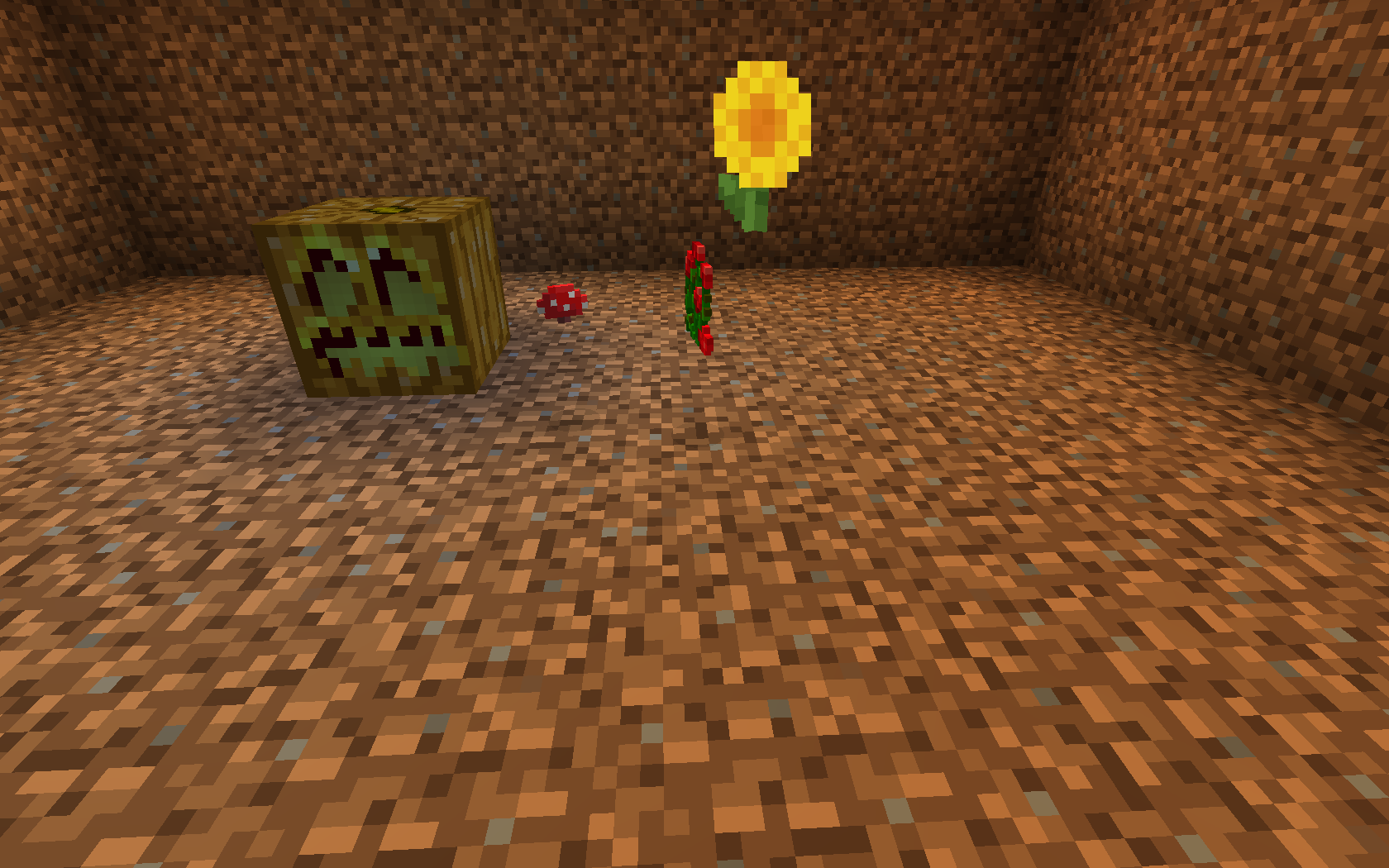



While in Creative mode,
walking towards a block and hitting the "Jump" key when the auto-jump feature activates, starts the player flying.I believe it happens because, while in Creative mode, hitting the "Jump" key twice in quick succession toggles flying.
If auto-jump is registering as the "jump" key, if the user hits "jump" shortly thereafter, it would count as hitting "Jump" twice, and toggle flying.I'm not sure if this is an "Intended Feature" - I certainly wasn't expecting it.
While in Creative mode, moving towards a block and hitting the "Jump" key when the auto-jump feature activates, starts the player flying.
I believe it happens because, while in Creative mode, hitting the "Jump" key twice in quick succession toggles flying.
If auto-jump is registering as the "jump" key, if the user hits "jump" shortly thereafter, it would count as hitting "Jump" twice, and toggle flying.I'm not sure if this is an "Intended Feature" - I certainly wasn't expecting it.
Auto-jump starts flyingAuto Jump starts flying in Creative mode
While in Creative mode, moving towards a block and hitting the "Jump" key when the auto-jump feature activates, starts the player flying.
I believe it happens because, while in Creative mode, hitting the "Jump" key twice in quick succession toggles flying.
If auto-jump is registering as the "jump" key,ifthe user hits "jump" shortly thereafter, it would count as hitting "Jump" twice, and toggle flying.I'm not sure if this is an "Intended Feature" - I certainly wasn't expecting it.
While in Creative mode, moving towards a block and hitting the "Jump" key when the auto-jump feature activates, starts the player flying.
I believe it happens because, while in Creative mode, hitting the "Jump" key twice in quick succession toggles flying.
If auto-jump is registering as the "jump" key, and the user hits "jump" shortly thereafter, it would count as hitting "Jump" twice, and toggle flying.I'm not sure if this is an "Intended Feature" - I certainly wasn't expecting it.
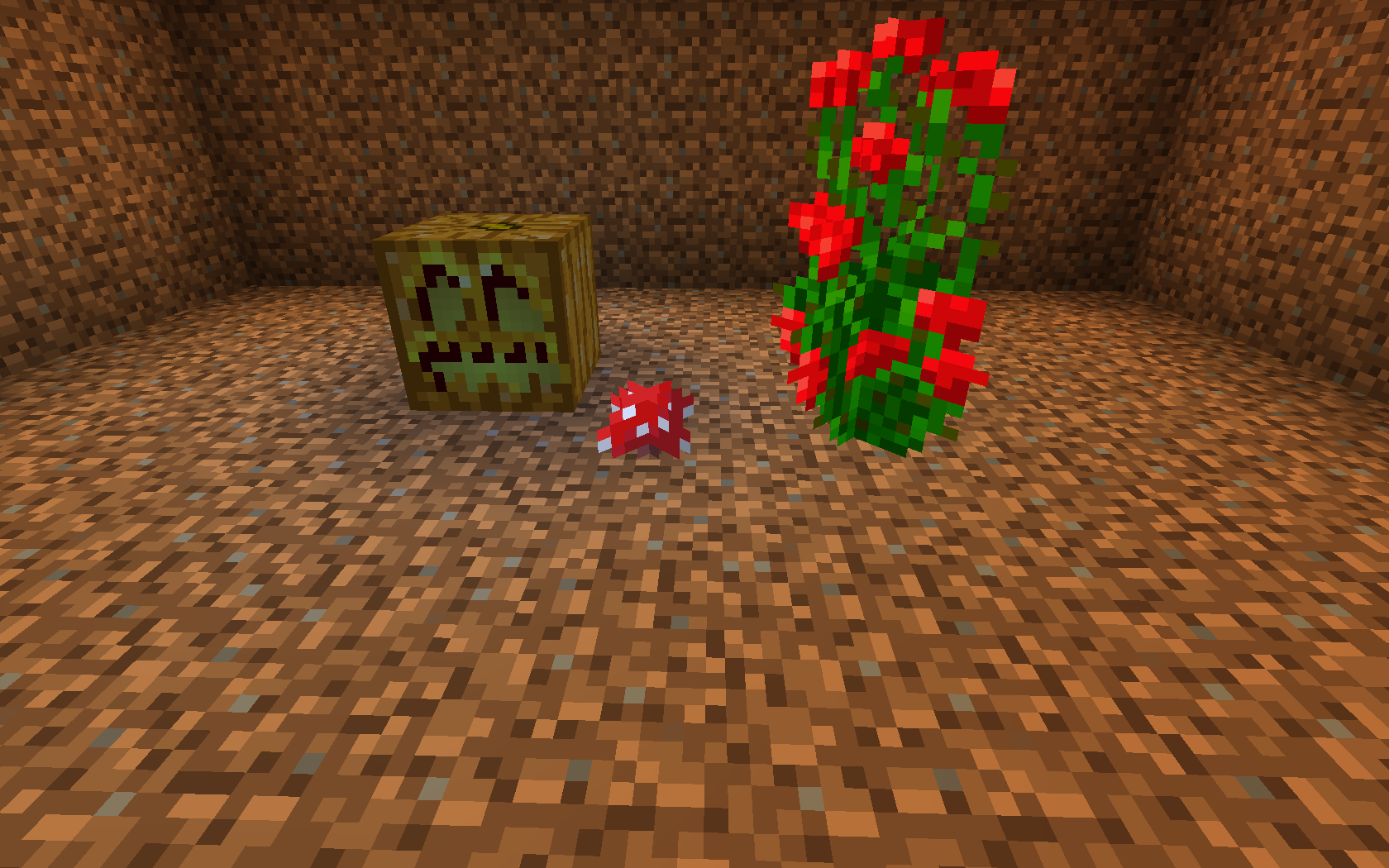
Night was beginning on my hardcore survival world while exploring; I wanted to sleep through the night to prevent mobs from spawning - and so placed my bed at a nearby location to prepare for the night. (Which was under the shade of a tree, where a red mushroom was growing)
What I expected to happen was:
The bed to be placed down, possibly 'popping' the mushroom if the nearby light level was too high, due to a block update.What actually happened was:
The mushroom updated and 'popped' out of the ground; and 'broke' the bed - 'causing the bed to drop as an item, but it left behind the "head" portion of the bed.Steps to Reproduce:
1. Create/find a dark room (i.e: through the fill command - "/fill ~5 ~3 ~5 ~-5 ~-1 ~-5 minecraft:dirt 0 hollow")
2. Grab a Mushroom (red or brown), a Bed, and a light-generating block (Redstone Lamp, Sea Lantern, Jack o' Lantern, Glowstone, Lava... anything that creates a light level of 15)
3. Place the mushroom, place the light-block 2 blocks away from the mushroom, so that the light level on the mushroom is 13.
4. Cause the mushroom a block update by placing the bed next to the mushroom.
5. Observe:
The mushroom updates, sees that the light level is too high, so drops - expected.
The bed drops as an item, but leaves the "head" of the bed behind.Additional Notes:
- This occurs in both (+/-) X and Z directions
- This only occurs when placing the bed directly adjacent to the mushroom - if you place the bed diagonally, where the "head" of the bed updates the mushroom - the bed will not "drop", and will remain entirely.
- Used 'Night Vision' effect for the screenshots for visibility purposes.
- Happens with crops when they have no light
- Placing a double plant instead of a bed, makes the bottom disappears and the top stays.
Night was beginning on my hardcore survival world while exploring; I wanted to sleep through the night to prevent mobs from spawning - and so placed my bed at a nearby location to prepare for the night. (Which was under the shade of a tree, where a red mushroom was growing)
What I expected to happen was:
The bed to be placed down, possibly 'popping' the mushroom if the nearby light level was too high, due to a block update.What actually happened was:
The mushroom updated and 'popped' out of the ground; and 'broke' the bed - 'causing the bed to drop as an item, but it left behind the "head" portion of the bed.Steps to Reproduce:
1. Create/find a dark room (i.e: through the fill command - "/fill ~5 ~3 ~5 ~-5 ~-1 ~-5 minecraft:dirt 0 hollow")
2. Grab a Mushroom (red or brown), a Bed, and a light-generating block (Redstone Lamp, Sea Lantern, Jack o' Lantern, Glowstone, Lava... anything that creates a light level of 15)
3. Place the mushroom, place the light-block 2 blocks away from the mushroom, so that the light level on the mushroom is 13.
4. Cause the mushroom a block update by placing the bed next to the mushroom.
5. Observe:
The mushroom updates, sees that the light level is too high, so drops - expected.
The bed drops as an item, but leaves the "head" of the bed behind - unexpected.Additional Notes:
- This occurs in both (+/-) X and Z directions
- This only occurs when placing the bed directly adjacent to the mushroom - if you place the bed diagonally, where the "head" of the bed updates the mushroom - the bed will not "drop", and will remain entirely.
- Used 'Night Vision' effect for the screenshots for visibility purposes.
- Happens with crops when they have no light
- Placing a double plant instead of a bed, makes the bottom disappears and the top stays.
Night was beginning on my hardcore survival world while exploring; I wanted to sleep through the night to prevent mobs from spawning
-and so placed my bed at a nearby location to prepare for the night. (Which was under the shade of a tree, where a red mushroom was growing)What I expected to happen was:
The bed to be placed down, possibly 'popping' the mushroom if the nearby light level was too high, due to a block update.What actually happened was:
The mushroom updated and 'popped' out of the ground; and 'broke' the bed - 'causing the bed to drop as an item, but it left behind the "head" portion of the bed.Steps to Reproduce:
1. Create/find a dark room (i.e: through the fill command - "/fill ~5 ~3 ~5 ~-5 ~-1 ~-5 minecraft:dirt 0 hollow")
2. Grab a Mushroom (red or brown), a Bed, and a light-generating block (Redstone Lamp, Sea Lantern, Jack o' Lantern, Glowstone, Lava... anything that creates a light level of 15)
3. Place the mushroom, place the light-block 2 blocks away from the mushroom, so that the light level on the mushroom is 13.
4. Cause the mushroom a block update by placing the bed next to the mushroom.
5. Observe:
The mushroom updates, sees that the light level is too high, so drops - expected.
The bed drops as an item, but leaves the "head" of the bed behind - unexpected.Additional Notes:
- This occurs in both (+/-) X and Z directions
- This only occurs when placing the bed directly adjacent to the mushroom - if you place the bed diagonally, where the "head" of the bed updates the mushroom - the bed will not "drop", and will remain entirely.
- Used 'Night Vision' effect for the screenshots for visibility purposes.
- Happens with crops when they have no light
- Placing a double plant instead of a bed, makes the bottom disappears and the top stays.
Night was beginning on my hardcore survival world while exploring; I wanted to sleep through the night to prevent mobs from spawning, and so placed my bed at a nearby location to prepare for the night. (Which was under the shade of a tree, where a red mushroom was growing)
What I expected to happen was:
The bed to be placed down, possibly 'popping' the mushroom if the nearby light level was too high, due to a block update.What actually happened was:
The mushroom updated and 'popped' out of the ground; and 'broke' the bed - 'causing the bed to drop as an item, but it left behind the "head" portion of the bed.Steps to Reproduce:
1. Create/find a dark room (e.g: through the fill command - "/fill ~5 ~3 ~5 ~-5 ~-1 ~-5 minecraft:dirt 0 hollow")
2. Grab a Mushroom (red or brown), a Bed, and a light-generating block (Redstone Lamp, Sea Lantern, Jack o' Lantern, Glowstone, Lava... anything that creates a light level of 15)
3. Place the mushroom, place the light-block 2 blocks away from the mushroom, so that the light level on the mushroom is 13.
4. Cause the mushroom a block update by placing the bed next to the mushroom.
5. Observe:
The mushroom updates, sees that the light level is too high, so drops - expected.
The bed drops as an item, but leaves the "head" of the bed behind - unexpected.Additional Notes:
- This occurs in both (+/-) X and Z directions
- This only occurs when placing the bed directly adjacent to the mushroom - if you place the bed diagonally, where the "head" of the bed updates the mushroom - the bed will not "drop", and will remain entirely.
- Used 'Night Vision' effect for the screenshots for visibility purposes.
- Happens with crops when they have no light
- Placing a double plant instead of a bed, makes the bottom disappears and the top stays.
Night was beginning on my hardcore survival world while exploring; I wanted to sleep through the night to prevent mobs from spawning, and so placed my bed at a nearby location to prepare for the night. (Which was under the shade of a tree, where a red mushroom was growing)
What I expected to happen was:
The bed to be placed down, possibly 'popping' the mushroom if the nearby light level was too high, due to a block update.What actually happened was:
The mushroom updated and 'popped' out of the ground; and 'broke' the bed - 'causing the bed to drop as an item, but it left behind the "head" portion of the bed.Steps to Reproduce:
1. Create/find a dark room (e.g: through the fill command - "/fill ~5 ~3 ~5 ~-5 ~-1 ~-5 minecraft:dirt 0 hollow")
2. Grab a Mushroom (red or brown), a Bed, and a light-generating block (Redstone Lamp, Sea Lantern, Jack o' Lantern, Glowstone, Lava... anything that creates a light level of 15)
3. Place the mushroom, place the light-block 2 blocks away from the mushroom, so that the light level on the mushroom is 13.
4. Cause the mushroom a block update by placing the bed next to the mushroom.
5. Observe:
The mushroom updates, sees that the light level is too high, so drops - expected.
The bed drops as an item, but leaves the "head" of the bed behind - unexpected.Additional Notes:
- This occurs in both (+/-) X and Z directions
- This only occurs when placing the bed directly adjacent to the mushroom - if you place the bed diagonally, where the "head" of the bed updates the mushroom - the bed will not "drop", and will remain entirely.
- Used 'Night Vision' effect for the screenshots for visibility purposes.
- Happens with crops when they have no light
- Placing a double plant instead of a bed, makes the bottom disappears and the top stays.
- The "head" of double plants does not appear to update upon placement/destruction of adjacent blocks; however, targeting the "head" and hitting the "use" key will update and remove it.
- The "head" of the bed does update and remove when placing/destroying adjacent blocks.
- Water/Lava flowing next to the "head" of double plants will not update/remove them
Water/lava flowing next to them does not update them - but will destroy them if it flows into their space.
One thing to note: these "leftover" pieces of the bed/double plants do not appear to update on block placement - for most blocks.
You can place blocks next to them and they will remain.
They do update when destroying an adjacent block.Water flowing onto them or next to them, or redstone wire updating next to these "leftover" pei
Night was beginning on my hardcore survival world while exploring; I wanted to sleep through the night to prevent mobs from spawning, and so placed my bed at a nearby location to prepare for the night. (Which was under the shade of a tree, where a red mushroom was growing)
What I expected to happen was:
The bed to be placed down, possibly 'popping' the mushroom if the nearby light level was too high, due to a block update.What actually happened was:
The mushroom updated and 'popped' out of the ground; and 'broke' the bed - 'causing the bed to drop as an item, but it left behind the "head" portion of the bed.Steps to Reproduce:
1. Create/find a dark room (e.g: through the fill command - "/fill ~5 ~3 ~5 ~-5 ~-1 ~-5 minecraft:dirt 0 hollow")
2. Grab a Mushroom (red or brown), a Bed, and a light-generating block (Redstone Lamp, Sea Lantern, Jack o' Lantern, Glowstone, Lava... anything that creates a light level of 15)
3. Place the mushroom, place the light-block 2 blocks away from the mushroom, so that the light level on the mushroom is 13.
4. Cause the mushroom a block update by placing the bed next to the mushroom.
5. Observe:
The mushroom updates, sees that the light level is too high, so drops - expected.
The bed drops as an item, but leaves the "head" of the bed behind - unexpected.Additional Notes:
- This occurs in both (+/-) X and Z directions
- This only occurs when placing the bed directly adjacent to the mushroom - if you place the bed diagonally, where the "head" of the bed updates the mushroom - the bed will not "drop", and will remain entirely.
- Used 'Night Vision' effect for the screenshots for visibility purposes.
- Happens with crops when they have no light
- Placing a double plant instead of a bed, makes the bottom disappears and the top stays.
- The "head" of double plants does not appear to update upon placement/destruction of adjacent blocks; however, targeting the "head" and hitting the "use" key will update and remove it.
The "head" of the bed doesupdateandremovewhen placing/destroying adjacent blocks.- Water/Lava flowing next to the "head" of double plants will not update/remove them
Water/lava flowing next to them does not update them - but will destroy them if it flows into their space.
One thing to note: these "leftover" pieces of the bed/double plants do not appear to update on block placement - for most blocks.
You can place blocks next to them and they will remain.
They do update when destroying an adjacent block.Water flowing onto them or next to them, or redstone wire updating next to these "leftover" pei
Night was beginning on my hardcore survival world while exploring; I wanted to sleep through the night to prevent mobs from spawning, and so placed my bed at a nearby location to prepare for the night. (Which was under the shade of a tree, where a red mushroom was growing)
What I expected to happen was:
The bed to be placed down, possibly 'popping' the mushroom if the nearby light level was too high, due to a block update.What actually happened was:
The mushroom updated and 'popped' out of the ground; and 'broke' the bed - 'causing the bed to drop as an item, but it left behind the "head" portion of the bed.Steps to Reproduce:
1. Create/find a dark room (e.g: through the fill command - "/fill ~5 ~3 ~5 ~-5 ~-1 ~-5 minecraft:dirt 0 hollow")
2. Grab a Mushroom (red or brown), a Bed, and a light-generating block (Redstone Lamp, Sea Lantern, Jack o' Lantern, Glowstone, Lava... anything that creates a light level of 15)
3. Place the mushroom, place the light-block 2 blocks away from the mushroom, so that the light level on the mushroom is 13.
4. Cause the mushroom a block update by placing the bed next to the mushroom.
5. Observe:
The mushroom updates, sees that the light level is too high, so drops - expected.
The bed drops as an item, but leaves the "head" of the bed behind - unexpected.Additional Notes:
- This occurs in both (+/-) X and Z directions
- This only occurs when placing the bed directly adjacent to the mushroom - if you place the bed diagonally, where the "head" of the bed updates the mushroom - the bed will not "drop", and will remain entirely.
- Used 'Night Vision' effect for the screenshots for visibility purposes.
- Happens with crops when they have no light
- Placing a double plant instead of a bed, makes the bottom disappears and the top stays.
- The "head" of double plants does not appear to update upon placement/destruction of adjacent blocks; however, targeting the "head" and hitting the "use" key will update and remove it.
- The "head" of the bed does update and remove when placing/destroying adjacent blocks - except when placing another bed where the foot of the original bed would be (in any other direction), even if the new 'foot' of the original bed is the "head" of a new bed. The bed, is then considered "complete" and will be exempt from further block placement/destruction until the bed that 'completes' it is removed.
- Water/Lava flowing next to the "head" of double plants will not update/remove them.
- Unloading and then reloading the chunks will remove the leftover "head" of double plants, but not of beds. (e.g: By teleporting away then back, or by disconnecting from then reconnecting to the single-player world); Reloading the chunks through the "Reload chunks" debug option ("F3 + A") does not remove the leftover "head" of double-plants.
- Placing the double plant adjacent to the mushroom (at y-1) where the "head" of the double plant updates the mushroom does not cause the mushroom to drop, nor does it affect the double plant.
Night was beginning on my hardcore survival world while exploring; I wanted to sleep through the night to prevent mobs from spawning, and so placed my bed at a nearby location to prepare for the night. (Which was under the shade of a tree, where a red mushroom was growing)
What I expected to happen was:
The bed to be placed down, possibly 'popping' the mushroom if the nearby light level was too high, due to a block update.What actually happened was:
The mushroom updated and 'popped' out of the ground; and 'broke' the bed - 'causing the bed to drop as an item, but it left behind the "head" portion of the bed.Steps to Reproduce:
1. Create/find a dark room (e.g: through the fill command - "/fill ~5 ~3 ~5 ~-5 ~-1 ~-5 minecraft:dirt 0 hollow")
2. Grab a Mushroom (red or brown), a Bed, and a light-generating block (Redstone Lamp, Sea Lantern, Jack o' Lantern, Glowstone, Lava... anything that creates a light level of 15)
3. Place the mushroom, place the light-block 2 blocks away from the mushroom, so that the light level on the mushroom is 13.
4. Cause the mushroom a block update by placing the bed next to the mushroom.
5. Observe:
The mushroom updates, sees that the light level is too high, so drops - expected.
The bed drops as an item, but leaves the "head" of the bed behind - unexpected.Additional Notes:
- This occurs in both (+/-) X and Z directions
- This only occurs when placing the bed directly adjacent to the mushroom - if you place the bed diagonally, where the "head" of the bed updates the mushroom - the bed will not "drop", and will remain entirely.
- Used 'Night Vision' effect for the screenshots for visibility purposes.
- Happens with crops when they have no light
- Placing a double plant instead of a bed, makes the bottom disappears and the top stays.
- The "head" of double plants does not appear to update upon placement/destruction of adjacent blocks; however, targeting the "head" and hitting the "use" key will update and remove it.
- The "head" of the bed does update and remove when placing/destroying adjacent blocks - except when placing another bed where the foot of the original bed would be (in any other direction), even if the new 'foot' of the original bed is the "head" of a new bed. The bed, is then considered "complete" and will be exempt from further block placement/destruction until the bed that 'completes' it is removed.
- Water/Lava flowing next to the "head" of double plants will not update/remove them.
- Unloading and then reloading the chunks will remove the leftover "head" of double plants, but not of beds. (e.g: By teleporting away then back, or by disconnecting from then reconnecting to the single-player world); Reloading the chunks through the "Reload chunks" debug option ("F3 + A") does not remove the leftover "head" of double-plants.
- Placing the double plant adjacent to the mushroom (at y-1) where the "head" of the double plant updates the mushroom does not cause the mushroom to drop, nor does it affect the double plant.
- The incomplete bed can be used to sleep through the night.
Night was beginning on my hardcore survival world while exploring; I wanted to sleep through the night to prevent mobs from spawning, and so placed my bed at a nearby location to prepare for the night. (Which was under the shade of a tree, where a red mushroom was growing)
What I expected to happen was:
The bed to be placed down, possibly 'popping' the mushroom if the nearby light level was too high, due to a block update.What actually happened was:
The mushroom updated and 'popped' out of the ground; and 'broke' the bed - 'causing the bed to drop as an item, but it left behind the "head" portion of the bed.Steps to Reproduce:
1. Create/find a dark room (e.g: through the fill command - "/fill ~5 ~3 ~5 ~-5 ~-1 ~-5 minecraft:dirt 0 hollow")
2. Grab a Mushroom (red or brown), a Bed, and a light-generating block (Redstone Lamp, Sea Lantern, Jack o' Lantern, Glowstone, Lava... anything that creates a light level of 15)
3. Place the mushroom, place the light-block 2 blocks away from the mushroom, so that the light level on the mushroom is 13.
4. Cause the mushroom a block update by placing the bed next to the mushroom.
5. Observe:
The mushroom updates, sees that the light level is too high, so drops - expected.
The bed drops as an item, but leaves the "head" of the bed behind - unexpected.Additional Notes:
- This occurs in both (+/-) X and Z directions
- This only occurs when placing the bed directly adjacent to the mushroom - if you place the bed diagonally, where the "head" of the bed updates the mushroom - the bed will not "drop", and will remain entirely.
- Used 'Night Vision' effect for the screenshots for visibility purposes.
- Happens with crops when they have no light
- Placing a double plant instead of a bed, makes the bottom disappears and the top stays.
- The "head" of double plants does not appear to update upon placement/destruction of adjacent blocks; however, targeting the "head" and hitting the "use" key will update and remove it.
- The "head" of the bed does update and remove when placing/destroying adjacent blocks - except when placing another bed where the foot of the original bed would be (in any other direction), even if the new 'foot' of the original bed is the "head" of a new bed. The bed, is then considered "complete" and will be exempt from further block placement/destruction until the bed that 'completes' it is removed.
- * Destroying any part of the bed while in Creative mode will remove the bed and any 'attached' components. However, destroying the original "head" of the bed while in Survival mode will only remove the 'incomplete' portion of the bed.
- Water/Lava flowing next to the "head" of double plants will not update/remove them.
- Unloading and then reloading the chunks will remove the leftover "head" of double plants, but not of beds. (e.g: By teleporting away then back, or by disconnecting from then reconnecting to the single-player world); Reloading the chunks through the "Reload chunks" debug option ("F3 + A") does not remove the leftover "head" of double-plants.
- Placing the double plant adjacent to the mushroom (at y-1) where the "head" of the double plant updates the mushroom does not cause the mushroom to drop, nor does it affect the double plant.
- The incomplete bed can be used to sleep through the night.
Night was beginning on my hardcore survival world while exploring; I wanted to sleep through the night to prevent mobs from spawning, and so placed my bed at a nearby location to prepare for the night. (Which was under the shade of a tree, where a red mushroom was growing)
What I expected to happen was:
The bed to be placed down, possibly 'popping' the mushroom if the nearby light level was too high, due to a block update.What actually happened was:
The mushroom updated and 'popped' out of the ground; and 'broke' the bed - 'causing the bed to drop as an item, but it left behind the "head" portion of the bed.Steps to Reproduce:
1. Create/find a dark room (e.g: through the fill command - "/fill ~5 ~3 ~5 ~-5 ~-1 ~-5 minecraft:dirt 0 hollow")
2. Grab a Mushroom (red or brown), a Bed, and a light-generating block (Redstone Lamp, Sea Lantern, Jack o' Lantern, Glowstone, Lava... anything that creates a light level of 15)
3. Place the mushroom, place the light-block 2 blocks away from the mushroom, so that the light level on the mushroom is 13.
4. Cause the mushroom a block update by placing the bed next to the mushroom.
5. Observe:
The mushroom updates, sees that the light level is too high, so drops - expected.
The bed drops as an item, but leaves the "head" of the bed behind - unexpected.Additional Notes:
- This occurs in both (+/-) X and Z directions
- This only occurs when placing the bed directly adjacent to the mushroom - if you place the bed diagonally, where the "head" of the bed updates the mushroom - the bed will not "drop", and will remain entirely.
- Used 'Night Vision' effect for the screenshots for visibility purposes.
- Happens with crops when they have no light
- Placing a double plant instead of a bed, makes the bottom disappears and the top stays.
- The "head" of double plants does not appear to update upon placement/destruction of adjacent blocks; however, targeting the "head" and hitting the "use" key will update and remove it.
- The "head" of the bed does update and remove when placing/destroying adjacent blocks - except when placing another bed where the foot of the original bed would be (in any other direction), even if the new 'foot' of the original bed is the "head" of a new bed. The bed, is then considered "complete" and will be exempt from further block placement/destruction until the bed that 'completes' it is removed.
*Destroying any part of the bed while in Creative mode will remove the bed and any 'attached' components. However, destroying the original "head" of the bed while in Survival mode will only remove the 'incomplete' portion of the bed.- Water/Lava flowing next to the "head" of double plants will not update/remove them.
- Unloading and then reloading the chunks will remove the leftover "head" of double plants, but not of beds. (e.g: By teleporting away then back, or by disconnecting from then reconnecting to the single-player world); Reloading the chunks through the "Reload chunks" debug option ("F3 + A") does not remove the leftover "head" of double-plants.
- Placing the double plant adjacent to the mushroom (at y-1) where the "head" of the double plant updates the mushroom does not cause the mushroom to drop, nor does it affect the double plant.
- The incomplete bed can be used to sleep through the night.
Night was beginning on my hardcore survival world while exploring; I wanted to sleep through the night to prevent mobs from spawning, and so placed my bed at a nearby location to prepare for the night. (Which was under the shade of a tree, where a red mushroom was growing)
What I expected to happen was:
The bed to be placed down, possibly 'popping' the mushroom if the nearby light level was too high, due to a block update.What actually happened was:
The mushroom updated and 'popped' out of the ground; and 'broke' the bed - 'causing the bed to drop as an item, but it left behind the "head" portion of the bed.Steps to Reproduce:
1. Create/find a dark room (e.g: through the fill command - "/fill ~5 ~3 ~5 ~-5 ~-1 ~-5 minecraft:dirt 0 hollow")
2. Grab a Mushroom (red or brown), a Bed, and a light-generating block (Redstone Lamp, Sea Lantern, Jack o' Lantern, Glowstone, Lava... anything that creates a light level of 15)
3. Place the mushroom, place the light-block 2 blocks away from the mushroom, so that the light level on the mushroom is 13.
4. Cause the mushroom a block update by placing the bed next to the mushroom.
5. Observe:
The mushroom updates, sees that the light level is too high, so drops - expected.
The bed drops as an item, but leaves the "head" of the bed behind - unexpected.Additional Notes:
- This occurs in both (+/-) X and Z directions
- This only occurs when placing the bed directly adjacent to the mushroom - if you place the bed diagonally, where the "head" of the bed updates the mushroom - the bed will not "drop", and will remain entirely.
- Used 'Night Vision' effect for the screenshots for visibility purposes.
- Happens with crops when they have no light
- Placing a double plant instead of a bed, makes the bottom disappears and the top stays.
- The "head" of double plants does not appear to update upon placement/destruction of adjacent blocks; however, targeting the "head" and hitting the "use" key will update and remove it.
- The "head" of the bed does update and remove when placing/destroying adjacent blocks - except when placing another bed where the foot of the original bed would be (in any other direction), even if the new 'foot' of the original bed is the "head" of a new bed. The bed, is then considered "complete" and will be exempt from further block placement/destruction until the bed that 'completes' it is removed.
- - Destroying any part of the bed while in Creative mode will remove the bed and any 'attached' components. However, destroying the original "head" of the bed while in Survival mode will only remove the 'incomplete' portion of the bed.
- Water/Lava flowing next to the "head" of double plants will not update/remove them.
- Unloading and then reloading the chunks will remove the leftover "head" of double plants, but not of beds. (e.g: By teleporting away then back, or by disconnecting from then reconnecting to the single-player world); Reloading the chunks through the "Reload chunks" debug option ("F3 + A") does not remove the leftover "head" of double-plants.
- Placing the double plant adjacent to the mushroom (at y-1) where the "head" of the double plant updates the mushroom does not cause the mushroom to drop, nor does it affect the double plant.
- The incomplete bed can be used to sleep through the night.
Night was beginning on my hardcore survival world while exploring; I wanted to sleep through the night to prevent mobs from spawning, and so placed my bed at a nearby location to prepare for the night. (Which was under the shade of a tree, where a red mushroom was growing)
What I expected to happen was:
The bed to be placed down, possibly 'popping' the mushroom if the nearby light level was too high, due to a block update.What actually happened was:
The mushroom updated and 'popped' out of the ground; and 'broke' the bed - 'causing the bed to drop as an item, but it left behind the "head" portion of the bed.Steps to Reproduce:
1. Create/find a dark room (e.g: through the fill command - "/fill ~5 ~3 ~5 ~-5 ~-1 ~-5 minecraft:dirt 0 hollow")
2. Grab a Mushroom (red or brown), a Bed, and a light-generating block (Redstone Lamp, Sea Lantern, Jack o' Lantern, Glowstone, Lava... anything that creates a light level of 15)
3. Place the mushroom, place the light-block 2 blocks away from the mushroom, so that the light level on the mushroom is 13.
4. Cause the mushroom a block update by placing the bed next to the mushroom.
5. Observe:
The mushroom updates, sees that the light level is too high, so drops - expected.
The bed drops as an item, but leaves the "head" of the bed behind - unexpected.Additional Notes:
- This occurs in both (+/-) X and Z directions
- This only occurs when placing the bed directly adjacent to the mushroom - if you place the bed diagonally, where the "head" of the bed updates the mushroom - the bed will not "drop", and will remain entirely.
- Used 'Night Vision' effect for the screenshots for visibility purposes.
- Happens with crops when they have no light
- Placing a double plant instead of a bed, makes the bottom disappears and the top stays.
- The "head" of double plants does not appear to update upon placement/destruction of adjacent blocks; however, targeting the "head" and hitting the "use" key will update and remove it.
- The "head" of the bed does update and remove when placing/destroying adjacent blocks - except when placing another bed where the foot of the original bed would be (in any other direction), even if the new 'foot' of the original bed is the "head" of a new bed. The bed, is then considered "complete" and will be exempt from further block placement/destruction until the bed that 'completes' it is removed.
-Destroying any part of the bed while in Creative mode will remove the bed and any 'attached' components. However, destroying the original "head" of the bed while in Survival mode will only remove the 'incomplete' portion of the bed.- Water/Lava flowing next to the "head" of double plants will not update/remove them.
- Unloading and then reloading the chunks will remove the leftover "head" of double plants, but not of beds. (e.g: By teleporting away then back, or by disconnecting from then reconnecting to the single-player world); Reloading the chunks through the "Reload chunks" debug option ("F3 + A") does not remove the leftover "head" of double-plants.
- Placing the double plant adjacent to the mushroom (at y-1) where the "head" of the double plant updates the mushroom does not cause the mushroom to drop, nor does it affect the double plant.
- The incomplete bed can be used to sleep through the night.
Night was beginning on my hardcore survival world while exploring; I wanted to sleep through the night to prevent mobs from spawning, and so placed my bed at a nearby location to prepare for the night. (Which was under the shade of a tree, where a red mushroom was growing)
What I expected to happen was:
The bed to be placed down, possibly 'popping' the mushroom if the nearby light level was too high, due to a block update.What actually happened was:
The mushroom updated and 'popped' out of the ground; and 'broke' the bed - 'causing the bed to drop as an item, but it left behind the "head" portion of the bed.Steps to Reproduce:
1. Create/find a dark room (e.g: through the fill command - "/fill ~5 ~3 ~5 ~-5 ~-1 ~-5 minecraft:dirt 0 hollow")
2. Grab a Mushroom (red or brown), a Bed, and a light-generating block (Redstone Lamp, Sea Lantern, Jack o' Lantern, Glowstone, Lava... anything that creates a light level of 15)
3. Place the mushroom, place the light-block 2 blocks away from the mushroom, so that the light level on the mushroom is 13.
4. Cause the mushroom a block update by placing the bed next to the mushroom.
5. Observe:
The mushroom updates, sees that the light level is too high, so drops - expected.
The bed drops as an item, but leaves the "head" of the bed behind - unexpected.Additional Notes:
- This occurs in both (+/-) X and Z directions
- This only occurs when placing the bed directly adjacent to the mushroom - if you place the bed diagonally, where the "head" of the bed updates the mushroom - the bed will not "drop", and will remain entirely.
- Used 'Night Vision' effect for the screenshots for visibility purposes.
- Happens with crops when they have no light
- Placing a double plant instead of a bed, makes the bottom disappears and the top stays.
- The "head" of double plants does not appear to update upon placement/destruction of adjacent blocks; however, targeting the "head" and hitting the "use" key will update and remove it.
- The "head" of the bed does update and remove when placing/destroying adjacent blocks - except when placing another bed where the foot of the original bed would be (in any other direction), even if the new 'foot' of the original bed is the "head" of a new bed. The bed, is then considered "complete" and will be exempt from further block placement/destruction until the bed that 'completes' it is removed.
- > Destroying any part of the bed while in Creative mode will remove the bed and any 'attached' components. However, destroying the original "head" of the bed while in Survival mode will only remove the 'incomplete' portion of the bed.
- Water/Lava flowing next to the "head" of double plants will not update/remove them.
- Unloading and then reloading the chunks will remove the leftover "head" of double plants, but not of beds. (e.g: By teleporting away then back, or by disconnecting from then reconnecting to the single-player world); Reloading the chunks through the "Reload chunks" debug option ("F3 + A") does not remove the leftover "head" of double-plants.
- Placing the double plant adjacent to the mushroom (at y-1) where the "head" of the double plant updates the mushroom does not cause the mushroom to drop, nor does it affect the double plant.
- The incomplete bed can be used to sleep through the night.
Night was beginning on my hardcore survival world while exploring; I wanted to sleep through the night to prevent mobs from spawning, and so placed my bed at a nearby location to prepare for the night. (Which was under the shade of a tree, where a red mushroom was growing)
What I expected to happen was:
The bed to be placed down, possibly 'popping' the mushroom if the nearby light level was too high, due to a block update.What actually happened was:
The mushroom updated and 'popped' out of the ground; and 'broke' the bed - 'causing the bed to drop as an item, but it left behind the "head" portion of the bed.Steps to Reproduce:
1. Create/find a dark room (e.g: through the fill command - "/fill ~5 ~3 ~5 ~-5 ~-1 ~-5 minecraft:dirt 0 hollow")
2. Grab a Mushroom (red or brown), a Bed, and a light-generating block (Redstone Lamp, Sea Lantern, Jack o' Lantern, Glowstone, Lava... anything that creates a light level of 15)
3. Place the mushroom, place the light-block 2 blocks away from the mushroom, so that the light level on the mushroom is 13.
4. Cause the mushroom a block update by placing the bed next to the mushroom.
5. Observe:
The mushroom updates, sees that the light level is too high, so drops - expected.
The bed drops as an item, but leaves the "head" of the bed behind - unexpected.Additional Notes:
- This occurs in both (+/-) X and Z directions
- This only occurs when placing the bed directly adjacent to the mushroom - if you place the bed diagonally, where the "head" of the bed updates the mushroom - the bed will not "drop", and will remain entirely.
- Used 'Night Vision' effect for the screenshots for visibility purposes.
- Happens with crops when they have no light
- Placing a double plant instead of a bed, makes the bottom disappears and the top stays.
- The "head" of double plants does not appear to update upon placement/destruction of adjacent blocks; however, targeting the "head" and hitting the "use" key will update and remove it.
- The "head" of the bed does update and remove when placing/destroying adjacent blocks - except when placing another bed where the foot of the original bed would be (in any other direction), even if the new 'foot' of the original bed is the "head" of a new bed. The bed, is then considered "complete" and will be exempt from further block placement/destruction until the bed that 'completes' it is removed.
>Destroying any part of the bed while in Creative mode will remove the bed and any 'attached' components. However, destroying the original "head" of the bed while in Survival mode will only remove the 'incomplete' portion of the bed.- Water/Lava flowing next to the "head" of double plants will not update/remove them.
- Unloading and then reloading the chunks will remove the leftover "head" of double plants, but not of beds. (e.g: By teleporting away then back, or by disconnecting from then reconnecting to the single-player world); Reloading the chunks through the "Reload chunks" debug option ("F3 + A") does not remove the leftover "head" of double-plants.
- Placing the double plant adjacent to the mushroom (at y-1) where the "head" of the double plant updates the mushroom does not cause the mushroom to drop, nor does it affect the double plant.
- The incomplete bed can be used to sleep through the night.
Night was beginning on my hardcore survival world while exploring; I wanted to sleep through the night to prevent mobs from spawning, and so placed my bed at a nearby location to prepare for the night. (Which was under the shade of a tree, where a red mushroom was growing)
What I expected to happen was:
The bed to be placed down, possibly 'popping' the mushroom if the nearby light level was too high, due to a block update.What actually happened was:
The mushroom updated and 'popped' out of the ground; and 'broke' the bed - 'causing the bed to drop as an item, but it left behind the "head" portion of the bed.Steps to Reproduce:
1. Create/find a dark room (e.g: through the fill command - "/fill ~5 ~3 ~5 ~-5 ~-1 ~-5 minecraft:dirt 0 hollow")
2. Grab a Mushroom (red or brown), a Bed, and a light-generating block (Redstone Lamp, Sea Lantern, Jack o' Lantern, Glowstone, Lava... anything that creates a light level of 15)
3. Place the mushroom, place the light-block 2 blocks away from the mushroom, so that the light level on the mushroom is 13.
4. Cause the mushroom a block update by placing the bed next to the mushroom.
5. Observe:
The mushroom updates, sees that the light level is too high, so drops - expected.
The bed drops as an item, but leaves the "head" of the bed behind - unexpected.Additional Notes:
- This occurs in both (+/-) X and Z directions
- This only occurs when placing the bed directly adjacent to the mushroom - if you place the bed diagonally, where the "head" of the bed updates the mushroom - the bed will not "drop", and will remain entirely.
- Used 'Night Vision' effect for the screenshots for visibility purposes.
- Happens with crops when they have no light
- Placing a double plant instead of a bed
,makes the bottom disappears andthe topstays.The "head"of doubleplants does not appear to update upon placement/destruction of adjacent blocks; however, targeting the "head" and hitting the "use" key will update and remove it.- The "head" of
the bed does update and remove when placing/destroyingadjacent blocks- except when placing another bed where the foot of the original bed would be (in any other direction), even if the new 'foot' of the original bed is the "head" of a new bed. The bed, is then considered "complete" and will be exempt from further block placement/destruction until the bed that 'completes' it isremoved.Destroying any part of the bed while in Creative mode will remove the bed and any 'attached' components. However, destroying the original "head" of the bed while in Survival mode will only remove the 'incomplete' portion of the bed.- Water/Lava flowing next to the "head" of double plants will not update/remove them.
- Unloading and then reloading the chunks will remove the leftover "head" of double plants, but not of beds. (e.g: By teleporting away then back, or by disconnecting from then reconnecting to the single-player world); Reloading the chunks through the "Reload chunks" debug option ("F3 + A") does not remove the leftover "head" of double-plants.
- Placing the double plant adjacent to the mushroom (at y-1) where the "head" of the double plant updates the mushroom does not cause the mushroom to drop, nor does it affect the double plant.
- The incomplete bed can be used to sleep through the night.
Night was beginning on my hardcore survival world while exploring; I wanted to sleep through the night to prevent mobs from spawning, and so placed my bed at a nearby location to prepare for the night. (Which was under the shade of a tree, where a red mushroom was growing)
What I expected to happen was:
The bed to be placed down, possibly 'popping' the mushroom if the nearby light level was too high, due to a block update.What actually happened was:
The mushroom updated and 'popped' out of the ground; and 'broke' the bed - 'causing the bed to drop as an item, but it left behind the "head" portion of the bed.Steps to Reproduce:
1. Create/find a dark room (e.g: through the fill command - "/fill ~5 ~3 ~5 ~-5 ~-1 ~-5 minecraft:dirt 0 hollow")
2. Grab a Mushroom (red or brown), a Bed, and a light-generating block (Redstone Lamp, Sea Lantern, Jack o' Lantern, Glowstone, Lava... anything that creates a light level of 15)
3. Place the mushroom, place the light-block 2 blocks away from the mushroom, so that the light level on the mushroom is 13.
4. Cause the mushroom a block update by placing the bed next to the mushroom.
5. Observe:
The mushroom updates, sees that the light level is too high, so drops - expected.
The bed drops as an item, but leaves the "head" of the bed behind - unexpected.Additional Notes:
- This occurs in both (+/-) X and Z directions
- This only occurs when placing the bed directly adjacent to the mushroom - if you place the bed diagonally, where the "head" of the bed updates the mushroom - the bed will not "drop", and will remain entirely.
- Used 'Night Vision' effect for the screenshots for visibility purposes.
- Happens with crops when they have no light
- Placing a double plant instead of a bed makes the bottom disappear, but the top remains.
- Regardless of the type of double-plant placed (in creative or survival game mode) the remaining 'top' will be the sunflower.
- The "head" of double plants does not appear to update upon placement/destruction of adjacent blocks; however, targeting the "head" and hitting the "use" key will update and remove it.
- The "head" of the bed does update and remove when placing/destroying adjacent blocks - except when placing another bed where the foot of the original bed would be (in any other direction), even if the new 'foot' of the original bed is the "head" of a new bed. The bed, is then considered "complete" and will be exempt from further block placement/destruction until the bed that 'completes' it is removed.
- Destroying any part of the bed while in Creative mode will remove the bed and any 'attached' components. However, destroying the original "head" of the bed while in Survival mode will only remove the 'incomplete' portion of the bed.
- Water/Lava flowing next to the "head" of double plants will not update/remove them.
- Unloading and then reloading the chunks will remove the leftover "head" of double plants, but not of beds. (e.g: By teleporting away then back, or by disconnecting from then reconnecting to the single-player world); Reloading the chunks through the "Reload chunks" debug option ("F3 + A") does not remove the leftover "head" of double-plants.
- Placing the double plant adjacent to the mushroom (at y-1) where the "head" of the double plant updates the mushroom does not cause the mushroom to drop, nor does it affect the double plant.
- The incomplete bed can be used to sleep through the night.
Night was beginning on my hardcore survival world while exploring; I wanted to sleep through the night to prevent mobs from spawning, and so placed my bed at a nearby location to prepare for the night. (Which was under the shade of a tree, where a red mushroom was growing)
While testing this further on a creative world, also encountered this happening with double_plantsWhat I expected to happen was:
For the double_plant to be placed down, possibly 'popping' the mushroom if the nearby light level was too high, due to a block update.What actually happened was:
A mushroom
The mushroom updated and 'popped' out of the ground; and 'broke' the bed - 'causing the bed to drop as an item, but it left behind the "head" portion of the bed.Steps to Reproduce:
1. Create/find a dark room (e.g: through the fill command - "/fill ~5 ~3 ~5 ~-5 ~-1 ~-5 minecraft:dirt 0 hollow")
2. Grab a Mushroom (red or brown), a double_plant, and a light-generating block (Redstone Lamp, Sea Lantern, Jack o' Lantern, Glowstone, Lava... anything that creates a light level of 15)
3. Place the mushroom, place the light-block 2 blocks away from the mushroom, so that the light level on the mushroom is 13.
4. Cause the mushroom a block update by placing the double_plant next to the mushroom.
5. Observe:
The mushroom updates, sees that the light level is too high, so drops - expected.
The double_plant drops as an item, but leaves the "head" of a sunflower behind - unexpected.
*double tall grass and large ferns will not drop as an itemAdditional Notes:
- This occurs in both (+/-) X and Z directions
- Used 'Night Vision' effect for the screenshots for visibility purposes.
- Happens with crops when they have no light
- Regardless of the type of double-plant placed (in creative or survival game mode) the remaining 'top' will be the sunflower.
- The "head" of double plants does not appear to update upon placement/destruction of adjacent blocks; however, targeting the "head" and hitting the "use" key will update and remove it.
- Water/Lava flowing next to the "head" of double plants will not update/remove them.
- Unloading and then reloading the chunks will remove the leftover "head" of double plants
- This can be done quickly by teleporting away, and then back, or by disconnecting from then reconnecting to the single-player world
- Reloading the chunks through the "Reload chunks" debug option ("F3 + A") does not remove the leftover "head" of double_plants.
- Placing the double plant adjacent to the mushroom (at y-1) where the "head" of the double plant updates the mushroom does not cause the mushroom to drop, nor does it affect the double_plant.
Night was beginning on my hardcore survival world while exploring; I wanted to sleep through the night to prevent mobs from spawning, and so placed my bed at a nearby location to prepare for the night. (Which was under the shade of a tree, where a red mushroom was growing)
While testing this further on a creative world, also encountered this happening with double_plantsWhat I expected to happen was:
For the double_plant to be placed down, possibly 'popping' the mushroom if the nearby light level was too high, due to a block update.What actually happened was:
A mushroom
The mushroom updated and 'popped' out of the ground; and 'broke' the bed - 'causing the bed to drop as an item, but it left behind the "head" portion of the bed.Steps to Reproduce:
- Create/find a dark room (e.g: through the fill command - "/fill ~5 ~3 ~5 ~-5 ~-1 ~-5 minecraft:dirt 0 hollow")
- Grab a Mushroom (red or brown), a double_plant, and a light-generating block (Redstone Lamp, Sea Lantern, Jack o' Lantern, Glowstone, Lava... anything that creates a light level of 15)
- Place the mushroom, place the light-block 2 blocks away from the mushroom, so that the light level on the mushroom is 13.
- Cause the mushroom a block update by placing the double_plant next to the mushroom.
- Observe:
The mushroom updates, sees that the light level is too high, so drops - expected.
The double_plant drops as an item, but leaves the "head" of a sunflower behind - unexpected.
- Double tall grass and large ferns will not drop as an item
- Placing the plant before the mushroom/crop does not 'pop' either item.
Additional Notes:
- This occurs in both (+/-) X and Z directions
- Used 'Night Vision' effect for the screenshots for visibility purposes.
- Happens with crops when they have no light
- Regardless of the type of double-plant placed (in creative or survival game mode) the remaining 'top' will be the sunflower.
- The "head" of double plants does not appear to update upon placement/destruction of adjacent blocks; however, targeting the "head" and hitting the "use" key will update and remove it.
- Water/Lava flowing next to the "head" of double plants will not update/remove them.
- Unloading and then reloading the chunks will remove the leftover "head" of double plants
- This can be done quickly by teleporting away, and then back, or by disconnecting from then reconnecting to the single-player world
- Reloading the chunks through the "Reload chunks" debug option ("F3 + A") does not remove the leftover "head" of double_plants.
- Placing the double plant adjacent to the mushroom (at y-1) where the "head" of the double plant updates the mushroom does not cause the mushroom to drop, nor does it affect the double_plant.
Night was beginning on my hardcore survival world while exploring; I wanted to sleep through the night to prevent mobs from spawning, and so placed my bed at a nearby location to prepare for the night. (Which was under the shade of a tree, where a red mushroom was growing)
While testing this further on a creative world, also encountered this happening with double_plantsWhat I expected to happen was:
For the double_plant to be placed down, possibly 'popping' the mushroom if the nearby light level was too high, due to a block update.What actually happened was:
A mushroom
The mushroom updated and 'popped' out of the ground; and 'broke' the bed - 'causing the bed to drop as an item, but it left behind the "head" portion of the bed.Steps to Reproduce:
- Create/find a dark room (e.g: through the fill command - "/fill ~5 ~3 ~5 ~-5 ~-1 ~-5 minecraft:dirt 0 hollow")
- Grab a Mushroom (red or brown), a double_plant, and a light-generating block (Redstone Lamp, Sea Lantern, Jack o' Lantern, Glowstone, Lava... anything that creates a light level of 15)
- Place the mushroom, place the light-block 2 blocks away from the mushroom, so that the light level on the mushroom is 13.
- Cause the mushroom a block update by placing the double_plant next to the mushroom.
- Observe:
The mushroom updates, sees that the light level is too high, so drops - expected.
The double_plant drops as an item, but leaves the "head" of a sunflower behind - unexpected.
- Double tall grass and large ferns will not drop as an item
- Placing the plant before the mushroom/crop does not 'pop' either item.
Additional Notes:
- This occurs in both (+/-) X and Z directions
- Used 'Night Vision' effect for the screenshots for visibility purposes.
- Happens with crops when they have no light
- Regardless of the type of double-plant placed (in creative or survival game mode) the remaining 'top' will be the sunflower.
- The "head" of double plants does not appear to update upon placement/destruction of adjacent blocks; however, targeting the "head" and hitting the "use" key will update and remove it.
- Water/Lava flowing next to the "head" of double plants will not update/remove them.
- Unloading and then reloading the chunks will remove the leftover "head" of double plants
- This can be done quickly by teleporting away, and then back, or by disconnecting from then reconnecting to the single-player world
- Reloading the chunks through the "Reload chunks" debug option ("F3 + A") does not remove the leftover "head" of double_plants.
- Placing the double plant adjacent to the mushroom (at y-1) where the "head" of the double plant updates the mushroom does not cause the mushroom to drop, nor does it affect the double_plant.
Night was beginning on my hardcore survival world while exploring; I wanted to sleep through the night to prevent mobs from spawning, and so placed my bed at a nearby location to prepare for the night. (Which was under the shade of a tree, where a red mushroom was growing)
While testing this further on a creative world, also encountered this happening with double_plantsWhat I expected to happen was:
For the double_plant to be placed down, possibly 'popping' the mushroom if the nearby light level was too high, due to a block update.What actually happened was:
A mushroom
The mushroom updated and 'popped' out of the ground; and 'broke' the bed - 'causing the bed to drop as an item, but it left behind the "head" portion of the bed.Steps to Reproduce:
- Create/find a dark room (e.g: through the fill command - "/fill ~5 ~3 ~5 ~-5 ~-1 ~-5 minecraft:dirt 0 hollow")
- Grab a Mushroom (red or brown), a double_plant, and a light-generating block (Redstone Lamp, Sea Lantern, Jack o' Lantern, Glowstone, Lava... anything that creates a light level of 15)
- Place the mushroom, place the light-block 2 blocks away from the mushroom, so that the light level on the mushroom is 13.
- Cause the mushroom a block update by placing the double_plant next to the mushroom.
- Observe:
#*The mushroom updates, sees that the light level is too high, so drops - expected.
#*The double_plant drops as an item, but leaves the "head" of a sunflower behind - unexpected.
- Double tall grass and large ferns will not drop as an item
- Placing the plant before the mushroom/crop does not 'pop' either item.
Additional Notes:
- This occurs in both (+/-) X and Z directions
- Used 'Night Vision' effect for the screenshots for visibility purposes.
- Happens with crops when they have no light
- Regardless of the type of double-plant placed (in creative or survival game mode) the remaining 'top' will be the sunflower.
- The "head" of double plants does not appear to update upon placement/destruction of adjacent blocks; however, targeting the "head" and hitting the "use" key will update and remove it.
- Water/Lava flowing next to the "head" of double plants will not update/remove them.
- Unloading and then reloading the chunks will remove the leftover "head" of double plants
- This can be done quickly by teleporting away, and then back, or by disconnecting from then reconnecting to the single-player world
- Reloading the chunks through the "Reload chunks" debug option ("F3 + A") does not remove the leftover "head" of double_plants.
- Placing the double plant adjacent to the mushroom (at y-1) where the "head" of the double plant updates the mushroom does not cause the mushroom to drop, nor does it affect the double_plant.
Night was beginning on my hardcore survival world while exploring; I wanted to sleep through the night to prevent mobs from spawning, and so placed my bed at a nearby location to prepare for the night. (Which was under the shade of a tree, where a red mushroom was growing)
While testing this further on a creative world, also encountered this happening with double_plantsWhat I expected to happen was:
For the double_plant to be placed down, possibly 'popping' the mushroom if the nearby light level was too high, due to a block update.What actually happened was:
A mushroom
The mushroom updated and 'popped' out of the ground; and 'broke' the bed - 'causing the bed to drop as an item, but it left behind the "head" portion of the bed.Steps to Reproduce:
- Create/find a dark room (e.g: through the fill command - "/fill ~5 ~3 ~5 ~-5 ~-1 ~-5 minecraft:dirt 0 hollow")
- Grab a Mushroom (red or brown), a double_plant, and a light-generating block (Redstone Lamp, Sea Lantern, Jack o' Lantern, Glowstone, Lava... anything that creates a light level of 15)
- Place the mushroom, place the light-block 2 blocks away from the mushroom, so that the light level on the mushroom is 13.
- Cause the mushroom a block update by placing the double_plant next to the mushroom.
- Observe:
#*The mushroom updates, sees that the light level is too high, so drops - expected.
#*The double_plant drops as an item, but leaves the "head" of a sunflower behind - unexpected.
- Double tall grass and large ferns will not drop as an item
- Placing the plant before the mushroom/crop does not 'pop' either item.
Additional Notes:
- This occurs in both (+/-) X and Z directions
- Used 'Night Vision' effect for the screenshots for visibility purposes.
- Happens with crops when they have no light
- Regardless of the type of double-plant placed (in creative or survival game mode) the remaining 'top' will be the sunflower.
- The "head" of double plants does not appear to update upon placement/destruction of adjacent blocks; however, targeting the "head" and hitting the "use" key will update and remove it.
- Water/Lava flowing next to the "head" of double plants will not update/remove them.
- Unloading and then reloading the chunks will remove the leftover "head" of double plants
- This can be done quickly by teleporting away, and then back, or by disconnecting from then reconnecting to the single-player world
- Reloading the chunks through the "Reload chunks" debug option ("F3 + A") does not remove the leftover "head" of double_plants.
- Placing the double plant adjacent to the mushroom (at y-1) where the "head" of the double plant updates the mushroom does not cause the mushroom to drop, nor does it affect the double_plant.
Night was beginning on my hardcore survival world while exploring; I wanted to sleep through the night to prevent mobs from spawning, and so placed my bed at a nearby location to prepare for the night. (Which was under the shade of a tree, where a red mushroom was growing)
While testing this further on a creative world, also encountered this happening with double_plantsWhat I expected to happen was:
For the double_plant to be placed down, possibly 'popping' the mushroom if the nearby light level was too high, due to a block update.What actually happened was:
A mushroom
The mushroom updated and 'popped' out of the ground; and 'broke' the bed - 'causing the bed to drop as an item, but it left behind the "head" portion of the bed.Steps to Reproduce:
- Create/find a dark room (e.g: through the fill command - "/fill ~5 ~3 ~5 ~-5 ~-1 ~-5 minecraft:dirt 0 hollow")
- Grab a Mushroom (red or brown), a double_plant, and a light-generating block (Redstone Lamp, Sea Lantern, Jack o' Lantern, Glowstone, Lava... anything that creates a light level of 15)
- Place the mushroom, place the light-block 2 blocks away from the mushroom, so that the light level on the mushroom is 13.
- Cause the mushroom a block update by placing the double_plant next to the mushroom.
- Observe:
- The mushroom updates, sees that the light level is too high, so drops - expected.
- The double_plant drops as an item, but leaves the "head" of a sunflower behind - unexpected.
- Double tall grass and large ferns will not drop as an item
- Placing the plant before the mushroom/crop does not 'pop' either item.
Additional Notes:
- This occurs in both (+/-) X and Z directions
- Used 'Night Vision' effect for the screenshots for visibility purposes.
- Happens with crops when they have no light
- Regardless of the type of double-plant placed (in creative or survival game mode) the remaining 'top' will be the sunflower.
- The "head" of double plants does not appear to update upon placement/destruction of adjacent blocks; however, targeting the "head" and hitting the "use" key will update and remove it.
- Water/Lava flowing next to the "head" of double plants will not update/remove them.
- Unloading and then reloading the chunks will remove the leftover "head" of double plants
- This can be done quickly by teleporting away, and then back, or by disconnecting from then reconnecting to the single-player world
- Reloading the chunks through the "Reload chunks" debug option ("F3 + A") does not remove the leftover "head" of double_plants.
- Placing the double plant adjacent to the mushroom (at y-1) where the "head" of the double plant updates the mushroom does not cause the mushroom to drop, nor does it affect the double_plant.
Night was beginning on my hardcore survival world while exploring; I wanted to sleep through the night to prevent mobs from spawning, and so placed my bed at a nearby location to prepare for the night. (Which was under the shade of a tree, where a red mushroom was growing)
While testing this further on a creative world, also encountered this happening with double_plantsWhat I expected to happen was:
For the double_plant to be placed down, possibly 'popping' the mushroom if the nearby light level was too high, due to a block update.What actually happened was:
A mushroom
The mushroom updated and 'popped' out of the ground; and 'broke' the bed - 'causing the bed to drop as an item, but it left behind the "head" portion of the bed.Steps to Reproduce:
- Create/find a dark room (e.g: through the fill command - "/fill ~5 ~3 ~5 ~-5 ~-1 ~-5 minecraft:dirt 0 hollow")
- Grab a Mushroom (red or brown), a double_plant, and a light-generating block (Redstone Lamp, Sea Lantern, Jack o' Lantern, Glowstone, Lava... anything that creates a light level of 15)
- Place the mushroom, place the light-block 2 blocks away from the mushroom, so that the light level on the mushroom is 13.
- Cause the mushroom a block update by placing the double_plant next to the mushroom.
- Observe:
- The mushroom updates, sees that the light level is too high, so drops - expected.
- The double_plant drops as an item, but leaves the "head" of a sunflower behind - unexpected.
- Double tall grass and large ferns will not drop as an item
- Placing the plant before the mushroom/crop does not 'pop' either item.
Additional Notes:
- This occurs in both (+/-) X and Z directions
- Used 'Night Vision' effect for the screenshots for visibility purposes.
- Happens with crops when they have no light
- Regardless of the type of double-plant placed (in creative or survival game mode) the remaining 'top' will be the sunflower.
- The "head" of double plants does not appear to update upon placement/destruction of adjacent blocks; however, targeting the "head" and hitting the "use" key will update and remove it.
- Water/Lava flowing next to the "head" of double plants will not update/remove them.
- Unloading and then reloading the chunks will remove the leftover "head" of double plants
- This can be done quickly by teleporting away, and then back, or by disconnecting from then reconnecting to the single-player world
- Reloading the chunks through the "Reload chunks" debug option ("F3 + A") does not remove the leftover "head" of double_plants.
- Placing the double plant adjacent to the mushroom (at y-1) where the "head" of the double plant updates the mushroom does not cause the mushroom to drop, nor does it affect the double_plant.
Night was beginning on my hardcore survival world while exploring; I wanted to sleep through the night to prevent mobs from spawning, and so placed my bed at a nearby location to prepare for the night. (Which was under the shade of a tree, where a red mushroom was growing)
While testing this further on a creative world, also encountered this happening with double_plantsWhat I expected to happen was:
For the double_plant to be placed down, possibly 'popping' the mushroom if the nearby light level was too high, due to a block update.What actually happened was:
A mushroom
The mushroom updated and 'popped' out of the ground; and 'broke' the bed - 'causing the bed to drop as an item, but it left behind the "head" portion of the bed.Steps to Reproduce:
- Create/find a dark room (e.g: through the fill command - "/fill ~5 ~3 ~5 ~-5 ~-1 ~-5 minecraft:dirt 0 hollow")
- Grab a Mushroom (red or brown), a double_plant, and a light-generating block (Redstone Lamp, Sea Lantern, Jack o' Lantern, Glowstone, Lava... anything that creates a light level of 15)
- Place the mushroom, place the light-block 2 blocks away from the mushroom, so that the light level on the mushroom is 13.
- Cause the mushroom a block update by placing the double_plant next to the mushroom.
- Observe:
- The mushroom updates, sees that the light level is too high, so drops - expected.
- The double_plant drops as an item, but leaves the "head" of a sunflower behind - unexpected.
- The double-plant will only drop as an item if it is of a type that normally drops when broken, as opposed to only drops with shears. i.e: Rose Bush or sunflower, instead of double tall grass or a tall fern.
- Placing the plant before the mushroom/crop does not 'pop' either item.
Additional Notes:
- This occurs in both (+/-) X and Z directions
- Used 'Night Vision' effect for the screenshots for visibility purposes.
- Happens with crops when they have no light
- Regardless of the type of double-plant placed (in creative or survival game mode) the remaining 'top' will be the sunflower.
- The "head" of double plants does not appear to update upon placement/destruction of adjacent blocks; however, targeting the "head" and hitting the "use" key will update and remove it.
- Water/Lava flowing next to the "head" of double plants will not update/remove them.
- Unloading and then reloading the chunks will remove the leftover "head" of double plants
- This can be done quickly by teleporting away, and then back, or by disconnecting from then reconnecting to the single-player world
- Reloading the chunks through the "Reload chunks" debug option ("F3 + A") does not remove the leftover "head" of double_plants.
- Placing the double plant adjacent to the mushroom (at y-1) where the "head" of the double plant updates the mushroom does not cause the mushroom to drop, nor does it affect the double_plant.
Night was beginning on my hardcore survival world while exploring; I wanted to sleep through the night to prevent mobs from spawning, and so placed my bed at a nearby location to prepare for the night. (Which was under the shade of a tree, where a red mushroom was growing)
While testing this further on a creative world, also encountered this happening with double_plantsWhat I expected to happen was:
For the double_plant to be placed down, possibly 'popping' the mushroom if the nearby light level was too high, due to a block update.What actually happened was:
A mushroom
The mushroom updated and 'popped' out of the ground; and 'broke' the double plant - 'causing the plant to drop as an item, but it left behind the "head" portion of the double plant.Steps to Reproduce:
- Create/find a dark room (e.g: through the fill command - "/fill ~5 ~3 ~5 ~-5 ~-1 ~-5 minecraft:dirt 0 hollow")
- Grab a Mushroom (red or brown), a double_plant, and a light-generating block (Redstone Lamp, Sea Lantern, Jack o' Lantern, Glowstone, Lava... anything that creates a light level of 15)
- Place the mushroom, place the light-block 2 blocks away from the mushroom, so that the light level on the mushroom is 13.
- Cause the mushroom a block update by placing the double_plant next to the mushroom.
- Observe:
- The mushroom updates, sees that the light level is too high, so drops - expected.
- The double_plant drops as an item, but leaves the "head" of a sunflower behind - unexpected.
- The double-plant will only drop as an item if it is of a type that normally drops when broken, as opposed to only drops with shears. i.e: Rose Bush or sunflower, instead of double tall grass or a tall fern.
- Placing the plant before the mushroom/crop does not 'pop' either item.
Additional Notes:
- This occurs in both (+/-) X and Z directions
- Used 'Night Vision' effect for the screenshots for visibility purposes.
- Happens with crops when they have no light
- Regardless of the type of double-plant placed (in creative or survival game mode) the remaining 'top' will be the sunflower.
- The "head" of double plants does not appear to update upon placement/destruction of adjacent blocks; however, targeting the "head" and hitting the "use" key will update and remove it.
- Water/Lava flowing next to the "head" of double plants will not update/remove them.
- Unloading and then reloading the chunks will remove the leftover "head" of double plants
- This can be done quickly by teleporting away, and then back, or by disconnecting from then reconnecting to the single-player world
- Reloading the chunks through the "Reload chunks" debug option ("F3 + A") does not remove the leftover "head" of double_plants.
- Placing the double plant adjacent to the mushroom (at y-1) where the "head" of the double plant updates the mushroom does not cause the mushroom to drop, nor does it affect the double_plant.
Night was beginning on my hardcore survival world while exploring; I wanted to sleep through the night to prevent mobs from spawning, and so placed my bed at a nearby location to prepare for the night. (Which was under the shade of a tree, where a red mushroom was growing)
While testing this further on a creative world, also encountered this happening with double_plantsWhat I expected to happen was:
For the double_plant to be placed down, possibly 'popping' the mushroom if the nearby light level was too high, due to a block update.What actually happened was:
The mushroom updated and 'popped' out of the ground; and 'broke' the double plant - 'causing the plant to drop as an item, but it left behind the "head" portion of the double plant.Steps to Reproduce:
- Create/find a dark room (e.g: through the fill command - "/fill ~5 ~3 ~5 ~-5 ~-1 ~-5 minecraft:dirt 0 hollow")
- Grab a Mushroom (red or brown), a double_plant, and a light-generating block (Redstone Lamp, Sea Lantern, Jack o' Lantern, Glowstone, Lava... anything that creates a light level of 15)
- Place the mushroom, place the light-block 2 blocks away from the mushroom, so that the light level on the mushroom is 13.
- Cause the mushroom a block update by placing the double_plant next to the mushroom.
- Observe:
- The mushroom updates, sees that the light level is too high, so drops - expected.
- The double_plant drops as an item, but leaves the "head" of a sunflower behind - unexpected.
- The double-plant will only drop as an item if it is of a type that normally drops when broken, as opposed to only drops with shears. i.e: Rose Bush or sunflower, instead of double tall grass or a tall fern.
- Placing the plant before the mushroom/crop does not 'pop' either item.
Additional Notes:
- This occurs in both (+/-) X and Z directions
- Used 'Night Vision' effect for the screenshots for visibility purposes.
- Happens with crops when they have no light
- Regardless of the type of double-plant placed (in creative or survival game mode) the remaining 'top' will be the sunflower.
- The "head" of double plants does not appear to update upon placement/destruction of adjacent blocks; however, targeting the "head" and hitting the "use" key will update and remove it.
- Water/Lava flowing next to the "head" of double plants will not update/remove them.
- Unloading and then reloading the chunks will remove the leftover "head" of double plants
- This can be done quickly by teleporting away, and then back, or by disconnecting from then reconnecting to the single-player world
- Reloading the chunks through the "Reload chunks" debug option ("F3 + A") does not remove the leftover "head" of double_plants.
- Placing the double plant adjacent to the mushroom (at y-1) where the "head" of the double plant updates the mushroom does not cause the mushroom to drop, nor does it affect the double_plant.
- May also provide block updates to the mushroom through redstone dust updating up to two blocks away (+/- 2 away from the mushroom on the X or Z axis).
2016-10-27_11.36.37.png
In the Woodland Mansion generated structure, floor and wall blocks for the interior of the building are visible on the exterior wall of the structure.
What I expected to happen was...:
To not be able to see any of the interior birch flooring as part of the outside wall (especially as it appears to be single blocks, and not a band running around the building)What actually happened was...:
Some blocks from the interior walling and flooring are replacing (or not being overwritten by) some of the exterior of the structure.Steps to Reproduce:
- Make a world (with generated structures setting turned on, and where "Roofed Forest" will generate)
- Find a Woodland Mansion structure (e.g: "/locate" command)
- Fly around the building - and note, between the second and third floors, that some of the birch flooring is visible from the exterior of the building.
Additional Notes:
- Related to: MC-107637?
- * Closest relative I could find when doing a search for this issue.
- I believe these are the same issue, but I can split the ticket if they're not:
- * May also see some Dark Oak logs poking through the walls (other than the pattern that rings the building)
- * May also see some Cobblestone stairs with incorrect facing that allows visibility into the structure
Examples:
- Seed: 5596122738704322835
- * Large Biomes generator setting.
- * Birch planks:
- * # 22533, 83, -10983
- * # 22549, 83, -10999
- * Dark Oak Logs:
- * # 22527, 81, -10983
- * # 22551, 81, -10999
- * "Incorrectly Facing" Stairs:
- * # 22559, 80, -11014
- * # 22559, 83, -11014
- * All of these missing slices, and showing pieces appear to be on the southern face of the structure
- * All of the 'incorrectly facing' stairs appear to be against the south-east corner
In the Woodland Mansion generated structure, floor and wall blocks for the interior of the building are visible on the exterior wall of the structure.
What I expected to happen was...:
To not be able to see any of the interior birch flooring as part of the outside wall (especially as it appears to be single blocks, and not a band running around the building)What actually happened was...:
Some blocks from the interior walling and flooring are replacing (or not being overwritten by) some of the exterior of the structure.Steps to Reproduce:
- Make a world (with generated structures setting turned on, and where "Roofed Forest" will generate)
- Find a Woodland Mansion structure (e.g: "/locate" command)
- Fly around the building - and note, between the second and third floors, that some of the birch flooring is visible from the exterior of the building.
Additional Notes:
- Related to: MC-107637?
- * Closest relative I could find when doing a search for this issue.
- I believe these are the same issue, but I can split the ticket if they're not:
- * May also see some Dark Oak logs poking through the walls (other than the pattern that rings the building)
- * May also see some Cobblestone stairs with incorrect facing that allows visibility into the structure
Examples:
- Seed: 5596122738704322835
- * Large Biomes generator setting.
- * Birch planks:
- * # 22533, 83, -10983
- * # 22549, 83, -10999
- * Dark Oak Logs:
- * # 22527, 81, -10983
- * # 22551, 81, -10999
- * "Incorrectly Facing" Stairs:
- * # 22559, 80, -11014
- * # 22559, 83, -11014
- * All of these missing slices, and showing pieces appear to be on the southern face of the structure
- * All of the 'incorrectly facing' stairs appear to be against the south-east corner
In the Woodland Mansion generated structure, floor and wall blocks for the interior of the building are visible on the exterior wall of the structure.
What I expected to happen was...:
To not be able to see any of the interior birch flooring as part of the outside wall (especially as it appears to be single blocks, and not a band running around the building)What actually happened was...:
Some blocks from the interior walling and flooring are replacing (or not being overwritten by) some of the exterior of the structure.Steps to Reproduce:
- Make a world (with generated structures setting turned on, and where "Roofed Forest" will generate)
- Find a Woodland Mansion structure (e.g: "/locate" command)
- Fly around the building - and note, between the second and third floors, that some of the birch flooring is visible from the exterior of the building.
Additional Notes:
- Related to: MC-107637?
- Closest relative I could find when doing a search for this issue.
- I believe these are the same issue, but I can split the ticket if they're not:
- May also see some Dark Oak logs poking through the walls (other than the pattern that rings the building)
- May also see some Cobblestone stairs with incorrect facing that allows visibility into the structure
Examples:
- Seed: 5596122738704322835
- Large Biomes generator setting.
- Birch planks:
- 22533, 83, -10983
- 22549, 83, -10999
- Dark Oak Logs:
- 22527, 81, -10983
- 22551, 81, -10999
- "Incorrectly Facing" Stairs:
- 22559, 80, -11014
- 22559, 83, -11014
- All of these missing slices, and showing pieces appear to be on the southern face of the structure
- All of the 'incorrectly facing' stairs appear to be against the south-east corner
Interior Floor/Wall blocks showing through exterior walls in Woodland Mansion
The loot tables for a world appear to reset upon reopening the world.
I noticed this with fishing - near the beginning of my loot table there was an enchanted bow, and an enchanted fishing rod.
After reloading the world a few hours later, I went fishing again... and got the same bow; thinking to myself "what are the chances it has the same enchantments and durability?" And shortly after received the same enchanted fishing rod - same enchantments, same durability.
I've created a new world. Checked the weather: raining or not doesn't appear to affect the results. Closed the world and restarted the launcher. Closed the world and reopened without starting the launcher. Checked with mobs, and fishing, and the loot table command. All appear to be reset upon reloading the world.
steps to reproduce:
- Load a world
- Interact with the loot tables.
- Close the world.
- Reload the world.
- Interact with the loot tables in the same way; note the same results.
e.g., super flat cold ocean; seed: 18768051455537978451
Fishing with a non-enchanted fishing rod returns: raw cod, raw cod, bowl, raw salmon, water bottle, raw cod...
Killing 3x witch with a non-enchanted weapon returns:
- Empty bottle, stick x2, red stone dust
- stick, glow stone dust
- gunpowder x2
and directly interacting with loot tables; such as via the loot command:
/loot give @p loot Minecraft:gameplay/piglin_bartering
- Obsidian
- fire charge
- spectral arrow x8
The splash screen "Something's not quite right..." was strangely appropriately timed.
The loot tables for a world appear to reset upon reopening the world.
I noticed this with fishing - near the beginning of my loot table there was an enchanted bow, and an enchanted fishing rod.
After reloading the world a few hours later, I went fishing again... and got the same bow; thinking to myself "what are the chances it has the same enchantments and durability?" And shortly after received the same enchanted fishing rod - same enchantments, same durability.
I've created a new world. Checked the weather: raining or not doesn't appear to affect the results. Closed the world and restarted the launcher. Closed the world and reopened without restarting the launcher. Checked with mobs, and fishing, and the loot table command. All appear to be reset upon reloading the world.
steps to reproduce:
- Load a world
- Interact with the loot tables.
- Close the world.
- Reload the world.
- Interact with the loot tables in the same way; note the same results.
e.g., super flat cold ocean; seed: 18768051455537978451
Fishing with a non-enchanted fishing rod returns: raw cod, raw cod, bowl, raw salmon, water bottle, raw cod...
Killing 3x witch with a non-enchanted weapon returns:
- Empty bottle, stick x2, red stone dust
- stick, glow stone dust
- gunpowder x2
and directly interacting with loot tables; such as via the loot command:
/loot give @p loot Minecraft:gameplay/piglin_bartering
- Obsidian
- fire charge
- spectral arrow x8
The splash screen "Something's not quite right..." was strangely appropriately timed.

ThothofMythos not really needed:
- It will clutter the list at one point.
- No fixed version was ever set, so why would you assume it was fixed in 16w21a?

ThothofMythos I saw some Minecraft codes in videos and yes, it's full of methods. But I'll better stop talking now before I get yelled at my mods. ;P
![[Mod] j_p_smith](../../../data/avatars/users/92851.png)
@ThothofMythos: On those tickets, the "Fix Version/s" field displays "Future Update". The fix will likely be included in the next snapshot of the game. 
I've noticed this issue as well; also in the east-west direction.
However, it only appears for me in a few specific circumstances:
(A) Sneaking up to the block, then letting go of the sneak key.
(B) Standing directly next to the block before moving towards it.
—
(A) When facing the +/- Z direction; approaching the block by sneaking, and then letting go of the sneak key will auto-jump.
When facing the +/- X direction; approaching the block by sneaking, and then letting go of the sneak key will not auto-jump.
(B) When facing the +/- Z direction and being directly next to the block; moving forwards will auto-jump (ex: 39.700 (facing South), 39.300 (facing North))
When facing the +/- X direction and being directly next to the block; moving forwards will not auto-jump (ex: 39.700 (facing East), 39.300 (facing West))
You can get into these positions by: sneaking towards the block; walking up against a wall, then strafing (walking sideways) to be in position; being pushed by liquids or other entities
—
I hope this information was clear and useful.
From what I've seen: being in the air and hitting the jump key does not toggle flying.
This is easily tested by walking/jumping off of a tall tower, falling for a second, then hitting the jump key.
But, yes, it does seem that auto-jump counts as a 'jump' key - so hitting jump yourself, after auto-jump activates, starts you flying.
This isn't necessarily a bad bug, probably useful - a lot of bugs in Minecraft have been useful.
You may want to update the affected versions to include: "Minecraft 16w21a".
Because, right now, it may seem the bug report is saying that it wasn't working in 16w20a, fixed in 16w21a, then broken again in 16w21b.
It would still add clutter, even though the field is a collapsible list?
I thought the "Affected Versions" field affected search results like the 'Labels' and title do.
My reasoning was:
If only "16w20a" and "16w21b" are listed as experiencing the issue, that means either "16w21a" didn't have the issue or it wasn't tested for the issue.
I can't imagine the developers have the time, or the inclination, to check their updates against each and every single bug report to see if their changes resolved any issues unexpectedly.
However, even if I don't entirely understand the reasoning, if it isn't needed then it isn't needed.
I don't mean to argue.
Thank you for the response.
Still noted in 1.10 PreRelease 1;
One thing to note;
It only appears to occur when facing East or West and approaching the East or West face of the block.
If you are facing North or South when approaching the East or West face of the block (by strafing sideways) auto-jump will still activate.
If you are facing East or West when approaching the North or South face of the block (by strafing sideways) auto-jump will still activate.
The 'Y-axis' (up/down) angle of the camera doesn't appear to affect how 'facing' reacts to the blocks; other than that auto-jump will activate while moving backwards if the camera angle is +/- 81.4 degrees.
Well, I don't know about being one of the "biggest" new bugs; the bright red lava from 16w21a was pretty big... and painful to look at! I'm really glad that one got fixed; I was worried there for a little bit that the developers had actually changed the texture of the lava!
I'm not sure how there would be a quick fix for this bug; you could change the auto-jump to count as "holding" the space bar until the player model is in contact with the ground again (which might also solve the water issue); but I can imagine that could 'cause all sorts of trouble in Creative/Spectator mode; especially with the ability to change between them with a keyboard shortcut.
What did you have in mind as a possible solution?
That 'auto-jump' seems to count as the "jump" key is easily noticeable while in shallow water; if you move towards a block and auto-jump tries to get you out, you'll see yourself bobbing up and down slightly (the same as if you were tapping the jump key over and over - on a non-creative/spectator mode).
It is interesting that you mention methods - that it's a program, and it behaves this way because something in the coding is telling it to, isn't something I had really thought about. I know that it's a program, but I hadn't looked at this from that perspective...
I was inclined to ask why you would think it's separate methods and not just an "if/else" branch; but thinking about what that code might actually look like...
I realize it's probably full of method calls.
Three at least: "jump", "swim_up", and of course the method that 'listens' for user input (typing on the keyboard; moving the mouse; etc.) and then performs the action...
if on_ground == true then jump
. elsif swimming == true then swim_up
. elsif game_mode == 'Creative'
. if just_jumped == true then flying != flying end
. else do_nothing
end
Should I take the "Related to..." note off of the description?
SLSCool,
I suppose that would depend on usage - if per Latin roots or in the sense of 'txt msg' shorthand.
Though, I doubt this is the place to be discussing grammar, sentence structure, and the evolution of language.
However, as I do try to use the language correctly, thank you for pointing out the error.
[Mod] Neko;
Would it be better to reorganize this ticket along the lines of: "Block Updates cause bed and double plants to drop"?
Not to be confused with redstone updates, of course, as a redstone "BUD" switch doesn't appear to affect the bed/double plant at all.
This could, perhaps, help collapse this and the "relates to" tickets under one ticket.
Using a too-well-lit mushroom and a rose bush, for example:
Placing the rose bush causes an update to the surrounding blocks.
When the mushroom receives the update from the bush, it realizes that it is in an invalid position and drops.
When the mushroom drops, it causes an update to the surrounding blocks - including the base of the rose bush.
When the base of the rose bush receives the update from the mushroom, it realizes that it is in an invalid position as well (Because the top of the rose bush hasn't been generated yet) and drops.
Then, the top of the rose bush generates from the initial rose-bush placement.
If the Cactus block from
MC-59303is being updated, and updating, just like the mushroom from the above example, this could explain the behavior.If the "Observer" block from
MC-107600is updating on game ticks, instead of redstone ticks, this could explain the behavior - and explain why redstone piston-based BUD switches don't cause the same issue, as redstone ticks, if I understand correctly, occur once every 2 game ticks.Possible explanation for Observer BUD/Piston BUD differences:
This appears to be only Partially Resolved.
The bed definitely seems to be fixed - but I am still seeing this issue with double plants.
I created a new Super Flat world in the 16w41a snapshot to test this, as well as the world I had been checking each version in.
In both cases, double plants still 'pop' and leave the 'head' behind when placed next to an 'invalid' block (e.g: a mushroom/farmland crop in improper lighting conditions).
Steps to Reproduce:
Still in 16w43a
Another example:
XYZ: 22528, 85, -10985
Seed: 5596122738704322835
Large Biomes generator setting.
But, of course, it occurs to me after the fact to mention that this example world was generated with "Large Biomes".
This doesn't appear to be just missing rows for the stairs, I found another missing slice, this time of wall, in the same mansion I referred to in my previous comment.
XYZ: 22568, 80, -11009
Facing North.
Seed: 5596122738704322835
Large Biomes generator setting.
I'm sorry to see this marked as "Won't Fix" but... alright.
Thank you, Mojang, for looking into it!
May be related to
MC-266325?Definitely not resolved as of 23w44a - the most recent update showing for my launcher.
MC-266289andMC-266287both show as resolved. However, this issue still occurs.Using the same worlds, and a new one, the issue continues.
Whether rebooting the launcher entirely, or just closing and reopening the world: loot tables reset each time.
I don't understand how all of these issues are marked as resolved; could someone explain the logic to me?
If the issue is a duplicate, I understand it being marked as a duplicate, but the tickets that the duplicate is linked to are marked as "resolved" as well - but the issue continues.
@ j_p_smith:
Now I know to look for the "Future Update" information instead of just "Resolved".
I appreciate the explanation.