 Tockster
- Tockster
- tockster
- America/Chicago
- Yes
- No
 MC-45887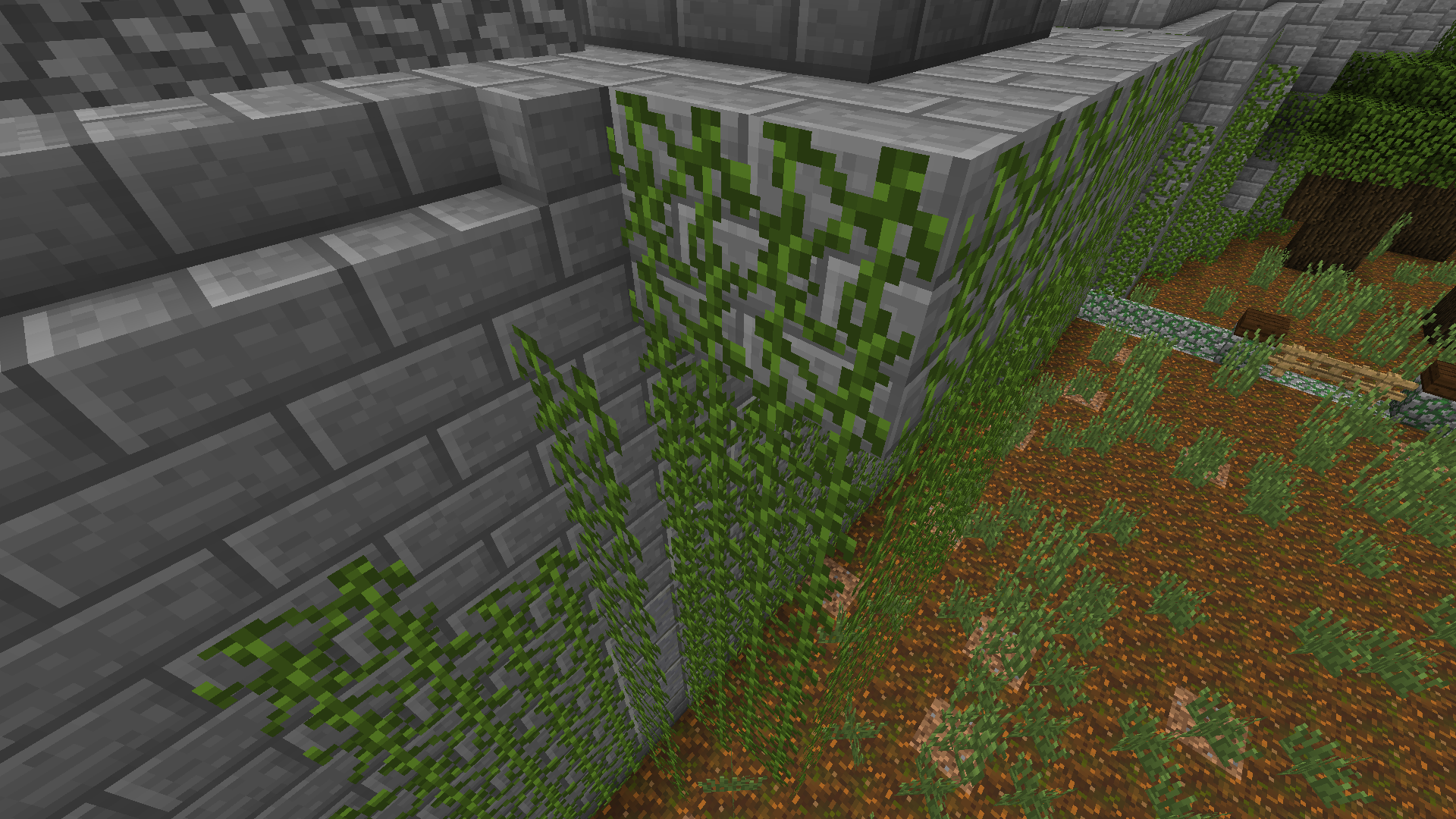


When cinematic camera mode is enabled, and I'm in motion and banking to the left or right with the mouse as I also move with the directional keys, the view hitches and jerks in an extremely obvious way. This only happens when the player is moving and turns the view while in cinematic mode.
The effect is more pronounced on Render Distance 16, but is also observable on Render Distance 2 and every setting in between. No other settings seem to have any affect on it whatsoever.
I believe this bug was present in previous versions (1.7 for sure) but it has become much more obvious, making use of cinematic mode unsuitable for videos if the POV is to be in motion as the camera pans and turns.
cinematic camerahitchescinematic camera jerky and not smooth
Columns of vines growing on the left-hand half of an inside corner will render out in the air when vines are already present on the right-hand side of the same inside corner. Previously, they overlapped, taking up the same block space, which looked just fine.
Probably has to do with boundary boxes on paintings and item-frames being changed so as not to overlap.Also present in 14w10a, but website insists that build doesn't exist.
Columns of vines growing on the left-hand half of an inside corner will render out in the air when vines are already present on the right-hand side of the same inside corner. Previously, they overlapped, taking up the same block space, which looked just fine.
Reverting to 14w8a
Also present in 14w10a, but website insists that build doesn't exist.
Columns of vines growing on the left-hand half of an inside corner will render out in the air when vines are already present on the right-hand side of the same inside corner.
Previously, they overlapped, taking up the same block space, which looked just fine.Reverting to 14w8a
Also present in 14w10a, but website insists that build doesn't exist.
Columns of vines growing on the left-hand half of an inside corner will render out in the air when vines are already present on the right-hand side of the same inside corner.
Reverting to 14w08a reverses the effect, causing vines to render normally.
Also present in 14w10a, but website insists that build doesn't exist.
Columns of vines growing on the left-hand half of an inside corner will render out in the air when vines are already present on the right-hand side of the same inside corner.
Reverting to 14w08a reverses the effect, causing vines to render normally.
Bug still present in 14w18a. Not fixed.
Also present in 14w10a, but website insists that build doesn't exist.
Columns of vines growing on the left-hand half of an inside corner will render outin theair when vines are already present on the right-hand side of the same inside corner.Reverting to 14w08a reverses the effect, causing vines to render normally.
Bug still present in 14w18a. Not fixed.
Columns of vines growing down into (not placed into) the left-hand half of an inside corner will render out in the air when vines are already present on the right-hand side of the same inside corner.
To reproduce:
In creative, place vines on both sides of an inside corner so that they will grow downwards and into the same block of air. Let some time pass. Observe that vines on the left side will pop out into the air instead of growing naturally. (See images.)
Reverting to 14w08a reverses the effect, causing vines to render normally.
Bug still present in 14w18a. Not fixed.
Columns of vines growing down into (not placed into) the left-hand half of an inside corner will render out in the air when vines are already present on the right-hand side of the same inside corner.
To reproduce:
In creative, place vines on both sides of an inside corner so that they will grow downwards and into the same block of air. Let some time pass. Observe that vines on the left side will pop out into the air instead of growing naturally. (See images.)
Reverting to 14w08a reverses the effect, causing vines to render normally.
Bug still present in 14w1
8a. Not fixed.Columns of vines growing down into (not placed into) the left-hand half of an inside corner will render out in the air when vines are already present on the right-hand side of the same inside corner.
To reproduce:
In creative, place vines on both sides of an inside corner so that they will grow downwards and into the same block of air. Let some time pass. Observe that vines on the left side will pop out into the air instead of growing naturally. (See images.)
Reverting to 14w08a reverses the effect, causing vines to render normally.
Bug still present in 14w19a. Not fixed.
Columns of vines growing down into (not placed into) the left-hand half of an inside corner will render out in the air when vines are already present on the right-hand side of the same inside corner.
To reproduce:
In creative, place vines on both sides of an inside corner so that they will grow downwards and into the same block of air. Let some time pass. Observe that vines on the left side will pop out into the air instead of growing naturally. (See images.)
Reverting to 14w08a reverses the effect, causing vines to render normally.
Bug still present in
14w19a. Not fixed.Columns of vines growing down into (not placed into) the left-hand half of an inside corner will render out in the air when vines are already present on the right-hand side of the same inside corner.
To reproduce:
In creative, place vines on both sides of an inside corner so that they will grow downwards and into the same block of air. Let some time pass. Observe that vines on the left side will pop out into the air instead of growing naturally. (See images.)
Reverting to 14w08a reverses the effect, causing vines to render normally.
Bug still present in latest snapshots. Not fixed.
Fixed with 14w24a!
EDIT: Now actually fixed with 14w25a!
Columns of vines growing down into (not placed into) the left-hand half of an inside corner will render out in the air when vines are already present on the right-hand side of the same inside corner.
To reproduce:
In creative, place vines on both sides of an inside corner so that they will grow downwards and into the same block of air. Let some time pass. Observe that vines on the left side will pop out into the air instead of growing naturally. (See images.)
Reverting to 14w08a reverses the effect, causing vines to render normally.
Bug still present in latest snapshots. Not fixed.
Yup, bug still present. Cinematic camera jerky when player character is in motion and turning.
Still present in 14w17a. Le sigh...
I'm sure they'll get to it eventually! It must not be very evident in natural terrain because vines are usually hanging off the edges of trees in swamps and jungles.
Yay!
Bug still present in 14w18a. Not fixed.
Yeah, it is. But that was listed as resolved, and it's not. So wasn't sure what to do other than repost.
Still present in 14w19a
Still present in 14w20a and 14w20b
Still present.
Fixed with 14w25a!
Noticed this today. Breaking texture overlays seem to have been replaced with crafting bench and perhaps a couple of the new underwater block textures.
This breaks the appearance of my world as well, as beacons play an important part in it's design. Beacon beams should be excluded from the visibility culling code.
Pretty recent. Occurred as a result of the visibility culling code that was put in to improve performance in 1.8.
Confirmed fixed in 1.8.1-pre1! Thanks!
Yes, this is still present in the latest snapshot. Toggling view bobbing off did not appear to have any discernible affect on the issue.
That's a good idea, Joseph. Don't know why I didn't think of that. That'll fix my issue easily, since I'm just making videos via two clients, and it's been a royal pain having to have a third client open and minimized to host.
I've tested 1.9, and the current pre-releases for 1.9.1. The issue is still present, but various rendering improvements have decreased it's severity. I think it's reached a point of being as good as it's going to get within the Java rendering environment.