 Konstantinos
- Tsotciri
- JIRAUSER580392
- Europe/Stockholm
- Yes
- No
 MCPE-111142
 MCL-20290
05-11-2021 (21;27;02).mkv
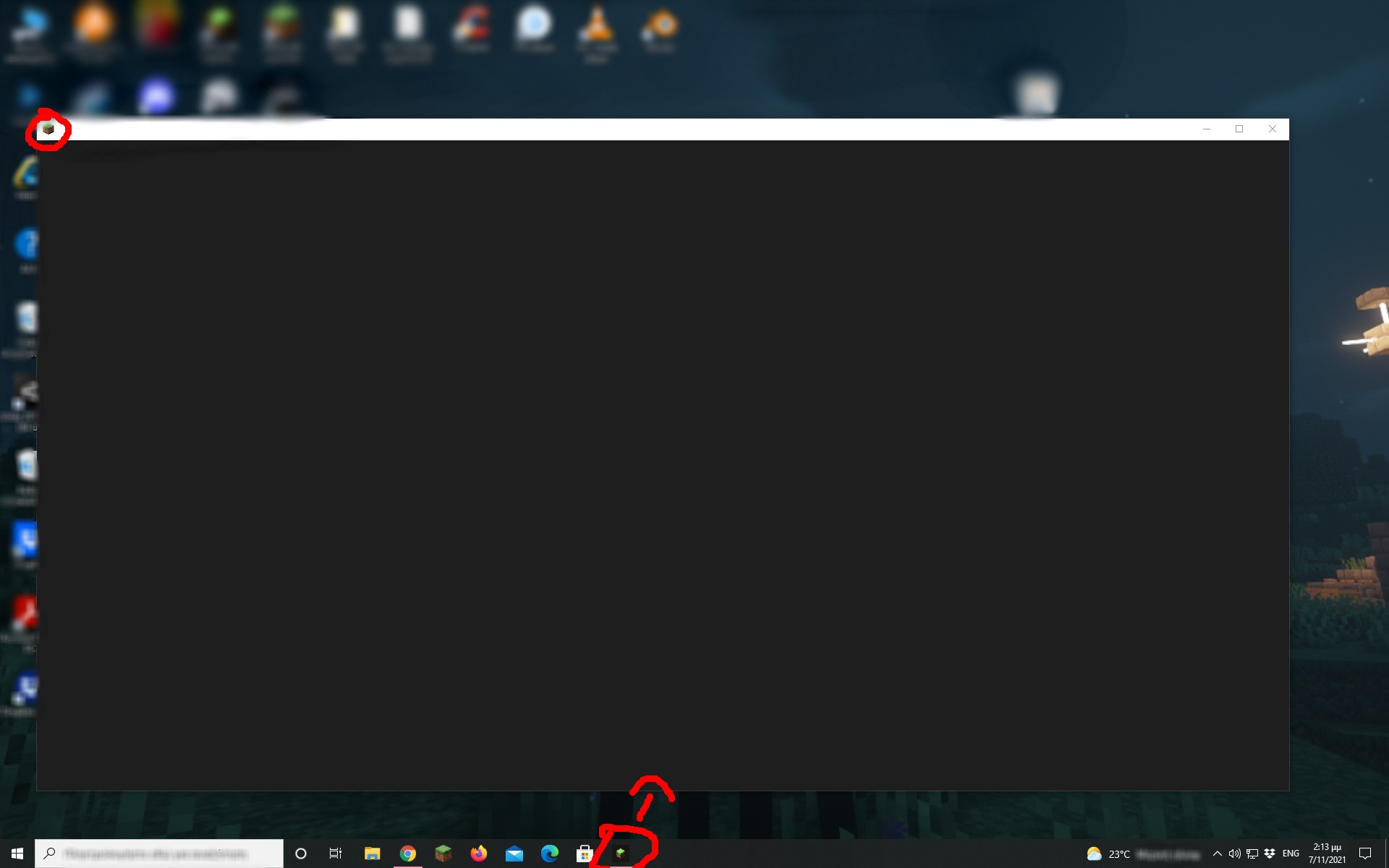
When i start Minecraft Launcher (for the microsoft store) a
greywindow opens with no title and it does nothing...I tried few things:
- Starting it from the microsoft store, taskbar and windows start
- Unintalling it and reinstalling it
- Downloading java 17
- Runing it as Administrator
Nothing of these worked. Also the old launcher works fine and the minecraft also opens normally.
When i start Minecraft Launcher (for the microsoft store) a black window(it supposed to be the launcher) opens with no title and it does nothing...
I tried few things:
- Starting it from the microsoft store, taskbar and windows start
- Unintalling it and reinstalling it
- Downloading java 17
- Runing it as Administrator
Nothing of these worked. Also the old launcher works fine and the minecraft also opens normally.
When i start Minecraft Launcher (for the microsoft store) a black window (it supposed to be the launcher) opens with no title and it does nothing...
I tried few things:
- Starting it from the microsoft store, taskbar and windows start
- Unintalling it and reinstalling it
- Downloading java 17
- Runing it as Administrator
Nothing of these worked. Also the old launcher works fine and the minecraft also opens normally.
When i start Minecraft Launcher (for the microsoft store) a black window (it supposed to be the launcher) opens with no title and it does nothing...
I tried few things:
- Starting it from the microsoft store, taskbar and windows start
- Unintalling it and reinstalling it
- Downloading java 17
- Runing it as Administrator
Nothing of these worked. Also the old launcher works fine and the minecraft also opens normally.
NOTE: I don't know how you can recreate this issue, the first time i installed, it was working normally with no problem but the other day it just does this.
When i
startMinecraft Launcher (for the microsoft store) a black window(it supposed to be the launcher)opens with no title and it does nothing...I tried few things:
- Starting it from the microsoft store, taskbar and windows start
- Unintalling it and reinstalling it
- Downloading java 17
- Runing it as Administrator
Nothing of these worked. Also the old launcher works fine and the minecraft also opens normally.
NOTE: I don't know how you can recreate this issue, the first time i installed, it was working normally with no problem but the other day it just does this.
When i try to open Minecraft Launcher (for the microsoft store) a black window opens with no title and it does nothing...
I tried few things:
- Starting it from the microsoft store, taskbar and windows start
- Unintalling it and reinstalling it
- Downloading java 17
- Runing it as Administrator
Nothing of these worked. Also the old launcher works fine and the minecraft also opens normally.
NOTE: I don't know how you can recreate this issue, the first time i installed, it was working normally with no problem but the other day it just does this.
UPDATE: It's fixed now, just out of curiosity i uninstalled and reinstalled it again (it tried it before but it didn't work) and it works fine now. I don't know what was happening before...
When i try to open Minecraft Launcher (for the microsoft store) a black window opens with no title and it does nothing...
I tried few things:
- Starting it from the microsoft store, taskbar and windows start
- Unintalling it and reinstalling it
- Downloading java 17
- Runing it as Administrator
Nothing of these worked. Also the old launcher works fine and the minecraft also opens normally.
NOTE: I don't know how you can recreate this issue, the first time i installed, it was working normally with no problem but the other day it just does this.
UPDATE: It's fixed now, just out of curiosity i uninstalled and reinstalled it again (i
ttried it before but it didn't work) and it works fine now. I don't know what was happening before...When i try to open Minecraft Launcher (for the microsoft store) a black window opens with no title and it does nothing...
I tried few things:
- Starting it from the microsoft store, taskbar and windows start
- Unintalling it and reinstalling it
- Downloading java 17
- Runing it as Administrator
Nothing of these worked. Also the old launcher works fine and the minecraft also opens normally.
NOTE: I don't know how you can recreate this issue, the first time i installed, it was working normally with no problem but the other day it just does this.
UPDATE: It's fixed now
, just out of curiosity i uninstalled and reinstalled it again (i tried it before but it didn't work) and it works fine now. I don't know what was happening before...When i try to open Minecraft Launcher (for the microsoft store) a black window opens with no title and it does nothing...
I tried few things:
- Starting it from the microsoft store, taskbar and windows start
- Unintalling it and reinstalling it
- Downloading java 17
- Runing it as Administrator
Nothing of these worked. Also the old launcher works fine and the minecraft also opens normally.
NOTE: I don't know how you can recreate this issue, the first time i installed, it was working normally with no problem but the other day it just does this.
UPDATE: It's kinda fixed now... Sometimes the launcher opens normaly some it just does not open...
I tried few things:
- Starting it from the microsoft store, taskbar and windows start
- Unintalling it and reinstalling it
- Downloading java 17
- Runing it as Administrator
Nothing of these worked. Also the old launcher works fine and the minecraft also opens normally.
NOTE: I don't know how you can recreate this issue, the first time i installed, it was working normally with no problem but the other day it just does this.
UPDATE: It's kinda fixed now... Sometimes the launcher opens normaly some it just does not open...
I tried few things:
- Starting it from the microsoft store, taskbar and windows start
- Unintalling it and reinstalling it
- Downloading java 17
- Runing it as Administrator
Nothing of these worked. Also the old launcher works fine and the minecraft also opens normally.
NOTE: I don't know how you can recreate this issue, the first time i installed, it was working normally with no problem but the other day it just does this.
UPDATE: I main disk (Where minecraft launcher was installed) failed and i got a new one, after installing the new launcher it works with no problem.
I tried few things:
- Starting it from the microsoft store, taskbar and windows start
- Unintalling it and reinstalling it
- Downloading java 17
- Runing it as Administrator
Nothing of these worked. Also the old launcher works fine and the minecraft also opens normally.
NOTE: I don't know how you can recreate this issue, the first time i installed, it was working normally with no problem but the other day it just does this.
UPDATE: I main disk (Where minecraft launcher was installed) failed and i got a new one, after installing the new launcher there it works with no problem.
I tried few things:
- Starting it from the microsoft store, taskbar and windows start
- Unintalling it and reinstalling it
- Downloading java 17
- Runing it as Administrator
Nothing of these worked. Also the old launcher works fine and the minecraft also opens normally.
NOTE: I don't know how you can recreate this issue, the first time i installed, it was working normally with no problem but the other day it just does this.
UPDATE: I main disk (Where minecraft launcher was installed) failed and i got a new one, after installing the new launcher there it works with no problem
.
I tried few things:
- Starting it from the microsoft store, taskbar and windows start
- Unintalling it and reinstalling it
- Downloading java 17
- Runing it as Administrator
Nothing of these worked. Also the old launcher works fine and the minecraft also opens normally.
NOTE: I don't know how you can recreate this issue, the first time i installed, it was working normally with no problem but the other day it just does this.
UPDATE: I main disk (Where minecraft launcher was installed) failed and i got a new one, after installing the new launcher there it works with no problems
I tried few things:
- Starting it from the microsoft store, taskbar and windows start
- Unintalling it and reinstalling it
- Downloading java 17
- Runing it as Administrator
Nothing of these worked. Also the old launcher works fine and the minecraft also opens normally.
NOTE: I don't know how you can recreate this issue, the first time i installed, it was working normally with no problem but the other day it just does this.
I have the same issue, i just logged in minecraft and the founder's cape disappeared i have the skin pack but the cape is not showing up whatever i do.
I am so confused, i just logged in minecraft today and the cape was back!
I have the exact same issue
UPDATE: I don't know what happen but i uninstalled and reinstalled the launcher again from the microsoft store and it just works fine now! Minecraft java and bedrock editions both start up normaly also.
I don't what's happeing but yesterday my launcher opened, then later in that day it did the grey screen again and then today it opend normaly again...