New launcher sits on grey screen and fails to load
UPDATE: I main disk (Where minecraft launcher was installed) failed and i got a new one, after installing the new launcher there it works with no problems
I tried few things:
- Starting it from the microsoft store, taskbar and windows start
- Unintalling it and reinstalling it
- Downloading java 17
- Runing it as Administrator
Nothing of these worked. Also the old launcher works fine and the minecraft also opens normally.
NOTE: I don't know how you can recreate this issue, the first time i installed, it was working normally with no problem but the other day it just does this.
Linked Issues
is cloned by1
is duplicated by46
 MC-241500Minecraft launcher won't load!DuplicateMC-241597Launcher won't load.DuplicateMC-241601Minecraft Launcher Doesn't OpenDuplicateMC-241746Minecraft launcher not loading at allDuplicateMC-243446my Minecraft launcher will not load.DuplicateMC-244327Minecraft launcherDuplicateMC-248565Minecraft launcher doesn't work.Duplicate
 MCL-20139I am stuck on a black screen in the new unified launcherDuplicateMCL-20180My launcher have open but it all grayDuplicateMCL-20181My minecraft launcher doesn't open, the launcher doesn't show me, the normal options, only a gray screen.DuplicateMCL-20257Minecraft launcher doesn't show anythingDuplicateMCL-20291Minecraft Launcher don't work.DuplicateMCL-20306Blank Screen when opening LauncherDuplicateMCL-20308Minecraft Launcher Is Blank On Windows 11DuplicateMCL-20345Black screen?DuplicateMCL-20389minecraft launcher does not allow you to enter because of the gray screen DuplicateMCL-20499Black screen on Unified Minecraft LauncherDuplicateMCL-20505The Microsoft Store Version of the launcher won't openDuplicateMCL-20531Minecraft Launcher just sits there at a black screen after being opened, does not load game.DuplicateMCL-20601that the launcher doesn't loadDuplicateMCL-20604New Minecraft Launcher don't startDuplicateMCL-20611My Minecraft Launcher won't load and it just gives me a black screen.DuplicateMCL-20612Minecraft For Windows 10 is a Black Screen.DuplicateMCL-20657Black ScreenDuplicateMCL-20658Windows 11 Minecraft Java Black Window upon opening MinecraftDuplicateMCL-20660The new Minecraft launcher keeps closingDuplicateMCL-20661My launcher is launching but nothing appears, just a black screenDuplicateMCL-20675Grey screen problemDuplicateMCL-20686Empty LauncherDuplicateMCL-20704New launcher goes grey when opening.DuplicateMCL-20777Minecraft Launcher (Windows 10, Java Edition) Grey Screen, Not LoadingDuplicateMCL-20781Gray screenDuplicateMCL-20825Minecraft Launcher got stuck when openingDuplicateMCL-20833LauncherAppBrowser.cpp(73) looping in logDuplicateMCL-20894New windows 10 Launcher not workingDuplicateMCL-20919My MC Launcher diedDuplicateMCL-20926My MC Launcher wont workDuplicateMCL-20938New Minecraft Launcher loads up with a grey pageDuplicateMCL-21082I have started the Minecraft Launcher, but it doesn't work.DuplicateMCL-21087The launcher will open, but won't loadDuplicateMCL-21091The launcher does not loadDuplicateMCL-21095yesterday work today dont DuplicateMCL-21117when i open minecraft launcher it shows a black window with no titleDuplicateMCL-21211launcher gray screenDuplicateMCL-21861When I open the minecraft installer it appears a gray screenDuplicateMCL-23297Minecraft Launcher often greys out after Minecraft crashes and it has to be restartedDuplicate
Attachments20




- Fixed
 Konstantinos
- 22
- 18
- Community Consensus
- 682603
- Minecraft Launcher
2.2.7265 (Windows) - 2.2.11696 (New Windows App)
2.2.7265 (Windows) 2.2.7264 (NEW Windows App) 2.2.7447 (Windows) 2.2.7450 (NEW Windows App) 2.2.7954 (New Windows App) 2.2.7957 (Windows) 2.2.8352 (New Windows App) 2.2.8542 (New Windows App) 2.2.8545 (Windows) 2.2.8907 (New Windows App) 2.2.10272 (New Windows App) 2.2.10322 (New Windows App) 2.2.11696 (New Windows App)- 2.2.12146 (New Windows App)
Created Issue:
Minecraft Launcher won't do anything
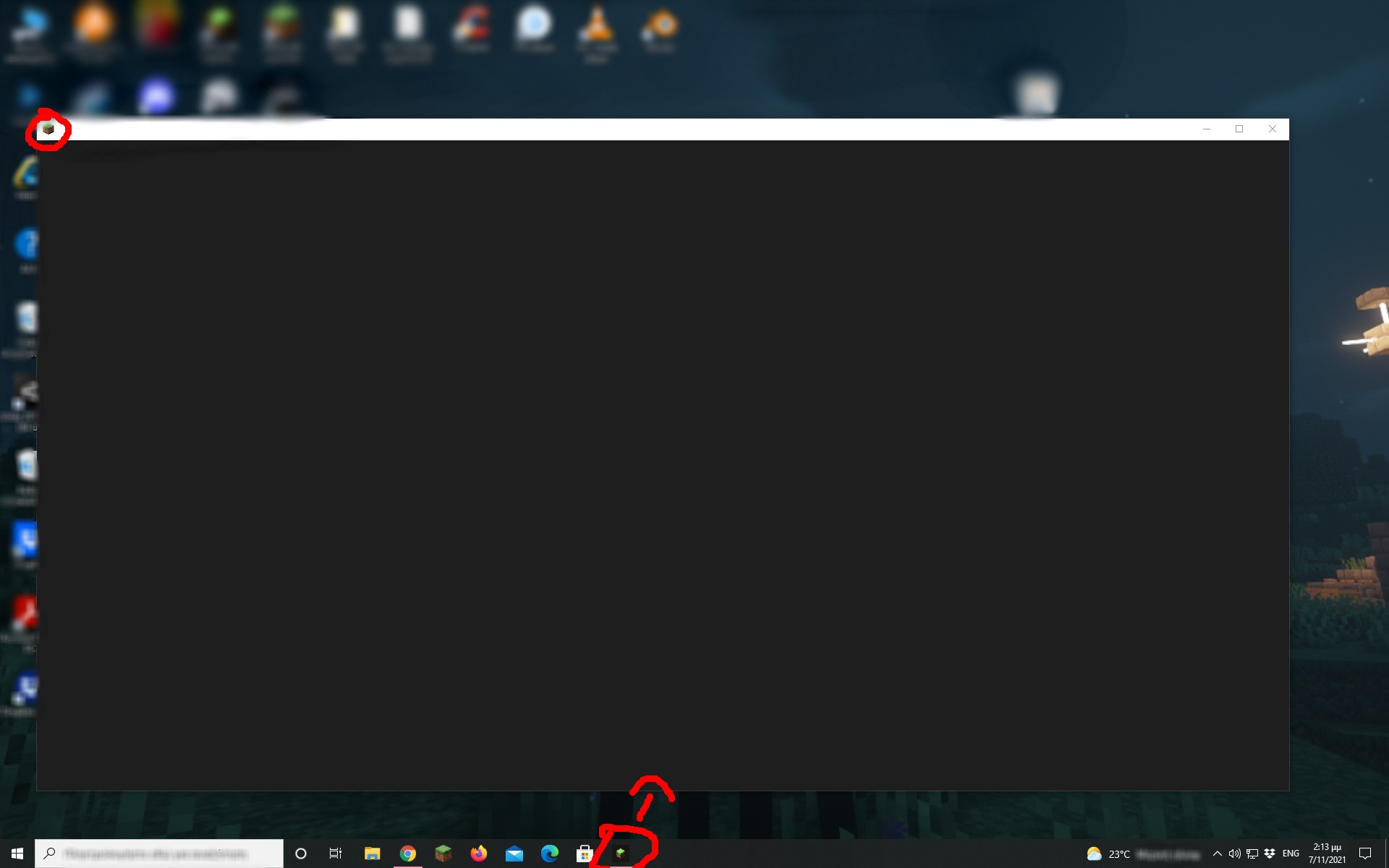
When i start Minecraft Launcher (for the microsoft store) a grey window opens with no title and it does nothing...
I tried few things:
- Starting it from the microsoft store, taskbar and windows start
- Unintalling it and reinstalling it
- Downloading java 17
- Runing it as Administrator
Nothing of these worked. Also the old launcher works fine and the minecraft also opens normally.
Linked Issues
Attachments2
05-11-2021 (21;27;02).mkv
When i start Minecraft Launcher (for the microsoft store) a
greywindow opens with no title and it does nothing...I tried few things:
- Starting it from the microsoft store, taskbar and windows start
- Unintalling it and reinstalling it
- Downloading java 17
- Runing it as Administrator
Nothing of these worked. Also the old launcher works fine and the minecraft also opens normally.
When i start Minecraft Launcher (for the microsoft store) a black window(it supposed to be the launcher) opens with no title and it does nothing...
I tried few things:
- Starting it from the microsoft store, taskbar and windows start
- Unintalling it and reinstalling it
- Downloading java 17
- Runing it as Administrator
Nothing of these worked. Also the old launcher works fine and the minecraft also opens normally.
When i start Minecraft Launcher (for the microsoft store) a black window (it supposed to be the launcher) opens with no title and it does nothing...
I tried few things:
- Starting it from the microsoft store, taskbar and windows start
- Unintalling it and reinstalling it
- Downloading java 17
- Runing it as Administrator
Nothing of these worked. Also the old launcher works fine and the minecraft also opens normally.
When i start Minecraft Launcher (for the microsoft store) a black window (it supposed to be the launcher) opens with no title and it does nothing...
I tried few things:
- Starting it from the microsoft store, taskbar and windows start
- Unintalling it and reinstalling it
- Downloading java 17
- Runing it as Administrator
Nothing of these worked. Also the old launcher works fine and the minecraft also opens normally.
NOTE: I don't know how you can recreate this issue, the first time i installed, it was working normally with no problem but the other day it just does this.
When i
startMinecraft Launcher (for the microsoft store) a black window(it supposed to be the launcher)opens with no title and it does nothing...I tried few things:
- Starting it from the microsoft store, taskbar and windows start
- Unintalling it and reinstalling it
- Downloading java 17
- Runing it as Administrator
Nothing of these worked. Also the old launcher works fine and the minecraft also opens normally.
NOTE: I don't know how you can recreate this issue, the first time i installed, it was working normally with no problem but the other day it just does this.
When i try to open Minecraft Launcher (for the microsoft store) a black window opens with no title and it does nothing...
I tried few things:
- Starting it from the microsoft store, taskbar and windows start
- Unintalling it and reinstalling it
- Downloading java 17
- Runing it as Administrator
Nothing of these worked. Also the old launcher works fine and the minecraft also opens normally.
NOTE: I don't know how you can recreate this issue, the first time i installed, it was working normally with no problem but the other day it just does this.
UPDATE: It's fixed now, just out of curiosity i uninstalled and reinstalled it again (it tried it before but it didn't work) and it works fine now. I don't know what was happening before...
When i try to open Minecraft Launcher (for the microsoft store) a black window opens with no title and it does nothing...
I tried few things:
- Starting it from the microsoft store, taskbar and windows start
- Unintalling it and reinstalling it
- Downloading java 17
- Runing it as Administrator
Nothing of these worked. Also the old launcher works fine and the minecraft also opens normally.
NOTE: I don't know how you can recreate this issue, the first time i installed, it was working normally with no problem but the other day it just does this.
UPDATE: It's fixed now, just out of curiosity i uninstalled and reinstalled it again (i
ttried it before but it didn't work) and it works fine now. I don't know what was happening before...When i try to open Minecraft Launcher (for the microsoft store) a black window opens with no title and it does nothing...
I tried few things:
- Starting it from the microsoft store, taskbar and windows start
- Unintalling it and reinstalling it
- Downloading java 17
- Runing it as Administrator
Nothing of these worked. Also the old launcher works fine and the minecraft also opens normally.
NOTE: I don't know how you can recreate this issue, the first time i installed, it was working normally with no problem but the other day it just does this.
![[Mod] Greymagic27](../../../data/avatars/users/92875.png)
Minecraft Launcher won't do anythingNew launcher sits on grey screen and fails to load
is duplicated by
![[Bot] Arisa](../../../data/avatars/users/43007.png)
is duplicated by
is duplicated by
is duplicated by
is duplicated by
is duplicated by
is duplicated by
is duplicated by
is duplicated by
UPDATE: It's fixed now
, just out of curiosity i uninstalled and reinstalled it again (i tried it before but it didn't work) and it works fine now. I don't know what was happening before...When i try to open Minecraft Launcher (for the microsoft store) a black window opens with no title and it does nothing...
I tried few things:
- Starting it from the microsoft store, taskbar and windows start
- Unintalling it and reinstalling it
- Downloading java 17
- Runing it as Administrator
Nothing of these worked. Also the old launcher works fine and the minecraft also opens normally.
NOTE: I don't know how you can recreate this issue, the first time i installed, it was working normally with no problem but the other day it just does this.
UPDATE: It's kinda fixed now... Sometimes the launcher opens normaly some it just does not open...
I tried few things:
- Starting it from the microsoft store, taskbar and windows start
- Unintalling it and reinstalling it
- Downloading java 17
- Runing it as Administrator
Nothing of these worked. Also the old launcher works fine and the minecraft also opens normally.
NOTE: I don't know how you can recreate this issue, the first time i installed, it was working normally with no problem but the other day it just does this.
![[Mod] violine1101](../../../data/avatars/users/92858.png)
is duplicated by
is duplicated by
is duplicated by
is duplicated by
is duplicated by
is duplicated by

the microsoft button doesnt work it wants to open the page but closes instantly and gives me in the top right a message that there is a mistake

is duplicated by
is duplicated by
is duplicated by
is duplicated by
![[Mod] Ezekiel (ezfe)](../../../data/assets/gravatar/ezekielelin.jpeg)
is duplicated by
is duplicated by
is duplicated by
is duplicated by
![[Mod] Michael Wobst](../../../data/avatars/users/37868.png)
is duplicated by

![[MCQA] Kinga Izdebska](../../../data/avatars/users/18949.svg)
is duplicated by
is duplicated by
is duplicated by
is duplicated by
is duplicated by
is duplicated by

![[Mod] OcelotOnesie](../../../data/avatars/users/43220.png)
UPDATE: It's kinda fixed now... Sometimes the launcher opens normaly some it just does not open...
I tried few things:
- Starting it from the microsoft store, taskbar and windows start
- Unintalling it and reinstalling it
- Downloading java 17
- Runing it as Administrator
Nothing of these worked. Also the old launcher works fine and the minecraft also opens normally.
NOTE: I don't know how you can recreate this issue, the first time i installed, it was working normally with no problem but the other day it just does this.
UPDATE: I main disk (Where minecraft launcher was installed) failed and i got a new one, after installing the new launcher it works with no problem.
I tried few things:
- Starting it from the microsoft store, taskbar and windows start
- Unintalling it and reinstalling it
- Downloading java 17
- Runing it as Administrator
Nothing of these worked. Also the old launcher works fine and the minecraft also opens normally.
NOTE: I don't know how you can recreate this issue, the first time i installed, it was working normally with no problem but the other day it just does this.
UPDATE: I main disk (Where minecraft launcher was installed) failed and i got a new one, after installing the new launcher there it works with no problem.
I tried few things:
- Starting it from the microsoft store, taskbar and windows start
- Unintalling it and reinstalling it
- Downloading java 17
- Runing it as Administrator
Nothing of these worked. Also the old launcher works fine and the minecraft also opens normally.
NOTE: I don't know how you can recreate this issue, the first time i installed, it was working normally with no problem but the other day it just does this.
UPDATE: I main disk (Where minecraft launcher was installed) failed and i got a new one, after installing the new launcher there it works with no problem
.
I tried few things:
- Starting it from the microsoft store, taskbar and windows start
- Unintalling it and reinstalling it
- Downloading java 17
- Runing it as Administrator
Nothing of these worked. Also the old launcher works fine and the minecraft also opens normally.
NOTE: I don't know how you can recreate this issue, the first time i installed, it was working normally with no problem but the other day it just does this.
UPDATE: I main disk (Where minecraft launcher was installed) failed and i got a new one, after installing the new launcher there it works with no problems
I tried few things:
- Starting it from the microsoft store, taskbar and windows start
- Unintalling it and reinstalling it
- Downloading java 17
- Runing it as Administrator
Nothing of these worked. Also the old launcher works fine and the minecraft also opens normally.
NOTE: I don't know how you can recreate this issue, the first time i installed, it was working normally with no problem but the other day it just does this.
is duplicated by
is cloned by
is duplicated by
is cloned by
is cloned by
is duplicated by
is duplicated by
is duplicated by
Thank you for your report!
We're tracking this issue in MCL-20290, so this ticket is being resolved and linked as a duplicate.
If you would like to add a vote and any extra information to the main ticket it would be appreciated.
If you haven't already, you might like to make use of the search feature to see if the issue has already been mentioned.
Quick Links:
📓 Bug Tracker Guidelines – 💬 Community Support – 📧 Mojang Support
📓 Project Summary – ✍️ Feedback and Suggestions – 📖 Game Wiki
– I am a bot. This action was performed automatically! The ticket was resolved by one of our moderators, and I left this message to give more information to you.

Duplicates MCL-20290
Duplicates MCL-20290
Duplicates MCL-20290
Duplicates MCL-20290
Duplicates MCL-20290
Duplicates MCL-20290
Thank you for your report!
We're tracking this issue in MCL-20290, so this ticket is being resolved and linked as a duplicate.
If you would like to add a vote and any extra information to the main ticket it would be appreciated.
If you haven't already, you might like to make use of the search feature to see if the issue has already been mentioned.
Quick Links:
📓 Bug Tracker Guidelines – 💬 Community Support – 📧 Mojang Support
📓 Project Summary – ✍️ Feedback and Suggestions – 📖 Game Wiki
– I am a bot. This action was performed automatically! The ticket was resolved by one of our moderators, and I left this message to give more information to you.
Thank you for your report!
We're tracking this issue in MCL-20290, so this ticket is being resolved and linked as a duplicate.
If you would like to add a vote and any extra information to the main ticket it would be appreciated.
If you haven't already, you might like to make use of the search feature to see if the issue has already been mentioned.
Quick Links:
📓 Bug Tracker Guidelines – 💬 Community Support – 📧 Mojang Support
📓 Project Summary – ✍️ Feedback and Suggestions – 📖 Game Wiki
– I am a bot. This action was performed automatically! The ticket was resolved by one of our moderators, and I left this message to give more information to you.
Thank you for your report!
We're resolving and linking this ticket forward as a duplicate of MCL-20290, as that ticket contains more detailed information and/or has already been triaged by Mojang.
If you would like to add a vote and any extra information to the main ticket it would be appreciated.
Quick Links:
📓 Bug Tracker Guidelines – 💬 Community Support – 📧 Mojang Support
📓 Project Summary – ✍️ Feedback and Suggestions – 📖 Game Wiki
– I am a bot. This action was performed automatically! The ticket was resolved by one of our moderators, and I left this message to give more information to you.
Thank you for your report!
We're resolving and linking this ticket forward as a duplicate of MCL-20290, as that ticket contains more detailed information and/or has already been triaged by Mojang.
If you would like to add a vote and any extra information to the main ticket it would be appreciated.
Quick Links:
📓 Bug Tracker Guidelines – 💬 Community Support – 📧 Mojang Support
📓 Project Summary – ✍️ Feedback and Suggestions – 📖 Game Wiki
– I am a bot. This action was performed automatically! The ticket was resolved by one of our moderators, and I left this message to give more information to you.
Thank you for your report!
We're resolving and linking this ticket forward as a duplicate of MCL-20290, as that ticket contains more detailed information and/or has already been triaged by Mojang.
If you would like to add a vote and any extra information to the main ticket it would be appreciated.
Quick Links:
📓 Bug Tracker Guidelines – 💬 Community Support – 📧 Mojang Support
📓 Project Summary – ✍️ Feedback and Suggestions – 📖 Game Wiki
– I am a bot. This action was performed automatically! The ticket was resolved by one of our moderators, and I left this message to give more information to you.
Thank you for your report!
We're resolving and linking this ticket forward as a duplicate of MCL-20290, as that ticket contains more detailed information and/or has already been triaged by Mojang.
If you would like to add a vote and any extra information to the main ticket it would be appreciated.
Quick Links:
📓 Bug Tracker Guidelines – 💬 Community Support – 📧 Mojang Support
📓 Project Summary – ✍️ Feedback and Suggestions – 📖 Game Wiki
– I am a bot. This action was performed automatically! The ticket was resolved by one of our moderators, and I left this message to give more information to you.
Thank you for your report!
We're tracking this issue in MCL-20290, so this ticket is being resolved and linked as a duplicate.
If you would like to add a vote and any extra information to the main ticket it would be appreciated.
If you haven't already, you might like to make use of the search feature to see if the issue has already been mentioned.
Quick Links:
📓 Bug Tracker Guidelines – 💬 Community Support – 📧 Mojang Support
📓 Project Summary – ✍️ Feedback and Suggestions – 📖 Game Wiki
– I am a bot. This action was performed automatically! The ticket was resolved by one of our moderators, and I left this message to give more information to you.
Does MCL-20290 describe your issue?
If not, then your report does not contain enough detail to clearly understand the problem.
Please clarify the Description section above, using this format:
Steps to Reproduce:
1. (list every step exactly, so someone else can reproduce the issue, and try following your list to make sure you can still reproduce the issue yourself)
2.
3.
Observed Results:
(briefly describe what actually happens, including exact message(s) shown)
Expected Results:
(briefly describe what should happen)
(add screenshots or video to help explain the issue)
This report has been temporarily closed as Awaiting Response. It will automatically reopen when you add information. Please follow the format shown and include all sections (steps, observed, expected). Reports that do not contain all of the requested information and complete steps to reproduce the issue may be closed as Incomplete. For more information please read the Bug Tracker Guidelines.
Thank you for your report!
We're tracking this issue in MCL-20290, so this ticket is being resolved and linked as a duplicate.
If you would like to add a vote and any extra information to the main ticket it would be appreciated.
If you haven't already, you might like to make use of the search feature to see if the issue has already been mentioned.
Quick Links:
📓 Bug Tracker Guidelines – 💬 Community Support – 📧 Mojang Support
📓 Project Summary – ✍️ Feedback and Suggestions – 📖 Game Wiki
– I am a bot. This action was performed automatically! The ticket was resolved by one of our moderators, and I left this message to give more information to you.
Thank you for your report!
We're tracking this issue in MCL-20290, so this ticket is being resolved and linked as a duplicate.
If you would like to add a vote and any extra information to the main ticket it would be appreciated.
If you haven't already, you might like to make use of the search feature to see if the issue has already been mentioned.
Quick Links:
📓 Bug Tracker Guidelines – 💬 Community Support – 📧 Mojang Support
📓 Project Summary – ✍️ Feedback and Suggestions – 📖 Game Wiki
– I am a bot. This action was performed automatically! The ticket was resolved by one of our moderators, and I left this message to give more information to you.
Duplicates MCL-20290
Thank you for your report!
We're tracking this issue in MCL-20290, so this ticket is being resolved and linked as a duplicate.
If you would like to add a vote and any extra information to the main ticket it would be appreciated.
If you haven't already, you might like to make use of the search feature to see if the issue has already been mentioned.
Quick Links:
📓 Bug Tracker Guidelines – 💬 Community Support – 📧 Mojang Support
📓 Project Summary – ✍️ Feedback and Suggestions – 📖 Game Wiki
– I am a bot. This action was performed automatically! The ticket was resolved by one of our moderators, and I left this message to give more information to you.
Duplicates MCL-20290
Does MCL-20290 describe your issue? If not please list the exact messages shown and/or attach screenshots showing what happens.
Thank you for your report!
We're tracking this issue in MCL-20290, so this ticket is being resolved and linked as a duplicate.
If you would like to add a vote and any extra information to the main ticket it would be appreciated.
If you haven't already, you might like to make use of the search feature to see if the issue has already been mentioned.
Quick Links:
📓 Bug Tracker Guidelines – 💬 Community Support – 📧 Mojang Support
📓 Project Summary – ✍️ Feedback and Suggestions – 📖 Game Wiki
– I am a bot. This action was performed automatically! The ticket was resolved by one of our moderators, and I left this message to give more information to you.
![[Mod] Avoma](../../../data/avatars/users/86198.png)
Duplicate of MCL-20290
Thank you for your report!
We're tracking this issue in MCL-20290, so this ticket is being resolved and linked as a duplicate.
That ticket has already been resolved as invalid, which means this is a technical support issue. Please take a look at the parent ticket (MCL-20290) and see if a solution is provided there.
If you need additional help to fix this problem, please contact Community Support and refer to this ticket (e.g. "I have reported this issue on Mojira as MC-XYZ.").
If you haven't already, you might like to make use of the search feature to see if the issue has already been mentioned.
Quick Links:
📓 Bug Tracker Guidelines – 💬 Community Support – 📧 Mojang Support
📓 Project Summary – ✍️ Feedback and Suggestions – 📖 Game Wiki
Duplicate of MCL-20290
Thank you for your report!
We're tracking this issue in MCL-20290, so this ticket is being resolved and linked as a duplicate.
If you would like to add a vote and any extra information to the main ticket it would be appreciated.
If you haven't already, you might like to make use of the search feature to see if the issue has already been mentioned.
Quick Links:
📓 Bug Tracker Guidelines – 💬 Community Support – 📧 Mojang Support
📓 Project Summary – ✍️ Feedback and Suggestions – 📖 Game Wiki
– I am a bot. This action was performed automatically! The ticket was resolved by one of our moderators, and I left this message to give more information to you.
Thank you for your report!
We're tracking this issue in MCL-20290, so this ticket is being resolved and linked as a duplicate.
If you would like to add a vote and any extra information to the main ticket it would be appreciated.
If you haven't already, you might like to make use of the search feature to see if the issue has already been mentioned.
Quick Links:
📓 Bug Tracker Guidelines – 💬 Community Support – 📧 Mojang Support
📓 Project Summary – ✍️ Feedback and Suggestions – 📖 Game Wiki
– I am a bot. This action was performed automatically! The ticket was resolved by one of our moderators, and I left this message to give more information to you.
Thank you for your report!
We're tracking this issue in MCL-20290, so this ticket is being resolved and linked as a duplicate.
If you would like to add a vote and any extra information to the main ticket it would be appreciated.
If you haven't already, you might like to make use of the search feature to see if the issue has already been mentioned.
Quick Links:
📓 Bug Tracker Guidelines – 💬 Community Support – 📧 Mojang Support
📓 Project Summary – ✍️ Feedback and Suggestions – 📖 Game Wiki
– I am a bot. This action was performed automatically! The ticket was resolved by one of our moderators, and I left this message to give more information to you.
Thank you for your report!
We're tracking this issue in MCL-20290, so this ticket is being resolved and linked as a duplicate.
If you would like to add a vote and any extra information to the main ticket it would be appreciated.
If you haven't already, you might like to make use of the search feature to see if the issue has already been mentioned.
Quick Links:
📓 Bug Tracker Guidelines – 💬 Community Support – 📧 Mojang Support
📓 Project Summary – ✍️ Feedback and Suggestions – 📖 Game Wiki
– I am a bot. This action was performed automatically! The ticket was resolved by one of our moderators, and I left this message to give more information to you.
Thank you for your report!
We're tracking this issue in MCL-20290, so this ticket is being resolved and linked as a duplicate.
If you would like to add a vote and any extra information to the main ticket it would be appreciated.
If you haven't already, you might like to make use of the search feature to see if the issue has already been mentioned.
Quick Links:
📓 Bug Tracker Guidelines – 💬 Community Support – 📧 Mojang Support
📓 Project Summary – ✍️ Feedback and Suggestions – 📖 Game Wiki
– I am a bot. This action was performed automatically! The ticket was resolved by one of our moderators, and I left this message to give more information to you.
Thank you for your report!
We're tracking this issue in MCL-20290, so this ticket is being resolved and linked as a duplicate.
If you would like to add a vote and any extra information to the main ticket it would be appreciated.
If you haven't already, you might like to make use of the search feature to see if the issue has already been mentioned.
Quick Links:
📓 Bug Tracker Guidelines – 💬 Community Support – 📧 Mojang Support
📓 Project Summary – ✍️ Feedback and Suggestions – 📖 Game Wiki
– I am a bot. This action was performed automatically! The ticket was resolved by one of our moderators, and I left this message to give more information to you.
Thank you for your report!
We're tracking this issue in MCL-20290, so this ticket is being resolved and linked as a duplicate.
If you would like to add a vote and any extra information to the main ticket it would be appreciated.
If you haven't already, you might like to make use of the search feature to see if the issue has already been mentioned.
Quick Links:
📓 Bug Tracker Guidelines – 💬 Community Support – 📧 Mojang Support
📓 Project Summary – ✍️ Feedback and Suggestions – 📖 Game Wiki
Duplicates MCL-20290
Duplicates MCL-20290
Thank you for your report!
We're tracking this issue in MCL-20290, so this ticket is being resolved and linked as a duplicate.
If you would like to add a vote and any extra information to the main ticket it would be appreciated.
If you haven't already, you might like to make use of the search feature to see if the issue has already been mentioned.
Quick Links:
📓 Bug Tracker Guidelines – 💬 Community Support – 📧 Mojang Support
📓 Project Summary – ✍️ Feedback and Suggestions – 📖 Game Wiki
– I am a bot. This action was performed automatically! The ticket was resolved by one of our moderators, and I left this message to give more information to you.
Thank you for your report!
We're tracking this issue in MCL-20290, so this ticket is being resolved and linked as a duplicate.
If you would like to add a vote and any extra information to the main ticket it would be appreciated.
If you haven't already, you might like to make use of the search feature to see if the issue has already been mentioned.
Quick Links:
📓 Bug Tracker Guidelines – 💬 Community Support – 📧 Mojang Support
📓 Project Summary – ✍️ Feedback and Suggestions – 📖 Game Wiki
– I am a bot. This action was performed automatically! The ticket was resolved by one of our moderators, and I left this message to give more information to you.
Resolving as a duplicate of MCL-20290 then 
Thank you for your report!
We're tracking this issue in MCL-20290, so this ticket is being resolved and linked as a duplicate.
If you would like to add a vote and any extra information to the main ticket it would be appreciated.
If you haven't already, you might like to make use of the search feature to see if the issue has already been mentioned.
Quick Links:
📓 Bug Tracker Guidelines – 💬 Community Support – 📧 Mojang Support
📓 Project Summary – ✍️ Feedback and Suggestions – 📖 Game Wiki
– I am a bot. This action was performed automatically! The ticket was resolved by one of our moderators, and I left this message to give more information to you.
Duplicates MCL-20290
Thank you for your report!
We're tracking this issue in MCL-20290, so this ticket is being resolved and linked as a duplicate.
If you would like to add a vote and any extra information to the main ticket it would be appreciated.
If you haven't already, you might like to make use of the search feature to see if the issue has already been mentioned.
Quick Links:
📓 Bug Tracker Guidelines – 💬 Community Support – 📧 Mojang Support
📓 Project Summary – ✍️ Feedback and Suggestions – 📖 Game Wiki
– I am a bot. This action was performed automatically! The ticket was resolved by one of our moderators, and I left this message to give more information to you.

Thank you for your report!
We're tracking this issue in MCL-20290, so this ticket is being resolved and linked as a duplicate.
If you would like to add a vote and any extra information to the main ticket it would be appreciated.
If you haven't already, you might like to make use of the search feature to see if the issue has already been mentioned.
Quick Links:
📓 Bug Tracker Guidelines – 💬 Community Support – 📧 Mojang Support
📓 Project Summary – ✍️ Feedback and Suggestions – 📖 Game Wiki
Duplicates MCL-20290
Duplicates MCL-20290
Thank you for your report!
We're tracking this issue in MCL-20290, so this ticket is being resolved and linked as a duplicate.
If you would like to add a vote and any extra information to the main ticket it would be appreciated.
If you haven't already, you might like to make use of the search feature to see if the issue has already been mentioned.
Quick Links:
📓 Bug Tracker Guidelines – 💬 Community Support – 📧 Mojang Support
📓 Project Summary – ✍️ Feedback and Suggestions – 📖 Game Wiki
– I am a bot. This action was performed automatically! The ticket was resolved by one of our moderators, and I left this message to give more information to you.
Thank you for your report!
We're tracking this issue in MCL-20290, so this ticket is being resolved and linked as a duplicate.
If you would like to add a vote and any extra information to the main ticket it would be appreciated.
If you haven't already, you might like to make use of the search feature to see if the issue has already been mentioned.
Quick Links:
📓 Bug Tracker Guidelines – 💬 Community Support – 📧 Mojang Support
📓 Project Summary – ✍️ Feedback and Suggestions – 📖 Game Wiki
– I am a bot. This action was performed automatically! The ticket was resolved by one of our moderators, and I left this message to give more information to you.
Duplicates MCL-20290
Duplicates MCL-20290 (blank launcher)
Duplicates MCL-20290
Thank you for your report!
We're tracking this issue in MCL-20290, so this ticket is being resolved and linked as a duplicate.
If you would like to add a vote and any extra information to the main ticket it would be appreciated.
If you haven't already, you might like to make use of the search feature to see if the issue has already been mentioned.
Quick Links:
📓 Bug Tracker Guidelines – 💬 Community Support – 📧 Mojang Support
📓 Project Summary – ✍️ Feedback and Suggestions – 📖 Game Wiki
– I am a bot. This action was performed automatically! The ticket was resolved by one of our moderators, and I left this message to give more information to you.
Thank you for your report!
We're tracking this issue in MCL-20290, so this ticket is being resolved and linked as a duplicate.
If you would like to add a vote and any extra information to the main ticket it would be appreciated.
If you haven't already, you might like to make use of the search feature to see if the issue has already been mentioned.
Quick Links:
📓 Bug Tracker Guidelines – 💬 Community Support – 📧 Mojang Support
📓 Project Summary – ✍️ Feedback and Suggestions – 📖 Game Wiki
– I am a bot. This action was performed automatically! The ticket was resolved by one of our moderators, and I left this message to give more information to you.
Duplicates MCL-20290 Try the prior Windows 7/8 launcher.
Thank you for your report!
We're tracking this issue in MCL-20290, so this ticket is being resolved and linked as a duplicate.
If you would like to add a vote and any extra information to the main ticket it would be appreciated.
If you haven't already, you might like to make use of the search feature to see if the issue has already been mentioned.
Quick Links:
📓 Bug Tracker Guidelines – 💬 Community Support – 📧 Mojang Support
📓 Project Summary – ✍️ Feedback and Suggestions – 📖 Game Wiki
Duplicates MCL-20290
Thank you for your report!
We're tracking this issue in MCL-20290, so this ticket is being resolved and linked as a duplicate.
If you would like to add a vote and any extra information to the main ticket it would be appreciated.
If you haven't already, you might like to make use of the search feature to see if the issue has already been mentioned.
Quick Links:
📓 Bug Tracker Guidelines – 💬 Community Support – 📧 Mojang Support
📓 Project Summary – ✍️ Feedback and Suggestions – 📖 Game Wiki
– I am a bot. This action was performed automatically! The ticket was resolved by one of our moderators, and I left this message to give more information to you.
Duplicates MCL-20290
Thank you for your report!
We're tracking this issue in MCL-20290, so this ticket is being resolved and linked as a duplicate.
If you would like to add a vote and any extra information to the main ticket it would be appreciated.
If you haven't already, you might like to make use of the search feature to see if the issue has already been mentioned.
Quick Links:
📓 Bug Tracker Guidelines – 💬 Community Support – 📧 Mojang Support
📓 Project Summary – ✍️ Feedback and Suggestions – 📖 Game Wiki
– I am a bot. This action was performed automatically! The ticket was resolved by one of our moderators, and I left this message to give more information to you.
Thank you for your report!
We're tracking this issue in MCL-20290, so this ticket is being resolved and linked as a duplicate.
If you would like to add a vote and any extra information to the main ticket it would be appreciated.
If you haven't already, you might like to make use of the search feature to see if the issue has already been mentioned.
Quick Links:
📓 Bug Tracker Guidelines – 💬 Community Support – 📧 Mojang Support
📓 Project Summary – ✍️ Feedback and Suggestions – 📖 Game Wiki
– I am a bot. This action was performed automatically! The ticket was resolved by one of our moderators, and I left this message to give more information to you.
Thank you for your report!
We're tracking this issue in MCL-20290, so this ticket is being resolved and linked as a duplicate.
If you would like to add a vote and any extra information to the main ticket it would be appreciated.
If you haven't already, you might like to make use of the search feature to see if the issue has already been mentioned.
Quick Links:
📓 Bug Tracker Guidelines – 💬 Community Support – 📧 Mojang Support
📓 Project Summary – ✍️ Feedback and Suggestions – 📖 Game Wiki
– I am a bot. This action was performed automatically! The ticket was resolved by one of our moderators, and I left this message to give more information to you.
Thank you for your report!
We're tracking this issue in MCL-20290, so this ticket is being resolved and linked as a duplicate.
If you would like to add a vote and any extra information to the main ticket it would be appreciated.
If you haven't already, you might like to make use of the search feature to see if the issue has already been mentioned.
Quick Links:
📓 Bug Tracker Guidelines – 💬 Community Support – 📧 Mojang Support
📓 Project Summary – ✍️ Feedback and Suggestions – 📖 Game Wiki
Thank you for your report!
We're tracking this issue in MCL-20290, so this ticket is being resolved and linked as a duplicate.
If you would like to add a vote and any extra information to the main ticket it would be appreciated.
If you haven't already, you might like to make use of the search feature to see if the issue has already been mentioned.
Quick Links:
📓 Bug Tracker Guidelines – 💬 Community Support – 📧 Mojang Support
📓 Project Summary – ✍️ Feedback and Suggestions – 📖 Game Wiki
Thank you for your report!
We're tracking this issue in MCL-20290, so this ticket is being resolved and linked as a duplicate.
If you would like to add a vote and any extra information to the main ticket it would be appreciated.
If you haven't already, you might like to make use of the search feature to see if the issue has already been mentioned.
Quick Links:
📓 Bug Tracker Guidelines – 💬 Community Support – 📧 Mojang Support
📓 Project Summary – ✍️ Feedback and Suggestions – 📖 Game Wiki
Thank you for your report!
We're tracking this issue in MCL-20290, so this ticket is being resolved and linked as a duplicate.
If you would like to add a vote and any extra information to the main ticket it would be appreciated.
If you haven't already, you might like to make use of the search feature to see if the issue has already been mentioned.
Quick Links:
📓 Bug Tracker Guidelines – 💬 Community Support – 📧 Mojang Support
📓 Project Summary – ✍️ Feedback and Suggestions – 📖 Game Wiki
Thank you for your report!
We're tracking this issue in MCL-20290, so this ticket is being resolved and linked as a duplicate.
If you would like to add a vote and any extra information to the main ticket it would be appreciated.
If you haven't already, you might like to make use of the search feature to see if the issue has already been mentioned.
Quick Links:
📓 Bug Tracker Guidelines – 💬 Community Support – 📧 Mojang Support
📓 Project Summary – ✍️ Feedback and Suggestions – 📖 Game Wiki
Thank you for your report!
We're tracking this issue in MCL-20290, so this ticket is being resolved and linked as a duplicate.
If you would like to add a vote and any extra information to the main ticket it would be appreciated.
If you haven't already, you might like to make use of the search feature to see if the issue has already been mentioned.
Quick Links:
📓 Bug Tracker Guidelines – 💬 Community Support – 📧 Mojang Support
📓 Project Summary – ✍️ Feedback and Suggestions – 📖 Game Wiki
Thank you for your report!
We're tracking this issue in MCL-20290, so this ticket is being resolved and linked as a duplicate.
If you would like to add a vote and any extra information to the main ticket it would be appreciated.
If you haven't already, you might like to make use of the search feature to see if the issue has already been mentioned.
Quick Links:
📓 Bug Tracker Guidelines – 💬 Community Support – 📧 Mojang Support
📓 Project Summary – ✍️ Feedback and Suggestions – 📖 Game Wiki
Clones MCL-20290 
Thank you for your report!
We're tracking this issue in MCL-20290, so this ticket is being resolved and linked as a duplicate.
If you would like to add a vote and any extra information to the main ticket it would be appreciated.
If you haven't already, you might like to make use of the search feature to see if the issue has already been mentioned.
Quick Links:
📓 Bug Tracker Guidelines – 💬 Community Support – 📧 Mojang Support
📓 Project Summary – ✍️ Feedback and Suggestions – 📖 Game Wiki
Thank you for your report!
We're tracking this issue in MCL-20290, so this ticket is being resolved and linked as a duplicate.
That ticket has already been resolved as Fixed. Please check the Fix Version/s field in that ticket to see in which version this behavior was or will be fixed.
If you haven't already, you might like to make use of the search feature to see if the issue has already been mentioned.
Quick Links:
📓 Bug Tracker Guidelines – 💬 Community Support – 📧 Mojang Support
📓 Project Summary – ✍️ Feedback and Suggestions – 📖 Game Wiki
– I am a bot. This action was performed automatically! The ticket was resolved by one of our moderators, and I left this message to give more information to you.
Thank you for your report!
We're tracking this issue in MCL-20290, so this ticket is being resolved and linked as a duplicate.
If you would like to add a vote and any extra information to the main ticket it would be appreciated.
If you haven't already, you might like to make use of the search feature to see if the issue has already been mentioned.
Quick Links:
📓 Bug Tracker Guidelines – 💬 Community Support – 📧 Mojang Support
📓 Project Summary – ✍️ Feedback and Suggestions – 📖 Game Wiki
– I am a bot. This action was performed automatically! The ticket was resolved by one of our moderators, and I left this message to give more information to you.
this could be because of
MCL-18306UPDATE: I don't know what happen but i uninstalled and reinstalled the launcher again from the microsoft store and it just works fine now! Minecraft java and bedrock editions both start up normaly also.
For the OPs of the reports I've resolved into this one:
Please try reinstalling the launcher and seeing if this solves your issue. Please also make sure you're running the latest video drivers as this may have an impact on the issue.
I tried reinstalling the launcher many times but it didn't help the problem
They tag it as 'resolved' but all the 'resolutions' i've seen don't explain how it's fixed. I've reinstalled it already after my issue was 'resolved' and I'm still having the same problem.
Khamille Tong your report appears as resolved as we merged into this report to track this bug in one central place.
nice but my launcher still doesn't open
Later in the day, I restarted my pc then the launcher opened fine... So something must have happened...
I'm experiencing this issue, but I have noticed that I'm getting this in my launcher_cef_log.txt file in the c:\users[myuser]\AppData\Roaming\.minecraft folder:
[1115/145612.888:WARNING:gpu_process_host.cc(1256)] The GPU process has crashed 1 time(s)
[1115/145612.892:WARNING:gpu_process_host.cc(1256)] The GPU process has crashed 2 time(s)
[1115/145612.895:WARNING:gpu_process_host.cc(1256)] The GPU process has crashed 3 time(s)
[1115/145612.897:WARNING:gpu_process_host.cc(1256)] The GPU process has crashed 4 time(s)
[1115/145612.900:WARNING:gpu_process_host.cc(1256)] The GPU process has crashed 5 time(s)
[1115/145612.903:WARNING:gpu_process_host.cc(1256)] The GPU process has crashed 6 time(s)
[1115/145612.903:ERROR:browser_gpu_channel_host_factory.cc(167)] Failed to launch GPU process.
[1115/145612.906:INFO:main_context.cpp(136)] CEF initialized successfully.
[1115/145612.906:INFO:main_context.cpp(138)] CEF version: 85.3.13+gcd6cbe0+chromium-85.0.4183.121
[1115/145612.956:ERROR:network_service_instance_impl.cc(264)] Network service crashed, restarting service.
[1115/145612.957:ERROR:browser_gpu_channel_host_factory.cc(167)] Failed to launch GPU process.
[1115/145612.988:ERROR:network_service_instance_impl.cc(264)] Network service crashed, restarting service.
[1115/145612.995:ERROR:network_service_instance_impl.cc(264)] Network service crashed, restarting service.
[1115/145613.006:ERROR:network_service_instance_impl.cc(264)] Network service crashed, restarting service.
[1115/145613.009:ERROR:network_service_instance_impl.cc(264)] Network service crashed, restarting service.
[1115/145613.013:ERROR:network_service_instance_impl.cc(264)] Network service crashed, restarting service.
[1115/145613.016:ERROR:network_service_instance_impl.cc(264)] Network service crashed, restarting service.
[1115/145613.020:ERROR:network_service_instance_impl.cc(264)] Network service crashed, restarting service.
[1115/145613.023:ERROR:network_service_instance_impl.cc(264)] Network service crashed, restarting service.
[1115/145613.026:ERROR:network_service_instance_impl.cc(264)] Network service crashed, restarting service.
[1115/145613.029:ERROR:network_service_instance_impl.cc(264)] Network service crashed, restarting service.
[1115/145613.032:ERROR:network_service_instance_impl.cc(264)] Network service crashed, restarting service.
... That just keeps repeating after that.
Any idea why that might be happening?
Cheers
I don't what's happeing but yesterday my launcher opened, then later in that day it did the grey screen again and then today it opend normaly again...
I just faced the same issue as @Gareth - the gray screen, and these errors in the logs:
TWIMC: I just updated the OS (Win10) and it solved the issue.
still doesnt work
I have the some problem.
I have the same problem except my closes after a second
This is what I receive. I'm on Windows 11, NVIDIA GEForce GTX 1060 with more than enough RAM. Appreciate the Devs!

For me, this issue has been resolved with the most recent update to Windows 11. Thank you. You are greatly appreciated!
This does the same to me. It doesn't crash only the launcher, but it BSODs my PC and the launcher was uninstalled when it closes. Looks like i'mma check my PC again! *sigh*
Windows 11 with all updates installed, latest version of the launcher: It stays gray indefinitely! I must re-rollback (again) to the old one to play Minecraft!
I'm experiencing the same issue as Milos Ranomirov below. I really hope it starts working soon. My son is pretty sad that Dad can't join him in Minecraft adventures anymore!
It was working fine the first few days but this bug suddenly happened. I painstakingly reinstalled it (It says failed to install so I have to clear cache and do all that stuff just to get the install button back), reset the app, nothing works. This bug is worse than
WEB-4529.This has to be made top priority. You put out a new launcher with many MANY bugs, and then you don't fix them.
My son is having this issue with his minecraft as well. I have reinstalled it, wiped out the .minecraft directory and reinstalled it. Wiped out all 3rd part startup services and apps and resinstalled it, reset the app, reset the app and data, and nothing has fixed it.
I do not get a crash dump, and in the launcher_log.txt file, I see it try to execute the following command dozens of times within the same second before giving up and shutting everything down:
[Info: 2021-12-11 21:52:14.0690663: LauncherAppBrowser.cpp(73)] Will launch a Chromium subprocess with command line string: "C:\Program Files\WindowsApps\Microsoft.4297127D64EC6_1.0.104.0_x64__8wekyb3d8bbwe\Minecraft.exe" --type=utility --utility-sub-type=network.mojom.NetworkService --field-trial-handle=2692,9464612885724412,5740278057686125672,131072 --enable-features=CastMediaRouteProvider --lang=en-US --service-sandbox-type=network --no-sandbox --log-file="C:\Users\Taiji\AppData\Roaming\.minecraft\launcher_cef_log.txt" --log-severity=info --lang=en-US --launcherui /prefetch:8
In the launcher_cef_log.txt file, I see the following:
[1211/155211.580:INFO:main_context.cpp(136)] CEF initialized successfully.
[1211/155211.580:INFO:main_context.cpp(138)] CEF version: 85.3.13+gcd6cbe0+chromium-85.0.4183.121
[1211/155211.581:WARNING:gpu_process_host.cc(1256)] The GPU process has crashed 1 time(s)
[1211/155211.582:WARNING:gpu_process_host.cc(1256)] The GPU process has crashed 2 time(s)
[1211/155211.584:WARNING:gpu_process_host.cc(1256)] The GPU process has crashed 3 time(s)
[1211/155211.585:WARNING:gpu_process_host.cc(1256)] The GPU process has crashed 4 time(s)
[1211/155211.586:WARNING:gpu_process_host.cc(1256)] The GPU process has crashed 5 time(s)
[1211/155211.587:WARNING:gpu_process_host.cc(1256)] The GPU process has crashed 6 time(s)
[1211/155211.588:ERROR:browser_gpu_channel_host_factory.cc(167)] Failed to launch GPU process.
[1211/155211.618:ERROR:network_service_instance_impl.cc(264)] Network service crashed, restarting service.
[1211/155211.619:ERROR:browser_gpu_channel_host_factory.cc(167)] Failed to launch GPU process.
[1211/155211.627:ERROR:network_service_instance_impl.cc(264)] Network service crashed, restarting service.
Where the last line regarding the Network service crashing repeats hundreds of times. Note that this is on a new Windows 11 computer, less than a week old, on which everything else has worked. Minecraft bedrock still work, and Minecraft Java worked only a week ago.
Happy to upload actual logfiles or similar if it would help move this issue forward. I'd also appreciate any advice as to how to backrev the launcher or game files, if that would give my son a workaround until this is addressed.
Somewhat of a temporary fix:
Restarting your PC then opening it once again should work.
Somewhat of a permanent fix:
Using the old launcher does not have this issue.
How this is probably happening (i think so):
The GPU Host is trying to load the Launcher, and such so the launcher doesn't want to startup where it keeps crashing. Then, the network service will crash because it doesn't know if it's started or on loading. So It try's to fix the crashes then it shows the default accent for the launcher and just completely go blank and not work until you restart your computer. | This happened to me while i am browsing on Firefox, then going up to start the launcher.
Thanks for the suggestions v2i0. Unfortunately, restarting does not help in the slightest. As I mentioned, I went through quite a few recycles including restarts when I was trying to troubleshoot the issue.
I'd like to go back to using the old launcher, but I cannot figure out how to do so. Any tips you could provide would be most welcome. I did try launching an earlier version of Minecraft (1.18 instead of 1.18.1), but I don't know how to run an earlier version of the launcher itself.
Given the number of folks affected, I'm surprised that Mojang/Microsoft hasn't just made the old launcher (maybe a modified version with any security fixes it needs) available as an official workaround until they can fix this problem.
My son loves to play Minecraft, and he's still able to play, but Papa can't play alongside him anymore until this gets fixed. It feels like it's been forever. There's even a whole new version now (1.18) since the last time I was able to play.
Hey Charles, you can get the old version of the launcher here. It's still being supported and works just as it should do, aside the occasional pop-up to get the new version.
cuz its like slow internet if you are connected but you have no data itll load forever. and if you have no internet connected, it will load a bit slower than when you are connected
hahaOne thing that annoys me about having to use the old launcher is that it does not support getting the bedrock edition it seems. It says incompatible with that version of the launcher. With that in mind, I'm surprised this is taking so long to fix. It's almost like this one isn't being taken seriously.
For me it got worse, now it won't start, however 3th party launchers, like Lunar Client work. Oh well at least something.
for me it just wont open at all, i get the loading circle above my curser but then it just fails to open, even if i open task manager it does not show as a running app. i can only play bedrock version by opening from the start menu. i cannot acces java at all. hope tey find a fix soon.
Would anyone experiencing this issue please add their .minecraft folder log to this bug? It would be a great help to have a log from someone experiencing this issue. Thanks in advance!
How would I do that if it's on the Microsoft Appstore? The normal launcher works fine and I use that but it's the Microsoft Store unified launcher
As usual, its located in the Minecraft data folder. (blue text is a link!)
same for my yesterday perfect today dead. and i see the task manager the app consume 10% cpu and consumed ram more more more over time(i uploaded pic)
Thanks Jess! I've attached my cef log and normal log files.
Thank you so much! We have been looking into this but this should help a lot.
No problem! I really wanna use the new launcher because it allows me to also launch Bedrock Edition from one launcher.
I have a temporary solution, at least for windows users. Not sure about Mac:
Start the launcher. It will be a grey screen, so close it. Restart your laptop/pc then start the launcher again. You have to log in every time you do this, but at least you can play.
Works for me. (Windows 10 on Gigabyte gaming laptop and on HP Compaq desktop)
Hope this helps!
JAG
launcher_log_ok.txt
launcher_cef_log_ok.txt
This is when everything works.
This happened to me too! And here's a fix that may help.
Try to restart your computer (might need to do it several times)
Can users running into this post comments clarifying:
I'm having the same issue with this new launcher; Windows 10 x64 PC, Intel i7-8700 CPU, Nvidia GTX 1080 GPU.
At first I could get it to work for a bit by restarting my PC, but after an update the launcher had today, it won't work at all, and reinstalling it doesn't fix it, nor does deleting profiles or any other launcher-related files it automatically generates if missing (I read this could fix it, but it doesn't). It stays stuck on the blank, gray screen.
It's having the same weird stuff going on in the logs, with "Network service crashed, restarting service" repeating endlessly in the launcher_cef_log.txt until the launcher closes, as well as "Will launch a Chromium subprocess with command line string:" in launcher_log.txt.
Running as admin doesn't work either, nor running it from the MS store.
This only started recently for me; until the past week or two, maybe three, it worked just fine.
Please re-test on Beta channel in Launcher; new fix released hopefully will help.
Realizing fix won’t work for those impacted until it’s on the Release branch.
Which will be early next week. Sorry for the inconvenience.
Update has been pushed to release; please re-check!
why is this marked as resolved? noone ever provided a fix, and the update never fixed it? this should still be open.
It is fixed, you just have to reinstall the launcher. That's what I had to do
I am still Having this problem and have reinstalled twice, is there a simple fix?