 Uskrat
- Uskrat
- uskrat
- Europe/Stockholm
- Yes
- No
 MCPE-71798






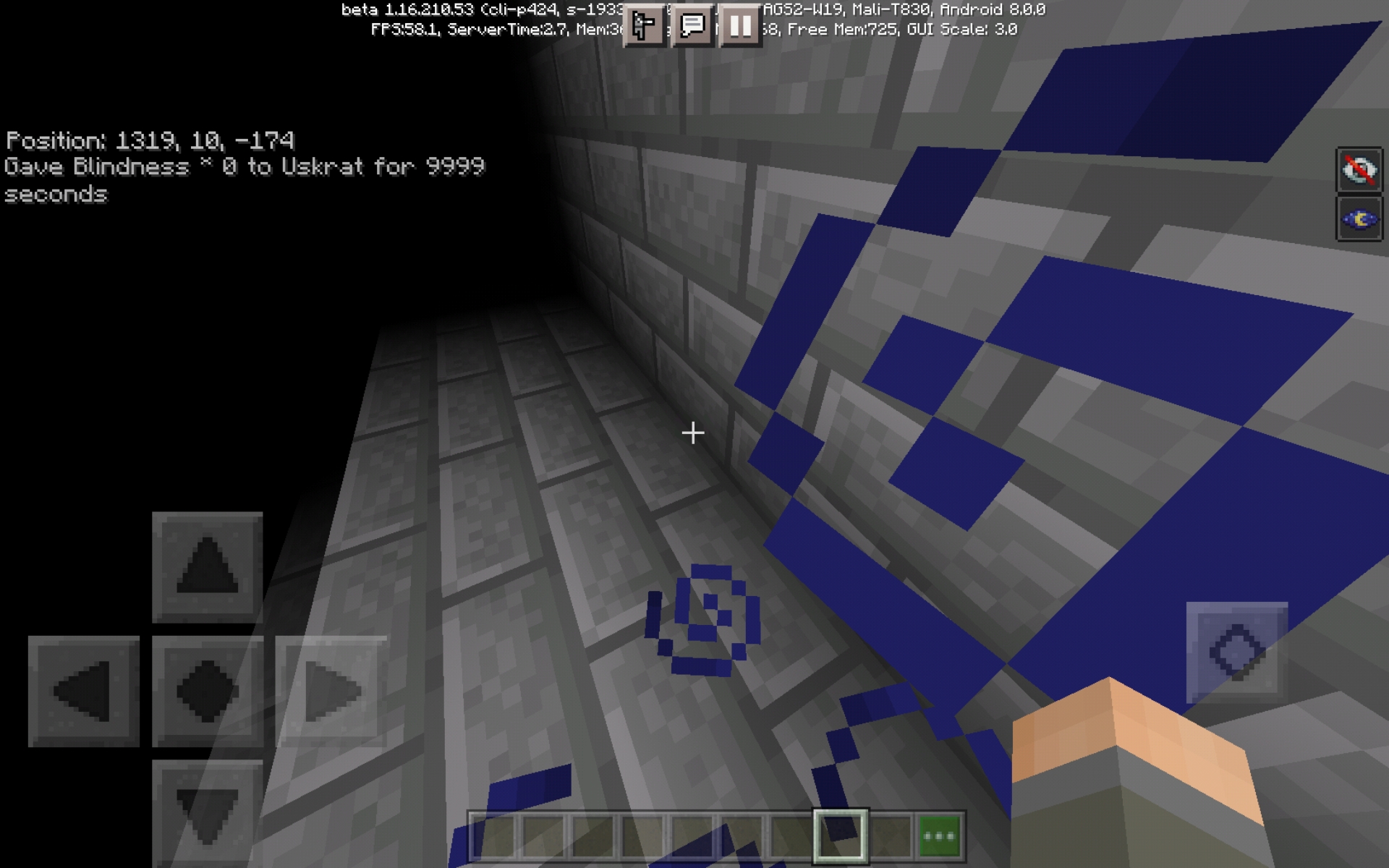


Al tener el efecto de visión nocturna junto al efecto de ceguera no se aplica la ceguera total.
Errors when placing blocksFlight errors in creative
Flight errors in creativeErrors when placing blocks
Errors when placing blocksFlight errors
When you want to put a block on top of another block at foot level, it won't put it if you're too close (it will disappear constantly).Sometimes the player flies slowly (as if shifting) just after flying over a block.
The effects of blindness and night vision together no longer apply total blindness.
Steps to Reproduce:
- Give yourself the night vision effect.
- Give yourself the effect of blindness.
Observed Results:
Vision is limited by the effect of blindness and what little is seen is illuminated by the effect of night vision.
Expected Results:
Vision should be totally obscured for as long as the effects together last.
When a player dies from walking through sweet berry bushes the death message is "<player> died" instead of "<player> was poked to death by a sweet berry bush".
Also, death messages including "whilst fighting <player / mob>", "using <item>", "whilst trying to escape <player / mob>", etc do not exist in the game.
More bugs with death messagesBugs with death messages
Bugs with death messagesSweet berry bush death message is incorrect.
Weapons of othercreatures enchanted with the "/ enchant" command do not work properly.Weapons of other mobs enchanted with the "/ enchant" command do not work properly.
When you use the "/ enchant" command to enchant a mob's weapon (in this case, a skeleton), the command will work but have no effect when the mob uses the weapon. Also, when killing the mob, its weapon will have the corresponding enchantment.
Steps to Reproduce:
- Summon or spawn a skeleton capable of collecting items (so that when it dies it drops the weapon).
- Remove the default weapon from
yourhand with the command "/ replaceitem".- Give him a new unenchanted weapon (so that he will be able to drop it upon death).
- Use the "/ enchant" command to enchant the weapon. (1)
- Change your gameplay to survival. (2)
- Kill the mob. (3)
Observed Results:
(1) The chat will show the message that the command was executed successfully, but the weapon will not show the glow that signals that it is enchanted.
(2) The weapon carried by the mob (skeleton in this case) will not have the effect that it would have when enchanted (in this case, arrows are not fired in flames).
(3) The mob will drop the already enchanted weapon even though, when held in hand, it did not look or function as an enchanted weapon.
Expected Results:
(1) The weapon should be shown glowing when enchanted.
(2) The weapon should have the effect corresponding to the enchantment applied (in this case, the arrows should be on fire).
(3) The mob must drop the enchanted weapon (which it already does and is fine).
When you use the "/ enchant" command to enchant a mob's weapon (in this case, a skeleton), the command will work but have no effect when the mob uses the weapon. Also, when killing the mob, its weapon will have the corresponding enchantment.
Steps to Reproduce:
- Summon or spawn a skeleton capable of collecting items (so that when it dies it drops the weapon).
- Remove the default weapon from his hand with the command "/ replaceitem".
- Give him a new unenchanted weapon (so that he will be able to drop it upon death).
- Use the "/ enchant" command to enchant the weapon. (1)
- Change your gameplay to survival. (2)
- Kill the mob. (3)
Observed Results:
(1) The chat will show the message that the command was executed successfully, but the weapon will not show the glow that signals that it is enchanted.
(2) The weapon carried by the mob (skeleton in this case) will not have the effect that it would have when enchanted (in this case, arrows are not fired in flames).
(3) The mob will drop the already enchanted weapon even though, when held in hand, it did not look or function as an enchanted weapon.
Expected Results:
(1) The weapon should be shown glowing when enchanted.
(2) The weapon should have the effect corresponding to the enchantment applied (in this case, the arrows should be on fire).
(3) The mob must drop the enchanted weapon (which it already does and is fine).
When you use the "/ enchant" command to enchant a mob's weapon (in this case, a skeleton), the command will work but have no effect when the mob uses the weapon. Also, when killing the mob, its weapon will have the corresponding enchantment.
Steps to Reproduce:
- Summon or spawn a skeleton capable of collecting items (so that when it dies it drops the weapon).
- Remove the default weapon from his hand with the command "/
replaceitem".- Give him a new unenchanted weapon (so that he will be able to drop it upon death).
- Use the "/ enchant" command to enchant the weapon. (1)
- Change your gameplay to survival. (2)
- Kill the mob. (3)
Observed Results:
(1) The chat will show the message that the command was executed successfully, but the weapon will not show the glow that signals that it is enchanted.
(2) The weapon carried by the mob (skeleton in this case) will not have the effect that it would have when enchanted (in this case, arrows are not fired in flames).
(3) The mob will drop the already enchanted weapon even though, when held in hand, it did not look or function as an enchanted weapon.
Expected Results:
(1) The weapon should be shown glowing when enchanted.
(2) The weapon should have the effect corresponding to the enchantment applied (in this case, the arrows should be on fire).
(3) The mob must drop the enchanted weapon (which it already does and is fine).
When you use the "/ enchant" command to enchant a mob's weapon (in this case, a skeleton), the command will work but have no effect when the mob uses the weapon. Also, when killing the mob, its weapon will have the corresponding enchantment.
Steps to Reproduce:
- Summon or spawn a skeleton capable of collecting items (so that when it dies it drops the weapon).
- Remove the default weapon from his hand with the command "/replaceitem".
Givehim a new unenchanted weapon (so that he will be able to drop it upon death).- Use the "/ enchant" command to enchant the weapon. (1)
- Change your gameplay to survival. (2)
- Kill the mob. (3)
Observed Results:
(1) The chat will show the message that the command was executed successfully, but the weapon will not show the glow that signals that it is enchanted.
(2) The weapon carried by the mob (skeleton in this case) will not have the effect that it would have when enchanted (in this case, arrows are not fired in flames).
(3) The mob will drop the already enchanted weapon even though, when held in hand, it did not look or function as an enchanted weapon.
Expected Results:
(1) The weapon should be shown glowing when enchanted.
(2) The weapon should have the effect corresponding to the enchantment applied (in this case, the arrows should be on fire).
(3) The mob must drop the enchanted weapon (which it already does and is fine).
When you use the "/ enchant" command to enchant a mob's weapon (in this case, a skeleton), the command will work but have no effect when the mob uses the weapon. Also, when killing the mob, its weapon will have the corresponding enchantment.
Steps to Reproduce:
- Summon or spawn a skeleton capable of collecting items (so that when it dies it drops the weapon).
- Remove the default weapon from his hand with the command "/replaceitem".
- Drop him a new unenchanted weapon (so that he will be able to drop it upon death).
- Use the "/ enchant" command to enchant the weapon. (1)
- Change your gameplay to survival. (2)
- Kill the mob. (3)
Observed Results:
(1) The chat will show the message that the command was executed successfully, but the weapon will not show the glow that signals that it is enchanted.
(2) The weapon carried by the mob (skeleton in this case) will not have the effect that it would have when enchanted (in this case, arrows are not fired in flames).
(3) The mob will drop the already enchanted weapon even though, when held in hand, it did not look or function as an enchanted weapon.
Expected Results:
(1) The weapon should be shown glowing when enchanted.
(2) The weapon should have the effect corresponding to the enchantment applied (in this case, the arrows should be on fire).
(3) The mob must drop the enchanted weapon (which it already does and is fine).
When you try to change the color of the beacons light there are times when the change takes time to appear. The same happens when breaking the base of the beacon.
Steps to Reproduce:
- Give yourself the night vision effect.
- Give yourself the effect of blindness.
Observed Results:
Vision is limited by the effect of blindness and what little is seen is illuminated by the effect of night vision.
Expected Results:
Vision should be totally obscured for as long as the effects together last.
When you try to change the color of the beacons light there are times when the change takes time to appear. The same happens when breaking the base of the beacon.
Steps to Reproduce:
- Give yourself the night vision effect.
- Give yourself the effect of blindness.
Observed Results:
Vision is limited by the effect of blindness and what little is seen is illuminated by the effect of night vision.
Expected Results:
Vision should be totally obscured for as long as the effects together last.
When you try to change the color of the beacons light there are times when the change takes time to appear. The same happens when breaking the base of the beacon.
When you try to change the color of the beacons light there are times when the change takes time to appear. The same happens when breaking the base of the beacon.
Steps to Reproduce:
- Place a beacon with its respective base.
- Replace and remove a block of stained glass (not white) repeatedly. (1)
- Place and remove a block from the base several times. (2)
Observed Results:
(1) There will be times when the beacon light takes time to change color or return to its original color.
(2) There will be times when the beacon light takes a long time to go away or appear.
Expected Results:
Both reactions should be instantaneous or at least take less time.
Swimming against a downdraft doesn'tcarryyou consistentlySwimming against a downdraft doesn't drags you consistently
Freshly spawned magma cubes jump twice in a rowNewly spawned magma cubes jump twice in a row
There are times when killing a magma cube will cause it to slide behind you before actually dying.
This together with the MCPE-114701 or
MCPE-114700error can lead to a very unfair death.
Water in stairs flows to the full side of the stair if there is a water source one block in front of and below it. The expected behavior is that the water from the ladder ignores the other water source (as it cannot reach it)
Steps to Reproduce:
- Place a stairs.
- Put blocks on the not full sides of the stairs.
- Put water on the stairs.
- Place water just one block below and one block in front of the full face of the stairs.
Observed Results:
The water plays the animation that it is flowing.
Expected Results:
The water should not play the animation that it is flowing.
Continually breaking blocks that update (like sculk sensors or freshly dropped gravel) causes you to cancel the break action. This also happens when the redstone changes state and when you point to the air
The expected behavior is for the action to continue.
Continually breakingblocks that update (like sculk sensors or freshly dropped gravel) causes you to cancel the break action. This also happens when the redstone changes state and when you point to the airThe
expected behavior is for the action to continue.When you are mining a group of blocks, the mining action is canceled if: - You target the air or a block outside the mining range. - If you point to a falling block (sand, gravel, scaffolding, etc). - If you mine a block that is updated (sensor sculk, redstone ore, etc). Please fix this as it is very annoying.
Steps to Reproduce:
- Place a large volume of blocks such: With gravity (sand, gravel, etc), which update when you mine (redstone ore) and you are close (sensor sculk).
- Mine that volume of blocks (preferably with V efficiency or the haste effect).
Observed Results:
If while mining you aim into the air, a falling block crosses your path or the block you are mining changes state; the mining action is canceled and you have to start the action again.
Expected Results:
The mining action should not stop and should continue breaking blocks as soon as there is one in the mining range (as it has always been).
Breaking blocks that are updated cancels the actionThe mining action is interrupted in many situations
When you are mining a group of blocks, the mining action is canceled if: - You target the air or a block outside the mining range. - If you point to a falling block (sand, gravel, scaffolding, etc). - If you mine a block that is updated (sensor sculk, redstone ore, etc). Please fix this as it is very annoying.
Steps to Reproduce:
- Place a large volume of blocks such: With gravity (sand, gravel, etc), which update when you mine (redstone ore) and you are close (sensor sculk).
- Mine that volume of blocks (preferably with V efficiency or the haste effect).
Observed Results:
If while mining you aim into the air, a falling block crosses your path or the block you are mining changes state; the mining action is canceled and you have to start the action again.
Expected Results:
The mining action should not stop and should continue breaking blocks as soon as there is one in the mining range (as it has always been).
When you are mining a group of blocks, the mining action is canceled if:
- You target the air or a block outside the mining range.
- If you point to a falling block (sand, gravel, scaffolding, etc).
- If you mine a block that is updated (sensor sculk, redstone ore, etc).
Please fix this as it is very annoying.
Steps to Reproduce:
- Place a large volume of blocks such: With gravity (sand, gravel, etc), which update when you mine (redstone ore) and you are close (sensor sculk).
- Mine that volume of blocks (preferably with V efficiency or the haste effect).
Observed Results:
If while mining you aim into the air, a falling block crosses your path or the block you are mining changes state; the mining action is canceled and you have to start the action again.
Expected Results:
The mining action should not stop and should continue breaking blocks as soon as there is one in the mining range (as it has always been).
When you are mining a group of blocks, the mining action is canceled if:
- You target the air or a block outside the mining range.
- If you point to a falling block (sand, gravel, scaffolding, etc).
- If you mine a block that is updated (sensor sculk, redstone ore, etc).
Please fix this as it is very annoying.
Steps to Reproduce:
- Place a large volume of blocks such: With gravity (sand, gravel, etc), which update when you mine (redstone ore)
andyou are close (sensor sculk).- Mine that volume of blocks (preferably with V efficiency or the haste effect).
Observed Results:
If while mining you aim into the air, a falling block crosses your path or the block you are mining changes state; the mining action is canceled and you have to start the action again.
Expected Results:
The mining action should not stop and should continue breaking blocks as soon as there is one in the mining range (as it has always been).
When you are mining a group of blocks, the mining action is canceled if:
- You target the air or a block outside the mining range.
- If you point to a falling block (sand, gravel, scaffolding, etc).
- If you mine a block that is updated (sensor sculk, redstone ore, etc).
Please fix this as it is very annoying.
Steps to Reproduce:
- Place a large volume of blocks such: With gravity (sand, gravel, etc), which update when you mine (redstone ore) or you are close (sensor sculk).
- Mine that volume of blocks (preferably with V efficiency or the haste effect).
Observed Results:
If while mining you aim into the air, a falling block crosses your path or the block you are mining changes state; the mining action is canceled and you have to start the action again.
Expected Results:
The mining action should not stop and should continue breaking blocks as soon as there is one in the mining range (as it has always been).
Netherite'saxes lock in their slot
The netherite axes (I have not checked it with other tools), when using them they remain locked in their slot and you cannot move them. I don't know if it has anything to do with it, but the axes featured in the video had the i
nformationequal to 167 (commands) or more (when using it).The netherite axes (I have not checked it with other tools), when using them they remain locked in their slot and you cannot move them. I don't know if it has anything to do with it, but the axes featured in the video had the item data equal to 167 (commands) or more (when using it).

Uskrat This ticket is about the bedrock edition.
Sorry. I am not that good at writing in English (I am somewhat untrained) and I think the translator might confuse some terms, but I will try to use it in the following contributions.
Yes, but I doubt if he is, when he's floating and trying to give you a crush, dash down / up almost as if he were teleporting
Still not solved
Solved
A dot should be displayed on the map if the player is off the map. The icon shown is not the one I mean. In previous versions a dot appeared, if you went much further, the dot would get smaller. This was seen more marked in the maps of mansions or monuments; However, now it is no longer in bedrock (in Java it does appear if I remember correctly) (If something is not understood it is because I am using a translator)
No, I think on YouTube you can find beta 1.1 videos where the dot icon was correctly displayed when you were away.
It also works in the Bedrock version.
We are already reaching 1.17 and it still unresolved.
I think it works as intended. The message will not update until there is another error to be highlighted or you activate the command.
I think a better way to measure the damage dealt would be to hit a rideable animal. When you mount you will see how many hearts / health points you took from him.
Well that explains why when you shoot relatively close to a target the projectile is not visible.
This report must be reopened.
Imagine how this would happen together with the MCPE-114701 or
MCPE-114700error. It is too unfair and frustrating.Resolved in beta 1.16.210.56
The most annoying thing is that the action is canceled just because you pointed to the air for a microsecond, and now removing sand from a desert is very tedious.
Still happening in the latest beta (1.16.220.50)
But this way you cannot put water in the treetops or on a floor made of upper slabs.
On android too
It happens in 1.16.220.52 beta (android)
Affects 1.16.230.52 beta
Still an issue on 1.17.0.50
Affects 1.17.0.50
Affects 1.17.0.50
Affects 1.17.0.50
Affects 1.17.0.50
It happens to me too (android)
Affects 1.17.0.52
Duplicate of
MCPE-126658Affects 1.17.0.52
Is it related to the stuttering of the camera that happens sometimes?
Affects 1.17.0.52
Affects 1.17.0.52
According to the Wiki, zombie sieges were removed in version 1.11.0
Affects 1.17.0.52
Affects 1.17.0.52
Affects 1.17.0.52
I opened a world in 1.17.0.54 and it seems fixed, but it doesn't appear in the patch notes.
Confirm for android
Affects 1.17.10.20
Affects 1.17.10.20.
Yes, it affects last beta (1.17.10.20)
Affects 1.17.10.20
Solved in 1.17.10.22
This bug affects 1.17.10.22.
(I have to say, it's too annoying)
Yes, still missing
Affects latest 1.18 hotfix
Still on 1.18.2
Still on 1.18.2
Still on 1.18.2
Affects 1.18.2
Still an issue
Still on 1.18.2
It's still a problem in 1.18.2. I have seen that in Java there are specific sounds for when the rockets explode away from the player, which do not exist or are not played in Bedrock.
Duplicate of
MCPE-144724Luckily it only seems to affect duration 1 rockets
Yes, but this is probably invalidated as not being a bug report.
From what I've seen, it's not exactly a delay. What happens is that the game doesn't recognize the camera movement until the touch leaves the action button area, or at least that's what happens to me.
Apparently this also affects the new death screen (doesn't show when EE is enabled)