 Voron Xarya
- VoronX
- voronx
- America/New_York
- Yes
- No
3 issues
Key
Summary
Status
Reporter
Assignee
Created
 MCPE-17914


Added Attachments:
Added Attachments:
Added Attachments:
Added Attachments:
![[Mojang] Mega_Spud (Jay Wells)](../../../data/avatars/users/92696.png)
Voron Xarya If you wish to discuss this issue further and get community support, may I suggest taking it to a forum environment: https://redd.it/5njy8a
Quick Links:
📓 Issue Guidelines – 💬 Community Support – 📧 Feedback – 📖 Game Wiki
Holding diamond and wooden sword, but achievements not given
Likewise, for iPhone 6s (easy and normal difficulty). I got a couple of the achievements at first, like for opening inventory, and the one for making all the tools, but didn't get the one for making a wooden sword, and have received none since, including Tasty fish, pork chop, iron armor suit, diamonds, etc. Started a brand new world but that didn't help.
Same problem with resizing (note that all map data is supposed to be deleted when resizing):
I can create a map which draws successfully, and added a compass to it, but when I resize the map with an anvil (in the same spot I created it) and view it, the map stays blank. Bug persists up to maximum zoom. I tried moving around, but no drawing. Dropped map and picked it back up, put it in a chest, renamed it - nothing works. Repeated this error three times. In two instances, at zoom level 2, the maps resized maps recentered to Spawn quadrant, which was 2 full (level 2) maps away (to the right/south-if sun rises east). The Level 4 zoom map seems to have a different location I have not found. This is on a Realms server, survival, iPhone 6s, iOS 10.0.2.
Duplicated by
MCPE-18393,MCPE-18751,MCPE-18764. Dupe of problem mentioned in comments ofMCPE-16948(though original complaint seems to be works as intended.)Same problem. Using iOS 10.0.2 on iPhone 6s to connect to Realm. To clarify, simply placing the frame causes the crash. There is a slight lag before it does so. I was able to place two frames, go around a corner, and place one more before a crash. Another time, I placed the frame, then went to the map I was going to place, and it crashed before I even tried to place it. I find the Realm can be down for a good 5 minutes or more.
We are having a similar problem to Dan Miller. First one player (not owner) could not log in without crashing the entire realm. I attempted to investigate the problem, and started getting disconnected and pushed out of a specific (corrupted) area. I approached it from multiple sides. Finally, I got too far in (via a boat), and now I cannot log in at all. I'm not sure what is in the area to cause the corruption. Are there block-editing tools that can replace/resolve this? Or reopen this bug? The owner cannot download/save the Realm either. This is a paid service and several people have put in months of work on this realm. A workaround would be nice.
We are a having this problem on MCPE Realms 0.16.1 (started in 0.16.0), which seems to be caused by a corrupt chunk. First one player (not owner) could not log in without crashing the entire realm. I attempted to investigate the problem, and started getting disconnected and pushed out of a specific (most likely corrupted) area. I approached it from multiple sides. Finally, I got too far in (via a boat), and now I cannot log in at all. I tried minimizing my rendering distance to no avail. I'm not sure what is in the area to cause the corruption. Are there block-analysis/editing tools that can replace/resolve this? Or reopen this bug? The owner cannot download/save the Realm either. He is thinking of resetting the Realm, but that is a last resort. A dozen or more people have put in months of work on this realm. A workaround for downloading/saving the Realm map would be nice. This is a paid service after all. I am in close contact with the owner and can put you in contact with him.
Duplicate of
MCPE-17647,MCPE-18393,MCPE-18751, and dupe of bug reported in comments ofMCPE-16948Same problem on iOS 10.1.1 iPhone 6s on a Realms server, survival mode. Had this problem since 0.16.0.
Sometimes, it seems that the map recenters to spawn, but other times not.
I was able to resize maps in creative mode on non-server worlds, but the map resizing "anchor" point (where zoom 4 maps meet) was not always (-64,64) relative to Spawn.
Dupe of
MCPE-18393,MCPE-18764. Partial Dupe ofMCPE-16948(original report seems to work as intended, this bug reported in comments.)Except when resized in the same location the original map was created, it does not fill in at all. So, it either relocates, or does not work at all. iOS 10, iPhone 6s. Survival mode.
I've had this problem too - I've seen renaming costs up to 32 levels with multiple renamings (which is often necessary with maps).
Okay, it seems there are two things going on here:
1. The original issue described seems to be a "works as intended". Explored data, (as I understand how maps are intended) ALWAYS disappears when resized. If resized within the map location, there should be a small area explored. It seems the original user's anvil was off the edge of the later maps in screenshot 1. The "go to unexplored area" and "return to anvil/crafting table" were giveaways. That said, I think it would be AWESOME if maps retained data upon resizing. It would save much time re-exploring for different sized maps, as I often work with multiple zoom levels.
2. I can verify that there is a bug mentioned in
MCPE-17647,MCPE-18393,MCPE-18751, andMCPE-18764is definitely reproduceable in MCPE Realms 0.16+ (survival mode, iOS 10, iPhone 6s) where the maps change location (or are rendered useless) upon resizing. Also, even with a compass added, all marker locations are not visible on the map. Steps to reproduce:a) create map. look at it - it will be filled or mostly filled. b) place anvil c) add compass d) resize map. look at it - completely blank, including current location and no location marker. This completely breaks the mapping feature.
The description of
MCPE-16948seems to work as intended. This bug is reported in the comments. Original report seems to refer to "normal" map clearing, but is understandably confused with this bug.Duplicate of
MCPE-17647, Duplicated byMCPE-18751,MCPE-18764They are not supposed to. They align based on the corners.
I got notice of the resolution yesterday. Unfortunately, the report says it is for 0.17.2. It looks like we will have to wait for the next update and deal with small-area maps until then.
I tried this with both compass empty maps and regular empty maps. Interestingly, when at zoom 1 there was no compass marker, and the map was blank, but when I zoomed out to zoom 4, the compass marker appeared, and the map, created around (-1100, -700) was centered around (0,0) (with the upper left anchor at (-1024, -1024), not (-64,-64) as is usually the case). I created another map in a different sector, (~1400, 73) and it re-centered to the exact same location after resizing.
Realms world download/save still failing. MCPE v 1.0.0 from a Samsung Galaxy S7 running Android 6.0.1.
Maps appear to be working again in Creative mode, but in MCPE Realms Survival mode, they are most definitely an issue. Maps work at Zoom 0, but on zoom 1 they go useless, then on Zoom 2, they work again, but they recenter themselves, and it doesn't seem to matter where you were when you created them. I am researching this further, to find out how they change at zoom 3 and zoom 4, and I will post more when I have more info.
Update in 1.0 MCPE Realms.
Zoom zero maps work fine, and you can add compasses and rename them. When you resize to zoom 1, they are blank, to zoom 2, and they get changed to center on 0,0 regardless of where they were created or resized (which is odd because at that level, the map with 0,0 should center on 128,128). Resize to zoom 3 and 4, they are blank again. Oddly, in the same seed on single player, the maps work as expected. So the only useable maps are zoom zero, and one location of a zoom 2 map.
(There is a change in single player creative mode from earlier versions 0.14 and 0.15 where taking a map off an item frame destroys it when it used to let you pick it up, giving you one in your inventory (or two if you just placed it). This can be annoying, as it is easy to destroy your work if the map on the frame is your only copy. Similarly, when you click on an item from the block menu, if you have a map in your hand, it will destroy/replace it, instead of shifting it in your inventory. The workaround is to empty your hand first, but it is annoying and I lost several completed maps this way. I mention this, but don't know if this issue is tracked elsewhere.)
(Please see attached photos)
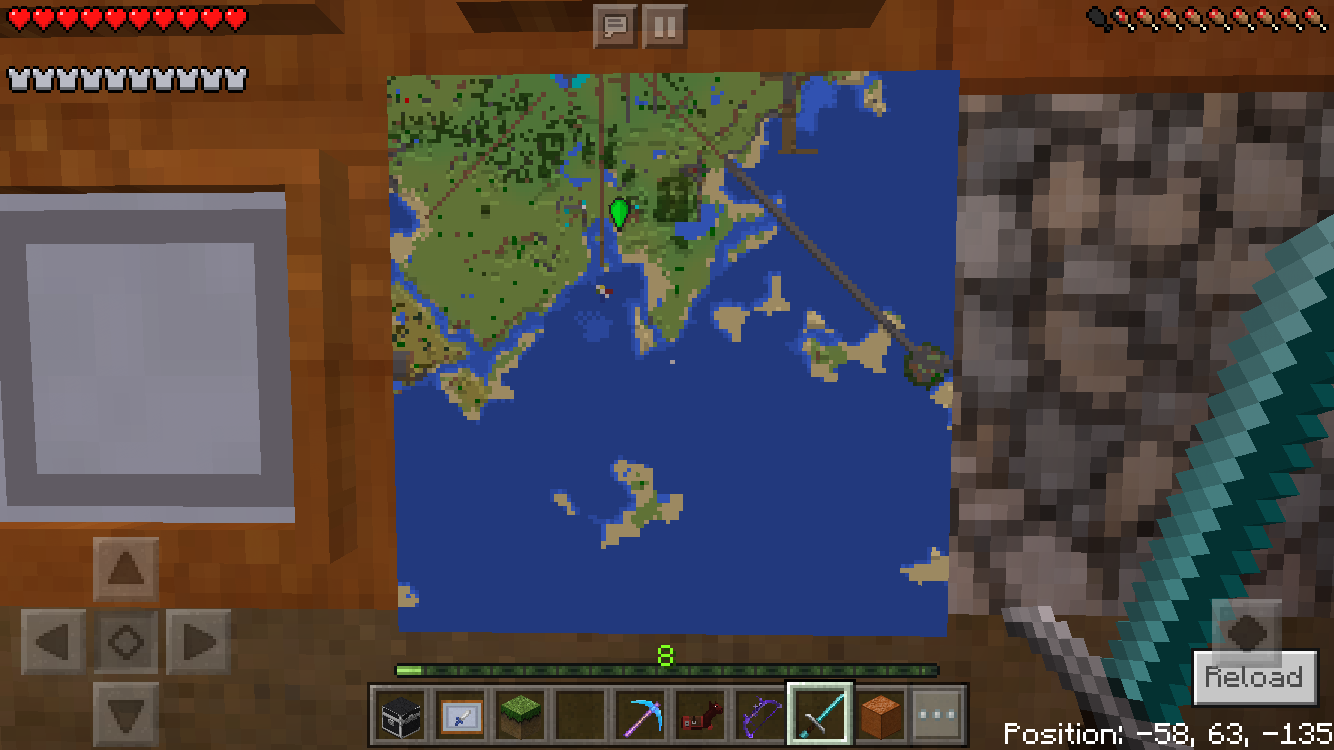
You will notice the anchor point of the four points on the local is at (-64, -64) in the harbor with the small + sign), as it should be. On the Realms map (and this map is exact map that every Zoom 2 map (regardless of origination) re-centers to and is the only usable zoomed map, as zoom 1, 3, and 4 remain blank (possibly recenter to distant as-yet-undetermined locations?)) you see the center is at (0,0) - the small point at the bottom of the peninsula. This is incorrect: it should center at (192,192) for most of that region. Seed is 3440988.
This is getting frustrating. While, Mega_Spud, I agree with your assessment on what the OP wrote, for whatever reason, a very serious yet different MCPE Realms issue has been assigned as a duplicate to this issue, probably because of the discussion here in the comments. There were multiple reports (
MCPE-17647,MCPE-18393,MCPE-18751, andMCPE-18764) of the very broken maps that more correctly describe the issue, and technically it appears to be a separate problem from what the OP described, but it looks like it has been decided to try to resolve those problems here. Please see my comment above from 28 Nov 16 above.Since 0.16.0 we have been having this problem. It works fine in local PE, but not in the MCPE Realm. I described the issue as described in 1.0.0 in detail on 3 Jan 17.
I have attached files that illustrate the difference between the broken MCPE Realms map and the perfectly fine (except for the framed map green dot icons turning to black dots upon reload) local MCPE maps.
I am the cartographer for a 50 or so person Realm, and I am experienced with maps. This has made things very frustrating, since zoom 0 maps are difficult to use for mapping large areas.
Specialistol -
You are right that these are two separate issues. I personally think that
MCPE-17647should be the official thread for my complaint, if it can be reopened and my comments transferred there.Regarding your complaint, I do not know if Mojang considers it a bug or a "works as intended." I thought I read documentation that a map lost its data when zoomed out, but cannot find record of that now. I agree that a map should keep data when zoomed. In reality, if you added paper to an existing map, that is what would happen.
To the moderator/admin - can we separate these issues and reopen the MCPE Realms map issue?
This is NOT a dupe of
MC-16948. Please reopen this.Please reopen
MCPE-17647. It is not a dupe of this problem.First noted 0.16.0, persists in 1.0.0 MCPE Realms, iOS 10.2, iPhone 6s. Zoom 0 maps work fine, and you can add compasses and rename them. When you resize to zoom 1, they are blank in the area where the small map was created. If you resize to to zoom 2, and the map's center is changed to (0,0) , regardless of where they were created or resized (please see attached). (The zoom 2 map containing (0,0) should center at (192,192)). Resize to zoom 3 and 4, they are blank again. I have not been able to determine where the centers for Zoom 1,3,and 4 are, if they work at all. Oddly, this only happens in Realms (see attached for difference in single player/local vs Realms). In the same seed on single player, the maps work as expected. As a result, in MCPE Realms (survival mode) the only useable maps are zoom 0, and one location of a zoom 2 map.
Interesting. Maps have bugs on MCPE Realms too, but there, the z=1, z=3, and z=4 stay blank (unknown center?) and all maps at z2 recenter to (0,0) instead of their proper place on the grid.
This is on Realms, isn't it? This seems to be a duplicate of
MCPE-17647which is not resolved, (and is not the same asMCPE-16948.)Zoom 1, 3, and 4 maps are blank (point of origin recentered?...to where?), and all zoom 2 maps recenter to (0,0) regardless of point of origination.
Update: In Realms, Zoom 2 maps recenter to 0,0 no matter where the map was created. They seem to work fine in Single-player/local mode. Zoom 1,3, and 4, stay blank, and presumably recenter to an unknown location. See
MCPE-17647and rerddit thread at https://www.reddit.com/r/Mojira/comments/5njy8a/mcpe17647_zoomed_maps_losing_their_data_when/