 Wonkatoad
- wonkatoad
- wonkatoad@yahoo.com
- America/Chicago
- Yes
- No
 MC-138129


Several note blocks are pitched slightly too high or low. Some are worse than others. Not overwhelmingly obvious, unless you have a keen ear, but it's bad enough to make note block songs sound out of tune

Here's a video demonstrating this issue:
https://www.youtube.com/watch?v=kX0SyD0R9RI&feature=youtu.be
Several note blocks are pitched slightly too high or low. Some are worse than others. Not overwhelmingly obvious, unless you have a keen ear, but it's bad enough to make note block songs sound out of tune
Here's a video demonstrating this issue:
https://www.youtube.com/watch?v=kX0SyD0R9RI&feature=youtu.beKeep up the great work

Lighting in 1.13 onward appears darker on doors, beds, banners, and possibly others than it appeared in 1.12 and previous versions.
I first noticed this on a pair of double iron doors, where one of the doors appeared darker and tinted yellow.
Also, smooth lighting doesn't seem to affect these blocks, but that's an old issue that deserves its own report.
I've attached some screenshots that showcase this issue. These were taken in both 1.12 and 1.13.
Thank you for reading
Lighting in 1.13 onward appears darker on doors, beds, banners, and possibly others than it appeared in 1.12 and previous versions.
I first noticed this on a pair of double iron doors, where one of the doors appeared darker and tinted yellow.
Also, smooth lighting doesn't seem to affect these blocks, but that's an old issue that deserves its own report.
I've attached some screenshots that showcase this issue. These were taken in both 1.12 and 1.13.
Thank you for reading
Lighting in 1.13 onward appears darker on doors, beds, banners, and possibly others than it appeared in 1.12 and previous versions.
I first noticed this on a pair of double iron doors, where one of the doors appeared darker and tinted yellow.
Also, smooth lighting doesn't seem to affect these blocks, but that's an old issue that deserves its own report.
I've attached some screenshots that showcase this issue. These were taken in both 1.12 and 1.13.
Thank you for reading
Lighting in 1.13 onward appears darker on doors, beds, banners, and possibly others than it appeared in 1.12 and previous versions.
I first noticed this on a pair of double iron doors, where one of the doors appeared darker and tinted yellow.
Also, smooth lighting doesn't seem to affect these blocks, but that's an old issue that deserves its own report.
I've attached some screenshots that showcase this issue. These were taken in both 1.12 and 1.13.
Thank you for reading
Lighting in 1.13 onward appears darker on doors, beds, banners, and possibly others than it appeared in 1.12 and previous versions.
I first noticed this on a pair of double iron doors, where one of the doors appeared darker and tinted yellow.
Also, smooth lighting doesn't seem to affect these blocks, but that's an old issue that deserves its own report.
I've attached some other screenshots that showcase this issue. These were taken in both 1.12 and 1.13.
Thank you for reading
Lighting in 1.13 onward appears darker on doors, beds, banners, and possibly others than it appeared in 1.12 and previous versions.
I first noticed this on a pair of double iron doors, where one of the doors appeared darker and tinted yellow.
Also, smooth lighting doesn't seem to affect these blocks, but that's an old issue that deserves its own report.
I've attached some other screenshots that showcase this issue. These were taken in both 1.12 and 1.13.
Thank you for reading
Lighting in 1.13 onward appears darker on doors, beds, banners, and possibly others than it appeared in 1.12 and previous versions. It's as though the light begins to falloff sooner than it did in version 1.12, and a yellow tint can be easily seen on some blocks, even in daylight.
I first noticed this on a pair of double iron doors, where one of the doors appeared darker and tinted yellow.
Also, smooth lighting doesn't seem to affect these blocks, but that's an old issue that deserves its own report.
I've attached some other screenshots that showcase this issue. These were taken in both 1.12 and 1.13.
Thank you for reading
Lighting in 1.13 onward appears darker
on doors, beds, banners, and possibly othersthan it appeared in 1.12 and previous versions. It's as though the light begins to falloff sooner than it did in version 1.12, and a yellow tint can be easily seen on some blocks, even in daylight.I first noticed this on a pair of double iron doors, where one of the doors appeared darker and tinted yellow.
Also, smooth lighting doesn't seem to affect these blocks, but that's an old issue that deserves its own report.
I've attached some other screenshots that showcase this issue. These were taken in both 1.12 and 1.13.
Thank you for reading
Lighting in 1.13 onward appears darker than it appeared in 1.12 and previous versions on doors, beds, banners, and possibly other blocks. It's as though the light begins to falloff sooner than it did in version 1.12, and a yellow tint can be easily seen on some blocks, even in daylight.
I first noticed this on a pair of double iron doors, where one of the doors appeared darker and tinted yellow.
Also, smooth lighting doesn't seem to affect these blocks, but that's an old issue that deserves its own report.
I've attached some other screenshots that showcase this issue. These were taken in both 1.12 and 1.13.
Thank you for reading
The flame particles for Soulfire Torches are fullbright and are not affected by surrounding light - they appear completely bright, when they should be more dim to match the brightness of the torch model.
I've attached an example image that showcases this issue.
Thank you for reading!
SoulfireTorch particles are fullbright - not affected by surrounding light
The flame particles for Soul
fireTorches are fullbright and are not affected by surrounding light - they appear completely bright, when they should be more dim to match the brightness of the torch model.I've attached an example image that showcases this issue.
Thank you for reading!
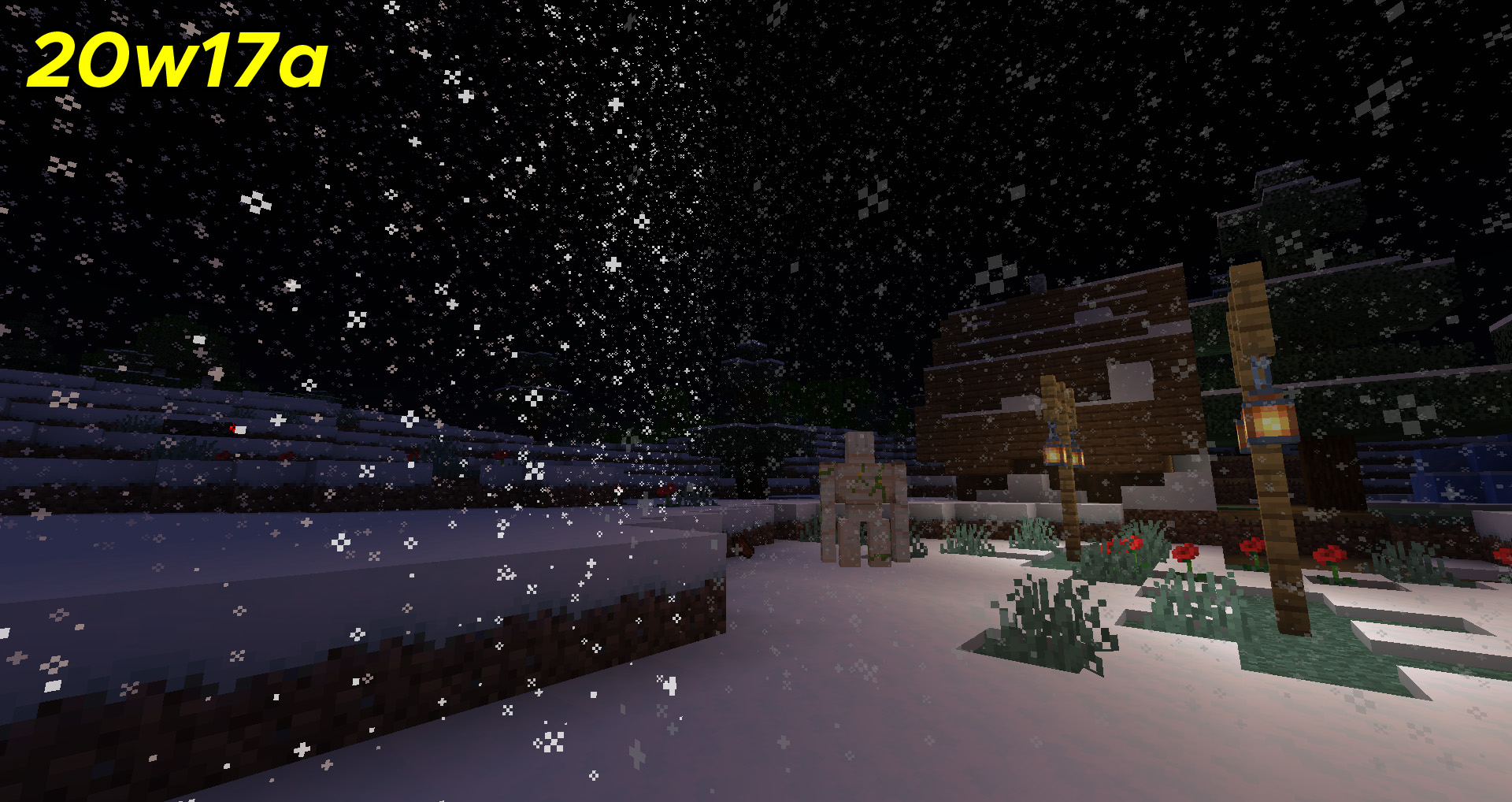
Snow particles appear dark around light sources. This issue is not present in 1.15.2. I've attached an image showcasing this issue.
I've also attached an image showing a very distinct line where you can see where the dark and light snow meet:
Thank you for reading
Snow particles appear dark around light sources. This issue is not present in 1.15.2. I've attached an image showcasing this issue.
I've also attached an image showing a very distinct line where you can see where the dark and light snow meet:
Thank you for reading
Snow particles appear dark around light sources. This issue is not present in 1.15.2. I've attached an image showcasing this issue.
I've also attached an image showing a very distinct line where you can see where the dark and light snow meet:
Thank you for reading
Snow particles appear dark around light sources. This issue is not present in 1.15.2. I've attached an image showcasing this issue.
I've also attached an image showing a very distinct line where you can see where the dark and light snow meet:
(note: this is a single screenshot, not two)
Thank you for reading
Snow particles appear dark around light sources. This issue is not present in 1.15.2. I've attached an image showcasing this issue.
I've also attached an image showing a very distinct line where you can see where the dark and light snow meet:
(note: this is a single screenshot, not two)
Thank you for reading
Snow particles appear dark around light sources. This issue is not present in 1.15.2.
I've attached an image showcasing this issue.
I've also attached an image showing a very distinct line where you can see where the dark and light snow meet:
(note: this is a single screenshot, not two)
Thank you for reading
I certainly hope this isn't intended. Mostly because it makes no sense and looks terrible, but what do I know?
@redstonehelper I remember seeing that issue posted, but that one pertains to the playsound command and how it handles pitch. I'm not sure if noteblocks use the same method for determining what the pitch of each note should be. If so, both of these issues may go hand-in-hand.
p.s. After reading Grum's comments, I hope someone on the team has since learned what a semitone is. :/
If you mark this issue as a duplicate, please change the original issue's status to something besides "Works as intended" since there's no way this is intended behavior.
This took me longer to figure out than I'm willing to admit, but if you're trying Georgii's workaround, be sure to put quotes around your path name:
-Dorg.lwjgl.openal.libname="C:\Users\YourName\AppData\Roaming\.minecraft\openal-soft-1.15.1-bin\Win64\OpenAL32.dll"
I extracted the zip file into my .minecraft folder, but you can probably stick it anywhere.
This isn't a bug. You need to use a smithing table instead of a crafting table.