 XxProudxGamerxX
- XxProudxGamerxX
- JIRAUSER721804
- America/Los_Angeles
- Yes
- No
 MCL-21589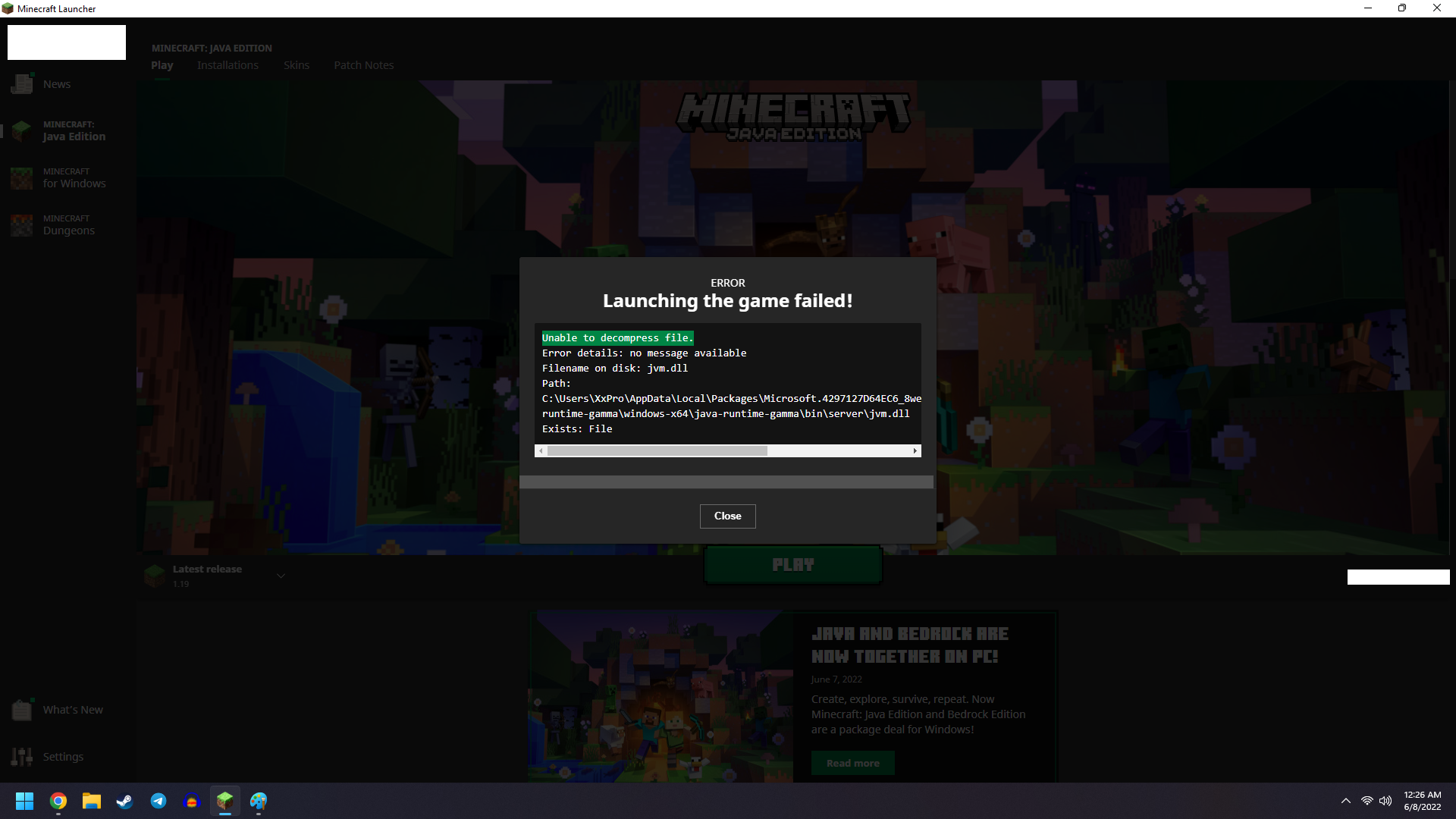
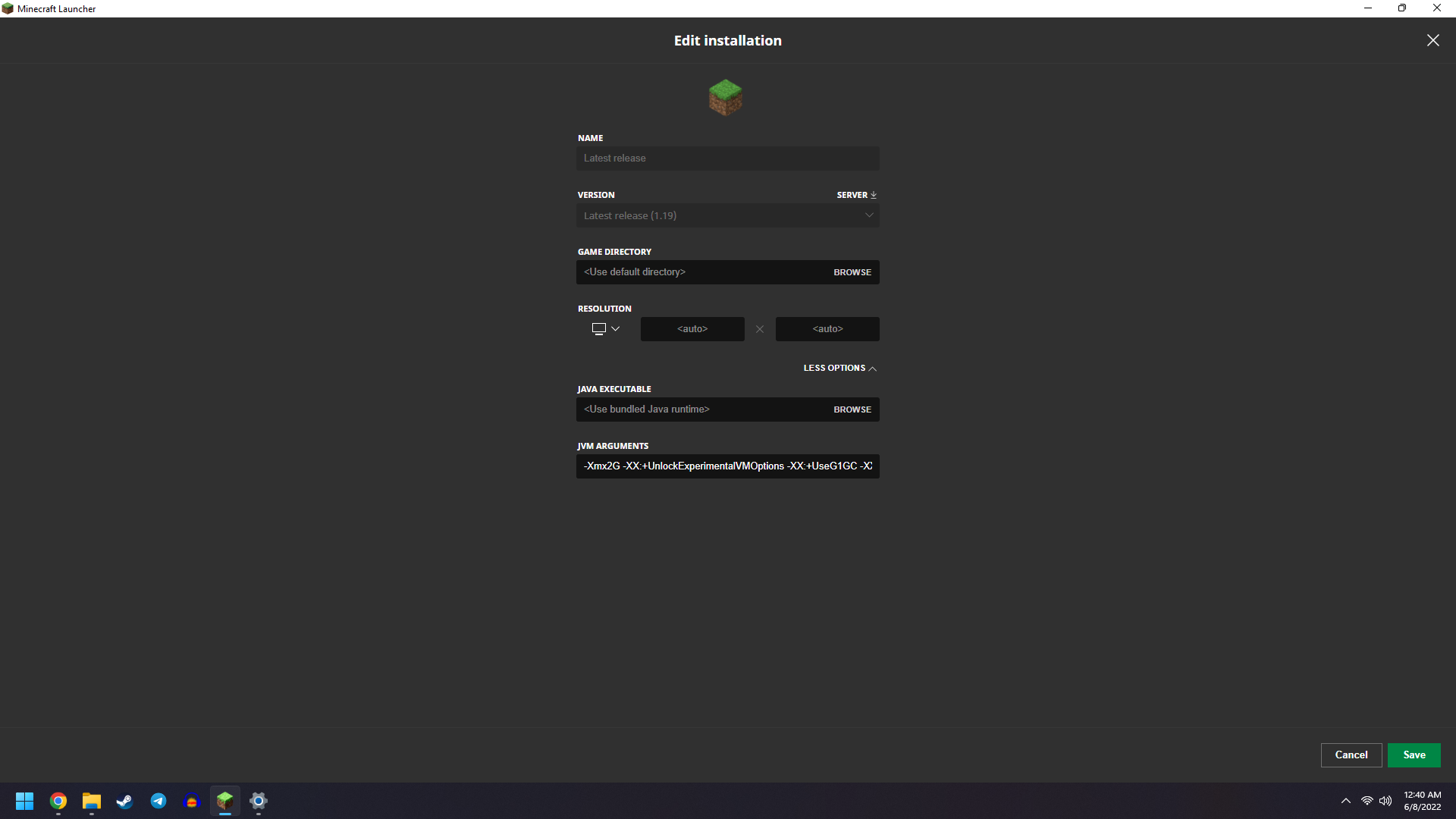


- JDK and JRE was completely reinstalled from scratch. Rebooted.
- Minecraft launcher and version completely reinstalled from scratch. Rebooted.
- Attempted running the launcher with elevated permissions.
Reset Windows 11 completely and reinstalled everything from scratch.
Amplifying information: Partner updated at the same time as me, almost Identical system with the only outlier being: Her system in Windows 10 Home, while my system run Windows 11 Home.
My thoughts: I believe the problem is isolated to the Windows 11 OS environment.
THE FOLLOWING WAS REPORTED BY THE MC LAUNCHER:
ERROR
Launching the game failed!
Unable to decompress file.
Error details: no message available
Filename on disk: jvm.dll
Path: C:\Users\XxPro\AppData\Local\Packages\Microsoft.4297127D64EC6_8wekyb3d8bbwe\LocalCache\Local\runtime\java-runtime-gamma\windows-x64\java-runtime-gamma\bin\server\jvm.dll
Exists: File
- JDK and JRE was completely reinstalled from scratch. Rebooted.
- Minecraft launcher and version completely reinstalled from scratch. Rebooted.
- Attempted running the launcher with elevated permissions.
Reset Windows 11 completely and reinstalled everything from scratch.
Amplifying information: Partner updated at the same time as me, almost Identical system with the only outlier being: Her system in Windows 10 Home, while my system run Windows 11 Home.
Currently, no fix has been found or reported on this development.
My thoughts: I believe the problem is isolated to the Windows 11 OS environment.
THE FOLLOWING WAS REPORTED BY THE MC LAUNCHER:
ERROR
Launching the game failed!
Unable to decompress file.
Error details: no message available
Filename on disk: jvm.dll
Path: C:\Users\XxPro\AppData\Local\Packages\Microsoft.4297127D64EC6_8wekyb3d8bbwe\LocalCache\Local\runtime\java-runtime-gamma\windows-x64\java-runtime-gamma\bin\server\jvm.dll
Exists: File
- JDK and JRE was completely reinstalled from scratch. Rebooted.
- Minecraft launcher and version completely reinstalled from scratch. Rebooted.
- Attempted running the launcher with elevated permissions.
Reset Windows 11 completely and reinstalled everything from scratch.
Amplifying information: Partner updated at the same time as me, almost Identical system with the only outlier being: Her system i
nWindows 10 Home, while my system run Windows 11 Home.Currently, no fix has been found or reported on this development.
My thoughts: I believe the problem is isolated to the Windows 11 OS environment.
THE FOLLOWING WAS REPORTED BY THE MC LAUNCHER:
ERROR
Launching the game failed!
Unable to decompress file.
Error details: no message available
Filename on disk: jvm.dll
Path: C:\Users\XxPro\AppData\Local\Packages\Microsoft.4297127D64EC6_8wekyb3d8bbwe\LocalCache\Local\runtime\java-runtime-gamma\windows-x64\java-runtime-gamma\bin\server\jvm.dll
Exists: File
- JDK and JRE was completely reinstalled from scratch. Rebooted.
- Minecraft launcher and version completely reinstalled from scratch. Rebooted.
- Attempted running the launcher with elevated permissions.
Reset Windows 11 completely and reinstalled everything from scratch.
Amplifying information: Partner updated at the same time as me, almost Identical system with the only outlier being: Her system is Windows 10 Home, while my system run Windows 11 Home.
Currently, no fix has been found or reported on this development.
My thoughts: I believe the problem is isolated to the Windows 11 OS environment.
THE FOLLOWING WAS REPORTED BY THE MC LAUNCHER:
ERROR
Launching the game failed!
Unable to decompress file.
Error details: no message available
Filename on disk: jvm.dll
Path: C:\Users\XxPro\AppData\Local\Packages\Microsoft.4297127D64EC6_8wekyb3d8bbwe\LocalCache\Local\runtime\java-runtime-gamma\windows-x64\java-runtime-gamma\bin\server\jvm.dll
Exists: File

Just deinstalling and reinstalling the old launcher fixed it for me. View XxProudxGamerxXs comment for more detail.
Windows 11?
Totally not resolved. Mine has way more information answering all the questions the previous post had. Ridiculous.
My ticket was marked as resolved and all questions were already answered. I will call tomorrow regarding this.
RESOLVED - PC Java version
I have used both the .msi and the windows store launchers and both produced the same errors, until....
My recommendation / fix:
In short, try the D.E.R.T method.
I think after resetting my Windows 11, it deleted all of the files including the old launcher files, and after re-installing the OLD launcher here, something was fixed.
Good luck.
According to the log, this may be of some relevance:
"Action failed with result "HTTP server doesn't seem to support byte ranges. Cannot resume." (33) : https://launcher.mojang.com/v1/objects/05c9dcada2e15aa982b26c81e092325d14c65137/jvm.dll"
ENVIRONMENT:
Windows 11 Home 22000.675; 64-bit operating system, x64-based processor
CPU: 11th Gen Intel(R) Core(TM) i5-11600KF @ 3.90GHz 3.91 GHz (No OC)
RAM: 16.0 GB (15.9 GB usable) 3200MHz
JRE: Version 8 Update 333
GPU: EVGA Nvidia GeForce RTX 3060 12GB VRAM (No OC)
Reset Windows 11 completely and reinstalled everything from scratch.
Amplifying information: Partner updated at the same time as me, almost Identical system with the only outlier being: Her system is Windows 10 Home, while my system run Windows 11 Home.
Currently, the fix has been found.
My thoughts: I believe the problem was isolated to the new launcher.
The Windows 7/8 launcher, after complete wipe and reinstall, works with Minecraft version 1.19; Find it here.
The following was a timeline of the steps taken to produce the error:
THE FOLLOWING WAS REPORTED BY THE MC LAUNCHER:
ERROR
Launching the game failed!
Unable to decompress file.
Error details: no message available
Filename on disk: jvm.dll
Path: C:\Users\XxPro\AppData\Local\Packages\Microsoft.4297127D64EC6_8wekyb3d8bbwe\LocalCache\Local\runtime\java-runtime-gamma\windows-x64\java-runtime-gamma\bin\server\jvm.dll
Exists: File
IN REPLY TO Zgajak
[MCQA] Zgajak added a comment - 17 hours ago
Hi there!
Could you answer few questions regarding this issue, it will help with the investigation:
Thank you for reading.
I have used both the .msi and the windows store launchers and both produced the same errors, until....
My recommendation / fix:
In short, try the D.E.R.T method.
I think after resetting my Windows 11, it deleted all of the files including the old launcher files, and after re-installing the OLD launcher, something was fixed.
Good luck.
According to the log, this may be of some relevance:
"Action failed with result "HTTP server doesn't seem to support byte ranges. Cannot resume." (33) : https://launcher.mojang.com/v1/objects/05c9dcada2e15aa982b26c81e092325d14c65137/jvm.dll"
ENVIRONMENT:
Windows 11 Home 22000.675; 64-bit operating system, x64-based processor
CPU: 11th Gen Intel(R) Core(TM) i5-11600KF @ 3.90GHz 3.91 GHz (No OC)
RAM: 16.0 GB (15.9 GB usable) 3200MHz
JRE: Version 8 Update 333
GPU: EVGA Nvidia GeForce RTX 3060 12GB VRAM (No OC) # JDK and JRE was completely reinstalled from scratch. Rebooted.
Reset Windows 11 completely and reinstalled everything from scratch.
Amplifying information: Partner updated at the same time as me, almost Identical system with the only outlier being: Her system is Windows 10 Home, while my system ran Windows 11 Home.
Currently, the fix has been found.
My thoughts: I believe the problem was isolated to the new launcher.
The Windows 7/8 launcher, after complete wipe and reinstall, works with Minecraft version 1.19; Find it here.
The following was a timeline of the steps taken to produce the error:
THE FOLLOWING WAS REPORTED BY THE MC LAUNCHER:
ERROR
Launching the game failed!
Unable to decompress file.
Error details: no message available
Filename on disk: jvm.dll
Path: C:\Users\XxPro\AppData\Local\Packages\Microsoft.4297127D64EC6_8wekyb3d8bbwe\LocalCache\Local\runtime\java-runtime-gamma\windows-x64\java-runtime-gamma\bin\server\jvm.dll
Exists: File
IN REPLY TO Zgajak
[MCQA] Zgajak added a comment - 17 hours ago
Hi there!
Could you answer few questions regarding this issue, it will help with the investigation:
Thank you for reading.
I don't own a Mac anymore but I assume it would be by uninstalling Minecraft and the .dmg and redownloading it and installing it. If I had one I'd try it for ya.