 MC-105820
Relative decimal coordinates with block related commands are inconsistent
Basically, when you use
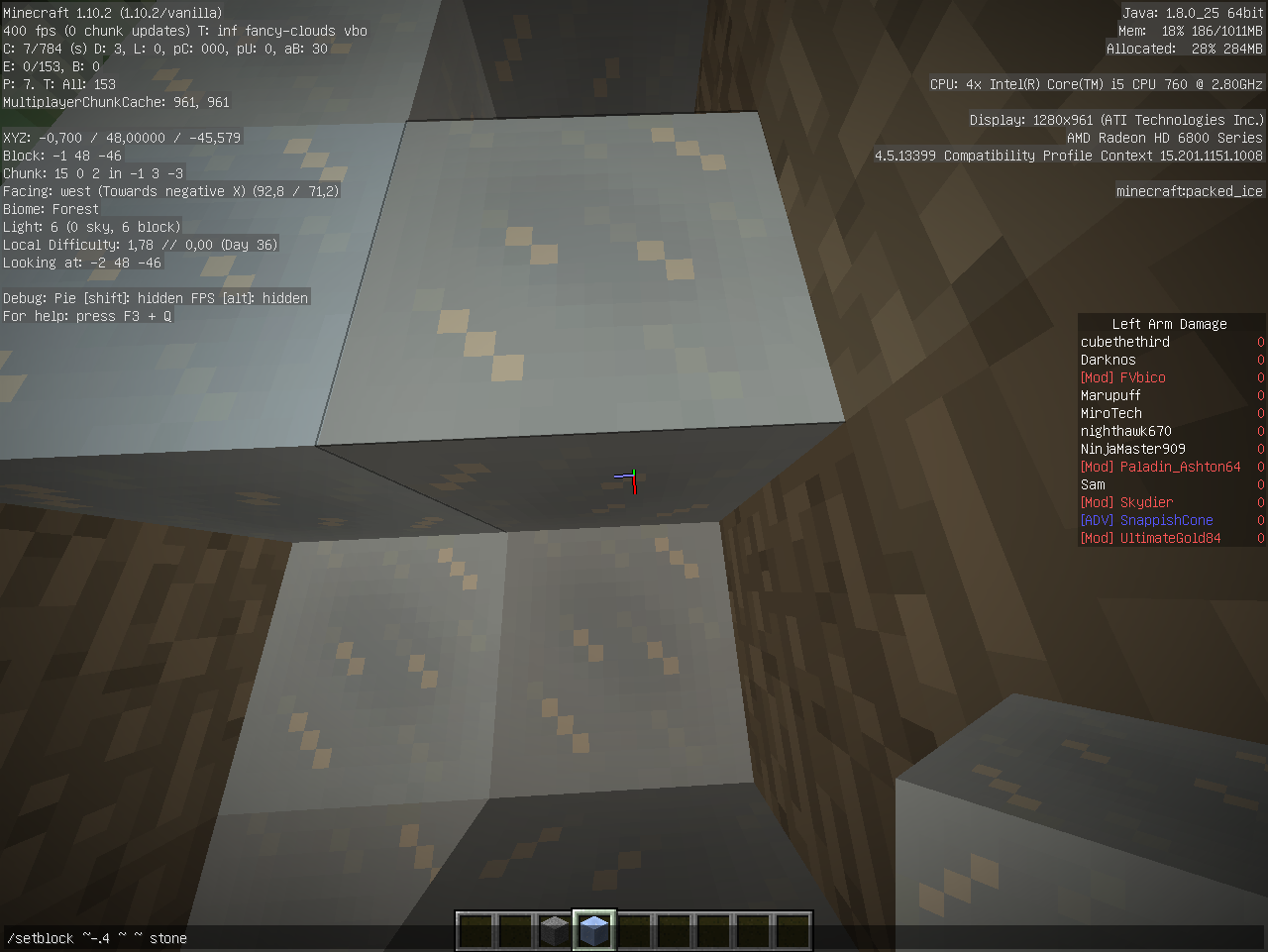
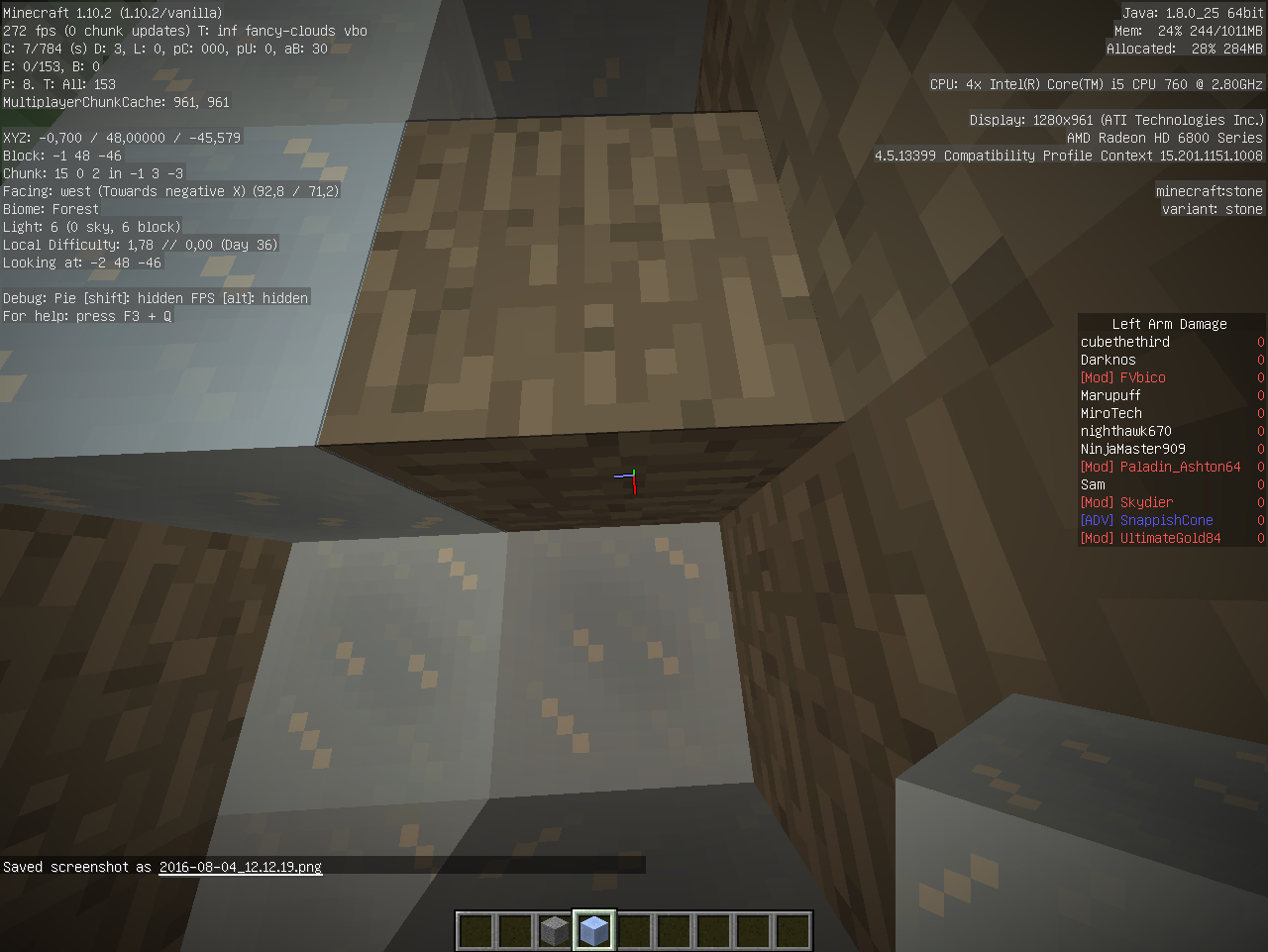
/setblock ~.4 ~ ~ stone
and stand at the most positive side of a block, right against another block, the stone gets placed in you, wheres
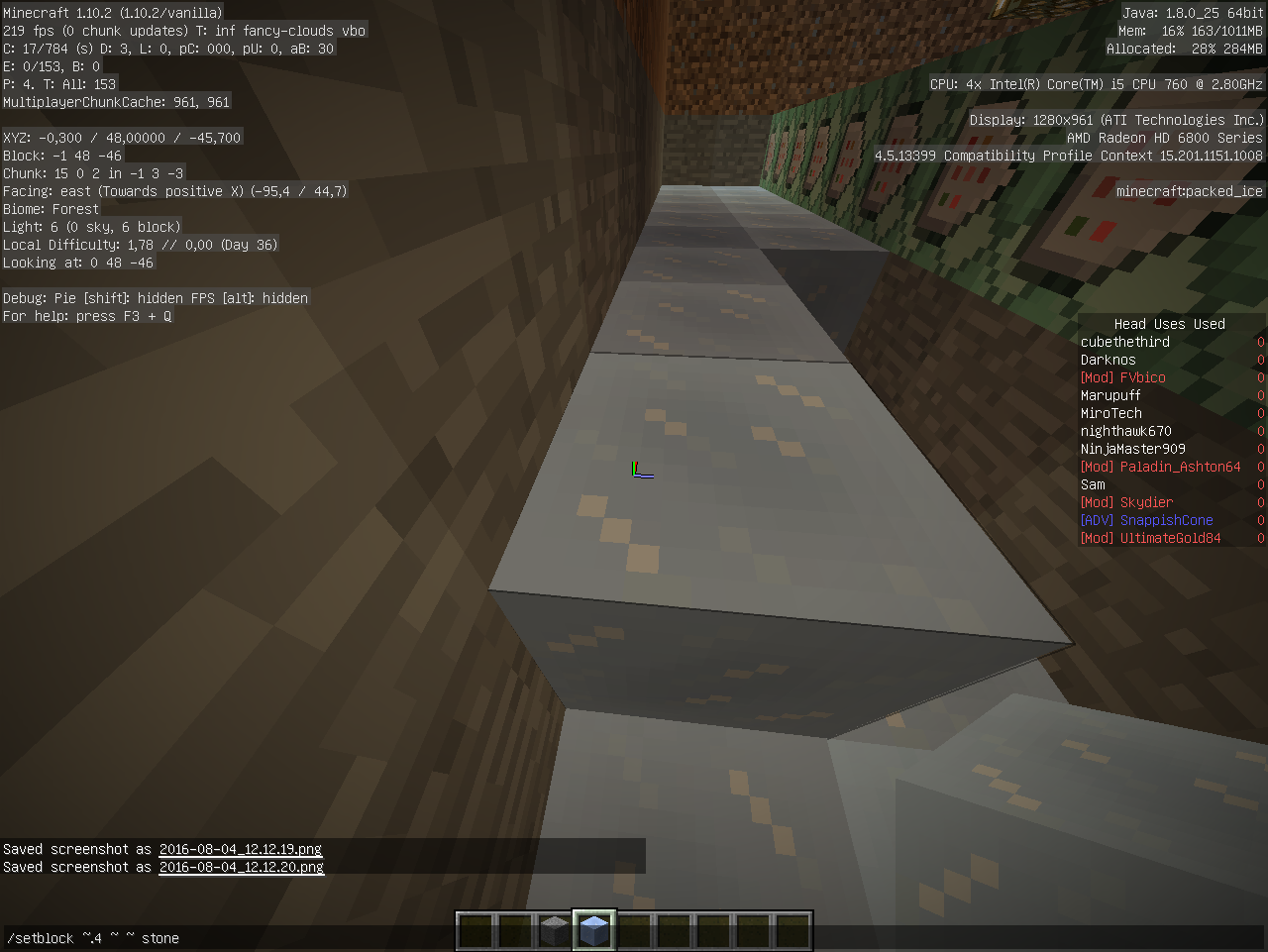
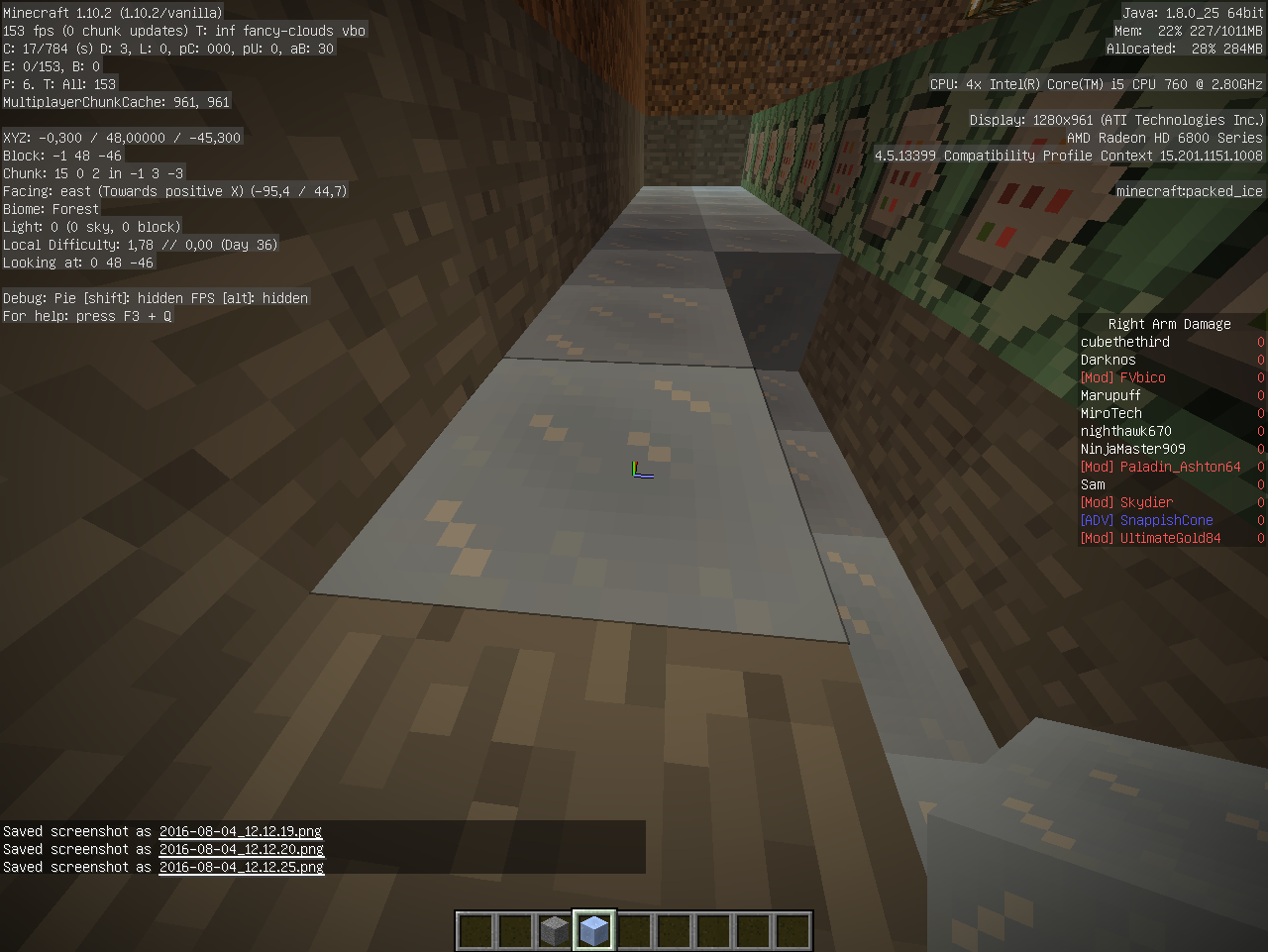
/setblock ~-.4 ~ ~ stone
and standing at the most negative side of a block is places it at the block next to you.
See screenshots.
This issue occures with the following commands:
- /fill
- /setblock
- /blockdata
- /testforblock
- /testforblocks
- /stats block
- /replaceitem block
Happens in both single player and multiplayer, so it's not a desync.
Expected behaviour:
- The block besides you gets targeted in both cases.
Reason this happens:
With these commands the coordinates ignore on what decimal you were in the first place, it get's rounded down to x.0 z.0.
So standing on the most positive part, and using ~.9999999 still places the block in you as x/y/z.0 +0.9999999 = x/z.9999999 =x/y/z.
A simple fix could be to round the numbers only after the final coordinates are calculated, rather then rounding down every coordinate provided.
So basically, the game said: .7 + .4 = .0+.0 = 0 instead of .7 + .4 = 1.1 = 1.
Code analysis by Marcono1234 can be found in this comment.
Linked Issues
is duplicated by2

![[Mojang] Nathan Adams](../../../data/assets/gravatar/dinnerbone.png)
Created Issue:
relative decimal coordinates with block related commands are inconsistent
Basically, when you use
/setblock ~.4 ~ ~ stoneand stand at the most positive side of a block, right against block, the stone gets placed in you, wheres
/setblock ~-.4 ~ ~ stoneand standing at the most negative side of a block is places it at the block next to you.
See screenshots.
This issue occures with the following commands:
- /fill
- /setblock
- /blockdata
- /testforblock
- /testforblocks
- /stats block
- /replaceitem block
Happens in both single player and multiplayer, so it's not a desync.
+x +z -z -z
Block in you is targeted.
Block at said direction is targeted.
Expected behaviour:
- The block besides you gets targeted in both cases.
Attachments4
relative decimal coordinates with block related commands are inconsistentRelative decimal coordinates with block related commands are inconsistent
Basically, when you use
/setblock ~.4 ~ ~ stoneand stand at the most positive side of a block, right against block, the stone gets placed in you, wheres
/setblock ~-.4 ~ ~ stoneand standing at the most negative side of a block is places it at the block next to you.
See screenshots.
This issue occures with the following commands:
- /fill
- /setblock
- /blockdata
- /testforblock
- /testforblocks
- /stats block
- /replaceitem block
Happens in both single player and multiplayer, so it's not a desync.
+x+z - z-z
Block at said direction is targeted.Expected behaviour:
- The block besides you gets targeted in both cases.
Basically, when you use
/setblock ~.4 ~ ~ stoneand stand at the most positive side of a block, right against block, the stone gets placed in you, wheres
/setblock ~-.4 ~ ~ stoneand standing at the most negative side of a block is places it at the block next to you.
See screenshots.
This issue occures with the following commands:
- /fill
- /setblock
- /blockdata
- /testforblock
- /testforblocks
- /stats block
- /replaceitem block
Happens in both single player and multiplayer, so it's not a desync.
-x +z -y +y -z +z
The y coordinated is tested with a slab and a relative difference of 0.5.Expected behaviour:
- The block besides you gets targeted in both cases.
Basically, when you use
/setblock ~.4 ~ ~ stoneand stand at the most positive side of a block, right against another block, the stone gets placed in you, wheres
/setblock ~-.4 ~ ~ stoneand standing at the most negative side of a block is places it at the block next to you.
See screenshots.
This issue occures with the following commands:
- /fill
- /setblock
- /blockdata
- /testforblock
- /testforblocks
- /stats block
- /replaceitem block
Happens in both single player and multiplayer, so it's not a desync.
-x +z -y +y -z +z
The y coordinated is tested with a slab and a relative difference of 0.5.Expected behaviour:
- The block besides you gets targeted in both cases.
Basically, when you use
/setblock ~.4 ~ ~ stoneand stand at the most positive side of a block, right against another block, the stone gets placed in you, wheres
/setblock ~-.4 ~ ~ stoneand standing at the most negative side of a block is places it at the block next to you.
See screenshots.
This issue occures with the following commands:
- /fill
- /setblock
- /blockdata
- /testforblock
- /testforblocks
- /stats block
- /replaceitem block
Happens in both single player and multiplayer, so it's not a desync.
-x +z -y +y -z +z
The y coordinated is tested with a slab and a relative difference of 0.5.Expected behaviour:
- The block besides you gets targeted in both cases.
Reason this happens:
With these commands the coordinated ignore on what decimal you were in the first place, it get's rounded down to x.0 z.0.
So standing on the most positive part, and using ~.9999999 still places the block in you as x/z.0 +0.9999999 = x/z.9999999 =x/z.
A simple fix could be to round the numbers only after the final coordinates are calculated, rather then rounding down every coordinate provided.
Basically, when you use
/setblock ~.4 ~ ~ stoneand stand at the most positive side of a block, right against another block, the stone gets placed in you, wheres
/setblock ~-.4 ~ ~ stoneand standing at the most negative side of a block is places it at the block next to you.
See screenshots.
This issue occures with the following commands:
- /fill
- /setblock
- /blockdata
- /testforblock
- /testforblocks
- /stats block
- /replaceitem block
Happens in both single player and multiplayer, so it's not a desync.
-x +z -y +y -z +z
The y coordinated is tested with a slab and a relative difference of 0.5.Expected behaviour:
- The block besides you gets targeted in both cases.
Reason this happens:
With these commands the coordinated ignore on what decimal you were in the first place, it get's rounded down to x.0 z.0.
So standing on the most positive part, and using ~.9999999 still places the block in you as x/z.0 +0.9999999 = x/z.9999999 =x/z.
A simple fix could be to round the numbers only after the final coordinates are calculated, rather then rounding down every coordinate provided.Basically, when you use
/setblock ~.4 ~ ~ stoneand stand at the most positive side of a block, right against another block, the stone gets placed in you, wheres
/setblock ~-.4 ~ ~ stoneand standing at the most negative side of a block is places it at the block next to you.
See screenshots.
This issue occures with the following commands:
- /fill
- /setblock
- /blockdata
- /testforblock
- /testforblocks
- /stats block
- /replaceitem block
Happens in both single player and multiplayer, so it's not a desync.
Expected behaviour:
- The block besides you gets targeted in both cases.
Reason this happens:
With these commands the coordinated ignore on what decimal you were in the first place, it get's rounded down to x.0 z.0.
So standing on the most positive part, and using ~.9999999 still places the block in you as x/y/z.0 +0.9999999 = x/z.9999999 =x/y/z.
A simple fix could be to round the numbers only after the final coordinates are calculated, rather then rounding down every coordinate provided.
Basically, when you use
/setblock ~.4 ~ ~ stoneand stand at the most positive side of a block, right against another block, the stone gets placed in you, wheres
/setblock ~-.4 ~ ~ stoneand standing at the most negative side of a block is places it at the block next to you.
See screenshots.
This issue occures with the following commands:
- /fill
- /setblock
- /blockdata
- /testforblock
- /testforblocks
- /stats block
- /replaceitem block
Happens in both single player and multiplayer, so it's not a desync.
Expected behaviour:
- The block besides you gets targeted in both cases.
Reason this happens:
With these commands the coordinated ignore on what decimal you were in the first place, it get's rounded down to x.0 z.0.
So standing on the most positive part, and using ~.9999999 still places the block in you as x/y/z.0 +0.9999999 = x/z.9999999 =x/y/z.
A simple fix could be to round the numbers only after the final coordinates are calculated, rather then rounding down every coordinate provided.
So basically, the game said: .7 + .4 = .0+.0 instead of .7 + .4 = 1.1 = 1.
Basically, when you use
/setblock ~.4 ~ ~ stoneand stand at the most positive side of a block, right against another block, the stone gets placed in you, wheres
/setblock ~-.4 ~ ~ stoneand standing at the most negative side of a block is places it at the block next to you.
See screenshots.
This issue occures with the following commands:
- /fill
- /setblock
- /blockdata
- /testforblock
- /testforblocks
- /stats block
- /replaceitem block
Happens in both single player and multiplayer, so it's not a desync.
Expected behaviour:
- The block besides you gets targeted in both cases.
Reason this happens:
With these commands the coordinated ignore on what decimal you were in the first place, it get's rounded down to x.0 z.0.
So standing on the most positive part, and using ~.9999999 still places the block in you as x/y/z.0 +0.9999999 = x/z.9999999 =x/y/z.
A simple fix could be to round the numbers only after the final coordinates are calculated, rather then rounding down every coordinate provided.
So basically, the game said: .7 + .4 = .0+.0 = 0 instead of .7 + .4 = 1.1 = 1.
![[Mojang] Grum (Erik Broes)](../../../data/assets/gravatar/grum.png) [Mojang] Grum (Erik Broes)
[Mojang] Grum (Erik Broes)
Basically, when you use
/setblock ~.4 ~ ~ stoneand stand at the most positive side of a block, right against another block, the stone gets placed in you, wheres
/setblock ~-.4 ~ ~ stoneand standing at the most negative side of a block is places it at the block next to you.
See screenshots.
This issue occures with the following commands:
- /fill
- /setblock
- /blockdata
- /testforblock
- /testforblocks
- /stats block
- /replaceitem block
Happens in both single player and multiplayer, so it's not a desync.
Expected behaviour:
- The block besides you gets targeted in both cases.
Reason this happens:
With these commands the coordinated ignore on what decimal you were in the first place, it get's rounded down to x.0 z.0.
So standing on the most positive part, and using ~.9999999 still places the block in you as x/y/z.0 +0.9999999 = x/z.9999999 =x/y/z.
A simple fix could be to round the numbers only after the final coordinates are calculated, rather then rounding down every coordinate provided.
So basically, the game said: .7 + .4 = .0+.0 = 0 instead of .7 + .4 = 1.1 = 1.
Code analysis by Marcono1234 can be found in this comment.
![[Mod] Neko](../../../data/avatars/users/92901.png)
relates to
is duplicated by
is duplicated by
Basically, when you use
/setblock ~.4 ~ ~ stoneand stand at the most positive side of a block, right against another block, the stone gets placed in you, wheres
/setblock ~-.4 ~ ~ stoneand standing at the most negative side of a block is places it at the block next to you.
See screenshots.
This issue occures with the following commands:
- /fill
- /setblock
- /blockdata
- /testforblock
- /testforblocks
- /stats block
- /replaceitem block
Happens in both single player and multiplayer, so it's not a desync.
Expected behaviour:
- The block besides you gets targeted in both cases.
Reason this happens:
With these commands the coordinatedignore on what decimal you were in the first place, it get's rounded down to x.0 z.0.
So standing on the most positive part, and using ~.9999999 still places the block in you as x/y/z.0 +0.9999999 = x/z.9999999 =x/y/z.
A simple fix could be to round the numbers only after the final coordinates are calculated, rather then rounding down every coordinate provided.
So basically, the game said: .7 + .4 = .0+.0 = 0 instead of .7 + .4 = 1.1 = 1.
Code analysis by Marcono1234 can be found in this comment.
Basically, when you use
/setblock ~.4 ~ ~ stoneand stand at the most positive side of a block, right against another block, the stone gets placed in you, wheres
/setblock ~-.4 ~ ~ stoneand standing at the most negative side of a block is places it at the block next to you.
See screenshots.
This issue occures with the following commands:
- /fill
- /setblock
- /blockdata
- /testforblock
- /testforblocks
- /stats block
- /replaceitem block
Happens in both single player and multiplayer, so it's not a desync.
Expected behaviour:
- The block besides you gets targeted in both cases.
Reason this happens:
With these commands the coordinates ignore on what decimal you were in the first place, it get's rounded down to x.0 z.0.
So standing on the most positive part, and using ~.9999999 still places the block in you as x/y/z.0 +0.9999999 = x/z.9999999 =x/y/z.
A simple fix could be to round the numbers only after the final coordinates are calculated, rather then rounding down every coordinate provided.
So basically, the game said: .7 + .4 = .0+.0 = 0 instead of .7 + .4 = 1.1 = 1.
Code analysis by Marcono1234 can be found in this comment.
Fixed in 17w45a.
relates to
is blocked by
relates to


The bug
Based on MC-105820 commands which modify blocks or get data from them use the block grid instead of the position of the command executor. This causes values from 0 up to 1 (exclusive) to select the block the command executer is in, while -1 to 0 (exclusive) selects the block in the negative direction. This behavior was stated as WAI by [Mojang] Grum (Erik Broes). The problem is that as these commands allow decimal values you would expect them to be based on the position of the command executor.
To make it clearer that this is not how it works, it might be more intuitive to allow only integers as coordinates (relative as well).
Affected commands
- /fill
- /setblock
- /blockdata
- /testforblock
- /testforblocks
- /stats block
- /replaceitem block

Why is this "WAI"?
Please link to this comment in the description
The following is based on a decompiled version of Minecraft 1.10 using MCP 9.30.
The reason for this is that the method net.minecraft.command.CommandBase.parseBlockPos(ICommandSender, String[], int, boolean) calls the method net.minecraft.command.ICommandSender.getPosition() which returns a block position (only integers). This could be fixed by having it call the method net.minecraft.command.ICommandSender.getPositionVector() instead.