 ProfMobius (Thomas Guimbretiere)
- ProfMobius
- profmobius
- Europe/Stockholm
- Yes
- No

 MC-4565
 MC-8348

![[Mod] Sonicwave](../../../data/avatars/users/94627.png)
 ProfMobius (Thomas Guimbretiere)
is duplicated by
duplicates
ProfMobius (Thomas Guimbretiere)![[Mojang] Grum (Erik Broes)](../../../data/assets/gravatar/grum.png)
is duplicated by
duplicates
duplicates
ProfMobius (Thomas Guimbretiere)ProfMobius (Thomas Guimbretiere)ProfMobius (Thomas Guimbretiere)ProfMobius (Thomas Guimbretiere)ProfMobius (Thomas Guimbretiere)ProfMobius (Thomas Guimbretiere)ProfMobius (Thomas Guimbretiere)ProfMobius (Thomas Guimbretiere)ProfMobius (Thomas Guimbretiere)ProfMobius (Thomas Guimbretiere)ProfMobius (Thomas Guimbretiere)duplicates
ProfMobius (Thomas Guimbretiere)is duplicated by
ProfMobius (Thomas Guimbretiere)ProfMobius (Thomas Guimbretiere)ProfMobius (Thomas Guimbretiere)ProfMobius (Thomas Guimbretiere)ProfMobius (Thomas Guimbretiere)ProfMobius (Thomas Guimbretiere)ProfMobius (Thomas Guimbretiere)ProfMobius (Thomas Guimbretiere)ProfMobius (Thomas Guimbretiere)ProfMobius (Thomas Guimbretiere)ProfMobius (Thomas Guimbretiere)ProfMobius (Thomas Guimbretiere)ProfMobius (Thomas Guimbretiere)ProfMobius (Thomas Guimbretiere)ProfMobius (Thomas Guimbretiere)If any moderator feels like this is a feature request, or if a moderator feels like this does indeed contain multiple issues, I'll be fine if its resolved as invalid.
Anyway, there are multiple issues in regards to the credits.txt file.
1. Johan Bernhardsson is not mentioned in the credits. I'm not sure if he fits under programming (or game design, programming, etc).(No longer necessary as he no longer works for Mojang)2. Kristoffer Jelbring, Martin Odhelius, Amir Moulavi, Tomas Sommar, Par Axelsson, and David Marby are not mentioned under website development.
3. Vu Bui, Owen Hill, Karin Severinson, and Jonas Martensson are not mentioned under Business and administration.
4. Director of fun should be changed to Brand Director.
5. Leonard Axelsson should be changed to Leonard Gram per https://twitter.com/xlson/status/640802951301308416
6. Guimb
ertiere Thomas is not mentioned.If any moderator feels like this is a feature request, or if a moderator feels like this does indeed contain multiple issues, I'll be fine if its resolved as invalid.
Anyway, there are multiple issues in regards to the credits.txt file.
1. Johan Bernhardsson is not mentioned in the credits. I'm not sure if he fits under programming (or game design, programming, etc).(No longer necessary as he no longer works for Mojang)2. Kristoffer Jelbring, Martin Odhelius, Amir Moulavi, Tomas Sommar, Par Axelsson, and David Marby are not mentioned under website development.
3. Vu Bui, Owen Hill, Karin Severinson, and Jonas Martensson are not mentioned under Business and administration.
4. Director of fun should be changed to Brand Director.
5. Leonard Axelsson should be changed to Leonard Gram per https://twitter.com/xlson/status/640802951301308416
6. Guimbretiere Thomas is not mentioned.
ProfMobius (Thomas Guimbretiere)ProfMobius (Thomas Guimbretiere)ProfMobius (Thomas Guimbretiere)ProfMobius (Thomas Guimbretiere)ProfMobius (Thomas Guimbretiere)ProfMobius (Thomas Guimbretiere)ProfMobius (Thomas Guimbretiere)![[Mojang] Jeb (Jens Bergensten)](../../../data/assets/gravatar/jeb.jpeg)
![[Mojang] Nathan Adams](../../../data/assets/gravatar/dinnerbone.png)
duplicates
is duplicated by
duplicates
is duplicated by
duplicates
is duplicated by
ProfMobius (Thomas Guimbretiere)ProfMobius (Thomas Guimbretiere)ProfMobius (Thomas Guimbretiere)ProfMobius (Thomas Guimbretiere)ProfMobius (Thomas Guimbretiere)ProfMobius (Thomas Guimbretiere)ProfMobius (Thomas Guimbretiere)duplicates
is duplicated by
ProfMobius (Thomas Guimbretiere)ProfMobius (Thomas Guimbretiere)ProfMobius (Thomas Guimbretiere)ProfMobius (Thomas Guimbretiere)ProfMobius (Thomas Guimbretiere)ProfMobius (Thomas Guimbretiere)ProfMobius (Thomas Guimbretiere)ProfMobius (Thomas Guimbretiere)ProfMobius (Thomas Guimbretiere)ProfMobius (Thomas Guimbretiere)ProfMobius (Thomas Guimbretiere)ProfMobius (Thomas Guimbretiere)ProfMobius (Thomas Guimbretiere)ProfMobius (Thomas Guimbretiere)ProfMobius (Thomas Guimbretiere)ProfMobius (Thomas Guimbretiere)ProfMobius (Thomas Guimbretiere)ProfMobius (Thomas Guimbretiere)ProfMobius (Thomas Guimbretiere)ProfMobius (Thomas Guimbretiere)ProfMobius (Thomas Guimbretiere)ProfMobius (Thomas Guimbretiere)ProfMobius (Thomas Guimbretiere)ProfMobius (Thomas Guimbretiere)ProfMobius (Thomas Guimbretiere)ProfMobius (Thomas Guimbretiere)ProfMobius (Thomas Guimbretiere)ProfMobius (Thomas Guimbretiere)ProfMobius (Thomas Guimbretiere)![[Mod] Torabi](../../../data/assets/gravatar/torabi.png)
We had a good chat about this with ProfMobius (Thomas Guimbretiere), and the relevant source code is old and confusing (we're talking beta or shortly thereafter old!), making it unclear what was ever actually intended. Either snow blocks should melt, but don't due to bad lighting checks, or they shouldn't, in which case they have unnecessary code copied over from layered snow. Unfortunately, most of the team is out of the office this week, so we weren't able to discuss it with them to determine what the correct behavior is. It has been noted that the long-standing behavior, and thus player expectation, is that crafted snow blocks don't melt, similar to how player-placed leaf blocks don't decay.
![[Mojang] Panda](../../../data/avatars/users/41658.png)
qmagnet Ture, the title could have been more clear 
[Mod] Torabi ProfMobius (Thomas Guimbretiere) Thank you! That's pretty much what I was thinking when finding out about it. It's nothing severe, but something that should be looked at eventually

[Mojang] Nathan Adams never worked on the ai for mobs, this has never been his department.
ProfMobius (Thomas Guimbretiere) worked on this department since he's hired.
You can't say [Mojang] Nathan Adams is worse because of this. 
ProfMobius (Thomas Guimbretiere) decided to fix trapped chest not showing present textures this was, so that's my it's probably intended
ProfMobius (Thomas Guimbretiere) I might be able to attach the world, but it only appear when I've been in a certain area.
The screenshots are from my 15w47c version server, I could also give you the IP, because I don't know if any scoreboard value (un)assigned might effect it, so I can also guide you though, or even place signs to follow the steps in the effected world if I have to attach it
Ah, it's confirmed to be intended by Mojang. See ProfMobius (Thomas Guimbretiere)'s comment at MC-8199.
If nothing can be spawned and nobody stands in front of the dispenser, the item will not be dropped into the world. This is an intended behavior.
So, should a new ticket be created for dispensers being able to drop armor and alike?
Marcono1234 Giants are unsupported, but perhaps might be added back in the game later, perhaps a new texture will come with it then as it's not a undead mob then you can tell the diffrence between the 2.
Anyway, it's useless to have a Giant in a spawner now as it won't spawn it anyway, under any condition
John Smith the issue here is that entities render outside of their spawner, due to the way of fixing not all entities are the same scale, the enderman was fixed and now is smaller then the skeleton.
that's the way how ProfMobius (Thomas Guimbretiere) decided to fix it

I can confirm that, as outlined by ProfMobius (Thomas Guimbretiere):
- Suffocation damage is not fixed. I receive anywhere between no damage and 5 hearts each time I enter the Nether.
- The position bug that up until 1.9-pre1 affected both Nether and End portals, which consistently caused fire damage with a specific Nether portal and occasionally misplaced players entering the End, appears to be fixed.
ProfMobius (Thomas Guimbretiere) If this is pathfinding related, here is another patch of mine I've been using in production just fine for a few months now:
https://github.com/PaperMC/Paper/blob/44a1d43781efe9792299457685731847b1a93e92/Spigot-Server-Patches/0061-Optimize-Pathfinding.patch
Drastically helped with failed pathfinding.

Yay indeed 😸 thank you!
</meta>
ProfMobius (Thomas Guimbretiere) PS: Would you mind sharing what it was? Or rather: What it fixed?
As there are many performance issues/lag reasons, it'd be probably good for the community to know which TYPE of lag was existent since 15w49a, thus which type of lag(s) your fix might hopefully resolve.
Because I have/had the feeling we were talking about different issues at some point, so separating each lag issues from each other would be great, if we knew.
I hope it isn't too much asked of you, I know you guys are super busy and have better to do than replying to everyone who asks you to do so, but I'm sure the community is curious }=)
ProfMobius (Thomas Guimbretiere) How exactly did you fix this issue without undoing the other 2?
ProfMobius (Thomas Guimbretiere) In my opinion the better solution is to apply the transparency detector only on 32x64px skin, and disable it on new 64x64px skins.
This don't break backward compatibility and that solve the problem on 64x64 new skin format (the original reported bug).
In all case, I think breaking thousands skins actually in use by player is a worst solution that have a bug only on new skin. There are thunsands of old skins (without transparency) on skins websites, and players continue today to use theses old skins :S
It's assigned, and it may be fixable by mojang, so we'll keep this open until ProfMobius (Thomas Guimbretiere) decides this is not a minecraft bug.
Assigned the ticket to null as the original reporter is inactive.
https://help.mojang.com/customer/en/portal/articles/331367-employees
Spelling mistakes:
- ProfMobius (Thomas Guimbretiere) is missing an 'i'
- [Mojang] Kristoffer Jelbring is missing an 't'
Dead links:
- Mathias Andersson's twitter profile
You do realize that ProfMobius (Thomas Guimbretiere) tried to fix it, right?
This should be considered a bug as mobs should not spawn in/on blocks that damage them.

Search for this should be in specified order
Per this comment by ProfMobius (Thomas Guimbretiere), intended search order is (relative to the minecart motion)
Right, Left, Back Right, Back Left, Front Right, Front Left, Back, Front
![[Mod] Pokechu22](../../../data/avatars/users/92931.png)
Alright, figured this out. (MCP 940, with 1.12.1 SRG mappings)
Why it only works some of the time
ProfMobius (Thomas Guimbretiere)' fix in 16w35a (which was suggested by Daniel Burnett) is correct, but the implementation has a slight flaw: it only sets the position on the server; the client isn't informed that it should move up. However, there is another mechanism that later causes the client to be informed: the serverside check that prevents players from moving into blocks. When the block is changed, the client starts falling into it. However, the server detects this and rejects that movement (after all, the server thinks the player is on top of the block). The server then teleports the player on top of the block, and everything is fine.
However, if the player does not fall (i.e. they're partially standing on another block), then the server doesn't move them up (even though they are still positioned inside a block). Why doesn't the server think they're in a block and thus move them out in this case? Well, for some reason, hitboxes are shrunk slightly before checking if the player is in a block. Specifically, they're shrunk by 0.0625D... or precisely 1/16th of a block. So the server is completely fine with the player being partially inside the farmland. And thus, the player can still move around, and overwrite the moved up position that the farmland chose. Then, when the player moves too far forward and has no other block holding them up, they start falling into the farmland. This time, there's no server position outside of the block to help them, and they get stuck.
Fix
To fix this, the client needs to be informed of the change in position using NetHandlerPlayClient.setPlayerLocation (this same special casing is used in plenty of other places, including the teleport commands):
private void turnToDirt(World worldIn, BlockPos pos) {
    IBlockState iblockstate = Blocks.DIRT.getDefaultState();
    worldIn.setBlockState(pos, iblockstate);
    AxisAlignedBB axisalignedbb = iblockstate.getCollisionBoundingBox(worldIn, pos).offset(pos);

    for (Entity entity : worldIn.getEntitiesWithinAABBExcludingEntity((Entity)null, axisalignedbb)) {
        if (entity instanceof EntityPlayerMP) {
            double delta = axisalignedbb.maxY - entity.posY;
            ((EntityPlayerMP) entity).connection.setPlayerLocation(0, delta, 0, 0, 0, EnumSet.allOf(SPacketPlayerPosLook.EnumFlags.class));
        } else {
            entity.setPosition(entity.posX, axisalignedbb.maxY, entity.posZ);
        }
    }
}
(I use a relative teleport instead of an absolute one because a relative teleport will be smoother)
This same logic should be added to BlockGrassPath. While grass paths can't be trampled, they do change when blocks are placed above them (for instance, signs). They do not make any attempt to move players out of the ground, which means that players will get stuck in them when the block is placed (again, the 1/16th of a block contraction). Fixing this simply requires adding the same code to BlockGrassPath's dirt conversion logic (which MCP calls updateBlockState).
![[Mod] NeunEinser](../../../data/avatars/users/39263.png)
Can confirm. Quoting ProfMobius (Thomas Guimbretiere) from MC-124950, this seems to be an unintentional change.
Heightmaps should be identical, but everything produced post initial heightmap generation might show variations.
Intended, see ProfMobius (Thomas Guimbretiere)'s comment here: https://bugs.mojang.com/browse/MC-124950?focusedCommentId=434590&page=com.atlassian.jira.plugin.system.issuetabpanels%3Acomment-tabpanel#comment-434590
ProfMobius (Thomas Guimbretiere) added a comment - 12/Feb/18 10:57 AM
The reseeding of decorations is different but more coherent after the refactor. Heightmaps should be identical, but everything produced post initial heightmap generation might show variations.
End cities are "decorations".
- ProfMobius (Thomas Guimbretiere) tweeted yesterday that a 18w19b will release today.
- It just changed to "Minecraft 18w19b".
@ProfMobius (Thomas Guimbretiere) My seed is -6968998364217797098.
The locations are as follows...
chunk 55, 71 (multiple times) and chunk 57, 71 (once).
Hope that is useful.

ProfMobius (Thomas Guimbretiere) The world '18w20a Test 2' loads fine in 18w22b for me too. Will test other worlds and report the results later when possible.
@ ProfMobius (Thomas Guimbretiere): To verify that the bug ist not fixed i used the fill command in 1.12.2 and 18w22c; 170 x 170 blocks wide; each the same world:
Coal Ore layer 1-64: 1.12.2: 23.120 / 18w22c: 22.012 = 95,12 %
Iron Ore: 13.318 / 12.314 = 92,50 %
Gold Ore: 1.208 / 1.103 = 91,31 %
Diamond Ore: 450 / 406 = 90,22 %
Lapis Lazuli Ore in severals worlds around 30 % reduced
Redstone Ore: 3.390 / 3.559 = 104,98 %
Netherquartz layer 1-32: 5.088 / 3.078 = 60,50 %
Emerald Ore: 299 / 281 = 93,98 %
Gold Ore in Mesa Biome layer 1-64: 10.899 / 10.323 = 94,72 %
Hope this issue will be fixed until the release. In 1.13. I would like to start a completely new world.
Working now. I created a new world to reproduce it but... seems to work correctly.
Seed: 7686493379246203685
Stronghold coordinates: /tp @s 2024 ~ -200
Spawn coordinates: 201.500 74 136.500
@ProfMobius (Thomas Guimbretiere)

Hello, ProfMobius (Thomas Guimbretiere)! Today I tryed the /locate command with pre7 and finally we have the better experience!
The /locate command is run better on 1.13-pre7, but the Vanilla lag (when typing /locate <locate> command the Vanilla server will lag) is not fixed yet.
Here's my results on 1.13-pre7:
- FPS drop is fixed.
- "Could not find that structure nearby" error message is fixed.
- Vanilla lag is not fixed.
I've asked rockenroll4life (Josh Letellier) about it, and he asked ProfMobius (Thomas Guimbretiere) about it, and it's now confirmed WAI.
![[Mod] SPGoding](../../../data/avatars/users/44622.png)
Thank you for your report!
However, this issue Works As Intended.
Wall penetration is WAI.
– ProfMobius (Thomas Guimbretiere) stated in this comment inMC-38307.
Full Version History – Snapshot Version History – Feature Requests and Suggestions
Quick Links:
📓 Issue Guidelines – 💬 Community Support – 📧 Customer Support – 📖 Game Wiki
I can't reproduce this in 20w07a, xp gets sucked to my torso:
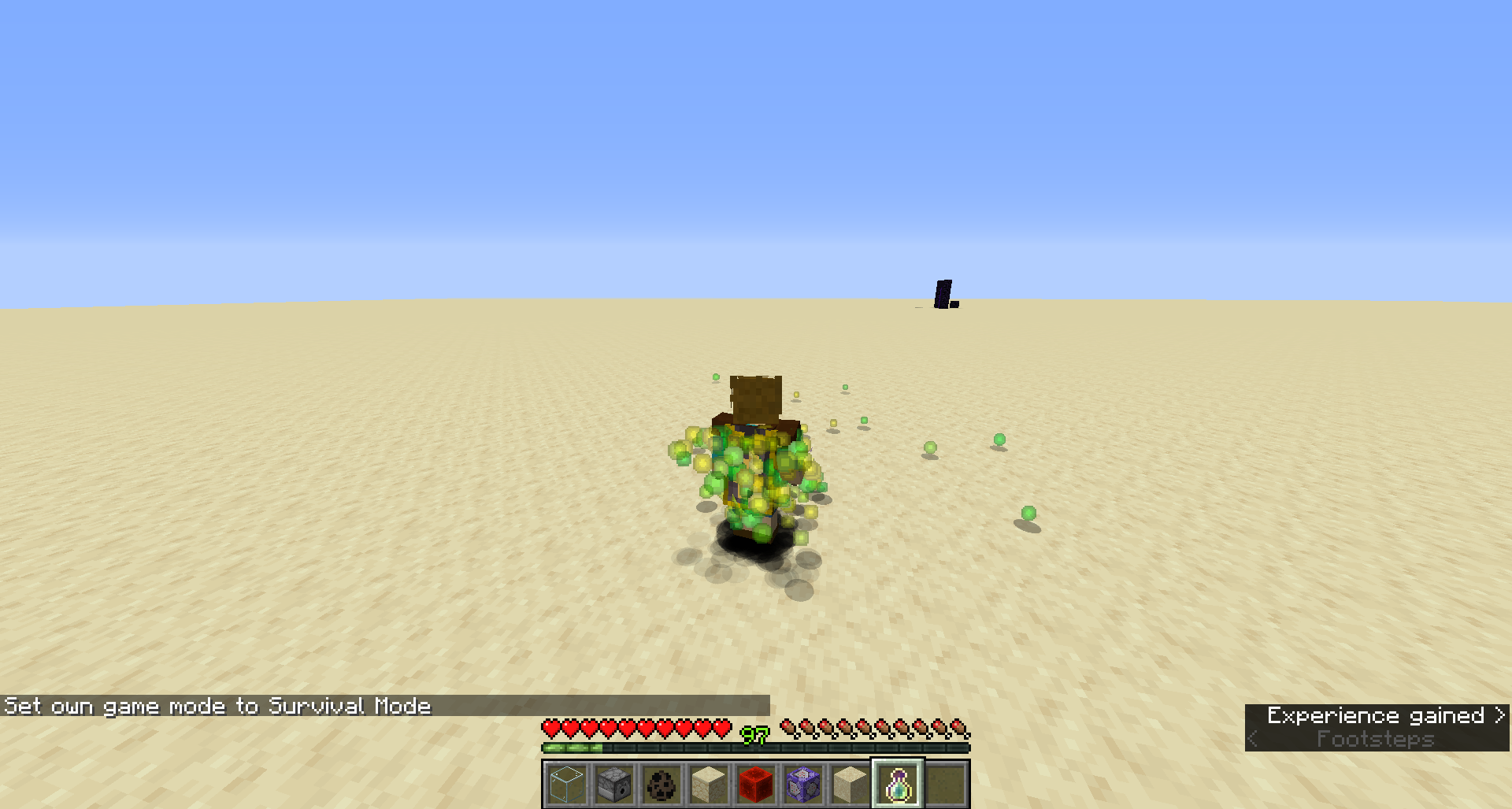
This is the intended height as evident by ProfMobius (Thomas Guimbretiere)'s comment in MC-11519
Hi qmagnet.
Any chance you can send me the world you used for the demo so I can reproduce this bug and find a fix ?
Cheers.
Open a new ticket with security level Private and link the map in it.
I will be able to find it.
Also, thx for the welcome
I actually only fixed the bug when a player switches to spectator while all the players are in bed.
I will test the case when the last player is disconnecting while all the other players are in bed.
KingSupernova Fair enough. Was wondering about a regression.
So, this problem is completly solved and I will look at other bugs on monday.
Have a nice weekend !
I confirmed the bug.
Unless I am mistaken, it only happens in creative.
Applied patch provided by Pokechu22.
Works as advertised.
Many thanks for the great bug report
Dismounting location is now predictable.
Entities will dismount from vehicules (boats, minecarts, horses) by the right side relative to the motion of the vehicule.
If the right side is unavailable, the other potential locations will be tested in this order :
Right, Left, Back Right, Back Left, Front Right, Front Left, Back, Front.
This means that 2 minecarts travelling along the same line, but in different direction will dismount on the right and left side of the track, respectivly. To get both sides to dismount to the same location, one of the sides need to be blocked via a block.
Another side effect of the fix is that entities will dismount in the middle of the target block, and not on the edge anymore, like previously.
PS : This issue should be solved in 15w39a but doesn't appear in the changelog because I closed the ticket too late.
Can you tell me if this issue persists with mipmaping turned off ?
On top of the original behavior of spawning golems, pumpkins & mob heads will auto equip if a player stand in front of the dispenser.
If nothing can be spawned and nobody stands in front of the dispenser, the item will not be dropped into the world. This is an intended behavior.
Same goes for shift-clicking. The fact it doesn't equip is an intended behavior.
The fix is slightly more extensive then just this issue.
If you want to see what I changed exactly in the way dismounting works, check out the bottom comment on
MC-51987.The issue should be fixed now.
The pathfinding was giving up too easly when expensive terrain was present (like water).
Couldn't reproduce in 15w44b.
Can you confirm it for the next snapshot ? I have corrected quite a few bugs in pathfinding and might have corrected this one as a side effect.
You are using a modded minecraft.
Please report this bug to the proper persons.
Both are more or less equivalent. Whilst just sound more old fashioned.
http://www.grammar-monster.com/easily_confused/while_whilst.htm
Must be the smallest commit I ever did. 1 char.
The report was spot on. The problem was that computed speed in water was right below the limit of considering the target static, preventing most entities from moving in water.
Many thanks for the great analysis and great bug report.
Couldn't reproduce. Must have been fixed along with one of the related uv bugs.
Couldn't reproduce. Must have been fixed along with one of the related uv bugs.
Couldn't reproduce. Must have been fixed along with one of the related uv bugs.
Can you confirm it in the next snapshot ? I couldn't reproduce it using the current codebase.
The issue has been fixed for the new worlds, but will persist in the old worlds.
To fix it, run this command while in The End :
/entitydata @e[type=EnderCrystal] {Invulnerable:0b}Cheers
Finally managed to reproduce.
Is this a satisfying resolution of this bug ?
https://youtu.be/SUpYdZIyTQg
If not, please reopen the ticket with an explanation of what more can be done.
When a container is put on top of the hopper, it is assumed the hopper is dedicated to this container.
The changes suggested have been added.
The testing procedure we used involved getting on our knees and try to look at the keyboard on the desk while moving our heads up and down. It has been confirmed the parallax was wrong.
Instead of the suggested 0.1f, we are going for 0.05f, since putting 0.1f move the camera way too close to the blocks at close range. In fact, any value > 0.0f should make the parallax behave properly.
It is possible to enable alpha blending for the top layer of the inventory, but due to how openGL works and how the inventory system is rendered, you will get your transparency computed on top of the dark transparent layer of the background, leading to hard to predict results.
Chorus plants are not a valid pathfinding target anymore.
This ticket was 2 fold. First, there is the leak in the End, which shouldn't affect humanoid skins anymore. The fix isn't complete and another ticket should be created if this OpenGL leak affect other parts of the rendering.
The second half of the ticket was about getting transparencies on head armor and hat layer. Well, this is in so enjoy ! You can now make skins with transparent glasses and helmets with glass like panes.
http://imgur.com/flH2V7G
This is due to rendering not being properly depth ordering.
When we proper ordering, this bug will solve itself.
I already know the cause of the bug.
It will be fixed in the next snapshot.
One layer of snow is replaceable, 2 layers are not.
It works as intended.
I am currently investigating this problem. It seems rendering differences between my development machine and most boxes out there masked the bug.Can anyone who is looking at this ticket post their GPU/OS/Driver version and if they are seeing things properly or not ?It has been narrowed down to the display of clouds and the Y level. Doesn't seem to be related to GPU
The changes to the range of detection for the waypoints have been reverted.
Please reopen the ticket if the problem persist after the next snapshot.
This bug is extremely hard to catch in the wild and reproduce in a reliable manner. While I know the source of the problem, I can't confirm the revert will solve it.
Creepers are dedicated huggers
I couldn't reproduce the prb with the new ridding code.
This problem is also surely due to how ridder/ridden AI are interacting and might solve itself once some global changes to the AI are implemented.
Until then, the ticket is closed as "Couldn't reproduce".
To be honest, I was a bit conflicted about fixing this one.
I quite like the idea that monsters can't see you when you are inside a block like double grass and such. On the other hand, there is no easy way to fix it for some blocks and keep the hiding concept for other blocks without adding a lot of code.
For now, it is fixed, but some of the cases might creep again in a later version once we discussed the gameplay implications.
Changed the behavior of all the throwable items to ignore none solid blocks (ie : Tall grass and such) and to get "stuck" when hitting a cobweb.
Paintings, frames and armor stands are indeed entities, but as construction blocks, they are not taking damages anymore from lightning.
Wall penetration is WAI
You usually do it via raytracing between the impact point and the list of all entities BBs. It is possible, but it is slightly more expensive and doesn't really reflect the behaviour of a shockwave properly.
Fixed, but here is a couple of things to be aware of :
Since the server itself doesn't have the pack when the ressource pack location is over the internet, the URI is used as a hash to check against client side ressource packs (instead of hashing the file itself).
It also means that when a ressource pack is updated, it is required to have a different version number / url / name in order to trigger an update client side.
Another solution is to set resource-pack-hash in server.properties to something you are going to change every time you are updating the ressource pack.
resource-pack-hash key, if present, is used in priority over a basic URI hashing.
I didn't managed to reproduce the bug.
Can you attach a world save with the mentioned bug and the skins of the people involved ?
Couple questions.
I didn't managed to reproduce the bug using the map, but I might have a couple ideas on what is going on.
When 2 persons are spectators, do they see each other solid or transparent ?
Can you confirm normal players can't see the spectators ?
Are you touching the teams in any way via command blocks ?
Seems like the part supposed to determine transparency doesn't trigger properly and returns that the rendering should be solid (ie : this is not a rendering problem, more like a logical problem with what should be transparent and what shouldn't).
This works as intended. There is no reason for mobs not to go for a swim.
On the other hand, there are some modifications planned with the random movement code, so this behaviour will be slightly tweaked in the near future.
Shows "Back to server list" for me in 15W50A.
Might have been already fixed.
Cannot reproduce as of 15W50A
Will be fixed in next snapshot (15w51a).
Many thanks for the well written bug report and the accurate solution in the comments.
Cheers!
You would run too if you were face to face with a zombie pigman from an infernal dimension.
It is now fixed.
The reason I couldn't reproduce it in the first place is that the reinforcement effect is only effective in Hard and my test world was in Normal.
This is both fixed/couldn't reproduce.
I think this got fixed automatically when I fixed the aggro behavior while in creative for the wolves.
Can you confirm this is still happening in 16w04a with a fresh world ?
There was some bugs in the ridding code that might have been the source of this bug and it has been solved as of 16w04a.
@bob The nether part of the problem should be fixed, but I couldn't reproduce the End problem. Do you have the map you used in the video ?
This bug was actually covering 2 issues.
1 - Suffocation damage when teleporting to the Nether
2 - Getting way off target when teleporting to the End.
Can we confirm that 2 is fixed ?
Good catch.
The reference was indeed never release. Thanks for pointing it out.
Knowing the fact that it started with 15w49a and not 15w47c, I looked at the commits for this specific snapshot.
Right now, I can't see anything that would justify the amount of lag reported and I couldn't reproduce the reported lag either, even with a large amount of mobs present.
Anyone with the problem, can you post an affected map ? This would help a lot if I could reproduce the lag.
Aikar I will check your patch on Monday, but without a reproducible case of massive lag, I can't say if the problem is solved or not.
Found the issue.
Performances should be back to normal in the next snapshot.
The bug described in this ticket was due to a pathfinding error. It can be tested via snocrash gold farm map.
It was also applying to any location with a large vertical empty space with mobs on top of it.
Any other lag related discussions should be kept to their respective tickets.
This is the intended behavior. Your skin is fully opaque white and is rendering fully opaque white.
Pre 1.9.4, some magic was done on all skins to make fully opaque areas not render at all. This was highly confusing as skin makers couldn't make fully opaque skins without running into problems. This was kept for compatibility with very old skins without a second layer (32x16 pixels).
The magic was removed for modern skins (32x32). If you don't want part of the second layer to render, turn it off in the options or make your skin with a transparent background.
Can you attach the affected map to the ticket ?
You are getting ahead of yourself.
Hey there.
I'm going to need your level.dat.
The problem seems to be related to the current state of the dragon fight instead of being directly related to the dragon phase itself.
Can you attach it to your ticket ?
Can you post screenshots of your setup ?
Anyone with the problem, can you post your level.dat or world so I can have a look at it ?
Also, can you post a console log from the server when you try to start the ritual ?
The tag isn't supposed to be empty at any time. Sounds like there is a silent error happening.
Cheers.
The farmland is slightly lower then the hopper by 1/16th of a block.
The items dragged by water can't fall into the hoppers because they are lower.
Biome 128 isn't assigned to anything and so revert back to Ocean.
I guess the wiki is outdated.
Deleting a world's icon.png shows the "no icon" icon in all test cases.
Are you using a resource pack ?
Can you attach the resource pack used on the picture ?
Thanks.
The crash making the game unplayable has been resolved, but not the underlying cause of it. This will be solved in a future patch.
The crash making the game unplayable has been resolved, but not the underlying cause of it. This will be solved in a future patch.
As a sidenote, the narrator doesn't connect to internet, at least on our side.
The reseeding of decorations is different but more coherent after the refactor. Heightmaps should be identical, but everything produced post initial heightmap generation might show variations.
After the refactor, chunks are not ticking until they are completely generated. It means that we cannot "instatick" them for fluid as we used to.
The worldgen refactor changed the way decorations are seeded, so changes are expected. Heightmap should be unaffected though.
The worldgen refactor changed the way decorations are seeded, so changes are expected.
Structures that were partially generated pre-18w06a should still generate at the proper location.
Frequency is similar to 1.12.2 at the same location.
Not really a bug. Changed the way worlds are saved when leaving a single player game resulting in the "freezing".
To make things clearer, added a "Saving world" message upon exiting a single player game.
Should have been fixed at some point between 18w08 and 18w14
As of 18W16a, the frequency of ocean biomes is fixed. Both warm and frozen are generating with the same frequency and the distribution make them rarer then their moderate counter parts, but still quite frequent in the grand scheme of things. If you find a cold or lukewarm biome, try to check at the center of it, there are chances it will be an extreme biome.

While having the ocean temperature match the land temperature would be nice, with the current biome generation, it is impossible without breaking biome distribution on already existing maps.
This problem might be eventually fixed if we completly revamp the biome selector in the future.
Can you use your scripts to verify that this bug is properly fixed in 18w20a ?
Bret Ryder Can you give me the seed and location where you get the crash ?
VideoklipBG Can you confirm your 18w20a Test 2 world still crash in 18w22b ? I just tested it and it works fine for me.
Can you confirm this bug still exist in 18w22c ? And if it does, can you send a world with the bug happening ? I couldn't reproduce it after generating over 1M blocks.
The spawn lookup code was reworked to be more reliable and not generate unneeded chunks and not spawn the player in water/lava or midair.
Having the spawn point shifted is a normal side effect of those changes.
Thanks for the help. This bug is hopefully fixed in the next version
Really good catch and very subtle error.
Which launcher and jvm arguments are you using ?
Seems like the problem is related to specific java arguments.
For people who time out and crash, can you post your crashlog ?
Paul Rozhkov Pau Olivares If you have a reproductible case, can you send me the seed, the spawn location and what /locate returns ?
Nico Kümmel I checked with your seed and coordinates. It actually does generate a Stronghold room, but is missing part of the stronghold itself. Can you confirm that ?
Cartographers have a range of 100 chunks in every direction to find an ocean temple or a mansion. If there is neither, the trade will not be unlocked.
We might add some visual cue later on to point out that the cartographer doesn't know any remarkable location.
In 1.12.1, the search radius was also 100 chunks. Nothing changed about that in 1.13.
The cartographer behavior was not changed between versions, beside the fact that now, we make sure it returns a valid location (no more no mansion when reaching the map location) and we scan for already existing chunks (which was not the case in 1.12.1, we would skip already existing chunks, leading to a lot of funny side effects).
If you have a case in 1.12.1 where there is a mansion more than 100 chunks away from a village, and the villager give you a map to it, I would like to examine it. Remember that you can't pre-visit the mansion in 1.12.1, or the villager will just skip the chunk.
BugHater No need to be agressive. Up to this point, all I got was "It doesn't work". Now I have proof and data to work with.
I will check again tomorrow how comes that a range of 100 in 1.12 and 100 in 1.13 are not equivalent at all.
I asked for test cases and I got them. So reopened.
How did you mark the chunk for repopulation ?
The current behavior is the right one due to changes in generation. In 1.12, without using external tools, only border chunks are marked for population. they are dropped when loaded in 1.13 since they don't contain full data to be converted.
When your world is opened directly in 1.13, the chunk is regenerated since it is marked as not finished. If I open the map first in 1.12 than 1.13, the house is there since the chunk was marked as fully decorated in 1.12.
[Helper] Michał Structures are stored separetly and ported from 1.12. They will keep on generating properly in 1.13. They are also part of the decoration, so at this point, the chunk is already decorated and will not be dropped. Only pre-decoration chunks are dropped (ie : the initial noise map).
[Mod] NeunEinser You can fly a machine into an unpopulated chunk, but this is a very rare case and like the name indicate, the chunk isn't done generating. In 1.12, it was accessible in some cases, but the data in it is still not valid data for any gameplay purpose. The fact that you could act on those chunks to begin with is a bug all by itself (which has been partially fixed in 1.13 with the introduction of protochunks).
As far as I understand it, the reported bug is that modifying the map with an external tool doesn't work properly when the map is loaded directly in 1.13. When loaded first in 1.12, the map ports perfectly fine.
I am going to close it as WAI.
I can see how it is possible to actually reach this state via commands. In 1.13, those border chunks are not accessible to the engine anymore.
This is a nasty regression. Thanks for catching it up. It is now fixed again.
Do you have a test world associated with that trace so we can reproduce the circumstances of the bug ?
Jungle bushes (small one log "trees") have always been made out of jungle wood and oak leaves. This is not a mistake and changing it would change the look and feel of the jungles.
Not updated for most recent versions. If the bug persist, please reopen the ticket.
Not updated for most recent versions. If the bug persist, please reopen the ticket.
Tree behaviors are being normalized across the board. This is an intended result of that.