 MC-1086
[FIXED] Command block/Repeater interacting weirdly
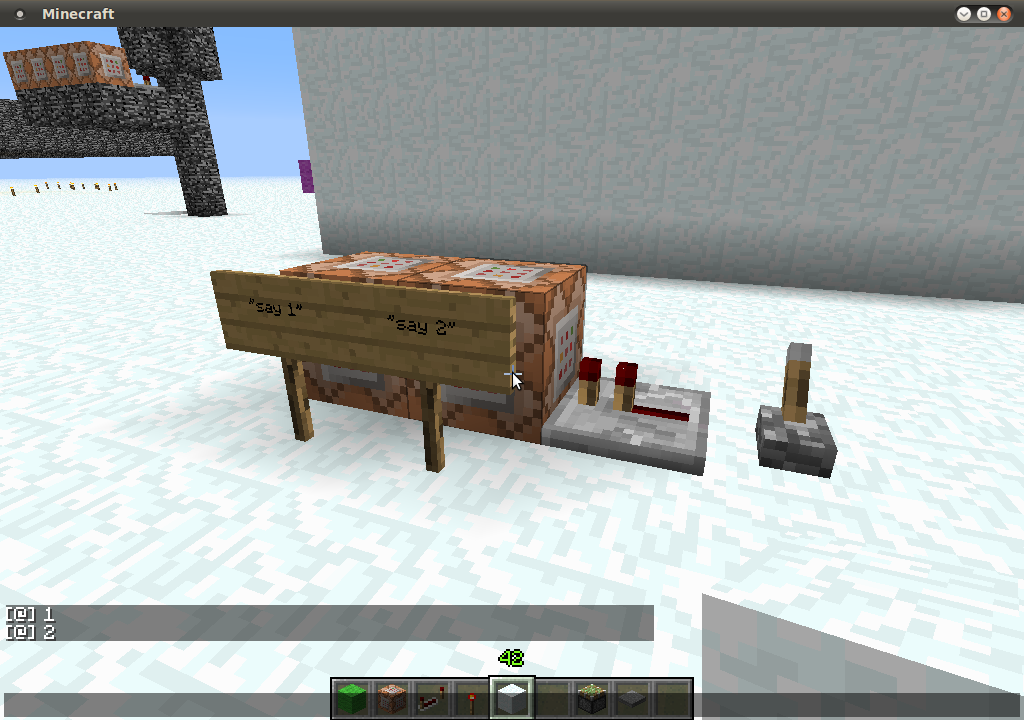
When using the setup in the attached photo; the lever is pulled and the repeater is powered the command block "say 1" is powered before the "say 2" command block. Maybe this is a bug or a strange way the redstone is powering through the command block and then checking for an update.
If you remove the repeater and use a piece of redstone it outputs as "intended" 2 then 1.
Steps to Reproduce:
1. Build setup as in picture
2. Pull lever
Environment
Multiplayer Linux box (clients on windows and linux) & Single player (again windows and linux)
Attachments1

Created Issue:
Command block/Repeater interacting weirdly
Hello all,
Please see the setup in the attached photo. When the lever is pulled and the repeater is powered the command block "say 1" is powered before the "say 2" command block. Maybe this is a bug or a strange way the redstone is powering through the command block and then checking for an update.
If you remove the repeater and use a piece of redstone it outputs as "intended" 2 then 1.
Steps to Reproduce:
1. Build setup as in picture
2. Pull leverEnvironment
Multiplayer Linux box (clients on windows and linux) & Single player (again windows and linuz)
Attachments1
- Unresolved
- Open
- Public
- Unconfirmed
- Creative
- commandblock redstone repeaters
- 1.4.2
Hello all,
Please see the setup in the attached photo. When the lever is pulled and the repeater is powered the command block "say 1" is powered before the "say 2" command block. Maybe this is a bug or a strange way the redstone is powering through the command block and then checking for an update.
If you remove the repeater and use a piece of redstone it outputs as "intended" 2 then 1.
Steps to Reproduce:
1. Build setup as in picture
2. Pull lever
Please seethe setup in the attached photo. When the lever is pulled and the repeater is powered the command block "say 1" is powered before the "say 2" command block. Maybe this is a bug or a strange way the redstone is powering through the command block and then checking for an update.If you remove the repeater and use a piece of redstone it outputs as "intended" 2 then 1.
Steps to Reproduce:
1. Build setup as in picture
2. Pull leverWhen using the setup in the attached photo. When the lever is pulled and the repeater is powered the command block "say 1" is powered before the "say 2" command block. Maybe this is a bug or a strange way the redstone is powering through the command block and then checking for an update.
If you remove the repeater and use a piece of redstone it outputs as "intended" 2 then 1.
Steps to Reproduce:
1. Build setup as in picture
2. Pull lever
Multiplayer Linux box (clients on windows and linux) & Single player (again windows and linu
z)Multiplayer Linux box (clients on windows and linux) & Single player (again windows and linux)
When using the setup in the attached photo
. Whenthe lever is pulled and the repeater is powered the command block "say 1" is powered before the "say 2" command block. Maybe this is a bug or a strange way the redstone is powering through the command block and then checking for an update.If you remove the repeater and use a piece of redstone it outputs as "intended" 2 then 1.
Steps to Reproduce:
1. Build setup as in picture
2. Pull leverWhen using the setup in the attached photo & the lever is pulled and the repeater is powered the command block "say 1" is powered before the "say 2" command block. Maybe this is a bug or a strange way the redstone is powering through the command block and then checking for an update.
If you remove the repeater and use a piece of redstone it outputs as "intended" 2 then 1.
Steps to Reproduce:
1. Build setup as in picture
2. Pull lever
When using the setup in the attached photo
&the lever is pulled and the repeater is powered the command block "say 1" is powered before the "say 2" command block. Maybe this is a bug or a strange way the redstone is powering through the command block and then checking for an update.If you remove the repeater and use a piece of redstone it outputs as "intended" 2 then 1.
Steps to Reproduce:
1. Build setup as in picture
2. Pull leverWhen using the setup in the attached photo; the lever is pulled and the repeater is powered the command block "say 1" is powered before the "say 2" command block. Maybe this is a bug or a strange way the redstone is powering through the command block and then checking for an update.
If you remove the repeater and use a piece of redstone it outputs as "intended" 2 then 1.
Steps to Reproduce:
1. Build setup as in picture
2. Pull lever


That's known aspect of redstone mechanic. Redstone usually updates blocks in order reverse to signal "spread". The difference between cases with repeater and redstone dust may follow from the fact repeaters power blocks "strongly".
[FIXED] Command block/Repeater interacting weirdly

![[Mod] Michael Wobst](../../../data/avatars/users/37868.png)
It's probably orientation-dependent. Which direction is repeater facing?
We have just tried this on all four orientations and the bug works on all four ways
Not a bug, repeaters power the block its facing and the powered block powers the other block, similar to redstone lamps
I understand that both blocks will be powered in that way, that's not the bug. The bug is that they are "activating" the commands in the wrong way around
Confirmed fixed in 13w02a
Thanks for the update.