 MC-115414
Type date and time in world selector does not match the date settings of the computer
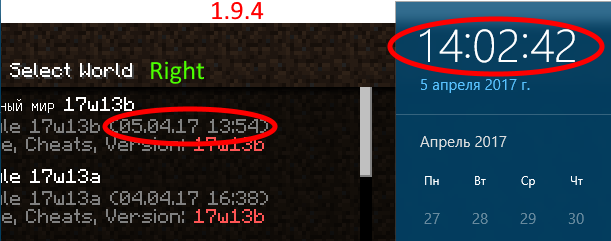
If you select a different date format on the computer, other than English, in the game, the date format will not change. In version 1.10.2 and earlier all worked fine.
Steps to Reproduce
1. Just change the date format on your computer, for example, DD.MM.YYYY.
2. Restart Minecraft.
3. Click "Single player".
4. If you already have any world view at the date and time, or create a new world, exit it and look at the date.
Environment
Windows 10, 64 bit
Linked Issues


Created Issue:
Type date and time in world selector does not match the date settings of the computer
If you select a different date format on the computer, other than English, in the game, the date format will not change. In version 1.9.4 and earlier all worked fine.
Steps to Reproduce
1. Just change the date format on your computer, for example, DD.MM.YYYY.
2. Restart Minecraft.
3. Click "Single player".
4. If you already have any world view at the date and time, or create a new world, exit it and look at the date.Environment
Windows 10, 64 bit
Attachments2
If you select a different date format on the computer, other than English, in the game, the date format will not change. In version 1.
9.4and earlier all worked fine.Steps to Reproduce
1. Just change the date format on your computer, for example, DD.MM.YYYY.
2. Restart Minecraft.
3. Click "Single player".
4. If you already have any world view at the date and time, or create a new world, exit it and look at the date.If you select a different date format on the computer, other than English, in the game, the date format will not change. In version 1.10.2 and earlier all worked fine.
Steps to Reproduce
1. Just change the date format on your computer, for example, DD.MM.YYYY.
2. Restart Minecraft.
3. Click "Single player".
4. If you already have any world view at the date and time, or create a new world, exit it and look at the date.

duplicates
I'm playing on v1.19.31 on PC with my computer set to DD/MM/YY format yet the world selector menu confusingly displays the date in MM/DD/YY format.
How has this still not been fixed years later when the vast, vast majority of the world doesn't use MM/DD/YY, including the developers of the game themselves?
Thank you for your report!
However, this issue has been closed as a Duplicate of
MC-5820.It has been linked to this report. If you have additional information, please add it to that report.
Please search before reporting, as it's likely that one exists already.
Quick Links:
📓 Issue Guidelines – 💬 Community Support – 📧 Customer Support – 📖 Game Wiki