 MC-261214
Amethyst in calibrated sculk sensor is shaded and not stretched
The bug
The amethyst bit present in the calibrated sculk sensor is shaded, causing it to look weird and inconsistent with most cross block models in the game. This can be easily fixed by adding a "shade: false" component to the two planes that compose it.
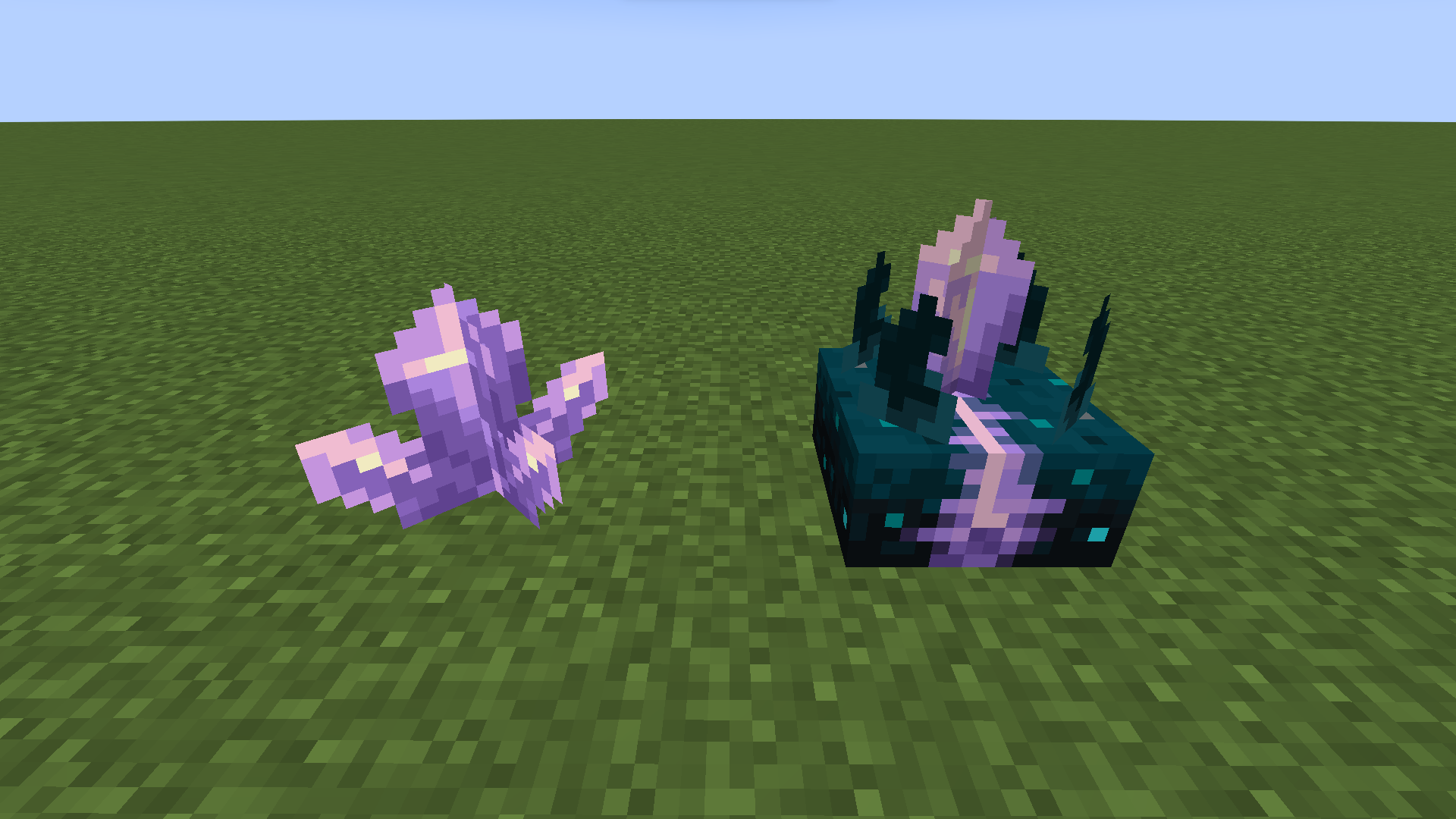
It is also not slightly stretched like the regular block, which can be fixed by adding "rescale": true to the planes components.
Linked Issues
is duplicated by1
Attachments1
![[Mod] LateLag](../../../data/avatars/users/92884.png)
Created Issue:
Amethyst in calibrated sculk sensor is shaded
The amethyst bit present in the calibrated sculk sensor is shaded, causing it to look weird and inconsistent with every other cross block model in the game. This can be easily fixed by adding a "shade: false" component to the two planes that compose it.
Attachments1
![[Mod] Les3awe](../../../data/avatars/users/79847.png)
![[Mod] ampolive](../../../data/avatars/users/18949.svg)
The amethyst bit present in the calibrated sculk sensor is shaded, causing it to look weird and inconsistent with
everyother cross block model in the game. This can be easily fixed by adding a "shade: false" component to the two planes that compose it.
The amethyst bit present in the calibrated sculk sensor is shaded, causing it to look weird and inconsistent with most other cross block models in the game. This can be easily fixed by adding a "shade: false" component to the two planes that compose it.
The amethyst bit present in the calibrated sculk sensor is shaded, causing it to look weird and inconsistent with most
othercross block models in the game. This can be easily fixed by adding a "shade: false" component to the two planes that compose it.
![[Mojang] Moesh](../../../data/avatars/users/10122.svg)
is duplicated by
The amethyst bit present in the calibrated sculk sensor is shaded, causing it to look weird and inconsistent with most cross block models in the game. This can be easily fixed by adding a "shade: false" component to the two planes that compose it.
The bug
The amethyst bit present in the calibrated sculk sensor is shaded, causing it to look weird and inconsistent with most cross block models in the game. This can be easily fixed by adding a "shade: false" component to the two planes that compose it.
It is also slightly squished compared to the regular block, which can be fixed by adding "rescale": true to the planes components.
Amethyst in calibrated sculk sensor is shaded and slightly squished
 Normal
![[Mojang] sarahboeving](../../../data/avatars/users/18935.svg) [Mojang] sarahboeving
[Mojang] sarahboeving![[Mojang] Chi Wong](../../../data/avatars/users/18941.svg)
Amethyst in calibrated sculk sensor is shaded andslightly squishedAmethyst in calibrated sculk sensor is shaded and not stretched
The bug
The amethyst bit present in the calibrated sculk sensor is shaded, causing it to look weird and inconsistent with most cross block models in the game. This can be easily fixed by adding a "shade: false" component to the two planes that compose it.
It is also slightly s
quished compared tothe regular block, which can be fixed by adding "rescale": true to the planes components.The bug
The amethyst bit present in the calibrated sculk sensor is shaded, causing it to look weird and inconsistent with most cross block models in the game. This can be easily fixed by adding a "shade: false" component to the two planes that compose it.
It is also not slightly stretched like the regular block, which can be fixed by adding "rescale": true to the planes components.
![[Bot] Piston](../../../data/avatars/users/31202.png)
![[Mod] violine1101](../../../data/avatars/users/92858.png)
relates to

Duplicate of MC-261214.
The bug
MC-261214 was fixed in 23w16a, bringing the amethyst in the calibrated sculk sensor closer to other similar crosses. However, the fix is flawed slightly, and this amethyst appears very slightly wider than other crosses such as flowers, sugar cane and cobwebs.
This is due to these two texture planes being defined from 0 to 16, rather than 0.8 to 15.2 like most other crosses are.
The same issue affects melon stems and pumpkin stems (MC-236476).
How to reproduce
- Download the "plane test" resource pack from this ticket
- Download the resource pack attached to
MC-236476 - Apply both resource packs at the same time
- Place a cobweb
- Place a calibrated sculk sensor
- Compare the two crosses, checking how far they reach to the corners of the block
Expected results
The cross shape in calibrated sculk sensors would stop slightly short of the four corners of the block, like the cobweb does.
Actual results
It goes all the way to the corner, unlike cobwebs (and almost all other cross shaped models).
How to fix
This is a very, very easy fix - just change the 0s and 16s in the two amethyst elements in the calibrated_sculk_sensor.json model file to 0.8 and 15.2 respectively. A resource pack is attached which implements this fix.
I'd strongly recommend doing the same thing for the melon stem and pumpkin stem models as well, since that fix is just as easy. The resource pack attached to MC-212630 fixes that issue.
The amethyst also looks squished because the two planes are missing "rescale": true. This was included in
MC-261256, which has been resolved as a duplicate of this.boda kugga Thank you, I've added this information to the ticket.
Reworded the summary, the amethyst part is not squished, it is just not stretched like the original block (MC-209634).