 MC-266246
IP addresses in multiplayer server list takes 6 seconds longer
Using an IP address to connect to a server in the multiplayer server list takes 3-6 seconds longer than using a domain. This effects the server MOTD/Player count displaying in the server list and when connecting to the server.
- This doesn't seem to effect all IP addresses, I noticed this when trying to run a Minecraft server with DigitalOcean.
- When you setup a domain and point it at the IP address and then connect via the domain, the problem goes away and the server in the server list shows instantly.
- I spoke to a friend and they said the reason for the delay could be due to the EULA blacklist checking the IP address, now I don't know anything about that but it might be worth looking at first as the cause.
The server IP address is a droplet I setup to demo, it's Vanilla 1.20.2 hosted in DigitalOcean London. Feel free to create your own droplet with DigitalOcean to demo and reproduce.
I have tried both San Francisco and Frankart DigitalOcean locations, along with 6 different droplets with different IP addresses, they all have the same problem.
Steps to reproduce
1. Multiplayer > Add server.
2. Put 209.97.179.190 in the server address field.
3. Count the seconds you've wasted waiting for the server MOTD to pop up or the extra long delay when you connect.
4. Compare it with another server like Hypixel and see the difference in how fast Hypixel pops up, or use the domain below to see the difference.
5. I setup a domain to demo/reproduce as well, "london.mcserver.gg" if you add this to the server list, it loads instantly.
The attachment below is a gif that demonstrates the issue using the IP address and domain above.
Attachments12


![[Mod] turbo](../../../data/avatars/users/92867.png)

![[Mod] j_p_smith](../../../data/avatars/users/92851.png)

Created Issue:
IP addresses in multiplayer server list takes 6 seconds longer
Using an IP address to connect to a server in the multiplayer server list takes 3-6 seconds longer than using a domain. This effects the server MOTD/Player count displaying in the server list and when connecting to the server.
- This doesn't seem to effect all IP addresses, I noticed this when trying to run a Minecraft server with DigitalOcean.
- When you setup a domain and point it at the IP address and then connect via the domain, the problem goes away and the server in the server list shows instantly.
- I spoke to a friend and they said the reason for the delay could be due to the EULA blacklist checking the IP address, now I don't know anything about that but it might be worth looking at first as the cause.
The server IP address is a droplet I setup to demo, it's Vanilla 1.20.2 hosted in DigitalOcean London. Feel free to create your own droplet with DigitalOcean to demo and reproduce.
I have tried both San Francisco and Frankart DigitalOcean locations, along with 6 different droplets with different IP addresses, they all have the same problem.
Steps to reproduce
1. Multiplayer > Add server.
2. Put 209.97.179.190 in the server address field.
3. Count the seconds you've wasted waiting for the server MOTD to pop up or the extra long delay when you connect.
4. Compare it with another server like Hypixel and see the difference in how fast Hypixel pops up, or use the domain below to see the difference.
5. I setup a domain to demo/reproduce as well, "london.mcserver.gg" if you add this to the server list, it loads instantly.
The attachment below is a gif that demonstrates the issue using the IP address and domain above.
Attachments1
![[Bot] Arisa](../../../data/avatars/users/43007.png)
![[Mojang] Maxime Lebrot](../../../data/avatars/users/18941.svg)
 Important
![[Mojang] Timur Nazarov](../../../data/avatars/users/18945.svg) [Mojang] Timur Nazarov
[Mojang] Timur Nazarov![[Mojang] slicedlime](../../../data/assets/gravatar/slicedlime.jpeg)
Hi, I cannot reproduce the reported behavior; Hypixel even takes longer than your two test instances. Please verify that your internet connection isn't the problem.
I was able to reproduce the problem first attempt, and every attempt afterwards.
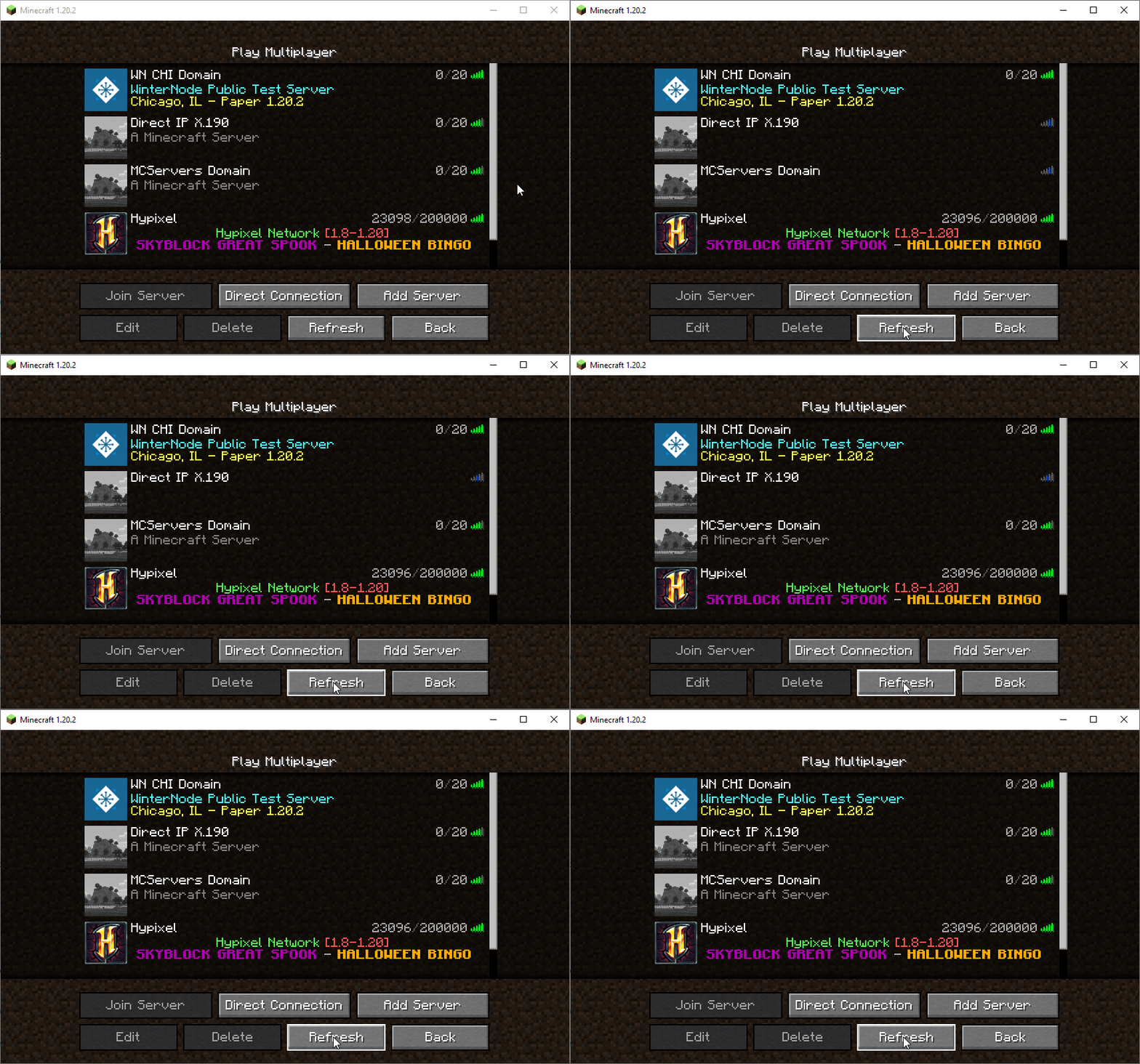
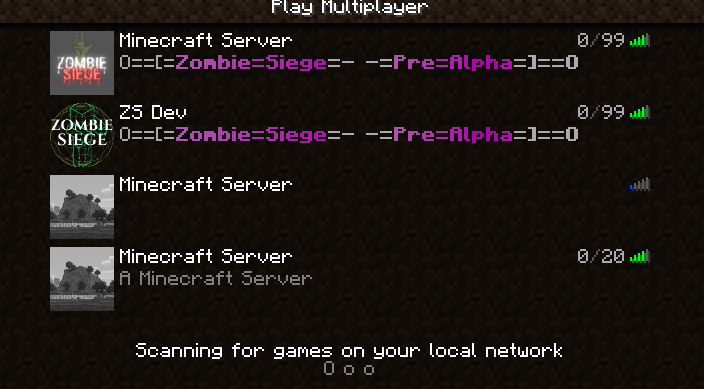
The top two servers are my own, the third server down is the IP address, the last server is via the domain. The IP address takes SEVERAL seconds longer to load.
Hi, I tested with a few different methods, in an attempt to assure you it's not my internet connection. I will try to visit my local cafe next week using my laptop and their wifi and test on a fresh Minecraft client install as well, if you still have any concerns.
Tested on my desktop using a VPN with Ethernet: 609a6316989845586TmDlP161b[1].mp4
Tested on my desktop using mobile data over WIFI tether to my phone: 44f3311698984827OLbg1n171b[1].mp4
I can reproduce this issue on a wired connection in the USA.
I could not reproduce for 1.20.2. See MC-266246 cannot repo.mp4 .
.
@henter5 Hi, sorry you haven't followed the reproduction steps, as you’re not using the server IP I provided, or haven't read that it seems to only effect certain IPs. If there are any questions as to whether it is just this IP address, I can get a few more IPs from different DigitalOcean Data centres. I can also try my best to find IPs that are not related to DigitalOcean, as there were a few comments on another website that have said this happens to them with other IPs.
Hi! Sorry if I misunderstood the issue at hand. The IP you provided is no longer online, hence why I resorted to using another alternative.
I would gladly try to reproduce this issue again if you are willing to provide IP and Domain for a DigitalOcean server as you mentioned.
Ah, no worries. I apologise I will start the server up again shortly.
Hi again, thanks for starting up your test servers. I tried it in 1.8.9 this time, and I still cannot reproduce the behavior you were showing. Same result as in 1.20.2 for me.
Hi! I am getting the same result as Turbo - cannot reproduce for 1.20.2. See MC-266246 cannot repo2.mp4 .
.
I do however have a suspicion that this might be due to your location, the location of the server you are trying to connect to as well as the DNS servers used.
If the reroute through the DNS servers is marginally longer than using the direct IP, then that could potentially explain the delay.
Hmm, weird. Thank you both for checking and good idea trying 1.8.9 - I have setup 2 new servers with DigitalOcean. One in San Francisco, US and the other in Frankfurt, Germany. (Like to point out, these servers are running the Vanilla Minecraft Server 1.20.2 jar file, as you'd expect. With no changes at all made to the server configs, or Droplet configs or whatever) - The Falceso guy pointed out he's in the USA, where's I am in the UK, so I doubt it's related to where you are in the world. My friend suggested reverse DNS/rDNS/PTR Records could be the cause but I am yet to test that and I don't understand how that could be the cause.
I am on the hunt for more IP addresses effected by this, but it is a little costly trying different hosting providers to find if they're effected too.
San Francisco: 144.126.218.8 - sanfran.mcserver.gg
Frankfurt: 157.230.97.247 - frankfurt.mcserver.gg
I also tried using 1.8.9 and I still have the same problem, so not related to EULA blacklist check - how far back was the EULA blacklist check added? e9e71216990262453NJRyg165b[1].mp4
Good theory henter5, although primarily DNS is only used only for domains. As DNS's main job is to translate a domain to a direct IP, so the delay in theory should be the domain not the direct IP which isn't the case (refer to below..), it's the other way around.
I am using Google's DNS 8.8.8.8, 8.8.4.4 - if that helps.
But like my friend mentioned, maybe "reverse DNS" or "PTR records" are to blame, as they do what sort of what you're talking about henter5, they translate an IP address to a domain name - this is most likely our best lead at the moment, but I then put forward, why would the Minecraft client try to do "reverse DNS" or get a domain name when you're connecting with a direct IP, it shouldn't do that.. it doesn't need to? As we're using a direct IP - Before opening the bug report I tested with a Python script and pinged the server with it, it didn't experience any delay which leads me to believe it a problem within the Minecraft client it's self - maybe the EULA blacklist check is still in 1.8.9(honestly don't know)? And they need to do a reverse DNS lookup to get a domain name for an IP in an attempt to see if it's blacklisted, and that's causing the delay?
Just wanted to add, with that "reverse DNS" theory, I am also not sure why you, henter5 and Turbo are not experiencing the problem, maybe DNS caching and you did experience the delay at one point, but the result(which is that the IP address has no PTR/reverse DNS records) was cached which leads to no more delays, where's the rest of ours for whatever didn't cache the result saying the records don't exist.
Hi again, thanks for providing this additional information and server instances to test. I am experiencing a slight delay when connecting to San Francisco, USA as I am based in Germany.
However, I don't see the IP taking significantly longer to ping than the domain. Here's a video showing my observed results in 1.20.2: 2023-11-03 17-05-35.mp4 .
.
Hi again! I tried researching what role DNS servers could play in this issue, but like you said, as it's the direct IP that is experiencing the delay and not the domain it doesn't seem plausible. Whether or not it has something to do with "reverse DNS" or "PTR records" I am not knowledgeable enough to comment on sadly.
Your idea of it being caused by an EULA blacklist check honestly seems the most logical to me after reading your message, though again, it's odd that not all users are experiencing it in that case.
Can reproduce (from Australia).mp4
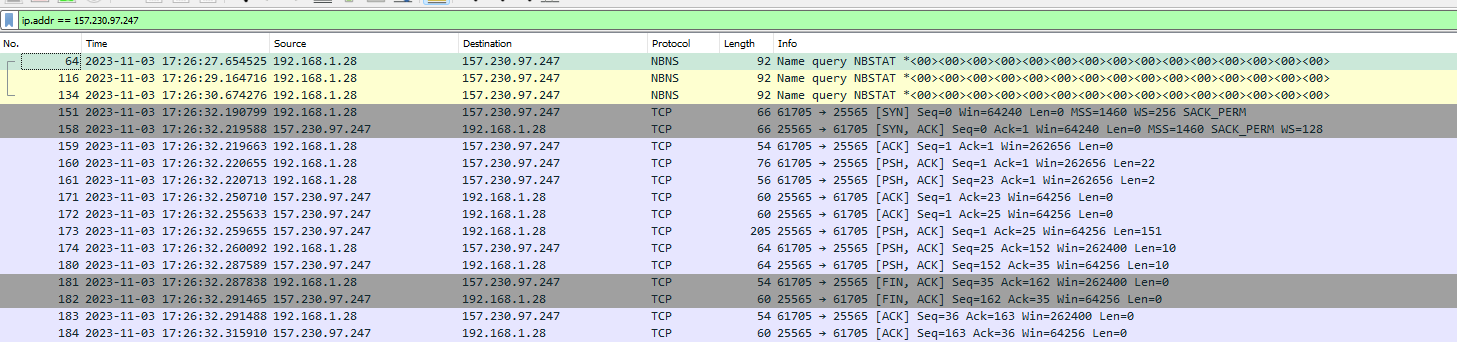
I downloaded Wireshark to see what network packets were sent when you try with the direct IP, now I don't understand this and it would be helpful if someone else knew more. But it seems 3x "NBNS" - "Name query NBSTAT" packets are sent when you ping the IP, as you can see it works out to 6 seconds extra time it took before the first TCP packet to port 25565 was sent. Maybe this is due to the EULA check or reverse DNS/PTR, I have no clue why the 3 extra packets are sent, but I very strongly believe the Minecraft client is sending these packets for whatever reason.
In the screenshot below, I showed the Frankfurt IP but I tested all 3 IPs(London, San fran, Frankfurt) and they showed the same packets sent. The screenshot is from pinging the server with the 1.20.2 client, but the same things/packets happen when the 1.8.9 client is used.
(192.168.1.28 is my computers internal network IP, so there is also nothing to worry about it being exposed here)
I'm not sure how relevant this is but I'd like to add it - I used the command-line mcstatus Python script originally developed by Dinnerbone to get the status of the Frankfurt server with the direct IP and this was the Wireshark result, without any delay whatsoever, so clearly shows something is up with the Minecraft client.
(192.168.1.28 is my computers internal network IP, so there is also nothing to worry about it being exposed here)
Hi, could you tell me how this is "Works As Intended" and why it's resolved?
flyncodes
The cause for slowdown is rDNS request when we have the IP but not the hostname.
We are doing that to check the hostname against the blocklists.
For most servers the request succeeds and there is no noticeable difference between how fast they are fully displayed in the server list.
For some (like the one from the bug description) though it takes a lot of time and fails. If it did not find anything it means it did not find anything in caches and had to actually query multiple DNS servers. It makes sense that it is slow in that case.