 hentor5
- hentor5
- hentor5
- Europe/Stockholm
- Yes
- No
 MC-152641
 MCL-23146MCL-23161
![[Mojang] Maxime Lebrot](../../../data/avatars/users/18941.svg)
 Normal
 Low
Low


 MCPE-46628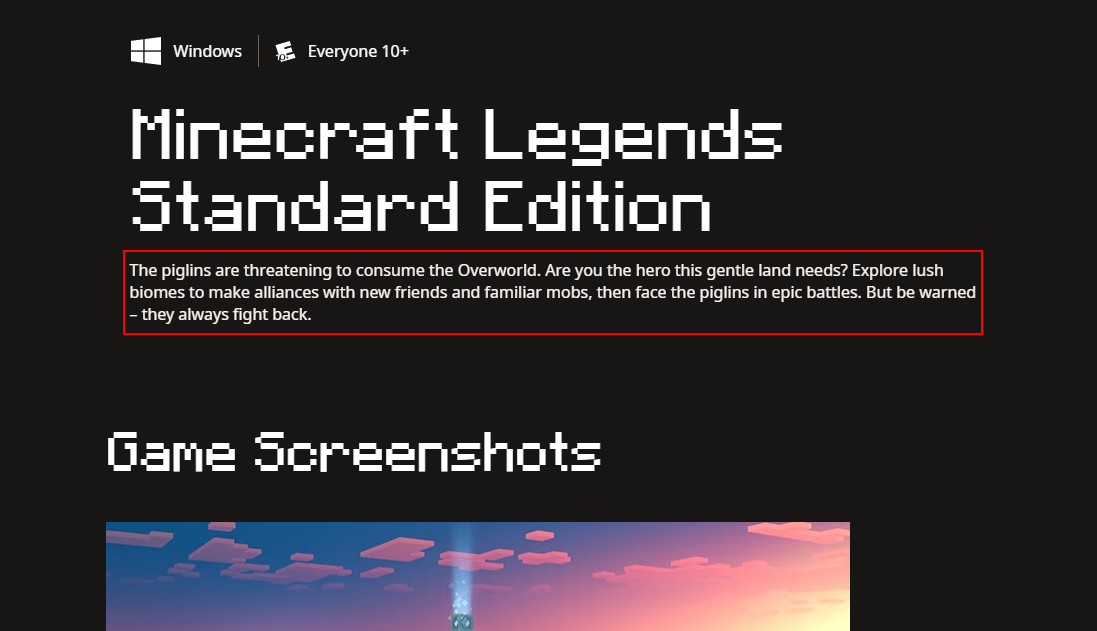















The Bug:
Some of the links under the "Third-party licenses" section in the Minecraft Launcher redirects to URLs containing either typos in the protocol, suspended domains, or removed subdirectories.
Below is a table over all affected links describing the exact issue related to each link.
Also able to reproduce in the latest beta version (b.2.3.643).
Affected Links:
License Title Current link Issue UTF8-CPP hhttps://... Typo in the URLs protocol. "hhttps://" should be "https://". TinyXHML2 http://www.grinninglizard.com/tinyxml2/ The account for the domain has been suspended. @sentry/minimal https://github.com/getsentry/sentry-javascript/tree/master/packages/minimal The URLs subdirectory (/minimal) no longer exist. The github file was deleted on May 30, 2022.
Steps to Reproduce:
- Open the Launcher and go to "Settings" > "About" > "Third-party licenses".
- Locate the affected links as listed in the table above.
- Click on the links.
→
The redirect for UTF8-CPP opens an error window requesting to download a new application to open the "hhttps-link".
→
→Observed Behavior:
The clicked links returns an invalid page leading to a 404 error, or is unable to be opened.
Expected Behavior:
The clicked links returns a valid page to the library corresponding to the license.
The Bug:
Some of the links under the "Third-party licenses" section in the Minecraft Launcher redirect
sto URLscontaining either typos in the protocol,suspended domains,or removed subdirectories.Below is a table o
verall affected links describingtheexact issue related toeachlink.
Also able to reproduce in the latest beta version (b.2.3.643).Affected Li
nks:
License Title Current linkIssue UTF8-CPP hhttps://... Typo in the URLs protocol. "hhttps://" should be "https://". TinyXHML2 http://www.grinninglizard.com/tinyxml2/ The account for the domain has been suspended. @sentry/minimal https://github.com/getsentry/sentry-javascript/tree/master/packages/minimal The URLs subdirectory (/minimal)no longer exist. Thegithub file was deleted on May 30, 2022.Steps to Reproduce:
- Open the Launcher and go to "Settings" > "About" > "Third-party licenses".
- Locate the affected links as listed in the table above.
- Click on the links.
→
→
→Observed Behavior:
The clicked links returns an invalid page leading to a 404 error, or is unable to be opened.
Expected Behavior:
The clicked links returns a valid page to the library corresponding to the license.
The Bug:
Some of the links under the "Third-party licenses" section in the Minecraft Launcher redirect to URLs that either contain a suspended domain, a typo in the protocol, or a deleted subdirectory.
Below is a table of all affected licenses as displayed in the Launcher, with descriptions of the underlying issue for each URL.
The bug is also reproducible in the latest beta version (b.2.3.643).
Affected Licenses:
License Title As Displayed in the Launcher Current URL Underlying Issue UTF8-CPP hhttps://... Typo in the URLs protocol. "hhttps://" should be "https://". TinyXHML2 http://www.grinninglizard.com/tinyxml2/ The account for the domain has been suspended. @sentry/minimal https://github.com/getsentry/sentry-javascript/tree/master/packages/minimal The URLs subdirectory "/minimal" no longer exist. The GitHub file was deleted on May 30, 2022. Steps to Reproduce:
- Open the Launcher and go to "Settings" > "About" > "Third-party licenses".
- Locate the affected links as listed in the table above.
- Click on the links.
→
→
→Observed Behavior:
The clicked links returns an invalid page leading to a 404 error, or is unable to be opened.
Expected Behavior:
The clicked links returns a valid page to the library corresponding to the license.
The Bug:
Some of the links under the "Third-party licenses" section in the Minecraft Launcher redirect to URLs that either contain a suspended domain, a typo in the protocol, or a deleted subdirectory.
Below is a table of all affected licenses as displayed in the Launcher, with descriptions of the underlying issue for each URL.
Th
ebug is also reproducible in the latest beta version(b.2.3.643).Affected Licenses:
License Title As Displayed in the Launcher Current URL Underlying Issue UTF8-CPP hhttps://... Typo in the URLs protocol. "hhttps://" should be "https://". TinyXHML2 http://www.grinninglizard.com/tinyxml2/ The account for the domain has been suspended. @sentry/minimal https://github.com/getsentry/sentry-javascript/tree/master/packages/minimal The URLs subdirectory "/minimal" no longer exist. The GitHub file was deleted on May 30, 2022. Steps to Reproduce:
- Open the Launcher and go to "Settings" > "About" > "Third-party licenses".
- Locate the affected links as listed in the table above.
- Click on the links.
→
→
→Observed Behavior:
The clicked links returns an invalid page leading to a 404 error, or is unable to be opened.
Expected Behavior:
The clicked links returns a valid page to the library corresponding to the license.
The Bug:
Some of the links under the "Third-party licenses" section in the Minecraft Launcher redirect to URLs that either contain a suspended domain, a typo in the protocol, or a deleted subdirectory.
Below is a table of all affected licenses as displayed in the Launcher, with descriptions of the underlying issue for each URL.
This bug is also reproducible in the latest beta versions b.2.3.647 (New Windows App) and b.2.3.651 (Legacy Windows).
Affected Licenses:
License Title As Displayed in the Launcher Current URL Underlying Issue UTF8-CPP hhttps://... Typo in the URLs protocol. "hhttps://" should be "https://". TinyXHML2 http://www.grinninglizard.com/tinyxml2/ The account for the domain has been suspended. @sentry/minimal https://github.com/getsentry/sentry-javascript/tree/master/packages/minimal The URLs subdirectory "/minimal" no longer exist. The GitHub file was deleted on May 30, 2022. Steps to Reproduce:
- Open the Launcher and go to "Settings" > "About" > "Third-party licenses".
- Locate the affected links as listed in the table above.
- Click on the links.
→
→
→Observed Behavior:
The clicked links returns an invalid page leading to a 404 error, or is unable to be opened.
Expected Behavior:
The clicked links returns a valid page to the library corresponding to the license.
The Bug:
Some of the links under the "Third-party licenses" section in the Minecraft Launcher redirect to URLs that either contain a suspended domain, a typo in the protocol,
ora deleted subdirectory.Below is a table of all affected licenses as displayed in the Launcher, with descriptions of the underlying issue for each URL.
This bug is also reproducible in the latest beta versions b.2.3.647 (New Windows App) and b.2.3.651 (Legacy Windows).
Affected Licenses:
License Title As Displayed in the Launcher Current URL Underlying Issue UTF8-CPP hhttps://...Typo in the URLs protocol. "hhttps://" should be "https://".TinyXHML2 http://www.grinninglizard.com/tinyxml2/ The account for the domain has been suspended. @sentry/minimal https://github.com/getsentry/sentry-javascript/tree/master/packages/minimal The URLs subdirectory "/minimal" no longer exist. The GitHub file was deleted on May 30, 2022. Steps to Reproduce:
- Open the Launcher and go to "Settings" > "About" > "Third-party licenses".
- Locate the affected links as listed in the table above.
- Click on the links.
→
→
→Observed Behavior:
The clicked links returns an invalid page leading to a 404 error, or is unable to be opened.
Expected Behavior:
The clicked links returns a valid page to the library corresponding to the license.
The Bug:
Some of the links under the "Third-party licenses" section in the Minecraft Launcher redirect to URLs that either contain a suspended domain, a typo in the protocol, a deleted subdirectory, or does not trigger at all.
Below is a table of all affected licenses as displayed in the Launcher, with descriptions of the underlying issue for each URL.
Affected Licenses:
License Title As Displayed in the Launcher Current URL Underlying Issue Status UTF8-CPP hhttps://... Typo in the URLs protocol. "hhttps://" should be "https://". Fixed TinyXHML2 http://www.grinninglizard.com/tinyxml2/ The account for the domain has been suspended. @sentry/minimal https://github.com/getsentry/sentry-javascript/tree/master/packages/minimal The URLs subdirectory "/minimal" no longer exist. The GitHub file was deleted on May 30, 2022. zlib Missing link. shared_mutex Missing link. Redux Missing link. enquire.js Missing link. Steps to Reproduce:
- Open the Launcher and go to "Settings" > "About" > "Third-party licenses".
- Locate the affected links as listed in the table above.
- Click on the links.
→
→
→Observed Behavior:
The clicked links returns an invalid page leading to a 404 error, or is unable to be opened.
Expected Behavior:
The clicked links returns a valid page to the library corresponding to the license.
There is a misplaced space character in one of the the Dungeons FAQ strings
There is a misplaced space character in one of thetheDungeons FAQ strings
The Bug:
There is a misplaced space character between the variable ("%2$s") and the link text "Season Pass FAQ" in one of the
theDungeons FAQ strings, causing a formatting issue.Below is a table to highlight this error. In there you can find information on what the current and expected string looks like along with a link to the string on Crowdin.
Affected String:
Before reading the table, please note the following:
- Incorrect expressions are highlighted in BOLD.
Current String Expected String String Context String URL on Crowdin %1$sThe Season Pass is a new offering that includes four exciting new DLC packs for Minecraft Dungeons as they become available, starting with Howling Peaks in December 2020. See the%2$s Season Pass FAQ%3$s for more details.%4$s%5$sThe Season Pass does not include content from the Hero Pass, and vice versa. These two passes are sold separately.%6$s %1$sThe Season Pass is a new offering that includes four exciting new DLC packs for Minecraft Dungeons as they become available, starting with Howling Peaks in December 2020. See the %2$sSeason Pass FAQ%3$s for more details.%4$s%5$sThe Season Pass does not include content from the Hero Pass, and vice versa. These two passes are sold separately.%6$s game_faqs/Answer for question: What is included in the Minecraft Dungeons Season Pass? https://crowdin.com/translate/minecraft-launcher/9442/en-sv#527342 Steps to Reproduce:
- Open the Launcher and go to "Minecraft Dungeons" > "FAQ".
- In the answer to question 2, take note of the space before the text "Season Pass FAQ".
Observed Behavior:
The space character is placed after the variable to the external link text.
Expected Behavior:
The space character is placed before the variable to the external link text, so as to not cause a formatting issue.
The Bug:
There is a misplaced space character between the variable ("%2$s") and the link text ("Season Pass FAQ") in one of the Dungeons FAQ strings, causing a formatting issue.
Below is a table to highlight this error. In there you can find information on what the current and expected string looks like along with a link to the string on Crowdin.
Affected String:
Before reading the table, please note the following:
- Incorrect expressions are highlighted in BOLD.
Current String Expected String String Context String URL on Crowdin %1$sThe Season Pass is a new offering that includes four exciting new DLC packs for Minecraft Dungeons as they become available, starting with Howling Peaks in December 2020. See the%2$s Season Pass FAQ%3$s for more details.%4$s%5$sThe Season Pass does not include content from the Hero Pass, and vice versa. These two passes are sold separately.%6$s %1$sThe Season Pass is a new offering that includes four exciting new DLC packs for Minecraft Dungeons as they become available, starting with Howling Peaks in December 2020. See the %2$sSeason Pass FAQ%3$s for more details.%4$s%5$sThe Season Pass does not include content from the Hero Pass, and vice versa. These two passes are sold separately.%6$s game_faqs/Answer for question: What is included in the Minecraft Dungeons Season Pass? https://crowdin.com/translate/minecraft-launcher/9442/en-sv#527342 Steps to Reproduce:
- Open the Launcher and go to "Minecraft Dungeons" > "FAQ".
- In the answer to question 2, take note of the space before the text "Season Pass FAQ".
Observed Behavior:
The space character is placed after the variable to the external link text.
Expected Behavior:
The space character is placed before the variable to the external link text, so as to not cause a formatting issue.
Screen elements for news articles have no alt text resultning in weird audioqueues from the narratorScreen elements for news articles have no alt text resultning in weird audio cues from the narrator
Discovered while testing narrator translations.
The Bug:
When using the Windows Narrator function in the Minecraft: Java Edition tab, the narrator reads the file names of news banners as well as their resolution. Normally, alt-texts (alternative texts) are used for screen elements such as banners and hero images, making this inconsistent with other parts of the Launcher.
I have attached a screen recording with audio of the narrator reading the Launcher window for Minecraft: Java Edition. Below is a table of the transcribed audio from that attachment.
This bug is also reproducible in the latest beta version b.2.3.645 (New Windows App).
Audio Transcription:
Before reading the table, please note the following:
- Incorrect expressions are highlighted in BOLD.
Minecraft Launcher window
Hero image for Minecraft: Java Edition
Choose installation: Latest snapshot 1.19.4-rc1
Play hentor5
logo reveal 700x466
The Trails & Tales Update
News March 2, 2023
Minecraft 1.20 has a name!
Read more about "The Trails & Tales Update" on the web
[inaudible]0222 700x466
New on Realms: Just the Two of Us
Minecraft Realms February 24, 2023
8 maps for me, you, and everyone we know!
Read more about "New on Realms: Just the Two of Us" on the web
cb 700x466
Cherry Blossom Biome Coming to 1.20
News February 14, 2023
Cherry blossom trees take the Overworld by storm!
Read more about "Cherry Blossom Biome Coming to 1.20" on the webSteps to Reproduce:
- Activate the Windows Narrator function.
- Open the Launcher and select the "Minecraft: Java Edition" tab.
- Make note of the narrator reading the names and resolutions for the news banners.
Observed Behavior:
The narrator reads file names and resolutions for news banners when selecting the Minecraft: Java Edition tab.
Expected Behavior:
The narrator does not read file names and resolutions for news banners when selecting the Minecraft: Java Edition tab, or it reads an appropriate alt-text instead.
Screen elements for news articles have no alt text resultning in weird audio cues from the narrator
Discovered while testing narrator translations.
The Bug:
When using the Windows Narrator function in the Minecraft: Java Edition tab, the narrator reads the file names of news banners as well as their resolution. Normally, alt-texts (alternative texts) are used for screen elements such as banners and hero images, making this inconsistent with other parts of the Launcher.
I have attached a screen recording with audio of the narrator reading the Launcher window for Minecraft: Java Edition. Below is a table of the transcribed audio from that attachment.
This bug is also reproducible in the latest beta version b.2.3.64
5(New Windows App).Audio Transcription:
Before reading the table, please note the following:
- Incorrect expressions are highlighted in BOLD.
Minecraft Launcher window
Hero image for Minecraft: Java Edition
Choose installation: Latest snapshot 1.19.4-rc1
Play hentor5
logo reveal 700x466
The Trails & Tales Update
News March 2, 2023
Minecraft 1.20 has a name!
Read more about "The Trails & Tales Update" on the web
[inaudible]0222 700x466
New on Realms: Just the Two of Us
Minecraft Realms February 24, 2023
8 maps for me, you, and everyone we know!
Read more about "New on Realms: Just the Two of Us" on the web
cb 700x466
Cherry Blossom Biome Coming to 1.20
News February 14, 2023
Cherry blossom trees take the Overworld by storm!
Read more about "Cherry Blossom Biome Coming to 1.20" on the webSteps to Reproduce:
- Activate the Windows Narrator function.
- Open the Launcher
and select the "Minecraft: Java Edition" tab.Make note of the narrator reading the names and resolutions for the news banners.Observed Behavior:
The narrator reads file names and resolutions for news banners when selecting the Minecraft: Java Edition tab.
Expected Behavior:
The narrator does not read file names and resolutions for news banners when selecting the Minecraft: Java Edition tab, or it reads an appropriate alt-text instead.
Discovered while testing narrator translations.
The Bug:
When using the Windows Narrator function in the Minecraft: Java Edition tab, the narrator reads the file names of news banners as well as their resolution. Normally, alt-texts (alternative texts) are used for screen elements such as banners and hero images, making this inconsistent with other parts of the Launcher.
I have attached a screen recording with audio of the narrator reading the Launcher window for Minecraft: Java Edition. Below is a table of the transcribed audio from that attachment.
This bug is also reproducible in the latest beta versions b.2.3.647 (New Windows App) and b.2.3.651 (Legacy Windows).
Audio Transcription:
Before reading the table, please note the following:
- Incorrect expressions are highlighted in BOLD.
Minecraft Launcher window
Hero image for Minecraft: Java Edition
Choose installation: Latest snapshot 1.19.4-rc1
Play hentor5
logo reveal 700x466
The Trails & Tales Update
News March 2, 2023
Minecraft 1.20 has a name!
Read more about "The Trails & Tales Update" on the web
[inaudible]0222 700x466
New on Realms: Just the Two of Us
Minecraft Realms February 24, 2023
8 maps for me, you, and everyone we know!
Read more about "New on Realms: Just the Two of Us" on the web
cb 700x466
Cherry Blossom Biome Coming to 1.20
News February 14, 2023
Cherry blossom trees take the Overworld by storm!
Read more about "Cherry Blossom Biome Coming to 1.20" on the webSteps to Reproduce:
- Activate the Windows Narrator function.
- Open the Launcher with an account that has purchased Minecraft: Java Edition.
- Select the "Minecraft: Java Edition" tab.
- Make note of the narrator reading the names and resolutions for the news banners.
Observed Behavior:
The narrator reads file names and resolutions for news banners when selecting the Minecraft: Java Edition tab.
Expected Behavior:
The narrator does not read file names and resolutions for news banners when selecting the Minecraft: Java Edition tab, or it reads an appropriate alt-text instead.
Discovered while testing narrator translations; relates to
MCL-23152.The Bug:
When using the Windows Narrator function in the Launcher windows for Minecraft: Java Edition, Minecraft for Windows, and Minecraft Dungeons, the narrator reads different screen elements although the layout of the pages are very similar.
The audio que "News section" is for example only read in the Launcher windows for Minecraft for Windows and Minecraft Dungeons, while the contents of news articles only are read in the Launcher windows for Minecraft: Java Edition.
I have attached screen recordings with audio of the narrator reading the different Launcher windows. Below is a table of the transcribed audio from those attachments.
This bug is also reproducible in the latest beta version b.2.3.645 (New Windows App).
Audio Transcriptions:
Before reading the table, please note the following:
- Inconsistent/incorrect xpressions are highlighted in BOLD.
Minecraft: Java Edition
(Minecraft Java Edition.mp4)
Minecraft for Windows
(Minecraft for Windows.mp4Minecraft Dungeons
(Minecraft Dungeons.mp4Minecraft Launcher window
Hero image for Minecraft: Java Edition
Choose installation: Latest release 1.19.3
Play hentor5
logo reveal 700x466
The Trails & Tales Update
. . .Minecraft Launcher window
Hero image for Minecraft for Windows
Play hentor5
News section
System requirements section
Group
Minecraft Launcher window
Hero image for Minecraft Dungeons
Play hentor5
News section
Group
Steps to Reproduce:
- Activate the Windows Narrator function.
- Open the Launcher and locate the Launcher windows mentioned above.
- Make note of the narrator reading different audio cues for similar Launcher windows.
Observed Behavior:
The narrator reads different audio cues for Launcher windows with similar layout.
Expected Behavior:
The narrator reads the same (or similar) audio cues for Launcher windows with similar layout.
Discovered while testing narrator translations; relates to
MCL-23152.The Bug:
When using the Windows Narrator function in the Launcher windows for Minecraft: Java Edition, Minecraft for Windows, and Minecraft Dungeons, the narrator reads different screen elements although the layout of the pages are very similar.
The audio que "News section" is for example only read in the Launcher windows for Minecraft for Windows and Minecraft Dungeons, while the contents of news articles only are read in the Launcher windows for Minecraft: Java Edition.
I have attached screen recordings with audio of the narrator reading the different Launcher windows. Below is a table of the transcribed audio from those attachments.
This bug is also reproducible in the latest beta version b.2.3.645 (New Windows App).
Audio Transcriptions:
Before reading the table, please note the following:
- Inconsistent/incorrect xpressions are highlighted in BOLD.
Minecraft: Java Edition
(Minecraft Java Edition.mp4
Minecraft for Windows
(Minecraft for Windows.mp4Minecraft Dungeons
(Minecraft Dungeons.mp4Minecraft Launcher window
Hero image for Minecraft: Java Edition
Choose installation: Latest release 1.19.3
Play hentor5
logo reveal 700x466
The Trails & Tales Update
. . .Minecraft Launcher window
Hero image for Minecraft for Windows
Play hentor5
News section
System requirements section
GroupMinecraft Launcher window
Hero image for Minecraft Dungeons
Play hentor5
News section
GroupSteps to Reproduce:
- Activate the Windows Narrator function.
- Open the Launcher and locate the Launcher windows mentioned above.
- Make note of the narrator reading different audio cues for similar Launcher windows.
Observed Behavior:
The narrator reads different audio cues for Launcher windows with similar layout.
Expected Behavior:
The narrator reads the same (or similar) audio cues for Launcher windows with similar layout.
Discovered while testing narrator translations; relates to
MCL-23152.The Bug:
When using the Windows Narrator function in the Launcher windows for Minecraft: Java Edition, Minecraft for Windows, and Minecraft Dungeons, the narrator reads different screen elements although the layout of the pages are very similar.
The audio
que "News section" is for example only read in the Launcher windows for Minecraft for Windows and Minecraft Dungeons, while the contents of news articles only are read in the Launcher windows for Minecraft: Java Edition.I have attached screen recordings with audio of the narrator reading the different Launcher windows. Below is a table of the transcribed audio from those attachments.
This bug is also reproducible in the latest beta version b.2.3.645 (New Windows App).
Audio Transcriptions:
Before reading the table, please note the following:
- Inconsistent/incorrect xpressions are highlighted in BOLD.
Minecraft: Java Edition
(Minecraft Java Edition.mp4
Minecraft for Windows
(Minecraft for Windows.mp4Minecraft Dungeons
(Minecraft Dungeons.mp4Minecraft Launcher window
Hero image for Minecraft: Java Edition
Choose installation: Latest release 1.19.3
Play hentor5
logo reveal 700x466
The Trails & Tales Update
. . .Minecraft Launcher window
Hero image for Minecraft for Windows
Play hentor5
News section
System requirements section
GroupMinecraft Launcher window
Hero image for Minecraft Dungeons
Play hentor5
News section
GroupSteps to Reproduce:
- Activate the Windows Narrator function.
- Open the Launcher and locate the Launcher windows mentioned above.
- Make note of the narrator reading different audio cues for similar Launcher windows.
Observed Behavior:
The narrator reads different audio cues for Launcher windows with similar layout.
Expected Behavior:
The narrator reads the same (or similar) audio cues for Launcher windows with similar layout.
Discovered while testing narrator translations; relates to
MCL-23152.The Bug:
When using the Windows Narrator function in the Launcher windows for Minecraft: Java Edition, Minecraft for Windows, and Minecraft Dungeons, the narrator reads different screen elements although the layout of the pages are very similar.
The audio cue "News section" is for example only read in the Launcher windows for Minecraft for Windows and Minecraft Dungeons, while the contents of news articles only are read in the Launcher windows for Minecraft: Java Edition.
I have attached screen recordings with audio of the narrator reading the different Launcher windows. Below is a table of the transcribed audio from those attachments.
This bug is also reproducible in the latest beta version b.2.3.645 (New Windows App).
Audio Transcriptions:
Before reading the table, please note the following:
- Inconsistent/incorrect xpressions are highlighted in BOLD.
Minecraft: Java Edition
(Minecraft Java Edition.mp4
Minecraft for Windows
(Minecraft for Windows.mp4Minecraft Dungeons
(Minecraft Dungeons.mp4Minecraft Launcher window
Hero image for Minecraft: Java Edition
Choose installation: Latest release 1.19.3
Play hentor5
logo reveal 700x466
The Trails & Tales Update
. . .Minecraft Launcher window
Hero image for Minecraft for Windows
Play hentor5
News section
System requirements section
GroupMinecraft Launcher window
Hero image for Minecraft Dungeons
Play hentor5
News section
GroupSteps to Reproduce:
- Activate the Windows Narrator function.
- Open the Launcher and locate the Launcher windows mentioned above.
- Make note of the narrator reading different audio cues for similar Launcher windows.
Observed Behavior:
The narrator reads different audio cues for Launcher windows with similar layout.
Expected Behavior:
The narrator reads the same (or similar) audio cues for Launcher windows with similar layout.
Discovered while testing narrator translations; relates to
MCL-23152.The Bug:
When using the Windows Narrator function in the Launcher windows for Minecraft: Java Edition, Minecraft for Windows, and Minecraft Dungeons, the narrator reads different screen elements although the layout of the pages are very similar.
The audio cue "News section" is for example only read in the Launcher windows for Minecraft for Windows and Minecraft Dungeons, while the contents of news articles only are read in the Launcher windows for Minecraft: Java Edition.
I have attached screen recordings with audio of the narrator reading the different Launcher windows. Below is a table of the transcribed audio from those attachments.
This bug is also reproducible in the latest beta version b.2.3.645 (New Windows App).
Audio Transcriptions:
Before reading the table, please note the following:
- Inconsistent/incorrect expressions are highlighted in BOLD.
Minecraft: Java Edition
(Minecraft Java Edition.mp4
Minecraft for Windows
(Minecraft for Windows.mp4Minecraft Dungeons
(Minecraft Dungeons.mp4Minecraft Launcher window
Hero image for Minecraft: Java Edition
Choose installation: Latest release 1.19.3
Play hentor5
logo reveal 700x466
The Trails & Tales Update
. . .Minecraft Launcher window
Hero image for Minecraft for Windows
Play hentor5
News section
System requirements section
GroupMinecraft Launcher window
Hero image for Minecraft Dungeons
Play hentor5
News section
GroupSteps to Reproduce:
- Activate the Windows Narrator function.
- Open the Launcher and locate the Launcher windows mentioned above.
- Make note of the narrator reading different audio cues for similar Launcher windows.
Observed Behavior:
The narrator reads different audio cues for Launcher windows with similar layout.
Expected Behavior:
The narrator reads the same (or similar) audio cues for Launcher windows with similar layout.
Discovered while testing narrator translations; relates to
MCL-23152.The Bug:
When using the Windows Narrator function in the Launcher windows for Minecraft: Java Edition, Minecraft for Windows, and Minecraft Dungeons, the narrator reads different screen elements although the layout of the pages are very similar.
The audio cue "News section" is for example only read in the Launcher windows for Minecraft for Windows and Minecraft Dungeons, while the contents of news articles only are read in the Launcher windows for Minecraft: Java Edition.
I have attached screen recordings with audio of the narrator reading the different Launcher windows. Below is a table of the transcribed audio from those attachments.
This bug is also reproducible in the latest beta version b.2.3.645 (New Windows App).
Audio Transcriptions:
Before reading the table, please note the following:
- Inconsistent/incorrect expressions are highlighted in BOLD.
Minecraft: Java Edition
(Minecraft Java Edition.mp4
Minecraft for Windows
(Minecraft for Windows.mp4Minecraft Dungeons
(Minecraft Dungeons.mp4Minecraft Launcher window
Hero image for Minecraft: Java Edition
Choose installation: Latest release 1.19.3
Play hentor5
logo reveal 700x466
The Trails & Tales Update
. . .Minecraft Launcher window
Hero image for Minecraft for Windows
Play hentor5
News section
System requirements section
GroupMinecraft Launcher window
Hero image for Minecraft Dungeons
Play hentor5
News section
Group
Steps to Reproduce:
- Activate the Windows Narrator function.
- Open the Launcher and locate the Launcher windows mentioned above.
- Make note of the narrator reading different audio cues for similar Launcher windows.
Observed Behavior:
The narrator reads different audio cues for Launcher windows with similar layout.
Expected Behavior:
The narrator reads the same (or similar) audio cues for Launcher windows with similar layout.
Discovered while testing narrator translations; relates to
MCL-23152.The Bug:
When using the Windows Narrator function in the Launcher windows for Minecraft: Java Edition, Minecraft for Windows, and Minecraft Dungeons, the narrator reads different screen elements although the layout of the pages are very similar.
The audio cue "News section" is for example only read in the Launcher windows for Minecraft for Windows and Minecraft Dungeons, while the contents of news articles only are read in the Launcher window
sfor Minecraft: Java Edition.I have attached screen recordings with audio of the narrator reading the different Launcher windows. Below is a table of the transcribed audio from those attachments.
This bug is also reproducible in the latest beta version b.2.3.645 (New Windows App).
Audio Transcriptions:
Before reading the table, please note the following:
- Inconsistent/incorrect expressions are highlighted in BOLD.
Minecraft: Java Edition
(Minecraft Java Edition.mp4
Minecraft for Windows
(Minecraft for Windows.mp4Minecraft Dungeons
(Minecraft Dungeons.mp4Minecraft Launcher window
Hero image for Minecraft: Java Edition
Choose installation: Latest release 1.19.3
Play hentor5
logo reveal 700x466
The Trails & Tales Update
. . .Minecraft Launcher window
Hero image for Minecraft for Windows
Play hentor5
News section
System requirements section
GroupMinecraft Launcher window
Hero image for Minecraft Dungeons
Play hentor5
News section
Group
Steps to Reproduce:
- Activate the Windows Narrator function.
- Open the Launcher and locate the Launcher windows mentioned above.
- Make note of the narrator reading different audio cues for similar Launcher windows.
Observed Behavior:
The narrator reads different audio cues for Launcher windows with similar layout.
Expected Behavior:
The narrator reads the same (or similar) audio cues for Launcher windows with similar layout.
Discovered while testing narrator translations; relates to
MCL-23152.The Bug:
When using the Windows Narrator function in the Launcher windows for Minecraft: Java Edition, Minecraft for Windows, and Minecraft Dungeons, the narrator reads different screen elements although the layout of the pages are very similar.
The audio cue "News section" is for example only read in the Launcher windows for Minecraft for Windows and Minecraft Dungeons, while the contents of news articles only are read in the Launcher window for Minecraft: Java Edition.
I have attached screen recordings with audio of the narrator reading the different Launcher windows. Below is a table of the transcribed audio from those attachments.
This bug is also reproducible in the latest beta version b.2.3.645 (New Windows App).
Audio Transcriptions:
Before reading the table, please note the following:
- Inconsistent/incorrect expressions are highlighted in BOLD.
Minecraft: Java Edition
(Minecraft Java Edition.mp4
Minecraft for Windows
(Minecraft for Windows.mp4Minecraft Dungeons
(Minecraft Dungeons.mp4Minecraft Launcher window
Hero image for Minecraft: Java Edition
Choose installation: Latest release 1.19.3
Play hentor5
logo reveal 700x466
The Trails & Tales Update
. . .Minecraft Launcher window
Hero image for Minecraft for Windows
Play hentor5
News section
System requirements section
GroupMinecraft Launcher window
Hero image for Minecraft Dungeons
Play hentor5
News section
GroupSteps to Reproduce:
- Activate the Windows Narrator function.
- Open the Launcher and locate the Launcher windows mentioned above.
- Make note of the narrator reading different audio cues for similar Launcher windows.
Observed Behavior:
The narrator reads different audio cues for Launcher windows with similar layout.
Expected Behavior:
The narrator reads the same (or similar) audio cues for Launcher windows with similar layout.
Discovered while testing narrator translations; relates to
MCL-23152.The Bug:
When using the Windows Narrator function in the Launcher windows for Minecraft: Java Edition, Minecraft for Windows, and Minecraft Dungeons, the narrator reads different screen elements although the layout of the pages are very similar.
The audio cue "News section" is for example only read in the Launcher windows for Minecraft for Windows and Minecraft Dungeons, while the contents of news articles only are read in the Launcher window for Minecraft: Java Edition.
I have attached screen recordings with audio of the narrator reading the different Launcher windows. Below is a table of the transcribed audio from those attachments.
This bug is also reproducible in the latest beta version b.2.3.645 (New Windows App).
Audio Transcriptions:
Before reading the table, please note the following:
- Inconsistent/incorrect expressions are highlighted in BOLD.
Minecraft: Java Edition
(Minecraft Java Edition.mp4Minecraft for Windows
(Minecraft for Windows.mp4Minecraft Dungeons
(Minecraft Dungeons.mp4Minecraft Launcher window
Hero image for Minecraft: Java Edition
Choose installation: Latest release 1.19.3
Play hentor5
logo reveal 700x466
The Trails & Tales Update
. . .Minecraft Launcher window
Hero image for Minecraft for Windows
Play hentor5
News section
System requirements section
Group
**
**Minecraft Launcher window
Hero image for Minecraft Dungeons
Play hentor5
News section
Group
**
**
**Steps to Reproduce:
- Activate the Windows Narrator function.
- Open the Launcher and locate the Launcher windows mentioned above.
- Make note of the narrator reading different audio cues for similar Launcher windows.
Observed Behavior:
The narrator reads different audio cues for Launcher windows with similar layout.
Expected Behavior:
The narrator reads the same (or similar) audio cues for Launcher windows with similar layout.
Discovered while testing narrator translations; relates to
MCL-23152.The Bug:
When using the Windows Narrator function in the Launcher windows for Minecraft: Java Edition, Minecraft for Windows, and Minecraft Dungeons, the narrator reads different screen elements although the layout of the pages are very similar.
The audio cue "News section" is for example only read in the Launcher windows for Minecraft for Windows and Minecraft Dungeons, while the contents of news articles only are read in the Launcher window for Minecraft: Java Edition.
I have attached screen recordings with audio of the narrator reading the different Launcher windows. Below is a table of the transcribed audio from those attachments.
This bug is also reproducible in the latest beta version b.2.3.645 (New Windows App).
Audio Transcriptions:
Before reading the table, please note the following:
- Inconsistent/incorrect expressions are highlighted in BOLD.
Minecraft: Java Edition
(Minecraft Java Edition.mp4Minecraft for Windows
(Minecraft for Windows.mp4Minecraft Dungeons
(Minecraft Dungeons.mp4Minecraft Launcher window
Hero image for Minecraft: Java Edition
Choose installation: Latest release 1.19.3
Play hentor5
logo reveal 700x466
The Trails & Tales Update
. . .Minecraft Launcher window
Hero image for Minecraft for Windows
Play hentor5
News section
System requirements section
Group
**
**Minecraft Launcher window
Hero image for Minecraft Dungeons
Play hentor5
News section
Group
**
**
**Steps to Reproduce:
- Activate the Windows Narrator function.
- Open the Launcher and locate the Launcher windows mentioned above.
- Make note of the narrator reading different audio cues for similar Launcher windows.
Observed Behavior:
The narrator reads different audio cues for Launcher windows with similar layout.
Expected Behavior:
The narrator reads the same (or similar) audio cues for Launcher windows with similar layout.
Discovered while testing narrator translations; relates to
MCL-23152.The Bug:
When using the Windows Narrator function in the Launcher windows for Minecraft: Java Edition, Minecraft for Windows, and Minecraft Dungeons, the narrator reads different screen elements although the layout of the pages are very similar.
The audio cue "News section" is for example only read in the Launcher windows for Minecraft for Windows and Minecraft Dungeons, while the contents of news articles only are read in the Launcher window for Minecraft: Java Edition.
I have attached screen recordings with audio of the narrator reading the different Launcher windows. Below is a table of the transcribed audio from those attachments.
This bug is also reproducible in the latest beta version b.2.3.645 (New Windows App).
Audio Transcriptions:
Before reading the table, please note the following:
- Inconsistent/incorrect expressions are highlighted in BOLD.
Minecraft: Java Edition
(Minecraft Java Edition.mp4Minecraft for Windows
(Minecraft for Windows.mp4Minecraft Dungeons
(Minecraft Dungeons.mp4Minecraft Launcher window
Hero image for Minecraft: Java Edition
Choose installation: Latest release 1.19.3
Play hentor5
logo reveal 700x466
The Trails & Tales Update
. . .Minecraft Launcher window
Hero image for Minecraft for Windows
Play hentor5
News section
System requirements section
Group
Minecraft Launcher window
Hero image for Minecraft Dungeons
Play hentor5
News section
Group
Steps to Reproduce:
- Activate the Windows Narrator function.
- Open the Launcher and locate the Launcher windows mentioned above.
- Make note of the narrator reading different audio cues for similar Launcher windows.
Observed Behavior:
The narrator reads different audio cues for Launcher windows with similar layout.
Expected Behavior:
The narrator reads the same (or similar) audio cues for Launcher windows with similar layout.
Discovered while testing narrator translations; relates to
MCL-23152.The Bug:
When using the Windows Narrator function in the Launcher windows for Minecraft: Java Edition, Minecraft for Windows, and Minecraft Dungeons, the narrator reads different screen elements although the layout of the pages are very similar.
The audio cue "News section" is for example only read in the Launcher windows for Minecraft for Windows and Minecraft Dungeons, while the contents of news articles only are read in the Launcher window for Minecraft: Java Edition.
I have attached screen recordings with audio of the narrator reading the different Launcher windows. Below is a table of the transcribed audio from those attachments.
This bug is also reproducible in the latest beta version b.2.3.645 (New Windows App).
Audio Transcriptions:
Before reading the table, please note the following:
- Inconsistent/incorrect expressions are highlighted in BOLD.
Minecraft: Java Edition
(Minecraft Java Edition.mp4Minecraft for Windows
(Minecraft for Windows.mp4Minecraft Dungeons
(Minecraft Dungeons.mp4Minecraft Launcher window
Hero image for Minecraft: Java Edition
Choose installation: Latest release 1.19.3
Play hentor5
logo reveal 700x466
The Trails & Tales Update
. . .Minecraft Launcher window
Hero image for Minecraft for Windows
Play hentor5
News section
System requirements section
Group
Minecraft Launcher window
Hero image for Minecraft Dungeons
Play hentor5
News section
Group
Steps to Reproduce:
- Activate the Windows Narrator function.
- Open the Launcher and locate the Launcher windows mentioned above.
- Make note of the narrator reading different audio cues for similar Launcher windows.
Observed Behavior:
The narrator reads different audio cues for Launcher windows with similar layout.
Expected Behavior:
The narrator reads the same (or similar) audio cues for Launcher windows with similar layout.
Discovered while testing narrator translations; relates to
MCL-23152.The Bug:
When using the Windows Narrator function in the Launcher windows for Minecraft: Java Edition, Minecraft for Windows, and Minecraft Dungeons, the narrator reads different screen elements although the layout of the pages are very similar.
The audio cue "News section" is for example only read in the Launcher windows for Minecraft for Windows and Minecraft Dungeons, while the contents of news articles only are read in the Launcher window for Minecraft: Java Edition.
I have attached screen recordings with audio of the narrator reading the different Launcher windows. Below is a table of the transcribed audio from those attachments.
This bug is also reproducible in the latest beta version b.2.3.64
5(New Windows App).Audio Transcriptions:
Before reading the table, please note the following:
- Inconsistent/incorrect expressions are highlighted in BOLD.
Minecraft: Java Edition
(Minecraft Java Edition.mp4Minecraft for Windows
(Minecraft for Windows.mp4Minecraft Dungeons
(Minecraft Dungeons.mp4Minecraft Launcher window
Hero image for Minecraft: Java Edition
Choose installation: Latest release 1.19.3
Play hentor5
logo reveal 700x466
The Trails & Tales Update
. . .Minecraft Launcher window
Hero image for Minecraft for Windows
Play hentor5
News section
System requirements section
GroupMinecraft Launcher window
Hero image for Minecraft Dungeons
Play hentor5
News section
GroupSteps to Reproduce:
- Activate the Windows Narrator function.
- Open the Launcher
and locate the Launcher windows mentioned above.Make note of the narrator reading different audio cues for similarLauncher windows.Observed Behavior:
The narrator reads different audio cues for Launcher windows with similar layout.
Expected Behavior:
The narrator reads the same (or similar) audio cues for Launcher windows with similar layout.
Discovered while testing narrator translations; relates to
MCL-23152.The Bug:
When using the Windows Narrator function in the Launcher windows for Minecraft: Java Edition, Minecraft for Windows, and Minecraft Dungeons, the narrator reads different screen elements although the layout of the pages are very similar.
The audio cue "News section" is for example only read in the Launcher windows for Minecraft for Windows and Minecraft Dungeons, while the contents of news articles only are read in the Launcher window for Minecraft: Java Edition.
I have attached screen recordings with audio of the narrator reading the different Launcher windows while using the New Windows App. Below is a table of the transcribed audio from those attachments.
This bug is also reproducible in the latest beta versions b.2.3.647 (New Windows App) and b.2.3.651 (Legacy Windows).
Audio Transcriptions:
Before reading the table, please note the following:
- Inconsistent/incorrect expressions are highlighted in BOLD.
Minecraft: Java Edition
(Minecraft Java Edition.mp4Minecraft for Windows
(Minecraft for Windows.mp4Minecraft Dungeons
(Minecraft Dungeons.mp4Minecraft Launcher window
Hero image for Minecraft: Java Edition
Choose installation: Latest release 1.19.3
Play hentor5
logo reveal 700x466
The Trails & Tales Update
. . .Minecraft Launcher window
Hero image for Minecraft for Windows
Play hentor5
News section
System requirements section
GroupMinecraft Launcher window
Hero image for Minecraft Dungeons
Play hentor5
News section
GroupSteps to Reproduce:
- Activate the Windows Narrator function.
- Open the Launcher with an account that has purchased Minecraft: Java Edition.
- Locate the Launcher windows mentioned above.
- Make note of the narrator reading different audio cues for similar Launcher windows.
Observed Behavior:
The narrator reads different audio cues for Launcher windows with similar layout.
Expected Behavior:
The narrator reads the same (or similar) audio cues for Launcher windows with similar layout.
The redeem icon in the upsell section for Minecraft Legendsisnarrated as "Logotype for Windows"Redeem icons in the upsell sections for Minecraft Legends and Java Edition are narrated as "Logotype for Windows"
Discovered while testing narrator translations.
The Bug:
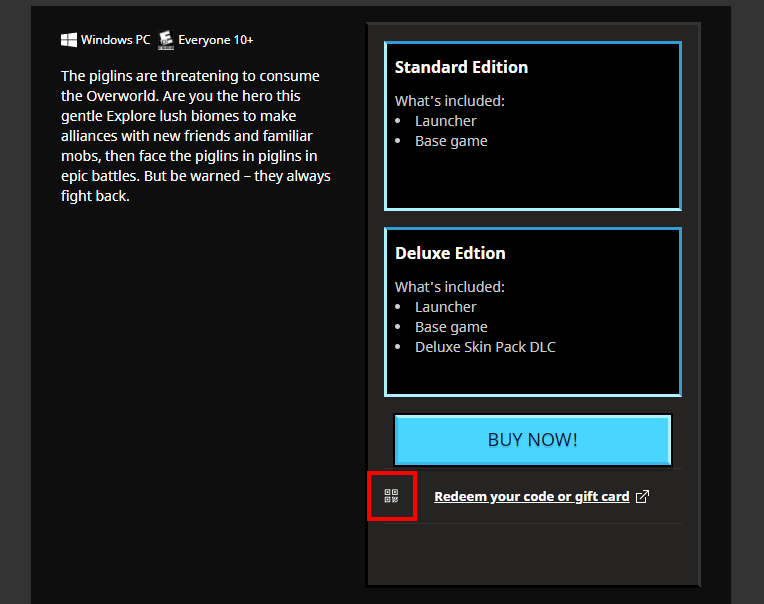
The alt-text (alternative text) for the redeem icon in the upsell section for Minecraft Legends
isnarrated as "Logotype for Windows" although the icon displayed does not resemble or have anything to do with Windows. (See attachments).This bug is also reproducible in the latest beta version b.2.3.64
5(New Windows App).Steps to Reproduce:
- Activate the Windows Narrator function.
- Open the Launcher and select the "Minecraft Legends"
tab.- Make note of the narrator reading the alt-text for the redeem icon as "Logotype for Windows".
Observed Behavior:
The narrator reads the alt-text "Logotype for Windows" when referring to the redeem icon in the Minecraft
Legendsupsell section.Expected Behavior:
The narrator reads the correct alt-text when referring to the redeem icon in the Minecraft
Legendsupsell section.Discovered while testing narrator translations.
The Bug:
The alt-texts (alternative texts) for the redeem icons in the upsell sections for Minecraft Legends and Minecraft: Java Edition are narrated as "Logotype for Windows" although the icons displayed does not resemble or have anything to do with Windows. (See attachments).
This bug is also reproducible in the latest beta version b.2.3.647 (New Windows App).
Steps to Reproduce:
- Activate the Windows Narrator function.
- Open the Launcher and select the tab for either "Minecraft Legends" or "Minecraft: Java Edition".
- Make note of the narrator reading the alt-text for the redeem icon as "Logotype for Windows".
Observed Behavior:
The narrator reads the alt-text "Logotype for Windows" when referring to the redeem icons in the Minecraft upsell sections.
Expected Behavior:
The narrator reads the correct alt-text when referring to the redeem icons in the Minecraft upsell sections.
Discovered while testing narrator translations.
The Bug:
The alt-texts (alternative texts) for the redeem icons in the upsell sections for Minecraft Legends and Minecraft: Java Edition are narrated as "Logotype for Windows" although the icons displayed does not resemble or have anything to do with Windows. (See attachments).
This bug is also reproducible in the latest beta versions b.2.3.647 (New Windows App) and b.2.3.651 (Legacy Windows).
Steps to Reproduce:
- Activate the Windows Narrator function.
- Open the Launcher and select the tab for either "Minecraft Legends" or "Minecraft: Java Edition".
- Make note of the narrator reading the alt-text for the redeem icon as "Logotype for Windows".
Observed Behavior:
The narrator reads the alt-text "Logotype for Windows" when referring to the redeem icons in the Minecraft upsell sections.
Expected Behavior:
The narrator reads the correct alt-text when referring to the redeem icons in the Minecraft upsell sections.
The Bug:
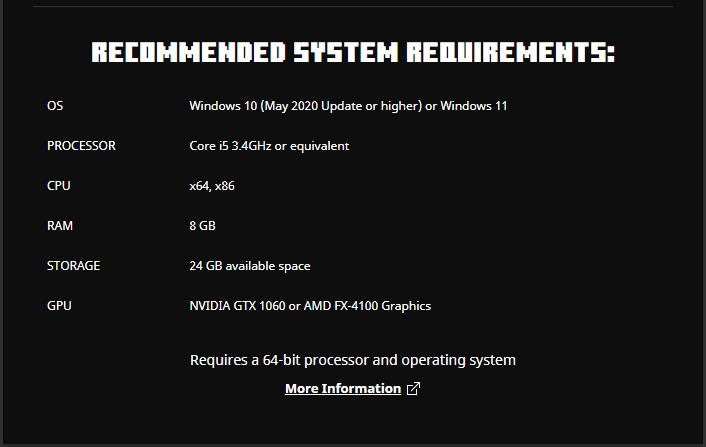
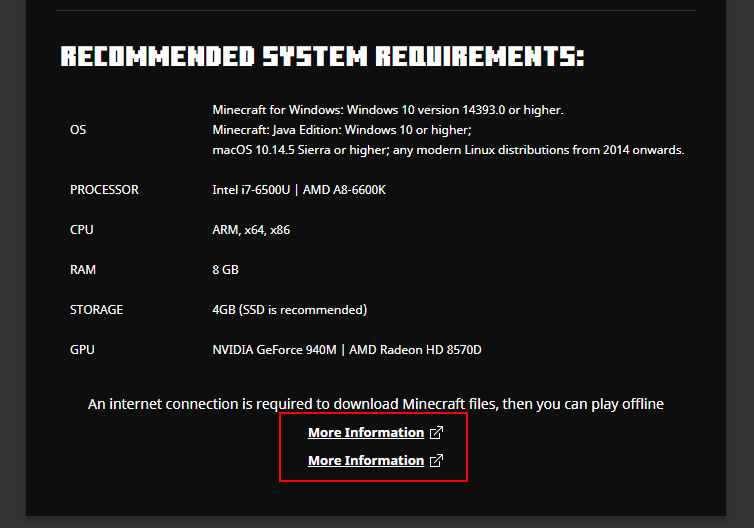
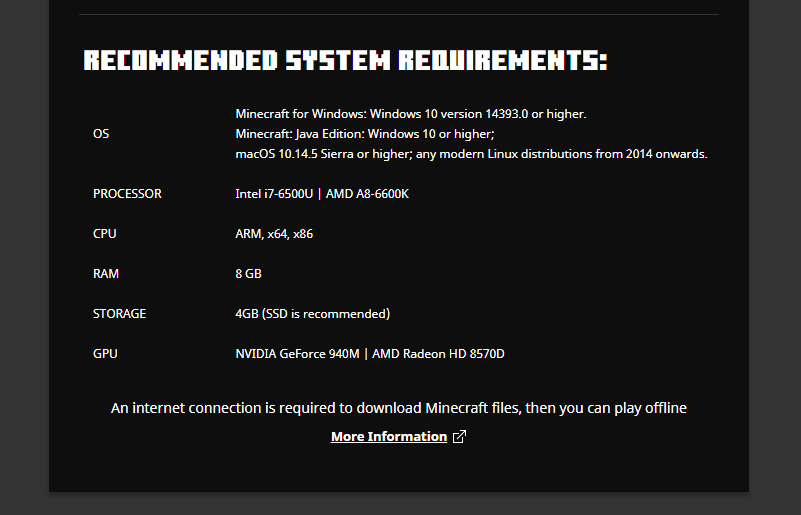
Two links with the text "More
information" are displayed within the Recommended System Requirements section for Minecraft: Java Edition.This bug is also reproducible in the latest beta version b.2.3.647 (New Windows App).
Steps to Reproduce:
- Open the Launcher with an account that has
n't purchased Minecraft: Java Edition.- Go to "Minecraft: Java Edition" > "Play" > "Recommended System Requirements".
- Make not of the duplicated link.
Observed Behavior:
Two links for "More
information" are displayed in the Recommended System Requirements section.Expected Behavior:
One link for "More
information" is displayed in the Recommended System Requirements section.The Bug:
Two links with the text "More Information" are displayed within the Recommended System Requirements section for Minecraft: Java Edition.
This bug is also reproducible in the latest beta version b.2.3.647 (New Windows App).
Steps to Reproduce:
- Open the Launcher with an account that has not purchased Minecraft: Java Edition.
- Go to "Minecraft: Java Edition" > "Play" > "Recommended System Requirements".
- Make note of the duplicated link for "More Information".
Observed Behavior:
Two links for "More Information" are displayed in the Recommended System Requirements section.
Expected Behavior:
One link for "More Information" is displayed in the Recommended System Requirements section.
There are two "Moreinformation" links displayed in the System Requirements section for Java EditionThere are two "More Information" links displayed in the System Requirements section for Java Edition
This bug also affects 2.3.647 (New Windows App).
I will update the Affects Version/s when it is added to Mojira.
The Bug:
Two links with the text "More Information" are displayed within the Recommended System Requirements section for Minecraft: Java Edition.
This bug is also reproducible in the latest beta versions b.2.3.647 (New Windows App) and b.2.3.651 (Legacy Windows).
Steps to Reproduce:
- Open the Launcher with an account that has not purchased Minecraft: Java Edition.
- Go to "Minecraft: Java Edition" > "Play" > "Recommended System Requirements".
- Make note of the duplicated link for "More Information".
Observed Behavior:
Two links for "More Information" are displayed in the Recommended System Requirements section.
Expected Behavior:
One link for "More Information" is displayed in the Recommended System Requirements section.
The Bug:
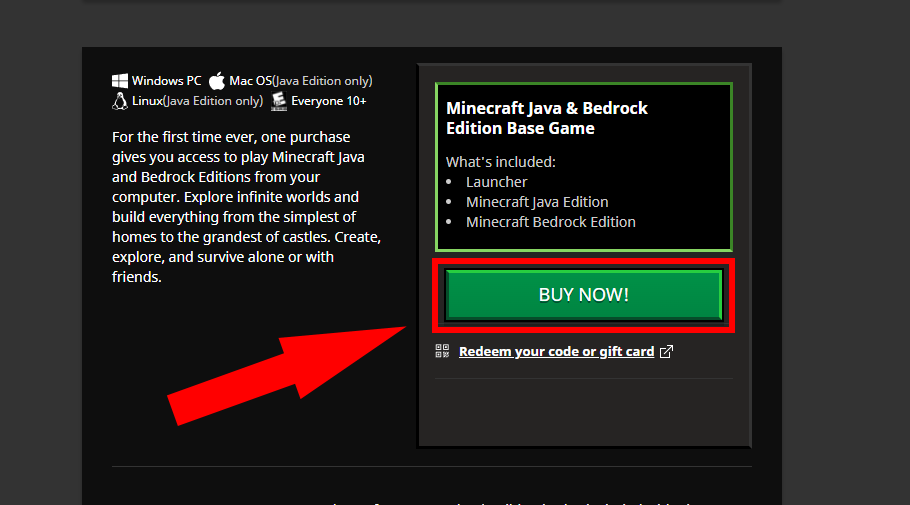
The text string "Buy now!" in the upsell sections for Minecraft Dungeons and Minecraft: Java Edition is not correctly linked to the string on Crowdin. This results in the text not being displayed when using languages other than English.
Below is a table to highlight this.
This bug is also reproducible in the latest beta version b.2.3.647 (New Windows App).
Affected String:
String Context Translatable? Buy now! ..\..\apps\launcher\src\routes\Java\routes\Play\components\BuyNowButton\index.tsx:57 No
Steps to Reproduce:
- Open the Launcher and go to "Settings" > "Language".
- Select a language other than English.
- Go to the upsell section for either Minecraft Dungeons or Minecraft: Java Edition.
→
Observed Behavior:
The string "Buy now!" does not display the translation from the selected language.
Expected Behavior:
The string "Buy now!" displays the translation from the selected language.
The Bug:
The text string "Buy now!" in the upsell sections for Minecraft Dungeons and Minecraft: Java Edition is not correctly linked to the string on Crowdin. This results in the text not being displayed when using languages other than English.
Below is a table to highlight this.
This bug is also reproducible in the latest beta version b.2.3.647 (New Windows App).
Affected String:
String Context Translatable?Buy now! ..\..\apps\launcher\src\routes\Java\routes\Play\components\BuyNowButton\index.tsx:57 No
Steps to Reproduce:
- Open the Launcher and go to "Settings" > "Language".
- Select a language other than English.
- Go to the upsell section for either Minecraft Dungeons or Minecraft: Java Edition.
→
Observed Behavior:
The string "Buy now!" does not display the translation from the selected language.
Expected Behavior:
The string "Buy now!" displays the translation from the selected language.
The Bug:
The text string "Buy now!" in the upsell sections for Minecraft Dungeons and Minecraft: Java Edition is not correctly linked to the string on Crowdin. This results in the text not being displayed when using languages other than English.
Below is a table to highlight this issue.
This bug is also reproducible in the latest beta version b.2.3.647 (New Windows App).
Affected String:
String Context String URL on Crowdin Translatable? Buy now! ..\..\apps\launcher\src\routes\Java\routes\Play\components\BuyNowButton\index.tsx:57 https://crowdin.com/translate/minecraft-launcher/9420/en-sv#5211984 No
Steps to Reproduce:
- Open the Launcher and go to "Settings" > "Language".
- Select a language other than English.
- Go to the upsell section for either Minecraft Dungeons or Minecraft: Java Edition.
→
Observed Behavior:
The string "Buy now!" does not display the translation from the selected language.
Expected Behavior:
The string "Buy now!" displays the translation from the selected language.
The Bug:
The text string "Buy now!" in the upsell sections for Minecraft Dungeons and Minecraft: Java Edition is not correctly linked to the string on Crowdin. This results in the text not being
displayed when using languages other than English.Below is a table to highlight this issue.
This bug is also reproducible in the latest beta version b.2.3.647 (New Windows App).
Affected String:
String Context String URL on Crowdin Translatable? Buy now! ..\..\apps\launcher\src\routes\Java\routes\Play\components\BuyNowButton\index.tsx:57 https://crowdin.com/translate/minecraft-launcher/9420/en-sv#5211984 No
Steps to Reproduce:
- Open the Launcher and go to "Settings" > "Language".
- Select a language other than English.
- Go to the upsell section for either Minecraft Dungeons or Minecraft: Java Edition.
→
Observed Behavior:
The string "Buy now!" does not display the translation from the selected language.
Expected Behavior:
The string "Buy now!" displays the translation from the selected language.
The Bug:
The text string "Buy now!" within the upsell sections for Minecraft Dungeons and Minecraft: Java Edition is not correctly linked to the string on Crowdin. This results in the text not being localized when using languages other than English.
Below is a table to highlight this issue.
This bug is also reproducible in the latest beta version b.2.3.647 (New Windows App).
Affected String:
String Context String URL on Crowdin Translatable? Buy now! ..\..\apps\launcher\src\routes\Java\routes\Play\components\BuyNowButton\index.tsx:57 https://crowdin.com/translate/minecraft-launcher/9420/en-sv#5211984 No
Steps to Reproduce:
- Open the Launcher and go to "Settings" > "Language".
- Select a language other than English.
- Go to the upsell section for either Minecraft Dungeons or Minecraft: Java Edition.
→
Observed Behavior:
The string "Buy now!" does not display the translation from the selected language.
Expected Behavior:
The string "Buy now!" displays the translation from the selected language.
Relates to
The Bug:
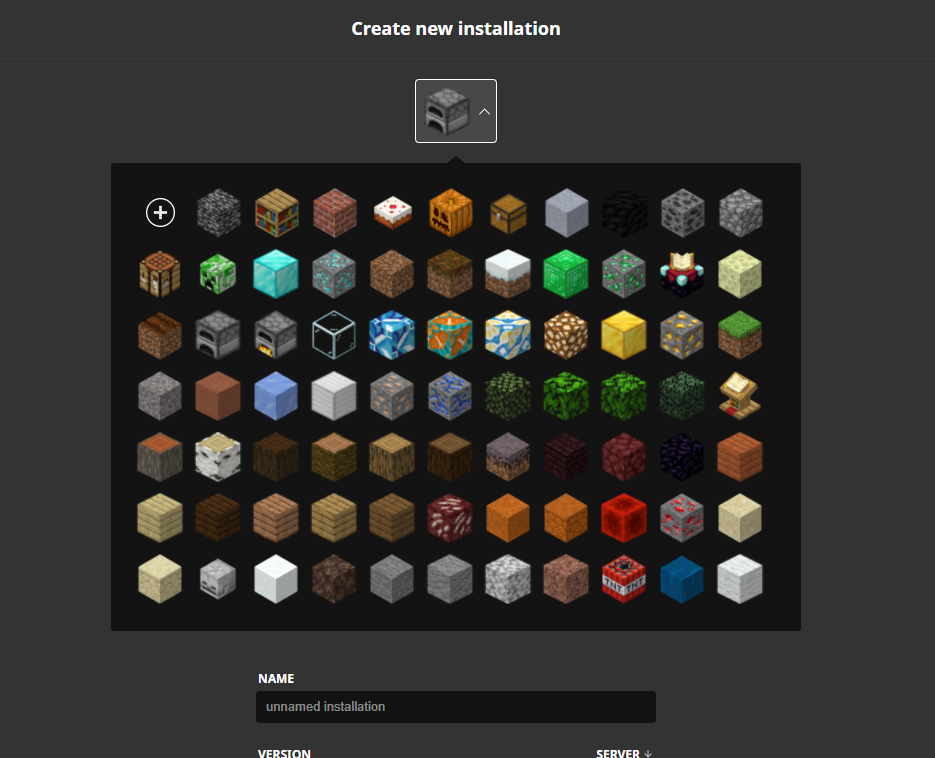
The narration strings for the different block icons displayed within the installations tab for Minecraft: Java Edition are currently untranslatable. This is inconsistent with other screen elements in the Launcher, as icons for operating systems, age limits and versions are all localized.
Below is a table highlighting this issue. In there you can find all the affected strings.
Should also be mentioned that most of these block names are already localized for the Java game engine over on Crowdin.This bug is also reproducible in the latest beta version b.2.3.647 (New Windows App).
Affected Strings:
Current Alt-text Block Name in Java Translatable? bedrock Bedrock No bookshelf Bookshelf No brick Bricks No cake Cake No carved_pumpkin Carved Pumpkin No chest Chest No clay Clay No coal_block Block of Coal No coal_ore Coal Ore No cobblestone Cobblestone No crafting_table Crafting Table No creeper_head Creeper Head No diamond_block Block of Diamond No diamond_ore Diamond Ore No dirt Dirt No dirt_podzol Podzol No dirt_snow N/A No emerald_block Block of Emerald No emerald_ore Emerald Ore No enchanting_table Enchanting Table No end_stone End Stone No farmland Farmland No furnace Furnace No furnace_on N/A No glass Glass No glazed_terracotta_ Glazed Terracotta No glazed_terracotta_orange Orange Glazed Terracotta No glazed_terracotta_white White Glazed Terracotta No glowstone Glowstone No gold_block Block of Gold No gold_ore Gold Ore No grass Grass Block No gravel Gravel No hardened_clay Terracotta No ice_packed Packed Ice No iron_block Block of Iron No iron_ore Iron Ore No lapis_ore Lapis Lazuli Ore No leaves_birch Birch Leaves No leaves_jungle Jungle Leaves No leaves_oak Oak Leaves No leaves_spruce Spruce Leaves No lectern_book Lectern No log_acacia Acacia Log No log_birch Birch Log No log_darkoak Dark Oak Log No log_jungle Jungle Log No log_oak Oak Log No log_spruce Spruce Log No mycelium Mycelium No nether_brick Nether Bricks No obsidian Obsidian No planks_acacia Acacia Planks No planks_birch Birch Planks No planks_darkoak Dark Oak Planks No planks_jungle Jungle Planks No planks_oak Oak Planks No planks_spruce Spruce Planks No quartz_ore Nether Quartz Ore No red_sand Red Sand No red_sandstone Red Sandstone No redstone_block Block of Redstone No redstone_ore Redstone Ore No sand Sand No sandstone Sandstone No skeleton_skull Skeleton Skull No snow Snow Block No soul_sand Soul Sand No stone Stone No stone_andesite Andesite No stone_diorite Diorite No stone_granite Granite No tnt TNT No water N/A No wool White Wool No
Steps to Reproduce:
- Activate the Windows Narrator function.
- Open the Launcher and go to "Settings" > "Language".
- Select a language other than English.
- Go to "Minecraft: Java Edition" > "Installations" > "New installation" > "Installation icon".
→
Observed Behavior:
The alt-texts read by the narrator for the Java installation icons are not translatable.
Expected Behavior:
The alt-texts read by the narrator for the Java installation icons would be translatable.
Relates to
MCL-23182.The Bug:
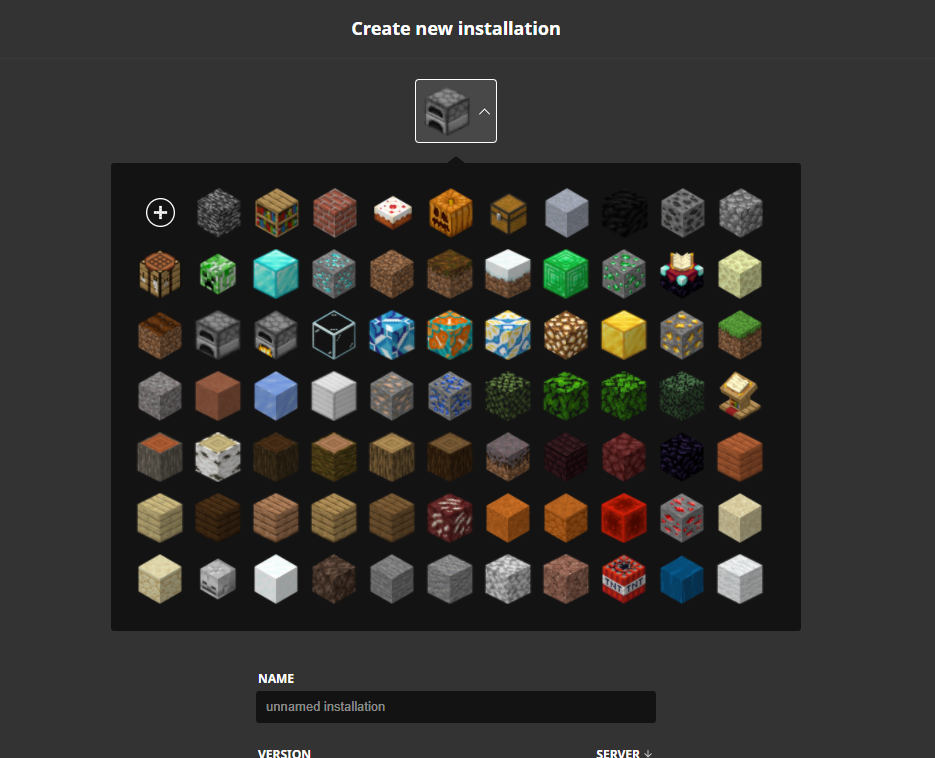
The narration strings for the different block icons displayed within the installations tab for Minecraft: Java Edition are currently untranslatable. This is inconsistent with other screen elements in the Launcher, as icons for operating systems, age limits and versions are all localized.
Below is a table highlighting this issue. In there you can find all the affected strings.
Should also be mentioned that most of these block names are already localized for the Java game engine over on Crowdin.
This bug is also reproducible in the latest beta version b.2.3.647 (New Windows App).
Affected Strings:
Current Alt-text Block Name in Java Translatable? bedrock Bedrock No bookshelf Bookshelf No brick Bricks No cake Cake No carved_pumpkin Carved Pumpkin No chest Chest No clay Clay No coal_block Block of Coal No coal_ore Coal Ore No cobblestone Cobblestone No crafting_table Crafting Table No creeper_head Creeper Head No diamond_block Block of Diamond No diamond_ore Diamond Ore No dirt Dirt No dirt_podzol Podzol No dirt_snow N/A No emerald_block Block of Emerald No emerald_ore Emerald Ore No enchanting_table Enchanting Table No end_stone End Stone No farmland Farmland No furnace Furnace No furnace_on N/A No glass Glass No glazed_terracotta_ Glazed Terracotta No glazed_terracotta_orange Orange Glazed Terracotta No glazed_terracotta_white White Glazed Terracotta No glowstone Glowstone No gold_block Block of Gold No gold_ore Gold Ore No grass Grass Block No gravel Gravel No hardened_clay Terracotta No ice_packed Packed Ice No iron_block Block of Iron No iron_ore Iron Ore No lapis_ore Lapis Lazuli Ore No leaves_birch Birch Leaves No leaves_jungle Jungle Leaves No leaves_oak Oak Leaves No leaves_spruce Spruce Leaves No lectern_book Lectern No log_acacia Acacia Log No log_birch Birch Log No log_darkoak Dark Oak Log No log_jungle Jungle Log No log_oak Oak Log No log_spruce Spruce Log No mycelium Mycelium No nether_brick Nether Bricks No obsidian Obsidian No planks_acacia Acacia Planks No planks_birch Birch Planks No planks_darkoak Dark Oak Planks No planks_jungle Jungle Planks No planks_oak Oak Planks No planks_spruce Spruce Planks No quartz_ore Nether Quartz Ore No red_sand Red Sand No red_sandstone Red Sandstone No redstone_block Block of Redstone No redstone_ore Redstone Ore No sand Sand No sandstone Sandstone No skeleton_skull Skeleton Skull No snow Snow Block No soul_sand Soul Sand No stone Stone No stone_andesite Andesite No stone_diorite Diorite No stone_granite Granite No tnt TNT No water N/A No wool White Wool No
Steps to Reproduce:
- Activate the Windows Narrator function.
- Open the Launcher and go to "Settings" > "Language".
- Select a language other than English.
- Go to "Minecraft: Java Edition" > "Installations" > "New installation" > "Installation icon".
→
Observed Behavior:
The alt-texts read by the narrator for the Java installation icons are not translatable.
Expected Behavior:
The alt-texts read by the narrator for the Java installation icons would be translatable.
Relates to
MCL-23182.The Bug:
The narration strings for the different block icons displayed within the installations tab for Minecraft: Java Edition are currently untranslatable. This is inconsistent with other screen elements in the Launcher, as icons for operating systems, age limits and versions are all localized.
Below is a table highlighting this issue. In there you can find all the affected strings.
Should also be mentioned that most of these block names are already localized for the Java game engine over on Crowdin.
This bug is also reproducible in the latest beta version b.2.3.647 (New Windows App).
Affected Strings:
Current Alt-text Block Name in Java Translatable? bedrock Bedrock No bookshelf Bookshelf No brick Bricks No cake Cake No carved_pumpkin Carved Pumpkin No chest Chest No clay Clay No coal_block Block of Coal No coal_ore Coal Ore No cobblestone Cobblestone No crafting_table Crafting Table No creeper_head Creeper Head No diamond_block Block of Diamond No diamond_ore Diamond Ore No dirt Dirt No dirt_podzol Podzol No dirt_snow N/A No emerald_block Block of Emerald No emerald_ore Emerald Ore No enchanting_table Enchanting Table No end_stone End Stone No farmland Farmland No furnace Furnace No furnace_on N/A No glass Glass No glazed_terracotta_ Glazed Terracotta No glazed_terracotta_orange Orange Glazed Terracotta No glazed_terracotta_white White Glazed Terracotta No glowstone Glowstone No gold_block Block of Gold No gold_ore Gold Ore No grass Grass Block No gravel Gravel No hardened_clay Terracotta No ice_packed Packed Ice No iron_block Block of Iron No iron_ore Iron Ore No lapis_ore Lapis Lazuli Ore No leaves_birch Birch Leaves No leaves_jungle Jungle Leaves No leaves_oak Oak Leaves No leaves_spruce Spruce Leaves No lectern_book Lectern No log_acacia Acacia Log No log_birch Birch Log No log_darkoak Dark Oak Log No log_jungle Jungle Log No log_oak Oak Log No log_spruce Spruce Log No mycelium Mycelium No nether_brick Nether Bricks No obsidian Obsidian No planks_acacia Acacia Planks No planks_birch Birch Planks No planks_darkoak Dark Oak Planks No planks_jungle Jungle Planks No planks_oak Oak Planks No planks_spruce Spruce Planks No quartz_ore Nether Quartz Ore No red_sand Red Sand No red_sandstone Red Sandstone No redstone_block Block of Redstone No redstone_ore Redstone Ore No sand Sand No sandstone Sandstone No skeleton_skull Skeleton Skull No snow Snow Block No soul_sand Soul Sand No stone Stone No stone_andesite Andesite No stone_diorite Diorite No stone_granite Granite No tnt TNT No water N/A No wool White Wool No
Steps to Reproduce:
- Activate the Windows Narrator function.
- Open the Launcher and go to "Settings" > "Language".
- Select a language other than English.
- Go to "Minecraft: Java Edition" > "Installations" > "New installation" > "Installation icon".
→
Observed Behavior:
The alt-texts read by the narrator for the Java installation icons are not translatable.
Expected Behavior:
The alt-texts read by the narrator for the Java installation icons would be translatable.
Relates to
MCL-23182.The Bug:
The narration strings for the different block icons displayed within the installations tab for Minecraft: Java Edition are currently untranslatable. This is inconsistent with other screen elements in the Launcher, as icons for operating systems, age limits and versions are all localized.
Below is a table highlighting this issue
. In there you can find all theaffected strings.Should
alsobe mentioned that most of these block names are already localized for the Java game engine over on Crowdin.This bug is also reproducible in the latest beta version b.2.3.647 (New Windows App).
Affected Strings:
Current Alt-text Block Name in Java Translatable? bedrock Bedrock No bookshelf Bookshelf No brick Bricks No cake Cake No carved_pumpkin Carved Pumpkin No chest Chest No clay Clay No coal_block Block of Coal No coal_ore Coal Ore No cobblestone Cobblestone No crafting_table Crafting Table No creeper_head Creeper Head No diamond_block Block of Diamond No diamond_ore Diamond Ore No dirt Dirt No dirt_podzol Podzol No dirt_snow N/A No emerald_block Block of Emerald No emerald_ore Emerald Ore No enchanting_table Enchanting Table No end_stone End Stone No farmland Farmland No furnace Furnace No furnace_on N/A No glass Glass No glazed_terracotta_ Glazed Terracotta No glazed_terracotta_orange Orange Glazed Terracotta No glazed_terracotta_white White Glazed Terracotta No glowstone Glowstone No gold_block Block of Gold No gold_ore Gold Ore No grass Grass Block No gravel Gravel No hardened_clay Terracotta No ice_packed Packed Ice No iron_block Block of Iron No iron_ore Iron Ore No lapis_ore Lapis Lazuli Ore No leaves_birch Birch Leaves No leaves_jungle Jungle Leaves No leaves_oak Oak Leaves No leaves_spruce Spruce Leaves No lectern_book Lectern No log_acacia Acacia Log No log_birch Birch Log No log_darkoak Dark Oak Log No log_jungle Jungle Log No log_oak Oak Log No log_spruce Spruce Log No mycelium Mycelium No nether_brick Nether Bricks No obsidian Obsidian No planks_acacia Acacia Planks No planks_birch Birch Planks No planks_darkoak Dark Oak Planks No planks_jungle Jungle Planks No planks_oak Oak Planks No planks_spruce Spruce Planks No quartz_ore Nether Quartz Ore No red_sand Red Sand No red_sandstone Red Sandstone No redstone_block Block of Redstone No redstone_ore Redstone Ore No sand Sand No sandstone Sandstone No skeleton_skull Skeleton Skull No snow Snow Block No soul_sand Soul Sand No stone Stone No stone_andesite Andesite No stone_diorite Diorite No stone_granite Granite No tnt TNT No water N/A No wool White Wool No Steps to Reproduce:
- Activate the Windows Narrator function.
- Open the Launcher and go to "Settings" > "Language".
- Select a language other than English.
- Go to "Minecraft: Java Edition" > "Installations" > "New installation" > "Installation icon".
→
Observed Behavior:
The alt-texts read by the narrator for the Java installation icons are not translatable.
Expected Behavior:
The alt-texts read by the narrator for the Java installation icons would be translatable.
Relates to
MCL-23182.The Bug:
The narration strings for the different block icons displayed within the installations tab for Minecraft: Java Edition are currently untranslatable. This is inconsistent with other screen elements in the Launcher, as icons for operating systems, age limits and versions are all localized.
Below is a table highlighting this issue, with all affected strings listed.
Should be mentioned that most of these block names are already localized for the Java game engine over on Crowdin.
This bug is also reproducible in the latest beta version b.2.3.647 (New Windows App) and b.2.3.651 (Legacy Windows).
Affected Strings:
Current Alt-text Block Name in Java Translatable? bedrock Bedrock No bookshelf Bookshelf No brick Bricks No cake Cake No carved_pumpkin Carved Pumpkin No chest Chest No clay Clay No coal_block Block of Coal No coal_ore Coal Ore No cobblestone Cobblestone No crafting_table Crafting Table No creeper_head Creeper Head No diamond_block Block of Diamond No diamond_ore Diamond Ore No dirt Dirt No dirt_podzol Podzol No dirt_snow N/A No emerald_block Block of Emerald No emerald_ore Emerald Ore No enchanting_table Enchanting Table No end_stone End Stone No farmland Farmland No furnace Furnace No furnace_on N/A No glass Glass No glazed_terracotta_ Glazed Terracotta No glazed_terracotta_orange Orange Glazed Terracotta No glazed_terracotta_white White Glazed Terracotta No glowstone Glowstone No gold_block Block of Gold No gold_ore Gold Ore No grass Grass Block No gravel Gravel No hardened_clay Terracotta No ice_packed Packed Ice No iron_block Block of Iron No iron_ore Iron Ore No lapis_ore Lapis Lazuli Ore No leaves_birch Birch Leaves No leaves_jungle Jungle Leaves No leaves_oak Oak Leaves No leaves_spruce Spruce Leaves No lectern_book Lectern No log_acacia Acacia Log No log_birch Birch Log No log_darkoak Dark Oak Log No log_jungle Jungle Log No log_oak Oak Log No log_spruce Spruce Log No mycelium Mycelium No nether_brick Nether Bricks No obsidian Obsidian No planks_acacia Acacia Planks No planks_birch Birch Planks No planks_darkoak Dark Oak Planks No planks_jungle Jungle Planks No planks_oak Oak Planks No planks_spruce Spruce Planks No quartz_ore Nether Quartz Ore No red_sand Red Sand No red_sandstone Red Sandstone No redstone_block Block of Redstone No redstone_ore Redstone Ore No sand Sand No sandstone Sandstone No skeleton_skull Skeleton Skull No snow Snow Block No soul_sand Soul Sand No stone Stone No stone_andesite Andesite No stone_diorite Diorite No stone_granite Granite No tnt TNT No water N/A No wool White Wool No Steps to Reproduce:
- Activate the Windows Narrator function.
- Open the Launcher and go to "Settings" > "Language".
- Select a language other than English.
- Go to "Minecraft: Java Edition" > "Installations" > "New installation" > "Installation icon".
→
Observed Behavior:
The alt-texts read by the narrator for the Java installation icons are not translatable.
Expected Behavior:
The alt-texts read by the narrator for the Java installation icons would be translatable.
Relates to
MCL-23182.The Bug:
The narration strings for the different block icons displayed within the installations tab for Minecraft: Java Edition are currently untranslatable. This is inconsistent with other screen elements in the Launcher, as icons for operating systems, age limits and versions are all localized.
Below is a table highlighting this issue, with all affected strings listed.
Should be mentioned that most of these block names are already localized for the Java game engine over on Crowdin.
This bug is also reproducible in the latest beta versions b.2.3.647 (New Windows App) and b.2.3.651 (Legacy Windows).
Affected Strings:
Current Alt-text Block Name in Java Translatable? bedrock Bedrock No bookshelf Bookshelf No brick Bricks No cake Cake No carved_pumpkin Carved Pumpkin No chest Chest No clay Clay No coal_block Block of Coal No coal_ore Coal Ore No cobblestone Cobblestone No crafting_table Crafting Table No creeper_head Creeper Head No diamond_block Block of Diamond No diamond_ore Diamond Ore No dirt Dirt No dirt_podzol Podzol No dirt_snow N/A No emerald_block Block of Emerald No emerald_ore Emerald Ore No enchanting_table Enchanting Table No end_stone End Stone No farmland Farmland No furnace Furnace No furnace_on N/A No glass Glass No glazed_terracotta_ Glazed Terracotta No glazed_terracotta_orange Orange Glazed Terracotta No glazed_terracotta_white White Glazed Terracotta No glowstone Glowstone No gold_block Block of Gold No gold_ore Gold Ore No grass Grass Block No gravel Gravel No hardened_clay Terracotta No ice_packed Packed Ice No iron_block Block of Iron No iron_ore Iron Ore No lapis_ore Lapis Lazuli Ore No leaves_birch Birch Leaves No leaves_jungle Jungle Leaves No leaves_oak Oak Leaves No leaves_spruce Spruce Leaves No lectern_book Lectern No log_acacia Acacia Log No log_birch Birch Log No log_darkoak Dark Oak Log No log_jungle Jungle Log No log_oak Oak Log No log_spruce Spruce Log No mycelium Mycelium No nether_brick Nether Bricks No obsidian Obsidian No planks_acacia Acacia Planks No planks_birch Birch Planks No planks_darkoak Dark Oak Planks No planks_jungle Jungle Planks No planks_oak Oak Planks No planks_spruce Spruce Planks No quartz_ore Nether Quartz Ore No red_sand Red Sand No red_sandstone Red Sandstone No redstone_block Block of Redstone No redstone_ore Redstone Ore No sand Sand No sandstone Sandstone No skeleton_skull Skeleton Skull No snow Snow Block No soul_sand Soul Sand No stone Stone No stone_andesite Andesite No stone_diorite Diorite No stone_granite Granite No tnt TNT No water N/A No wool White Wool No Steps to Reproduce:
- Activate the Windows Narrator function.
- Open the Launcher and go to "Settings" > "Language".
- Select a language other than English.
- Go to "Minecraft: Java Edition" > "Installations" > "New installation" > "Installation icon".
→
Observed Behavior:
The alt-texts read by the narrator for the Java installation icons are not translatable.
Expected Behavior:
The alt-texts read by the narrator for the Java installation icons would be translatable.
Relates to
MCL-23181.The Bug:
There are some alt-texts (alternative texts) that are not properly formatted for the different block icons available in the installations tab for Minecraft: Java Edition. Several of the block names contains underscores, and some are also inconsistent with names used by the game engine, which all result in confusing audio cues when read by the narrator.
Below is a table highlighting this issue. Listed there are all affected strings with descriptions of their associated issues.
This bug is also reproducible in the latest beta version b.2.3.647 (New Windows App).
Affected Alt-texts:
Current Alt-text Block Name in Java Notes bedrock Bedrock bookshelf Bookshelf brick Bricks Should be plural cake Cake carved_pumpkin Carved Pumpkin chest Chest clay Clay coal_block Block of Coal Inconsistent with Java Edition coal_ore Coal Ore cobblestone Cobblestone crafting_table Crafting Table creeper_head Creeper Head diamond_block Block of Diamond Inconsistent with Java Edition diamond_ore Diamond Ore dirt Dirt dirt_podzol Podzol Inconsistent with Java Edition dirt_snow N/A No name in Java Edition emerald_block Block of Emerald emerald_ore Emerald Ore Inconsistent with Java Edition enchanting_table Enchanting Table end_stone End Stone farmland Farmland furnace Furnace furnace_on N/A No name in Java Edition glass Glass glazed_terracotta_ Glazed Terracotta Inconsistent with Java Edition glazed_terracotta_orange Orange Glazed Terracotta Inconsistent with Java Edition glazed_terracotta_white White Glazed Terracotta Inconsistent with Java Edition glowstone Glowstone gold_block Block of Gold Inconsistent with Java Edition gold_ore Gold Ore grass Grass Block Inconsistent with Java Edition gravel Gravel hardened_clay Terracotta Uses the outdated name ice_packed Packed Ice iron_block Block of Iron Inconsistent with Java Edition iron_ore Iron Ore lapis_ore Lapis Lazuli Ore Inconsistent with Java Edition leaves_birch Birch Leaves Inconsistent with Java Edition leaves_jungle Jungle Leaves Inconsistent with Java Edition leaves_oak Oak Leaves Inconsistent with Java Edition leaves_spruce Spruce Leaves Inconsistent with Java Edition lectern_book Lectern Inconsistent with Java Edition log_acacia Acacia Log Inconsistent with Java Edition log_birch Birch Log Inconsistent with Java Edition log_darkoak Dark Oak Log Inconsistent with Java Edition log_jungle Jungle Log Inconsistent with Java Edition log_oak Oak Log Inconsistent with Java Edition log_spruce Spruce Log Inconsistent with Java Edition mycelium Mycelium nether_brick Nether Bricks Should be plural obsidian Obsidian planks_acacia Acacia Planks Inconsistent with Java Edition planks_birch Birch Planks Inconsistent with Java Edition planks_darkoak Dark Oak Planks Inconsistent with Java Edition planks_jungle Jungle Planks Inconsistent with Java Edition planks_oak Oak Planks Inconsistent with Java Edition planks_spruce Spruce Planks Inconsistent with Java Edition quartz_ore Nether Quartz Ore Inconsistent with Java Edition red_sand Red Sand red_sandstone Red Sandstone redstone_block Block of Redstone Inconsistent with Java Edition redstone_ore Redstone Ore sand Sand sandstone Sandstone skeleton_skull Skeleton Skull snow Snow Block Inconsistent with Java Edition soul_sand Soul Sand stone Stone stone_andesite Andesite stone_diorite Diorite stone_granite Granite tnt TNT water N/A wool White Wool Inconsistent with Java Edition
Steps to Reproduce:
- Activate the Windows Narrator function.
- Open the Launcher and go to "Minecraft: Java Edition" > "Installations" > "New installation" > "Installation icon".
→
(ex: narrator reads "emerald_block" instead of "Block of Emerald")Observed Behavior:
The alt-texts read by the narrator for the Java installation icons contains formatting errors.
Expected Behavior:
The alt-texts read by the narrator for the Java installation icons are consistent with the block names for Minecraft: Java Edition.
Relates to
MCL-23181.The Bug:
There are some alt-texts (alternative texts) that are not properly formatted for the different block icons available in the installations tab for Minecraft: Java Edition. Several of the block names contains underscores, and some are also inconsistent with names used by the game engine, which all result in confusing audio cues when read by the narrator.
Below is a table highlighting this issue. Listed there are all affected strings with descriptions of their associated issues.
This bug is also reproducible in the latest beta version b.2.3.647 (New Windows App).
Affected Alt-texts:
Current Alt-text Block Name in Java Notes bedrock Bedrock bookshelf Bookshelf brick Bricks Should be plural cake Cake carved_pumpkin Carved Pumpkin chest Chest clay Clay coal_block Block of Coal Inconsistent with Java Edition coal_ore Coal Ore cobblestone Cobblestone crafting_table Crafting Table creeper_head Creeper Head diamond_block Block of Diamond Inconsistent with Java Edition diamond_ore Diamond Ore dirt Dirt dirt_podzol Podzol Inconsistent with Java Edition dirt_snow N/A No name in Java Edition emerald_block Block of Emerald emerald_ore Emerald Ore Inconsistent with Java Edition enchanting_table Enchanting Table end_stone End Stone farmland Farmland furnace Furnace furnace_on N/A No name in Java Edition glass Glass glazed_terracotta_ Glazed Terracotta Inconsistent with Java Edition glazed_terracotta_orange Orange Glazed Terracotta Inconsistent with Java Edition glazed_terracotta_white White Glazed Terracotta Inconsistent with Java Edition glowstone Glowstone gold_block Block of Gold Inconsistent with Java Edition gold_ore Gold Ore grass Grass Block Inconsistent with Java Edition gravel Gravel hardened_clay Terracotta Uses the outdated name ice_packed Packed Ice iron_block Block of Iron Inconsistent with Java Edition iron_ore Iron Ore lapis_ore Lapis Lazuli Ore Inconsistent with Java Edition leaves_birch Birch Leaves Inconsistent with Java Edition leaves_jungle Jungle Leaves Inconsistent with Java Edition leaves_oak Oak Leaves Inconsistent with Java Edition leaves_spruce Spruce Leaves Inconsistent with Java Edition lectern_book Lectern Inconsistent with Java Edition log_acacia Acacia Log Inconsistent with Java Edition log_birch Birch Log Inconsistent with Java Edition log_darkoak Dark Oak Log Inconsistent with Java Edition log_jungle Jungle Log Inconsistent with Java Edition log_oak Oak Log Inconsistent with Java Edition log_spruce Spruce Log Inconsistent with Java Edition mycelium Mycelium nether_brick Nether Bricks Should be plural obsidian Obsidian planks_acacia Acacia Planks Inconsistent with Java Edition planks_birch Birch Planks Inconsistent with Java Edition planks_darkoak Dark Oak Planks Inconsistent with Java Edition planks_jungle Jungle Planks Inconsistent with Java Edition planks_oak Oak Planks Inconsistent with Java Edition planks_spruce Spruce Planks Inconsistent with Java Edition quartz_ore Nether Quartz Ore Inconsistent with Java Edition red_sand Red Sand red_sandstone Red Sandstone redstone_block Block of Redstone Inconsistent with Java Edition redstone_ore Redstone Ore sand Sand sandstone Sandstone skeleton_skull Skeleton Skull snow Snow Block Inconsistent with Java Edition soul_sand Soul Sand stone Stone stone_andesite Andesite stone_diorite Diorite stone_granite Granite tnt TNT water N/A wool White Wool Inconsistent with Java Edition Steps to Reproduce:
- Activate the Windows Narrator function.
- Open the Launcher and go to "Minecraft: Java Edition" > "Installations" > "New installation" > "Installation icon".
→
(ex: narrator reads "emerald_block" instead of "Block of Emerald")Observed Behavior:
The alt-texts read by the narrator for the Java installation icons contains formatting errors.
Expected Behavior:
The alt-texts read by the narrator for the Java installation icons are consistent with the block names for Minecraft: Java Edition.
Relates to
MCL-23181.The Bug:
There are some alt-texts (alternative texts) that are not properly formatted for the different block icons available in the installations tab for Minecraft: Java Edition. Several of the block names contains underscores, and some are also inconsistent with names used by the game engine, which all result in confusing audio cues when read by the narrator.
Below is a table highlighting this issue. Listed there are all affected strings with descriptions of their associated issues.
This bug is also reproducible in the latest beta version b.2.3.647 (New Windows App).
Affected Alt-texts:
Current Alt-text Block Name in Java Notes bedrock Bedrock bookshelf Bookshelf brick Bricks Should be plural cake Cake carved_pumpkin Carved Pumpkin chest Chest clay Clay coal_block Block of Coal Inconsistent with Java Edition coal_ore Coal Ore cobblestone Cobblestone crafting_table Crafting Table creeper_head Creeper Head diamond_block Block of Diamond Inconsistent with Java Edition diamond_ore Diamond Ore dirt Dirt dirt_podzol Podzol Inconsistent with Java Edition dirt_snow N/A No name in Java Edition emerald_block Block of Emerald emerald_ore Emerald Ore Inconsistent with Java Edition enchanting_table Enchanting Table end_stone End Stone farmland Farmland furnace Furnace furnace_on N/A No name in Java Edition glass Glass glazed_terracotta_ Glazed Terracotta Inconsistent with Java Edition glazed_terracotta_orange Orange Glazed Terracotta Inconsistent with Java Edition glazed_terracotta_white White Glazed Terracotta Inconsistent with Java Edition glowstone Glowstone gold_block Block of Gold Inconsistent with Java Edition gold_ore Gold Ore grass Grass Block Inconsistent with Java Edition gravel Gravel hardened_clay Terracotta Uses the outdated name ice_packed Packed Ice iron_block Block of Iron Inconsistent with Java Edition iron_ore Iron Ore lapis_ore Lapis Lazuli Ore Inconsistent with Java Edition leaves_birch Birch Leaves Inconsistent with Java Edition leaves_jungle Jungle Leaves Inconsistent with Java Edition leaves_oak Oak Leaves Inconsistent with Java Edition leaves_spruce Spruce Leaves Inconsistent with Java Edition lectern_book Lectern Inconsistent with Java Edition log_acacia Acacia Log Inconsistent with Java Edition log_birch Birch Log Inconsistent with Java Edition log_darkoak Dark Oak Log Inconsistent with Java Edition log_jungle Jungle Log Inconsistent with Java Edition log_oak Oak Log Inconsistent with Java Edition log_spruce Spruce Log Inconsistent with Java Edition mycelium Mycelium nether_brick Nether Bricks Should be plural obsidian Obsidian planks_acacia Acacia Planks Inconsistent with Java Edition planks_birch Birch Planks Inconsistent with Java Edition planks_darkoak Dark Oak Planks Inconsistent with Java Edition planks_jungle Jungle Planks Inconsistent with Java Edition planks_oak Oak Planks Inconsistent with Java Edition planks_spruce Spruce Planks Inconsistent with Java Edition quartz_ore Nether Quartz Ore Inconsistent with Java Edition red_sand Red Sand red_sandstone Red Sandstone redstone_block Block of Redstone Inconsistent with Java Edition redstone_ore Redstone Ore sand Sand sandstone Sandstone skeleton_skull Skeleton Skull snow Snow Block Inconsistent with Java Edition soul_sand Soul Sand stone Stone stone_andesite Andesite stone_diorite Diorite stone_granite Granite tnt TNT water N/A wool White Wool Inconsistent with Java Edition Steps to Reproduce:
- Activate the Windows Narrator function.
- Open the Launcher and go to "Minecraft: Java Edition" > "Installations" > "New installation" > "Installation icon".
→
(ex: narrator reads "emerald_block" instead of "Block of Emerald")Observed Behavior:
The alt-texts read by the narrator for the Java installation icons contains formatting errors.
Expected Behavior:
The alt-texts read by the narrator for the Java installation icons are consistent with the block names for Minecraft: Java Edition.
Relates to
MCL-23181.The Bug:
There are some alt-texts (alternative texts) that are not properly formatted for the different block icons available in the installations tab for Minecraft: Java Edition. Several of the block names contains underscores, and some are also inconsistent with names used by the game engine, which all result in confusing audio cues when read by the narrator.
Below is a table highlighting this issue. Listed there are all affected strings with descriptions of their associated issues.
This bug is also reproducible in the latest beta version b.2.3.647 (New Windows App).
Affected Alt-texts:
Current Alt-text Block Name in Java Notes bedrock Bedrock bookshelf Bookshelf brick Bricks Should be plural cake Cake carved_pumpkin Carved Pumpkin chest Chest clay Clay coal_block Block of Coal Inconsistent with Java Edition coal_ore Coal Ore cobblestone Cobblestone crafting_table Crafting Table creeper_head Creeper Head diamond_block Block of Diamond Inconsistent with Java Edition diamond_ore Diamond Ore dirt Dirt dirt_podzol Podzol Inconsistent with Java Edition dirt_snow N/A No name in Java Edition emerald_block Block of Emerald emerald_ore Emerald Ore Inconsistent with Java Edition enchanting_table Enchanting Table end_stone End Stone farmland Farmland furnace Furnace furnace_on N/A No name in Java Edition glass Glass glazed_terracotta_ Glazed Terracotta Inconsistent with Java Edition glazed_terracotta_orange Orange Glazed Terracotta Inconsistent with Java Edition glazed_terracotta_white White Glazed Terracotta Inconsistent with Java Edition glowstone Glowstone gold_block Block of Gold Inconsistent with Java Edition gold_ore Gold Ore grass Grass Block Inconsistent with Java Edition gravel Gravel hardened_clay Terracotta Uses the outdated name ice_packed Packed Ice iron_block Block of Iron Inconsistent with Java Edition iron_ore Iron Ore lapis_ore Lapis Lazuli Ore Inconsistent with Java Edition leaves_birch Birch Leaves Inconsistent with Java Edition leaves_jungle Jungle Leaves Inconsistent with Java Edition leaves_oak Oak Leaves Inconsistent with Java Edition leaves_spruce Spruce Leaves Inconsistent with Java Edition lectern_book Lectern Inconsistent with Java Edition log_acacia Acacia Log Inconsistent with Java Edition log_birch Birch Log Inconsistent with Java Edition log_darkoak Dark Oak Log Inconsistent with Java Edition log_jungle Jungle Log Inconsistent with Java Edition log_oak Oak Log Inconsistent with Java Edition log_spruce Spruce Log Inconsistent with Java Edition mycelium Mycelium nether_brick Nether Bricks Should be plural obsidian Obsidian planks_acacia Acacia Planks Inconsistent with Java Edition planks_birch Birch Planks Inconsistent with Java Edition planks_darkoak Dark Oak Planks Inconsistent with Java Edition planks_jungle Jungle Planks Inconsistent with Java Edition planks_oak Oak Planks Inconsistent with Java Edition planks_spruce Spruce Planks Inconsistent with Java Edition quartz_ore Nether Quartz Ore Inconsistent with Java Edition red_sand Red Sand red_sandstone Red Sandstone redstone_block Block of Redstone Inconsistent with Java Edition redstone_ore Redstone Ore sand Sand sandstone Sandstone skeleton_skull Skeleton Skull snow Snow Block Inconsistent with Java Edition soul_sand Soul Sand stone Stone stone_andesite Andesite stone_diorite Diorite stone_granite Granite tnt TNT water N/A No name in Java Edition wool White Wool Inconsistent with Java Edition Steps to Reproduce:
- Activate the Windows Narrator function.
- Open the Launcher and go to "Minecraft: Java Edition" > "Installations" > "New installation" > "Installation icon".
→
(ex: narrator reads "emerald_block" instead of "Block of Emerald")Observed Behavior:
The alt-texts read by the narrator for the Java installation icons contains formatting errors.
Expected Behavior:
The alt-texts read by the narrator for the Java installation icons are consistent with the block names for Minecraft: Java Edition.
MCL-23182.mp4
Java installation icons have no alt text resultning in weird audio cues from the narrator
Relates to
MCL-23181.The Bug:
The
re are some alt-texts (alternative texts) that are not properly formattedfor the different block iconsavailablein the installations tab for Minecraft: Java Edition. Several of the block names contains underscores, and some are also inconsistent with names used by the game engine, which all result in confusing audio cues when read by the narrator.Below is a table highlighting this issue
. Listed there areall affected strings with descriptions of their associated issues.This bug is also reproducible in the latest beta version b.2.3.647 (New Windows App).
Affected Alt-texts:
Current Alt-text Block Name in Java Notes bedrock Bedrock bookshelf Bookshelf brick Bricks Should be plural cake Cake carved_pumpkin Carved Pumpkin chest Chest clay Clay coal_block Block of Coal Inconsistent with Java Edition coal_ore Coal Ore cobblestone Cobblestone crafting_table Crafting Table creeper_head Creeper Head diamond_block Block of Diamond Inconsistent with Java Edition diamond_ore Diamond Ore dirt Dirt dirt_podzol Podzol Inconsistent with Java Edition dirt_snow N/A No name in Java Edition emerald_block Block of Emerald emerald_ore Emerald Ore Inconsistent with Java Edition enchanting_table Enchanting Table end_stone End Stone farmland Farmland furnace Furnace furnace_on N/A No name in Java Edition glass Glass glazed_terracotta_ Glazed Terracotta Inconsistent with Java Edition glazed_terracotta_orange Orange Glazed Terracotta Inconsistent with Java Edition glazed_terracotta_white White Glazed Terracotta Inconsistent with Java Edition glowstone Glowstone gold_block Block of Gold Inconsistent with Java Edition gold_ore Gold Ore grass Grass Block Inconsistent with Java Edition gravel Gravel hardened_clay Terracotta Uses the outdated name ice_packed Packed Ice iron_block Block of Iron Inconsistent with Java Edition iron_ore Iron Ore lapis_ore Lapis Lazuli Ore Inconsistent with Java Edition leaves_birch Birch Leaves Inconsistent with Java Edition leaves_jungle Jungle Leaves Inconsistent with Java Edition leaves_oak Oak Leaves Inconsistent with Java Edition leaves_spruce Spruce Leaves Inconsistent with Java Edition lectern_book Lectern Inconsistent with Java Edition log_acacia Acacia Log Inconsistent with Java Edition log_birch Birch Log Inconsistent with Java Edition log_darkoak Dark Oak Log Inconsistent with Java Edition log_jungle Jungle Log Inconsistent with Java Edition log_oak Oak Log Inconsistent with Java Edition log_spruce Spruce Log Inconsistent with Java Edition mycelium Mycelium nether_brick Nether Bricks Should be plural obsidian Obsidian planks_acacia Acacia Planks Inconsistent with Java Edition planks_birch Birch Planks Inconsistent with Java Edition planks_darkoak Dark Oak Planks Inconsistent with Java Edition planks_jungle Jungle Planks Inconsistent with Java Edition planks_oak Oak Planks Inconsistent with Java Edition planks_spruce Spruce Planks Inconsistent with Java Edition quartz_ore Nether Quartz Ore Inconsistent with Java Edition red_sand Red Sand red_sandstone Red Sandstone redstone_block Block of Redstone Inconsistent with Java Edition redstone_ore Redstone Ore sand Sand sandstone Sandstone skeleton_skull Skeleton Skull snow Snow Block Inconsistent with Java Edition soul_sand Soul Sand stone Stone stone_andesite Andesite stone_diorite Diorite stone_granite Granite tnt TNT water N/A No name in Java Edition wool White Wool Inconsistent with Java Edition Steps to Reproduce:
- Activate the Windows Narrator function.
- Open the Launcher and go to "Minecraft: Java Edition" > "Installations" > "New installation" > "Installation icon".
→
(ex: narrator reads "emerald_block" instead of "Block of Emerald")Observed Behavior:
The alt-texts read by the narrator for the Java installation icons contains formatting errors.
Expected Behavior:
The alt-texts read by the narrator for the Java installation icons are consistent with the block names for Minecraft: Java Edition.
Relates to
MCL-23181.The Bug:
The icon names for the different block icons displayed within the installations tab for Minecraft: Java Edition have no alt-texts (alternative texts), resulting in weird audio cues when read by the narrator. Several of the block names contains underscores, and some are also inconsistent with names used by the game engine.
Below is a table highlighting this issue, with all affected strings listed along with descriptions of their associated issues.
This bug is also reproducible in the latest beta versions b.2.3.647 (New Windows App) and b.2.3.651 (Legacy Windows).
Affected Alt-texts:
Current Alt-text Block Name in Java Notes bedrock Bedrock bookshelf Bookshelf brick Bricks Should be plural cake Cake carved_pumpkin Carved Pumpkin chest Chest clay Clay coal_block Block of Coal Inconsistent with Java Edition coal_ore Coal Ore cobblestone Cobblestone crafting_table Crafting Table creeper_head Creeper Head diamond_block Block of Diamond Inconsistent with Java Edition diamond_ore Diamond Ore dirt Dirt dirt_podzol Podzol Inconsistent with Java Edition dirt_snow N/A No name in Java Edition emerald_block Block of Emerald emerald_ore Emerald Ore Inconsistent with Java Edition enchanting_table Enchanting Table end_stone End Stone farmland Farmland furnace Furnace furnace_on N/A No name in Java Edition glass Glass glazed_terracotta_ Glazed Terracotta Inconsistent with Java Edition glazed_terracotta_orange Orange Glazed Terracotta Inconsistent with Java Edition glazed_terracotta_white White Glazed Terracotta Inconsistent with Java Edition glowstone Glowstone gold_block Block of Gold Inconsistent with Java Edition gold_ore Gold Ore grass Grass Block Inconsistent with Java Edition gravel Gravel hardened_clay Terracotta Uses the outdated name ice_packed Packed Ice iron_block Block of Iron Inconsistent with Java Edition iron_ore Iron Ore lapis_ore Lapis Lazuli Ore Inconsistent with Java Edition leaves_birch Birch Leaves Inconsistent with Java Edition leaves_jungle Jungle Leaves Inconsistent with Java Edition leaves_oak Oak Leaves Inconsistent with Java Edition leaves_spruce Spruce Leaves Inconsistent with Java Edition lectern_book Lectern Inconsistent with Java Edition log_acacia Acacia Log Inconsistent with Java Edition log_birch Birch Log Inconsistent with Java Edition log_darkoak Dark Oak Log Inconsistent with Java Edition log_jungle Jungle Log Inconsistent with Java Edition log_oak Oak Log Inconsistent with Java Edition log_spruce Spruce Log Inconsistent with Java Edition mycelium Mycelium nether_brick Nether Bricks Should be plural obsidian Obsidian planks_acacia Acacia Planks Inconsistent with Java Edition planks_birch Birch Planks Inconsistent with Java Edition planks_darkoak Dark Oak Planks Inconsistent with Java Edition planks_jungle Jungle Planks Inconsistent with Java Edition planks_oak Oak Planks Inconsistent with Java Edition planks_spruce Spruce Planks Inconsistent with Java Edition quartz_ore Nether Quartz Ore Inconsistent with Java Edition red_sand Red Sand red_sandstone Red Sandstone redstone_block Block of Redstone Inconsistent with Java Edition redstone_ore Redstone Ore sand Sand sandstone Sandstone skeleton_skull Skeleton Skull snow Snow Block Inconsistent with Java Edition soul_sand Soul Sand stone Stone stone_andesite Andesite stone_diorite Diorite stone_granite Granite tnt TNT water N/A No name in Java Edition wool White Wool Inconsistent with Java Edition Steps to Reproduce:
- Activate the Windows Narrator function.
- Open the Launcher and go to "Minecraft: Java Edition" > "Installations" > "New installation" > "Installation icon".
→
(ex: narrator reads "emerald_block" instead of "Block of Emerald")Observed Behavior:
The alt-texts read by the narrator for the Java installation icons contains formatting errors.
Expected Behavior:
The alt-texts read by the narrator for the Java installation icons are consistent with the block names for Minecraft: Java Edition.
The Bug:
When navigating between different screen elements in the Minecraft Launcher UI, the narration of the previously selected element is usually interrupted to play the new one. However, if you navigate to an element with an alert message, you will not be able to cancel the narration and the entire alert will be read out automatically.
This is quite limiting in terms of accessibility as some of these messages are quite long, and meanwhile prevents the user from navigating the menu through the screen reader.
This bug is also reproducible in the latest beta version b.2.3.64
5(New Windows App).Steps to Reproduce:
- Activate the Windows Narrator function.
- Open the Launcher and select a screen element with an alert message.
(For example "Minecraft: Java Edition" > "Installations" > "Versions" > "Snapshots").- While the alert message is read, attempt selecting another screen element.
Observed Behavior:
Unable to cancel the narration of alert messages.
Expected Behavior:
Able to cancel the narration of alert messages.
The Bug:
When navigating between different screen elements in the Minecraft Launcher UI, the narration of the previously selected element is usually interrupted to play the new one. However, if you navigate to an element with an alert message, you will not be able to cancel the narration and the entire alert will be read out automatically.
This is quite limiting in terms of accessibility as some of these messages are quite long, and meanwhile prevents the user from navigating the menu through the screen reader.
This bug is also reproducible in the latest beta versions b.2.3.647 (New Windows App) and b.2.3.651 (Legacy Windows).
WorkaroundThe narration of these alert messages can be canceled by pressing either LCtrl, RCtrl, or RAlt (Alt Gr on European keyboards).
Steps to Reproduce:
- Activate the Windows Narrator function.
- Open the Launcher and select a screen element with an alert message.
(For example "Minecraft: Java Edition" > "Installations" > "Versions" > "Snapshots").- While the alert message is read, attempt selecting another screen element.
Observed Behavior:
Unable to cancel the narration of alert messages by navigating to a new screen element.
Expected Behavior:
Able to cancel the narration of alert messages by navigating to a new screen element.
The Bug:
The text strings and icons for supported operating systems and age rating do not fit in properly within the upsell section for Minecraft: Java Edition when some languages are selected. The text is instead displayed across multiple lines, making it difficult for users to understand the information being presented.
This bug is also reproducible in the latest beta versions b.2.4.1 (New Windows App) and b.2.4.4 (Legacy Windows).
Steps to Reproduce:
- Open the Launcher with an account that has not purchased Minecraft: Java Edition.
- Select a language that require longer translations than the source for these strings.
(ex: Swedish, Polish, or Spanish - Argentina)- Go to the top of the upsell section for Minecraft: Java Edition.
→
Observed Behavior:
In some languages the translations for the supported operating systems and the age rating do
esnot fit within the designated space.Expected Behavior:
The translations for the supported operating systems and the age rating are properly reformatted for languages that require longer translations than the source.
Formatting issue withthetext strings for operating systems and age rating within the upsell section for Java Edition
Drop-down shows up in the wrong place whenusing RTL languagesDrop-down shows up in the wrong place when changing between languages with different scripts
This issue only affects the latest beta version b.2.4.1 (New Windows App).
Relates to
MCL-23195.The Bug:
The drop-down in the top left corner shows up in the wrong place when using right-to-left languages in the latest beta version.Steps to Reproduce:
- Open the launcher and go to "Settings" > "Languages".
- Select a language with
right-to-left script.
(ex:Arabic or Hebrew)- Click on the drop-down in the top right corner.
→
lefteven though the UIisinverted.Observed Behavior:
The drop-down
alwaysappears on theleft, regardlessofwhether or not the UI is inverted.Expected Behavior:
The drop-down appears on the same side as the button, as expected.
Relates to
MCL-23195.The Bug:
The drop-down in the top left/right corner shows up in the wrong place when changing between languages with different scripts.
For example, changing from English to Arabic (from left-to-right to right-to-left script) will display the drop-down in the top left corner, although it should be displayed in the top right. Only if you reboot the Launcher will the position for the drop-down update and work as expected.
Steps to Reproduce:
- Open the launcher and go to "Settings" > "Languages".
- Select a language with a different script from what is currently selected.
(ex: English → Arabic OR Arabic → English).- Click on the drop-down in the top left/right corner.
→
Observed Behavior:
The drop-down appears on the opposite side of the UI button when changing between languages with different scripts.
Expected Behavior:
The drop-down always appears on the same side as the UI button, as expected.
The Bug:
The purchase buttons within the pop-up for Minecraft Legends handle all currency symbols and abbreviations as prefixes although some languages usually display them after the amount - as suffixes.
In the screenshot provided below you can see this issue occurring for the Swedish conversion. In this case, "kr" is displayed in front of the price and not after.
Compare "kr393.00" and "393.00 kr".
Steps to Reproduce:
- Open the Launcher and go to the Minecraft Dungeons tab.
- Click on the "Buy now" button to open the pop-up.
- Note how the currency symbols are displayed within the two buttons at the bottom.
Observed Behavior:
Currency symbols and abbreviations are all handled in the same way as USD ($).
Expected Behavior:
Currency symbols and abbreviations are handled properly.
The Bug:
The purchase buttons within the pop-up for Minecraft Legends handle all currency symbols and abbreviations as prefixes although some languages usually display them after the amount - as suffixes.
In the screenshot provided below you can see this issue occurring for the Swedish conversion. In this case, "kr" is displayed in front of the price and not after.
Compare "kr393.00" and "393.00 kr".
Steps to Reproduce:
- Open the Launcher and go to the Minecraft Dungeons tab.
- Click on the "Buy now" button to open the pop-up.
- Note how the currency symbols are displayed within the two buttons at the bottom.
Observed Behavior:
Currency symbols and abbreviations are all handled in the same way as USD ($).
Expected Behavior:
Currency symbols and abbreviations are handled properly.
The Bug:
Freezing the game with the /tick command and then tick sprinting during an item's pick-up animation creates a glitched item that is synced to the player's movement.
See the provided video for a better understanding: 2023-10-28_04-23-48-2.mp4
Steps to Reproduce:
- Drop any item onto the ground and wait so the item can be picked up again.
- Run the following command to freeze the game.
/tick freeze
- Once the game is frozen, pick up the item.
- Position yourself a few blocks away from the drop point.
- Run the following command:
/tick sprint 1t(For a better visual, try running the command again).
- Move around and observe the movement of the item.
Observed Behavior:
The game desyncs the position of an item if the game is frozen during the pick-up animation.
Expected Behavior:
The game does not desync the position of an item if the game is frozen during the pick-up animation.
The Bug:
Freezing the game with the /tick command and then tick sprinting during an item's pick-up animation creates a glitched item that is synced to the player's movement.
See the provided video for a better understanding: 2023-10-28_04-23-48-2.mp4
Steps to Reproduce:
- Drop any item onto the ground and wait so the item can be picked up again.
- Run the following command to freeze the game:
/tick freeze
- Once the game is frozen, pick up the item.
- Position yourself a few blocks away from the drop point and run the following command:
/tick sprint 1t(For a better visual, try running the command again).
- Move around and observe the movement of the item.
Observed Behavior:
The game desyncs the position of an item if the game is frozen during the pick-up animation.
Expected Behavior:
The game does not desync the position of an item if the game is frozen during the pick-up animation.
The Bug:
Freezing the game with the /tick command and then tick sprinting during an item's pick-up animation creates a glitched item that is synced to the player's movement.
See the provided video for a better understanding: 2023-10-28_04-23-48-2.mp4
Steps to Reproduce:
- Drop any item onto the ground and wait so the item can be picked up again.
- Run the following command to freeze the game:
/tick freeze
- Once the game is frozen, pick up the item.
- Position yourself a few blocks away from the drop point and run the following command:
/tick sprint 1t(For a better visual, try running the command again).
- Move around and observe the movement of the item.
Observed Behavior:
The game desyncs the position of an item if the game is frozen during the pick-up animation.
Expected Behavior:
The game does not desync the position of an item if the game is frozen during the pick-up animation.
The Bug:
Freezing the game with the /tick command and then tick sprinting during an item's pick-up animation creates a glitched item that is synced to the player's movement.
See the provided video for a better understanding: 2023-10-28_04-23-48-2.mp4
This bug was also reproducible on a multiplayer server with nearby players sharing the same visual experience.
Steps to Reproduce:
- Drop any item onto the ground and wait so the item can be picked up again.
- Run the following command to freeze the game.
/tick freeze
- Once the game is frozen, pick up the item.
- Position yourself a few blocks away from the drop point.
- Run the following command:
/tick sprint 1t(For a better visual, try running the command again).
- Move around and observe the movement of the item.
Observed Behavior:
The game desyncs the position of an item if the game is frozen during the pick-up animation.
Expected Behavior:
The game does not desync the position of an item if the game is frozen during the pick-up animation.
The Bug:
Freezing the game with the /tick command and then tick sprinting during an item's pick-up animation creates a glitched item that is synced to the player's movement.
See the provided video for a better understanding: 2023-10-28_04-23-48-2.mp4
This bug was also reproducible on a multiplayer server with nearby players sharing the same visual experience.
Steps to Reproduce:
- Drop any item onto the ground and wait so the item can be picked up again.
- Run the following command to freeze the game.
/tick freeze
- Once the game is frozen, pick up the item.
- Position yourself a few blocks away from the drop point.
- Run the following command:
/tick sprint 1t(For a better visual, try running the command again).
- Move around and observe the movement of the item.
Observed Behavior:
The game desyncs the position of an item if the game is frozen during the pick-up animation.
Expected Behavior:
The game does not desync the position of an item if the game is frozen during the pick-up animation.
The Bug:
Freezing the game with the /tick command and then tick sprinting during an item's pick-up animation creates a glitched item that is synced to the player's movement.
See the provided video for a better understanding: 2023-10-28_04-23-48-2.mp4
This bug was also reproducible on a multiplayer server with nearby players sharing the same visual experience.
Steps to Reproduce:
- Drop any item onto the ground and wait so the item can be picked up again.
- Run the following command to freeze the game:
/tick freeze
- Once the game is frozen, pick up the item.
- Position yourself a few blocks away from the drop point and run the following command:
/tick sprint 1t(For a better visual, try running the command again).
- Move around and observe the movement of the item.
Observed Behavior:
The game desyncs the position of an item if the game is frozen during the pick-up animation.
Expected Behavior:
The game does not desync the position of an item if the game is frozen during the pick-up animation.
The Bug:
Freezing the game with the /tick command and then tick sprinting during an item's pick-up animation creates a glitched item that is synced to the player's movement.
See the provided video for a better understanding: 2023-10-28_04-23-48-2.mp4
This bug was also reproducible on a multiplayer server with nearby players sharing the same visual experience.
Steps to Reproduce:
- Drop any item onto the ground and wait so the item can be picked up again.
- Run the following command to freeze the game:
/tick freeze
- Once the game is frozen, pick up the item.
- Position yourself a few blocks away from the drop point and run the following command:
/tick sprint 1t(For a better visual, try running the command again).
- Move around and observe the movement of the item.
Observed Behavior:
The game desyncs the position of an item if the game is frozen during the pick-up animation.
Expected Behavior:
The game does not desync the position of an item if the game is frozen during the pick-up animation.
The Bug:
Freezing the game with the /tick command and then tick sprinting during an item's pick-up animation creates a glitched item that is synced to the player's movement.
See the provided video for a better understanding: 2023-10-28_04-23-48-2.mp4
This bug was also reproducible on a multiplayer server with nearby players sharing the same visual experience.
Steps to Reproduce:
- Drop any item onto the ground and wait so the item can be picked up again.
- Run the following command to freeze the game:
/tick freeze- Once the game is frozen, pick up the item.
- Position yourself a few blocks away from the drop point and run the following command:
/tick sprint 1t(For a better visual, try running the command again).
- Move around and observe the movement of the item.
Observed Behavior:
The game desyncs the position of an item if the game is frozen during the pick-up animation.
Expected Behavior:
The game does not desync the position of an item if the game is frozen during the pick-up animation.
The Bug:
Freezing the game with the /tick command and then tick sprinting during an item's pick-up animation creates a glitched item that is synced to the player's movement.
See the provided video for a better understanding: 2023-10-28_04-23-48-2.mp4
This bug was also reproducible on a multiplayer server with nearby players sharing the same visual experience.
Steps to Reproduce:
- Drop any item onto the ground and wait so the item can be picked up again.
- Run the following command to freeze the game:
- Once the game is frozen, pick up the item.
- Position yourself a few blocks away from the drop point and run the following command:
(For a better visual, try running the command again).
- Move around and observe the movement of the item.
Observed Behavior:
The game desyncs the position of an item if the game is frozen during the pick-up animation.
Expected Behavior:
The game does not desync the position of an item if the game is frozen during the pick-up animation.
The Bug:
Relates to
MC-266288.Freezing the game with the /tick command and then tick sprinting during an item's pick-up animation creates a glitched item that is synced to the player's movement.
See the provided video for a better understanding: 2023-10-28_04-23-48-2.mp4
This bug was also reproducible on a multiplayer server with nearby players sharing the same visual experience.
Steps to Reproduce:
- Drop any item onto the ground and wait so the item can be picked up again.
- Run the following command to freeze the game:
/tick freeze- Once the game is frozen, pick up the item.
- Position yourself a few blocks away from the drop point and run the following command:
/tick sprint 1t(For a better visual, try running the command again).
- Move around and observe the movement of the item.
Observed Behavior:
The game desyncs the position of an item if the game is frozen during the pick-up animation.
Expected Behavior:
The game does not desync the position of an item if the game is frozen during the pick-up animation.
The Bug:
Relates to
MC-266288.Freezing the game with the /tick command and then tick sprinting during an item's pick-up animation creates a glitched item that is synced to the player's movement.
See the provided video for a better understanding: 2023-10-28_04-23-48-2.mp4
This bug was also reproducible on a multiplayer server with nearby players sharing the same visual experience.
Steps to Reproduce:
- Drop any item onto the ground and wait so the item can be picked up again.
- Run the following command to freeze the game:
/tick freeze- Once the game is frozen, pick up the item.
- Position yourself a few blocks away from the drop point and run the following command:
/tick sprint 1t(For a better visual, try running the command again).
- Move around and observe the movement of the item.
Observed Behavior:
The game desyncs the position of an item if the game is frozen during the pick-up animation.
Expected Behavior:
The game does not desync the position of an item if the game is frozen during the pick-up animation.
The Bug:
This is a clone of
MC-261119.The Accessibility settings button on the Welcome screen
is usingthe same string as the Accessibility settings button in the Options menu (options.accessibility), which causes issues in some languages where the text doesn't fit due to the icon.To make it extra clear (considering the mis
sunderstanding inMC-261119):
The button shown in Welcome screen.pngObserved Behavior:
The current string used for the Accessibility settings button
in the Welcome screen is the same as for the Accessibility settings button in the Options menu.Expected Behavior:
To ensure the Accessibility settings button on the new Welcome screen fits properly in all languages, a separate string should be added. This would align with the approach taken for other settings, where separate strings are used for different elements (for example options.sounds and options.sounds.title).
Note:
The attached examples illustrate this need for a separate string. The current behavior can make it difficult for users with accessibility needs to read and access the button. Therefore, creating a separate string is important to ensure that the feature is accessibility-friendly.
The Bug:
This is a clone of
MC-261119.The Accessibility settings button on the Welcome screen uses the same string as the Accessibility settings button in the Options menu (options.accessibility), which causes issues in some languages where the text doesn't fit due to the icon.
To make it extra clear (considering the misunderstanding in
MC-261119):
The button shown in Welcome screen.pngObserved Behavior:
The current string used for the Accessibility settings button on the Welcome screen is the same as for the Accessibility settings button in the Options menu.
Expected Behavior:
To ensure the Accessibility settings button on the new Welcome screen fits properly in all languages, a separate string should be added. This would align with the approach taken for other settings, where separate strings are used for different elements (for example options.sounds and options.sounds.title).
Note:
The attached examples illustrate this need for a separate string. The current behavior can make it difficult for users with accessibility needs to read and access the button. Therefore, creating a separate string is important to ensure that the feature is accessibility-friendly.
The
bugShulkers
can detect a player's movementwhen the player is in creative mode and their shell is closed.
Howtoreproduce
- Summon a shulker
- Press F3 + B to enable hitboxes.
- Orbit the shulker with a 1-3 block radius
→The Bug:
Shulkers can detect a player's movements even if their shell is closed. This applies to all game modes except spectator.
Steps to Reproduce:
- Summon a shulker.
- Press F3 + B to enable hitboxes.
- Orbit the shulker with a 1-3 block radius.
→For survival and adventure mode, you can try to build an enclosed area and use regeneration to avoid being killed.
/effect give @s minecraft:regeneration infinite 99 true
The Bug:
When a shulker opens one block above a player sitting in a minecart it will bump the player up and down.
Steps to Reproduce:
- Place [this|^mc-1429.nbt] structure file in .minecraft\saves\<world_name>\generated\minecraft\structures.
- Go in that world and run:
/setblock ~ ~ ~ structure_block{mode:"LOAD",name:"mc-1429",showboundingbox:1}- Orbit the shulker with a 1-3 block radius.
→The bug
An open beacon GUI does not update whenever beacon power level or active state changes.
How to reproduce
- Place [this|^mc-1429.nbt] structure file in .minecraft\saves\<world_name>\generated\minecraft\structures.
- Go in that world and run:
/setblock ~ ~ ~ structure_block{mode:"LOAD",name:"mc-1429",showboundingbox:1}
- Get an iron ingot, stand on the pressure plate and put the iron in the beacon.
→
The Bug:
When a shulker opens one block above a player sitting in a minecart it will bump the player up and down.
Steps to Reproduce:
- Place [this|^mc-1429.nbt] structure file in .minecraft\saves\<world_name>\generated\minecraft\structures.
- Go in that world and run:
/setblock ~ ~ ~ structure_block{mode:"LOAD",name:"mc-1429",showboundingbox:1}- Orbit the shulker with a 1-3 block radius.
→The bug
An open beacon GUI does not update whenever beacon power level or active state changes.
How to reproduce
- Place [this|^mc-1429.nbt] structure file in .minecraft\saves\<world_name>\generated\minecraft\structures.
- Go in that world and run:
/setblock ~ ~ ~ structure_block{mode:"LOAD",name:"mc-1429",showboundingbox:1}
Get an iron ingot, stand on the pressure plate and put the iron in the beacon.
→After the beacon is deactived, you can still select an effectThe Bug:
When a shulker opens one block above a player sitting in a minecart it will bump the player up and down.
Steps to Reproduce:
- Place this
- Go in that world and run:
/setblock ~ ~ ~ structure_block{mode:"LOAD",name:"mc-1429",showboundingbox:1}
- Enter the minecart and wait for the shulker to open its shell.
→
The Bug:
When a shulker opens one block above a player sitting in a minecart it will bump the player up and down.
Steps to Reproduce:
- Place this
- Go in that world and run:
/setblock ~ ~ ~ structure_block{mode:"LOAD",name:"mc-1429",showboundingbox:1}
- Enter the minecart and wait for the shulker to open its shell.
→The Bug:
When a shulker opens one block above a player sitting in a minecart it will bump the player up and down.
Steps to Reproduce:
- Place this
- Go in that world and run:
/setblock ~ ~ ~ structure_block{mode:"LOAD",name:"mc-104991",showboundingbox:1}
- Enter the minecart and wait for the shulker to open its shell.
→
The Bug:
When a shulker opens one block above a player sitting in a minecart it will bump the player up and down.
Steps to Reproduce:
- Place this
- Go in that world and run:
/setblock ~ ~ ~ structure_block{mode:"LOAD",name:"mc-104991",showboundingbox:1}
- Enter the minecart and wait for the shulker to open its shell.
→The Bug:
When a shulker opens one block above a player sitting in a minecart it will bump the player up and down.
Steps to Reproduce:
- Place mc-104991.nbt
- Go in that world and run:
/setblock ~ ~ ~ structure_block{mode:"LOAD",name:"mc-104991",showboundingbox:1}
- Enter the minecart and wait for the shulker to open its shell.
→
Shulker openinganimation makes your screen shake in minecartShulker opening bumps the player up and down
The Bug:
When a shulker opens one block above a player sitting in a minecart it will bump the player up and down.
Steps to Reproduce:
- Place mc-104991.nbt
- Go in that world and run:
/setblock ~ ~ ~ structure_block{mode:"LOAD",name:"mc-104991",showboundingbox:1}
- Enter the minecart and wait for the shulker to open its shell.
→The Bug:
When a shulker opens one block above a player sitting in a minecart it will bump the player up and down.
Steps to Reproduce:
- Place this
- Go in that world and run:
/setblock ~ ~ ~ structure_block{mode:"LOAD",name:"mc-104991",showboundingbox:1}
- Enter the minecart and wait for the shulker to open its shell.
→
Shulker opening bumps the player up and down in minecart
The
bugIn the
nether you can still usesplashwater bottles todealdamage to blazes,ect. Also, canbe used toextinguishfires and campfires. Thisis inconsistent with water. Water instantly evaporates so do the splash bottles and would make sense if they don't workin thenethertoo. They also don't make the evaporate particles.The Bug:
In the Nether, you can still use water bottles to cause damage to blazes etc. They can also be used to put out fires and campfires. This behavior is not consistent with how other forms of water work in the Nether. Normally, water evaporates immediately when used in the Nether, so it would be logical for water bottles to behave the same way.
Steps to Reproduce:
- Put yourself into the Nether with the following command:
/execute in minecraft:the_nether run tp @s ~ ~ ~- Summon a blaze with the following command:
/summon minecraft:blaze ~ ~ ~- Get a splash water bottle and throw it at the blaze.
The end gateway is supposed to teleport the player to the first non-transparent block it finds along its search path. The problem is that it does
n't check the blocks above that block to make sure that they're air blocks.How to replicate:
Build a platform outside of an end gateway, and make one block higher than the rest. Confirm that this is the block that the gateway will teleport you to when you come from the other side. Now place two stairs above that one. When you teleport back to that platform, you will be place inside of the stairs.
The Bug:
The end gateway is supposed to teleport the player to the first non-transparent block it finds along its search path. The problem is that it does not check the blocks above that block to make sure that they are air blocks.
Steps to Reproduce:
- Put yourself in the End with the following command:
/execute in minecraft:the_end run tp @s 0 80 0- Kill the Ender Dragon with the following command:
/kill @e[type=minecraft:ender_dragon]- Locate the End Gateway that was placed.
- Build a platform with a radius of 5 blocks from the center of the lowest bedrock block in the Gateway.
- Now place a solid block somewhere on the platform, and place two transparent blocks on top. For example two stairs.
- Use ender pearls to go back and forth through the End Gateway.
End Gateway teleportsPlayer insideoftransparent blocksEnd Gateway teleports the player inside transparent blocks

The
bug
When youtryto crawl into 1 blockstall spacesusing an elytrawhile standing in 2 blockstall spaces, it will not work. You willconstantlybeteleportedback. I think it is a desync, where you only crawl on client side, but not server side. This works in both multiplayer and singleplayer. If you sneak to lower your hitbox or are ina 2.5 blockstall space, it will work fine.
Howtoreproduce:
- Build a 2 blocks tall space
- Build a 1 block tall space right next to it
- Stand in the 2 blocks tall space
- Go into survival mode (to prevent you from starting flying)
- Try
towalk into the 1 blockstall space and press the jump button quicklytwice
The Bug:
You cannot use an Elytra to crawl into 1 block tall spaces while standing in a 2 block tall space. The game will instead constantly teleport back, as if you are trying to crawl through a ghost block. This works in both multiplayer and singleplayer. If you sneak to lower your hitbox or are in taller spaces, it will work fine.
Steps to Reproduce:
- Build a 2 block tall space.
- Build a 1 block tall space adjacent to it.
- Stand in the 2 block tall space and face the 1 block tall space.
- Put yourself into survival mode and equip an Elytra.
- Try walking into the 1 block tall space and pressing the jump button twice quickly.
Observed Behavior:
The player cannot use an Elytra to crawl into 1 block tall spaces while standing in a 2 block tall space.
Expected Behavior:
The player can use an Elytra to crawl into 1 block tall spaces while standing in a 2 block tall space.
The Bug:
You cannot use an Elytra to crawl into 1 block tall spaces while standing in a 2 block tall space. The game will instead constantly teleport back, as if you are trying to crawl through a ghost block. This works in both multiplayer and singleplayer. If you sneak to lower your hitbox or are in taller spaces, it will work fine.
Steps to Reproduce:
- Build a 2 block tall space.
- Build a 1 block tall space adjacent to it.
- Stand in the 2 block tall space and face the 1 block tall space.
- Put yourself into survival mode and equip an Elytra.
- Try walking into the 1 block tall space and pressing the jump button twice quickly.
Observed Behavior:
The player cannot use an Elytra to crawl into 1 block tall spaces while standing in a 2 block tall space.
Expected Behavior:
The player can use an Elytra to crawl into 1 block tall spaces while standing in a 2 block tall space.
The Bug:
You cannot use an Elytra to crawl into 1 block tall spaces while standing in a 2 block tall space. The game will instead constantly teleport back, as if you are trying to crawl through a ghost block. This works in both multiplayer and singleplayer. If you sneak to lower your hitbox or are in taller spaces, it will work fine.
Steps to Reproduce:
- Build a 2 block tall space.
- Build a 1 block tall space adjacent to it.
- Stand in the 2 block tall space and face the 1 block tall space.
- Put yourself into survival mode and equip an Elytra.
- Try walking into the 1 block tall space and pressing the jump button twice quickly.
Observed Behavior:
The player cannot use an Elytra to crawl into 1 block tall spaces while standing in a 2 block tall space.
Expected Behavior:
The player can use an Elytra to crawl into 1 block tall spaces while standing in a 2 block tall space.
When you have a block with a block state in item form and place it, the entity collision checking ignores the block states. This can lead to some strange valid or invalid placement conditions for certain blocks that have different collision boxes depending on the block state. Relates to
MC-116877.Examples:
If you use this command:
and aim at the side of a block with the item, the entity collision checking thinks that the chain will be placed horicontally even though you place it vertically. This means that for exmple when you are standing on the edge of a non-full block like an enchanting table you will be able to place the chain inside yourself when aiming at the side of a block.

If you use this command:
and aim at the floor you would usually place a bottom slab, but with the item you will place a double slab. However the entity collision checking still thinks you are placing a bottom slab allowing you to place the double slab inside yourself when jumping of standing on the edge of a non-full block like for example an enchanting table.If you aiming at the side of a block with the chain that places a vertical chain and standing like this you can see in this screenshot, you will not be able to place chain even though it wouldn’t be insde you, if you are aiming at the floor however it will work.
This affects every block with any block state that changes the collision box.
The Bug:
Relates to
MC-116877.When you have a block with a block state in item form and place it, the entity collision checking ignores the block state. This can lead to some strange valid or invalid placement conditions for certain blocks that have different collision boxes depending on the block state.
Steps to Reproduce:
- Build the configuration as seen in this image
- Give yourself a slab with the "double" BlockStateTag using the following command:
/give @s end_stone_brick_slab{BlockStateTag:{type:"double"}} 1
- Position yourself on the edge of the enchanting table.
- Place the slab on the side of the Gray Wool block to the left of the Enchanting Table.
Examples from Original Report:
If you use this command:
/give @s chain{BlockStateTag:{axis:"y"}} 1and aim at the side of a block with the item, the entity collision checking thinks that the chain will be placed horicontally even though you place it vertically. This means that for exmple when you are standing on the edge of a non-full block like an enchanting table you will be able to place the chain inside yourself when aiming at the side of a block.
If you use this command:/give @s end_stone_brick_slab{BlockStateTag:{type:"double"}} 1and aim at the floor you would usually place a bottom slab, but with the item you will place a double slab. However the entity collision checking still thinks you are placing a bottom slab allowing you to place the double slab inside yourself when jumping of standing on the edge of a non-full block like for example an enchanting table.
If you aiming at the side of a block with the chain that places a vertical chain and standing like this you can see in this screenshot, you will not be able to place chain even though it wouldn’t be insde you, if you are aiming at the floor however it will work.
This affects every block with any block state that changes the collision box.

Collision checking of block placement ignores block states oftheitemCollision checking of block placement ignores block states of items
The Bug:
Relates to
MC-116877.When you have a block with a block state in item form and place it, the entity collision checking ignores the block state. This can lead to some strange valid or invalid placement conditions for certain blocks that have different collision boxes depending on the block state.
Steps to Reproduce:
- Build the configuration as seen in this image
- Give yourself a slab with the "double" BlockStateTag using the following command:
/give @s end_stone_brick_slab{BlockStateTag:{type:"double"}} 1
- Position yourself on the edge of the enchanting table.
- Place the slab on the side of the Gray Wool block to the left of the Enchanting Table.
Examples from Original Report:
If you use this command:
/give @s chain{BlockStateTag:{axis:"y"}} 1and aim at the side of a block with the item, the entity collision checking thinks that the chain will be placed horicontally even though you place it vertically. This means that for exmple when you are standing on the edge of a non-full block like an enchanting table you will be able to place the chain inside yourself when aiming at the side of a block.
If you use this command:/give @s end_stone_brick_slab{BlockStateTag:{type:"double"}} 1and aim at the floor you would usually place a bottom slab, but with the item you will place a double slab. However the entity collision checking still thinks you are placing a bottom slab allowing you to place the double slab inside yourself when jumping of standing on the edge of a non-full block like for example an enchanting table.
If you aiming at the side of a block with the chain that places a vertical chain and standing like this you can see in this screenshot, you will not be able to place chain even though it wouldn’t be insde you, if you are aiming at the floor however it will work.
This affects every block with any block state that changes the collision box.
The Bug:
Relates to
MC-116877.When you have a block with a block state in item form and place it, the entity collision checking ignores the block state. This can lead to some strange valid or invalid placement conditions for certain blocks that have different collision boxes depending on the block state.
Steps to Reproduce:
- Build the configuration as seen in MC-221256.png
- Give yourself a slab with the "double" BlockStateTag using the following command:
/give @s end_stone_brick_slab{BlockStateTag:{type:"double"}} 1
- Position yourself on the edge of the enchanting table.
- Place the slab on the side of the Gray Wool block to the left of the Enchanting Table.
Examples from Original Report:
If you use this command:
/give @s chain{BlockStateTag:{axis:"y"}} 1and aim at the side of a block with the item, the entity collision checking thinks that the chain will be placed horicontally even though you place it vertically. This means that for exmple when you are standing on the edge of a non-full block like an enchanting table you will be able to place the chain inside yourself when aiming at the side of a block.
If you use this command:/give @s end_stone_brick_slab{BlockStateTag:{type:"double"}} 1and aim at the floor you would usually place a bottom slab, but with the item you will place a double slab. However the entity collision checking still thinks you are placing a bottom slab allowing you to place the double slab inside yourself when jumping of standing on the edge of a non-full block like for example an enchanting table.
If you aiming at the side of a block with the chain that places a vertical chain and standing like this you can see in this screenshot, you will not be able to place chain even though it wouldn’t be insde you, if you are aiming at the floor however it will work.
This affects every block with any block state that changes the collision box.
The Bug:
Relates to
MC-116877.When you have a block with a block state in item form and place it, the entity collision checking ignores the block state. This can lead to some strange valid or invalid placement conditions for certain blocks that have different collision boxes depending on the block state.
Steps to Reproduce:
- Build the configuration as seen in MC-221256.png
- Give yourself a slab with the "double" BlockStateTag using the following command:
/give @s end_stone_brick_slab{BlockStateTag:{type:"double"}} 1
- Position yourself on the edge of the enchanting table.
- Place the slab on the side of the Gray Wool block to the left of the Enchanting Table.
Examples from Original Report:
If you use this command:
/give @s chain{BlockStateTag:{axis:"y"}} 1and aim at the side of a block with the item, the entity collision checking thinks that the chain will be placed horicontally even though you place it vertically. This means that for exmple when you are standing on the edge of a non-full block like an enchanting table you will be able to place the chain inside yourself when aiming at the side of a block.
If you use this command:/give @s end_stone_brick_slab{BlockStateTag:{type:"double"}} 1and aim at the floor you would usually place a bottom slab, but with the item you will place a double slab. However the entity collision checking still thinks you are placing a bottom slab allowing you to place the double slab inside yourself when jumping of standing on the edge of a non-full block like for example an enchanting table.
If you aiming at the side of a block with the chain that places a vertical chain and standing like this you can see in this screenshot, you will not be able to place chain even though it wouldn’t be insde you, if you are aiming at the floor however it will work.
This affects every block with any block state that changes the collision box.
The Bug:
Relates to
MC-116877.When you have a block with a block state in item form and place it, the entity collision checking ignores the block state. This can lead to some strange valid or invalid placement conditions for certain blocks that have different collision boxes depending on the block state.
Steps to Reproduce:
- Build the configuration as seen in MC-221256.png
- Give yourself a slab with the "double" BlockStateTag using the following command:
/give @s end_stone_brick_slab{BlockStateTag:{type:"double"}} 1- Position yourself on the edge of the enchanting table.
- Place the slab on the side of the Gray Wool block to the left of the Enchanting Table.
Examples from Original Report:
If you use this command:
/give @s chain{BlockStateTag:{axis:"y"}} 1and aim at the side of a block with the item, the entity collision checking thinks that the chain will be placed horicontally even though you place it vertically. This means that for exmple when you are standing on the edge of a non-full block like an enchanting table you will be able to place the chain inside yourself when aiming at the side of a block.
If you use this command:/give @s end_stone_brick_slab{BlockStateTag:{type:"double"}} 1and aim at the floor you would usually place a bottom slab, but with the item you will place a double slab. However the entity collision checking still thinks you are placing a bottom slab allowing you to place the double slab inside yourself when jumping of standing on the edge of a non-full block like for example an enchanting table.
If you aiming at the side of a block with the chain that places a vertical chain and standing like this you can see in this screenshot, you will not be able to place chain even though it wouldn’t be insde you, if you are aiming at the floor however it will work.
This affects every block with any block state that changes the collision box.
The Bug:
Relates to
MC-116877.When you have a block with a block state in item form and place it, the entity collision checking ignores the block state. This can lead to some strange valid or invalid placement conditions for certain blocks that have different collision boxes depending on the block state.
Steps to Reproduce:
- Build the configuration as seen in MC-221256.png
- Give yourself a slab with the "double" BlockStateTag using the following command:
/give @s end_stone_brick_slab{BlockStateTag:{type:"double"}} 1- Position yourself on the edge of the
enchantingtable.- Place the slab on the side of the Gray Wool block to the left of the Enchanting Table.
Examples from Original Report:
If you use this command:
/give @s chain{BlockStateTag:{axis:"y"}} 1and aim at the side of a block with the item, the entity collision checking thinks that the chain will be placed horicontally even though you place it vertically. This means that for exmple when you are standing on the edge of a non-full block like an enchanting table you will be able to place the chain inside yourself when aiming at the side of a block.
If you use this command:/give @s end_stone_brick_slab{BlockStateTag:{type:"double"}} 1and aim at the floor you would usually place a bottom slab, but with the item you will place a double slab. However the entity collision checking still thinks you are placing a bottom slab allowing you to place the double slab inside yourself when jumping of standing on the edge of a non-full block like for example an enchanting table.
If you aiming at the side of a block with the chain that places a vertical chain and standing like this you can see in this screenshot, you will not be able to place chain even though it wouldn’t be insde you, if you are aiming at the floor however it will work.
This affects every block with any block state that changes the collision box.
The Bug:
Relates to
MC-116877.When you have a block with a block state in item form and place it, the entity collision checking ignores the block state. This can lead to some strange valid or invalid placement conditions for certain blocks that have different collision boxes depending on the block state.
Steps to Reproduce:
- Build the configuration as seen in MC-221256.png
- Give yourself a slab with the "double" BlockStateTag using the following command:
/give @s end_stone_brick_slab{BlockStateTag:{type:"double"}} 1
- Position yourself on the edge of the Enchanting Table.
- Place the slab on the side of the Gray Wool block to the left of the Enchanting Table.
Examples from Original Report:
If you use this command:
/give @s chain{BlockStateTag:{axis:"y"}} 1and aim at the side of a block with the item, the entity collision checking thinks that the chain will be placed horicontally even though you place it vertically. This means that for exmple when you are standing on the edge of a non-full block like an enchanting table you will be able to place the chain inside yourself when aiming at the side of a block.
If you use this command:/give @s end_stone_brick_slab{BlockStateTag:{type:"double"}} 1and aim at the floor you would usually place a bottom slab, but with the item you will place a double slab. However the entity collision checking still thinks you are placing a bottom slab allowing you to place the double slab inside yourself when jumping of standing on the edge of a non-full block like for example an enchanting table.
If you aiming at the side of a block with the chain that places a vertical chain and standing like this you can see in this screenshot, you will not be able to place chain even though it wouldn’t be insde you, if you are aiming at the floor however it will work.
This affects every block with any block state that changes the collision box.
The Bug:
Relates to
MC-116877.When you have a block with a block state in item form and place it, the entity collision checking ignores the block state. This can lead to some strange valid or invalid placement conditions for certain blocks that have different collision boxes depending on the block state.
Steps to Reproduce:
- Build the configuration as seen in MC-221256.png
- Give yourself a slab with the "double" BlockStateTag using the following command:
/give @s end_stone_brick_slab{BlockStateTag:{type:"double"}} 1
- Position yourself on the edge of the Enchanting Table.
- Place the slab on the side of the Gray Wool block to the left of the Enchanting Table.
Examples from Original Report:
If you use this command:
/give @s chain{BlockStateTag:{axis:"y"}} 1and aim at the side of a block with the item, the entity collision checking thinks that the chain will be placed horicontally even though you place it vertically. This means that for exmple when you are standing on the edge of a non-full block like an enchanting table you will be able to place the chain inside yourself when aiming at the side of a block.
If you use this command:/give @s end_stone_brick_slab{BlockStateTag:{type:"double"}} 1and aim at the floor you would usually place a bottom slab, but with the item you will place a double slab. However the entity collision checking still thinks you are placing a bottom slab allowing you to place the double slab inside yourself when jumping of standing on the edge of a non-full block like for example an enchanting table.
If you aiming at the side of a block with the chain that places a vertical chain and standing like this you can see in this screenshot, you will not be able to place chain even though it wouldn’t be insde you, if you are aiming at the floor however it will work.
This affects every block with any block state that changes the collision box.
The Bug:
Relates to
MC-116877.When you have a block with a block state in item form and place it, the entity collision checking ignores the block state. This can lead to some strange valid or invalid placement conditions for certain blocks that have different collision boxes depending on the block state.
Steps to Reproduce:
- Build the configuration as seen in MC-221256.png
- Give yourself a slab with the "double" BlockStateTag using the following command:
/give @s end_stone_brick_slab{BlockStateTag:{type:"double"}} 1- Position yourself on the edge of the Enchanting Table.
- Place the slab on the side of the Gray Wool block to the left of the Enchanting Table.
Examples from Original Report:
If you use this command:
/give @s chain{BlockStateTag:{axis:"y"}} 1and aim at the side of a block with the item, the entity collision checking thinks that the chain will be placed horicontally even though you place it vertically. This means that for exmple when you are standing on the edge of a non-full block like an enchanting table you will be able to place the chain inside yourself when aiming at the side of a block.
If you use this command:/give @s end_stone_brick_slab{BlockStateTag:{type:"double"}} 1and aim at the floor you would usually place a bottom slab, but with the item you will place a double slab. However the entity collision checking still thinks you are placing a bottom slab allowing you to place the double slab inside yourself when jumping of standing on the edge of a non-full block like for example an enchanting table.
If you aiming at the side of a block with the chain that places a vertical chain and standing like this you can see in this screenshot, you will not be able to place chain even though it wouldn’t be insde you, if you are aiming at the floor however it will work.
This affects every block with any block state that changes the collision box.
The
bugAs you might know, when you press F4 while spectating a mob with a shader effect it will toggle the shader effect on and off. But because the game mode switcher is opened using F3 + F4 you will also toggle that effect at the same time. This is inconsistent with other F3 shortcuts, for example F3+ D or F3 + A don’t perfrom the action done by pressing these buttons, so you don’t move, but this is not the case for F4. Discovered while testing
MC-46503.
Howtoreproduce:
- Spawn a
creeper,enderman,spider orcavespider- Go into spectator mode
- Spectate the mob
- Open the game mode switcher by pressing F3+ F4 (I would recomment to move the cursor to spectator mode before closing the game mode switcher to prevent you from stopping spectating the entity)
gets disabled. If you do it again, it will be enabled again.The Bug:
Discovered while testing MC-46503. (Original reporter).
When you press F4 while spectating a mob with a shader effect it will toggle the shader effect on and off. But because the game mode switcher is opened using F3 + F4 you will also toggle that effect by opening the menu. This is inconsistent with other F3 shortcuts. For example F3+ D or F3 + A do not perform the action done by pressing these buttons, so you do not move, but this is not the case for F4.
Steps to Reproduce:
- Spawn a Creeper, Enderman, Spider or Cave Spider.
- Put yourself into spectator mode and spectate the mob by left clicking it.
- Open the game mode switcher by pressing F3+ F4.
(You can move the selector to spectator mode before closing the menu to prevent you from stopping spectating the entity).
Opening game mode switcher while spectatingcreeper, enderman, spider or cave spider alsotoggles theshadereffectOpening game mode switcher while spectating a mob with shader effect toggles the effect
The
bug
Closely relates to MC-195030 andMC-146927. If you are for example aiming at the top of a torch and there is a block 2 block above the torch where the bell can be hung on, you will not be able to place it. It does however work if you are aiming at the side of a block that the bell cannot support.The Bug:
Relates to MC-195030 and
MC-146927.If you are for example aiming at the top of a torch and there is a block 2 blocks above the torch where the bell can be hung on, you will not be able to place it. It does however work if you are aiming at the side of a block that the bell cannot support.
Steps to Reproduce:
- Build the configuration as seen in 2021-03-15_20.18.01.png
- Attempt to place a Bell on the left side of the Torch on the right.
The Bell is placed and attatched to the underside of the block.
- Attempt to place a Bell on the top side of the Torch at the bottom.

Ceiling bells cannot be placedwhen targeting the top side of a block the bellcannot be placed oneven if placement at the ceiling is availableUnable to place ceiling bells when targeting the top side of a block it cannot be placed on
The Bug:
Relates to MC-195030 and
MC-146927.If you are for example aiming at the top of a torch and there is a block 2 blocks above the torch where the bell can be hung on, you will not be able to place it. It does however work if you are aiming at the side of a block that the bell cannot support.
Steps to Reproduce:
- Build the configuration as seen in 2021-03-15_20.18.01.png
- Attempt to place a
Bell on the left side of theTorch on the right.
Bell is placed and attatched to the underside of the block.- Attempt to place a
Bell on the top side of theTorch at the bottom.
Bell is not placed.The Bug:
Relates to MC-195030 and
MC-146927.If you are for example aiming at the top of a torch and there is a block 2 blocks above the torch where the bell can be hung on, you will not be able to place it. It does however work if you are aiming at the side of a block that the bell cannot support.
Steps to Reproduce:
- Build the configuration as seen in 2021-03-15_20.18.01.png
- Attempt to place a bell on the left side of the torch on the right.
- Attempt to place a bell on the top side of the torch at the bottom.
The
bugDispensers are able to place pumpkins
when it spawns asnow golemoriron golemthen and they canplace wither skeleton skulls tospawn awither. However ifthere isa blocklikegrass, snow or fireetc.in front of the dispenser, itwon’t beable to placeit even though the player could. It can only place these blocks if the block in front of themis air. This works fine with placingshulker boxes.
Howtoreproduce:
- Place to snow blocks on top of each other
- Place a
snow layer on top- Place a dispenser facing into it
- Put a pumpkin inside
- Power it
was not placed, because there is a snow.- Break the snow
Power the dispenseragain
snowgolemisspawned.The Bug:
Dispensers are able to place carved pumpkins to create snow golems and iron golems as well as place wither skeleton skulls to create withers. However, if a block such as grass, snow layer or fire is in front of the dispenser, it is unable to place the block even though the player can. It can only place these blocks if the block in front of the dispenser is air. These blocks do not affect the placement of shulker boxes.
Steps to Reproduce:
- Build the configuration as seen in MC-217270.png
- Place a carved pumpkin inside the dispenser.
- Attempt to power the dispenser.
- Break the snow layer.
- Attempt to power the dispenser.

Dispensersplacing pumpkintocreate snow golemsor iron golems or placing wither skeleton skull to create wither cannot replace grass, snow, fire etc.Dispensers are unable to replace grass, snow, or fire when creating golems or withers
The
bugWhether you are affected by fire or not is always calculated as if it would be a full block, meaning that fire that is on the side of a block or on the ceilling, it can deal damage to you too far away. Lava had a simelar issue.
MC-150455
Howtoreproduce:
- Place any flamable block, for example oak log
- Place a fire on the side of it using a flint and steal or fire charge
- Walk into it
- Walk slowly away from it
survivaleven though it doesn’t look like you are touching it.(May have been reported before, but I could not find it and others also haven’t found it.)
The Bug:
Relates to
MC-150455.Whether or not you are affected by fire is always calculated as if the fire were a full block. This means that fire on the side or bottom of a block can damage the player further away than its hitbox.
Steps to Reproduce:
- Place any flammable block, for example an oak log.
- Set fire to the side of the block using a flint and steel.
- Put yourself into survival mode and walk into the block.
- Walk slowly away from it.
Whether fire sets you on fire and damages or notis calculated as if fire would bea full blockDamage from fire blocks is calculated as if the fire was a full block
The Bug:
Relates to
MC-150455.Whether or not you are affected by fire is always calculated as if the fire were a full block. This means that fire on the side or bottom of a block can damage the player further away than its hitbox.
Steps to Reproduce:
- Place any flammable block, for example an oak log.
- Set fire to the side of the block using a flint and steel.
- Put yourself into survival mode and walk into the block.
- Walk slowly away from it.
The Bug:
Relates to
MC-150455.Whether or not you are affected by fire is always calculated as if the fire were a full block. This means that fire on the side or bottom of a block can damage the player further away than its hitbox.
Steps to Reproduce:
- Place any flammable block, for example an oak log.
- Set fire to the side of the block using a flint and steel.
- Put yourself into survival mode and walk into the block.
- Walk slowly away from it.
When
you aresneaking while standing on the ground and on a climbable block you are considered to benoton the ground. This causes you to mine blocks slower and not beingable to do sweeping attacks. You also won’t get upwardsknockback. Scaffoldings arenot affected by this bug.
Toreproduce
- Place a ladder
- Go into the ladder
and beon the groundSwitchto survival- Mine a block
Youwill mineblocksslower as if youaremidair.You can also put these two commands into two repeating command blocks to know
,whether you are considered to be on the ground or not:
The Bug:
When sneaking while standing on the ground and on a climbable block you are not considered to be on the ground. This causes you to mine blocks slower and not be able to do sweeping attacks. You also will not get upward knockback. Scaffolding is not affected by this bug.
Steps to Reproduce:
- Place a ladder on the side of a block.
- Go into the ladder but remain on the ground.
- Put yourself into survival mode.
- Mine any block.
You can also put these two commands into two repeating command blocks to know whether you are considered to be on the ground or not:
The Bug:
When sneaking while standing on the ground and on a climbable block you are not considered to be on the ground. This causes you to mine blocks slower and not be able to do sweeping attacks. You also will not get upward knockback. Scaffolding is not affected by this bug.
Steps to Reproduce:
- Place a ladder on the side of a block.
- Go into the ladder but remain on the ground.
- Put yourself into survival mode.
- Mine any block.
You can also put these two commands into two repeating command blocks to know whether you are considered to be on the ground or not:
The Bug:
When sneaking while standing on the ground and on a climbable block you are not considered to be on the ground. This causes you to mine blocks slower and not be able to do sweeping attacks. You also will not get upward knockback. Scaffolding is not affected by this bug.
Steps to Reproduce:
- Place a ladder on the side of a block.
- Go into the ladder but remain on the ground.
- Put yourself into survival mode.
- Mine any block.
You can also put these two commands into two repeating command blocks to know whether you are considered to be on the ground or not:
The Bug:
Summoning a wolf with the Owner value set to either the name or UUID of a non-existent player will cause the wolf to be spawned sitting. This does not change even if the Sitting value is set to 0b.
The bug can also be reproduced by summoning a wolf with the Owner value set to the UUID of another mob in the same world.
Steps to Reproduce:
- Summon a wolf with the following command:
/summon wolf ~ ~ ~ {Owner:"PLAYER_NAME",Sitting:0b}
- Summon a wolf with the following command:
/summon wolf ~ ~ ~ {Owner:"////",Sitting:0b}
Wolves with the OwnerUUIDof a non-player are spawned sitting
Quick Play labels string translations used for the Quick Play feature are broken

The Bug:
Minecraft currently only supports the decimal point (.) for value separation.
This becomes problematic for users in regions where the decimal points are not the standard separator for values, but instead the decimal commas (,) or similar (for example the Arabic decimal comma (٫)) are used.
Since about half of all languages use decimal commas for value separation instead of decimal points, a string similar to that of "options.percent_value", "options.framerate", "options.fullscreen.entry" or "options.pixel_value" is required to reflect each language's format properly.
Observed Behavior:
Minecraft does NOT support other formats for decimal separation in its language translations.
Expected Behavior:
Minecraft does support other formats for decimal separation in its language translations.
Here is a gif showing how this would look in the options menu.
The Bug:
Minecraft currently only supports the decimal point (.) for value separation.
This becomes problematic for users in regions where the decimal points are not the standard separator for values, but instead the decimal commas (,) or similar (for example the Arabic decimal comma (٫)) are used.
Since about half of all languages use decimal commas for value separation instead of decimal points, a string similar to that of "options.percent_value", "options.framerate", "options.fullscreen.entry" or "options.pixel_value" is required to reflect each language's format properly.
Observed Behavior:
Minecraft does NOT support other formats for decimal separation in its language translations.
Expected Behavior:
Minecraft does support other formats for decimal separation in its language translations.
Here is a gif showing how this would look in the options menu.
The Bug:
The error message "Invalid session id", which is shown after the player unsucessfully tries to join a Realm server, is untranslatable.
Below I have atta
tched an image which shows the message being displayed in English depsite me having Swedish as the selected language.Observed Behavior:
The Realms error message "Invalid session id" is untranslatable.
Expected Behavior:
The Realms error message "Invalid session id" is translatable with a string on Crowdin.
The Bug:
The error message "Invalid session id", which is shown after the player unsuccessfully tries to join a Realm server, is untranslatable.
Below I have attached an image which shows the message being displayed in English despite me having Swedish as the selected language.
Observed Behavior:
The Realms error message "Invalid session id" is untranslatable.
Expected Behavior:
The Realms error message "Invalid session id" is translatable with a string on Crowdin.

The WEB project is the right place for reports regarding the websites, so this is correct.
However, as hentor5 mentioned, in the future please only describe one problem per report.
Are you still experiencing the second problem? I cannot reproduce it.
—
Additionally regarding the first bug, can you check what your browser is sending as Accept-Language header value when you open minecraft.net (or what you have set as language in your browser)?
The ISO 639 code for Lithuanian is lt, and sending this manually redirects me to the en-us page as expected.
Firstly, you should not categorize this "bug" with realms as it also occurs in vanilla Minecraft 1.14.1 singleplayer. I can confirm this as I tried it my self.
Secondly, this post is more of a feature request/suggestion than a bug. This site is for bug reports only. I recommend visiting: feedback.minecraft.net to be able to submit a feature request or suggestion.
Bug reports are only accepted in English. Feel free to create a new post explaining the issue again but in English.
Bug reports are only accepted in English. Feel free to create a new post explaining the issue again but in English.
More information is probably needed to solve this problem. Try adding a more explanatory description as a comment on this post or just create a new post about this issue.
On the Minecraft wiki it says: The player can bump a medium slime in a minecart, and it will be unable to attack. However, a large slime is able to attack.
I think this is a similar issue to the slime example since a wolfs attack range is too small.
Look closely

#1
Minecraft.net might not support Lithuanian. Maybe why it redirects you to the Polish version of the website.
Couldn't find the language code for Lithuania, so I'm not sure if this is the case. Can you link me the URL you used when discovering this problem?
#2
I tried clicking the minecraft.net text on the Mojang website. But unlike you, I got no error.
Maybe for the same reason as to why you are being sent to the Polish version of the minecraft.net website.
Also, don't include multiple bugs in the same post.
Bug reports are only accepted in English. Feel free to create a new post explaining the same issue again but in English.
When I tried this bug the same thing didn't happen to me. Thinking this might have something to do with the player not having any space to respawn in. For example, if you try to set your spawnpoint mid-air using a bed. The game will not be able to respawn you on a solid block and cause of that respawn you at the worldspawnpoint instead.
The same thing appeared to happen when I tried this in an earlier version, vanilla 1.13.2.
This is also a duplicate of
MC-151243(I believe)
Believe this is a duplicate of
MC-152786Believe this can relate to
MC-152639According to the Issue Guidelines - "we only accept bug reports for unmodified game clients".
Think all of these bugs are intentional...
Don't include multiple bugs in the same report.
Good that you added more information to the issue. All you can do now is wait for a bug tracker moderator to look into this issue.
Can confirm in 21w15a
Can confirm for 21w19a.
Can confirm.
Can confirm.
Can confirm.
Can confirm.
Can confirm.
Can confirm.
Can confirm.
I can confirm this behavior.
Can confirm.
I can confirm this behaviour.
The string paths have been updated once again.
Table over the current and previous paths as of 2.3.619 (New Windows App):
Can confirm up to 1.19.4-pre3.
According to the text found at https://www.minecraft.net/en-us/store/legends-standard-edition, the expected string should be as follows:
I am not sure where the current text was taken from, but I guess an update of the table within this ticket would be appropriate.
I have also added an attachment of the text as it appears on the webpage.
Can confirm for 1.19.3 and 1.19.4-pre3.
I can confirm this behavior.
This bug is for 2.3.645 (New Windows App), not 2.3.619.
I will update the Affects Version/s when it's added to Mojira.
I also use the Chrome browser but have no problem loading Mojang Support's Twitter. Could it be due to the location?
Hello there!
Please mark this ticket as resolved as I was also unable to reproduce this issue yesterday when updating tickets.
I requested it to be updated in the Mojira Discord but never got a response.
Searching by the error message you received in the attachment, it seems that this has been a problem for some Twitter accounts as far back as 2011. Some sites suggested trying different versions of the different browsers, but it may also depend on the activity on the account. I guess you could try logging into a different account to see if it makes a difference.
Can confirm for 1.19.4-rc2. However, using the /kill command as specified in the description defaults to "Killed player" - other methods include the Husk as attacker.
Relates to
MCL-23161.The Swedish translation for "subtitles.block.chest.locked" that is displayed within this ticket has since been updated to "Låst kista öppnas inte".
With that said, the strings that replace the variable in "container.isLocked" still limits an accurate translation meaning the issue persists.
Upscaled the image: image-2023-03-14-18-49-06-740.png
This bug also affects the upsell section for Minecraft: Java Edition. I have therefore updated this ticket to better reflect that.
Attatched an image of the redeem icon as it is displayed with in the Minecraft: Java Edition tab: MCL-23162 - Java Edition tab.png
I can confirm this behavior.
Hi! Cross referencing some information from
MCL-23175.This issue has been fixed for the "Where is the play button?" dialogs. However, the same issue reoccured for the button text within the "Not sure why you can't play the full game?" dialog box.
Have included the repo steps to find the new occurrence below. Also attached MCL-22245.png
Steps to Reproduce:
Hi! I can confirm this behavior in the latest Launcher version 2.3.645 (New Windows).
Even though I already own the Ultimate Edition bundle, the "Buy now" button still appears in the DLC tab. Each of the individual DLCs instead appears as "Owned".
When I try to purchase the bundle on minecraft.net again, I am taken directly to the checkout page: MCL-19124 - Website checkout.png (Website works as intended).
Expected Behavior:
The Ultimate Edition bundle is displayed as "Owned" in the DLC Launcher tab after it has been purchased.
I can also confirm this behavior in 2.3.646 (Legacy Windows).
Hi! After testing this myself, I discovered that the application window always opens in the same position and size last saved by Windows.
It is therefore likely that the underlying issue has something to do with how the Launcher restores these window attributes after the game crashes. However, it might also be the way Windows stores these values that is causing this problem.
To reproduce this, try saving the application window's position and size before launching:
(This forces Windows to save the window attributes).
While revisiting this bug I accidently discovered a workaround to this issue. It is possible to cancel the narration of these alert messages by pressing either LCtrl, RCtrl, or RAlt. I have added this information to the report above.
Hi! This issue seems to be fixed for both Windows Launchers. Please mark this ticket as resolved.
Hi! Noticed that the exclamation points within these text strings are displayed in front of the "Buy now" text when using right-to-left languages.
This suggests that these characters are separate elements from the texts.
See MCL-23176 - RTL Dungeons tab.png and MCL-23176 - RTL Dungeons tab.png
 .
.
Hi! After testing this myself, I discovered that the position of the configuration prompt can be updated by rescaling the application window.
This moves the prompt to the correct location, however, only for the installation selected when the window was rescaled.
See MCL-23195 - Rescaling .mp4
Additionally, the exact position for the prompt seems to vary as it sometimes shows up outside or partly outside of the application window.
See MCL-23195 - Prompt outside.png
Hi! Despite not being the reporter of this issue, I am following up on the questions from Zgajak.
Incompatible software: Issue persists after disabling game overlays for Discord and GeForce Experience.
Also attatched MCL-23186 - v.2.4.1.mp4
Hi! Rephrased this whole report as the issue was reproducible both when changing LTR→RTL and RTL→LTR.
Fixed in both 2.4.1 (Win 10/10 App) and 2.4.4 (Legacy Windows).
See MCL-23174 - Fixed.png
Affects 2.4.1 (Win 10/11 App).
Believe this relates to
MC-261191.Believe this relates to
MC-261243.Thanks Mark!
The latest version of Launcher appears to have fixed this issue. See MCL-22245 - Fixed.png
Hi! It appears that the alt texts for Minecraft Java have been changed due to the correction of
MCL-23152. However, the error still persists as the Minecraft for Windows tab has a system requirements header that is still read, and the Minecraft Legends tab has all of its information boxes read.Hi!
Yes, it seems to occur for any UI element with an alert message.
I can also confirm this behavior in 2.4.69 (Win 10/11 App) and 2.4.69 (Legacy Windows).
See MCL-19124 - v.2.4.69.png .
.
Hi! Looking at the repo steps from your comment, I would say that the issue seems plausible as the launcher should not assume that everyone is using C: as the main drive.
It is however possible that you are the only one experiencing this, so it would be great if you could provide simplified repro steps (that the average user can follow).
Can confirm.
Hi! The translation visible in the image has been deleted on Crowdin, another community suggestion will replace it when translations are updated.
Can confirm.
As of version 2.6.16, the hyperlinks for UTF8-CPP and TinyXHML2 no longer work.
The @sentry/minimal still redirects to a 404.
Can confirm.
Can confirm.
Can confirm.

Issue is no longer reproducible. Please update the Resolution.
I can confirm.
Prior to the latest pre-release (1.20.2 Pre-2), this issue was marked as fixed, however, no new string was added for the accessiblity onboarding screen as requested.
options.accessibility is still used for both the options menu and the onboarding screen, meaning the translatability is still limited. See MC-261119 - options menu.png and MC-261119 - onboarding screen.png
 .
.
Please consider reopening this ticket.
I can confirm.
Pretty sure this is as duplicate of
MC-50556.Pretty sure this is a duplicate of
MC-929.Hi! I tried reproducing this in both a singleplayer world and on a server but was unable to. See MC-266219_repo.mp4 .
.
Maybe I am misunderstanding the exact issue or there is something else serverside that is causing this.
Hi! Reading through this entire report and watching the video provided makes me think there isn't enough information to reproduce this bug.
The video shows a lot of running command blocks with unspecified commands/functions, meaning it's hard to know if they would interfere with this issue or not.
Even in the case where other commands/functions wouldn't interfere, the report provides little to no information on which tags the related armor stands have nor how the teams and scoreboards are set up.
Would be appreciated if you could provide more detailed repo steps! Thanks
Hi! When I load the world in both the Affects version (1.17.1) and the latest snapshot (23w43b), I instantly see the shulkers aggro the snowgolem in the middle. See 2023-10-30 14-11-25.mp4
I also tried a set up with solid blocks so that the shulkers couldn't see the player. The only result I could get, even after restarting the world, was that the shulkers able to see the player were the only ones who aggroed.
In short, I could not reproduce the described behaviour.
Hi! This bug does not seem to be a duplicate of
MC-127949as Arisa stated. (See Seaviper's comment onMC-244098.)I have attached a video reproducing this bug in the latest snapshot (23w43b). See 2023-10-30 14-34-29.mp4 .
.
This bug is also duplicated by
MC-244098.Hi! I agree with Seaviper's observation. This bug should likely be resolved as a duplicate of MC-187456 and not
MC-127949as neither this bug nor MC-187456 are duplicates ofMC-127949.I have attached a video reproducing this bug in the latest snapshot (23w23b) to MC-187456.
Hi! I agree that this relates to MC-124435, however I could not reproduce this bug in the latest snapshot (23w43b). See 2023-10-30 15-18-28.mp4 .
.
Can confirm for 23w43b.
Relates to
MC-248561and MC-248584.Can confirm in 23w43b. I would like to request ownership of this issue to maintain it.
Can confirm 23w43b. I would like to request ownership of this issue to maintain it.
Can confirm 23w43b. I would like to request ownership of this issue to maintain it.
Can confirm 23w43b. MC-26572 23w43b.png
I would like to request ownership of this issue to maintain it.
Can confirm 23w43b. I would like to request ownership of this issue to maintain it.
Can confirm 23w43b. I would like to request ownership of this issue to maintain it.
Can confirm 23w43b. MC-148302 23w43b.mp4
I would like to request ownership of this issue to maintain it.
Can confirm 23w43b. I would like to request ownership of this issue to maintain it.
Can confirm 23w43b. I would like to request ownership of this issue to maintain it.
Command need to be changed to:
Can confirm 23w43b. I would like to request ownership of this issue to maintain it.
Can confirm 23w43b.
Can confirm 23w43b. I would like to request ownership of this issue to maintain it.
Can confirm 23w43b.
Can confirm 23w43b. I would like to request ownership of this issue to maintain it.
Can confirm 23w43b. I would like to request ownership of this issue to maintain it.
Can confirm 23w43b. I would like to request ownership of this issue to maintain it.
Can confirm 23w43b. I would like to request ownership of this issue to maintain it.
Can confirm 23w43b. I would like to request ownership of this issue to maintain it.
Can confirm 23w43b. I would like to request ownership of this issue to maintain it.
Can confirm 23w43b. I would like to request ownership of this issue to maintain it.
Can confirm 23w43b. I would like to request ownership of this issue to maintain it.
Can confirm 23w43b. I would like to request ownership of this issue to maintain it.
Can confirm 23w43b. I would like to request ownership of this issue to maintain it.
Can confirm 23w43b.
Can confirm 23w43b. I would like to request ownership of this issue to maintain it.
Can confirm 23w43b. I would like to request ownership of this issue to maintain it.
Can confirm 23w43b. I would like to request ownership of this issue to maintain it.
Is likely duplicated by
MC-266288.Relates to MC-118053.
The bug can also be reproduced with the setup shown in this image .
.
Can confirm 23w44a.
Can confirm 23w44a.
This issue is likely related to MC-148370 and MC-19830.
I could not reproduce for 1.20.2. See MC-266246 cannot repo.mp4 .
.
Hi! Sorry if I misunderstood the issue at hand. The IP you provided is no longer online, hence why I resorted to using another alternative.
I would gladly try to reproduce this issue again if you are willing to provide IP and Domain for a DigitalOcean server as you mentioned.
Hi! I am getting the same result as Turbo - cannot reproduce for 1.20.2. See MC-266246 cannot repo2.mp4 .
.
I do however have a suspicion that this might be due to your location, the location of the server you are trying to connect to as well as the DNS servers used.
If the reroute through the DNS servers is marginally longer than using the direct IP, then that could potentially explain the delay.
Hi again! I tried researching what role DNS servers could play in this issue, but like you said, as it's the direct IP that is experiencing the delay and not the domain it doesn't seem plausible. Whether or not it has something to do with "reverse DNS" or "PTR records" I am not knowledgeable enough to comment on sadly.
Your idea of it being caused by an EULA blacklist check honestly seems the most logical to me after reading your message, though again, it's odd that not all users are experiencing it in that case.
Can confirm for 23w44a.
Can confirm for 1.20.2 and 23w44a.