 MC-26748
No sound in usb headset on Linux
Minecraft sound does not work with my usb headset. I tried forcing it to use the headset through Pulseaudio Volume Control, but it won't let me.
Earlier I was able to fix this by using specific version of LWJGL (2.7 I think), but the new launcher uses 2.9 by default and I don't know how to downgrade.
Environment
Ubuntu 12.10
java version 1.7.0_25 (Oraclels)

Created Issue:
No sound in usb headset on Linux
Minecraft sound does not work with my usb headset. I tried forcing it to use the headset through Pulseaudio Volume Control, but it won't let me.
Earlier I was able to fix this by using specific version of LWJGL (2.7 I think), but the new launcher uses 2.9 by default and I don't know how to downgrade.
Environment
Ubuntu 12.10
java version 1.7.0_25 (Oraclels)

duplicates

duplicates
duplicates
![[Mod] Ezekiel (ezfe)](../../../data/assets/gravatar/ezekielelin.jpeg)
![[Mod] Pokechu22](../../../data/avatars/users/92931.png)
is duplicated by
duplicates
is duplicated by
duplicates
![[Mod] Torabi](../../../data/assets/gravatar/torabi.png)
First: this isn't marked as a duplicate – MC-26748 is marked as a duplicate of this issue.
Second: I don't hear any Minecraft sounds in your second video, during the 1.5.2 portion.
Third: Lots of things changed with the 1.6 update, not just the Minecraft jar. In particular, the launcher, and the 3rd-party libraries used by Minecraft.
Fourth: The cause of, and a solution to, your problem is all in the comments of the issue linked as a duplicate to your issue: MC-26748.
I am unable to change my audio device for Minecraft on Linux Mint 19.3. I expect this issue will affect other OS, as per the bugs I will reference, however I am reporting what I am testing on.
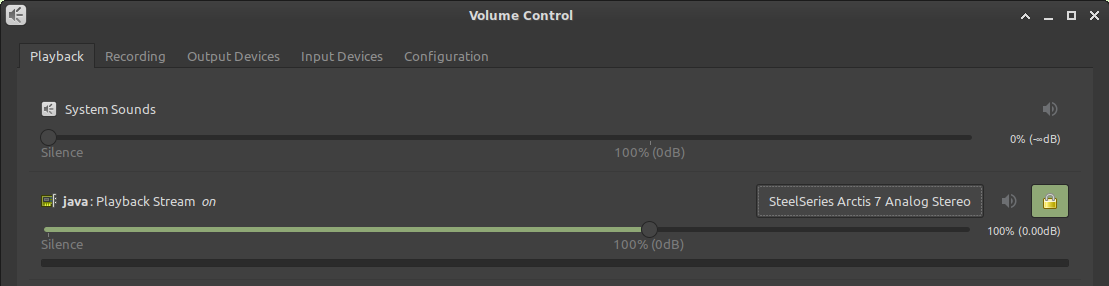
When I go to Volume Control, I have the dropdown menu for audio devices, but selecting any of them does nothing.
See this forum thread for more details on the troubleshooting I've performed: https://forums.linuxmint.com/viewtopic.php?f=47&t=331982&p=1898021
According to MC-26748 and MC-25528, this was previously reported in 2013 as an LWJGL issue and was not pursued. The workaround in MC-26748 of downgrading the LWJGL version to 2.8.0 isn't an acceptable solution, as the 2.x stream of this library ended in 2015.
I raised this via the LWJGL forums. Please see this thread for feedback from LWJGL developers: http://forum.lwjgl.org/index.php?topic=7081.0:
What could be done to resolve this? Suggestions:

- Minecraft regularly queries alcGetInteger(device, ALC_CONNECTED), via the ALC_EXT_disconnect extension. If it returns ALC_FALSE, it automatically recreates the audio context.
- Minecraft regularly queries alcGetString(NULL, ALC_DEFAULT_ALL_DEVICES_SPECIFIER). This returns a string that describes the default audio device. If it changes, it automatically recreates the audio context.
- Minecraft queries ALC_ALL_DEVICES_SPECIFIER (also regularly updates it) and displays the list of available audio devices. Instead of changing the default audio device from the OS settings, users can change the audio device used by Minecraft itself. This is the simplest and most robust solution. I don't remember a PC game that doesn't have such an option in its audio settings.
MC-44055 is still open as unresolved since 2014. There is a mod comment that it was resolved as "Won't Fix" as F3+T is an acceptable workaround. Please note that in this scenario you are unable to change the audio device in the OS to force an update through F3+T.
Requesting the following:
1. Confirmation that the issue is with Minecraft Java Edition integration either with OpenAL Soft or LWJGL. Issue should be reproduced and confirmed where the problem exists, and a fix developed. This issue has persisted since 2013.
2. Feature Enhancement Request to have Minecraft Java Edition allow the user to use a "Default" audio device, or specify the audio device in the game client.
3. Feature Enhancement Request to have Minecraft Java Edition be able to change the audio device without having to use F3+T to reload resource packs. Please revisit MC-44055 for this request, as it is still open.
Duplicate of
MC-25528. It sounds like an LWJGL issue, which Minecraft cannot control.Is there at least a way to use another version of lwjgl?
Sure:
Thank you for your response, but I have an issue.
I don't know where to get lwjgl-platform-2.7.1-natives jar. I tried copying 2.9.0 and replacing the libraries inside
with the ones from lwjgl-2.7.1 download, but in that case I get the error:
Exception in thread "main" java.lang.UnsatisfiedLinkError: /home/azat/.minecraft/versions/1.6.2-patched/1.6.2-patched-natives-12763220458973/liblwjgl.so: /home/azat/.minecraft/versions/1.6.2-patched/1.6.2-patched-natives-12763220458973/liblwjgl.so: wrong ELF class: ELFCLASS32 (Possible cause: architecture word width mismatch)
I run the 64 bit system btw.
Of course you have to provide the .so files for 64bit linux.
Check out 2.7.1 from https://github.com/LWJGL/lwjgl and compile the natives.
It turned out that the link error was somehow related to my java installation, fixed it by replacing it with openjdk.
The solution works with the 2.8.0 version of lwjgl, thank you.