 MC-270279
Disabled item cooldown overlay renders incorrectly over stack size number
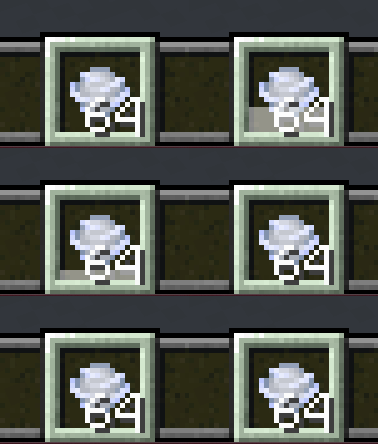
The white item cooldown overlay renders on top of the number indicating an item stack's count, but does not cover the entirity of the number, resulting in an unusual and unexpected look.
Steps to Reproduce:
- Throw an enderpearl, or wind charge
- Observe the shadow of the item count's number value
Observed & Expected Results:
 - The overlay covers most of the number, but not the shadow, making it stand out far more.
 - The numbers would either entirely be covered by the overlay, or would be rendered on top of the overlay.
Screenshots/Videos:
Pay attention to the shadow of the numbers:
Linked Issues
Attachments1
![[Mod] Jiingy](../../../data/avatars/users/91802.png)
Created Issue:
Item cooldown overlay renders incorrectly over stack size number
The white item cooldown overlay renders on top of the number indicating an item stack's count, but does not cover the entirity of the number, resulting in an unusual and unexpected look.
Steps to Reproduce:
- Throw an enderpearl, or wind charge
- Observe the shadow of the item count's number value
Observed & Expected Results:
Screenshots/Videos:
Pay attention to the shadow of the numbers:
Attachments1
Item cooldown overlay renders incorrectly over stack size numberDisabled item cooldown overlay renders incorrectly over stack size number
![[Mod] ampolive](../../../data/avatars/users/18949.svg)
relates to
![[Mod] Greymagic27](../../../data/avatars/users/92875.png)
relates to
![[Mojang] Triage Team](../../../data/avatars/users/89842.png)
 Low
LowThe transparent item cooldown overlay for items renders behind the recipe book and its various buttons. This behavior is very closely related to MC-269549. While this issue may not be incredibly obvious or easy to reproduce right now in standard gameplay (provided the fact that all item cooldowns in the game currently are very quick), should there ever be implimentation added to customize item cooldowns via components (allowing for long cooldowns), this issue would become more obvious.
Steps to Reproduce:
- Give the player any effect via (splash potion, or command)
- Slow down the tick rate (to observe the issue better)
/tick rate 1
- Get a wind charge
- Throw the wind charge (activating the cooldown)
- Open the inventory
- Drag the wind charge over the recipe book GUI
Observed & Expected Results:
- The item renders above the recipe book GUI as expected, but the cooldown renders behind it.
- The item and cooldown would both render above the GUI.

Can confirm