 MC-273372
Game Crashes With OBS Game Capture
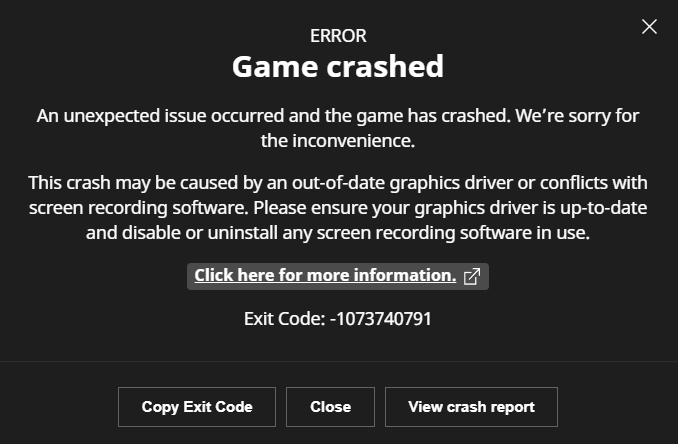
Hello, my game worked and still does work pretty fine except when I try to record or capture the game for a video, it recently started to crash with the error you can see on the first attachment (Exit code: -1073740791). There was nothing else than the numerical code until recently so I'm guessing the code has been updated due to someone crashing a lot with the same code over and over again. (I was not able to specify any other affected version but the versions I tried and failed were 1.20.4 1.20.1 1.8.9)
Here's a list of things I've tried over the 4 weeks I haven't been able to record videos as a content creator:
- Following OBS's Minecraft Java Edition Guide for the game capture asset: https://obsproject.com/kb/minecraft-java-edition-troubleshooting.
- Using logs from OBS to reach support, they could not find any solution.
- Putting both Minecraft and OBS on the high performance GPU.
- Giving both Minecraft and OBS admin permissions.
- Updating all graphics related assets, failing and seek help from a professional device support, still failing.
- Contacting OBS support with the crash reports first, then realize it only doesn't work when I try to record Minecraft.
- Recording with different launchers like Modrinth or Curseforge.
- Recording with StreamLabs instead of OBS.
- Recording another game from Steam called Stick Fight: The Game and it worked just fine, I was able to record full screen.
- Recording with only the "windowed capture mode" from OBS which is just inconvenient, it does capture the game when it's in the small window just as it launches but it's just a workaround, does not solve my problem and just looks bad. Crashed on some occasions too.
- Using windowed capture and enlarging the output. Really inconvenient and looks bad.
- Removing and setting up both Minecraft and OBS.
- Removing every single version of Java and setting up with a clean start.
There may be even more to add to the list that I forgot over time. To summarize, my game just refuses to be captured by OBS game capture or any other source. It works fine with any other game, even in full screen but Minecraft just crashes even when I'm not recording but just targeting the game from game capture. The game doesn't crash when I'm using display capture which just records my whole desktop. I ran out of solutions and reached Minecraft support, they did not have a solution so I was sent here. There is nothing else left on the internet to seek a potential solution from. Please help me.
Environment
Windows 10 Home Version 10.0.19045 Build 19045
Processor AMD Ryzen 7 7840HS w/ Radeon 780M Graphics, 3801 Mhz, 8 Core(s), 16 Logical Processor(s)
System Model Victus by HP Gaming Laptop 16-s0xxx
16 GB DDR4 RAM
AMD Radeon Graphics Processor (0x15BF)
NVIDIA GeForce RTX 4060 Laptop GPU
Drivers are up to date
Using or not using mods does not matter. I'm using the standard Minecraft launcher.


Created Issue:
Game Crashes With OBS Game Capture
Hello, my game worked and still does work pretty fine except when I try to record or capture the game for a video, it recently started to crash with the error you can see on the first attachment. There was nothing else than the numerical code until recently so I'm guessing the code has been updated due to someone crashing a lot with the same code over and over again. (I was not able to specify any other affected version but the versions I tried and failed were 1.20.4 1.20.1 1.8.9)
Here's a list of things I've tried over the 4 weeks I haven't been able to record videos as a content creator:
- Following OBS's Minecraft Java Edition Guide for the game capture asset: https://obsproject.com/kb/minecraft-java-edition-troubleshooting.
- Using logs from OBS to reach support, they could not find any solution.
- Putting both Minecraft and OBS on the high performance GPU.
- Giving both Minecraft and OBS admin permissions.
- Updating all graphics related assets, failing and seek help from a professional device support, still failing.
- Contacting OBS support with the crash reports first, then realize it only doesn't work when I try to record Minecraft.
- Recording with different launchers like Modrinth or Curseforge.
- Recording with StreamLabs instead of OBS.
- Recording another game from Steam called Stick Fight: The Game and it worked just fine, I was able to record full screen.
- Recording with only the "windowed capture mode" from OBS which is just inconvenient, it does capture the game when it's in the small window just as it launches but it's just a workaround, does not solve my problem and just looks bad. Crashed on some occasions too.
- Using windowed capture and enlarging the output. Really inconvenient and looks bad.
- Removing and setting up both Minecraft and OBS.
- Removing every single version of Java and setting up with a clean start.
There may be even more to add to the list that I forgot over time. To summarize, my game just refuses to be captured by OBS game capture or any other source. It works fine with any other game, even in full screen but Minecraft just crashes even when I'm not recording but just targeting the game from game capture. The game doesn't crash when I'm using display capture which just records my whole desktop. I ran out of solutions and reached Minecraft support, they did not have a solution so I was sent here. There is nothing else left on the internet to seek a potential solution from. Please help me.
Environment
Windows 10 Home Version 10.0.19045 Build 19045
Processor AMD Ryzen 7 7840HS w/ Radeon 780M Graphics, 3801 Mhz, 8 Core(s), 16 Logical Processor(s)
System Model Victus by HP Gaming Laptop 16-s0xxx
16 GB DDR4 RAM
AMD Radeon Graphics Processor (0x15BF)
NVIDIA GeForce RTX 4060 Laptop GPU
Drivers are up to dateUsing or not using mods does not matter. I'm using the standard Minecraft launcher.
Attachments2
Hello, my game worked and still does work pretty fine except when I try to record or capture the game for a video, it recently started to crash with the error you can see on the first attachment (Exit code: -1073740791). There was nothing else than the numerical code until recently so I'm guessing the code has been updated due to someone crashing a lot with the same code over and over again. (I was not able to specify any other affected version but the versions I tried and failed were 1.20.4 1.20.1 1.8.9)
Here's a list of things I've tried over the 4 weeks I haven't been able to record videos as a content creator:
- Following OBS's Minecraft Java Edition Guide for the game capture asset: https://obsproject.com/kb/minecraft-java-edition-troubleshooting.
- Using logs from OBS to reach support, they could not find any solution.
- Putting both Minecraft and OBS on the high performance GPU.
- Giving both Minecraft and OBS admin permissions.
- Updating all graphics related assets, failing and seek help from a professional device support, still failing.
- Contacting OBS support with the crash reports first, then realize it only doesn't work when I try to record Minecraft.
- Recording with different launchers like Modrinth or Curseforge.
- Recording with StreamLabs instead of OBS.
- Recording another game from Steam called Stick Fight: The Game and it worked just fine, I was able to record full screen.
- Recording with only the "windowed capture mode" from OBS which is just inconvenient, it does capture the game when it's in the small window just as it launches but it's just a workaround, does not solve my problem and just looks bad. Crashed on some occasions too.
- Using windowed capture and enlarging the output. Really inconvenient and looks bad.
- Removing and setting up both Minecraft and OBS.
- Removing every single version of Java and setting up with a clean start.
There may be even more to add to the list that I forgot over time. To summarize, my game just refuses to be captured by OBS game capture or any other source. It works fine with any other game, even in full screen but Minecraft just crashes even when I'm not recording but just targeting the game from game capture. The game doesn't crash when I'm using display capture which just records my whole desktop. I ran out of solutions and reached Minecraft support, they did not have a solution so I was sent here. There is nothing else left on the internet to seek a potential solution from. Please help me.
![[Mod] Greymagic27](../../../data/avatars/users/92875.png)
2024-06-14 20-22-00.txt
![[Bot] Arisa](../../../data/avatars/users/43007.png)
So your solution for my issue that was labeled a "bug" by Minecraft support when I reached them is to send other threads that 'look similar' to my case and is also unresolved but is marked as resolved by the mods. The strange part about this bug is that it only happens on the game that has an amazing bug tracking team. I have no issues on any other game, JUST MINECRAFT. The thread you have linked points out it's an issue with OBS. It is not an issue with OBS, I already tried reaching them, naturally they told me to reach Minecraft support since MINECRAFT IS THE ONLY PROGRAM THAT THE PROBLEM OCCURED. Please don't make me go through other threads that are labeled resolved just because you had no solutions for it. I have had this issue with your game only, FOR A WHOLE MONTH and it's causing me to be unable to create content.
![[Mod] Jiingy](../../../data/avatars/users/91802.png)
Do you by chance have OBS open when the crash occurs? I have an RX 6600 XT and can get the same error code when I have OBS open capturing my screen and the game window.
If OBS is involved in any way for you to get the crash to occur, MC-229195 would be relevant here. Specifically; [Mojang] Gegy's comment here (This is found through MC-273372)

We do not have enough information to find the cause of this issue.
Please attach the crash report found in minecraft/crash-reports/crash-<DATE>-client.txt here.
If you cannot find a crash report, please attach the full launcher log found in minecraft/launcher_log.txt.
This issue is being temporarily resolved as Awaiting Response. Once the requested information has been delivered, the report will be reopened automatically.
Quick Links:
📓 Bug Tracker Guidelines – 💬 Community Support – 📧 Mojang Support (Technical Issues) – 📧 Microsoft Support (Account Issues)
📓 Project Summary – ✍️ Feedback and Suggestions – 📖 Game Wiki
Thank you for your report!
However, this issue is Invalid.
Your game, launcher or server is modified.
If you can reproduce the issue in a vanilla environment, please recreate the issue.
Quick Links:
📓 Bug Tracker Guidelines – 💬 Community Support – 📧 Mojang Support (Technical Issues) – 📧 Microsoft Support (Account Issues)
📓 Project Summary – ✍️ Feedback and Suggestions – 📖 Game Wiki
– I am a bot. This action was performed automatically! If you think it was incorrect, please notify us on Discord or Reddit
Updated the logs with a clean vanilla environment. The issue suddenly began, I was able to use the same set of mods before without crashing.
See
MC-229195. This seems like the same issue.