 MC-277772
Fabulous setting breaks rendering of stained glass through item model in other stained glass since 1.21.2
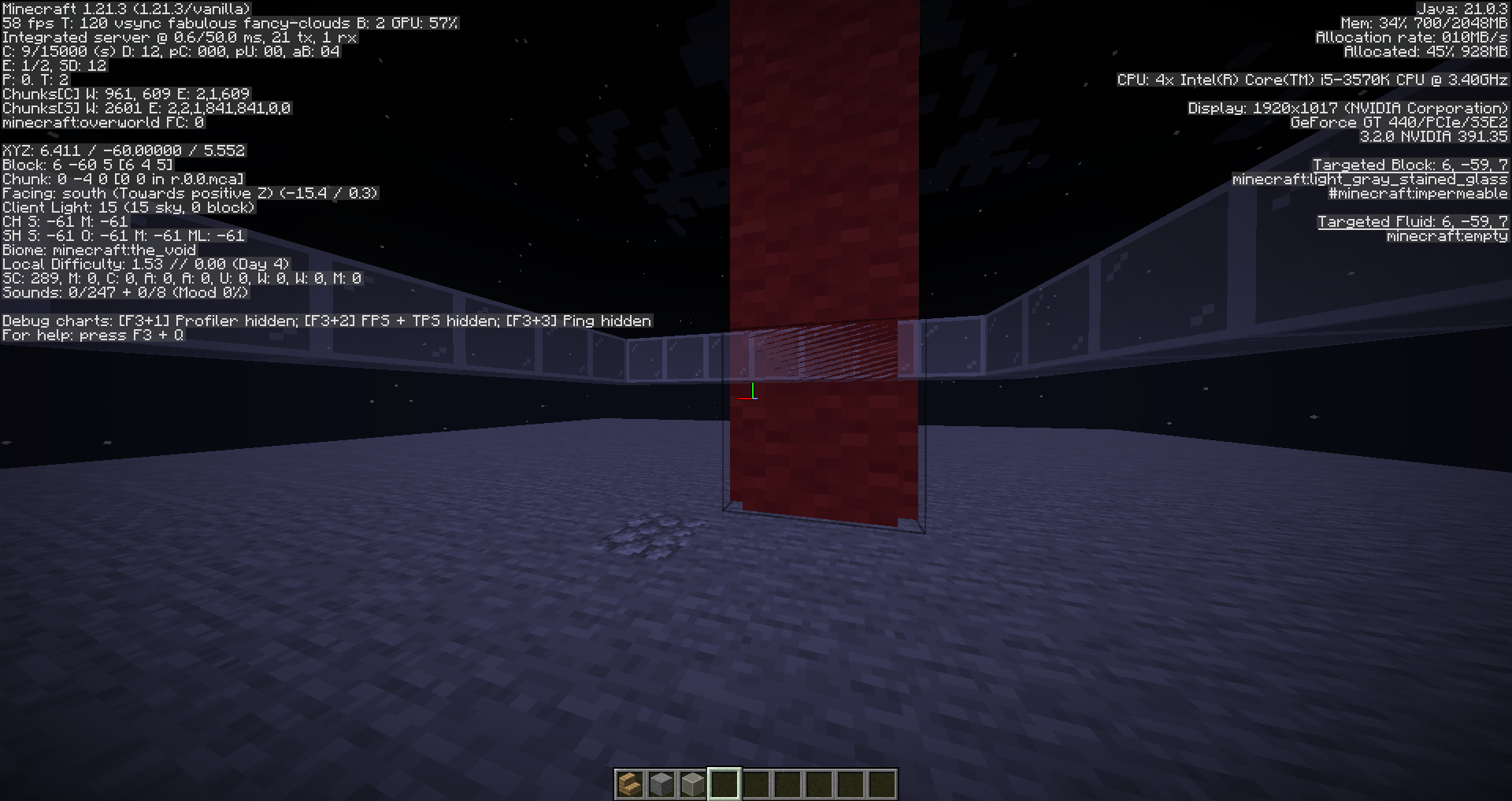
See screenshots; the "block" in front is a custom model on an entity's head. This works fine in 1.21.1.
Normal glass is unaffected. (The resource pack in initial screenshots makes white stained glass look like normal glass.)
Steps to reproduce
- Enable the attached resource pack.
- Use the commands to spawn the model and place light gray stained glass (invisible) in it:
/execute align xyz run summon armor_stand ~0.5 ~5.6 ~0.5 {ArmorItems:[{},{},{},{id:"diamond_pickaxe",count:1}],NoGravity:1b} /fill ~ ~1 ~ ~ ~3 ~ light_gray_stined_glass - Place white stained glass nearby.
- Look through the model in the direction of the stained glass.
- Change your graphics settings.
Observed results
The white stained glass will bleed through the punching bag model, on fabulous graphics.
Expected results
It would render the same as in fast or fancy graphics, the punching bag being fully in front.
Notes
Breaking the stained glass in the model corrects the rendering, and disabling the resource pack shows that stained glass on stained glass renders fine. All 3 elements are needed to see this issue.
Linked Issues
 Normal




Created Issue:
Fabulous setting makes glass render in front of items on entities
See screenshots; the "block" in front is a custom model on an entity's head. This works fine in 1.21.1.
Attachments2
Fabulous setting makes stained glass render in front of items on entities
See screenshots; the "block" in front is a custom model on an entity's head. This works fine in 1.21.1.
Normal glass is unaffected. (The resource pack makes white stained glass look like normal glass.)
See screenshots; the "block" in front is a custom model on an entity's head. This works fine in 1.21.1.
Normal glass is unaffected. (The resource pack makes white stained glass look like normal glass.)
Steps to reproduce
- Enable the attached resource pack.
- Use the commands to spawn the model and place light gray stained glass (invisible) in it:
/execute align xyz run summon armor_stand ~0.5 ~5.6 ~0.5 {ArmorItems:[{},{},{},{id:"diamond_pickaxe",count:1,components:{item_model:"punching_bag"}}],NoGravity:1b} /fill ~ ~1 ~ ~ ~3 ~ light_gray_stined_glass- Place white stained glass nearby.
- Look through the model in the direction of the stained glass.
- Change your graphics settings.
Observed results
The white stained glass with bleed through the punching bag model, on fabulous graphics.
Expected results
It would render the same as in fast or fancy graphics, the punching bag being fully in front.
See screenshots; the "block" in front is a custom model on an entity's head. This works fine in 1.21.1.
Normal glass is unaffected. (The resource pack makes white stained glass look like normal glass.)
Steps to reproduce
- Enable the attached resource pack.
- Use the commands to spawn the model and place light gray stained glass (invisible) in it:
/execute align xyz run summon armor_stand ~0.5 ~5.6 ~0.5 {ArmorItems:[{},{},{},{id:"diamond_pickaxe",count:1,components:{item_model:"punching_bag"}}],NoGravity:1b} /fill ~ ~1 ~ ~ ~3 ~ light_gray_stined_glass- Place white stained glass nearby.
- Look through the model in the direction of the stained glass.
- Change your graphics settings.
Observed results
The white stained glass with bleed through the punching bag model, on fabulous graphics.
Expected results
It would render the same as in fast or fancy graphics, the punching bag being fully in front.
See screenshots; the "block" in front is a custom model on an entity's head. This works fine in 1.21.1.
Normal glass is unaffected. (The resource pack makes white stained glass look like normal glass.)
Steps to reproduce
- Enable the attached resource pack.
- Use the commands to spawn the model and place light gray stained glass (invisible) in it:
/execute align xyz run summon armor_stand ~0.5 ~5.6 ~0.5 {ArmorItems:[{},{},{},{id:"diamond_pickaxe",count:1}],NoGravity:1b} /fill ~ ~1 ~ ~ ~3 ~ light_gray_stined_glass- Place white stained glass nearby.
- Look through the model in the direction of the stained glass.
- Change your graphics settings.
Observed results
The white stained glass with bleed through the punching bag model, on fabulous graphics.
Expected results
It would render the same as in fast or fancy graphics, the punching bag being fully in front.
Fabulous settingmakes stained glass renderinfront of items on entitiesFabulous setting breaks rendering of stained glass through item model in other stained glass since 1.21.2
See screenshots; the "block" in front is a custom model on an entity's head. This works fine in 1.21.1.
Normal glass is unaffected. (The resource pack in initial screenshots makes white stained glass look like normal glass.)
Steps to reproduce
- Enable the attached resource pack.
- Use the commands to spawn the model and place light gray stained glass (invisible) in it:
/execute align xyz run summon armor_stand ~0.5 ~5.6 ~0.5 {ArmorItems:[{},{},{},{id:"diamond_pickaxe",count:1}],NoGravity:1b} /fill ~ ~1 ~ ~ ~3 ~ light_gray_stined_glass- Place white stained glass nearby.
- Look through the model in the direction of the stained glass.
- Change your graphics settings.
Observed results
The white stained glass with bleed through the punching bag model, on fabulous graphics.
Expected results
It would render the same as in fast or fancy graphics, the punching bag being fully in front.
Notes
Breaking the stained glass in the model corrects the rendering, and disabling the resource pack shows that stained glass on stained glass renders fine. All 3 elements are needed to see this issue.
MC-2777772.zip
![[Mod] turbo](../../../data/avatars/users/92867.png)
![[Mod] Michael Wobst](../../../data/avatars/users/37868.png)
relates to
![[Mojang] Triage Team](../../../data/avatars/users/89842.png)
 Important
![[Mojang] Rebecca](../../../data/avatars/users/18936.svg)
![[Bot] Arisa](../../../data/avatars/users/43007.png)
See screenshots; the "block" in front is a custom model on an entity's head. This works fine in 1.21.1.
Normal glass is unaffected. (The resource pack in initial screenshots makes white stained glass look like normal glass.)
Steps to reproduce
- Enable the attached resource pack.
- Use the commands to spawn the model and place light gray stained glass (invisible) in it:
/execute align xyz run summon armor_stand ~0.5 ~5.6 ~0.5 {ArmorItems:[{},{},{},{id:"diamond_pickaxe",count:1}],NoGravity:1b} /fill ~ ~1 ~ ~ ~3 ~ light_gray_stined_glass- Place white stained glass nearby.
- Look through the model in the direction of the stained glass.
- Change your graphics settings.
Observed results
The white stained glass wi
thbleed through the punching bag model, on fabulous graphics.Expected results
It would render the same as in fast or fancy graphics, the punching bag being fully in front.
Notes
Breaking the stained glass in the model corrects the rendering, and disabling the resource pack shows that stained glass on stained glass renders fine. All 3 elements are needed to see this issue.
See screenshots; the "block" in front is a custom model on an entity's head. This works fine in 1.21.1.
Normal glass is unaffected. (The resource pack in initial screenshots makes white stained glass look like normal glass.)
Steps to reproduce
- Enable the attached resource pack.
- Use the commands to spawn the model and place light gray stained glass (invisible) in it:
/execute align xyz run summon armor_stand ~0.5 ~5.6 ~0.5 {ArmorItems:[{},{},{},{id:"diamond_pickaxe",count:1}],NoGravity:1b} /fill ~ ~1 ~ ~ ~3 ~ light_gray_stined_glass- Place white stained glass nearby.
- Look through the model in the direction of the stained glass.
- Change your graphics settings.
Observed results
The white stained glass will bleed through the punching bag model, on fabulous graphics.
Expected results
It would render the same as in fast or fancy graphics, the punching bag being fully in front.
Notes
Breaking the stained glass in the model corrects the rendering, and disabling the resource pack shows that stained glass on stained glass renders fine. All 3 elements are needed to see this issue.
We do not have enough information to reproduce this issue.
Please include the following information to help us understand your problem:
Please also attach any needed commands, add-ons/behavior packs, data packs, resource packs, screenshots, videos, or worlds needed to help reproduce this issue.
Refer to the Bug Tracker Guidelines for more information about how to write helpful bug reports. Bug reports with insufficient information may be closed as Incomplete.
This issue is being temporarily resolved as Awaiting Response. Once the requested information has been delivered, the report will be reopened automatically.
Quick Links:
📓 Bug Tracker Guidelines – 💬 Community Support – 📧 Mojang Support (Technical Issues) – 📧 Microsoft Support (Account Issues)
📓 Project Summary – ✍️ Feedback and Suggestions – 📖 Game Wiki
Can you confirm that the issue still persists in the latest version?
1.21.3 (latest release) is already marked as affected...