 MC-30691
Mouse Button shortcuts don't work in inventory
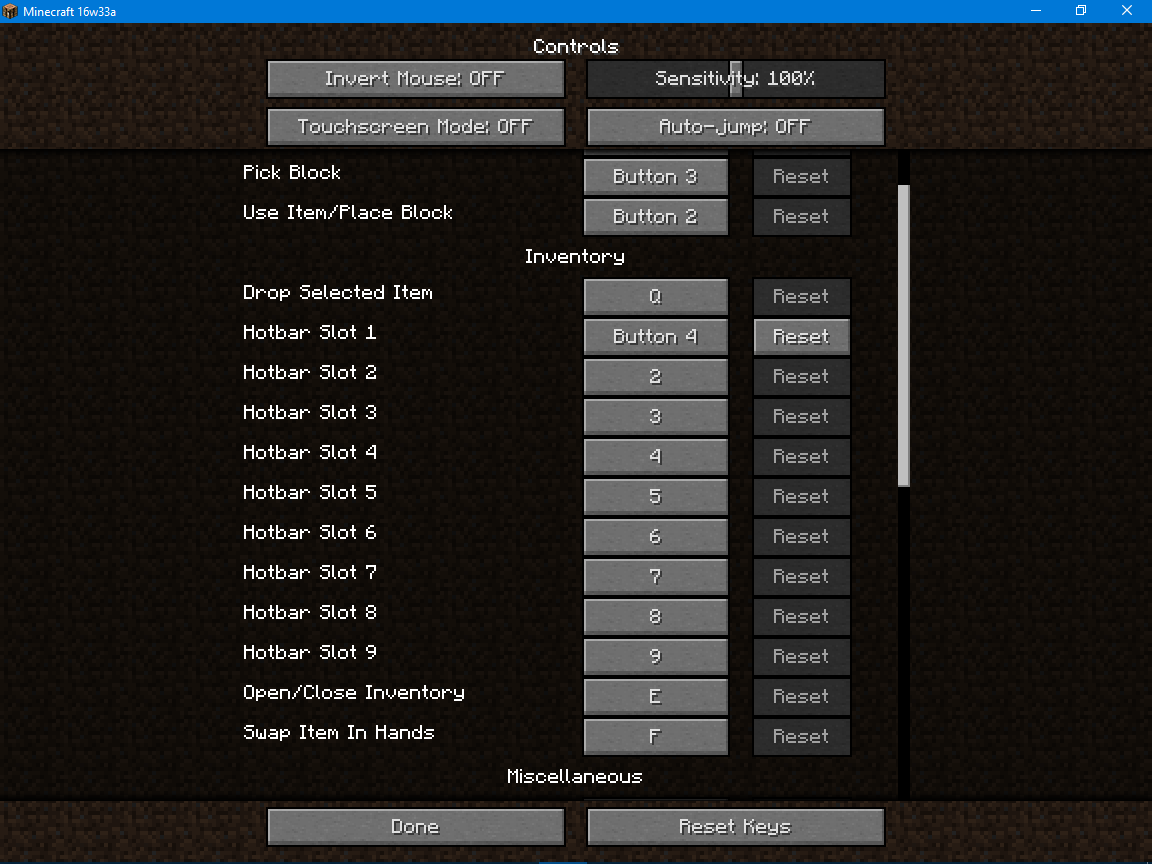
Normally when you hover over an item in inventory and press a hotbar shortcut, the hovered item goes to the respective hotbar slot. I have programmed first slot of my hotbar to a side button of my mouse. But when I open any container to quickly take an item using the side mouse button, it doesn't react at all. Also I noticed another bug/conflict: selecting the first hotbar slot while standing calm is working fine, but you can't select it while sneaking/pressing Shift.
The bug appears in Survival and Creative modes.
My mouse: Defender Datum MM-070
Environment
Windows 10 Pro, Java 9 Update 102
Linked Issues
 Normal

Created Issue:
Mouse Button shortcuts don't work in inventory
I have several buttons programmed to my mouse's programmable buttons, which I then have assigned to specific controls in Minecraft:
Programmed key: Minecraft control
num1: Hotbar Slot 1
num2: Hotbar Slot 2
num3: Hotbar Slot 3
num4: Hotbar Slot 4
num6: Hotbar Slot 5
num7: Hotbar Slot 6
num8: Hotbar Slot 7
Mouse Button4: Hotbar Slot 8
Mouse Button5: Hotbar Slot 9The num key programmed buttons work for all uses of of the hotkeys. However, the Mouse Buttons fail when trying to use the shortcut in the inventory. Normally when you press a hotbar slot button while hovering over an item in your inventory, it will immediately be assigned to that slot in the hotbar. However, when trying to do the same thing with the Mouse Button 4 or 5, nothing happens.
While not in the inventory, I can switch to Hotbar Slots 8 and 9 using Mouse Buttons 4 and 5, respectively.
Environment
Windows 7 SP1 64-bit
Java 7u25
Mouse: Corsair M90
Attachments1
- Unresolved
- Open
- Unconfirmed
- Survival
- bug controls mouse mouse_buttons shortcuts
- 13w36b

![[Mod] Ezekiel (ezfe)](../../../data/assets/gravatar/ezekielelin.jpeg)


Windows 7 SP1 64-bit
Java 7u25
Mouse: Corsair M90Windows 10 Pro, Java 9 Update 102
I have several buttons programmed to my mouse's programmable buttons, which I then have assigned to specific controls in Minecraft:
Programmed key: Minecraft control
num1: Hotbar Slot 1
num2: Hotbar Slot 2
num3: Hotbar Slot 3
num4: Hotbar Slot 4
num6: Hotbar Slot 5
num7: Hotbar Slot 6
num8: Hotbar Slot 7
Mouse Button4: Hotbar Slot 8
Mouse Button5: Hotbar Slot 9
The num key programmed buttons work for all uses of of the hotkeys. However, the Mouse Buttons fail when trying to use theshortcut in the inventory. Normally when you press a hotbar slot button while hovering over an item in your inventory, it will immediately be assigned to that slotin thehotbar. However, when trying to do the same thing with the Mouse Button 4 or 5, nothing happens.While not in the inventory, I can switch to Hotbar Slots 8 and 9 using Mouse Buttons 4 and 5, respectively.
Normally when you hover over an item in inventory and press a hotbar shortcut, the hovered item goes to the respective hotbar slot. I have programmed first slot of my hotbar to a side button of my mouse. But when I open any container to quickly take an item using the side mouse button, it doesn't react at all. Also I noticed another bug/conflict: selecting the first hotbar slot while standing calm is working fine, but you can't select it while sneaking/pressing Shift.
Normally when you hover over an item in inventory and press a hotbar shortcut, the hovered item goes to the respective hotbar slot. I have programmed first slot of my hotbar to a side button of my mouse. But when I open any container to quickly take an item using the side mouse button, it doesn't react at all. Also I noticed another bug/conflict: selecting the first hotbar slot while standing calm is working fine, but you can't select it while sneaking/pressing Shift.
The bug appears in Survival and Creative modes.
Normally when you hover over an item in inventory and press a hotbar shortcut, the hovered item goes to the respective hotbar slot. I have programmed first slot of my hotbar to a side button of my mouse. But when I open any container to quickly take an item using the side mouse button, it doesn't react at all. Also I noticed another bug/conflict: selecting the first hotbar slot while standing calm is working fine, but you can't select it while sneaking/pressing Shift.
The bug appears in Survival and Creative modes.
My mouse: Defender Datum MM-070
duplicates
Is this still a concern in the current Minecraft version 1.7.2 / Launcher version 1.3.4 or later? If so, please update the affected versions in order to best aid Mojang ensuring bugs are still valid in the latest releases/pre-releases.
Retested and updated affected versions: bug still affects 1.7.1 through 1.7.4.
Is this still a concern in the latest Minecraft version 14w08a? If so, please update the affected versions in order to best aid Mojang ensuring bugs are still valid in the latest releases/pre-releases.
Still affects 08a and relates to
MC-6589Is this still a concern in the current Minecraft version 1.8.1 Prerelease 3 / Launcher version 1.5.3 or later? If so, please update the affected versions in order to best aid Mojang ensuring bugs are still valid in the latest releases/pre-releases.
No response for over a year.
I'm here to confirm this. Assigned first hotbar slot to a side mouse button, but when I hover over an item in inventory and press the button, nothing happens. And I noticed another bug/conflict with that: mouse shortcuts don't work at all while sneaking.
Reopened and gave the ticket to Samuel Lembas please update it accordingly.
Dupe of MC-577