 MC-32539
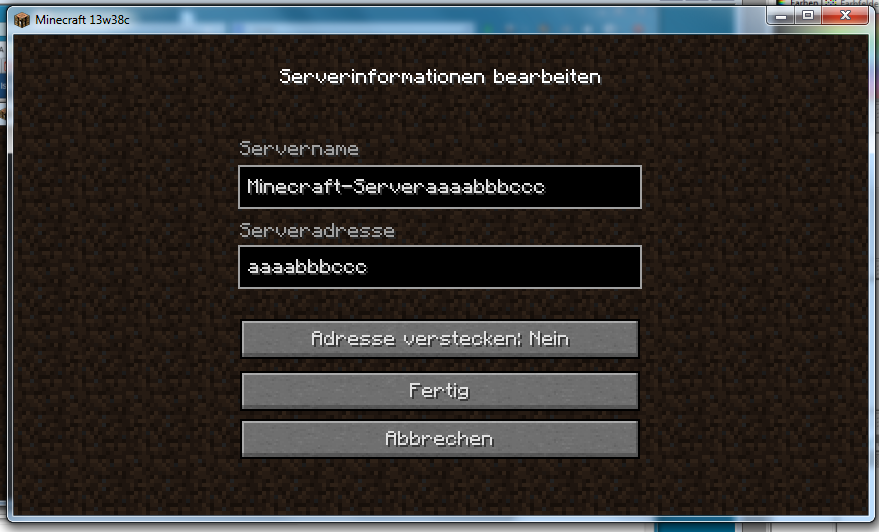
You can write on both the server name and the server address input field at the same time
The bug
Entering the screen to add or edit a server on the multiplayer server list, two input boxes and several buttons appear. When clicking somewhere outside the input boxes and none of the buttons, the blinking cursor disappears. Then I pressed the TAB key and the cursor started blinking on both the name box and the address box at the same time and I could write in both boxes at the same time.
How to reproduce
- Click the "Multiplayer" button in the main menu
- Click "Add server" or select one previously added server and click "Edit server"
- Click somewhere on the dirt background
- Press the TAB key
- Start writing
Note: This bug did not happen before any 1.6 release
Code analysis
Code analysis by [Mod] bemoty can be found in this comment.
Linked Issues
Attachments1


Created Issue:
You can write on both the server name and the server address input field at the same time
Entering the screen to add or edit a server on the multiplayer server list, two input boxes and several buttons appear. When clicking somewhere outside the input boxes and none of the buttons, the blinking cursor disappears. Then I pressed the TAB key.
What I expected to happen was:
After pressing tab, the cursor would start blinking on the name box.What actually happened was:
Instead, the cursor started blinking on both the name box and the address box at the same time and I could write in both boxes at the same time.Steps to Reproduce:
1. Click the "Multiplayer" button in the main menu.
2. Click "Add server" or select one previously added server and click "Edit server"
3. Click somewhere on the dirt background.
4. Press the tab key.
5. Start writing.
Note: This bug did not happen before any 1.6 release
Entering the screen to add or edit a server on the multiplayer server list, two input boxes and several buttons appear. When clicking somewhere outside the input boxes and none of the buttons, the blinking cursor disappears. Then I pressed the TAB key.
What I expected to happen was:
After pressing tab, the cursor would start blinking on the name box.What actually happened was:
Instead, the cursor started blinking on both the name box and the address box at the same time and I could write in both boxes at the same time.Steps to Reproduce:
1. Click the "Multiplayer" button in the main menu.
2. Click "Add server" or select one previously added server and click "Edit server"
3. Click somewhere on the dirt background.
4. Press the tab key.
5. Start writing.
is duplicated by

Works on Linux Mint 15 Xfce edition - 64 bit w/ 64 bit Java 7 installed.
is duplicated by

![[Mod] Michael Wobst](../../../data/avatars/users/37868.png)
Note: This bug did not happen before any 1.6 release
Entering the screen to add or edit a server on the multiplayer server list, two input boxes and several buttons appear. When clicking somewhere outside the input boxes and none of the buttons, the blinking cursor disappears. Then I pressed the TAB key.
What I expected to happen was:
After pressing tab, the cursor would start blinking on the name box.What actually happened was:
Instead, the cursor started blinking on both the name box and the address box at the same time and I could write in both boxes at the same time.Steps to Reproduce:
1. Click the "Multiplayer" button in the main menu.
2. Click "Add server" or select one previously added server and click "Edit server"
3. Click somewhere on the dirt background.
4. Press the tab key.
5. Start writing.
Code analysis by [Mod] bemoty can be found in this comment.
Note: This bug did not happen before any 1.6 release
Entering the screen to add or edit a server on the multiplayer server list, two input boxes and several buttons appear. When clicking somewhere outside the input boxes and none of the buttons, the blinking cursor disappears. Then I pressed the TAB key.
What I expected to happen was:
After pressing tab,the cursorwouldstart blinking on the name box.What actually happened was:
Instead, the cursor started blinking on both the name box and the address box at the same time and I could write in both boxes at the same time.Steps to Reproduce:
1. Click the "Multiplayer" button in the main menu.
2. Click "Add server" or select one previously added server and click "Edit server"
3. Click somewhere on the dirt background.
4. Press the tab key.
5. Start writing.
Code analysis by [Mod] bemoty can be found in this comment.
The bug
Entering the screen to add or edit a server on the multiplayer server list, two input boxes and several buttons appear. When clicking somewhere outside the input boxes and none of the buttons, the blinking cursor disappears. Then I pressed the TAB key and the cursor started blinking on both the name box and the address box at the same time and I could write in both boxes at the same time.
How to reproduce
- Click the "Multiplayer" button in the main menu
- Click "Add server" or select one previously added server and click "Edit server"
- Click somewhere on the dirt background
- Press the TAB key
- Start writing
Note: This bug did not happen before any 1.6 release
Code analysis
Code analysis by [Mod] bemoty can be found in this comment.
Confirmed.
Also works on Linux Mint 15 Xfce edition - 64 bit w/ 64 bit Java 7 installed.
Confirmed in 1.7.4/5 and 1.8 snapshots
The following is based on MCP 9.40pre-1 using MC 1.12. (Can confirm for 1.12.1)
This is because there is no check in the net.minecraft.client.gui.GuiScreenAddServer.keyTyped() method if there is at least one focused text box. The game just assumes that there is one and invokes the setFocused(!isFocusedIn) method for both text boxes. As they both have no focus when the tab button is pressed in this case, isFocusedIn is false for both and they are set focused. This issue can be fixed by simply adding the missing check to the method. -> if(!this.serverNameField.isFocused() && !this.serverIPField.isFocused())