 MCD-334
Extreme GPU Usage
Moving around or standing still, uses almost 100% of my GPU..
I've provided a screenshot.
Even if I moved my Graphics to Fancy from Fanciest it the percentage only went down 1%
![[Mod] Raybeano99](../../../data/avatars/users/55518.png)



Created Issue:
Extreme GPU Usage
Moving around or standing still, uses almost 100% of my GPU..
I've provided a screenshot.
Attachments1
- Unresolved
- Open
- Unconfirmed
- Windows 10, RTX 2060
- Version #19304
Changed Description:
Moving around or standing still, uses almost 100% of my GPU..
I've provided a screenshot.
Even if I moved my Graphics to Fancy from Fanciest it the percentage only went down 1%

![[Bot] Arisa](../../../data/avatars/users/43007.png)
Added Affects Versions: Version #19500
Added Attachments:
Added Attachments:
![[Mojang] Mega_Spud (Jay Wells)](../../../data/avatars/users/92696.png)
What are the specs of your computer?
I'm running;
Seeing as my CPU is totally fine and the GPU is maxed out, I'm feeling that there's a Graphics Bug, because there's no way a RTX 2060 should almost maxed out with MC: Dungeons.
Is your FPS set to be capped in the settings? My reasoning is that your GPU might just be fully loaded by rendering as many frames as possible.
It's set to Unlimited, but only get around 60-62 FPS...
If I set it to Unlimited I can get about 200 FPS on MC: Java Edition,
running Optifine with shaders, I get about 130-150 FPS...
I've always had better fps and not fully loading the GPU with unlimited.
Commenting on this so it gets another look...
Game released now and issue still occurs,

and this is the temp it reaches.

Having the same issue now with latest patch - 1.2.0.0. Was running fine at highest graphics setting but with the patch GPU was hitting 98% and had to reduce the graphic setting to play the game. GPU is an NVDIA RTX 2060 Super. Since is is basically the same GPU as Nathaniel M I'd say that may be the problem except it ran fine at the highest settings before this latest patch.
Build 1.3.2.0_4307136 on Win10 (Win7/Win8/Win10 game version)
RTX 2060
Had the very same issue today after I got back to playing when the DLC got released.
With the usual settings I used before I got under 20 FPS = unplayable.
I noticed though I got a graphics card driver update to download. Everything went back to normal after the driver update (90-170 FPS while in game with/without mobs on screen - full graphics).
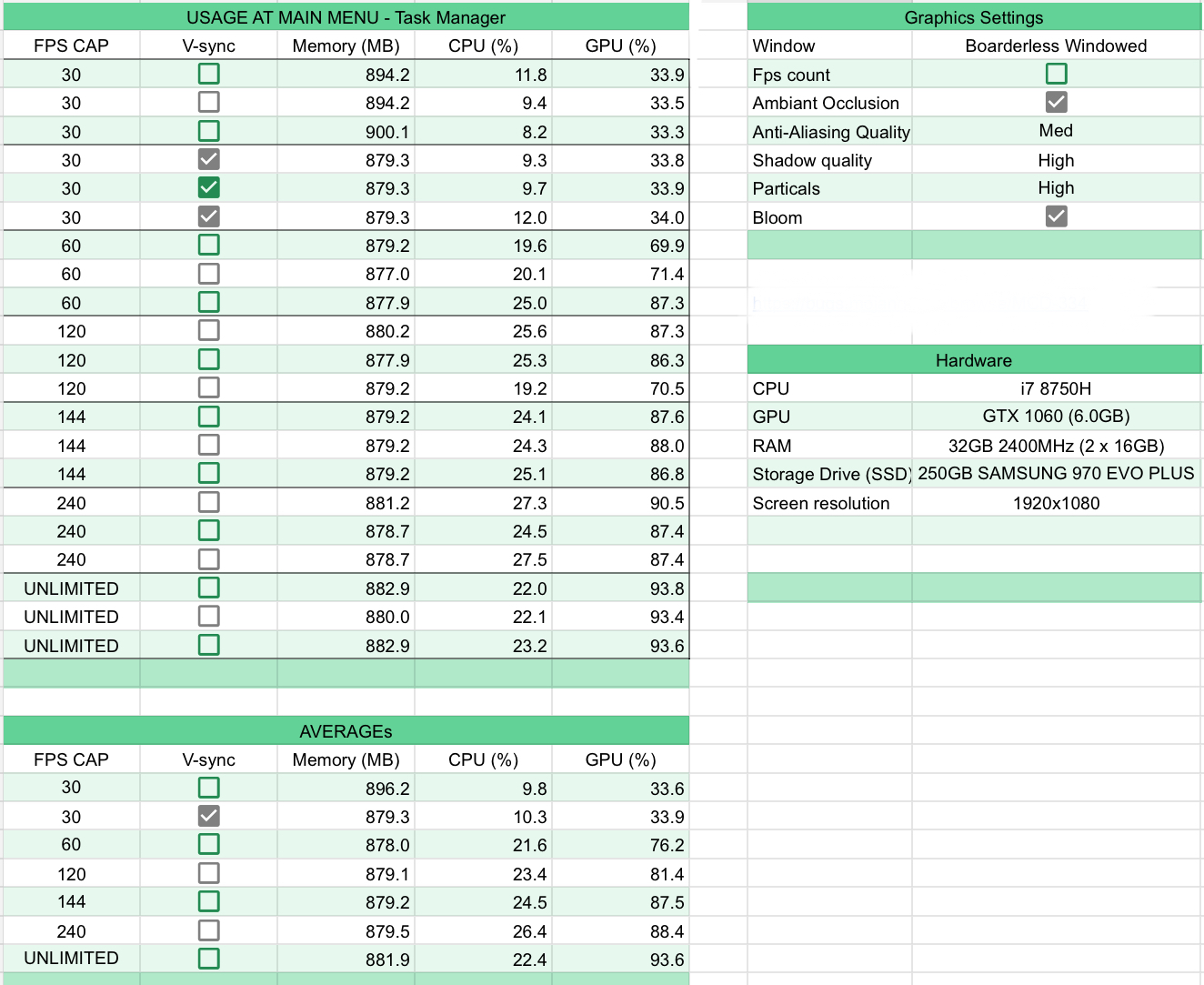
This data might provide some insight into the usage at different FPS Caps. Sample size is terrible at three unfortunately.
Thank you for your report!
However, this issue has been temporarily closed as Awaiting Response
Is this still an issue in the latest version? If it is, please try and include steps to reproduce the issue of possible:
If your ticket does not look like the example given here, then it's likely to be closed as incomplete.
This ticket will automatically reopen when you reply.
Quick Links:
📓 Issue Guidelines – 💬 Mojang Support – 📧 Suggestions – 📖 Minecraft Wiki
Cleaning up old tickets: This ticket had been set to 'Awaiting Response', but has not received a response from the reporter (~3 months+) so is being closed as Incomplete. If you feel this is still a valid issue then please comment, or create a new ticket following the Issue Guidelines which includes steps to reproduce the problem.
For any account or purchasing related issues, please contact Minecraft Customer Support directly, as we cannot assist with those here at the bug tracker.
Quick Links:
📓 Issue Guidelines – 💬 Mojang Support – 📧 Suggestions – 📖 Minecraft Wiki