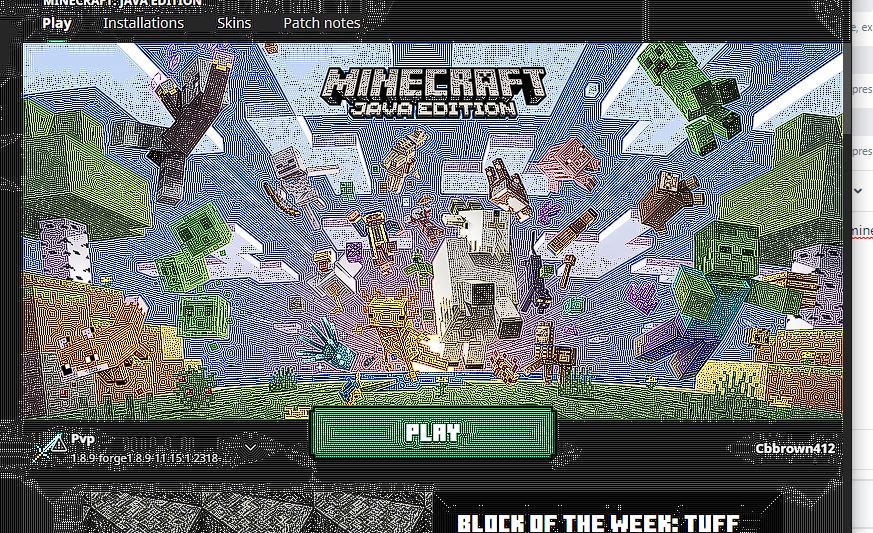
in minecraft launcher Lots of white lines from like corrupting the client
When i open up minecraft.exe not minecraft normally it has these like white lines
Environment
newest java version and windows
Linked Issues
is duplicated by5
 MC-258627Graphical issue on minecraft Java. I've tried uninstalling and reinstalling both the launcher and Java itself.Duplicate
 MCL-19806glitch in minecraft launcher DuplicateMCL-20922Pixelated launcher GUIDuplicateMCL-21912icons and images have a "white grainy" effectDuplicateMCL-23148White dot on launcherDuplicate
Attachments1

Created Issue:
in minecraft launcher Lots of white lines from like corrupting the client
When i open up minecraft.exe not minecraft normally it has these like white lines
Environment
newest java version and windows
Attachments1
![[Mod] SPGoding](../../../data/avatars/users/44622.png)
is duplicated by
![[Bot] Arisa](../../../data/avatars/users/43007.png)
![[MCQA] Zgajak](../../../data/avatars/users/10122.svg)
is duplicated by
![[Mod] ampolive](../../../data/avatars/users/18949.svg)
is duplicated by
is duplicated by

May duplicate MCL-19804
May duplicate MCL-19804
Thank you for your report!
We're tracking this issue in MCL-19804, so this ticket is being resolved and linked as a duplicate.
If you would like to add a vote and any extra information to the main ticket it would be appreciated.
If you haven't already, you might like to make use of the search feature to see if the issue has already been mentioned.
Quick Links:
📓 Bug Tracker Guidelines – 💬 Community Support – 📧 Mojang Support
📓 Project Summary – ✍️ Feedback and Suggestions – 📖 Game Wiki
– I am a bot. This action was performed automatically! The ticket was resolved by one of our moderators, and I left this message to give more information to you.
Thank you for your report!
We're tracking this issue in MCL-19804, so this ticket is being resolved and linked as a duplicate.
If you would like to add a vote and any extra information to the main ticket it would be appreciated.
If you haven't already, you might like to make use of the search feature to see if the issue has already been mentioned.
Quick Links:
📓 Bug Tracker Guidelines – 💬 Community Support – 📧 Mojang Support
📓 Project Summary – ✍️ Feedback and Suggestions – 📖 Game Wiki
Thank you for your report!
We're tracking this issue in MCL-19804, so this ticket is being resolved and linked as a duplicate.
If you would like to add a vote and any extra information to the main ticket it would be appreciated.
If you haven't already, you might like to make use of the search feature to see if the issue has already been mentioned.
Quick Links:
📓 Bug Tracker Guidelines – 💬 Community Support – 📧 Mojang Support
📓 Project Summary – ✍️ Feedback and Suggestions – 📖 Game Wiki
– I am a bot. This action was performed automatically! The ticket was resolved by one of our moderators, and I left this message to give more information to you.
Hi there!
Could you answer few questions regarding this issue, it will help with the investigation:
What I also suggest: disable all of the overlays like: Discord, Nvidia (or other graphic cards) overlay + be sure to turn off all of the program which can affect graphic settings like programs which read temperatures and cpu/gpu load.
This ticket will automatically reopen when you reply.
I am also experiencing this problem.
What information do you need to solve the problem?
Possible fix: Open the Nvidia Control Panel, Manage 3D Settings and disable the feature Image Sharpening. (Source)