 MCL-22850
Custom game versions/mod loaders no longer work as expected.
Custom game versions or modloaders (such as Fabric) that use the "inheritsFrom" key in the version json no longer start the game and leave the launcher in a broken state.
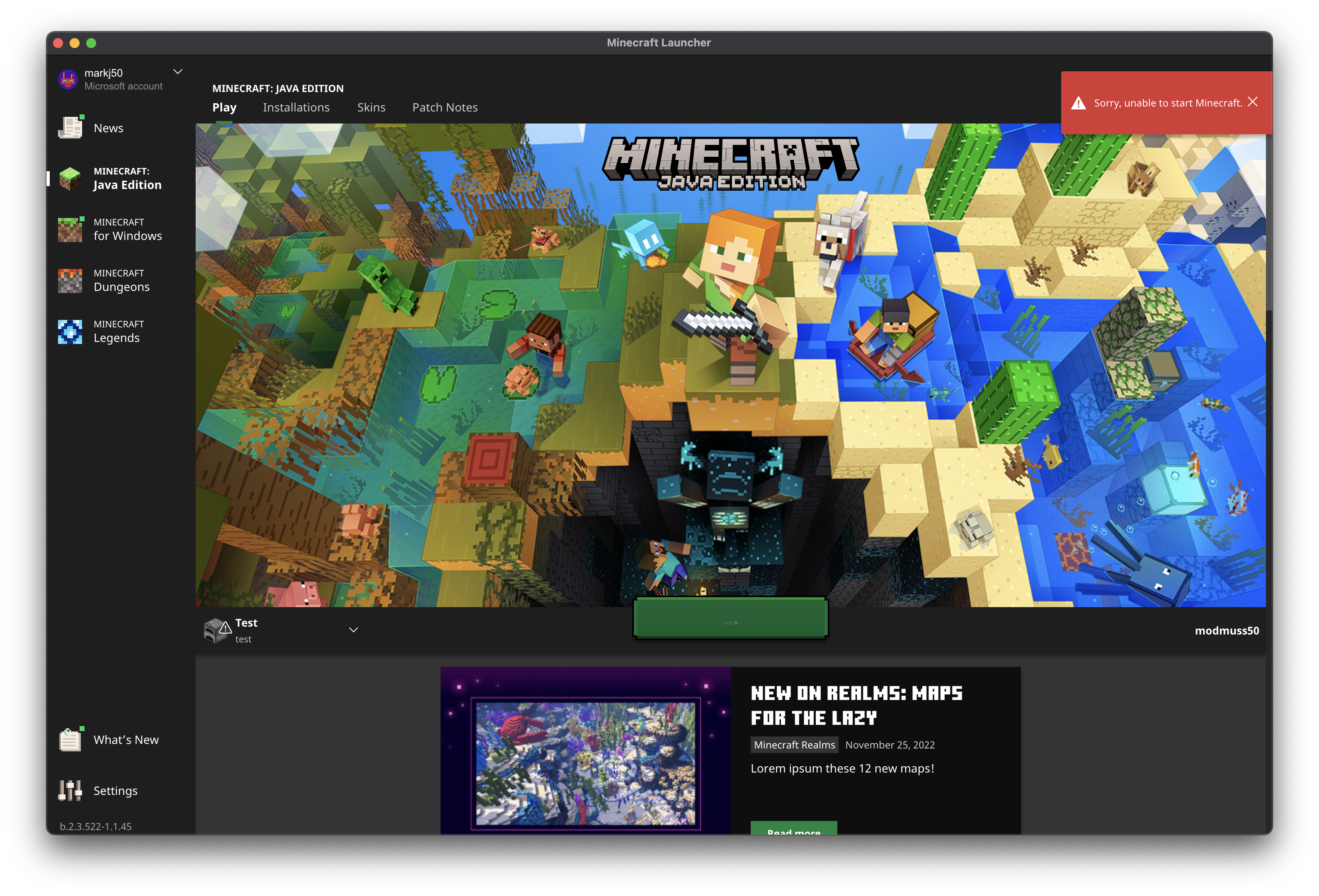
Recently we (Fabric) have had a large number of players contacting us about being unable to start their modded versions of Minecraft. When clicking play a toast is shown saying "Unable to start Minecraft" and the launcher is left in a broken/un-useable state. (See: screenshots)
After looking into this I was able to reproduce this without the use of a mod loader by creating a simple custom version. It appears the issue only happens when you have not previously used the Minecraft version that the custom version inherits from. The expected and previous behavour allowed the launcher to download the vanilla version as required.
Steps to reproduce:
1. Start with a fresh install of the launcher, or ensure that the vanilla version behing inherited from has not been started previously.
2. Save the following file to .minecraft/versions/test.json :
{
    "id": "test",
    "inheritsFrom": "1.19.2",
    "releaseTime": "2022-12-08T16:30:33+0000",
    "time": "2022-12-08T16:30:33+0000",
    "type": "release"
}
3. Create a new instance using this version
4. Click play on the new instance and notice the toast error and the game does not start.
5. Notice under "Installations" all installations are suck "Waiting to install"
This can be fixed by fully closing the launcher, creating a new instance with vanilla 1.19.2 starting the game, and then the modded/custom instance will work. I have been able to reproduce this in the none beta version of the Windows and MacOS launchers.
Please let me know if you require any more information or details. A swift resolution would be highly appreciated due to the severity of this issue.
Environment
Windows, MacOS



Created Issue:
Custom game versions/mod loaders no longer work as expected.
Custom game versions or modloaders (such as Fabric) that use the "inheritsFrom" key in the version json no longer start the game and leave the launcher in a broken state.
Recently we (Fabric) have had a large number of players contacting us about being unable to start their modded versions of Minecraft. When clicking play a toast is shown saying "Unable to start Minecraft" and the launcher is left in a broken/un-useable state. (See: screenshots)
After looking into this I was able to reproduce this without the use of a mod loader by creating a simple custom version. It appears the issue only happens when you have not previously used the Minecraft version that the custom version inherits from. The expected and previous behavour allowed the launcher to download the vanilla version as required.
Steps to reproduce:
1. Start with a fresh install of the launcher, or ensure that the vanilla version behing inherited from has not been started previously.
1 . Saving the following file to .minecraft/versions/test.json :
{ "id": "test", "inheritsFrom": "1.19.2", "releaseTime": "2022-12-08T16:30:33+0000", "time": "2022-12-08T16:30:33+0000", "type": "release" }2. Create a new instance using this version
3. Click play on the new instance and notice the toast error and the game does not start.
4. Notice under "Installations" all installations are suck "Waiting to install"
This can be fixed by fully closing the launcher, creating a new instance with vanilla 1.19.2 starting the game, and then the modded/custom instance will work. I have been able to reproduce this in the none beta version of the Windows and MacOS launchers.
Please let me know if you require any more information or details. A swift resolution would be highly appreciated due to the severity of this issue.
Environment
Windows, MacOS
Attachments4
Custom game versions or modloaders (such as Fabric) that use the "inheritsFrom" key in the version json no longer start the game and leave the launcher in a broken state.
Recently we (Fabric) have had a large number of players contacting us about being unable to start their modded versions of Minecraft. When clicking play a toast is shown saying "Unable to start Minecraft" and the launcher is left in a broken/un-useable state. (See: screenshots)
After looking into this I was able to reproduce this without the use of a mod loader by creating a simple custom version. It appears the issue only happens when you have not previously used the Minecraft version that the custom version inherits from. The expected and previous behavour allowed the launcher to download the vanilla version as required.
Steps to reproduce:
1. Start with a fresh install of the launcher, or ensure that the vanilla version behing inherited from has not been started previously.
1. Savingthe following file to .minecraft/versions/test.json :{ "id": "test", "inheritsFrom": "1.19.2", "releaseTime": "2022-12-08T16:30:33+0000", "time": "2022-12-08T16:30:33+0000", "type": "release" }
2. Create a new instance using this version
3. Click play on the new instance and notice the toast error and the game does not start.
4. Notice under "Installations" all installations are suck "Waiting to install"This can be fixed by fully closing the launcher, creating a new instance with vanilla 1.19.2 starting the game, and then the modded/custom instance will work. I have been able to reproduce this in the none beta version of the Windows and MacOS launchers.
Please let me know if you require any more information or details. A swift resolution would be highly appreciated due to the severity of this issue.
Custom game versions or modloaders (such as Fabric) that use the "inheritsFrom" key in the version json no longer start the game and leave the launcher in a broken state.
Recently we (Fabric) have had a large number of players contacting us about being unable to start their modded versions of Minecraft. When clicking play a toast is shown saying "Unable to start Minecraft" and the launcher is left in a broken/un-useable state. (See: screenshots)
After looking into this I was able to reproduce this without the use of a mod loader by creating a simple custom version. It appears the issue only happens when you have not previously used the Minecraft version that the custom version inherits from. The expected and previous behavour allowed the launcher to download the vanilla version as required.
Steps to reproduce:
1. Start with a fresh install of the launcher, or ensure that the vanilla version behing inherited from has not been started previously.
2. Save the following file to .minecraft/versions/test.json :
{ "id": "test", "inheritsFrom": "1.19.2", "releaseTime": "2022-12-08T16:30:33+0000", "time": "2022-12-08T16:30:33+0000", "type": "release" }3. Create a new instance using this version
4. Click play on the new instance and notice the toast error and the game does not start.
5. Notice under "Installations" all installations are suck "Waiting to install"
This can be fixed by fully closing the launcher, creating a new instance with vanilla 1.19.2 starting the game, and then the modded/custom instance will work. I have been able to reproduce this in the none beta version of the Windows and MacOS launchers.
Please let me know if you require any more information or details. A swift resolution would be highly appreciated due to the severity of this issue.
![[Bot] Arisa](../../../data/avatars/users/43007.png)
![[Mod] markderickson](../../../data/avatars/users/18946.svg)
Hi there!
Could you please record a video of this issue step by step?
We are unable to reproduce this issue.
This ticket will automatically reopen when you reply.
Hi!
I have uploaded 2 videos showing the issue and the workaround.
Part 1 first shows the test version that inherits 1.19.2 and how trying to launch that (without a previous 1.19.2 installation) causes the launcher to show an error, and get suck in an installation state. The 2nd 1/2 of part shows me creating a new vanilla 1.19.2 instance after hard restarting the launcher.
Part 2 contiunes on after 1.19.2 has been started and then shows that the test instance launches succesfully.
The expected behaviour would be for the test version to launch first time without showing the error. Please let me know if you need any future info. (Sorry about the low quality videos I had to compress them a lot to fit within the 10MB limit)
Hi again!
I still cannot reproduce this issue, your test file boots up correctly as well as fabric mod.
Can you please uninstall the Launcher, delete .minecraft folder (copy its content elsewhere before deletion) and then reinstall, restart your computer. Then please try to boot the Launcher, and games.
This ticket will automatically reopen when you reply.
Thats strange, I have uploaded a part 3 video on a fresh Windows install in a VM.
After installing the launcher I ensured that there were no pending updates by closing and reopening it. Part 3 contiunes just after logging into my MS account. The game has never started. The following detailed steps cover how I reproduced this:
1. Fresh windows install in VM
2. Install launcher and open
3. Reopen launcher to install pending update
4. Log in with MS account
5. (Video starts here) Close launcher
6. Open fabric installer and install for an older Minecraft version, 1.19.2 in this case not 1.19.3.
7. Reopen Minecraft launcher and launch the pre selected fabric instance
8. Error is shown, launcher is in a broken "installing" state.
Launcher version is `v2.3.522-1.1.32` (bottom left of window)
I can still reproduce this with the latest `2.3.549` launcher update on MacOS.
I am also still seeing a steady stream of players seeking help for this issue in the Fabric discord support channels.
Can confirm this here on KUbuntu 23.04 (Beta) with latest Minecraft Launcher.
its macOS on a VM in windows ? sorry i'm french
Players on my server are still reproduce this issue
Hi, sorry to be a pain and bump this issue.
However a lot of our players are still experiencing this issue, even on the latest launcher version. I have tried my best to provide intructions to help you reproduce this, please let me know if there is anything more I can do.
Many thanks.
Can you give this a try on the latest beta version of the launcher and let us know if you still experience the issue?
Hi, after testing on the beta version using MacOS and Windows it appears that this issue has been fixed.
Many thanks for everything.