 MCL-23931
Launcher shows wrong available disk space
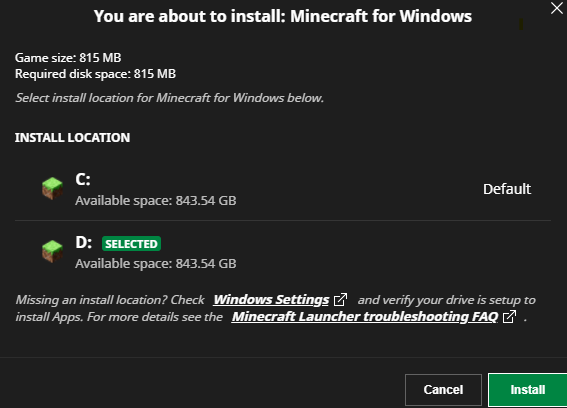
When selecting a location where to install Minecraft: Bedrock Edition or Minecraft Dungeons the launcher shows the same available disk space for all drives. This can be seen in the screenshot below.


Environment
System: Windows 11 Home 23H2
Bootstrap: 1.3.7 (a29fda43bf6d269b3821b540443f1cb47775c72c)
UI: 2.14.12 (4ec9447653cf24fa2d9574846fb431851b0b18c2)
Attachments7


![[Mod] turbo](../../../data/avatars/users/92867.png)

Created Issue:
Launcher shows wrong available disk space
When selecting a location where to install Minecraft: Bedrock Edition or Minecraft Dungeons the launcher shows the same available disk space for all drives. This can be seen in the screenshot below.
Environment
System: Windows 11 23H2
Bootstrap: 1.3.7 (a29fda43bf6d269b3821b540443f1cb47775c72c)
UI: 2.14.12 (4ec9447653cf24fa2d9574846fb431851b0b18c2)
Attachments3
![[Bot] Arisa](../../../data/avatars/users/43007.png)
When selecting a location where to install Minecraft: Bedrock Edition or Minecraft Dungeons the launcher shows the same available disk space for all drives. This can be seen in the screenshot below.
When selecting a location where to install Minecraft: Bedrock Edition or Minecraft Dungeons the launcher shows the same available disk space for all drives. This can be seen in the screenshot below.
System: Windows 11 Home 23H2
Bootstrap: 1.3.7 (a29fda43bf6d269b3821b540443f1cb47775c72c)
UI: 2.14.12 (4ec9447653cf24fa2d9574846fb431851b0b18c2)
![[MCQA] Zgajak](../../../data/avatars/users/10122.svg)
![[Mod] Greymagic27](../../../data/avatars/users/92875.png)
Hi, I cannot reproduce the bug you are experiencing on my Windows 11 Pro 23H2 machine (see my attached images). Have you tried uninstalling the launcher, rebooting your PC, and reinstalling it?
This ticket will automatically reopen when you reply.
That unfortunately did not fix the bug. Is there anything else I can do/ any other information I can provide?
Hi!
First of all, do you have an updated Windows? Please check anyways.
Can you also check Xbox app >settings >install options and see if there is anything out of ordinary there?
Please also click the Windows settings link in installation window and see if proper discs are selected.
Please also check drive for potential errors. Open Disc's properties, click on the Tools tab and click on Check under Error Checking. If Windows reports any errors, back up your important files immediately.
This ticket will reopen automatically when you reply.
Can confirm (on a fresh installation of windows 11):
Requesting ownership (the user seems to be inactive.)
Hi!
Can you please see Install options in Xbox app?
Can you change the installation path there and then restart both Apps?
Mooved my launcher to C: (sytem) drive. It works on it.
I no longer own a Windows computer. If possible and if @Lunarian wouldn't mind, can ownership of this issue be transferred to them?
Please confirm if this is still an issue.