 MCL-546
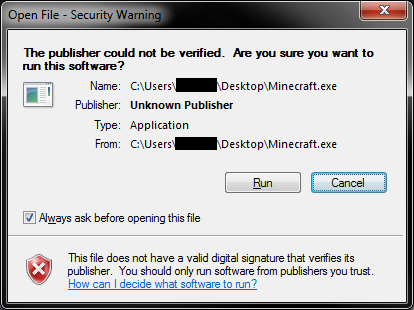
Unknown Publisher, Missing digital Signature
This has been happening forever on the new and old launcher. There is no Valid digital signature. so the Publisher is blank. This only gives you a Security Warning till you tell it not to. not really a bug. This does not need to be fixed, Minecraft runs fine. Just thought I would post it, to let you know its there.
Environment
Windows 7 Ultimate 64bit
Linked Issues
 MC-95463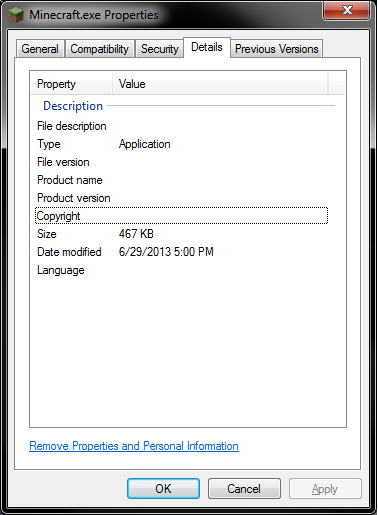

Created Issue:
Unknown Publisher, Missing digital Signature
This has been happening forever on the new and old launcher. There is no Valid digital signature. so the Publisher is blank. This only gives you a Security Warning till you tell it not to. not really a bug. This does not need to be fixed, Minecraft runs fine. Just thought I would post it, to let you know its there.
Environment
Windows 7
Attachments1
Minecraft Launcher Security Warning.png

![[Mojang] Nathan Adams](../../../data/assets/gravatar/dinnerbone.png) [Mojang] Nathan Adams
[Mojang] Nathan Adams

relates to

Relates to MCL-546
The digital signature of the Minecraft launcher (https://launcher.mojang.com/download/Minecraft.exe) is outdated. The signature by Mojang was only valid until 24th July 2016.

Please do not mark unreleased versions as affected. You do not have access to this yet.
There is no need to add launcher versions as labels, that is what the "Affects Version/s" field is for. Similarly, the OS is for the Environment, and the project type already says its for the launcher.
Redownload it if you need the signed exe.
Reopening, as the latest executable seems to have this issue.
This issue has reappeared in launcher version 1.2.7 (issue didn't exist with version 1.2.5). Also, I'm going to toss this in here because I don't know where else to put it, but the launcher download webpage <http://minecraft.net/download> has the wrong date for the launcher's release...so if/when someone is doing what they should (double-checking the download of an unsigned executable that is presenting warnings), they then encounter an inconsistency between what the downloaded executable's created date is and the webpage's claim of what it should be.
Digital signature isn't updated.
Just ignore that buddy.
Still present in the most recent version of the launcher.
Fixed as of Launcher 1.6.11
Not fixed for Minecraft.exe (https://s3.amazonaws.com/Minecraft.Download/launcher/Minecraft.exe)
Please reopen
"Classic Launcher 1.6.11" is outdated and won't be updated any more.
Alright, I assumed as it was linked to on https://minecraft.net/download that it is up to date as well and not only a workaround