 MCL-6412
Version selection in profile editor is empty
We need more information to find out the cause of this issue. To those who are currently affected by the issue, please navigate to the Minecraft data folder (how-to) and then please attach launcher_log.txt.
You may try to fix the issue by deleting the versions folder in the Minecraft data folder and restarting the launcher. If that did not help, then you can try fully reinstalling Minecraft.
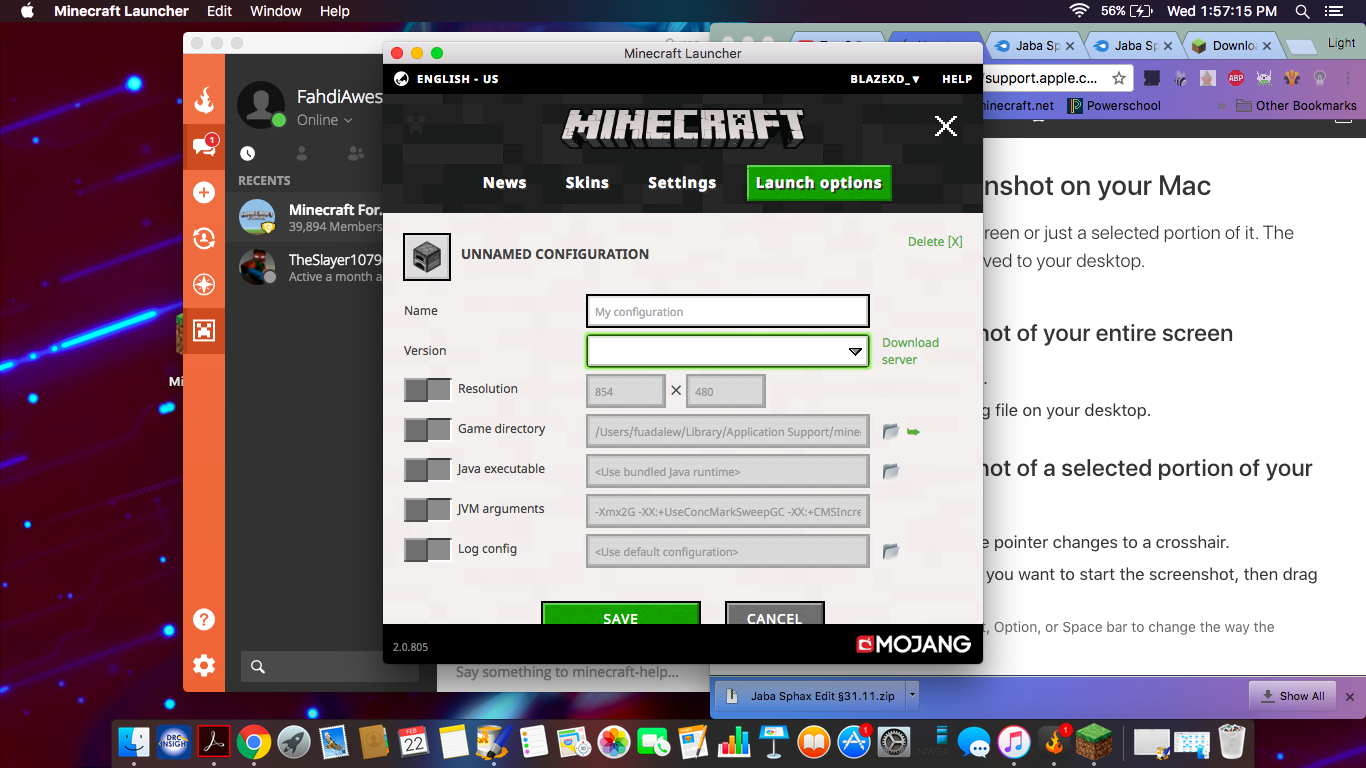
Everytime I try to make a new config in the new 2017 launcher,everything works. Except the versions. I try to click it and it just highlights the box,and does nothing else! I will attach a screenshot. Plus,my brother uses the same account and type of Macbook I have...I don't know if it's my problem,or the launchers.
Linked Issues

Created Issue:
Problem with clicking the version button
Everytime I try to make a new config in the new 2017 launcher,everything works. Except the versions. I try to click it and it just highlights the box,and does nothing else! I will attach a screenshot.
Attachments1
Everytime I try to make a new config in the new 2017 launcher,everything works. Except the versions. I try to click it and it just highlights the box,and does nothing else! I will attach a screenshot. Plus,my brother uses the same account and type of Macbook I have...I don't know if it's my problem,or the launchers.

Problem with clicking the version buttonVersion selection in profile editor is empty
is duplicated by
![[Mod] violine1101](../../../data/avatars/users/92858.png)
is duplicated by

Attach log filesWe need more information to find out the cause of this issue. To those who are currently affected by the issue, please navigate to the Minecraft data folder (how-to) and then please attach launcher_log.txt.
You may try to fix the issue by deleting the versions folder in the Minecraft data folder and restarting the launcher. If that did not help, then you can try fully reinstalling Minecraft.
Everytime I try to make a new config in the new 2017 launcher,everything works. Except the versions. I try to click it and it just highlights the box,and does nothing else! I will attach a screenshot. Plus,my brother uses the same account and type of Macbook I have...I don't know if it's my problem,or the launchers.
is duplicated by
is duplicated by

And launcher.log is already there
![[Bot] Arisa](../../../data/assets/gravatar/mustek2.png)

is duplicated by
Thank you for your report!
However, this issue is a Duplicate of MCL-6412.
It has been linked to this report. If you have additional information, please add it to that report.
Please search before reporting, as it's likely that one exists already.
Quick Links:
📓 Issue Guidelines – 💬 Community Support – 📧 Customer Support – 📖 Game Wiki
Yes it appears others have experienced this as well, see MCL-6412. However there no one was able to provide the requested log files. Please comment and attach them there, but keep in mind that others are watching that report as well and every comment you write and edit you make will send e-mail notifications to them.
Same problem, but my topic got closed (and ignored because of duplicate)
I provide a lot of information, but they just ignored it
To those affected by this issue:
It this still an issue in current Launcher versions 2.1.x?
Yes it unfortunately is.
I did install mods though, if that is the reason, what can i do about it
I fixed it, deleting the versions file has done the trick
@Ruud Rodriguez y Ligtenberg: see the yellow box in the description.
Since at least one person had this issue after installing a mod, I'm closing this as Invalid for now. It's likely that a mod was improperly installed and the launcher failed to load it.
If anyone has experienced this without any mods installed, please comment and attach the launcher log (see the description).
Thanks for all your help!
Nu launcher is working completelucht now