 MCPE-151391
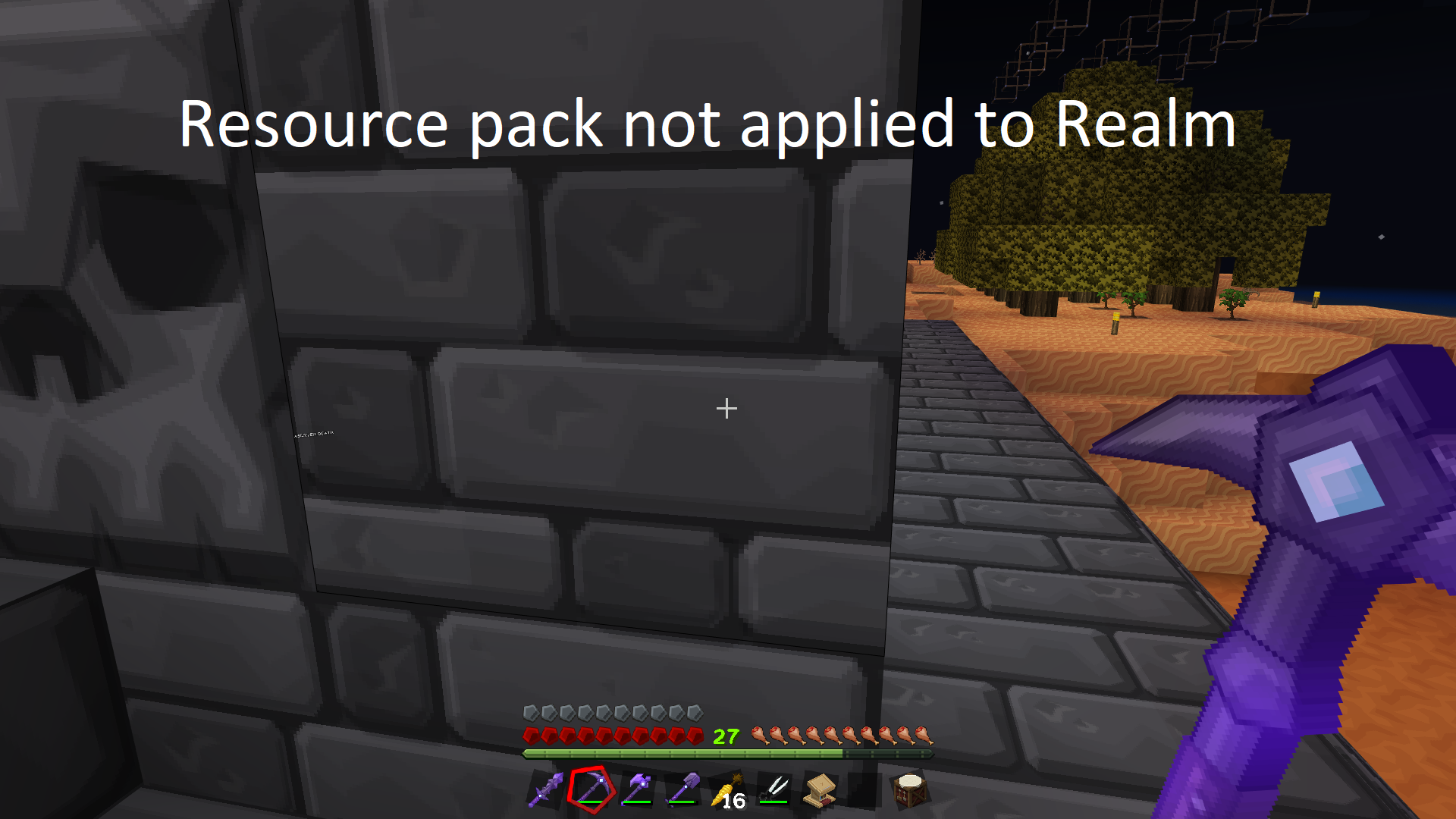
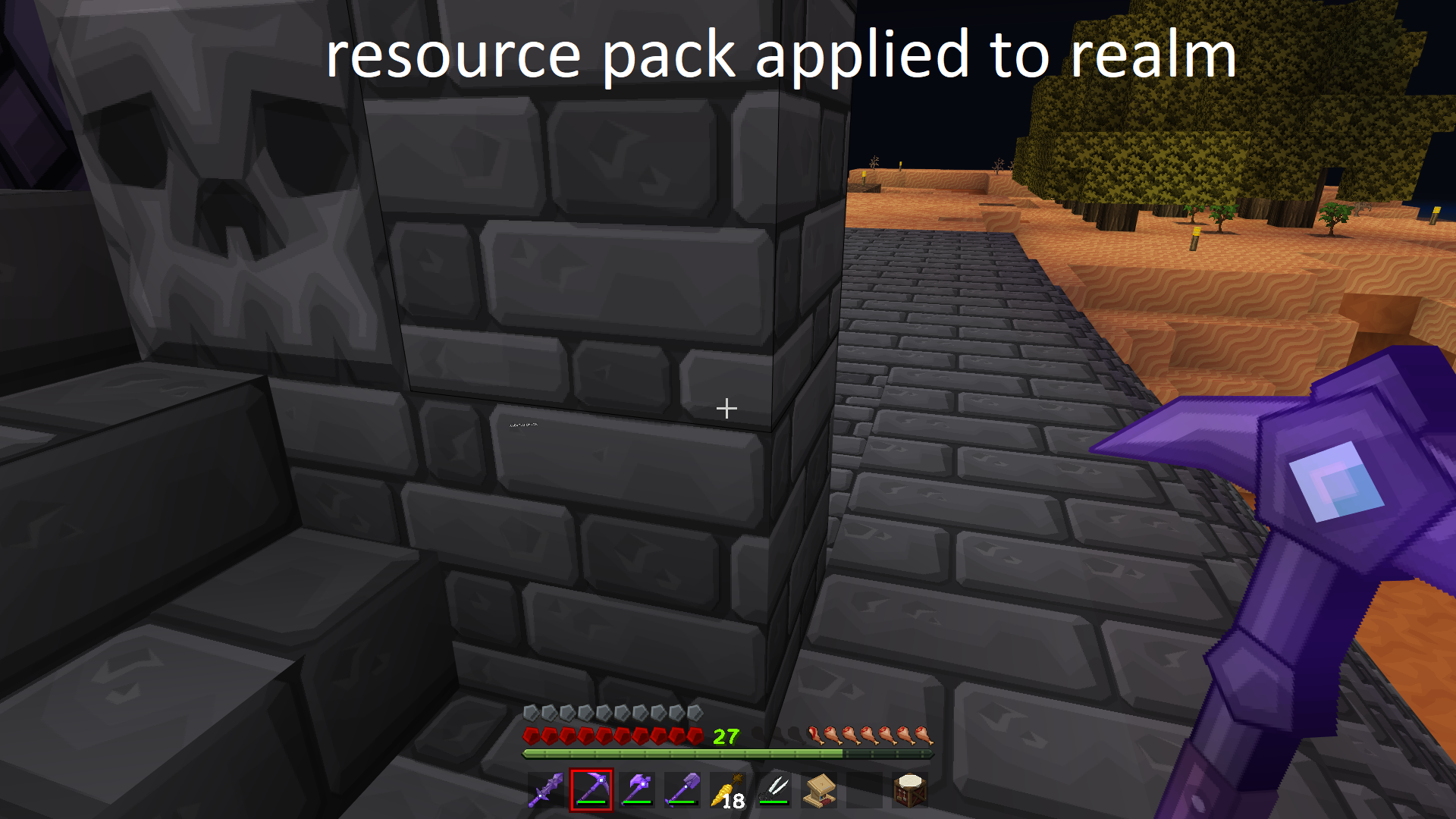
Joining Realm with the same resource pack as client causes resource pack to load at different Resolution.
When joining a realm that has the same resource pack as the one, you're currently using if yours is set on the client side to any resolution other than the one on the furthest right resolution on the slider it will change to the one on the furthest right.
Steps to reproduce:
Step 1: Upload resource pack to realm Ex. PureBDcraft (Require players to accept resource packs to join should be toggled off)
Step 2: Load same resource pack on the client side with a resolution set to any option that isn't the furthest right one on the slider.
Step 3: Join Realm you uploaded the resource pack to.
Observed Result:
When you load into the Realm your Resource pack will load at the furthest right resolution on the slider.
Expected Result:
When joining realm resource pack loads at clients preferred resolution.
Tested using PureBDcraft resource pack. Currently the resolution slider for this pack is [32x 256x 128x 64x] with any option chosen changing to 64x when joining a realm with the same resource pack. Previously the slider for the pack was [32x 64x 128x 256x] so when you joined a realm it defaulted to 256x which was the furthest right option.
Edited for clarity and updated with new information.

Created Issue:
Joining Realm with the same resource pack as client causes resource pack to load at max resolution
When joining a realm that has the same resource pack as the one you're currently using if yours is set on the client side to less than the highest available resolution it will be bumped up to the highest when joining.
Steps to reproduce:
Step 1: Upload resource pack to realm Ex. PureBDcraft (Require players to accept resource packs to join should be toggled off)
Step 2: Load same resource pack on client at lower than max resolution Ex. if max is 256x then use 128x
Step 3: Join Realm you uploaded the resource pack to.Observed Result:
When you load into the Realm your Resource pack will load at 256x Instead of 128xExpected Result:
When joining realm resource pack loads at clients preferred resolution of 128x
Attachments2
- Unresolved
- Open
- Unconfirmed
- Windows
- Windows 11 Pro 21H2
- 1.18.2 Hotfix
![[MCQA] Bartłomiej Słodkowski](../../../data/avatars/users/18941.svg)
![[Bot] Arisa](../../../data/avatars/users/43007.png)
Joining Realm with the same resource pack as client causes resource pack to load atmax resolutionJoining Realm with the same resource pack as client causes resource pack to load at different Resolution.
When joining a realm that has the same resource pack as the one, you're currently using if yours is set on the client side to less than the highest available resolution it will be bumped up to the highest when joining.
Steps to reproduce:
Step 1: Upload resource pack to realm Ex. PureBDcraft (Require players to accept resource packs to join should be toggled off)
Step 2: Load same resource pack on client at lower than max resolution Ex. if max is 256x then use 128x
Step 3: Join Realm you uploaded the resource pack to.Observed Result:
When you load into the Realm your Resource pack will load at 256x Instead of 128xExpected Result:
When joining realm resource pack loads at clients preferred resolution of 128x
The above issue has changed slightly has I show it is now dropping the resolution down to the lowest for example going from 128x to 64x when the resource pack is loaded to the realm.
When joining a realm that has the same resource pack as the one, you're currently using if yours is set on the client side to less than the highest available resolution it will be bumped up to the highest when joining.
Steps to reproduce:
Step 1: Upload resource pack to realm Ex. PureBDcraft (Require players to accept resource packs to join should be toggled off)
Step 2: Load same resource pack on client at lower than max resolution Ex. if max is 256x then use 128x
Step 3: Join Realm you uploaded the resource pack to.Observed Result:
When you load into the Realm your Resource pack will load at 256x Instead of 128xExpected Result:
When joining realm resource pack loads at clients preferred resolution of 128x
The above issue has changed slightly
has I show it is now dropping the resolution down to the lowest for example going from 128x to 64x when the resource pack is loaded to the realm.
When joining a realm that has the same resource pack as the one, you're currently using if yours is set on the client side to less than the highest available resolution it will be bumped up to the highest when joining.
Steps to reproduce:
Step 1: Upload resource pack to realm Ex. PureBDcraft (Require players to accept resource packs to join should be toggled off)
Step 2: Load same resource pack on client at lower than max resolution Ex. if max is 256x then use 128x
Step 3: Join Realm you uploaded the resource pack to.Observed Result:
When you load into the Realm your Resource pack will load at 256x Instead of 128xExpected Result:
When joining realm resource pack loads at clients preferred resolution of 128x
The above issue has changed slightly as I show it is now dropping the resolution down to the
lowestfor example going from 128x to 64x when the resource pack is loaded to the realm.When joining a realm that has the same resource pack as the one, you're currently using if yours is set on the client side to less than the highest available resolution it will be bumped up to the highest when joining.
Steps to reproduce:
Step 1: Upload resource pack to realm Ex. PureBDcraft (Require players to accept resource packs to join should be toggled off)
Step 2: Load same resource pack on client at lower than max resolution Ex. if max is 256x then use 128x
Step 3: Join Realm you uploaded the resource pack to.Observed Result:
When you load into the Realm your Resource pack will load at 256x Instead of 128xExpected Result:
When joining realm resource pack loads at clients preferred resolution of 128x
The above issue has changed slightly as I show it is now dropping the resolution down to the 64x for example going from 128x to 64x when the resource pack is loaded to the realm. Per the remark in the comments
When joining a realm that has the same resource pack as the one, you're currently using if yours is set on the client side to less than the highest available resolution it will be bumped up to the highest when joining.
Steps to reproduce:
Step 1: Upload resource pack to realm Ex. PureBDcraft (Require players to accept resource packs to join should be toggled off)
Step 2: Load same resource pack on client at lower than max resolution Ex. if max is 256x then use 128x
Step 3: Join Realm you uploaded the resource pack to.Observed Result:
When you load into the Realm your Resource pack will load at 256x Instead of 128xExpected Result:
When joining realm resource pack loads at clients preferred resolution of 128x
The above issue has changed slightly as I show it is now dropping the resolution down to the 64x for example going from 128x to 64x when the resource pack is loaded to the realm. Per the remark in the comments
When joining a realm that has the same resource pack as the one, you're currently using if yours is set on the client side to less than the highest available resolution it will be bumped up to the highest when joining.
Steps to reproduce:
Step 1: Upload resource pack to realm Ex. PureBDcraft (Require players to accept resource packs to join should be toggled off)
Step 2: Load same resource pack on client at lower than max resolution Ex. if max is 256x then use 128x
Step 3: Join Realm you uploaded the resource pack to.Observed Result:
When you load into the Realm your Resource pack will load at 256x Instead of 128xExpected Result:
When joining realm resource pack loads at clients preferred resolution of 128x
The above issue has changed slightly as I show it is now dropping the resolution down to the 64x for example going from 128x to 64x when the resource pack is loaded to the realm. Per the remark in the comments the highest or lowest resolution isn't being used it is whatever is farthest right on the slider.
![[Mod] GoldenHelmet](../../../data/avatars/users/18951.svg)
![[MCQA] v-magwar](../../../data/avatars/users/18935.svg)
When joining a realm that has the same resource pack as the one, you're currently using if yours is set on the client side to
less than the highest available resolution it will be bumped up tothehighestwhen joining.Steps to reproduce:
Step 1: Upload resource pack to realm Ex. PureBDcraft (Require players to accept resource packs to join should be toggled off)
Step 2: Load same resource pack on clientat lower than max resolution Ex. if max is 256x then use 128x
Step 3: Join Realm you uploaded the resource pack to.Observed Result:
When you load into the Realm your Resource pack will load at256x Instead of 128xExpected Result:
When joining realm resource pack loads at clients preferred resolutionof 128x
The above issue has changed slightly as I show it is now dropping the resolution down to the 64x for example going from 128x to 64x when the resource pack is loaded to the realm. Per the remark in the comments the highest or lowest resolution isn't being used it is whatever is farthest right on the slider.
When joining a realm that has the same resource pack as the one, you're currently using if yours is set on the client side to any resolution other than the one on the furthest right resolution on the slider it will change to the one on the furthest right.
Steps to reproduce:
Step 1: Upload resource pack to realm Ex. PureBDcraft (Require players to accept resource packs to join should be toggled off)
Step 2: Load same resource pack on the client side with a resolution set to any option that isn't the furthest right one on the slider.
Step 3: Join Realm you uploaded the resource pack to.Observed Result:
When you load into the Realm your Resource pack will load at the furthest right resolution on the slider.Expected Result:
When joining realm resource pack loads at clients preferred resolution.Tested using PureBDcraft resource pack. Currently the resolution slider for this pack is [32x 256x 128x 64x] with any option chosen changing to 64x when joining a realm with the same resource pack. Previously the slider for the pack was [32x 64x 128x 256x] so when you joined a realm it defaulted to 256x which was the furthest right option.
Edited for clarity and updated with new information.
Thank you for your report!
However, this issue has been temporarily closed as Awaiting Response.
Is this still an issue in the latest version? If yes, can you please add it to the affected versions (or mention it if you are not the reporter)?
This ticket will automatically reopen when you reply.
Quick Links:
📓 Issue Guidelines – 💬 Mojang Support – 📧 Suggestions – 📖 Minecraft Wiki
Just want to add that I am having this same issue.
A way to sometimes fix the issue is to download the world, change the resolution settings there, replace the world then set the resolution again. then restart game then join. but only sometimes, then after a few days the issue reappears.
Edit: If you check "Require players to accept resource packs to join", it also does not stay checked. so maybe the issue is with realms not saving settings?
Just to add proper technical context it's not that the game is choosing the highest or lowest (64x isn't the lowest in BDcraft packs, that's 32x), Realms is choosing whatever is the right-most selection if you go to Options > Packs > select the relevant pack > Cick the Cog icon.
The reason BDcraft packs changed from choosing 256x by default on Realms to 64x is we changed the rightmost selection to be 64x. This was specifically done to workaround the issue where mobile clients were likely to crash when connecting to a Realm which had a BDcraft pack loaded due to the game defaulting to 256x instead.
In single player the game looks at a client's available RAM (system memory) and choose the relevant pack resolutions when comparing that to the list in the manifest.json of the pack. However, for some bewildering reason Realms doesn't check a client's capabilities, it only selects the last selection.
We could not reproduce the issue. Given it has not been updated in a while, is this still an issue?
@v-magwar How did you test the problem? Baring in mind my comment below it's unlikely testing with BDcraft packs will currently cause issues, but the problem within the context I outlined may not be fixed.
You would need to check with a resourcepack that is "ordered" correctly in the manifest (i.e. left-most selection being something like 16x, while the right-most is 256x or so) then apply the pack to a Realm and then get a mobile client which doesn't have enough system memory to load 256x to connect and see if it crashes, or chooses the correct resolution like offline.