 Han Prower
- HanFox
- hanfox
- Europe/London
- Yes
- No
 MCPE-20255
 MC-116810
![[Mojang] Cory Scheviak](../../../data/avatars/users/92893.png)
 Low
Low![[Mojang] Chi Wong](../../../data/avatars/users/18941.svg)
![[Mojang] Nathan Adams](../../../data/assets/gravatar/dinnerbone.png)
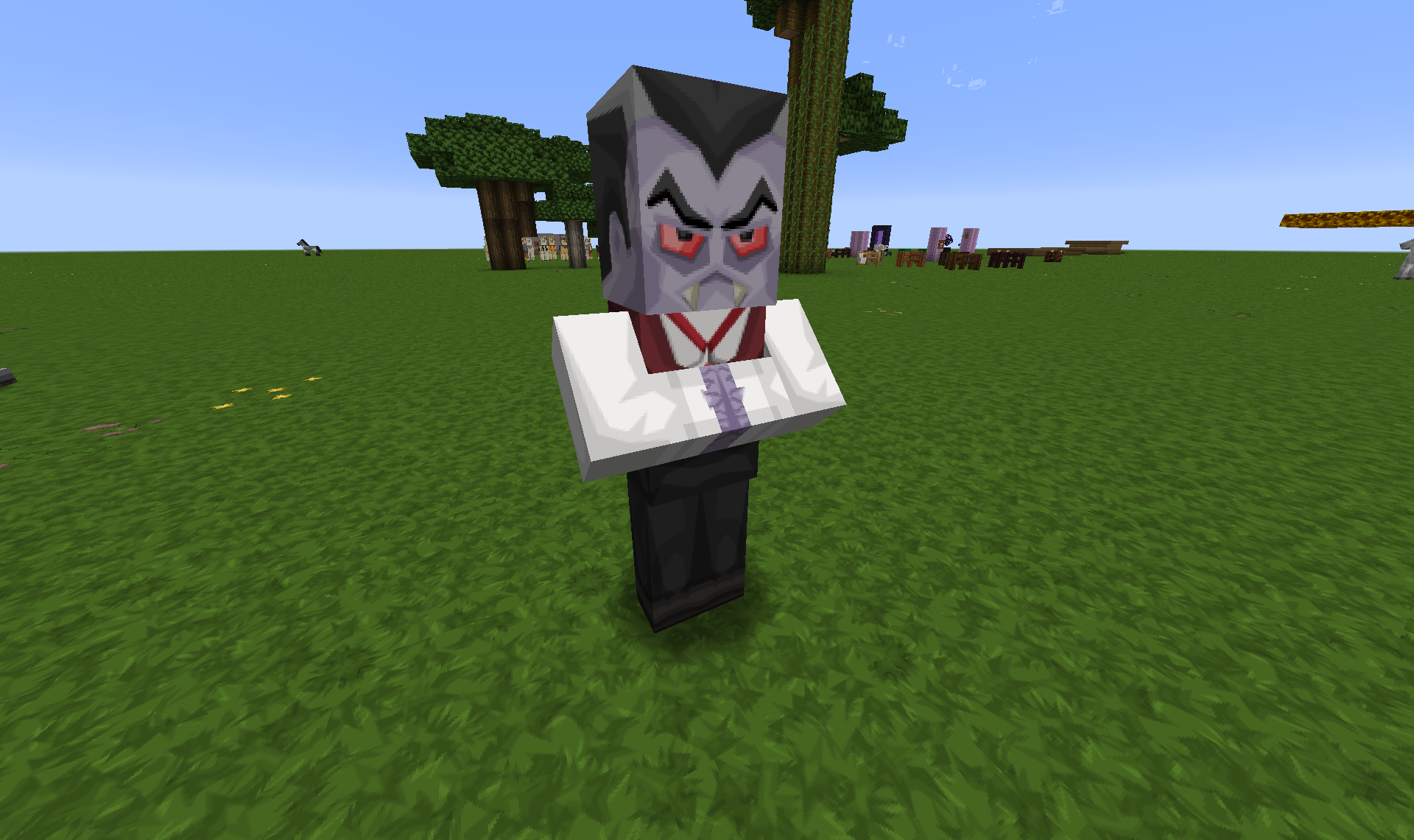






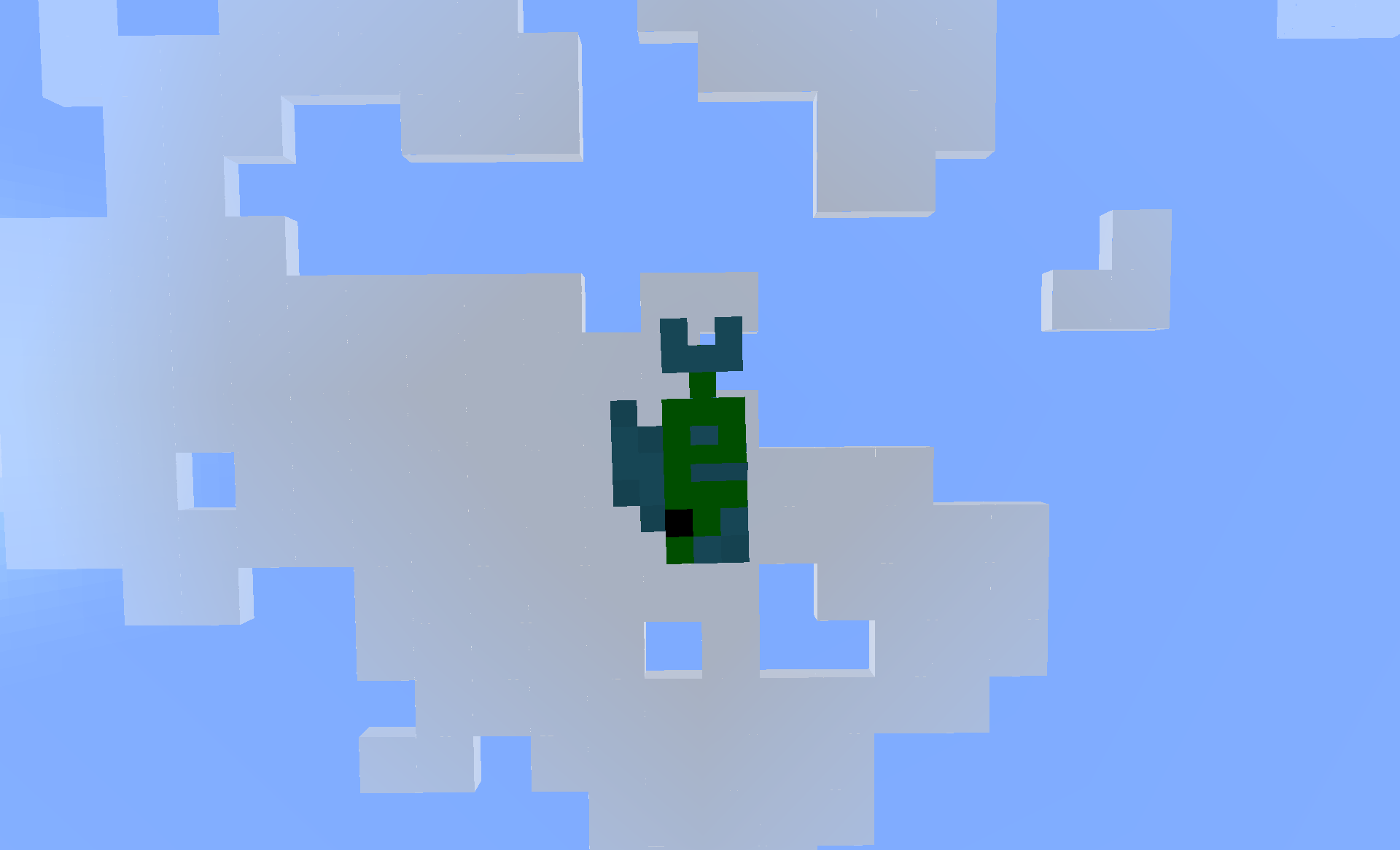


Villagers'/ Witchs' right arm doesnt have the texture flipped. (Like zombies/giants/players/zombie pigmen/zombie villagers does.)[1.5.2/13w25c]
Villagers'/ Witchs'/Illagers' right arm doesnt have the texture flipped. (Like zombies/giants/players/zombie pigmen/zombie villagers does.)
Villagers'/ Witchs'/Illagers'right arm doesnt have the texture flipped. (Like zombies/giants/players/zombie pigmen/zombie villagers does.)Villagers'/ Witchs' right arm doesnt have the texture flipped. (Like zombies/giants/players/zombie pigmen/zombie villagers/Illagers' does.)
As can be seen from the screenshot the GUI for writing on the sign is both clipped on the right side and too tall (as shown by the 1, 2, 3, 4).
You can see it's not an issue with the actual entity texture as you can see it looks correct in the background.
I see no way to correct this manually in the resourcepack via
aany of the numerous UI json files.As can be seen from the screenshot the GUI for writing on the sign is both clipped on the right side and too tall (as shown by the 1, 2, 3, 4).
You can see it's not an issue with the actual entity texture as you can see it looks correct in the background.
I see no way to correct this manually in the resourcepack via any of the numerous UI json files.
EDIT: You can also see by the 1, 2, 3, 4 in the entity the text isn't vertically aligned centrally either.
As can be seen from the screenshot the GUI for writing on the sign is both clipped on the right side and too tall (as shown by the 1, 2, 3, 4).
You can see it's not an issue with the actual entity texture as you can see it looks correct in the background.
I see no way to correct this manually in the resourcepack via any of the numerous UI json files.
EDIT: You can also see by the 1, 2, 3, 4 in the entity the text isn't vertically aligned centrally on there either.
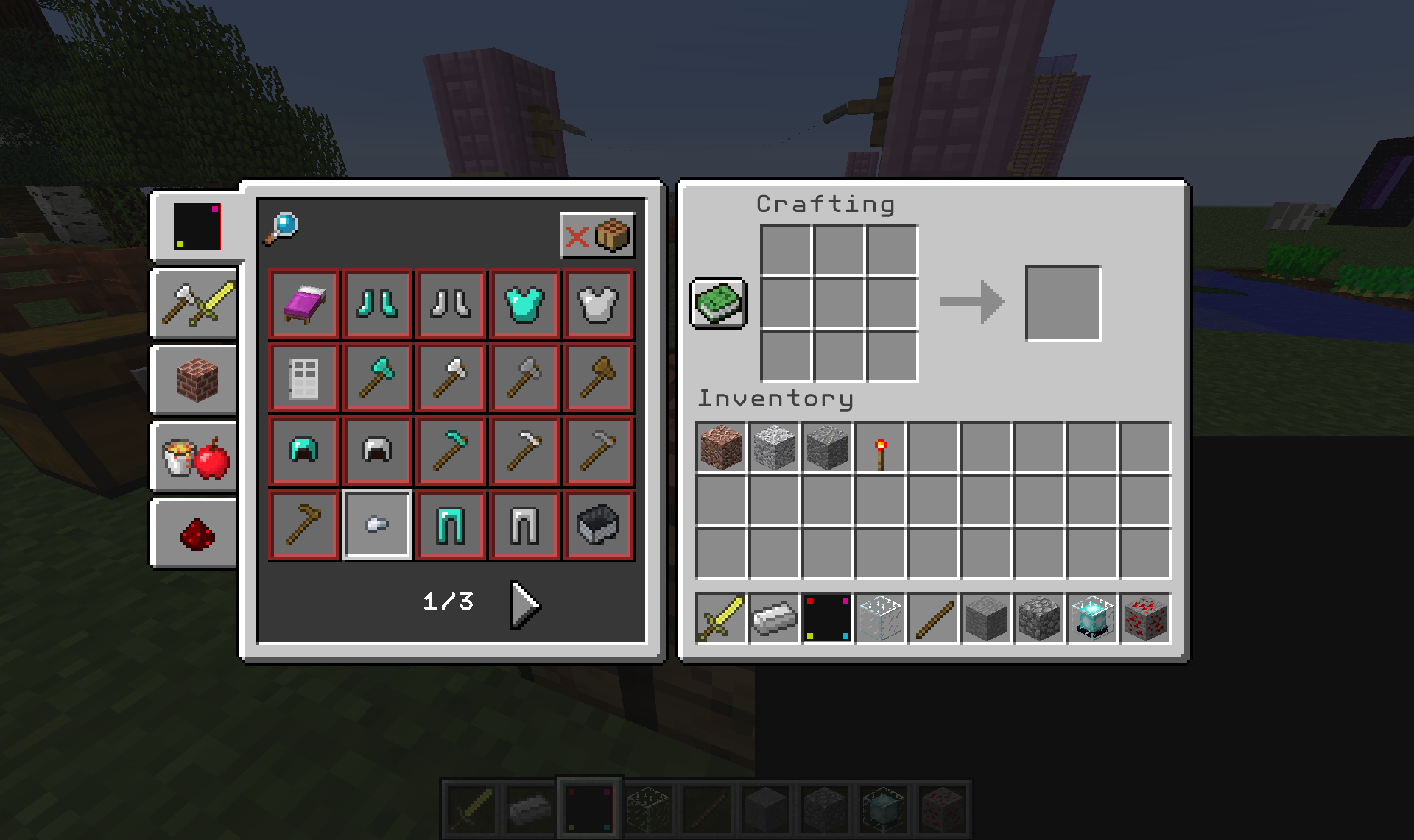
As can be seen from the screenshot models on the Recipe Book GUI tabs don't render correctly.
Basically they're ignoring z positioning of the elements instead rendering models bottom to top procedurally through the JSON file structure (i.e. the highest element is at the back of the rendered model).
You can see a properly rendered compass in the hotbar
towards the bottom right.As can be seen from the screenshot models on the Recipe Book GUI tabs don't render correctly.
Basically they're ignoring z positioning of the elements instead rendering models bottom to top procedurally through the JSON file structure (i.e. the highest element is at the back of the rendered model).
You can see a properly rendered compass in the hotbar and you can test it with the simple model resourcepack zip attached.
As can be seen from the screenshot models on the Recipe Book GUI tabs don't render correctly.
Basically they're ignoring z positioning of the elements instead rendering models bottom to top procedurally through the JSON file structure (i.e. the highest element is at the back of the rendered model).
You can see a
properly renderedcompass in the hotbar and you can test it with the simple model resourcepack zip attached.As can be seen from the screenshot models on the Recipe Book GUI tabs don't render correctly.
Basically they're ignoring z positioning of the elements instead rendering models bottom to top procedurally through the JSON file structure (i.e. the highest element is at the back of the rendered model).
You can see an example of simple model (black square with coloured dots) replacing the compass in the hotbar and you can test it with the simple model resourcepack zip attached.
recipe_book_models.jpg
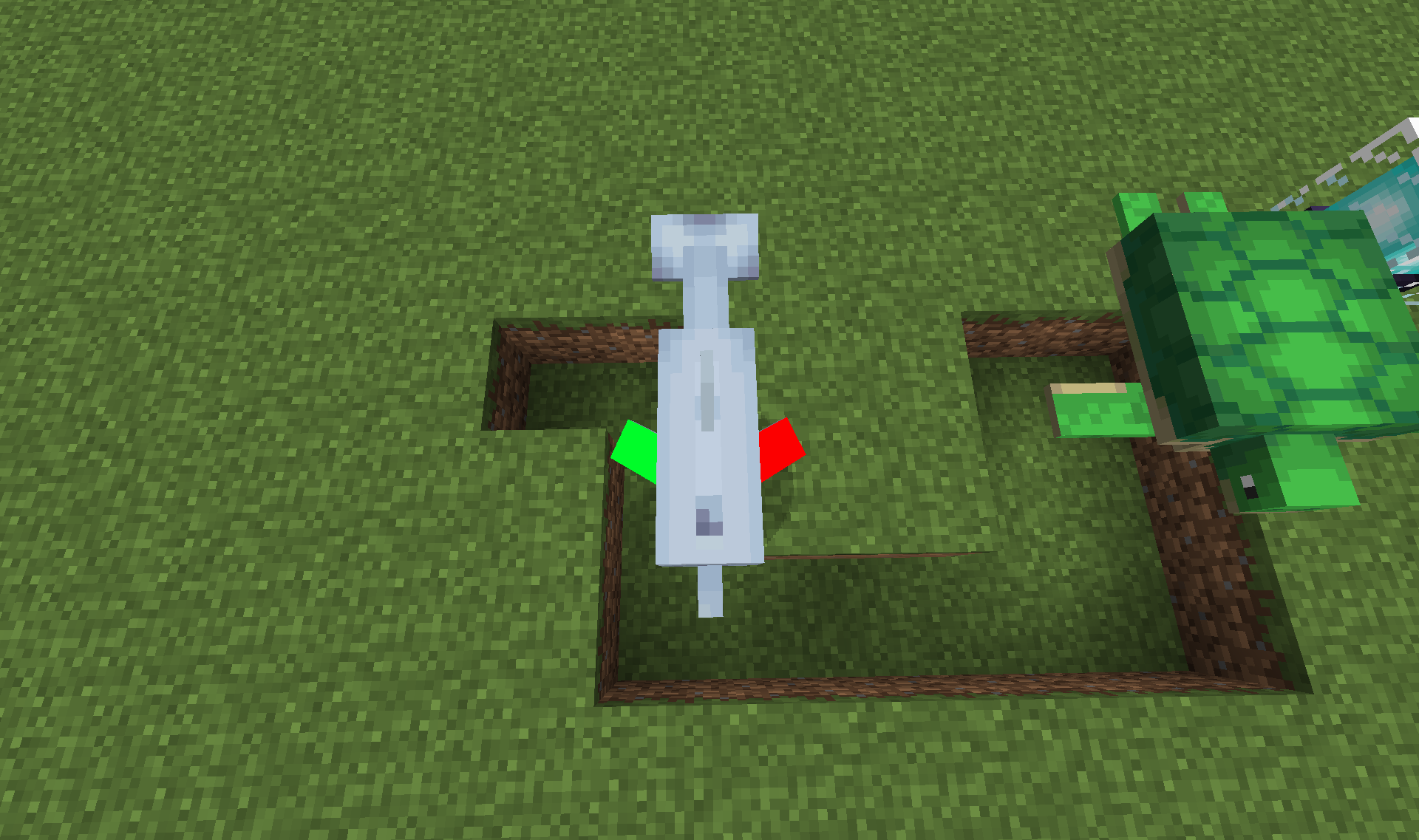
Dolphin's pectoral (side) fins are flipped over instead ofrotated aroundDolphin's pectoral (side) fins are flipped over instead of mirrored
The dolphin's pectoral (side) fins are flipped over
(y?)instead ofrotated around (x?).Whilst this doesn't really effect vanilla, it effects resourcepacks that want to add correct shading.
The dolphin's pectoral (side) fins are flipped over instead of being mirrored.
Whilst this doesn't really effect vanilla, it effects resourcepacks that want to add correct shading.
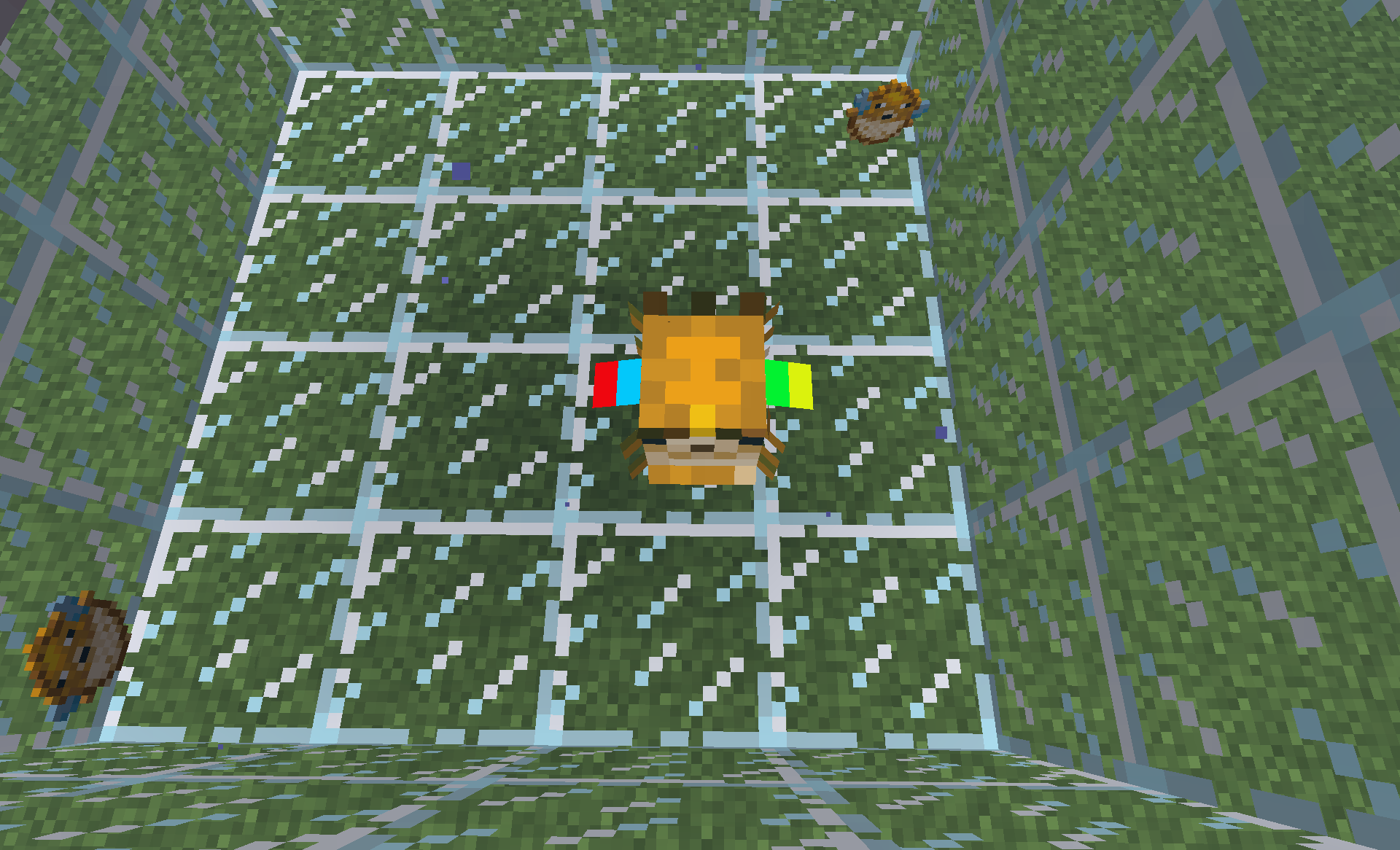
Pufferfish unpuffed (PuffState:0) side fins are mapped incorrectlyParts of the pufferfish entity UV are wrong
The bug
1) The pufferfish side fins are mapped inconsistently. PuffState:2 and PuffState:1 match each other while PuffState:0 deviates. (see attachments)
2) PuffState:1 has badly mapped UV. Some of the top of the head of the Pufferfish is used as the front spikes under the mouth. I suspect the row above the PuffState:1 main body is meant to be there instead. (currently no attachments to display issue)
I will update this further if I find more issues with the pufferfish entity.
The bug
1) The pufferfish side fins are mapped inconsistently. PuffState:2 and PuffState:1 match each other while PuffState:0 deviates. (see attachments)
2) PuffState:1 has badly mapped UV. Some of the top of the head of the Pufferfish
isused as the front spikes under the mouth. I suspect the row above the PuffState:1 main body is meant to be there instead. (currently no attachments to display issue)I will update this further if I find more issues with the pufferfish entity.
The bug
1) The pufferfish side fins are mapped inconsistently. PuffState:2 and PuffState:1 match each other while PuffState:0 deviates. (see attachments)
2) PuffState:1 has badly mapped UV. Some of the top of the head (and some other areas) of the Pufferfish are used as the front spikes under the mouth. I suspect the row above the PuffState:1 main body is meant to be there instead. (currently no attachments to display issue)
I will update this further if I find more issues with the pufferfish entity.
The bug
1) The pufferfish side fins are mapped inconsistently. PuffState:2 and PuffState:1 match each other while PuffState:0 deviates. (see attachments)
2) PuffState:1 has badly mapped UV. Some of the top of the head (and some other areas) of the Pufferfish are used as the front spikes under the mouth. I suspect the row above the PuffState:1 main body is meant to be there instead. (currently no attachments to display issue)
I will update this further if I find more issues with the pufferfish entity.
The bug
1) The pufferfish side fins are mapped inconsistently. PuffState:2 and PuffState:1 match each other while PuffState:0 deviates. (see attachments)
2) PuffState:1 has badly mapped UV. Some of the top of the head (and some other areas) of the Pufferfish are used as the front spikes under the mouth. I suspect the row above the PuffState:1 main body is meant to be there instead. (currently no attachments to display issue)
3) This may be more of an academic matter than a bug: PuffState:2 and PuffState:1 are lacking any mapping for the tail entirely. The tail still exists in real life while puffed (i.e. it doesn't stretch and flatten to the body), so it seems like an odd omission.
I will update this further if I find more issues with the pufferfish entity.
The bug
1) The pufferfish side fins are mapped inconsistently. PuffState:2 and PuffState:1 match each other while PuffState:0 deviates. (see attachments
)2) PuffState:1 has badly mapped UV. Some of the top of the head (and some other areas) of the Pufferfish are used as the front spikes under the mouth. I suspect the row above the PuffState:1 main body is meant to be there instead. (currently no attachments to display issue)
3) This may be more of an academic matter than a bug: PuffState:2 and PuffState:1
are lacking any mapping for the tail entirely. The tail still exists in real life while puffed (i.e. it doesn't stretch and flatten to the body), so it seems like an odd omission.I will update this further if I find more issues with the pufferfish entity.
The bug
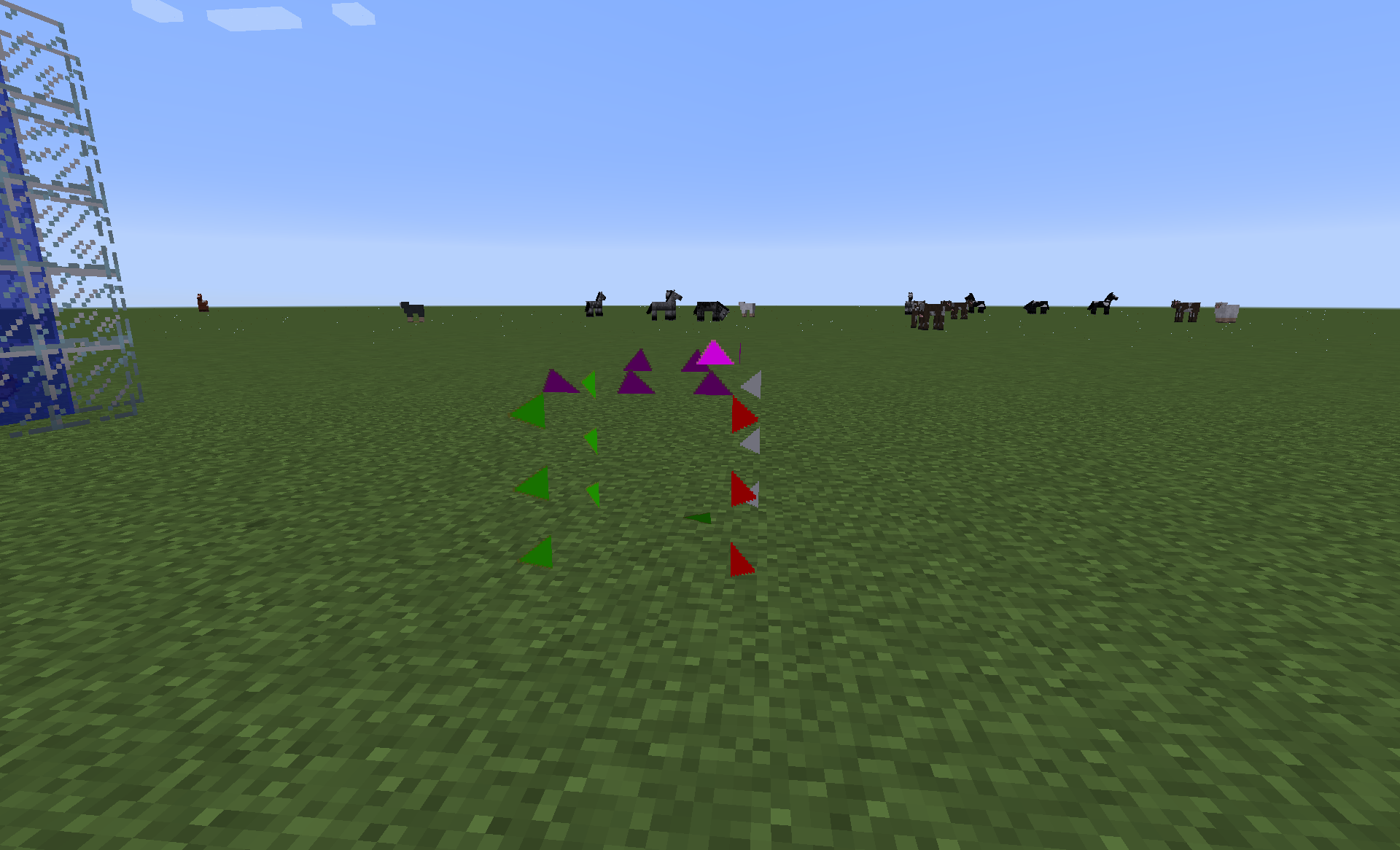
1) The pufferfish side fins are mapped inconsistently. PuffState:2 and PuffState:1 match each other while PuffState:0 deviates. (see attachments pufferfish.png and the screenshots prefixed with 2018-05-21

)
2) PuffState:1 has badly mapped UV. Some of the top of the head (and some other areas) of the Pufferfish are used as the front spikes under the mouth. I suspect the row above the PuffState:1 main body is meant to be there instead. (currently no attachments to display issue)
3) This may be more of an academic matter than a bug: PuffState:2 and PuffState:1 are lacking any mapping for the tail entirely. The tail still exists in real life while puffed (i.e. it doesn't stretch and flatten to the body), so it seems like an odd omission.
4) Some of the spikes are mapped incorrectly. Whilst looking at the front of the entity during PuffState:2 and PuffState:1 the "back right" spikes are "pointing" towards the body instead of away. Also during PuffState:1 there are some erroneous spikes which may relate to point 2 above (see attachments spikes_state_1.png, spikes_state_2.png and pufferfish_spikes.png)
I will update this further if I find more issues with the pufferfish entity.
The bug
1) The pufferfish side fins are mapped inconsistently. PuffState:2 and PuffState:1 match each other while PuffState:0 deviates. (see attachments pufferfish.png and the screenshots prefixed with 2018-05-21
2) PuffState:1 has badly mapped UV. Some of the top of the head (and some other areas) of the Pufferfish are used as the front spikes under the mouth. I suspect the row above the PuffState:1 main body is meant to be there instead. (currently no attachments to display issue)
3) This may be more of an academic matter than a bug: PuffState:2 and PuffState:1 are lacking any mapping for the tail entirely. The tail still exists in real life while puffed (i.e. it doesn't stretch and flatten to the body), so it seems like an odd omission.
4) Some of the spikes are mapped incorrectly. Whilst looking at the front of the entity during PuffState:2 and PuffState:1 the "back right" spikes are "pointing" towards the body instead of away. Also during PuffState:1 there are some erroneous spikes which may relate to point 2 above (see attachments spikes_state_1.png, spikes_state_2.png and pufferfish_spikes.png)
I will update this further if I find more issues with the pufferfish entity.
The bug
1) The pufferfish side fins are mapped inconsistently. PuffState:2 and PuffState:1 match each other while PuffState:0 deviates. (see attachments pufferfish.png and the screenshots prefixed with 2018-05-21)
2) PuffState:1 has badly mapped UV. Some of the top of the head (and some other areas) of the Pufferfish are used as the front spikes under the mouth. I suspect the row above the PuffState:1 main body is meant to be there instead. (currently no attachments to display issue)
3) This may be more of an academic matter than a bug: PuffState:2 and PuffState:1 are lacking any mapping for the tail entirely. The tail still exists in real life while puffed (i.e. it doesn't stretch and flatten to the body), so it seems like an odd omission.
4) Some of the spikes are mapped incorrectly. Whilst looking at the front of the entity during PuffState:2 and PuffState:1 the "back right" spikes are "pointing" towards the body instead of away. Also during PuffState:1 there are some erroneous spikes which may relate to point 2 above (see attachments spikes_state_1.png, spikes_state_2.png and pufferfish_spikes.png)
I will update this further if I find more issues with the pufferfish entity.
The Bug
I haven't checked tropical_b, but would suggest a dev does check it.
{{/summon minecraft:tropical_fish ~ ~1 ~
{NoAI:1b,PersistenceRequired:1b,Silent:1,Invulnerable:1,Variant:50660352}}}
On one side parts of the fin are overlayed and on the other they are not (see screenshots). This error effects all fins of the fish.
Whilst it looks fine in pixel art resource pack makers will struggle.
The Bug
I haven't checked tropical_b, but would suggest a dev does check it.
/summon minecraft:tropical_fish ~ ~1 ~ {NoAI:1b,PersistenceRequired:1b,Silent:1,Invulnerable:1,Variant:50660352}On one side parts of the fin are overlayed and on the other they are not (see screenshots). This error effects all fins of the fish.
Whilst it looks fine in pixel art resource pack makers will struggle.
The bug
I haven't checked tropical_b, but would suggest a dev does check it.
/summon minecraft:tropical_fish ~ ~1 ~ {NoAI:1b,PersistenceRequired:1b,Silent:1,Invulnerable:1,Variant:50660352}On one side parts of the fin are overlayed and on the other they are not (see screenshots). This error effects all fins of the fish.
Whilst it looks fine in pixel art resource pack makers will struggle.The bug
I haven't checked tropical_b, but would suggest a dev does check it.tropical_b also has mapping errors on its fins./summon minecraft:tropical_fish ~ ~1 ~ {NoAI:1b,PersistenceRequired:1b,Silent:1,Invulnerable:1,Variant:50660352}On one side parts of the fin are overlayed and on the other they are not (see screenshots). This error effects all fins of the fish.
Whilst it looks fine in pixel art resource pack makers will struggle.
The bug
I haven't checked tropical_b, but would suggest a dev does check it.tropical_b also has mapping errorson its fins./summon minecraft:tropical_fish ~ ~1 ~ {NoAI:1b,PersistenceRequired:1b,Silent:1,Invulnerable:1,Variant:50660352}On one side parts of the fin are overlayed and on the other they are not (see screenshots). This error effects all fins of the fish.
Whilst it looks fine in pixel art resource pack makers will struggle.The bug
I haven't checked tropical_b, but would suggest a dev does check it.I've now also checked tropical_b and it also has mapping errors./summon minecraft:tropical_fish ~ ~1 ~ {NoAI:1b,PersistenceRequired:1b,Silent:1,Invulnerable:1,Variant:50660352}On one side parts of the fin are overlayed and on the other they are not (see screenshots). This error effects all fins of the fish.
Whilst it looks fine in pixel art resource pack makers will struggle.
Expanded colour_palettes don't work for armour trims
Expanded colour_palettes don't work for armour trims
When using expanded color_palettes for trims as described by JAPPA here Bedrock doesn't seem to apply the extended palettes correctly (see screenshot bedrock.png).
The same extended color_palettes work fine on Java (see screenshot java.png).
HD packs being limited to 8 colours is going to make things very difficult to make them not look poor/low definition.
In both screenshots it's Iron Armour, with a Dune trim, and Gold Ingot colouring. Both should look the same, or very similar, however in Bedrock the colour is a lot darker, and has lots of weird speckles caused by the custom palette not being used.
The
customcolor_palettes.zip areattached for a dev to test.When using expanded color_palettes for trims as described by JAPPA here Bedrock doesn't seem to apply the extended palettes correctly (see screenshot bedrock.png).
The same extended color_palettes work fine on Java (see screenshot java.png).
HD packs being limited to 8 colours is going to make things very difficult to make them not look poor/low definition.
In both screenshots it's Iron Armour, with a Dune trim, and Gold Ingot colouring. Both should look the same, or very similar, however in Bedrock the colour is a lot darker, and has lots of weird speckles caused by the custom palette not being used.
The extendedcolorpalette.mcaddon is attached for a dev to test.
![[Mojang] slicedlime](../../../data/assets/gravatar/slicedlime.jpeg)
Han Prower This is not a place meant for insulting developers. If you have no additional valuable input on a bug, please refrain from posting.
Confirmed for 15w45a
Appears to be fixed in 15w46a.
Still an issue in 16w03a
This is still a problem in 1.10.2.
Please re-open the report and slap a dev in to action
Example of the arm messed up in PureBD Evoker Illager attached for clarity (and hopefully to poke a dev to fix it >.< )
So 17w16a/b seems to have fixed the arms of the Illagers, but Villagers and Witches are still broken.
Done. Simple 5 element compass model to show the issue.
EDIT: Tidied up the issue to not refer to a HD resourcepack to avoid confusion.
No, it's not a duplicate of that bug. This bug is about model texture UV and that bug is about entity shadows.
It's such a mess and it didn't get fixed before final. How disappointing.
This issue is still present in the 1.8 betas tested with PureBDcraft on Xbox and Windows 10.
On initial world load horses/donkeys lack their ears and saddles when the texturepack is using the horse models (as opposed to the newer horse2 models).
Saving the world, and reloading it will cause the models to render correctly (i.e. the ears and saddles will appear correctly).
Maybe I wasn't clear with my previous comment, so I'll try and offer a more detailed explanation.
There are 2 horse/donkey models in Minecraft Bedrock: horse and horse2
horse is the old style detailed models with mouths, and extra bits for legs. horse2 is the newer more blocky, less detailed models.
Resourcepacks such as PureBDcraft, amongst others, are using an older pack version which allows the old horse models to be used.
What appears to be happening is the game just isn't pulling in all the parts of those models during initial resource loading, so the level loads and resources load, but for whatever reason it's missed parts of the saddle and the ears (and other bits).
When you save out of the world, and then reload the world the resources then load correctly. No amount of reinstalling is going to help, it's an issue across multiple devices which is obviously baked in to the code. Likely a bug created when the newer horse2 models were introduced.
The fix here is not to just tell resourcepack makers to use the newer pack version, mainly because no guidance from the people who process the submitted packs to marketplace have stated it's necessary (I work on PureBDcraft, so I know personally).
If the game is to keep both models, this issue needs fixing. Otherwise the devs/people who process packs need to update their guidance with, quite possibly, a deadline for packs to update to the horse2.
This issue really needs to be pushed upstream to someone who can actually make a decision about the future of the old horse models instead of being left as obviously buggy code.
Whilst I find it too fiddly to unenroll from the beta (and actually get back on stable – it'd be nice if beta and stable could be seperate for resourcepack makers ) I can say it seems fixed in 1.12 beta.
Affects MC1.14.2.
So, is there any technical justification for why this change was made?
Does it make general entity management in game easier for Mojang?
Currently we're all just seeing it as someone doing it because they had nothing better to do.
Oh, it wasn't meant to be an insult, it was meant to show general frustration at a change that was undocumented and how the bug was closed with a sweeping statement as if that's okay. I'm sorry that you found it offensive.
However, I feel my questions are still relevant to the bug and it's a shame you ignored them just to give me a slap on the wrist.
Is there an official justification for the change? It would be great to also know why the changes are important. There are a lot of content creators out there which changes like this effect and things being done without clear reason are a bit of a slap in the face for them. If this isn't the correct place to get these answered directly by devs where is, or is some sort of an announcement forthcoming (such as a future Snapshot post on minecraft.net)?
This affects MC1.15.1pre1.
Someone posted a possible workaround on the BDcraft forum back on 3rd December in regards to the lag issues. I have no idea if this works (no one else has confirmed it, and I don't have a Nvidia GPU to test it with), so I'll post it here for people to try (at your own risk!). If it does work it may give Mojang some technical aspect to explore.
Below is the quoted post text:
FIXED!!!!
At least for the Windows 10 edition that I am playing (From the Windows Store)*** The problem is that the game executable that shows up in Nvidia Control Panel is NOT the executable that the game runs when you launch it, so custom settings are NEVER applied to your game.
The first step is finding the actual .exe the game uses to run off of on your computer
1. Start the game, and then open task manager
2. Find the currently running minecraft exe, right click and select open containing folder
3. find the minecraft executable inside this folder (should be Minecraft.Windows.exe) and copy its file path location
4. Open nvidia control panel and click Add under program settings tab
5. Click browse, and then paste the file path you copied into the top input field
6. Select the Minecraft.Windows.exe that shows up in this folder
Now you can get on with editing the settings for the ACTUAL executable that cause the FPS drop. I noticed that minecraft was NOT using my 3080 to actually do 3d rendering for the game, which tells me that the game is bottlenecking the CPU for some stupid reason. In order to offload to the GPU, I changed the following settings;
1. Cuda GPUs - All
2. ***Low Latency Mode - Ultra (This prevents frame queing on the CPU, which allows the GPU to process them faster)
3. OpenGL Rendering GPU - Select your actual graphics card
4. Power Management Mode - Prefer max performance
5. Preferred Refresh rate - highest available
6. Virtual Reality pre-rendered frames - 1
I went from 5-15 fps inside my house, to over 240 fps instantly. Zero lag spikes, and zero fps drops. Cheers, and I hope this works for you.
Just to add proper technical context it's not that the game is choosing the highest or lowest (64x isn't the lowest in BDcraft packs, that's 32x), Realms is choosing whatever is the right-most selection if you go to Options > Packs > select the relevant pack > Cick the Cog icon.
The reason BDcraft packs changed from choosing 256x by default on Realms to 64x is we changed the rightmost selection to be 64x. This was specifically done to workaround the issue where mobile clients were likely to crash when connecting to a Realm which had a BDcraft pack loaded due to the game defaulting to 256x instead.
In single player the game looks at a client's available RAM (system memory) and choose the relevant pack resolutions when comparing that to the list in the manifest.json of the pack. However, for some bewildering reason Realms doesn't check a client's capabilities, it only selects the last selection.
@v-magwar How did you test the problem? Baring in mind my comment below it's unlikely testing with BDcraft packs will currently cause issues, but the problem within the context I outlined may not be fixed.
You would need to check with a resourcepack that is "ordered" correctly in the manifest (i.e. left-most selection being something like 16x, while the right-most is 256x or so) then apply the pack to a Realm and then get a mobile client which doesn't have enough system memory to load 256x to connect and see if it crashes, or chooses the correct resolution like offline.
Sure. I've attached an mcaddon which has the extended color palettes which work on Java and a custom 128x Dune armour (which is the one you can see in the screenshots).
I changed it to an mcpack... it looks correct to me. Me having to mess around trying to make a working mcpack when a dev could just unpack it to the resource_packs folder seems like a bit of a silly point for this issue to die on though.