 MCPE-170791
Content Log GUI in Education Edition worlds
When creating a world with Content Log GUI and the Education Edition world setting on, this text appears at the top of the screen.
Steps to Reproduce:
- Enable Content Log GUI in the Creator section of settings.
- Create a new world with the Education Edition world setting on.
- Watch the top of the screen.
Observed Results:
This text appears.
Expected Results:
This text should not appear.
Screenshots/Videos attached: 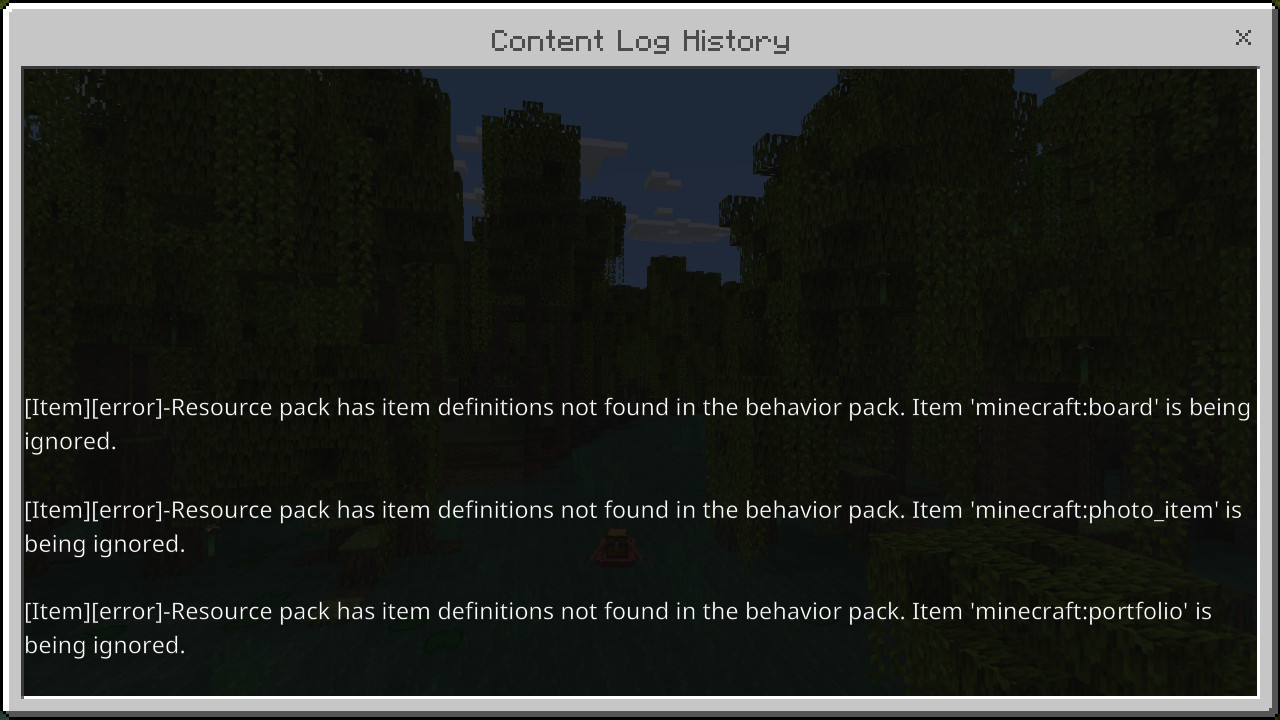
Notes:
This could be because the portfolio, board, and photo items from Minecraft Education aren't in Bedrock Edition, even when the Education Edition world setting is enabled.
Linked Issues
is duplicated by1

Created Issue:
Content Log GUI in Education Edition worlds
When creating a world with Content Log GUI and the Education Edition setting on, this text appears at the top of the screen.
Steps to Reproduce:
- Enable Content Log GUI in the Creator section of settings.
- Create a new world with the Education Edition setting on.
- Watch the top of the screen while the world loads.
Observed Results:
The text appears.Expected Results:
The text should not appear.Screenshots/Videos attached:
Notes:
This could be because the portfolio, board, and photo items from Minecraft Education are not in Bedrock Edition even with the Education Edition toggle enabled.
Attachments2
When creating a world with Content Log GUI and the Education Edition setting on, this text appears at the top of the screen.
Steps to Reproduce:
- Enable Content Log GUI in the Creator section of settings.
- Create a new world with the Education Edition setting on.
- Watch the top of the screen while the world loads.
Observed Results:
The text appears.Expected Results:
The text should not appear.Screenshots/Videos attached:
Notes:
This could be because the portfolio, board, and photo items from Minecraft Education are not in Bedrock Edition even with the Education Edition toggle enabled.When creating a world with Content Log GUI and the Education Edition setting on, this text appears at the top of the screen. I've only seen this on Nintendo Switch, I've tried on Android and it didn't appear.
Steps to Reproduce:
- Enable Content Log GUI in the Creator section of settings.
- Create a new world with the Education Edition setting on.
- Watch the top of the screen while the world loads.
Observed Results:
The text appears.Expected Results:
The text should not appear.Screenshots/Videos attached:
Notes:
This could be because the portfolio, board, and photo items from Minecraft Education are not in Bedrock Edition even with the Education Edition toggle enabled.
When creating a world with Content Log GUI and the Education Edition setting on, this text appears at the top of the screen.
I've only seen this on Nintendo Switch, I've tried on Android and it didn't appear.Steps to Reproduce:
- Enable Content Log GUI in the Creator section of settings.
- Create a new world with the Education Edition setting on.
- Watch the top of the screen while the world loads.
Observed Results:
The text appears.Expected Results:
The text should not appear.Screenshots/Videos attached:
Notes:
This could be because the portfolio, board, and photo items from Minecraft Education are not in Bedrock Edition even with the Education Edition toggle enabled.
![[MCQA] Bartłomiej Słodkowski](../../../data/avatars/users/18941.svg)
When creating a world with Content Log GUI and the Education Edition setting on, this text appears at the top of the screen.
Steps to Reproduce:
- Enable Content Log GUI in the Creator section of settings.
- Create a new world with the Education Edition setting on.
- Watch the top of the screen
while the world loads.Observed Results:
The text appears.Expected Results:
The text should not appear.Screenshots/Videos attached:
Notes:
This could be because the portfolio, board, and photo items from Minecraft Education are not in Bedrock Edition even with the Education Edition toggle enabled.
When creating a world with Content Log GUI and the Education Edition setting on, this text appears at the top of the screen.
Steps to Reproduce:
- Enable Content Log GUI in the Creator section of settings.
- Create a new world with the Education Edition setting on.
- Watch the top of the screen.
Observed Results:
The text appears.Expected Results:
The text should not appear.Screenshots/Videos attached:
Notes:
This could be because the portfolio, board, and photo items from Minecraft Education are not in Bedrock Edition even withthe Education Edition toggle enabled.When creating a world with Content Log GUI and the Education Edition world setting on, this text appears at the top of the screen.
Steps to Reproduce:
- Enable Content Log GUI in the Creator section of settings.
- Create a new world with the Education Edition world setting on.
- Watch the top of the screen.
Observed Results:
The text appears.Expected Results:
The text should not appear.Screenshots/Videos attached:
Notes:
This could be because the portfolio, board, and photo items from Minecraft Education are not in Bedrock Edition even when the Education Edition world toggle is enabled.
is duplicated by
![[Bot] Arisa](../../../data/avatars/users/43007.png)
When creating a world with Content Log GUI and the Education Edition world setting on, this text appears at the top of the screen.
Steps to Reproduce:
- Enable Content Log GUI in the Creator section of settings.
- Create a new world with the Education Edition world setting on.
- Watch the top of the screen.
Observed Results:
Thetext appears.Expected Results:
Thetext should not appear.Screenshots/Videos attached:
Notes:
This could be because the portfolio, board, and photo items from Minecraft Education are not in Bedrock Edition even when the Education Edition world toggle is enabled.When creating a world with Content Log GUI and the Education Edition world setting on, this text appears at the top of the screen.
Steps to Reproduce:
- Enable Content Log GUI in the Creator section of settings.
- Create a new world with the Education Edition world setting on.
- Watch the top of the screen.
Observed Results:
This text appears.Expected Results:
This text should not appear.Screenshots/Videos attached:
Notes:
This could be because the portfolio, board, and photo items from Minecraft Education are not in Bedrock Edition, even when the Education Edition world toggle is enabled.
When creating a world with Content Log GUI and the Education Edition world setting on, this text appears at the top of the screen.
Steps to Reproduce:
- Enable Content Log GUI in the Creator section of settings.
- Create a new world with the Education Edition world setting on.
- Watch the top of the screen.
Observed Results:
This text appears.Expected Results:
This text should not appear.Screenshots/Videos attached:
Notes:
This could be because the portfolio, board, and photo items from Minecraft Education arenot in Bedrock Edition, even when the Education Edition world toggle is enabled.When creating a world with Content Log GUI and the Education Edition world setting on, this text appears at the top of the screen.
Steps to Reproduce:
- Enable Content Log GUI in the Creator section of settings.
- Create a new world with the Education Edition world setting on.
- Watch the top of the screen.
Observed Results:
This text appears.Expected Results:
This text should not appear.Screenshots/Videos attached:
Notes:
This could be because the portfolio, board, and photo items from Minecraft Education aren't in Bedrock Edition, even when the Education Edition world toggle is enabled.
When creating a world with Content Log GUI and the Education Edition world setting on, this text appears at the top of the screen.
Steps to Reproduce:
- Enable Content Log GUI in the Creator section of settings.
- Create a new world with the Education Edition world setting on.
- Watch the top of the screen.
Observed Results:
This text appears.Expected Results:
This text should not appear.Screenshots/Videos attached:
Notes:
This could be because the portfolio, board, and photo items from Minecraft Education aren't in Bedrock Edition, even when the Education Edition worldtoggleis enabled.When creating a world with Content Log GUI and the Education Edition world setting on, this text appears at the top of the screen.
Steps to Reproduce:
- Enable Content Log GUI in the Creator section of settings.
- Create a new world with the Education Edition world setting on.
- Watch the top of the screen.
Observed Results:
This text appears.Expected Results:
This text should not appear.Screenshots/Videos attached:
Notes:
This could be because the portfolio, board, and photo items from Minecraft Education aren't in Bedrock Edition, even when the Education Edition world setting is enabled.
![[Mod] Jarl-Penguin](../../../data/avatars/users/92849.png)
![[Mod] OcelotOnesie](../../../data/avatars/users/43220.png)
Thank you for your report!
We're resolving and linking this ticket forward as a duplicate of MCPE-170791, as that ticket contains more detailed information and/or has already been triaged by Mojang.
If you would like to add a vote and any extra information to the main ticket it would be appreciated.
Quick Links:
📓 Bug Tracker Guidelines – 💬 Community Support – 📧 Mojang Support
📓 Project Summary – ✍️ Feedback and Suggestions – 📖 Game Wiki
– I am a bot. This action was performed automatically! The ticket was resolved by one of our moderators, and I left this message to give more information to you.
This happens on windows 10 and windows 11 as well, I think the way to fix this would be to add a behavior pack with the .json item Files for the chalkboard, photo item, and portfolio from the education edition Vanilla behavior pack, the only problem is that I don’t know where in the education edition files the item definitions are or what file they are encoded in to.
No, this is a beta preview error of 1.20.50.24. It's not the behavior pack. it's the problem of the appearance of items in "Creative's inventory" on Bedrock Edition "minecraft:board", "minecraft:portfolio", "minecraft:camera",
"minecraft:photo_item
the bug will fix this problem of Bedrock Edition MCPE-187575