 OpaqueSleet7802
- OpaqueSleet7802
- JIRAUSER728909
- America/Chicago
- Yes
- No
 MCPE-160631
 MCLG-117
![[Mojang] Mega_Spud (Jay Wells)](../../../data/avatars/users/92696.png)
 MCD-7661
 MC-262886
 WEB-6883

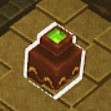














Well how are they supposed to work at their cauldron if it's filled with lava anyways? I think it should be kept in the game and maybe it isn't even a bug.
MCPE-160445.mp4
The Super Mario Mash-Up pack does not appear in the Global Resources tab of settings.
I think this bug also happens to the LittleBigPlanet Mash-up pack on PlayStation because you can't use it cross-platform either, but I don't have a PlayStation so I can't check.Steps to reproduce:
1. Go to the settings menu on Nintendo Switch
2. Open the Global Resources tab
3. Open the my packs menu
4. Look for the Super Mario Mash-Up Pack
5. Realize it's not thereWhat was expected to happen: The pack to be available in Global Resources
What happened: The pack is not available in Global Resources.
This ResourcePack isn't supposed to be used Cross-PlatformsootherPlatforms can't see it, but Global Resources lets you use a Resource Pack in any world, (Including Cross-Platform ones)so even though the playerwould be the only one who could see the pack, itdoesn't let you addit to Global Resources anyways.The Super Mario Mash-Up pack does not appear in the Global Resources tab of settings.
I think this bug also happens to the LittleBigPlanet Mash-up pack on PlayStation because you can't use it cross-platform either, but I don't have a PlayStation so I can't check.Steps to reproduce:
1. Go to the settings menu on Nintendo Switch
2. Open the Global Resources tab
3. Open the my packs menu
4. Look for the Super Mario Mash-Up Pack
5. Realize it's not thereWhat was expected to happen: The pack to be available in Global Resources
What happened: The pack is not available in Global Resources.
I think this is because The Super Mario Mash-Up Pack isn't supposed to be used in Cross-Platform worlds so users on other platforms can't see it, but Global Resources lets you use a Resource Pack in any world, (Including Cross-Platform ones) and only the player who added the pack to Global Resources would be the only one who could see the pack. But the game doesn't let you add the pack to Global Resources anyways, I think this is a bug.
The Super Mario Mash-Up pack does not appear in the Global Resources tab of settings.
I think this bug also happens to the LittleBigPlanet Mash-up pack on PlayStation because you can't use it cross-platform either, but I don't have a PlayStation so I can't check.Steps to reproduce:
1. Go to the settings menu on Nintendo Switch
2. Open the Global Resources tab
3. Open the my packs menu
4. Look for the Super Mario Mash-Up Pack
5. Realize it's not thereWhat was expected to happen: The pack to be available in Global Resources
What happened: The pack is not available in Global Resources.
I think this is because The Super Mario Mash-Up Pack isn't supposed to be used in Cross-Platform worlds so users on other platforms can't see it, but Global Resources lets you use a Resource Pack in any world, (Including Cross-Platform ones) and only the player who added the pack to Global Resources would be the only one who could see the pack. But the game doesn't let you add the pack to Global Resources anyways
,I think this is a bug.The Super Mario Mash-Up pack does not appear in the Global Resources tab of settings.
I think this bug also happens to the LittleBigPlanet Mash-up pack on PlayStation because you can't use it cross-platform either, but I don't have a PlayStation so I can't check.Steps to reproduce:
1. Go to the settings menu on Nintendo Switch
2. Open the Global Resources tab
3. Open the my packs menu
4. Look for the Super Mario Mash-Up Pack
5. Realize it's not thereWhat was expected to happen: The pack to be available in Global Resources
What happened: The pack is not available in Global Resources.
I think this is because The Super Mario Mash-Up Pack isn't supposed to be used in Cross-Platform worlds so users on other platforms can't see it, but Global Resources lets you use a Resource Pack in any world, (Including Cross-Platform ones) and only the player who added the pack to Global Resources would be the only one who could see the pack. But the game doesn't let you add the pack to Global Resources anyways. I think this is a bug.
The Super Mario Mash-Up pack does not appear in the Global Resources tab of settings.
I think this bug also happens to the LittleBigPlanet Mash-up pack on PlayStation because you can't use it cross-platform either, but I don't have a PlayStation so I can't check.Steps to reproduce:
1. Go to the settings menu on Nintendo Switch
2. Open the Global Resources tab
3. Open the my packs menu
4. Look for the Super Mario Mash-Up Pack
5. Realize it's not there
What was expected to happen: The pack to be available in Global Resources
What happened: The pack is not available in Global Resources.I think this is because The Super Mario Mash-Up Pack isn't supposed to be used in Cross-Platform worlds so users on other platforms can't see it, but Global Resources lets you use a Resource Pack in any world, (Including Cross-Platform ones) and only the player who added the pack to Global Resources would be the only one who could see the pack. But the game doesn't let you add the pack to Global Resources anyways. I think this is a bug.
The Super Mario Mash-Up pack does not appear in the Global Resources tab of settings.
I think this bug also happens to the LittleBigPlanet Mash-up pack on PlayStation because you can't use it cross-platform either, but I do not have a PlayStation so I can't check.Steps to reproduce:
1. Go to the settings menu on Nintendo Switch
2. Open the Global Resources tab
3. Open the my packs menu
4. Look for the Super Mario Mash-Up Pack
5. Realize it's not thereExpected result: The pack to be available in Global Resources
Actual result: The pack is not available in Global Resources.
I think this is because The Super Mario Mash-Up Pack isn't supposed to be used in Cross-Platform worlds so users on other platforms can't see it, but Global Resources lets you use a Resource Pack in any world, (Including Cross-Platform ones) and only the player who added the pack to Global Resources would be the only one who could see the pack. But the game doesn't let you add the pack to Global Resources anyways. I think this is a bug.
The Super Mario Mash-Up pack does not appear in the Global Resources tab of settings.
I think this bug also happens to the LittleBigPlanet Mash-up pack on PlayStation because you can't use it cross-platform either, but I do not have a PlayStation so I can't check.Steps to reproduce:
1. Go to the settings menu on Nintendo Switch
2. Open the Global Resources tab
3. Open the my packs menu
4. Look for the Super Mario Mash-Up Pack
5. Realize it's not thereExpected result: The pack to be available in Global Resources
Actual result: The pack is not available in Global Resources.
I think this
is because The Super Mario Mash-Up Pack isn't supposed to be used in Cross-Platform worlds so users on other platforms can't see it, but Global Resources lets you use a Resource Pack in any world, (Including Cross-Platform ones) and only the player who added the pack to Global Resources would be the only one who could see the pack. But the game doesn't let you add the pack to Global Resources anyways. I think this is a bug.The Super Mario Mash-Up pack does not appear in the Global Resources tab of settings.
I think this bug also happens to the LittleBigPlanet Mash-up pack on PlayStation because you can't use it cross-platform either, but I do not have a PlayStation so I can't check.Steps to reproduce:
1. Go to the settings menu on Nintendo Switch
2. Open the Global Resources tab
3. Open the my packs menu
4. Look for the Super Mario Mash-Up Pack
5. Realize it's not thereExpected result: The pack to be available in Global Resources
Actual result: The pack is not available in Global Resources.
I think this bug happens because The Super Mario Mash-Up Pack isn't supposed to be used in Cross-Platform worlds so users on other platforms can't see it, but Global Resources lets you use a Resource Pack in any world, (Including Cross-Platform ones) and only the player who added the pack to Global Resources would be the only one who could see the pack. But the game doesn't let you add the pack to Global Resources anyways. I think this is a bug.
The Super Mario Mash-Up pack does not appear in the Global Resources tab of settings.
I think this bug also happens to the LittleBigPlanet Mash-up pack on PlayStation because you can't use it cross-platform either, but I do not have a PlayStation so I can't check.Steps to reproduce:
1. Go to the settings menu on Nintendo Switch
2. Open the Global Resources tab
3. Open the my packs menu
4. Look for the Super Mario Mash-Up Pack
5. Realize it's not thereExpected result: The pack to be available in Global Resources
Actual result: The pack is not available in Global Resources.
I think this bug happens because The Super Mario Mash-Up Pack isn't supposed to be used in Cross-Platform worlds so users on other platforms can't see it, but Global Resources lets you use a Resource Pack in any world, (Including Cross-Platform ones) and only the player who added the pack to Global Resources would be the only one who could see the pack. But the game doesn't let you add the pack to Global Resources anyways. I think this is a bug.
This bug was also reported in
MCPE-63439, but that ticket was closed as Incomplete because the reporter is inactive and did not respond.
The Super Mario Mash-Up pack does not appear in the Global Resources tab of settings.
I think this bug also happens to the LittleBigPlanet Mash-up pack on PlayStation because you can't use it cross-platform either, but I do not have a PlayStation so I can't check.Steps to reproduce:
1. Go to the settings menu on Nintendo Switch
2. Open the Global Resources tab
3. Open the my packs menu
4. Look for the Super Mario Mash-Up Pack
5. Realize it's not thereExpected result: The pack to be available in Global Resources
Actual result: The pack is not available in Global Resources.
I think this bug happens because The Super Mario Mash-Up Pack isn't supposed to be used in Cross-Platform worlds so users on other platforms can't see it, but Global Resources lets you use a Resource Pack in any world, (Including Cross-Platform ones) and only the player who added the pack to Global Resources would be the only one who could see the pack. But the game doesn't let you add the pack to Global Resources anyways. I think this is a bug.
This bug
was also reported inMCPE-63439, but that ticket was closed as Incomplete because the reporter is inactive and did not respond.The Super Mario Mash-Up pack does not appear in the Global Resources tab of settings.
I think this bug also happens to the LittleBigPlanet Mash-up pack on PlayStation because you can't use it cross-platform either, but I do not have a PlayStation so I can't check.Steps to reproduce:
1. Go to the settings menu on Nintendo Switch
2. Open the Global Resources tab
3. Open the my packs menu
4. Look for the Super Mario Mash-Up Pack
5. Realize it's not thereExpected result: The pack to be available in Global Resources
Actual result: The pack is not available in Global Resources.
I think this bug happens because The Super Mario Mash-Up Pack isn't supposed to be used in Cross-Platform worlds so users on other platforms can't see it, but Global Resources lets you use a Resource Pack in any world, (Including Cross-Platform ones) and only the player who added the pack to Global Resources would be the only one who could see the pack. But the game doesn't let you add the pack to Global Resources anyways. I think this is a bug.
This bug relates to
MCPE-63439, but that ticket was closed as Incomplete because the reporter is inactive and did not respond.
The Super Mario Mash-Up pack does not appear in the Global Resources tab of settings.
I think this bug also happens to the LittleBigPlanet Mash-up pack on PlayStation because you can't use it cross-platform either, but I do not have a PlayStation so I can't check.Steps to reproduce:
1. Go to the settings menu on Nintendo Switch
2. Open the Global Resources tab
3. Open the my packs menu
4. Look for the Super Mario Mash-Up Pack
5. Realize it's not thereExpected result: The pack to be available in Global Resources
Actual result: The pack is not available in Global Resources.
I think this bug happens because The Super Mario Mash-Up Pack isn't supposed to be used in Cross-Platform worlds so users on other platforms can't see it, but Global Resources lets you use a Resource Pack in any world, (Including Cross-Platform ones) and only the player who added the pack to Global Resources would be the only one who could see the pack. But the game doesn't let you add the pack to Global Resources anyways. I think this is a bug.
This bug relates to
MCPE-63439,but that ticket was closed as Incomplete because the reporter is inactive and did not respond.The Super Mario Mash-Up pack does not appear in the Global Resources tab of settings.
I think this bug also happens to the LittleBigPlanet Mash-up pack on PlayStation because you can't use it cross-platform either, but I do not have a PlayStation so I can't check.Steps to reproduce:
1. Go to the settings menu on Nintendo Switch
2. Open the Global Resources tab
3. Open the my packs menu
4. Look for the Super Mario Mash-Up Pack
5. Realize it's not thereExpected result: The pack to be available in Global Resources
Actual result: The pack is not available in Global Resources.
I think this bug happens because The Super Mario Mash-Up Pack isn't supposed to be used in Cross-Platform worlds so users on other platforms can't see it, but Global Resources lets you use a Resource Pack in any world, (Including Cross-Platform ones) and only the player who added the pack to Global Resources would be the only one who could see the pack. But the game doesn't let you add the pack to Global Resources anyways. I think this is a bug.
This bug relates to
MCPE-63439, (alsoMCPE-64397because it was a duplicate) but that ticket was closed as Incomplete because the reporter is inactive and did not respond.
The Super Mario Mash-Up pack does not appear in the Global Resources tab of settings.
I think this bug also happens to the LittleBigPlanet Mash-up pack on PlayStation because you can't use it cross-platform either, but I do not have a PlayStation so I can't check.Steps to reproduce:
1. Go to the settings menu on Nintendo Switch
2. Open the Global Resources tab
3. Open the my packs menu
4. Look for the Super Mario Mash-Up Pack
5. Realize it's not thereExpected result: The pack to be available in Global Resources
Actual result: The pack is not available in Global Resources.
I think this bug happens because
The Super Mario Mash-Up Pack isn't supposed to be used in Cross-Platform worlds so users on other platforms can't see it, but Global Resources lets you use a Resource Pack in any world, (Including Cross-Platform ones) and only the player who added the pack to Global Resources would be the only one who could see the pack. But the game doesn't let you add the pack to Global Resources anyways. I think this is a bug.This bug relates to
MCPE-63439, (alsoMCPE-64397because it was a duplicate) but that ticket was closed as Incomplete because the reporter is inactive and did not respond.The Super Mario Mash-Up pack does not appear in the Global Resources tab of settings.
I think this bug also happens to the LittleBigPlanet Mash-up pack on PlayStation because you can't use it cross-platform either, but I do not have a PlayStation so I can't check.Steps to reproduce:
1. Go to the settings menu on Nintendo Switch
2. Open the Global Resources tab
3. Open the my packs menu
4. Look for the Super Mario Mash-Up Pack
5. Realize it's not thereExpected result: The pack to be available in Global Resources
Actual result: The pack is not available in Global Resources.
I think that this bug happens because the Super Mario Mash-Up Pack isn't supposed to be used in Cross-Platform worlds so users on other platforms can't see it, but Global Resources lets you use a Resource Pack in any world, (Including Cross-Platform ones) and only the player who added the pack to Global Resources would be the only one who could see the pack. But the game doesn't let you add the pack to Global Resources anyways. I think this is a bug.
This bug relates to
MCPE-63439, (alsoMCPE-64397because it was a duplicate) but that ticket was closed as Incomplete because the reporter is inactive and did not respond.
The Super Mario Mash-Up pack does not appear in the Global Resources tab of settings.
I think this bug also happens to the LittleBigPlanet Mash-up pack on PlayStation because you can't use it cross-platform either, but I do not have a PlayStation so I can't check.Steps to reproduce:
1. Go to the settings menu on Nintendo Switch
2. Open the Global Resources tab
3. Open the my packs menu
4. Look for the Super Mario Mash-Up Pack
5. Realize it's not thereExpected result: The pack to be available in Global Resources
Actual result: The pack is not available in Global Resources.
I think that this bug happens because the Super Mario Mash-Up Pack isn't supposed to be used in Cross-Platform worlds so users on other platforms can't see it, but Global Resources lets you use a Resource Pack in any world, (Including Cross-Platform ones) and only the player who added the pack to Global Resources would be the only one who could see the pack. But the game doesn't let you add the pack to Global Resources anyways. I think this is a bug.
This bug relates to
MCPE-63439, (alsoMCPE-64397because it was a duplicate) but that ticket was closed as Incomplete because the reporter is inactive and did not respond.The Super Mario Mash-Up pack does not appear in the Global Resources tab of settings.
I think this bug also happens to the LittleBigPlanet Mash-up pack on PlayStation because you can't use it cross-platform either, but I do not have a PlayStation so I can't check.Steps to Reproduce:
1. Go to the settings menu on Nintendo Switch
2. Open the Global Resources tab
3. Open the my packs menu
4. Look for the Super Mario Mash-Up Pack
5. Realize it's not thereExpected result: The pack to be available in Global Resources
Actual result: The pack is not available in Global Resources.
I think that this bug happens because the Super Mario Mash-Up Pack isn't supposed to be used in Cross-Platform worlds so users on other platforms can't see it, but Global Resources lets you use a Resource Pack in any world, (Including Cross-Platform ones) and only the player who added the pack to Global Resources would be the only one who could see the pack. But the game doesn't let you add the pack to Global Resources anyways. I think this is a bug.
This bug relates to
MCPE-63439, (alsoMCPE-64397because it was a duplicate) but that ticket was closed as Incomplete because the reporter is inactive and did not respond.
The Super Mario Mash-Up pack does not appear in the Global Resources tab of settings.
I think this bug also happens to the LittleBigPlanet Mash-up pack on PlayStation because you can't use it cross-platform either, but I do not have a PlayStation so I can't check.Steps to Reproduce:
1. Go to the settings menu on Nintendo Switch
2. Open the Global Resources tab
3. Open the my packs menu
4. Look for the Super Mario Mash-Up Pack
5. Realize it's not thereExpected result: The pack to be available in Global Resources
Actual result: The pack is not available in Global Resources.
I think that this bug happens because the Super Mario Mash-Up Pack isn't supposed to be used in Cross-Platform worlds so users on other platforms can't see it, but Global Resources lets you use a Resource Pack in any world, (Including Cross-Platform ones) and only the player who added the pack to Global Resources would be the only one who could see the pack. But the game doesn't let you add the pack to Global Resources anyways. I think this is a bug.
This bug relates to
MCPE-63439, (alsoMCPE-64397because it was a duplicate) but that ticket was closed as Incomplete because the reporter is inactive and did not respond.The Super Mario Mash-Up pack does not appear in the Global Resources tab of settings.
I think this bug also happens to the LittleBigPlanet Mash-up pack on PlayStation because you can't use it cross-platform either, but I do not have a PlayStation so I can't check.Steps to Reproduce:
1. Go to the settings menu on Nintendo Switch
2. Open the Global Resources tab
3. Open the my packs menu
4. Look for the Super Mario Mash-Up Pack
5. Realize it's not thereObserved Results: The pack is not available in Global Resources.
Expected Results: The pack to be available in Global Resources
Notes:
{}I think that this bug happens because the Super Mario Mash-Up Pack isn't supposed to be used in Cross-Platform worlds so users on other platforms can't see it, but Global Resources lets you use a Resource Pack in any world, (Including Cross-Platform ones) and only the player who added the pack to Global Resources would be the only one who could see the pack. But the game doesn't let you add the pack to Global Resources anyways. I think this is a bug.
This bug relates to
MCPE-63439, (alsoMCPE-64397because it was a duplicate) but that ticket was closed as Incomplete because the reporter is inactive and did not respond.
The Super Mario Mash-Up pack does not appear in the Global Resources tab of settings.
I think this bug also happens to the LittleBigPlanet Mash-up pack on PlayStation because you can't use it cross-platform either, but I do not have a PlayStation so I can't check.Steps to Reproduce:
1. Go to the settings menu on Nintendo Switch
2. Open the Global Resources tab
3. Open the my packs menu
4. Look for the Super Mario Mash-Up Pack
5. Realize it's not thereObserved Results: The pack is not available in Global Resources.
Expected Results: The pack to be available in Global Resources
Notes:
{}I think that this bug happens because the Super Mario Mash-Up Pack isn't supposed to be used in Cross-Platform worlds so users on other platforms can't see it, but Global Resources lets you use a Resource Pack in any world, (Including Cross-Platform ones) and only the player who added the pack to Global Resources would be the only one who could see the pack. But the game doesn't let you add the pack to Global Resources anyways. I think this is a bug.
This bug relates to
MCPE-63439, (alsoMCPE-64397because it was a duplicate) but that ticket was closed as Incomplete because the reporter is inactive and did not respond.
The Super Mario Mash-Up pack does not appear in the Global Resources tab of settings.
I think this bug also happens to the LittleBigPlanet Mash-uppack on PlayStation because you can't useit cross-platform either, but I do not have a PlayStation so I can't check.Steps to Reproduce:
1. Go to the settings menu on Nintendo Switch
2. Open the Global Resources tab
3. Open the my packs menu
4. Look for the Super Mario Mash-Up Pack
5. Realize it's not thereObserved Results: The pack is not available in Global Resources.
Expected Results: The pack to be available in Global Resources
Notes:
{}I think that this bug happens because the Super Mario Mash-Up Pack isn't supposed to be used in Cross-Platform worlds so users on other platforms can't see it, but Global Resources lets you use a Resource Pack in any world, (Including Cross-Platform ones) and only the player who added the pack to Global Resources would be the only one who could see the pack. But the game doesn't let you add the pack to Global Resources anyways. I think this is a bug.
This bug relates to
MCPE-63439, (alsoMCPE-64397because it was a duplicate) but that ticket was closed as Incomplete because the reporter is inactive and did not respond.The Super Mario Mash-Up pack does not appear in the Global Resources tab of settings.
I think this bug also happens to the LittleBigPlanet Mash-up Pack on PlayStation because you can't use that resource pack Cross-Platform either, but I do not have a PlayStation so I can't check.Steps to Reproduce:
1. Go to the settings menu on Nintendo Switch
2. Open the Global Resources tab
3. Open the my packs menu
4. Look for the Super Mario Mash-Up Pack
5. Realize it's not thereObserved Results: The pack is not available in Global Resources.
Expected Results: The pack to be available in Global Resources
Notes:
{}I think that this bug happens because the Super Mario Mash-Up Pack isn't supposed to be used in Cross-Platform worlds so users on other platforms can't see it, but Global Resources lets you use a Resource Pack in any world, (Including Cross-Platform ones) and only the player who added the pack to Global Resources would be the only one who could see the pack. But the game doesn't let you add the pack to Global Resources anyways. I think this is a bug.
This bug relates to
MCPE-63439, (alsoMCPE-64397because it was a duplicate) but that ticket was closed as Incomplete because the reporter is inactive and did not respond.
The Super Mario Mash-Up
pack does not appear in the Global Resources tab ofsettings.
I think this bug also happens to the LittleBigPlanet Mash-up Pack on PlayStation because you can't use that resource pack Cross-Platform either, but I do not have a PlayStation so I can't check.Steps to Reproduce:
1. Go to the settings menu on Nintendo Switch
2. Open the Global Resources tab
3. Open the my packs menu
4. Look for the Super Mario Mash-Up Pack
5. Realize it's not thereObserved Results: The pack is not available in Global Resources.
Expected Results: The pack to be available in Global Resources
Notes:
{}I think that this bug happens because the Super Mario Mash-Up Pack isn't supposed to be used in Cross-Platform worlds so users on other platforms can't see it, but Global Resources lets you use a Resource Pack in any world, (Including Cross-Platform ones) and only the player who added the pack to Global Resources would be the only one who could see the pack. But the game doesn't let you add the pack to Global Resources anyways. I think this is a bug.
This bug relates to
MCPE-63439, (alsoMCPE-64397because it was a duplicate) but that ticket was closed as Incomplete because the reporter is inactive and did not respond.The Super Mario Mash-Up Pack does not appear in the Global Resources tab of Settings.
I think this bug also happens to the LittleBigPlanet Mash-up Pack on PlayStation because you can't use that resource pack Cross-Platform either, but I do not have a PlayStation so I can't check.Steps to Reproduce:
1. Go to the settings menu on Nintendo Switch
2. Open the Global Resources tab
3. Open the my packs menu
4. Look for the Super Mario Mash-Up Pack
5. Realize it's not thereObserved Results: The pack is not available in Global Resources.
Expected Results: The pack to be available in Global Resources
Notes:
{}I think that this bug happens because the Super Mario Mash-Up Pack isn't supposed to be used in Cross-Platform worlds so users on other platforms can't see it, but Global Resources lets you use a Resource Pack in any world, (Including Cross-Platform ones) and only the player who added the pack to Global Resources would be the only one who could see the pack. But the game doesn't let you add the pack to Global Resources anyways. I think this is a bug.
This bug relates to
MCPE-63439, (alsoMCPE-64397because it was a duplicate) but that ticket was closed as Incomplete because the reporter is inactive and did not respond.
The Super Mario Mash-Up Pack does not appear in the Global Resources tab of Settings.
I think this bug also happens to the LittleBigPlanet Mash-up Pack on PlayStation because you can't use that resource pack Cross-Platform either, but I do not have a PlayStation so I can't check.Steps to Reproduce:
1. Go to the settings menu on Nintendo Switch
2. Open the Global Resources tab
3. Open the my packs menu
4. Look for the Super Mario Mash-Up Pack
5. Realize it's not thereObserved Results: The pack is not available in Global Resources.
Expected Results: The pack to be available in Global Resources
Notes:
{}I think that this bug happens because the Super Mario Mash-Up Pack isn't supposed to be used in Cross-Platform worlds so users on other platforms can't see it, but Global Resources lets you use a Resource Pack in any world, (Including Cross-Platform ones) and only the player who added the pack to Global Resources would be the only one who could see the pack. But the game doesn't let you add the pack to Global Resources anyways. I think this is a bug.
This bug relates to
MCPE-63439, (alsoMCPE-64397because it was a duplicate) but that ticket was closed as Incomplete because the reporter is inactive and did not respond.
The Super Mario Mash-Up Pack does not appear in the Global Resources tab of Settings.
I think this bug also happens to the LittleBigPlanet Mash-up Pack on PlayStation because you can't use that resource pack Cross-Platform either, but I do not have a PlayStation so I can't check.Steps to Reproduce:
1. Go to the settings menu on Nintendo Switch
2. Open the Global Resources tab
3. Open the my packs menu
4. Look for the Super Mario Mash-Up Pack
5. Realize it's not thereObserved Results: The pack is not available in Global Resources.
Expected Results: The pack to be available in Global Resources
Notes:
{}I think that this bug happens because the Super Mario Mash-Up Pack isn't supposed to be used in Cross-Platform worlds so users on other platforms can't see it, but Global Resources lets you use a Resource Pack in any world, (Including Cross-Platform ones) and only the player who added the pack to Global Resources would be the only one who could see the pack. But the game doesn't let you add the pack to Global Resources anyways. I think this is a bug.
This bug relates to
MCPE-63439, (alsoMCPE-64397because it was a duplicate) but that ticket was closed as Incomplete because the reporter is inactive and did not respond.The Super Mario Mash-Up Pack does not appear in the Global Resources tab of Settings.
I think this bug also happens to the LittleBigPlanet Mash-up Pack on PlayStation because you can't use that resource pack Cross-Platform either, but I do not have a PlayStation so I can't check.Steps to Reproduce:
1. Go to the settings menu on Nintendo Switch
2. Open the Global Resources tab
3. Open the my packs menu
4. Look for the Super Mario Mash-Up Pack
5. Realize it's not thereObserved Results: The pack is not available in Global Resources.
Expected Results: The pack to be available in Global Resources
Notes:
I think that this bug happens because the Super Mario Mash-Up Pack isn't supposed to be used in Cross-Platform worlds so users on other platforms can't see it, but Global Resources lets you use a Resource Pack in any world, (Including Cross-Platform ones) and only the player who added the pack to Global Resources would be the only one who could see the pack. But the game doesn't let you add the pack to Global Resources anyways. I think this is a bug.
This bug relates to
MCPE-63439, (alsoMCPE-64397because it was a duplicate) but that ticket was closed as Incomplete because the reporter is inactive and did not respond.
The Super Mario Mash-Up Pack does not appear in the Global Resources tab of Settings.
I think this bug also happens to the LittleBigPlanet Mash-up Pack on PlayStation because you can't use that resource pack Cross-Platform either, but I do not have a PlayStation so I can't check.Steps to Reproduce:
1. Go to the settings menu on Nintendo Switch
2. Open the Global Resources tab
3. Open the my packs menu
4. Look for the Super Mario Mash-Up Pack
5. Realize it's not thereObserved Results: The pack is not available in Global Resources.
Expected Results: The pack to be available in Global Resources
Notes:
I think that this bug happens because the Super Mario Mash-Up Pack isn't supposed to be used in Cross-Platform worlds so users on other platforms can't see it, but Global Resources lets you use a Resource Pack in any world, (Including Cross-Platform ones) and only the player who added the pack to Global Resources would be
the only one who couldsee the pack. But the game doesn't let you add the pack to Global Resources anyways. I think this is a bug.This bug relates to
MCPE-63439, (alsoMCPE-64397because it was a duplicate) but that ticket was closed as Incomplete because the reporter is inactive and did not respond.The Super Mario Mash-Up Pack does not appear in the Global Resources tab of Settings.
I think this bug also happens to the LittleBigPlanet Mash-up Pack on PlayStation because you can't use that resource pack Cross-Platform either, but I do not have a PlayStation so I can't check.Steps to Reproduce:
1. Go to the settings menu on Nintendo Switch
2. Open the Global Resources tab
3. Open the my packs menu
4. Look for the Super Mario Mash-Up Pack
5. Realize it's not thereObserved Results: The pack is not available in Global Resources.
Expected Results: The pack to be available in Global Resources
Notes:
I think that this bug happens because the Super Mario Mash-Up Pack isn't supposed to be used in Cross-Platform worlds so users on other platforms can't see it, but Global Resources lets you use a Resource Pack in any world, (Including Cross-Platform ones) and only the player who added the pack to Global Resources would be able to see the pack. But the game doesn't let you add the pack to Global Resources anyways. I think this is a bug.
This bug relates to
MCPE-63439, (alsoMCPE-64397because it was a duplicate) but that ticket was closed as Incomplete because the reporter is inactive and did not respond.
The Super Mario Mash-Up Pack does not appear in the Global Resources tab of Settings.
I think this bug also happens to the LittleBigPlanet Mash-up Pack on PlayStation because you can't use that resource pack Cross-Platform either, but I do not have a PlayStation so I can't check.Steps to Reproduce:
1. Go to the settings menu on Nintendo Switch
2. Open the Global Resources tab
3. Open themypacks menu
4. Look for the Super Mario Mash-Up Pack
5. Realize it's not thereObserved Results: The pack is not available in Global Resources.
Expected Results: The pack to be available in Global Resources
Notes:
I think that this bug happens because the Super Mario Mash-Up Pack isn't supposed to be used in Cross-Platform worlds so users on other platforms can't see it, but Global Resources lets you use a Resource Pack in any world, (Including Cross-Platform ones) and only the player who added the pack to Global Resources would be able to see the pack. But the game doesn't let you add the pack to Global Resources anyways. I think this is a bug.
This bug relates to
MCPE-63439, (alsoMCPE-64397because it was a duplicate) but that ticket was closed as Incomplete because the reporter is inactive and did not respond.The Super Mario Mash-Up Pack does not appear in the Global Resources tab of Settings.
I think this bug also happens to the LittleBigPlanet Mash-up Pack on PlayStation because you can't use that resource pack Cross-Platform either, but I do not have a PlayStation so I can't check.Steps to Reproduce:
1. Go to the settings menu on Nintendo Switch
2. Open the Global Resources tab
3. Open the "My Packs" menu
4. Look for the Super Mario Mash-Up Pack
5. Realize it's not thereObserved Results: The pack is not available in Global Resources.
Expected Results: The pack to be available in Global Resources
Notes:
I think that this bug happens because the Super Mario Mash-Up Pack isn't supposed to be used in Cross-Platform worlds so users on other platforms can't see it, but Global Resources lets you use a Resource Pack in any world, (Including Cross-Platform ones) and only the player who added the pack to Global Resources would be able to see the pack. But the game doesn't let you add the pack to Global Resources anyways. I think this is a bug.
This bug relates to
MCPE-63439, (alsoMCPE-64397because it was a duplicate) but that ticket was closed as Incomplete because the reporter is inactive and did not respond.
The Super Mario Mash-Up Pack does not appear in the Global Resources tab of Settings.
I think this bug also happens to the LittleBigPlanet Mash-up Pack on PlayStation because you can't use that resource pack Cross-Platform either, but I donot have a PlayStation so I can't check.Steps to Reproduce:
1. Go to the
settings menu on Nintendo Switch
2. Open the Global Resources tab
3. Open the "My Packs" menu
4. Look for the Super Mario Mash-Up Pack
5. Realize it's not thereObserved Results: The pack is not available in Global Resources.
Expected Results: The pack to be available in Global Resources
Notes:
I think
thatthis bug happens because the Super Mario Mash-Up Pack isn't supposed to be used in Cross-Platform worlds so users on other platforms can't see it, but Global Resources lets you use a Resource Pack in any world, (Including Cross-Platform ones) and only the player who added the pack to Global Resources would be able to see the pack. But the game doesn't let you add the pack to Global Resources anyways. I think this is a bug.This bug relates to
MCPE-63439, (alsoMCPE-64397because it was a duplicate) but that ticket was closed as Incomplete because the reporter is inactive and did not respond.The Super Mario Mash-Up Pack does not appear in the Global Resources tab of Settings.
I think this bug also happens to the LittleBigPlanet Mash-up Pack on PlayStation because you can't use that resource pack Cross-Platform either, but I don't have a PlayStation so I can't check.Steps to Reproduce:
1. Go to the Settings menu on Nintendo Switch
2. Open the Global Resources tab
3. Open the "My Packs" menu
4. Look for the Super Mario Mash-Up Pack
5. Realize it's not thereObserved Results: The pack is not available in Global Resources.
Expected Results: The pack to be available in Global Resources
Notes:
I think this bug happens because the Super Mario Mash-Up Pack isn't supposed to be used in Cross-Platform worlds so users on other platforms can't see it, but Global Resources lets you use a Resource Pack in any world, (Including Cross-Platform ones) and only the player who added the pack to Global Resources would be able to see the pack. But the game doesn't let you add the pack to Global Resources anyways. I think this is a bug.
This bug relates to
MCPE-63439, (alsoMCPE-64397because it was a duplicate) but that ticket was closed as Incomplete because the reporter is inactive and did not respond.
The Super Mario Mash-Up Pack does not appear in the Global Resources tab of Settings.
I think this bug also happens to the LittleBigPlanet Mash-up Pack on PlayStation because you can't use that resource pack Cross-Platform either, but I don't have a PlayStation so I can't check.Steps to Reproduce:
1. Go to the Settings menu on Nintendo Switch
2. Open the Global Resources tab
3. Open the "My Packs" menu
4. Look for the Super Mario Mash-Up Pack
5. Realize it's not thereObserved Results: The pack is not available in Global Resources.
Expected Results:
The pack to be available in Global ResourcesNotes:
I think this bug happens because the Super Mario Mash-Up Pack isn't supposed to be used in Cross-Platform worlds so users on other platforms can't see it, but Global Resources lets you use a Resource Pack in any world, (Including Cross-Platform ones) and only the player who added the pack to Global Resources would be able to see the pack. But the game doesn't let you add the pack to Global Resources anyways. I think this is a bug.
This bug relates to
MCPE-63439, (alsoMCPE-64397because it was a duplicate) but that ticket was closed as Incomplete because the reporter is inactive and did not respond.The Super Mario Mash-Up Pack does not appear in the Global Resources tab of Settings.
I think this bug also happens to the LittleBigPlanet Mash-up Pack on PlayStation because you can't use that resource pack Cross-Platform either, but I don't have a PlayStation so I can't check.Steps to Reproduce:
1. Go to the Settings menu on a Nintendo Switch
2. Open the Global Resources tab
3. Open the "My Packs" menu
4. Look for the Super Mario Mash-Up Pack
5. Realize it's not thereObserved Results: The pack is not available in Global Resources.
Expected Results: The pack to be available in Global Resources
Notes:
I think this bug happens because the Super Mario Mash-Up Pack isn't supposed to be used in Cross-Platform worlds so users on other platforms can't see it, but Global Resources lets you use a Resource Pack in any world, (Including Cross-Platform ones) and only the player who added the pack to Global Resources would be able to see the pack. But the game doesn't let you add the pack to Global Resources anyways. I think this is a bug.
This bug relates to
MCPE-63439, (alsoMCPE-64397because it was a duplicate) but that ticket was closed as Incomplete because the reporter is inactive and did not respond.
The Super Mario Mash-Up Pack does not appear in the Global Resources tab of Settings.
I think this bug also happens to the LittleBigPlanet Mash-up Pack on PlayStation because you can't use that resource pack Cross-Platform either, but I don't have a PlayStation so I can't check.Steps to Reproduce:
1. Go to the Settings menu on a Nintendo Switch
2. Open the Global Resources tab
3. Open the "My Packs" menu
4. Look for the Super Mario Mash-Up Pack
5. Realize it's not thereObserved Results: The pack is not available in Global Resources.
Expected Results: The pack to be available in Global Resources
Notes:
I think this bug happens because the Super Mario Mash-Up Pack isn't supposed to be used in Cross-Platform worldsso users on other platforms can't see it, but Global Resources lets you use a Resource Pack in any world, (Including Cross-Platform ones) and only the player who added the pack to Global Resources would be able to see the pack. Butthe game doesn't let youadd the pack to Global Resources anyways. I think this is a bug.This bug relates to
MCPE-63439, (alsoMCPE-64397because it was a duplicate) but that ticket was closed as Incomplete because the reporter is inactive and did not respond.The Super Mario Mash-Up Pack does not appear in the Global Resources tab of Settings.
I think this bug also happens to the LittleBigPlanet Mash-up Pack on PlayStation because you can't use that resource pack Cross-Platform either, but I don't have a PlayStation so I can't check.Steps to Reproduce:
1. Go to the Settings menu on a Nintendo Switch
2. Open the Global Resources tab
3. Open the "My Packs" menu
4. Look for the Super Mario Mash-Up Pack
5. Realize it's not thereObserved Results: The pack is not available in Global Resources.
Expected Results: The pack to be available in Global Resources
Notes:
The Super Mario Mash-Up Pack isn't supposed to be used in Cross-Platform worlds, (so users on other platforms can't see it), but putting a pack in Global Resources lets you use a Resource Pack in any world, (Including Cross-Platform ones) and only the player who added the pack to Global Resources would be able to see the pack. But you can't add the pack to Global Resources anyways. I think this is a bug.
This bug relates to
MCPE-63439, (alsoMCPE-64397because it was a duplicate) but that ticket was closed as Incomplete because the reporter is inactive and did not respond.
The Super Mario Mash-Up Pack does not appear in the Global Resources tab of Settings.
I think this bug also happens to the LittleBigPlanet Mash-up Pack on PlayStation because you can't use that resource pack Cross-Platform either, but I don't have a PlayStation so I can't check.Steps to Reproduce:
1.
Go to theSettingsmenuon a Nintendo Switch
2. Open the Global Resources tab
3. Open the "My Packs" menu
4. Look for the Super Mario Mash-Up Pack
5.Realize it's not thereObserved Results: The pack is not available in Global Resources.
Expected Results: The pack to be available in Global Resources
Notes:
The Super Mario Mash-Up Pack isn't supposed to be used in Cross-Platform worlds, (so users on other platforms can't see it), but putting a pack in Global Resources lets you use a Resource Pack in any world, (Including Cross-Platform ones) and only the player who added the pack to Global Resources would be able to see the pack. But you can't add the pack to Global Resources anyways. I think this is a bug.
This bug relates to
MCPE-63439, (alsoMCPE-64397because it was a duplicate) but that ticket was closed as Incomplete because the reporter is inactive and did not respond.The Super Mario Mash-Up Pack does not appear in the Global Resources tab of Settings.
I think this bug also happens to the LittleBigPlanet Mash-up Pack on PlayStation because you can't use that resource pack Cross-Platform either, but I don't have a PlayStation so I can't check.Steps to Reproduce:
1. Open Settings on a Nintendo Switch
2. Open the Global Resources tab
3. Open the "My Packs" menu
4. Look for the Super Mario Mash-Up Pack
5. See that it is not thereObserved Results: The pack is not available in Global Resources.
Expected Results: The pack to be available in Global Resources.
Notes:
The Super Mario Mash-Up Pack isn't supposed to be used in Cross-Platform worlds, (so users on other platforms can't see it), but putting a pack in Global Resources lets you use a Resource Pack in any world, (Including Cross-Platform ones) and only the player who added the pack to Global Resources would be able to see the pack. But you can't add the pack to Global Resources anyways. I think this is a bug.
This bug relates to
MCPE-63439, (alsoMCPE-64397because it was a duplicate) but that ticket was closed as Incomplete because the reporter is inactive and did not respond.
The Super Mario Mash-Up Pack does
not appear intheGlobal Resourcestab ofSettings.
I think this bug also happens to the LittleBigPlanet Mash-up Pack on PlayStation because you can't use that resource pack Cross-Platform either, but I don't have a PlayStation so I can't check.Steps to Reproduce:
1. Open Settings on a Nintendo Switch
2. Open the Global Resources tab
3. Open the "My Packs" menu
4. Look for the Super Mario Mash-Up Pack
5. See that it is not thereObserved Results: The pack is not available in Global Resources.
Expected Results: The pack
tobe available in Global Resources.Notes:
The Super Mario Mash-Up Pack isn't supposed to be used in Cross-Platform worlds, (so users on other platforms can't see it), but putting a pack in Global Resources lets you use a Resource Pack in any world, (Including Cross-Platform ones) and only the player who added the pack to Global Resources would be able to see the pack. But you can't add the pack to Global Resources anyways. I think this is a bug.
This bug relates to
MCPE-63439, (alsoMCPE-64397because it was a duplicate) but that ticket was closed as Incomplete because the reporter is inactive and did not respond.The Super Mario Mash-Up Pack doesn't appear in Global Resources in Settings.
I think this bug also happens to the LittleBigPlanet Mash-up Pack on PlayStation, because you can't use that resource pack Cross-Platform either, but I don't have a PlayStation so I can't check.Steps to Reproduce:
1. Open Settings on a Nintendo Switch.
2. Open the Global Resources tab.
3. Open the "My Packs" menu.
4. Look for the Super Mario Mash-Up Pack.
5. See that it is not there.Observed Results: The pack is not available in Global Resources.
Expected Results: The pack should be available in Global Resources.
Notes:
The Super Mario Mash-Up Pack isn't supposed to be used in Cross-Platform worlds, (so users on other platforms can't see it), but putting a pack in Global Resources lets you use a Resource Pack in any world, (Including Cross-Platform ones) and only the player who added the pack to Global Resources would be able to see the pack. But you can't add the pack to Global Resources anyways. I think this is a bug.
This bug relates to
MCPE-63439, (alsoMCPE-64397because it was a duplicate) but that ticket was closed as Incomplete because the reporter is inactive and did not respond.
The Super Mario Mash-Up Pack doesn't appear in Global Resources in Settings.
I think this bug also happens to the LittleBigPlanet Mash-up Pack on PlayStation, because you can't use that resource pack Cross-Platform either, but I don't have a PlayStation so I can't check.Steps to Reproduce:
1. Open Settings on a Nintendo Switch.
2. Open the "Global Resources" tab.
3. Open the "My Packs" menu.
4. Look for the Super Mario Mash-Up Pack.
5. See that it is not there.Observed Results: The pack is not available in Global Resources.
Expected Results: The pack should be available in Global Resources.
Notes:
The Super Mario Mash-Up Pack isn't supposed to be used in Cross-Platform worlds, (so users on other platforms can't see it), but putting a pack in Global Resources lets you use a Resource Pack in any world, (Including Cross-Platform ones) and only the player who added the pack to Global Resources would be able to see the pack. But you can't add the pack to Global Resources anyways. I think this is a bug.
This bug relates to
MCPE-63439, (alsoMCPE-64397because it was a duplicate) but that ticket was closed as Incomplete because the reporter is inactive and did not respond.
The Super Mario Mash-Up Pack doesn't appear in Global Resources in Settings.
I think this bug also happens to the LittleBigPlanet Mash-up Pack on PlayStation, because you can't use that resource pack Cross-Platform either, but I don't have a PlayStation so I can't check.Steps to Reproduce:
1. Open Settings on a Nintendo Switch.
2. Open the "Global Resources" tab.
3. Open the "My Packs" menu.
4. Look for the Super Mario Mash-Up Pack.
5. See that it is not there.Observed Results: The pack is not available in Global Resources.
Expected Results: The pack
shouldbe available in Global Resources.Notes:
The Super Mario Mash-Up Pack isn't supposed to be used in Cross-Platform worlds, (so users on other platforms can't see it), but putting a pack in Global Resources lets you use a Resource Pack in any world, (Including Cross-Platform ones) and only the player who added the pack to Global Resources would be able to see the pack. But you can't add the pack to Global Resources anyways. I think this is a bug.
This bug relates to
MCPE-63439, (alsoMCPE-64397because it was a duplicate) but that ticket was closed as Incomplete because the reporter is inactive and did not respond.The Super Mario Mash-Up Pack doesn't appear in Global Resources in Settings.
I think this bug also happens to the LittleBigPlanet Mash-up Pack on PlayStation, because you can't use that resource pack Cross-Platform either, but I don't have a PlayStation so I can't check.Steps to Reproduce:
1. Open Settings on a Nintendo Switch.
2. Open the "Global Resources" tab.
3. Open the "My Packs" menu.
4. Look for the Super Mario Mash-Up Pack.
5. See that it is not there.Observed Results: The pack is not available in Global Resources.
Expected Results: The pack to be available in Global Resources.
Notes:
The Super Mario Mash-Up Pack isn't supposed to be used in Cross-Platform worlds, (so users on other platforms can't see it), but putting a pack in Global Resources lets you use a Resource Pack in any world, (Including Cross-Platform ones) and only the player who added the pack to Global Resources would be able to see the pack. But you can't add the pack to Global Resources anyways. I think this is a bug.
This bug relates to
MCPE-63439, (alsoMCPE-64397because it was a duplicate) but that ticket was closed as Incomplete because the reporter is inactive and did not respond.
The Super Mario Mash-Up Pack doesn't appear in Global Resources in Settings.
I think this bug also happens to the LittleBigPlanet Mash-up Pack on PlayStation, because you can't use that resource pack Cross-Platform either, but I don't have a PlayStation so I can't check.Steps to Reproduce:
1. Open Settings on a Nintendo Switch.
2. Open the "Global Resources" tab.
3. Open the "My Packs" menu.
4. Look for the Super Mario Mash-Up Pack.
5. See that it is not there.Observed Results: The pack is not available in Global Resources.
Expected Results: The pack to be available in Global Resources.
Notes:
The Super Mario Mash-Up Pack isn't supposed to be used in Cross-Platform worlds, (so users on other platforms can't see it), but putting a pack in Global Resources lets you use a Resource Pack in any world, (Including Cross-Platform ones) and only the player who added the pack to Global Resources would be able to see the pack. But you can't add the pack to Global Resources anyways. I think this is a bug.
This bug relates to
MCPE-63439, (alsoMCPE-64397because it was a duplicate) but that ticket was closed as Incomplete because the reporter is inactive and did not respond.The Super Mario Mash-Up Pack doesn't appear in Global Resources in Settings.
Steps to Reproduce:
1. Open Settings on a Nintendo Switch.
2. Open the "Global Resources" tab.
3. Open the "My Packs" menu.
4. Look for the Super Mario Mash-Up Pack.
5. See that it is not there.Observed Results: The pack is not available in Global Resources.
Expected Results: The pack to be available in Global Resources.
Notes:
The Super Mario Mash-Up Pack isn't supposed to be used in Cross-Platform worlds, (so users on other platforms can't see it), but putting a pack in Global Resources lets you use a Resource Pack in any world, (Including Cross-Platform ones) and only the player who added the pack to Global Resources would be able to see the pack. But you can't add the pack to Global Resources anyways. I think this is a bug.
This bug relates to
MCPE-63439, (alsoMCPE-64397because it was a duplicate) but that ticket was closed as Incomplete because the reporter is inactive and did not respond.
Touch controls cannot be used on Nintendo Switch, the "Touch" section in settings just doesn't appear.
Steps to Reproduce:
Step 1: Go to Settings on Nintendo Switch
Step 2: Look for Touch section
Step 3: Realize it's not thereObserved Results:
The Touch section does not appear on Nintendo Switch
Expected Results:
The Touch section to be visible on Nintendo Switch, because it has a Touch Screen.
Notes:
This bug likely happens because "Touch only affects hotbar" is enabled in the menu, even though the player can't see it.
You can see this in game by touching the hotbar or inventory. You can change this by joining one of your friends that is using a resource pack, like the Secret Settings Add-on by WildtheGamer. Once the pack is downloaded and applied, you can open settings and you can see the "Touch" section, allowing you to disable "Touch only affects hotbar" and use Touch Controls. You can then switch between touch controls and controller controls by touching the screen or pressing a button.
I hope this bug is fixed soon, because I think the ability to use touch controls would be very useful for many players.
Touch controls cannot be used on Nintendo Switch, the "Touch" section in settings just doesn't appear.
Steps to Reproduce:
Step 1: Go to Settings on Nintendo Switch
Step 2: Look for Touch section
Step 3: Realize it's not thereObserved Results:
The Touch section does not appear on Nintendo Switch
Expected Results:
The Touch section to be visible on Nintendo Switch, because it has a Touch Screen.
Notes:
This bug likely happens because "Touch only affects hotbar" is enabled in the menu, even though the player can't see it.
You can see this in game by touching the hotbar or inventory. You can change this by joining one of your friends that is using a resource pack, like the Secret Settings Add-on by WildtheGamer. Once the pack is downloaded and applied, you can open settings and you can see the "Touch" section, allowing you to disable "Touch only affects hotbar" and use Touch Controls. You can then switch between touch controls and controller controls by touching the screen or pressing a button.
I hope this bug is fixed soon, because I think the ability to use touch controls would be very useful for many players.
I also reported a bug about the Pocket UI not appearing in Settings on Nintendo Switch,
MCPE-160727..
Touch controls cannot be used on Nintendo Switch, the "Touch" section in settings
justdoesn't appear.Steps to Reproduce:
Step 1: Go to Settings on Nintendo Switch
Step 2: Look for Touch section
Step 3: Realize it's not thereObserved Results:
The Touch section does not appear on Nintendo Switch
Expected Results:
The Touch section to be visible on Nintendo Switch, because it has a Touch Screen.
Notes:
This bug likely happens because "Touch only affects hotbar" is enabled in the menu, even though the player can't see it.
You can see this in game by touching the hotbar or inventory. You can change this by joining one of your friends that is using a resource pack, like the Secret Settings Add-on by WildtheGamer. Once the pack is downloaded and applied, you can open settings and you can see the "Touch" section, allowing you to disable "Touch only affects hotbar" and use Touch Controls. You can then switch between touch controls and controller controls by touching the screen or pressing a button.
I hope this bug is fixed soon, because I think the ability to use touch controls would be very useful for many players.
I also reported a bug about the Pocket UI not appearing in Settings on Nintendo Switch,
MCPE-160727..
Touch controls cannot be used on Nintendo Switch, the "Touch" section in settings does not appear.
Steps to Reproduce:
Step 1: Go to Settings on Nintendo Switch
Step 2: Look for the "Touch" section
Step 3: Realize it's not thereObserved Results:
The Touch section does not appear on Nintendo Switch
Expected Results:
The Touch section to be visible on Nintendo Switch, because it has a Touch Screen.
Notes:
This bug likely happens because "Touch only affects hotbar" is enabled in the menu, even though the player can't see it.
You can see this in game by touching the hotbar or inventory. You can change this by joining one of your friends that is using a resource pack, like the Secret Settings Add-on by WildtheGamer. Once the pack is downloaded and applied, you can open settings and you can see the "Touch" section, allowing you to disable "Touch only affects hotbar" and use Touch Controls. You can then switch between touch controls and controller controls by touching the screen or pressing a button.
I hope this bug is fixed soon, because I think the ability to use touch controls would be very useful for many players.
I also reported a bug about the Pocket UI not appearing in Settings on Nintendo Switch,
MCPE-160727..
Touch controls cannot be used on Nintendo Switch, the "Touch" section in settings does not appear.
Steps to Reproduce:
Step 1: Go to Settings on Nintendo Switch
Step 2: Look for the "Touch" section
Step 3: Realize it's not thereObserved Results:
The Touch section does not appear on Nintendo Switch
Expected Results:
The Touch section to be visible on Nintendo Switch, because it has a Touch Screen.
Notes:
This bug likely happens because "Touch only affects hotbar" is enabled in the menu, even though the player can
't see it.You can see this in game by touching the hotbar or inventory. You can change this by joining one of your friends that is using a resource pack, like the Secret Settings Add-on by WildtheGamer. Once the pack is downloaded and applied, you can open settings and you can see the "Touch" section, allowing you to disable "Touch only affects hotbar" and use Touch Controls. You can then switch between touch controls and controller controls by touching the screen or pressing a button.
I hope this bug is fixed soon, because I think the ability to use touch controls would be very useful for many players.
I also reported a bug about the Pocket UI not appearing in Settings on Nintendo Switch,
MCPE-160727..
Touch controls cannot be used on Nintendo Switch, the "Touch" section in settings does not appear.
Steps to Reproduce:
Step 1: Go to Settings on Nintendo Switch
Step 2: Look for the "Touch" section
Step 3: Realize it's not thereObserved Results:
The Touch section does not appear on Nintendo Switch
Expected Results:
The Touch section to be visible on Nintendo Switch, because it has a Touch Screen.
Notes:
This bug likely happens because the "Touch only affects hotbar" option is enabled in the menu, even though the player cannot see it.
You can see this in game by touching the hotbar or inventory. You can change this by joining one of your friends that is using a resource pack, like the Secret Settings Add-on by WildtheGamer. Once the pack is downloaded and applied, you can open settings and you can see the "Touch" section, allowing you to disable "Touch only affects hotbar" and use Touch Controls. You can then switch between touch controls and controller controls by touching the screen or pressing a button.
I hope this bug is fixed soon, because I think that the ability to use touch controls would be very useful for many players.
I also reported a bug about the Pocket UI not appearing in Settings on Nintendo Switch,
MCPE-160727..
Touch controls cannot be used on Nintendo Switch, the "Touch" section in settings does not appear.
Steps to Reproduce:
Step 1: Go to Settings on Nintendo Switch
Step 2: Look for the "Touch" section
Step 3: Realize it's not thereObserved Results:
The Touch section does not appear on Nintendo Switch
Expected Results:
The Touch section to be visible on Nintendo Switch, because it has a Touch Screen.
Notes:
This bug likely happens because the "Touch only affects hotbar" option is enabled in the menu, even though the player cannot see it.
You can see this in game by touching the hotbar or inventory. You can change this by joining one of your friends that is using a resource pack, like the Secret Settings Add-on by WildtheGamer. Once the pack is downloaded and applied, you can open settings and you can see the "Touch" section, allowing you to disable "Touch only affects hotbar" and use Touch Controls. You can then switch between touch controls and controller controls by touching the screen or pressing a button on the controller.
I hope this bug is fixed soon, because I think that the ability to use touch controls would be very useful for many players.
I also reported a bug about the Pocket UI not appearing in Settings on Nintendo Switch,
MCPE-160727..
Touch controls cannot be used on Nintendo Switch, the "Touch" section in settings does not appear.
Steps to Reproduce:
Step 1: Go to Settings on Nintendo Switch
Step 2: Look for the "Touch" section
Step 3: Realize it's not thereObserved Results:
The Touch section does not appear on Nintendo Switch
Expected Results:
The Touch section to be visible on Nintendo Switch, because it has a Touch Screen.
Notes:
This bug likely happens because the "Touch only affects hotbar" option is enabled in the menu, even though the player can not see it.
You can see this in game by touching the hotbar or inventory. You can change this by joining one of your friends that is using a resource pack, like the Secret Settings Add-on by WildtheGamer. Once the pack is downloaded and applied, you can open settings and you can see the "Touch" section, allowing you to disable "Touch only affects hotbar" and use Touch Controls. You can then switch between touch controls and controller controls by touching the screen or pressing a button on the controller.
I hope this bug is fixed soon, because I think that the ability to use touch controls would be very useful for many players.
I also reported a bug about the Pocket UI not appearing in Settings on Nintendo Switch,
MCPE-160727..
Touch controls cannot be used on Nintendo Switch, the "Touch" section in settings does not appear.
Steps to Reproduce:
Step 1: Go to Settings on Nintendo Switch
Step 2: Look for the "Touch" section
Step 3: Realize it's not thereObserved Results:
The Touch section does not appear on Nintendo Switch.
Expected Results:
The Touch section to be visible on Nintendo Switch, because it has a Touch Screen.
Notes:
This bug likely happens because the "Touch only affects hotbar" option is enabled in the menu, even though the player can not see it.
You can see this in game by touching the hotbar or inventory. You can change this by joining one of your friends that is using a resource pack, like the Secret Settings Add-on by WildtheGamer. Once the pack is downloaded and applied, you can open settings and you can see the "Touch" section, allowing you to disable "Touch only affects hotbar" and use Touch Controls. You can then switch between touch controls and controller controls by touching the screen or pressing a button on the controller.
I hope that this bug is fixed soon, because I think that the ability to use touch controls would be very useful for many players.
I also reported a bug about the Pocket UI not appearing in Settings on Nintendo Switch,
MCPE-160727..
Touch controls cannot be used on Nintendo Switch, the "Touch" section in settings does not appear.
Steps to Reproduce:
Step 1: Go to Settings on Nintendo Switch
Step 2: Look for the "Touch" section
Step 3: Realize it's not thereObserved Results:
The Touch section does not appear on Nintendo Switch.
Expected Results:
The Touch section to be visible on Nintendo Switch, because it has a Touch Screen.
Notes:
This bug likely happens because the "Touch only affects hotbar" option is enabled in the menu, even though the player can not see it.
You can see this in game by touching the hotbar or inventory. You can change this by joining one of your friends that is using a resource pack, like the Secret Settings Add-on by WildtheGamer. Once the pack is downloaded and applied, you can open settings and you can see the "Touch" section, allowing you to disable "Touch only affects hotbar" and use Touch Controls. You can then switch between touch controls and controller controls by touching the screen or pressing a button on the controller.
I hope that this bug is fixed soon, because I think that the ability to use touch controls would be very useful for many players.
I have also reported a similar bug about the Pocket UI not appearing in Settings on Nintendo Switch,
MCPE-160727..
You can upload it to an external website like google drive and then link it, if we have the world file we might be able to edit the NBT data and get your friend out of the void.
Reply from [Mod] Umija5895M - Please avoid commenting as an "authority" or as "we". You might also like to visit the Mojira Discord to help in other ways besides commenting on bug reports. (Feel free to edit and delete this reply after you read it.)
Pocket UI is not available on Minecraft for Nintendo Switch, it just doesn't appear in settings.
Steps to Reproduce:
- Go to settings
- Go to video
- Look for UI Profile
- Realize it doesn't appear
Observed Results:
The UIprofile menu doesn't appearExpected Results:
The UI Profile menu to appear, because Nintendo Switch has a Touch Screen.Notes:
Many players would like to be able to use the Pocket UI on Nintendo Switch, it would be very convenient because the device has a touch screen and Pocket UI is designed for touch screen. I hope this bug is fixed soon, because the ability to use Pocket UI could be very useful for many Nintendo Switch users.
I also reported a bug about Touch Controls not appearing in Settings on Nintendo Switch,
MCPE-160708.Pocket UI is not available on Minecraft for Nintendo Switch, it just doesn't appear in settings.
Steps to Reproduce:
- Go to settings
- Go to video
- Look for the "UI Profile" option
- Realize it doesn't appear
Observed Results:
The UI Profile menu does not appearExpected Results:
The UI Profile menu to appear, because Nintendo Switch has a Touch Screen.Notes:
Many players would like to be able to use the Pocket UI on Nintendo Switch, it would be very convenient because the device has a touch screen and Pocket UI is designed for touch screen. I hope this bug is fixed soon, because the ability to use Pocket UI could be very useful for many Nintendo Switch users.
I also reported a bug about Touch Controls not appearing in Settings on Nintendo Switch,
MCPE-160708.
Pocket UI is not available on Minecraft for Nintendo Switch, it just doesn't appear in settings.
Steps to Reproduce:
- Go to settings
- Go to video
- Look for the "UI Profile" option
- Realize it doesn't appear
Observed Results:
The UI Profile menu does not appearExpected Results:
The UI Profile menu to appear, because the Nintendo Switch console has a Touch Screen.Notes:
Many players would like to be able to use the Pocket UI on Nintendo Switch, it would be very convenient because the device has a touch screen and Pocket UI is designed for touch screen. I hope this bug is fixed soon, because the ability to use Pocket UI could be very useful for many Nintendo Switch users.
I also reported a bug about Touch Controls not appearing in Settings on Nintendo Switch,
MCPE-160708.
Pocket UI is not available on Minecraft for Nintendo Switch, it just doesn't appear in settings.
Steps to Reproduce:
- Go to settings
- Go to video
- Look for the "UI Profile" option
- Realize it doesn't appear
Observed Results:
The UI Profile menu does not appearExpected Results:
The UI Profile menu to appear, because the Nintendo Switch console has a Touch Screen.Notes:
Many players would like to be able to use the Pocket UI on Nintendo Switch, it would be very convenient because the device has a touch screen, and Pocket UI is designed for touch screen. I hope that this bug is fixed soon, because the ability to use Pocket UI could be very useful for many Nintendo Switch users.
I also reported a bug about Touch Controls not appearing in Settings on Nintendo Switch,
MCPE-160708.
Pocket UI is not available on Minecraft for Nintendo Switch, it just does
n't appear in settings.Steps to Reproduce:
- Go to settings
- Go to video
- Look for the "UI Profile" option
- Realize it doesn't appear
Observed Results:
The UI Profile menu does not appearExpected Results:
The UI Profile menu to appear, because the Nintendo Switch console has a Touch Screen.Notes:
Many players would like to be able to use the Pocket UI on Nintendo Switch, it would be very convenient because the device has a touch screen, and Pocket UI is designed for touch screen. I hope that this bug is fixed soon, because the ability to use Pocket UI could be very useful for many Nintendo Switch users.
I also reported a bug about Touch Controls not appearing in Settings on Nintendo Switch,
MCPE-160708.Pocket UI is not available on Minecraft for Nintendo Switch, it just does not appear in settings.
Steps to Reproduce:
- Go to settings
- Go to video
- Look for the "UI Profile" option
- Realize it doesn't appear
Observed Results:
The UI Profile menu does not appearExpected Results:
The UI Profile menu to appear, because the Nintendo Switch console has a Touch Screen.Notes:
Many players would like to be able to use the Pocket UI on Nintendo Switch, it would be very convenient because the device has a touch screen, and Pocket UI is designed for touch screen. I hope that this bug is fixed soon, because the ability to use Pocket UI could be very useful for many Nintendo Switch users.
I also reported a bug about Touch Controls not appearing in Settings on Nintendo Switch,
MCPE-160708.
Pocket UI is not available on Minecraft for Nintendo Switch, it just does not appear in settings.
Steps to Reproduce:
- Go to settings
- Go to video
- Look for the "UI Profile" option
- Realize it doesn't appear
Observed Results:
The UI Profile menu does not appearExpected Results:
The UI Profile menu to appear, because the Nintendo Switch console has a Touch Screen.Notes:
Many players would like to be able to use the Pocket UI on Nintendo Switch, it would be very convenient because the device has a touch screen, and Pocket UI is designed for touch screen. I hope that this bug is fixed soon, because the ability to use Pocket UI could be very useful for many Nintendo Switch users.
I also reported a bug about Touch Controls not appearing in Settings on Nintendo Switch,
MCPE-160708.Pocket UI is not available on Minecraft for Nintendo Switch, it just does not appear in settings.
Steps to Reproduce:
- Go to settings
- Go to video
- Look for the "UI Profile" option
- Realize it doesn't appear
Observed Results:
The UI Profile menu does not appearExpected Results:
The UI Profile menu to appear, because the Nintendo Switch console has a Touch Screen.Notes:
Many players would like to be able to use the Pocket UI on Nintendo Switch, it would be very convenient because the device has a touch screen, and Pocket UI is designed for touch screen. I hope that this bug is fixed soon, because the ability to use Pocket UI could be very useful for many Nintendo Switch users.
I also reported a bug about Touch Controls not appearing in the Settings menu on Nintendo Switch,
MCPE-160708.
Pocket UI is not available on Minecraft for Nintendo Switch, it just does not appear in settings.
Steps to Reproduce:
- Go to settings
- Go to video
- Look for the "UI Profile" option
- Realize it doesn't appear
Observed Results:
The UI Profile menu does not appearExpected Results:
The UI Profile menu to appear, because the Nintendo Switch console has a Touch Screen.Notes:
Many players would like to be able to use the Pocket UI on Nintendo Switch, it would be very convenient because the device has a touch screen, and Pocket UI is designed for touch screen. I hope that this bug is fixed soon, because the ability to use Pocket UI could be very useful for many Nintendo Switch users.
I also reported a bug about Touch Controls not appearing in the Settings
menuon Nintendo Switch,MCPE-160708.
Pocket UI is not available on Minecraft for Nintendo Switch, it just does not appear in settings.
Steps to Reproduce:
- Go to settings
- Go to video
- Look for the "UI Profile" option
- Realize it doesn't appear
Observed Results:
The UI Profile menu does not appear.Expected Results:
The UI Profile menu to appear, because the Nintendo Switch console has a Touch Screen.Notes:
Many players would like to be able to use the Pocket UI on Nintendo Switch, it would be very convenient because the device has a touch screen, and Pocket UI is designed for touch screen. I hope that this bug is fixed soon, because the ability to use Pocket UI could be very useful for many Nintendo Switch users.
I have also reported a similar bug about Touch Controls not appearing in the Settings on Nintendo Switch,
MCPE-160708.
This has also happened to me, but not when eating food. It used to happen every time I died, but now it rarely ever happens. Gamerule doimmediaterespawn wasn't always set to true when it happened to me though.
Have you tried changing the tick delay on the command block? Setting it to 20 will make it so it only ticks every 1 second.
If the issue cannot be resolved, the process for a refund is to go to Minecraft Support.
When a carved pumpkin is placed, any enchantments it had are removed.
Steps to Reproduce:
- Enchant a Carved Pumpkin
- Place the Carved Pumpkin
- Pick the Carved Pumpkin back up
Observed Results:
The enchantments the Carved Pumpkin had are now removed.Expected Results:
The Carved Pumpkin should keep it's enchantments.{}
When a carved pumpkin is placed, any enchantments it had are removed.
Steps to Reproduce:
- Enchant a Carved Pumpkin
- Place the Carved Pumpkin
- Pick the Carved Pumpkin back up
Observed Results:
The enchantments the Carved Pumpkin had are now removed.Expected Results:
The Carved Pumpkin should keepit'senchantments.When a carved pumpkin is placed, any enchantments it had are removed.
Steps to Reproduce:
- Enchant a Carved Pumpkin
- Place the Carved Pumpkin
- Pick the Carved Pumpkin back up
Observed Results:
The enchantments the Carved Pumpkin had are now removed.Expected Results:
The Carved Pumpkin should keep the enchantments it had before it was placed.
When a carved pumpkin is placed, any enchantments it had before it was placed are removed.
Steps to Reproduce:
- Enchant a Carved Pumpkin
- Place the Carved Pumpkin
- Pick the Carved Pumpkin back up
Observed Results:
The enchantments that the Carved Pumpkin had before it was placed are now removed.Expected Results:
The Carved Pumpkin should keep the enchantments that it had before it was placed.
When a carved pumpkin is placed, any enchantments it had before it was placed are removed.
Steps to Reproduce:
- Enchant a Carved Pumpkin.
- Place the Carved Pumpkin.
- Pick the Carved Pumpkin back up.
Observed Results:
The enchantments that the Carved Pumpkin had before it was placed are now removed.Expected Results:
The Carved Pumpkin should keep the enchantments that it had before it was placed.
When a carved pumpkin is placed, any enchantments it had before it was placed are removed.
Steps to Reproduce:
- Enchant a Carved Pumpkin.
- Place the Carved Pumpkin.
- Pick the Carved Pumpkin back up.
Observed Results:
The enchantments that the Carved Pumpkin had before it was placedare nowremoved.Expected Results:
The Carved Pumpkin should keep the enchantmentsthatit had before it was placed.When a carved pumpkin is placed, any enchantments it had before it was placed are removed.
Steps to Reproduce:
- Enchant a Carved Pumpkin.
- Place the Carved Pumpkin.
- Pick the Carved Pumpkin back up.
Observed Results:
The enchantments that the Carved Pumpkin had before it was placed have been removed.Expected Results:
The Carved Pumpkin should keep the enchantments it had before it was placed.
When a carved pumpkin is placed, any enchantments it had before it was placed are removed.
Steps to Reproduce:
- Enchant a Carved Pumpkin.
- Place the Carved Pumpkin.
- Pick the Carved Pumpkin
back up.Observed Results:
The enchantments that the Carved Pumpkin had before it was placed have been removed.Expected Results:
The Carved Pumpkin should keep the enchantments it had before it was placed.When a carved pumpkin is placed, any enchantments it had before it was placed are removed.
Steps to Reproduce:
- Enchant a Carved Pumpkin.
- Place the Carved Pumpkin.
- Pick up the Carved Pumpkin again.
Observed Results:
The enchantments that the Carved Pumpkin had before it was placed have been removed.Expected Results:
The Carved Pumpkin should keep the enchantments it had before it was placed.
When a
carvedpumpkin is placed, any enchantments it had before it was placed are removed.Steps to Reproduce:
- Enchant a Carved Pumpkin.
- Place the Carved Pumpkin.
- Pick up the Carved Pumpkin again.
Observed Results:
The enchantmentsthatthe Carved Pumpkin had before it was placed have been removed.Expected Results:
The Carved Pumpkin should keep the enchantments it had before it was placed.When a Carved Pumpkin is placed, any enchantments that it had before it was placed are removed from it.
Steps to Reproduce:
- Enchant a Carved Pumpkin.
- Place the Carved Pumpkin.
- Pick up the Carved Pumpkin again.
Observed Results:
The enchantments the Carved Pumpkin had before it was placed have been removed.Expected Results:
The Carved Pumpkin should keep the enchantments that it had before it was placed, instead of losing them.
When a Carved Pumpkin is placed, any enchantments
thatit had before it was placed are removedfrom it.Steps to Reproduce:
- Enchant a Carved Pumpkin.
- Place the Carved Pumpkin.
- Pick up the Carved Pumpkin again.
Observed Results:
The enchantments the Carved Pumpkin had before it was placed have been removed.Expected Results:
The Carved Pumpkin should keep the enchantmentsthatit had before it was placed,instead of losing them.
When a Carved Pumpkin is placed, any enchantments it had before it was placed are removed.
Steps to Reproduce:
- Enchant a Carved Pumpkin.
- Place the Carved Pumpkin.
- Pick up the Carved Pumpkin again.
Observed Results:
The enchantments the Carved Pumpkin had before it was placed have been removed.Expected Results:
The Carved Pumpkin should keep the enchantmentsit had before it was placedinstead of losing them.
When a Carved Pumpkin is placed, any enchantments it had before it was placed are removed.
Steps to Reproduce:
- Enchant a Carved Pumpkin.
- Place the Carved Pumpkin.
- Pick up the Carved Pumpkin again.
Observed Results:
The enchantments the Carved Pumpkin had before it was placedhave beenremoved.Expected Results:
The Carved Pumpkin should keep the enchantments instead of losing them.When a Carved Pumpkin is placed, any enchantments it had before it was placed are removed.
Steps to Reproduce:
- Enchant a Carved Pumpkin.
- Place the Carved Pumpkin.
- Pick up the Carved Pumpkin again.
Observed Results:
The enchantments the Carved Pumpkin had before it was placed were removed.Expected Results:
The Carved Pumpkin should keep the enchantments instead of losing them.
When a Carved Pumpkin is placed, any enchantments it had before it was placed are removed.
Steps to Reproduce:
- Enchant a Carved Pumpkin.
- Place the Carved Pumpkin.
- Pick up the Carved Pumpkin again.
Observed Results:
The enchantments the Carved Pumpkin had before it was placed were removed.Expected Results:
The Carved Pumpkin should keep the enchantments from before it was placed instead of losing them.
When a Carved Pumpkin is placed, any enchantments it had before it was placed are removed.
Steps to Reproduce:
- Enchant a Carved Pumpkin.
- Place the Carved Pumpkin.
- Pick up the Carved Pumpkin again.
Observed Results:
The enchantments the Carved Pumpkin had before it was placedwere removed.Expected Results:
The Carved Pumpkinshouldkeep the enchantments from before it was placed instead of losing them.When a Carved Pumpkin is placed, any enchantments it had before it was placed are removed.
Steps to Reproduce:
- Enchant a Carved Pumpkin.
- Place the Carved Pumpkin.
- Pick up the Carved Pumpkin again.
Observed Results:
The enchantments the Carved Pumpkin had before it was placed are removed.Expected Results:
The Carved Pumpkin to keep the enchantments from before it was placed instead of losing them.
When a Carved Pumpkin is placed, any enchantments it had before it was placed are removed.
Steps to Reproduce:
- Enchant a Carved Pumpkin.
- Place the Carved Pumpkin.
- Pick up the Carved Pumpkin again.
Observed Results:
The enchantments the Carved Pumpkin had before it was placedare removed.Expected Results:
The Carved Pumpkin to keep the enchantments from before it was placed instead of losing them.When a Carved Pumpkin is placed, any enchantments it had before it was placed are removed.
Steps to Reproduce:
- Enchant a Carved Pumpkin.
- Place the Carved Pumpkin.
- Pick up the Carved Pumpkin again.
Observed Results:
The enchantments the Carved Pumpkin had before it was placed were removed.Expected Results:
The Carved Pumpkin to keep the enchantments from before it was placed instead of losing them.
When a Carved Pumpkin is placed, any enchantments it had before it was placed are removed.
Steps to Reproduce:
- Enchant a Carved Pumpkin.
- Place the Carved Pumpkin.
- Pick up the Carved Pumpkin again.
Observed Results:
The enchantments the Carved Pumpkin had before it was placedwereremoved.Expected Results:
The Carved Pumpkin to keep the enchantments from before it was placed instead of losing them.When a Carved Pumpkin is placed, any enchantments it had before it was placed are removed.
Steps to Reproduce:
- Enchant a Carved Pumpkin.
- Place the Carved Pumpkin.
- Pick up the Carved Pumpkin again.
Observed Results:
The enchantments the Carved Pumpkin had before it was placed have been removed.Expected Results:
The Carved Pumpkin to keep the enchantments from before it was placed instead of losing them.
When trying to make an Iron Golem underwater, it doesn't spawn.
Steps to Reproduce:
- Try to make an Iron Golem underwater
Observed Results:
The Iron Golem does not spawn.Expected Results:
The Iron Golem should be able to spawn.Notes:
Snow Golems can be spawned underwater.This bug does not Work as Intended, because MC-60792 was reopened.
When trying to make an Iron Golem underwater, it doesn't spawn.
Steps to Reproduce:
- Try to make an Iron Golem underwater
Observed Results:
The Iron Golem does not spawn.Expected Results:
The Iron Golem should be able to spawn.Notes:
Snow Golems can be spawned underwater.This bug does not Work as Intended, because MC-60792 was reopened.
Even when the water is removed the Iron Golem still does not spawn.
Sometimes when you don't have enough resources to use a
spawner, instead of the entity's icon appearing, the text "CANNOT_FIND_ICON" will appear instead.Sometimes when you don't have enough resources to use a Spawner, instead of the entity's icon appearing, the text "CANNOT_FIND_ICON" will appear instead.
CANNOT_FIND_ICON when using a Spawner.
Sometimes when you don't have enough resources to use a Spawner, instead of the entity
'sicon appearing, the text "CANNOT_FIND_ICON" will appear instead.
Sometimes when you don't have enough resources to use a Spawner, instead of the entity icon appearing, the text "CANNOT_FIND_ICON" will appear instead.When you don't have enough resources to use a Spawner, instead of the entity icon appearing, sometimes the text "CANNOT_FIND_ICON" will appear instead.
When you don't have enough resources to use a Spawner, instead of the entity icon appearing, sometimes the text "CANNOT_FIND_ICON" will appear instead.
When you don't have enough resources to use a Spawner, instead of the entity icon appearing, sometimes the text "CANNOT_FIND_ICON" will appear instead. This bug seems to be random, because earlier today the icon actually appeared for me for a while.
**Observed Results:
Instead of the entity icon, Spawners instead display the text "CANNOT_FIND_ICON".Expected Results:
The entity icon appears as intended.Screenshots/Videos attached:

Notes:
This bug seems to be random. Even though it happens to me a lot, it hasn't happened to my brother a single time yet.
When you don't have enough resources to use a Spawner, instead of the entity's icon appearing, sometimes the text "CANNOT_FIND_ICON" will appear instead. This bug seems to be random, because earlier today the icon actually appeared for me for a while.
**Observed Results:
Instead of the entity's icon, Spawners instead display the text "CANNOT_FIND_ICON".Expected Results:
The entity's icon appears as intended.Screenshots/Videos attached:
Notes:
This bug seems to be random. Even though it happens to me a lot, it hasn't happened to my brother a single time yet.
When you don't have enough resources to use a Spawner, instead of the entity's icon appearing, sometimes the text "CANNOT_FIND_ICON" will appear instead. This bug
seems to berandom, because earlier today the icon actually appeared for me for a while.
**Observed Results:
Instead of the entity's icon, Spawners instead display the text "CANNOT_FIND_ICON".Expected Results:
The entity's icon appears as intended.Screenshots/Videos attached:
Notes:
This bugseems to berandom. Even though it happens to me a lot, it hasn't happened to my brother a single time yet.When you don't have enough resources to use a Spawner, instead of the entity's icon appearing, sometimes the text "CANNOT_FIND_ICON" will appear instead. This bug looks random, because earlier today the icon actually appeared for me for a while.
**Observed Results:
Instead of the entity's icon, Spawners instead display the text "CANNOT_FIND_ICON".Expected Results:
The entity's icon appears as intended.Screenshots/Videos attached:
Notes:
This bug looks random. Even though it happens to me a lot, it hasn't happened to my brother a single time yet.
When you don't have enough resources to use a Spawner, instead of the entity
'sicon appearing, sometimes the text "CANNOT_FIND_ICON" will appear instead. This bug looks random, because earlier today the icon actually appeared for me for a while.
**Observed Results:
Instead of the entity'sicon, Spawners instead display the text "CANNOT_FIND_ICON".Expected Results:
The entity'sicon appears as intended.Screenshots/Videos attached:
Notes:
This bug looks random. Even though it happens to me a lot, it hasn't happened to my brother a single time yet.
When you don't have enough resources to use a Spawner, instead of the entity icon appearing, sometimes the text "CANNOT_FIND_ICON" will appear instead. This bug looks random, because
earlier todaythe icon actually appeared for me for a while.
**Observed Results:
Instead of the entity icon, Spawners instead display the text "CANNOT_FIND_ICON".Expected Results:
The entity icon appears as intended.Screenshots/Videos attached:
Notes:
This bug looks random. Even though it happens to me a lot, it hasn't happened to my brother a single time yet.When you don't have enough resources to use a Spawner, instead of the entity icon appearing, sometimes the text "CANNOT_FIND_ICON" will appear instead. This bug looks random, because at some point the icon actually appeared for me for a while.
**Observed Results:
Instead of the entity icon, Spawners instead display the text "CANNOT_FIND_ICON".Expected Results:
The entity icon appears as intended.Screenshots/Videos attached:
Notes:
This bug looks random. Even though it happens to me a lot, it hasn't happened to my brother a single time yet.
When you don't have enough resources to use a Spawner, instead of the entity icon appearing, sometimes the text "CANNOT_FIND_ICON" will appear instead. This bug looks random, because at some point the icon actually appeared for me for a while.
**Observed Results:
Instead of the entity icon, Spawners instead display the text "CANNOT_FIND_ICON".Expected Results:
The entity icon appears as intended.Screenshots/Videos attached:
Notes:
This bug looks random. Even though it happens to me a lot, it hasn't happened to my brother a single time yet.
When you don't have enough resources to use a Spawner, instead of the entity icon appearing, sometimes the text "CANNOT_FIND_ICON" will appear instead. This bug looks random, because at some point the icon actually appeared for me for a while.
**Observed Results:
Instead of the entity icon, Spawners will instead display the text "CANNOT_FIND_ICON".Expected Results:
The entity icon appears as intended.Screenshots/Videos attached:
When you don't have enough resources to use a Spawner, instead of the entity icon appearing, sometimes the text "CANNOT_FIND_ICON" will appear instead. This bug looks random, because at some point the icon actually appeared for me for a while.
**Observed Results:
Instead of the entity icon, Spawners will instead display the text "CANNOT_FIND_ICON".Expected Results:
The entity icon appears as intended.Screenshots/Videos attached:
When you don't have enough resources to use a Spawner, instead of the entity icon appearing, sometimes the text "CANNOT_FIND_ICON" will appear instead. This bug looks random, because at some point the icon actually appeared for me for a while.
Observed Results:
Instead of the entity icon, Spawners will instead display the text "CANNOT_FIND_ICON".Expected Results:
The entity icon appears as intended.Screenshots/Videos attached:
When you don't have enough resources to use a Spawner, instead of the entity icon appearing, sometimes the text "CANNOT_FIND_ICON" will appear instead. This bug looks random, because at some point the icon actually appeared for me for a while.
Observed Results:
Instead of the entity icon, the Spawners will instead display the text "CANNOT_FIND_ICON".Expected Results:
The entity icon appears as intended.Screenshots/Videos attached:
When you don't have enough resources to use a Spawner, instead of the entity icon appearing, sometimes the text "CANNOT_FIND_ICON" will appear instead. This bug looks random, because at some point the icon actually appeared for me for a while.
Observed Results:
Instead of the entity icon, the Spawners will instead displaythe text"CANNOT_FIND_ICON".Expected Results:
The entity icon appears as intended.Screenshots/Videos attached:
When you don't have enough resources to use a Spawner, instead of the entity icon appearing, sometimes the text "CANNOT_FIND_ICON" will appear instead. This bug looks random, because at some point the icon actually appeared for me for a while.
Observed Results:
Instead of the entity icon,theSpawners will instead display "CANNOT_FIND_ICON".Expected Results:
The entity icon appears as intended.Screenshots/Videos attached:
The bug tracker uses the old
logo forMinecraft Dungeons.
The bug tracker uses the old Minecraft Dungeons logo.
The bug tracker uses the old Minecraft Dungeons logo instead of the new one from 2021.
The Hero's texture is missing for just a second when entering the Switch Hero screen.
Steps to Reproduce:
- Enter the Switch Hero screen.
- Look at the Hero just as you enter the screen.
Observed Results:
The Hero's texture is missing andisjust purple until it turns back to normal.Expected Results:
The Hero's texture is not missing and will be there when you enter the screen.Screenshots/Videos attached:
hero_missing_texture.mp4

The Hero's texture is missing for just a second when entering the Switch Hero screen.
Steps to Reproduce:
- Enter the Switch Hero screen.
- Look at the Hero
justas you enter the screen.Observed Results:
The Hero's texture is missing and just purple until it turns back to normal.Expected Results:
The Hero's texture is not missing and will be there when you enter the screen.Screenshots/Videos attached:
hero_missing_texture.mp4
When trying to record video captures
on Minecraft Dungeons, the text "Video cannot be captured for this software" will appear.Steps to Reproduce:
- Start Minecraft Dungeons on Nintendo Switch.
- Try to take a video capture. (Hold down the capture button.)
Observed Results:
The text "Video cannot be captured for this software" appears.Expected Results:
The video capture saves.Notes:
While taking a video capture does not work, taking a screenshot does work. It is possible to take a video capture in Minecraft and Minecraft Legends, but it does not work in Minecraft Dungeons.When trying to record video captures in Minecraft Dungeons, the text "Video cannot be captured for this software" will appear.
Steps to Reproduce:
- Start Minecraft Dungeons on a Nintendo Switch.
- Try to take a video capture. (Hold down the capture button.)
Observed Results:
The text "Video cannot be captured for this software" appears.Expected Results:
The video capture saves.Notes:
While taking a video capture does not work, taking a screenshot does work. It is possible to take a video capture in Minecraft and Minecraft Legends, but it does not work in Minecraft Dungeons.
Can't take video captureson Minecraft Dungeons.Can't take video captures in Minecraft Dungeons.
Account Issue, not valid for the bug tracker.
A page has this link: Minecraft: Console Editions - Open Tickets sorted by date.
Thislink is now useless because the Console Edition Bug Tracker was removed, and when it's clicked on, an error message says "A value with ID '11302' does not exist for the field 'project'.".Affected Page: https://www.minecraft.net/en-us/article/bug-us-about-bugs
A page has this link: Minecraft: Console Editions - Open Tickets sorted by date.
The link is now useless because the Console Edition Bug Tracker was removed, and when it's clicked on, an error message says "A value with ID '11302' does not exist for the field 'project'.".Affected Page: https://www.minecraft.net/en-us/article/bug-us-about-bugs.
A page has this link: Minecraft: Console Editions - Open Tickets sorted by date.
The link is now useless because the Console Edition Bug Trackerwas removed, and whenit's clickedon, an error message says "A value with ID '11302' does not exist for the field 'project'.".Affected Page: https://www.minecraft.net/en-us/article/bug-us-about-bugs.
A page has this link: Minecraft: Console Editions - Open Tickets sorted by date.
The link is now useless because the Console Edition Bug Tracker has been removed, and when the link is clicked, an error message says "A value with ID '11302' does not exist for the field 'project'.".Affected Page: https://www.minecraft.net/en-us/article/bug-us-about-bugs.
A
page has this link: Minecraft: Console Editions - Open Tickets sorted by date.
The link is now useless because the Console Edition Bug Tracker has been removed, and when the link is clicked, an error message says "A value with ID '11302' does not exist for the field 'project'.".Affected Page: https://www.minecraft.net/en-us/article/bug-us-about-bugs.
An article has this link: Minecraft: Console Editions - Open Tickets sorted by date.
The link is now useless because the Console Edition Bug Tracker has been removed, and when the link is clicked, an error message says "A value with ID '11302' does not exist for the field 'project'.".Affected Page: https://www.minecraft.net/en-us/article/bug-us-about-bugs.
An article has this link: Minecraft: Console Editions - Open Tickets sorted by date.
Thelink is now useless because the Console Edition Bug Tracker has been removed, and when the link is clicked, an error message says "A value with ID '11302' does not exist for the field 'project'.".Affected Page: https://www.minecraft.net/en-us/article/bug-us-about-bugs.
An article has this link: Minecraft: Console Editions - Open Tickets sorted by date.
This link is now useless because the Console Edition Bug Tracker has been removed, and when the link is clicked, an error message says "A value with ID '11302' does not exist for the field 'project'.".Affected Page: https://www.minecraft.net/en-us/article/bug-us-about-bugs.
In the "Get started with Redstone" section on https://www.minecraft.net/en-us/community , the text reads "Redstone community is here help.".
In the "Get started with Redstone" section on https://www.minecraft.net/en-us/community , the text reads "Redstone community is here help.".
Achievements do not unlock when signed in with a Microsoft Account on Nintendo Switch.
Steps to Reproduce:
- Sign in with a Microsoft Account on Nintendo Switch.
- Do something in-game that would get you an achievement.
- Check your Xbox account.
Observed Results:
The achievement is not there.Expected Results:
The achievement should be unlocked.Notes:
In Minecraft and Minecraft Dungeons, you can get achievements when signed in with a Microsoft Account. This might be related to
Achievements do not unlock when signed in with a Microsoft Account on Nintendo Switch.
Steps to Reproduce:
- Sign in with a Microsoft Account on Nintendo Switch.
- Do something in-game that would get you an achievement.
- Check your Xbox account.
Observed Results:
The achievement is not there.Expected Results:
The achievement should be unlocked.Notes:
In Minecraft and Minecraft Dungeons, you can get achievements when signed in with a Microsoft Account. This might be related toAchievements do not unlock when signed in with a Microsoft Account on Nintendo Switch.
Steps to Reproduce:
- Sign in with a Microsoft Account on Nintendo Switch.
- Do something in-game that would get you an achievement.
- Check your Xbox account.
Observed Results:
The achievement is not there.Expected Results:
The achievement should be unlocked.Notes:
In Minecraft and Minecraft Dungeons, you can get achievements when signed in with a Microsoft Account. This might be related toMCLG-64
Achievements do not unlock when signed in with a Microsoft Account on Nintendo Switch.
Steps to Reproduce:
- Sign in with a Microsoft Account on Nintendo Switch.
- Do something in-game that would get you an achievement.
- Check your Xbox account.
Observed Results:
The achievement is not there.Expected Results:
The achievement should be unlocked.Notes:
In Minecraft and Minecraft Dungeons, you can get achievements when signed in with a Microsoft Account. This might be related toMCLG-64.
Achievements do not unlock when signed in with a Microsoft Account on Nintendo Switch.
Steps to Reproduce:
- Sign in with a Microsoft Account on Nintendo Switch.
- Do something in-game that would get you an achievement.
- Check your
Xbox account.Observed Results:
The achievement is not there.Expected Results:
The achievement should be unlocked.Notes:
In Minecraft and Minecraft Dungeons, you can get achievements when signed in with a Microsoft Account. This might be related toMCLG-64.Achievements do not unlock when signed in with a Microsoft Account on Nintendo Switch.
Steps to Reproduce:
- Sign in with a Microsoft Account on Nintendo Switch.
- Do something in-game that would get you an achievement.
- Check your Microsoft Account on the Xbox App or website.
Observed Results:
The achievement is not there.Expected Results:
The achievement should be unlocked.Notes:
In Minecraft and Minecraft Dungeons, you can get achievements when signed in with a Microsoft Account. This might be related toMCLG-64.
Achievements do not unlock when signed in with a Microsoft Account on Nintendo Switch.
Steps to Reproduce:
- Sign in with a Microsoft Account on Nintendo Switch.
- Do something in-game that would get you an achievement.
- Check your Microsoft Account on the Xbox App or website.
Observed Results:
The achievement is not there.Expected Results:
The achievement should be unlocked.Notes:
In Minecraft and Minecraft Dungeons, you can get achievements when signed inwitha Microsoft Account. This might be related toMCLG-64.Achievements do not unlock when signed in with a Microsoft Account on Nintendo Switch.
Steps to Reproduce:
- Sign in with a Microsoft Account on a Nintendo Switch.
- Do something in-game that would get you an achievement.
- Check your Microsoft Account on the Xbox App or website.
Observed Results:
The achievement is not there.Expected Results:
The achievement should be unlocked.Notes:
In Minecraft and Minecraft Dungeons, you can get achievements when signed in to a Microsoft Account. This might be related toMCLG-64.
When creating a world with Content Log GUI and the Education Edition setting on, this text appears at the top of the screen.
Steps to Reproduce:
- Enable Content Log GUI in the Creator section of settings.
- Create a new world with the Education Edition setting on.
- Watch the top of the screen while the world loads.
Observed Results:
The text appears.Expected Results:
The text should not appear.Screenshots/Videos attached:
Notes:
This could be because the portfolio, board, and photo items from Minecraft Education are not in Bedrock Edition even with the Education Edition toggle enabled.When creating a world with Content Log GUI and the Education Edition setting on, this text appears at the top of the screen. I've only seen this on Nintendo Switch, I've tried on Android and it didn't appear.
Steps to Reproduce:
- Enable Content Log GUI in the Creator section of settings.
- Create a new world with the Education Edition setting on.
- Watch the top of the screen while the world loads.
Observed Results:
The text appears.Expected Results:
The text should not appear.Screenshots/Videos attached:
Notes:
This could be because the portfolio, board, and photo items from Minecraft Education are not in Bedrock Edition even with the Education Edition toggle enabled.
When creating a world with Content Log GUI and the Education Edition setting on, this text appears at the top of the screen.
I've only seen this on Nintendo Switch, I've tried on Android and it didn't appear.Steps to Reproduce:
- Enable Content Log GUI in the Creator section of settings.
- Create a new world with the Education Edition setting on.
- Watch the top of the screen while the world loads.
Observed Results:
The text appears.Expected Results:
The text should not appear.Screenshots/Videos attached:
Notes:
This could be because the portfolio, board, and photo items from Minecraft Education are not in Bedrock Edition even with the Education Edition toggle enabled.
When creating a world with Content Log GUI and the Education Edition setting on, this text appears at the top of the screen.
Steps to Reproduce:
- Enable Content Log GUI in the Creator section of settings.
- Create a new world with the Education Edition setting on.
- Watch the top of the screen
while the world loads.Observed Results:
The text appears.Expected Results:
The text should not appear.Screenshots/Videos attached:
Notes:
This could be because the portfolio, board, and photo items from Minecraft Education are not in Bedrock Edition even with the Education Edition toggle enabled.
When creating a world with Content Log GUI and the Education Edition setting on, this text appears at the top of the screen.
Steps to Reproduce:
- Enable Content Log GUI in the Creator section of settings.
- Create a new world with the Education Edition setting on.
- Watch the top of the screen.
Observed Results:
The text appears.Expected Results:
The text should not appear.Screenshots/Videos attached:
Notes:
This could be because the portfolio, board, and photo items from Minecraft Education are not in Bedrock Edition even withthe Education Edition toggle enabled.When creating a world with Content Log GUI and the Education Edition world setting on, this text appears at the top of the screen.
Steps to Reproduce:
- Enable Content Log GUI in the Creator section of settings.
- Create a new world with the Education Edition world setting on.
- Watch the top of the screen.
Observed Results:
The text appears.Expected Results:
The text should not appear.Screenshots/Videos attached:
Notes:
This could be because the portfolio, board, and photo items from Minecraft Education are not in Bedrock Edition even when the Education Edition world toggle is enabled.
When creating a world with Content Log GUI and the Education Edition world setting on, this text appears at the top of the screen.
Steps to Reproduce:
- Enable Content Log GUI in the Creator section of settings.
- Create a new world with the Education Edition world setting on.
- Watch the top of the screen.
Observed Results:
Thetext appears.Expected Results:
Thetext should not appear.Screenshots/Videos attached:
Notes:
This could be because the portfolio, board, and photo items from Minecraft Education are not in Bedrock Edition even when the Education Edition world toggle is enabled.When creating a world with Content Log GUI and the Education Edition world setting on, this text appears at the top of the screen.
Steps to Reproduce:
- Enable Content Log GUI in the Creator section of settings.
- Create a new world with the Education Edition world setting on.
- Watch the top of the screen.
Observed Results:
This text appears.Expected Results:
This text should not appear.Screenshots/Videos attached:
Notes:
This could be because the portfolio, board, and photo items from Minecraft Education are not in Bedrock Edition, even when the Education Edition world toggle is enabled.
When creating a world with Content Log GUI and the Education Edition world setting on, this text appears at the top of the screen.
Steps to Reproduce:
- Enable Content Log GUI in the Creator section of settings.
- Create a new world with the Education Edition world setting on.
- Watch the top of the screen.
Observed Results:
This text appears.Expected Results:
This text should not appear.Screenshots/Videos attached:
Notes:
This could be because the portfolio, board, and photo items from Minecraft Education arenot in Bedrock Edition, even when the Education Edition world toggle is enabled.When creating a world with Content Log GUI and the Education Edition world setting on, this text appears at the top of the screen.
Steps to Reproduce:
- Enable Content Log GUI in the Creator section of settings.
- Create a new world with the Education Edition world setting on.
- Watch the top of the screen.
Observed Results:
This text appears.Expected Results:
This text should not appear.Screenshots/Videos attached:
Notes:
This could be because the portfolio, board, and photo items from Minecraft Education aren't in Bedrock Edition, even when the Education Edition world toggle is enabled.
When creating a world with Content Log GUI and the Education Edition world setting on, this text appears at the top of the screen.
Steps to Reproduce:
- Enable Content Log GUI in the Creator section of settings.
- Create a new world with the Education Edition world setting on.
- Watch the top of the screen.
Observed Results:
This text appears.Expected Results:
This text should not appear.Screenshots/Videos attached:
Notes:
This could be because the portfolio, board, and photo items from Minecraft Education aren't in Bedrock Edition, even when the Education Edition worldtoggleis enabled.When creating a world with Content Log GUI and the Education Edition world setting on, this text appears at the top of the screen.
Steps to Reproduce:
- Enable Content Log GUI in the Creator section of settings.
- Create a new world with the Education Edition world setting on.
- Watch the top of the screen.
Observed Results:
This text appears.Expected Results:
This text should not appear.Screenshots/Videos attached:
Notes:
This could be because the portfolio, board, and photo items from Minecraft Education aren't in Bedrock Edition, even when the Education Edition world setting is enabled.
"I have a Linux server"
I'm not sure but does this belong in the Bedrock Dedicated Server category instead of Minecraft (Bedrock codebase)?
Bamboo Mosaic does not repair Wooden Tools/Weapons or Shields in an Anvil.
Steps to Reproduce:
- Place an Anvil.
- Try to use Bamboo Mosaic to repair these items.
Observed Results:
Bamboo Mosaic cannot be used to repair these items.Expected Results:
Bamboo Mosaic should be able to be used to repair these items.
Screenshots/Videos attached:
Bamboo Mosaic does not repair Wooden Tools/Weapons or Shields in an Anvil.
Steps to Reproduce:
- Place an Anvil.
- Try to use Bamboo Mosaic to repair these items.
Observed Results:
Bamboo Mosaic cannot be used to repair these items.Expected Results:
Bamboo Mosaic should be able to be used to repair these items.Notes:
This bug also happens on Bedrock Edition, seeMCPE-170800.
When adding a link to a bug report or comment, choosing external link defaults to an http link.
Steps to Reproduce:
1. Create a post or
acomment on a post.
2. Choose Link.
3. Choose External Link.
4. Look at the link that appears by default.Observed Results:
The link says "http://example.com"Expected Results:
The link should say "https://example.com" for more people to use https links for safety.Screenshots/Videos attached:
Notes: Using an https link for the example link would probably make more people use https links instead of http links, making more links safer.
When adding a link to a bug report or comment, choosing the external link option defaults to an http link.
Steps to Reproduce:
1. Create a post or comment on a post.
2. Choose Link.
3. Choose External Link.
4. Look at the link that appears by default.Observed Results:
The link says "http://example.com"Expected Results:
The link should say "https://example.com"Screenshots/Videos attached:
Notes: Using an https link for the example link would probably make more people use https links instead of http links, making more links safer.
The Minecraft Legends category doesn't appear in the Feedback site
Steps to Reproduce:
- Open the Feedback site
- Go to Categories
- Look for Minecraft Legends
Observed Results:
The Minecraft Legends category is not in the list.Expected Results:
The Minecraft Legends category should appear.Screenshots/Videos attached:
Notes:
Minecraft Legends suggestions cannot be officially posted until the category isthere.The Minecraft Legends category doesn't appear in the Categories section of the Feedback site
Steps to Reproduce:
- Open the Feedback site
- Go to Categories
- Look for Minecraft Legends
Observed Results:
The Minecraft Legends category is not in the list.Expected Results:
The Minecraft Legends category should appear.Screenshots/Videos attached:
Notes:
Minecraft Legends suggestions cannot be officially posted until the category is in the list.
Sonic texture pack article references a 'Netherite Bow' despite this item not exsisting
Affected site: Minecraft for PlayStation Vita
The Minecraft for PlayStation Vita site says that it allows you to transfer saved worlds with PS3, despite
this featurebeing removed in 2020 in 1.84, the final version of PlayStation Vita Edition.
Affected site: Minecraft for PlayStation Vita
The Minecraft for PlayStation Vita site says that it allows you to transfer saved worlds with PS3, despite world transferring to PS3 and PS4 being removed in 2020 in 1.84, the final version of PlayStation Vita Edition.
Affected site: Minecraft for PlayStation Vita
The Minecraft for PlayStation Vita site says that it allows you to transfer saved worlds with P
S3, despite world transferring to PS3 and PS4 being removed in 2020 in 1.84, the final version of PlayStation Vita Edition.
Affected site: Minecraft for PlayStation Vita
The Minecraft for PlayStation Vita site says that it allows you to transfer saved worlds with PlayStation 3 Edition, despite world transferring to PlayStation 3 and PlayStation 4 being removed in 2020 in 1.84, the final version of PlayStation Vita Edition.
Affected site: Minecraft for PlayStation Vita
The Minecraft for PlayStation Vita site says that it allows you to transfer saved worlds with PlayStation 3 Edition, despite
worldtransferring to PlayStation 3 and PlayStation 4 being removed in 2020 in 1.84, the final version of PlayStation Vita Edition.
Affected site: Minecraft for PlayStation Vita
The Minecraft for PlayStation Vita site says that it allows you to transfer saved worlds with PlayStation 3 Edition, despite transferring worlds to PlayStation 3 and PlayStation 4 being removed in 2020 in 1.84, the final version of PlayStation Vita Edition.
Affected site: Minecraft for PlayStation Vita
The Minecraft for PlayStation Vita site says that it allows you to transfer saved worlds with PlayStation 3 Edition, despite transferring worlds to PlayStation 3 and PlayStation 4 being removed in 2020 in 1.84, the final version of PlayStation Vita Edition.
Affected site: Minecraft for PlayStation Vita
The Minecraft for PlayStation Vita site says that it allows you to transfer saved worlds with PlayStation 3 Edition, despite transferring worlds to PlayStation 3 and PlayStation 4 being removed in 2020 in 1.84, the final version of PlayStation Vita Edition.
Affected site: Minecraft for PlayStation Vita
The Minecraft for PlayStation Vita site says that it allows you to transfer saved worlds with PlayStation 3 Edition, despite transferring worlds to PlayStation 3 and PlayStation 4 being removed
in 2020in 1.84, the final version of PlayStation Vita Edition.
Affected site: Minecraft for PlayStation Vita
The Minecraft for PlayStation Vita site says that it allows you to transfer saved worlds with PlayStation 3 Edition, despite transferring worlds to PlayStation 3 and PlayStation 4 being removed in 2020 in 1.84, the final version of PlayStation Vita Edition.
Affected site: Minecraft for PlayStation Vita
The Minecraft for PlayStation Vita site says that it allows you to transfer saved worlds
withPlayStation 3 Edition, despite transferring worlds to PlayStation 3 and PlayStation 4 being removed in 2020 in 1.84, the final version of PlayStation Vita Edition.
Affected site: Minecraft for PlayStation Vita
The Minecraft for PlayStation Vita site says that it allows you to transfer saved worlds to PlayStation 3 Edition, despite transferring worlds to PlayStation 3 and PlayStation 4 being removed in 2020 in 1.84, the final version of PlayStation Vita Edition.
Affected site: Minecraft for PlayStation Vita
The Minecraft for PlayStation Vita site says that it allows you to transfer saved worlds to PlayStation 3 Edition, despite transferring worlds to PlayStation 3 and PlayStation 4 being removed
in2020 in 1.84, the final version of PlayStation Vita Edition.
Affected site: Minecraft for PlayStation Vita
The Minecraft for PlayStation Vita site says that it allows you to transfer saved worlds to PlayStation 3 Edition, despite transferring worlds to PlayStation 3 and PlayStation 4 being removed on April 15th, 2020 in 1.84, the final version of PlayStation Vita Edition.
Affected site: Minecraft Dungeons - Minecraft Feedback
Feedback can still be submitted for Minecraft Dungeons on the Feedback site despite the game recieving it's final update, 1.17.0.0, on November 30th, 2022. Even though the game is discontinued, the section being on the Feedback site could lead many users to post their feedback and suggestions even though the game is discontinued, and many people already have. Users can still select the "Minecraft Dungeons" category when posting feedback.
Affected site: Minecraft Dungeons - Minecraft Feedback
Feedback can still be submitted for Minecraft Dungeons on the Feedback site despite the game recieving it's final update, 1.17.0.0, on November 30th, 2022. Even though the game is discontinued, the section being on the Feedback site could lead many users to post their feedback and suggestions even though the game is discontinued, and many people already have. Users can still select the "Minecraft Dungeons" category when posting feedback.
Affected site: Minecraft Dungeons - Minecraft Feedback
Feedback can still be submitted for Minecraft Dungeons on the Feedback site despite the game recieving it's final update, 1.17.0.0, on November 30th, 2022. Even though the game is discontinued, the section being on the Feedback site could lead many users to post their feedback and suggestions even though the game is discontinued, and many people already have. Users can still select the "Minecraft Dungeons" category when posting feedback.
Affected site: Minecraft Dungeons - Minecraft Feedback
Feedback can still be submitted for Minecraft Dungeons on the Feedback site despite the game recieving it's final update, 1.17.0.0, on November 30th, 2022. Even though the game is discontinued, the section still being on the Feedback site could lead many users to post their feedback and suggestions even though the game is discontinued, and many people already have. Users can still select the "Minecraft Dungeons" category when posting feedback.
Wolves can be put on leashes when they're angry.
Steps to Reproduce:
1. Make a wolf angry at the player by attacking it in Survival or Adventure mode
2. Attach a lead to the wolfObserved Results:
The lead is put on the angry wolfExpected Results:
You shouldn't be able to put angry wolves on a leadNotes:
This bug also used to affect Java Edition, seeMC-15707.
![[Mod] Avoma](../../../data/avatars/users/86198.png)
OpaqueSleet7802, 1.19.4 is already marked as affected.
Is it possible you accidentally created a clone of your character? When you create a clone of your character everything has a ! mark over it, and you don't have anything in your inventory except the stuff you have equipped. Maybe you created a clone of your character and your original one is still there. Try opening hero settings and see if there are any other characters.
I've heard that some achievements don't unlock in certain languages. (see
MCD-6944,MCD-6978, andMCD-6994) Have you tried changing your language?Gratis is the Swedish translation for the word Free, is it possible you accidentally selected Swedish instead of Spanish?
On the menu screen have you tried going to settings and looking at controls? Maybe the deadzone was set wrong or something?
Also I don't think it's possible that it's the game cartridge's fault. Have you updated the game to the most recent version? (Pressing the Plus button while hovering over the game on the home screen and choosing Software Update)
I also play on Nintendo Switch and recently played the level Broken Citadel for the first time, this didn't happen to me. It might just be a rare chance or something but on my first playthrough it didn't happen to me.
I don't think this is a bug, it might be intentional. Try posting on the Minecraft Feedback site. But it does make sense the escape button brings you back to camp. You are escaping the tower after all.
I looked at the duplicates and clones and it looks like they all say PlayStation. I think this bug only affects PlayStation players.
This sometimes happens to me (on Nintendo Switch), but when I close the game and reopen it the Servers tab goes back to normal.
This might be because the id for nether planks is different from the regular planks id. I haven't tested the mangrove planks part but i think that maybe mangrove planks might have a different id.
I think that Axolotls still spawn in the latest version. Axolotls can only spawn in water and below Y-level 63 in lush cave biomes. They can only spawn in perfect darkness (Light Level 0). Also, Axolotls can only spawn when there is a clay block less than 5 blocks below them. In 1.17 Axolotls could spawn in any biome because lush caves didn't exist yet. Have you tried finding one in a lush cave biome, or are you trying to find one in a different biome?
I think the reporter is talking about this: (At a certain biome-dependent elevation, the rain becomes snowfall, resulting in huge natural mountains having snow on the peaks while it is raining on the ground. Each biome has a certain temperature, and temperatures below 0.15 turn rain into snow. The temperature drops by 0.0016 per meter above sea level, so at high elevations, it can be cold enough to snow despite there normally being rain instead. From https://minecraft.fandom.com/wiki/Rain) I think this works as intended. See the attached video about this bug report. MCPE-160445.mp4
This is the same for me, but I think the toggles on the settings screens do look slightly different.
The damage you take from crashing into a wall with an Elytra is kinetic energy damage, not fall damage.
(<player> experienced kinetic energy/<player> experienced kinetic energy whilst trying to escape <player/mob>) (crashing into a wall isn't falling) If you want a gamerule to be added for this then suggest it on Minecraft Feedback instead.
I think this works as intended, the point of the structure void block is to make structure blocks ignore whatever block is there. (Structure voids can be placed as part of a structure and are ignored when the structure file is saved. This results in the blocks at the location where the structure is placed being maintained and not being overridden. For example, if a player saves a 2 block high structure with air at the top and a structure void at the bottom, and loads it into a 2 block high area of stone, the top block becomes air but the bottom stays stone.) (Source: Minecraft Wiki)
PlayStation consoles have their own version of the 2nd birthday pack with exclusive skins, and you need to download that one instead. I don't know if the PlayStation version is still available though, because when I try to use the marketplace link it just redirects me to https://www.minecraft.net/404 instead.
Flat worlds are a plains biome by default (Unless you change the NBT data of the world using unofficial third-party tools.) so at a certain height, snow turns into rain.
Have you tried downloading a copy of the world, applying the packs, and then uploading it to the realm?
I've looked at the NBT data of your world and it looks like the hasBeenLoadedInCreative tag is off, so you should be able to unlock achievements. Have you tried making a copy of your world?
I have the same problem on Nintendo Switch.
I recently updated to 1.19.20, and I think this bug has been fixed.
Doesn't affect me on version 1.19.20
You should wait to join the game before you get an item, you were still connecting. You weren't in the game, so you didn't receive the item.
I think this bug might be related to
MCPE-160475.The blocks floating were actually the bug. The purpose of structure void blocks are to make structure blocks ignore the block in that location. (Structure voids can be placed as part of a structure and are ignored when the structure file is saved. This results in the blocks at the location where the structure is placed being maintained and not being overridden. For example, if a player saves a 2 block high structure with air at the top and a structure void at the bottom, and loads it into a 2 block high area of stone, the top block becomes air but the bottom stays stone. (Source: Minecraft Wiki))
@Bone2 you can move save data from Internal Storage to microSD Card by going to System Settings, then Data Management, and Move Data Between System / microSD Card.
Adventure Mode's purpose is to make players unable to break or place blocks. Players can still interact with items like opening doors or containers, or in the case of this report, eating cake. This works as intended. If you want to restrict players from doing more things, change player permissions to Visitor or Custom.
Duplicate of
MCPE-130262The gamerule commandblockoutput disables the command block's output from appearing, not the feedback the player recives in chat.
Example:
Command Block Output: (Command Block) gave (player name) Structure Block
Feedback: You have been given Structure Block
it's not a bug, you just forgot to do this command: /gamerule sendcommandfeedback false
So it works as intended.
Duplicate of
MCPE-160451This works as intended. The "feedback" is the message the player receives telling the player a command was used on them. commandblockoutput controls the output a command block gives. If you want, you can add a suggestion to Minecraft Feedback to add a gamerule for this.
This bug does not happen to me on Nintendo Switch 1.19.20.
I spent a while looking for a possible way to place these blocks on lightning rods. I tried pushing the blocks using a piston, but that just causes the item to drop. As of right now it looks like the only way to place these on lightning rods is using commands. MCPE-152468 with a piston.mp4 MCPE-152468 with commands.mp4
It's been a long time, and I want to collect all of the official Minecraft Texture Packs and Mash-up Packs, so I really want this fixed. It's been almost 5 years and they still haven't fixed this.
Duplicate of
MCPE-160451I don't know what part of the patch notes you're talking about, but if you're talking about the timeout for joining multiplayer worlds being reduced from 180 seconds to 90 seconds, you are on singleplayer mode so this shouldn't effect you.
Duplicate of
MCPE-160451I also looked in Settings but I couldn't find it there.
We are humans ._.
Also if you're talking about the Texture Update Beta resource pack from the marketplace, that's outdated and the texture update already came to the game a long time ago, so I suggest you remove it.
I can confirm on my Nintendo Switch on 1.19.20.
I've attached a video as proof. MCPE-160710.mp4
I'm not sure but I think this belongs on the Bedrock Dedicated Server project.
You can't officially add servers on Minecraft for Consoles (idk why i think it's just legal problems or something) there are still ways to play on custom servers, but i don't think they are officially supported.
Have you tried throwing splash potions of harming down on your friend? Your friend might be able to take enough damage to die and respawn. (If splash potions of harming actually go down that far.)
Duplicate
CloneofMCPE-160451This bug has happened to me, but I can still access servers, multiplayer games, and achievements.
The question mark button is supposed to say invite. Also I think I have had this bug for a short time on Nintendo Switch, but it's gone now for some reason.
Can you share a screenshot of the error?
Reply to asjfookl132: Buying another copy of the game does not reset achievements, they are linked to Microsoft Accounts.
Relates to
MCPE-160546Duplicate of
MCPE-160451This is a duplicate of
MCPE-160451I might be wrong, but I think this report belongs in the Minecraft Realms project.
I haven't seen it happen on the most recent version anymore, but i used to get this all the time, even when not eating food.
Also doimmediaterespawn didn't have to be on when it happened to me.
Is this a duplicate of
MCPE-160451Is this a
MCPE-160451duplicate?This bug has not happened to me, I play on Nintendo Switch and have been playing since launch day. Maybe it's something to do with your Nintendo Switch, or it's a rare chance?
Even though this version is not available in the launcher, the client and server are available to download on the Minecraft Wiki page for it.
https://minecraft.fandom.com/wiki/Java_Edition_2.0
Edit: I think the reason it's not available in the launcher is because of the fact that there are multiple versions of Minecraft 2.0 (Purple, Red, and Blue versions.)
This is probably because chalkboards, photos, and portfolios are exclusive to education edition. If you want to remove the errors, go to Settings, Creator, then Disable Content Log GUI.
Go to the Marketplace in-game, click on the the "Carrot Commander Strike Team" pack, and choose "Download DLC". It's free if you have the Deluxe Edition.
Duplicate of
MCD-6409.Same for me, except even though it shows the Link Account screen it automatically signs me in when I choose Link Account. I also have to go through the settings again even though I think that you're only supposed to have to do that on your first time starting the game.
Can confirm on Nintendo Switch. Says "hb.ui.baseswitch.on" and "hb.ui.baseswitch.off".
Can confirm
Can confirm on Nintendo Switch.
Can confirm on Nintendo Switch. It just starts on the first hero instead of the already selected one. MCLG-39.mp4
I've also tried on my brother's Nintendo Switch and got the exact same result as I did on my own one.
Can confirm.
Just started the game again, this time being required to go all the way to the Microsoft account linking site again instead of being automatically signed in after selecting Link Account.
Attached a screenshot.
Possibly related to
MCLG-64.Might be related to
MCLG-122.This is a bug report site, and this is not a bug. This issue should be marked as Invalid.
Have you tried contacting Support?
This site is for bug reports.
Can confirm on Nintendo Switch.
Can confirm on NIntendo Switch. MCLG-141.mp4
Can confirm on Nintendo Switch. MCLG-20.mp4
Relates to
MCD-160???Can confirm on Nintendo Switch. Minecraft Dungeons got archeology before Minecraft.

Unable to reproduce in Minecraft Education 1.19.52.
Can confirm on April 24th, 2023.
Can confirm. https://education.minecraft.net/support/knowledgebase/ should be replaced with https://feedback.minecraft.net/hc/categories/115000410252-Knowledge-Base.
Can confirm for 1.19.4
Can confirm as of April 25th, 2023.
Can confirm as of April 25th, 2023.
https://help.minecraft.net/hc/ja-jp redirects to https://help.minecraft.net/hc/en-us. Can confirm.
Can confirm on Nintendo Switch. Also, this doesn't have to happen on wave 5, and it happened to me on wave 19.
If you leave the game with the invicibility and rejoin, you will fail the lost legend.
In my case, even though I got invincibility, the piglins were also invincible.
Relates to
MCLG-117.The text to speech also says "First sign-in screen" when entering the screen. This could mean that it's only intended to appear once when starting the game for the first time.
I am also unable to reproduce. My game is set to Japanese, and I entered Spectator Mode, but it does not look like your attached image. I have attached a screenshot from my Nintendo Switch.
Can confirm.
This is a feature request. Please visit https://feedback.minecraft.net to submit feature requests.
I think this is working as intended. I think it's just supposed to look like that.
Can confirm on Nintendo Switch. Sometimes this happens to me but other times it doesn't.
Might be related to
MCLG-106???Can confirm as fixed now.
Can confirm that this is fixed now.
This is a feature request.
Can confirm for 1.17.31676.0
Maragas your issue might be related to
MCLG-64.Can confirm, this has confused me a lot before. This might be related to
MCPE-158940.It is also in Vanilla, just enable the Education world toggle.
Can confirm. The achievements aren't unlocking on Nintendo Switch. In Minecraft and Minecraft Dungeons, you can get achievements when signed in to a Microsoft Account. Possibly related to
MCLG-64, because they both involve Microsoft Accounts not working properly on Nintendo Switch.Does this belong in https://bugs.mojang.com/projects/WEB/ instead of https://bugs.mojang.com/projects/MCLG/?
Might be related to REALMS-474?
Can still confirm on the most recent update.
Luke_BUG-REPORT
The old Minecraft Dungeons logo looked like this:

and the new one looks like this:

This ticket should be reopened because of
MCL-23290getting fixed.Can confirm that this issue still occurs on the most recent update.
Can confirm as fixed.
Can confirm as fixed.
Can confirm the controls listed here are not accurate to the default in-game controls.

Possibly related to
MCL-24081???This might be related to
MCPE-178825???This actually is really annoying. It looks like there was supposed to be another button there or but they forgot it at the last minute or something.

I tested the pack on 1.20.13, the most recent version of Minecraft Education, (not just Bedrock Edition with the Education Edition world setting enabled) and all of the particles did actually appear as the unused angry villager face. This issue might just affect Bedrock Edition worlds with the Education Edition world setting on, not Education Edition itself.
I also just tested the pack on Minecraft Education Preview 1.20.60 and got the same results as in the full release of Minecraft Education.
I've attached a behavior pack based on GoldenHelmet's fix. MCPE-42471.mcpack
Can confirm for 1.20.62
I was unable to reproduce on Nintendo Switch 1.20.62
This most likely works as intended, because other projectiles like snowballs, ender pearls, arrows from bows or crossbows, fishing rods, eggs, and a lot more also always fire in the center of the screen. It's also probably to not give mobile players such a huge advantage in pvp as being able to shoot projectiles anywhere they can see.