When you're running and jumping at the same time you stop running
Updated Description by [Mojang] Mega_Spud (Jay Wells)
Verification builds:
1.2.0.15 Retail
Summary:
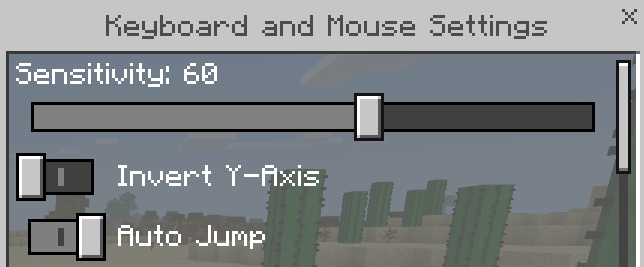
If Auto Jump in enabled in the control settings, then Sprinting will be cancelled when the player Jumps, auto-jumps up one block, or runs down off the edge of a block.
Steps to Reproduce:
- Enable Auto Jump in the settings
- Sprint forward (double tap or press ctrl)
- Jump or run off the edge of a block
Observed Results:
Sprinting stops, and the player is slowed to a walk
Expected Results:
The player should continue sprinting forward
Screenshots/Videos attached: Yes
Notes:
Affects Windows 10 and mobile (Tested on Android)
Original Description:
- When you're walking and at the same time you're jumping at this point you stop running instead of continuing to run
Note by [Mojang] Mega_Spud (Jay Wells):
This only seems to be an issue if Auto Jump in enabled in the settings.
Linked Issues
is duplicated by8
 MCPE-24852Sprinting gets cancelledDuplicateMCPE-24885Can't jump while sprintingDuplicateMCPE-24945sprintingDuplicateMCPE-24975Auto jump won't let me manually jump forward.DuplicateMCPE-24991Sprinting bugDuplicateMCPE-25000Stopped running when jumpingDuplicateMCPE-25003running bug & wither skeleton sink down when spawn using spawn eggDuplicateMCPE-25024jump and spint do not workDuplicate
Attachments1
![[Mojang] Mega_Spud (Jay Wells)](../../../data/avatars/users/92696.png)

Created Issue:
When you're running and jumping at the same time you stop running
- When you're walking and at the same time you're jumping at this point you stop running instead of continuing to run
(V.1.2.0.15)
- When you're walking and at the same time you're jumping at this point you stop running instead of continuing to run
(V.1.2.0.15)
![[MCPE Mod] Celesian](../../../data/avatars/users/81635.png)
is duplicated by
is duplicated by
- When you're walking and at the same time you're jumping at this point you stop running instead of continuing to run
Note by [Mojang] Mega_Spud (Jay Wells):
This only seems to be an issue if Auto Jump in enabled in the settings.
is duplicated by
Updated Description by [Mojang] Mega_Spud (Jay Wells)
Verification builds:
1.2.0.15 RetailSummary:
If Auto Jump in enabled in the control settings, then Sprinting will be cancelled when the player Jumps,Steps to Reproduce:
#Observed Results:
Expected Results:
Screenshots/Videos attached: Yes
Notes:
Original Description:
- When you're walking and at the same time you're jumping at this point you stop running instead of continuing to run
Note by [Mojang] Mega_Spud (Jay Wells):
This only seems to be an issue if Auto Jump in enabled in the settings.
Updated Description by [Mojang] Mega_Spud (Jay Wells)
Verification builds:
1.2.0.15 RetailSummary:
If Auto Jump in enabled in the control settings, then Sprinting will be cancelled when the player Jumps, or runs off the edge of a blockSteps to Reproduce:
#Observed Results:
Expected Results:
Screenshots/Videos attached: Yes
Notes:
Original Description:
- When you're walking and at the same time you're jumping at this point you stop running instead of continuing to run
Note by [Mojang] Mega_Spud (Jay Wells):
This only seems to be an issue if Auto Jump in enabled in the settings.
Updated Description by [Mojang] Mega_Spud (Jay Wells)
Verification builds:
1.2.0.15 RetailSummary:
If Auto Jump in enabled in the control settings, then Sprinting will be cancelled when the player Jumps, or runs off the edge of a blockSteps to Reproduce:
#Observed Results:
Expected Results:
Screenshots/Videos attached: Yes
Notes:
Original Description:
- When you're walking and at the same time you're jumping at this point you stop running instead of continuing to run
Note by [Mojang] Mega_Spud (Jay Wells):
This only seems to be an issue if Auto Jump in enabled in the settings.Updated Description by [Mojang] Mega_Spud (Jay Wells)
Verification builds:
1.2.0.15 RetailSummary:
If Auto Jump in enabled in the control settings, then Sprinting will be cancelled when the player Jumps, auto-jumps up one block, or runs down off the edge of a block.Steps to Reproduce:
- Enable Auto Jump in the settings
- Sprint forward (double tap or press ctrl)
- Jump or run off the edge of a block
Observed Results:
Sprinting stops, and the player is slowed to a walkExpected Results:
The player should continue sprinting forwardScreenshots/Videos attached: Yes
Notes:
Original Description:
- When you're walking and at the same time you're jumping at this point you stop running instead of continuing to run
Note by [Mojang] Mega_Spud (Jay Wells):
This only seems to be an issue if Auto Jump in enabled in the settings.
Updated Description by [Mojang] Mega_Spud (Jay Wells)
Verification builds:
1.2.0.15 RetailSummary:
If Auto Jump in enabled in the control settings, then Sprinting will be cancelled when the player Jumps, auto-jumps up one block, or runs down off the edge of a block.Steps to Reproduce:
- Enable Auto Jump in the settings
- Sprint forward (double tap or press ctrl)
- Jump or run off the edge of a block
Observed Results:
Sprinting stops, and the player is slowed to a walkExpected Results:
The player should continue sprinting forwardScreenshots/Videos attached: Yes
Notes:
Original Description:
- When you're walking and at the same time you're jumping at this point you stop running instead of continuing to run
Note by [Mojang] Mega_Spud (Jay Wells):
This only seems to be an issue if Auto Jump in enabled in the settings.Updated Description by [Mojang] Mega_Spud (Jay Wells)
Verification builds:
1.2.0.15 RetailSummary:
If Auto Jump in enabled in the control settings, then Sprinting will be cancelled when the player Jumps, auto-jumps up one block, or runs down off the edge of a block.Steps to Reproduce:
- Enable Auto Jump in the settings
- Sprint forward (double tap or press ctrl)
- Jump or run off the edge of a block
Observed Results:
Sprinting stops, and the player is slowed to a walkExpected Results:
The player should continue sprinting forwardScreenshots/Videos attached: Yes
Notes:
Affects Windows 10 and mobile (Tested on Android)Original Description:
- When you're walking and at the same time you're jumping at this point you stop running instead of continuing to run
Note by [Mojang] Mega_Spud (Jay Wells):
This only seems to be an issue if Auto Jump in enabled in the settings.
is duplicated by
is duplicated by
is duplicated by
Thank you for your report!
However, this issue has been closed as a Duplicate of MCPE-24851
It has been linked to this report. If you have additional information, please add it to that report.
Please search before reporting, as it's likely that one exists already.
Quick Links:
📓 Issue Guidelines – 💬 Community Support – 📧 Customer Support – 📖 Game Wiki
Thank you for your report!
However, this issue has been closed as a Duplicate of MCPE-24851
It has been linked to this report. If you have additional information, please add it to that report.
Please search before reporting, as it's likely that one exists already.
Quick Links:
📓 Issue Guidelines – 💬 Community Support – 📧 Customer Support – 📖 Game Wiki
![[Mod] bemoty](../../../data/avatars/users/50554.png)
Duplicate of MCPE-24851?
Thank you for your report!
However, this issue has been closed as a Duplicate of MCPE-24851.
It has been linked to this report. If you have additional information, please add it to that report.
If you have not, please search before reporting, as it's likely that one exists already.
Quick Links:
📓 Issue Guidelines – 💬 Community Support – 📧 Feedback – 📖 Game Wiki
Thank you for your report!
However, this issue has been closed as a Duplicate of MCPE-24851.
It has been linked to this report. If you have additional information, please add it to that report.
If you have not, please search before reporting, as it's likely that one exists already.
Quick Links:
📓 Issue Guidelines – 💬 Community Support – 📧 Feedback – 📖 Game Wiki
Thank you for your report!
However, this issue has been closed as a Duplicate of MCPE-24851 as I believe this is the same root issue.
If you have additional information, please add it to that report.
If you have not, please search before reporting, as it's likely that one exists already.
Quick Links:
📓 Issue Guidelines – 💬 Community Support – 📧 Feedback – 📖 Game Wiki
Thank you for your report!
However, this issue has been closed as a Duplicate of MCPE-24851.
It has been linked to this report. If you have additional information, please add it to that report.
If you have not, please search before reporting, as it's likely that one exists already.
Quick Links:
📓 Issue Guidelines – 💬 Community Support – 📧 Feedback – 📖 Game Wiki
Thank you for your report!
However, this issue has been closed as a Duplicate of MCPE-24851.
It has been linked to this report. If you have additional information, please add it to that report.
If you have not, please search before reporting, as it's likely that one exists already.
(Please limit your reports to one bug per ticket)
Quick Links:
📓 Issue Guidelines – 💬 Community Support – 📧 Feedback – 📖 Game Wiki
Related or caused by MCPE-24851
This happens to me to
I realized that all you must do is closing auto-jump