 MCPE-32429
Command block doesn't work well
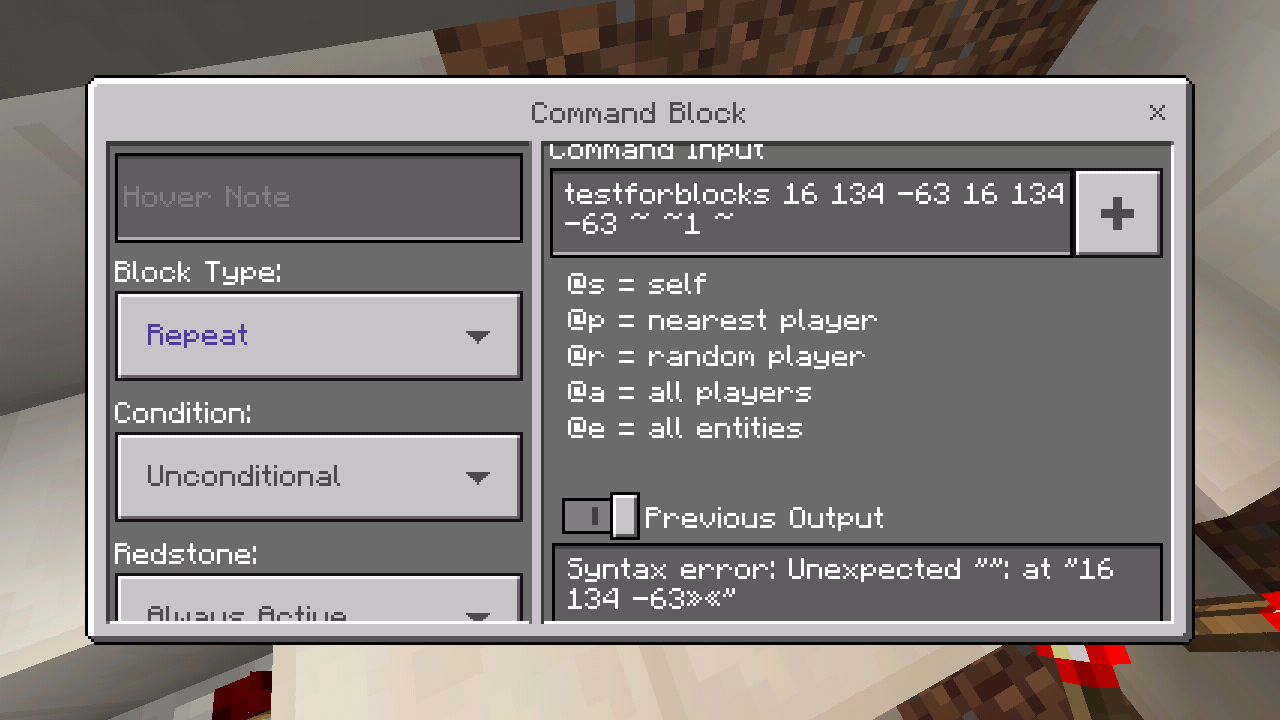
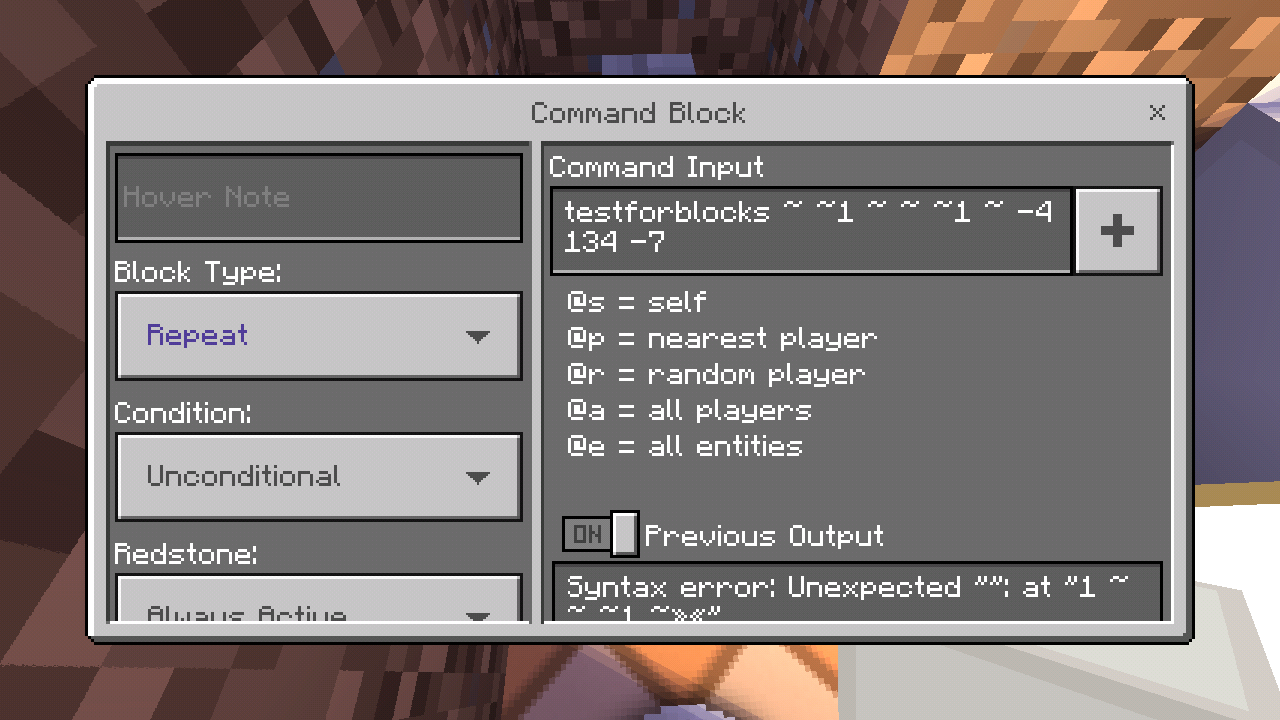
Cherry Mobile Flare S4 Max. The command block doesn't work properly and doesn't execute command properly. I place a command block then input a command then activate it using some redstone but it doesn't work it's not even have a text in previous output so even the command is wrong, you see it in previous output and saying syntax errorbut nothing, so meaning the command is really doesn't work and didn't execute a command. And also even the command is right the command block keep say syntax error look a screenshot with command. I'm sure that there's no wrong with it. Look at some screenshots with tesforblocks command nothing wrong with those but it's say syntax error. And the screenshot below that set to repeat and always active I already save the command and open it again but previous output is empty meaning the command doesn't execute. And information below is wrong, the information about what type of command block is that. Chain command also don't work properly.


Created Issue:
Command block doesn't work well
The command block doesn't work properly and doesn't execute command properly. I place a command block then input a command then activate ot using some redstone but it doesn't work it's not even have a text in previous output so even the command is wrong, you see it in previous outpu, but none so meaning the command really doesn't work and didn't execute a command. And also even the command is right the command block keep say syntax error. I'm that there's no wrong with it.
- Unresolved
- Open
- Unconfirmed
- Android
- Android 6.0
- 1.2.20.1
The command block doesn't work properly and doesn't execute command properly. I place a command block then input a command then activate ot using some redstone but it doesn't work it's not even have a text in previous output so even the command is wrong, you see it in previous outpu, but none so meaning the command really doesn't work and didn't execute a command. And also even the command is right the command block keep say syntax error. I'm that there's no wrong with it. Look at some screenshots with tesforblocks command nothing wrong with those but it's say syntax error. And the screenshot below that set to repeat and always active I already save the command and open it again but previous output is empty meaning the command doesn't execute.
The command block doesn't work properly and doesn't execute command properly. I place a command block then input a command then activate
ot using some redstone but it doesn't work it's not even have a text in previous output so even the command is wrong, you see it in previous outpu, but noneso meaning the command really doesn't work and didn't execute a command. And also even the command is right the command block keep say syntax error. I'mthat there's no wrong with it. Look at some screenshots with tesforblocks command nothing wrong with those but it's say syntax error. And the screenshot below that set to repeat and always active I already save the command and open it again but previous output is empty meaning the command doesn't execute.Cherry Mobile Flare S4 Max. The command block doesn't work properly and doesn't execute command properly. I place a command block then input a command then activate it using some redstone but it doesn't work it's not even have a text in previous output so even the command is wrong, you see it in previous output and saying syntax errorbut nothing, so meaning the command is really doesn't work and didn't execute a command. And also even the command is right the command block keep say syntax error look a screenshot with command. I'm sure that there's no wrong with it. Look at some screenshots with tesforblocks command nothing wrong with those but it's say syntax error. And the screenshot below that set to repeat and always active I already save the command and open it again but previous output is empty meaning the command doesn't execute. And information below is wrong, the information about what type of command block is that. Chain command also don't work properly.
The issue here appears to be that a command block cannot be modified while it is activated. In this case you have a repeat command block with the Always Active setting, which means that it executes every redstone tick (10 times a second). When I tried to modify such a block, I couldn't change anything - not only the command, but the type, condition, or Always Active settings were not changed. In effect, the only thing you can do with such a command block is break it.
Steps to reproduce:
- Place a command block.
- Set its Type to Repeat and its Redstone to Always Active.
- Enter "say hello" in the command field.
- Close the UI. Note that it begins typing "hello" in chat continuously.
- Try to change any property of the command block. For example, try to change it back to Needs Redstone and change the command input to "say goodbye".
Expected result: The chat output stops, possibly after typing "goodbye" once.
Actual result: The chat output shows the "Command set:" output message, but the block continues typing "hello" continuously. If you reopen the command block UI, the command and all settings remain unchanged.
is duplicated by
duplicates
is duplicated by
duplicates
![[Mojang] Mega_Spud (Jay Wells)](../../../data/avatars/users/92696.png)
Unknown: That was my mistake. I have reopened MCPE-32429 and responded there. Please resume working with us on that ticket.
The /testforblocks command almost always doesn't work properly a hopper with item inside I test that block to the another place, a hopper also with same item on it also same direction where hopper is connected but it's say "destination are not identical" something like that I don't what exactly it's says but it really doesn't work correctly. Then I try to clone that 1st hopper to second hopper and it work, but now it doesn't work again when I play that world again. Please fix these all bugs, even there's no new items or features in next update at least all bugs has been fixed. When 1.2.13 starts to come it's also start to ruin the game because of bug and annoying number versions
Thank you for your report!
However, this issue is a Duplicate of
MCPE-32692.If you have additional information, please add it to that report.
Please search before reporting, as it's likely that one exists already.
Quick Links:
📓 Issue Guidelines – 💬 Community Support – 📧 Customer Support – 📖 Game Wiki
Reopened after reporter pointed out that this issue is different from
MCPE-32692. (See comment in the other ticket.)Unknown: I apologize for not realizing this issue is different from the other one. Partly it happened because your English is a bit hard to understand. I think part of what you're reporting is covered by the other report, but I see now that part of it is not.
The two screenshots that display a "syntax error" in the Previous Output can be explained. The testforblocks command expects your first and second positions to be opposite corners of a rectangular volume. However, you have specified the same coordinates for both, which means that there are no blocks in your volume. For this command, these coordinates must always be different by at least 1 in each of the X, Y, and Z values, else you're asking it to compare 0 blocks. It's not technically a "syntax" error (which is why the message says at "" instead of showing the incorrect text), but the game probably calls it a syntax error because that's the only kind of error it knows how to make a message for.
The third screenshot doesn't show anything in the Previous Output, but I noticed that it's a Repeat command block. That's what the other report (the one I think this is partly a duplicate of) is about. It's hard to understand, because your description goes back and forth between the different problems. Could you please try to describe the issue shown in the third screenshot in a new comment, and also say what the command you entered into it was?
Thank you for your report!
However, this issue has been closed as Incomplete.
Please include more information including steps to reproduce the problem:
If your ticket does not look like the example given here, then it's likely to be closed as incomplete.
Quick Links:
📓 Issue Guidelines – 💬 Mojang Support – 📧 Suggestions – 📖 Minecraft Wiki