 MCPE-60715
Lost most of my stuff
It happened on December 30, 2019. At somewhere around 3-4 PM. I lost my world templates, marketplace purchases, mine coins, and every time I refresh Minecraft it would sign me out of Xbox live. Some of my settings keep getting reset whenever I go back to Minecraft. The photo shows that there's only my worlds and resource packs in my Minecraft storage. I was also in the files app, deleting stuff I think I didn’t need. Username: SophisticChaff3 but now every time I sign into Xbox live it would just keep my name as “Steve” and in worlds/servers I have my regular gamertag. If there’s a way to get all those back using files & documents app I’d be happy.
Linked Issues




Created Issue:
Lost most of my stuff
It happened on December 30, 2019. At somewhere around 3-4 PM. I lost my worlds, skins, resource & behavior packs, world templates, the cape that's the minecraft Founder's cape, marketplace purchases, mine coins, and every time I refresh Minecraft it would sign me out of Xbox live. The photo shows that there's nothing in my Minecraft storage.
Attachments1
B8FEBCDD-5FCB-431F-A70F-D5F3F4480704.png
It happened on December 30, 2019. At somewhere around 3-4 PM. I lost my worlds, skins, resource & behavior packs, world templates, the cape that's the minecraft Founder's cape, marketplace purchases, mine coins, and every time I refresh Minecraft it would sign me out of Xbox live. The photo shows that there's nothing in my Minecraft storage. I was also in the files app, deleting stuff I think I didn’t need.
It happened on December 30, 2019. At somewhere around 3-4 PM. I lost my worlds, skins, resource & behavior packs, world templates, the cape that's the minecraft Founder's cape, marketplace purchases, mine coins, and every time I refresh Minecraft it would sign me out of Xbox live. The photo shows that there's nothing in my Minecraft storage. I was also in the files app, deleting stuff I think I didn’t need. Username: SophisticChaff3 but now every time I sign into Xbox live it would just keep my name as “Steve” and in worlds/servers I have my regular name.
It happened on December 30, 2019. At somewhere around 3-4 PM. I lost my worlds, skins, resource & behavior packs, world templates, the cape that's the minecraft Founder's cape, marketplace purchases, mine coins, and every time I refresh Minecraft it would sign me out of Xbox live. Some of my settings keep getting reset whenever I go back to Minecraft. The photo shows that there's nothing in my Minecraft storage. I was also in the files app, deleting stuff I think I didn’t need. Username: SophisticChaff3 but now every time I sign into Xbox live it would just keep my name as “Steve” and in worlds/servers I have my regular name.
It happened on December 30, 2019. At somewhere around 3-4 PM. I lost my worlds, skins, resource & behavior packs, world templates, the cape that's the minecraft Founder's cape, marketplace purchases, mine coins, and every time I refresh Minecraft it would sign me out of Xbox live. Some of my settings keep getting reset whenever I go back to Minecraft. The photo shows that there's nothing in my Minecraft storage. I was also in the files app, deleting stuff I think I didn’t need. Username: SophisticChaff3 but now every time I sign into Xbox live it would just keep my name as “Steve” and in worlds/servers I have my regular name. If Minecraft can somehow restore all of my data I’d be very, very happy.
It happened on December 30, 2019. At somewhere around 3-4 PM. I lost my
worlds,skins, resource & behavior packs, world templates, the cape that's the minecraft Founder's cape, marketplace purchases, mine coins, and every time I refresh Minecraft it would sign me out of Xbox live. Some of my settings keep getting reset whenever I go back to Minecraft. The photo shows that there's nothing in my Minecraft storage. I was also in the files app, deleting stuff I think I didn’t need. Username: SophisticChaff3 but now every time I sign into Xbox live it would just keep my name as “Steve” and in worlds/servers I have my regular name. If Minecraft can somehow restore all of my data I’d be very, very happy.
It happened on December 30, 2019. At somewhere around 3-4 PM. I lost my skins, resource & behavior packs, world templates, the cape that's the minecraft Founder's cape, marketplace purchases, mine coins, and every time I refresh Minecraft it would sign me out of Xbox live. Some of my settings keep getting reset whenever I go back to Minecraft. The photo shows that there's nothing in my Minecraft storage. I was also in the files app, deleting stuff I think I didn’t need. Username: SophisticChaff3 but now every time I sign into Xbox live it would just keep my name as “Steve” and in worlds/servers I have my regular name. If
Minecraft can somehow restore all of my data I’d be very, veryhappy.It happened on December 30, 2019. At somewhere around 3-4 PM. I lost my skins, resource & behavior packs, world templates, the cape that's the minecraft Founder's cape, marketplace purchases, mine coins, and every time I refresh Minecraft it would sign me out of Xbox live. Some of my settings keep getting reset whenever I go back to Minecraft. The photo shows that there's nothing in my Minecraft storage. I was also in the files app, deleting stuff I think I didn’t need. Username: SophisticChaff3 but now every time I sign into Xbox live it would just keep my name as “Steve” and in worlds/servers I have my regular name. If there’s a way to get all those back using files & documents app I’d be happy.
It happened on December 30, 2019. At somewhere around 3-4 PM. I lost my skins, resource & behavior packs, world templates, the cape that's the minecraft Founder's cape, marketplace purchases, mine coins, and every time I refresh Minecraft it would sign me out of Xbox live. Some of my settings keep getting reset whenever I go back to Minecraft. The photo shows that there's
nothingin my Minecraft storage. I was also in the files app, deleting stuff I think I didn’t need. Username: SophisticChaff3 but now every time I sign into Xbox live it would just keep my name as “Steve” and in worlds/servers I have my regular name. If there’s a way to get all those back using files & documents app I’d be happy.It happened on December 30, 2019. At somewhere around 3-4 PM. I lost my skins, resource & behavior packs, world templates, the cape that's the minecraft Founder's cape, marketplace purchases, mine coins, and every time I refresh Minecraft it would sign me out of Xbox live. Some of my settings keep getting reset whenever I go back to Minecraft. The photo shows that there's only my worlds in my Minecraft storage. I was also in the files app, deleting stuff I think I didn’t need. Username: SophisticChaff3 but now every time I sign into Xbox live it would just keep my name as “Steve” and in worlds/servers I have my regular name. If there’s a way to get all those back using files & documents app I’d be happy.
It happened on December 30, 2019. At somewhere around 3-4 PM. I lost my
skins, resource &behavior packs, world templates, the cape that's the minecraft Founder's cape, marketplace purchases, mine coins, and every time I refresh Minecraft it would sign me out of Xbox live. Some of my settings keep getting reset whenever I go back to Minecraft. The photo shows that there's only my worlds in my Minecraft storage. I was also in the files app, deleting stuff I think I didn’t need. Username: SophisticChaff3 but now every time I sign into Xbox live it would just keep my name as “Steve” and in worlds/servers I have my regular name. If there’s a way to get all those back using files & documents app I’d be happy.It happened on December 30, 2019. At somewhere around 3-4 PM. I lost my marketplace skin packs (the snowball warriors skin pack from last year’s 12 days of Christmas skin pack I really want back), behavior packs, world templates, the cape that's the minecraft Founder's cape, marketplace purchases, mine coins, and every time I refresh Minecraft it would sign me out of Xbox live. Some of my settings keep getting reset whenever I go back to Minecraft. The photo shows that there's only my worlds and resource packs in my Minecraft storage. I was also in the files app, deleting stuff I think I didn’t need. Username: SophisticChaff3 but now every time I sign into Xbox live it would just keep my name as “Steve” and in worlds/servers I have my regular name. If there’s a way to get all those back using files & documents app I’d be happy.
It happened on December 30, 2019. At somewhere around 3-4 PM. I lost my marketplace skin packs (the snowball warriors skin pack from
lastyear’s 12 days of Christmas skin pack I really want back), behavior packs, world templates, the cape that's the minecraft Founder's cape, marketplace purchases, mine coins, and every time I refresh Minecraft it would sign me out of Xbox live. Some of my settings keep getting reset whenever I go back to Minecraft. The photo shows that there's only my worlds and resource packs in my Minecraft storage. I was also in the files app, deleting stuff I think I didn’t need. Username: SophisticChaff3 but now every time I sign into Xbox live it would just keep my name as “Steve” and in worlds/servers I have my regular name. If there’s a way to get all those back using files & documents app I’d be happy.It happened on December 30, 2019. At somewhere around 3-4 PM. I lost my marketplace skin packs (the snowball warriors skin pack from 2 years ago, the 12 days of Christmas skin pack I really want back), behavior packs, world templates, the cape that's the minecraft Founder's cape, marketplace purchases, mine coins, and every time I refresh Minecraft it would sign me out of Xbox live. Some of my settings keep getting reset whenever I go back to Minecraft. The photo shows that there's only my worlds and resource packs in my Minecraft storage. I was also in the files app, deleting stuff I think I didn’t need. Username: SophisticChaff3 but now every time I sign into Xbox live it would just keep my name as “Steve” and in worlds/servers I have my regular name. If there’s a way to get all those back using files & documents app I’d be happy.
It happened on December 30, 2019. At somewhere around 3-4 PM. I lost my
marketplace skin packs (the snowball warriors skin pack from 2 years ago, the 12 days of Christmas skin pack I really want back), behavior packs, world templates, the cape that's the minecraft Founder's cape, marketplace purchases, mine coins, and every time I refresh Minecraft it would sign me out of Xbox live. Some of my settings keep getting reset whenever I go back to Minecraft. The photo shows that there's only my worlds and resource packs in my Minecraft storage. I was also in the files app, deleting stuff I think I didn’t need. Username: SophisticChaff3 but now every time I sign into Xbox live it would just keep my name as “Steve” and in worlds/servers I have my regular name. If there’s a way to get all those back using files & documents app I’d be happy.It happened on December 30, 2019. At somewhere around 3-4 PM. I lost my world templates, marketplace purchases, mine coins, and every time I refresh Minecraft it would sign me out of Xbox live. Some of my settings keep getting reset whenever I go back to Minecraft. The photo shows that there's only my worlds and resource packs in my Minecraft storage. I was also in the files app, deleting stuff I think I didn’t need. Username: SophisticChaff3 but now every time I sign into Xbox live it would just keep my name as “Steve” and in worlds/servers I have my regular name. If there’s a way to get all those back using files & documents app I’d be happy.
It happened on December 30, 2019. At somewhere around 3-4 PM. I lost my world templates, marketplace purchases, mine coins, and every time I refresh Minecraft it would sign me out of Xbox live. Some of my settings keep getting reset whenever I go back to Minecraft. The photo shows that there's only my worlds and resource packs in my Minecraft storage. I was also in the files app, deleting stuff I think I didn’t need. Username: SophisticChaff3 but now every time I sign into Xbox live it would just keep my name as “Steve” and in worlds/servers I have my regular
name. If there’s a way to get all those back using files & documents app I’d be happy.It happened on December 30, 2019. At somewhere around 3-4 PM. I lost my world templates, marketplace purchases, mine coins, and every time I refresh Minecraft it would sign me out of Xbox live. Some of my settings keep getting reset whenever I go back to Minecraft. The photo shows that there's only my worlds and resource packs in my Minecraft storage. I was also in the files app, deleting stuff I think I didn’t need. Username: SophisticChaff3 but now every time I sign into Xbox live it would just keep my name as “Steve” and in worlds/servers I have my regular gamertag. If there’s a way to get all those back using files & documents app I’d be happy.
![[Mod] OcelotOnesie](../../../data/avatars/users/43220.png)
is duplicated by
![[Mojang] Mega_Spud (Jay Wells)](../../../data/avatars/users/92696.png)

You've already reported this issue (as MCPE-60715). Please try to avoid duplicating your own ticket.
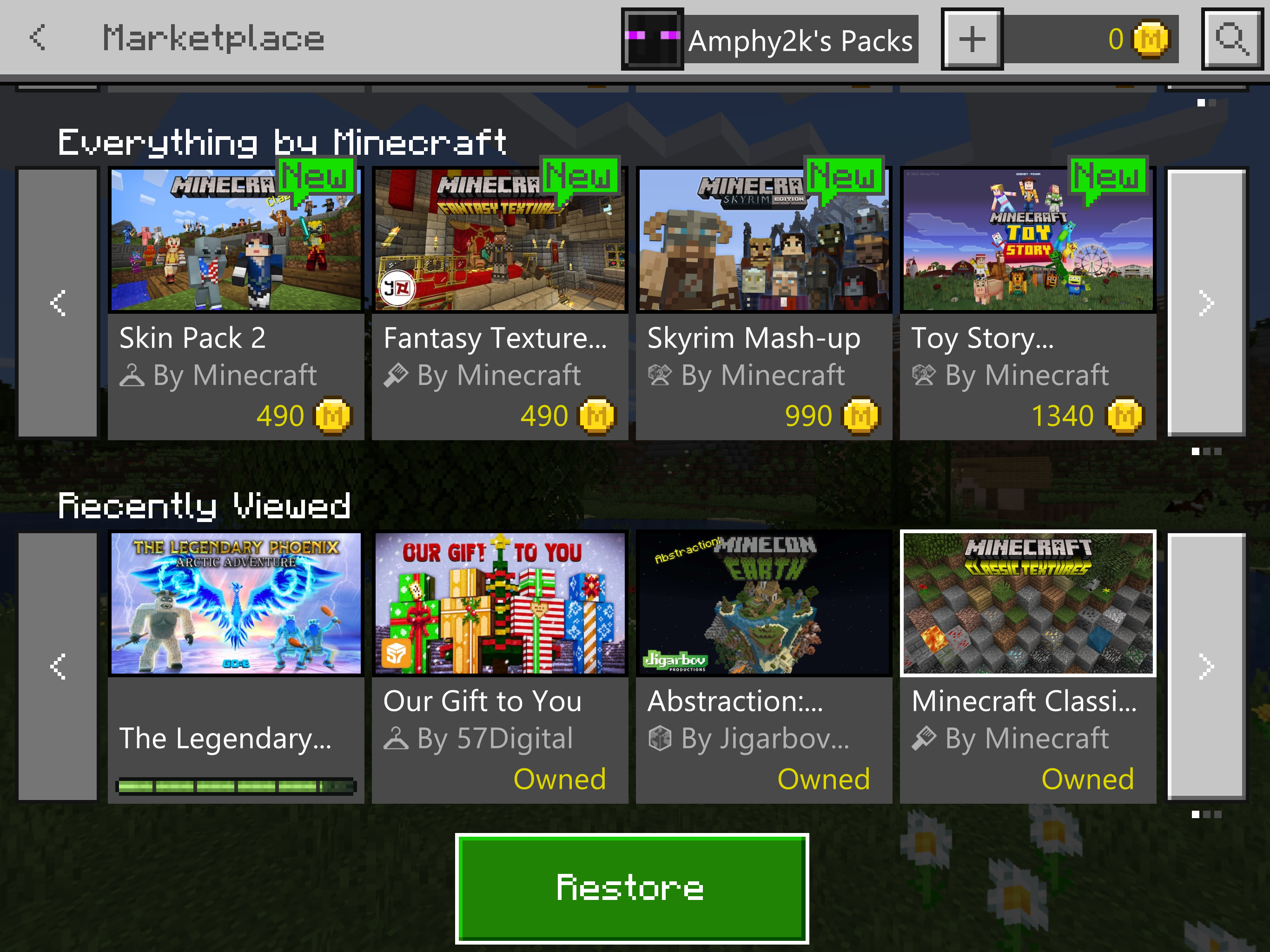
Have you tried to restore all purchases while logged into XBox Live yet? You can do that by scrolling to the very bottom of the Minecraft Marketplace screen and tapping the large “Restore” button. As shown in this image.

Amphy2k I did it today 50 times, didn’t work...
My best guess is the files caused the problem that deleted my data cause I was deleting stuff and then I went to Minecraft, refreshed it, and then everything I listed in the description just happened.
Can anyone help me?!?! No ones talking about fixing this bug.
The way i got it to work:
Delete Minecraft Windows 10
Sign out of Xbox Console Companion + Xbox (Beta - The app that is used for Gamepass on the PC)
Re-install Minecraft Windows 10
Login and sign into your microsoft account
It should now sync correctly.
One problem Cameron, I don’t play on computer, I play on iOS iPad.
If you were messing around with the files then there is a good chance that could have caused it. The damaged would be irreplaceable without deleting and redownloading the game.
The good news is you can save your worlds before deleting the app, then when you redownload it you can just re-add them. Any worlds you want to save (or all of them) you have to go into the “minecraftWorlds” file and copy all of the world files and save them to any location that isn’t the Minecraft file. I would recommend either iCloud Drive so you have them on all devices or in an external app like Dropbox or Documents. After redownloading the app just copy and paste all the worlds back into the same “minecraftWorlds” file. They should all work. You will lose all addons you have globally saved but you will not lose them if they are saved onto the world. Only copy and paste files though, don’t open them or edit them in any way. If you have any questions message me on Discord @Amphy#9133 and I would be more then happy to help.
Ampty, are u saying that if I delete minecraft and redownload it, I can get my purchases back?
Btw I don’t have discord and I also found the Snowball warriors and the Minecraft Founder’s cape pages in Files. Is it possible to bring it back to Minecraft using that?
One more thing, can I just offload Minecraft instead of deleting Minecraft? (I’m expecting a no to this answer but I just asked it anyways)
it's happening to me too. if I log into my bedrock on my laptop, to start with, he does not sign me in automatically anymore, even if I am already using my computer on my existing xbox live / microsoft ID. then when I press sign in, it tells me I have no minecoins, no owned skins, and shows all my already purchased worlds locked.
I do not have a restore button at the very bottom of the marketplace.
when I log into my bedrock edition on my xbox one, it is normal, with minecoins, skins and worlds already purchase here and available to select.
I WANT TO PLAY ON MY LAPTOP, PLEASE RESOLVE THIS.
Thank you for your report!
Issues such as these are often due to a temporary service outage, and should be back up and working again soon. Please keep an eye out for messages from @MojangStatus on twitter for the latest status updates.
For any issues with your specific account or billing, you will need to contact Minecraft Customer Support directly, who will be able to advise you individually.
Quick Links:
📓 Issue Guidelines – 💬 Mojang Support – 📧 Suggestions – 📖 Minecraft Wiki