 REALMS-286
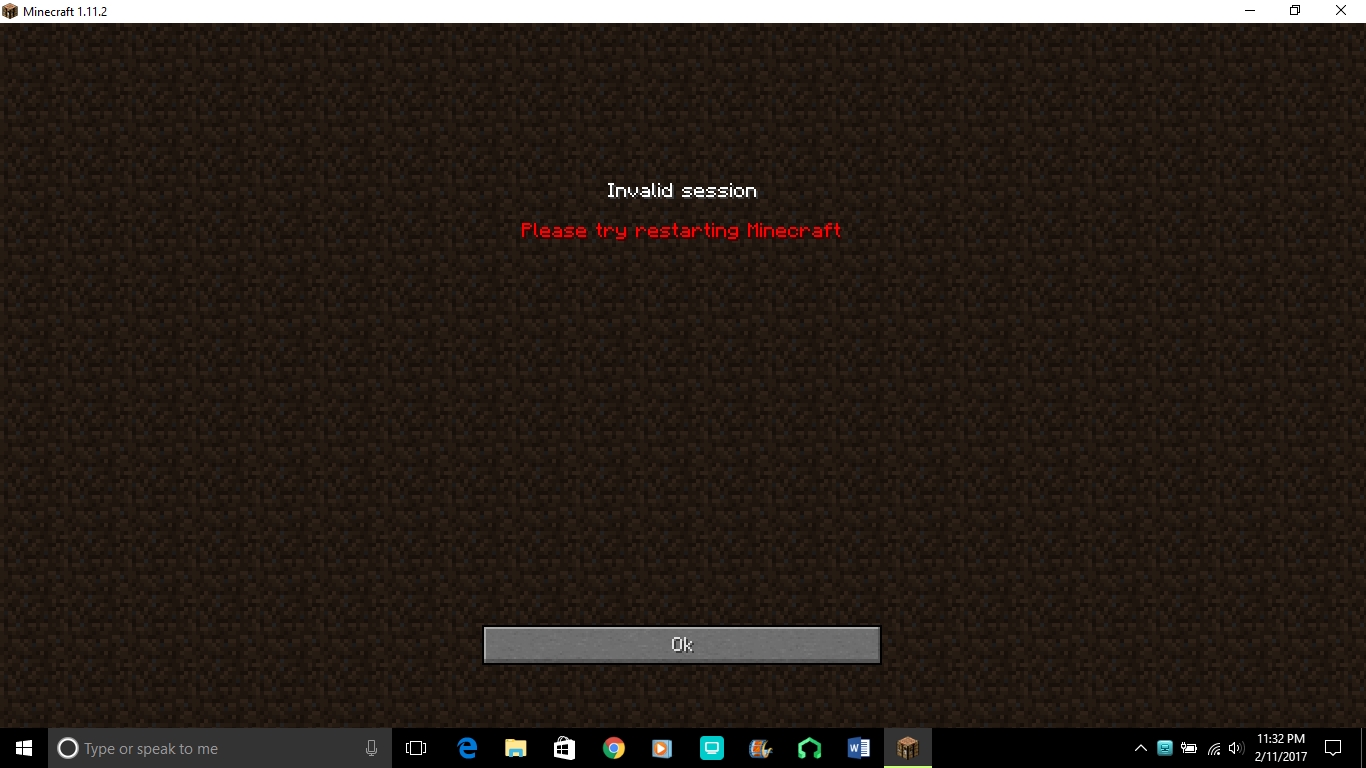
Invalid session - Please try restarting Minecraft
When I click "Minecraft Realms" from the main screen of Minecraft, it shows me an error and does not even allow me to see my world options. Restarting the game does not help, and neither does logging out completely. I've even reinstalled the game. This issue has always been an occasional issue, but the past few days it hasn't gone away at all.
[UPDATE] As of yesterday, I am able to get on Realms again. I had to restart the launcher in order to get it to work, but finally I was able to play. Does anyone know if there was an update of some sort?
Environment
Windows
Linked Issues
is duplicated by1
 MCL-5967
Attachments2


Created Issue:
Invalid session - Please try restarting Minecraft
When I click "Minecraft Realms" from the main screen of Minecraft, it shows me an error and does not even allow me to see my world options. Restarting the game does not help, and neither does logging out completely. I've even reinstalled the game. This issue has always been an occasional issue, but the past few days it hasn't gone away at all.
Environment
Windows
Attachments1

is duplicated by
When I click "Minecraft Realms" from the main screen of Minecraft, it shows me an error and does not even allow me to see my world options. Restarting the game does not help, and neither does logging out completely. I've even reinstalled the game. This issue has always been an occasional issue, but the past few days it hasn't gone away at all.
[UPDATE] As of yesterday, I am able to get on Realms again. I had to restart the launcher in order to get it to work, but finally I was able to play. Does anyone know if there was an update of some sort?
![[Mod] Greymagic27](../../../data/avatars/users/92875.png)
This has just popped up again on minecraft support discord
I added a picture of the output log, in case that will help anyone solve this
I am still having this issue. I cannot get on Realms at all
Is there any other information I need to add to get this solved?
Click your name in the launcher and log out, then log back in
I did last night. That's part of what fixed it. That had not been working before though
This is happening to me now. I tried closing and reopening tried closing logging out and relogging, still nothing. Its happening to me and my friend. The both of us and we tried everything that was suggested. Is there any news on what could be causing this?
Yes, this just started happening to me. Something tells me this is an issue with Realms and not the end user, considering how many people are running into it at the same time suddenly.
It is also happening to me and my friend I've tried everything can someone help? I can play in Mineplex and other multiplayer worlds but it won't let me go onto the realms tab.
Just sit tight and wait. I've also tried everything, like I said, I'm guessing this issue isn't on our end.
Im getting this aswell. This bug has been reported so many times its getting dumb, Mojang pls fix.
I just started my trial for realms so I want to get this fixed as fast as possible.
My friend and I are having the same issue since today. I have logged out of the launcher, rebooted my PC, etc. multiple times and nothing works. I agree with the others that are saying this must be a Realms issue. I'm not sure if they are working on this issue or not. If there is a forum or page that Mojang updates in regards to issues like this, please leave a link. Thanks
Have the owner of the realm join with the latest version of the game(currently 1.12.2)
I am using version 1.12.2 on my client, and have been with no issues.
Until today, when I am getting this error every time I click the realms button.
I am the realms owner, so how am I meant to fix this?
I am also having this problem.
I am the realm owner.
I have updated to 1.12.2
I have tried logging out of everything.
I deleted minecraft and reinstalled.
still getting the same message every time.
Hey helpers, I know you're on this issue and I want to say thank I'm reporting pruely to make sure that whom ever's in charge here knows whats up.
I am also having this problem.
I am the realm owner.
I have updated to 1.12.2
I have tried logging out of everything
I have NOT reinstalled due to not wanting to reinstall my 1.9 mods
I'm in the south-east USA if that helps at all
Hi, i found this thread and i want to comment because i want to report the same problem.
I bought the realm 11 days ago.
I am also having this problem.
I cannot log in nor my friend.
I am the realm owner.
I played 11 days with 1.12.2
I have tried logging out of everything
I have NOT reinstalled.
I can play in multiplayer server and Singleplayer server.
I'm in the Europe (Italy) if that helps at all
I'm having the same problem too, I tried re-logging but it hasn't worked. It keeps popping up a message saying to restart your minecraft, and i have, but it hasn't been working. Please help
I had the same problem as the last 5 comments.
Found a fix.
Search for `.minecraft` folder and rename (or delete) `usercache.json`.
Fixed the problem for me.
Seems to be working now all of a sudden
It works now thank you!!
I have found that by removing or renaming the file 'realms_persistence.json' in the .minecraft directory of the user AppData->Roaming folder fixed the problem (at least for me).
i have the same problem but i have java edition cracked
jeremy's and bogdan's fix doesn't work for me
i have cracked minecraft and the fix doesn't work plz HELP mojang
so, i have this problem too right now. I logged out in the launcher, closed the launcher, and logged in again. Did not work. I deleted those files that others say that works and i deleted minecraft, also .minecraft and reinstalled it. Did not work. So, what to do?
Yo guys, I had the same issue and tried everything what i found in internet and of course it didnt work.
So i deleted everything on my computer relating to minecraft (especially .minecraft folder in AppData/Roaming) and reinstalled the game, and it fixed the problem.
Warning! You will lose all ur resourcepacks and shaders so u better copy them somewhere else before uninstalling.
@ The people complaining that it doesn't work on cracked clients >
Cracked"/Pirated clients are illegal in most countries as it is considered piracy. [
Please buy the game and support the creators!
https://www.makeuseof.com/tag/dangers-downloading-pirated-games/
This issue is still happening and is not resolved. Not using a cracked version either, I have bought minecraft.
Yep same issue here, but my friend is currently on the realms. Restarted ten times, logged out 3 times, deleted and reinstalled minecraft. Friend has no issue.
I also have this issue as well, tried reinstalling mincraft, may have to delete everything minecraft related, is fine for others of same realm
I can concur that this is suddenly an issue. 'Invalid Sesson ID' and 'Please restart Minecraft'
Followed all the troubleshooting guidance I could find so far but to no avail.
Same problem here. Tried restarting the launcher, restarting my pc, changing userprofile in the launcher, deleting and downloading launcher, deleting .minecraft and downloading launcher again... Nothing worked.
EDIT: works again for me! Out of the blue... I didn't change anything, just waited an hour and tried again.
I have the same issue. I can't reproduce it, but I can temporarily bypass it by using a VPN. Turning off the VPN brings back the issue. Hope this helps someone.
Also, someone else in the same house has the same issue.
Putting household and VPN together, this indicates it may have something to do with either network issues or ISP issues.
Hey there. I'm having the same issue again so I'm assuming it's a seasonal thing that happens every once in a while? (Looking at the dates of people reporting on this issue) None of the fixes mentioned before helped, so I'm assuming it will be fixed by itself with time?
Also just wanted to confirm if there's others running into this issue right now again.