Cannot connect to Realms
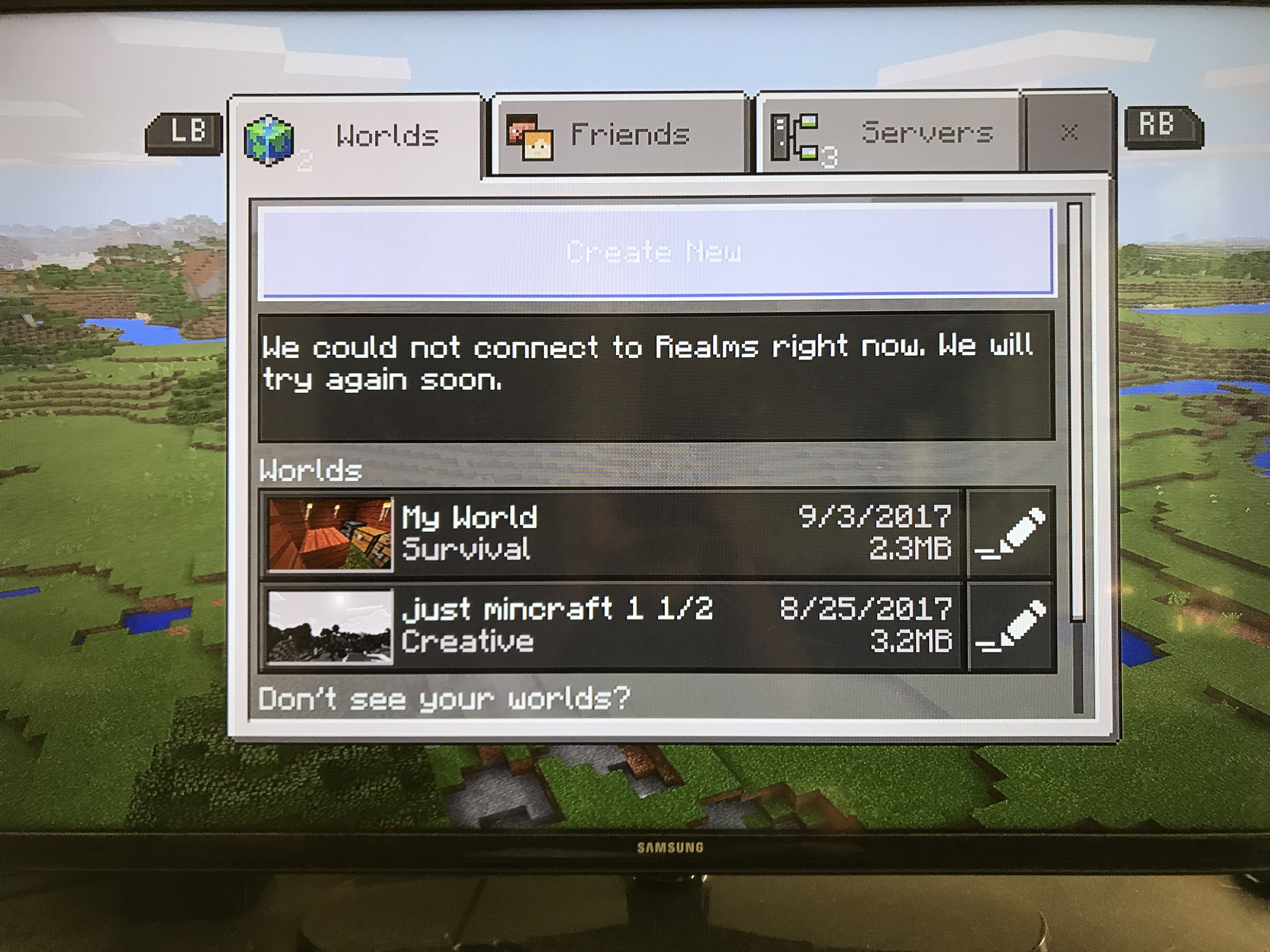
Realms is not available. When I log into my Xbox live profile on Xbox One it says, "We could not connect to Realms right now. We will try again soon." It's the same for my kids' profiles. I hard restart my Xbox, but it doesn't help. My internet is working and I can log into Lifeboat. This has been happening consistently.
Linked Issues





Created Issue:
Cannot connect to Realms
Realms is not available. When I log into my Xbox live profile on Xbox One it says, "We could not connect to Realms right now. We will try again soon." It's the same for my kids' profiles. I hard restart my Xbox, but it doesn't help. My internet is working and I can log into Lifeboat. This has been happening consistently.
Attachments1
![[Mod] bemoty](../../../data/avatars/users/50554.png)
![[Mojang] Mega_Spud (Jay Wells)](../../../data/avatars/users/92696.png)
is duplicated by
 MCPE-26368 →
  REALMS-514
relates to
![[Mojang] MissMarzenia (Aleksandra Zajac)](../../../data/assets/gravatar/missmarzenia.png)
Thank you for your report!
However, this issue is a Duplicate of MCPE-26368.
If you have additional information, please add it to that report.
Please search before reporting, as it's likely that one exists already.
Quick Links:
📓 Issue Guidelines – 💬 Community Support – 📧 Customer Support – 📖 Game Wiki
Thank you for your report!
However, this issue is a Duplicate of MCPE-26368.
If you have additional information, please add it to that report.
Please search before reporting, as it's likely that one exists already.
Quick Links:
📓 Issue Guidelines – 💬 Community Support – 📧 Customer Support – 📖 Game Wiki

Please reopen MCPE-26368
It is not resolved. There are several "workarounds" for the issue to temporarily resolve the problem but it still plagues the user base.
The re-iterate the issue: secondary XBL accounts on the XBOX ONE console get the error message "Unable to connect to realms" frequently. This can be temporarily fixed by hard resetting the XBOX. However the issue returns the same day.
See REALMS-514
This issue is plaguing a lot of players who have an account on an XBOX ONE that is not the Realm owner.
The fixes above are only temporary and the problem will return.
I even went as far as uninstalling Minecraft, removing the afflicted profile and adding everything back. It worked one time then went right back to "Unable to connect to Realms".
I have a similar issue, with V 1.2.1. Installed this version only yesterday.
+The problem for us are: +
1) This is on Xbox One S
2) In our case this problem is happening on my sons profile:
3) My sons profile has no restrictions for online play, "Minecraft Xbox One Edition" online play works fine on my sons profile , he can play online, invite friends, play multiplayer games, etc all works in Minecraft Xbox One Edition
4) Other games online play works without issue on my sons profile.
More detail about the issue/error:
In addition to this is that on the first screen (Worlds/Friends/Servers):
-Yet then when I then go to one of my own worlds (yes its set as multiplayer game), and you press the "start" button on the Xbox one s controller, on the right hand side of the screen it says "Current World", and a message below it : "Oops! You were disconnected from Xbox Live To invite more players, reopen your world." (When i'm not disconnected from Xbox live)
Similar issue: Minecraft Better Together only works correctly for the account that purchased the Xbox Live Gold membership. Other users cannot connect to realms, servers or purchase items in the game's shop. Sometimes the error messages says: I need to Login to XBL, please check internet connect, or unable to join.
Minecraft Xbox One Edition works fine for anyone using the Xbox that has Xbox Live ID account and is set as the Home Xbox.
I'm having the same issue on my wife's XBox Live account trying to join my realm.
I have a Gold Subscription under my XBox Account which should allow any player signed in access to XBox Gold. My XBox is setup as my home XBox.
The weird thing is, if I sign into her XBox One Live account from my Windows 10 PC I can play in my realm with no issues.
It seems to be only a problem from the XBox One. I can also play in my realm from the XBox under my account.
After reading the OP again I realized we are having the exact opposite issue. I own Gold and I bought Minecraft under my account.
What I'm wondering is if my wife's account also needs a separate Minecraft license?
Interestingly enough, 1 out of 10 times she tries she is able to see and access the realm. It seems hit or miss but misses about 90% of the times she tries.
I contacted microsoft support on twitter about this. They told me to uninstall Minecraft XBox Edition and 1.2, restart the XBox and reinstall the games. That worked! I have not had any issues with any profile and Realms or the online servers.
"Let's uninstall the app http://xbx.lv/Il4Jag & power cycle http://xbx.lv/19Pxh2o the console & reinstall. Then let us know if you still get that error."
I saw a post on the Minecraft Forums that has a work around for this issue: http://www.minecraftforum.net/forums/support/xbox-one-support/2862518-xbox-one-unable-to-connect-to-realms-solved
The steps are to load Minecraft.
Go to Play and wait until you see the Unable to fetch realms right now message.
Press the XBox Menu button on the controller (the white one in the middle).
Scroll down to the settings tab where you can view your profile settings.
Then hard reset the XBox One by holding the power button on the console for 10 seconds.
Once the XBox One reboots, load back into Minecraft, (change profiles to the offending profile) then the Realms should show.
This did work for me but I don't know if it is a permanent fix or not. I will update.
Hi Guys, I've posted this elsewhere, but thought it might be worth mentioning here as this resolved the issue for us. In our case it was something that was not right on my sons profile that didn't pick up on the gold membership. by removing his profile and adding it back on again somehow fixed it for us, see the steps below that worked for us :
The Xbox support guy (Ryan) recons it is something to do with my sons profile not picking up/linking properly with the main member/profile's gold subscription, and removing the profile as per the steps above and then adding it establishes the connection to the main member's gold membership.
This resolved the problems for us and it all now works.
Note: I was initially hesitant to remove my sons profile completely from the Xbox, and the Xbox support said that his saved games/worlds/etc are saved in the "cloud" and will be there when you add the profile back to the Xbox - my fears were false and his saved games/worlds were there to download again in Minecraft and also the same for his other games.
Given the above responses, is anyone still having issue with this in 1.2.1.1?
Yes, I do. I continue to have issues with 1.2.1 on iOS.
I can not connect to Realms (or see achievements from within the app). Under the "Worlds" tab it says "We could not connect to Realms right now. We will try again soon."
This occurs when on Wi-Fi, I can connect when on cellular. Yet on the same Wi-Fi network, I can connect fine with the Windows 10 version of Minecraft to Realms.
I have deleted and reinstalled both the Minecraft app and the Xbox app on iOS. iOS is up to date. My router has nothing blocked or restricted, and it works from the same network with Windows 10, so I'm not sure what I'm missing.
The same issue here.
For me this is only happening on Xbox One.
On PC and mobile it always works.
Sometimes the Xbox can`t connect to my own realm, but after trying to edit the realm it get`s disconnected.
I have this issue as well. There are also several duplicates of this issue as well. This problem seems to effect Realms, Servers, Purchases, and Joining friends but seems to be all related to Sub Accounts to a shared Gold Account and/or new Gold accounts.
My comments on another ticket:
MCPE-26902Update: This issue is not resolved, The issue returned with the same symptoms! Is anyone at Mojang/Microsoft looking at this?
This time I did not remove my sons profile, what I did:
Note: On my profile this problem does not happen at all (my profile is the one with the Xbox Gold subscription), and issue does not happen at all on the old Minecraft Xbox One edition
How can we get Microsoft or Mojang's attention? These are marked as resolved when they are not!!!!
All "fixes" so far have only been temporary. Within the same day the issue returns.
I tried to uninstall Minecraft, removed my wife's profile, installed Minecraft again, added wife's profile and the issue was only temporarily resolved. That same night she logged in and got the "Unable to connect to realms message". At that point we did the temp solution I posted earlier and it worked but again the next day she has the same "Unable to connect to realms message".
This needs a permanent fix.
I am having a similar issue. This issue is definitely not resolved. I have tried everything and nothing helps. We have 3 Xbox ones. 2 are normal and 1 is Xbox one s. My wife and I both have gold. I can log into minecraft and join the realm every single time on all 3 xbox ones. My wife can log in and join a realm on the 2 normal Xbox Ones but every time she tries to join on the Xbox One S it gives the error "we could not connect to realms right now. we will try again soon". This Xbox one S used to be my home Xbox but it is not anymore. It is actually my wife's home Xbox. I very other game seems to work perfect for her except minecraft. Which is our most played game. Very disappointing this has not been fixed.
Moved to the realms section.
I find resetting the Xbox and/or account only works for a short period of time (hours to a day). The Xbox Gold account is fine. The Xbox Live without Gold has the issues.
I even tried adding XBox Live Gold to the account that can't see realms and that didn't fix the issue either. It seems like the issue is with all other accounts except the account that owns the realm.
However if I use the afflicted account in Windows 10 there is no issue connecting to Friend Realms.
Please check out my last solution here:
[
REALMS-462It also may help for you.
I can't connect to realms on my iPad Air 2 but I can on my windows 10 computer.
Here is a link to the bug report I filled out last month.
https://bugs.mojang.com/browse/MCPE-26157
This happens most of the time on IOS (MC 1.2.11). It is very frustrating and it is not at all clear what to do about it. The xbox login is really sketchy for iOS so I was surprised to see that it is also affecting xbox players. I sit on the open screen until after the xbox login has taken place but that does not seem to help the realms connectivity, so it seems to be a problem with the minecraft bedrock codebase itself or the realms servers rather than a consequence of the bad xbox gamertag login. When I first open the app this seriously happens MOST of the time!
It even occurs in the same session AFTER already being connected. For instance, if I am playing realms and then save quit to do something in the kitchen (because pausing doesn't pause the game), when I come back it may take several minutes for the game to try to reconnect.
I'm also having the same problem on iOS with version 1.6.0. I've tried restarting, reinstalling, relogging, testing on a variety of different wi-fi networks. I bought minecraft specifically to play with my friend and since that doesn't work, it's completely useless to me.
At this point, I'm charging back Minecraft as Microsoft doesn't seem to care about this issue anymore. I suggest anyone who is having this issue to do the same.
iOS: https://support.apple.com/en-us/HT204084
Windows/Xbox: https://support.microsoft.com/en-us/help/10558/microsoft-account-refunds-for-purchases-and-subscriptions
If none of these work, contact your bank and dispute the charge.
If you buy something and you're led to believe it should work a certain way and it doesn't, you are entitled to a refund.
Anyone still affected by this issue?
I instaled a texture pack to my realm and since that I can´t login, it worked at first and then I tried to change something and I couldn´t login to my realm
*[RESOLVED]
I loaded the Windows 10 Xbox App, logged in, and relaunched the game. this resolved the issue.
I am having the same issue on my desktop only.
it's allowing me to log into XBL, loading the store, but nothing else.
When I attempt to connect to the 'featured servers' I'm given the error "invalid session. try restarting your game".
my firewall is disabled.
it seems to be somehow related to XBL. when i select "change gamertag' from the profile section i get two XBL login windows popping up before getting another error. " error

This window loads 3/4 times before I"m given the "something went wrong when loading this section.
Cleaning up old tickets: This ticket had been set to 'Awaiting Response', but has not received a response from the reporter (~3 months+) so is being closed as Cannot Reproduce. If you feel this is still a valid issue then please comment, or create a new ticket following the Issue Guidelines which includes steps to reproduce the problem.
For any account related issues, or issues with your specific Realm - please contact Customer Support directly, who will be able to advise you further.
Quick Links:
📓 Issue Guidelines – 💬 Mojang Support – 📧 Suggestions – 📖 Minecraft Wiki