Text on signs may ignore space/newline formatting
Summary
Text written on signs can ignore spacing/newline formatting under certain conditions. This might relate to MCPE-20759, but I am quite unsure on this, and I have encountered this only on Realms so far (thus reporting under REALMS).
Reproduction steps
There is no clear situation under which the problem will occur, however when it does occur, all of the following has been observed of the affected signs:
- Newline(s)/space(s) is/are added before the affected text.
There is no space between the text; for example, Waterloo will cause the bug to appear, but Water loo will not. Formatting symbols also count as text in this case.- The text does not overflow onto the next line; for example, if the text starts out on line 2 but more typing causes the text to go to line 3, the bug will not appear.
Video demonstrating the bug: https://youtu.be/pAyDxKMng0c
The bug has been checked to occur without any addons both server-side (Realms) and client-side. The bug may come and go without any clear explanation.
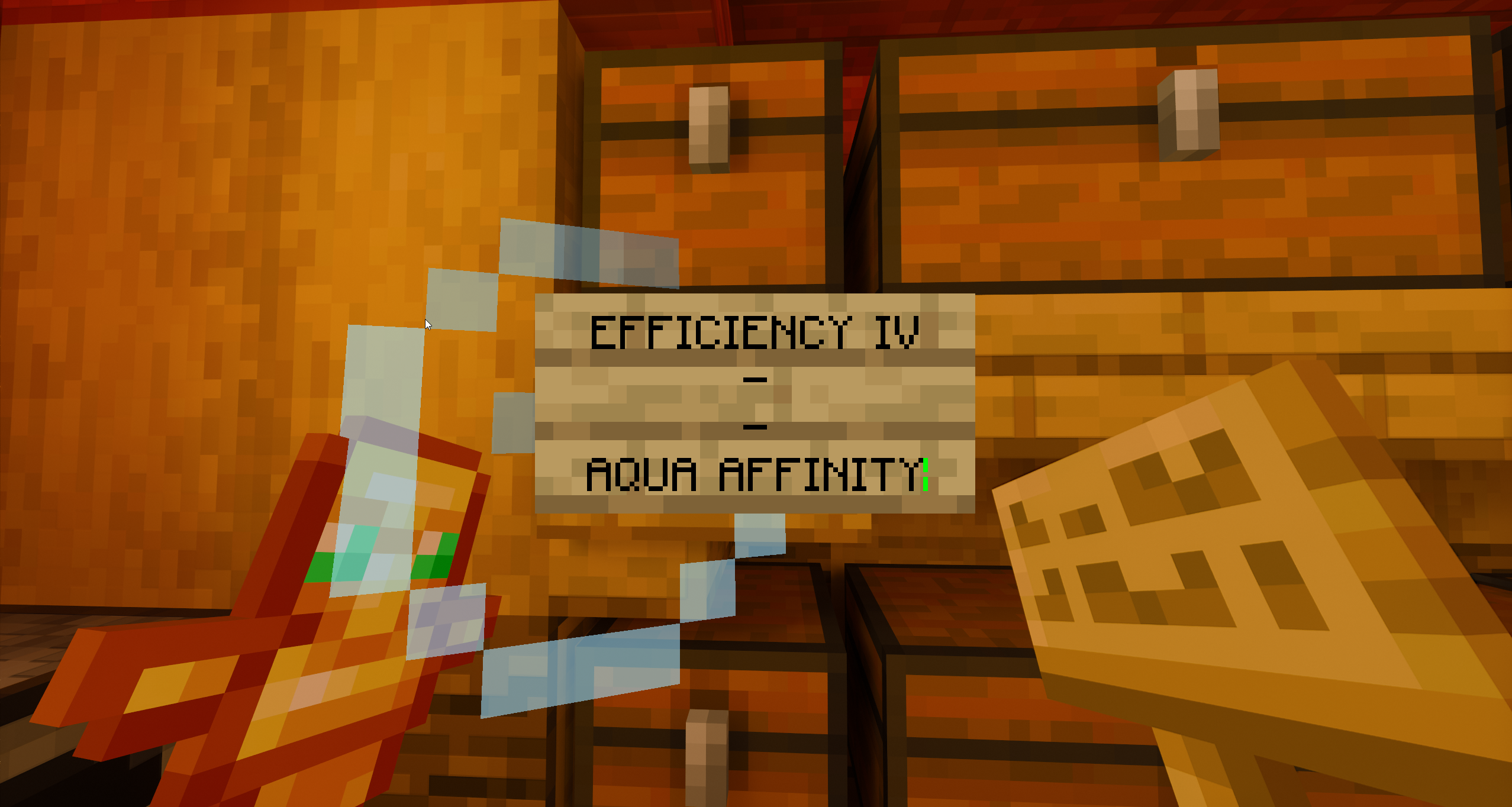
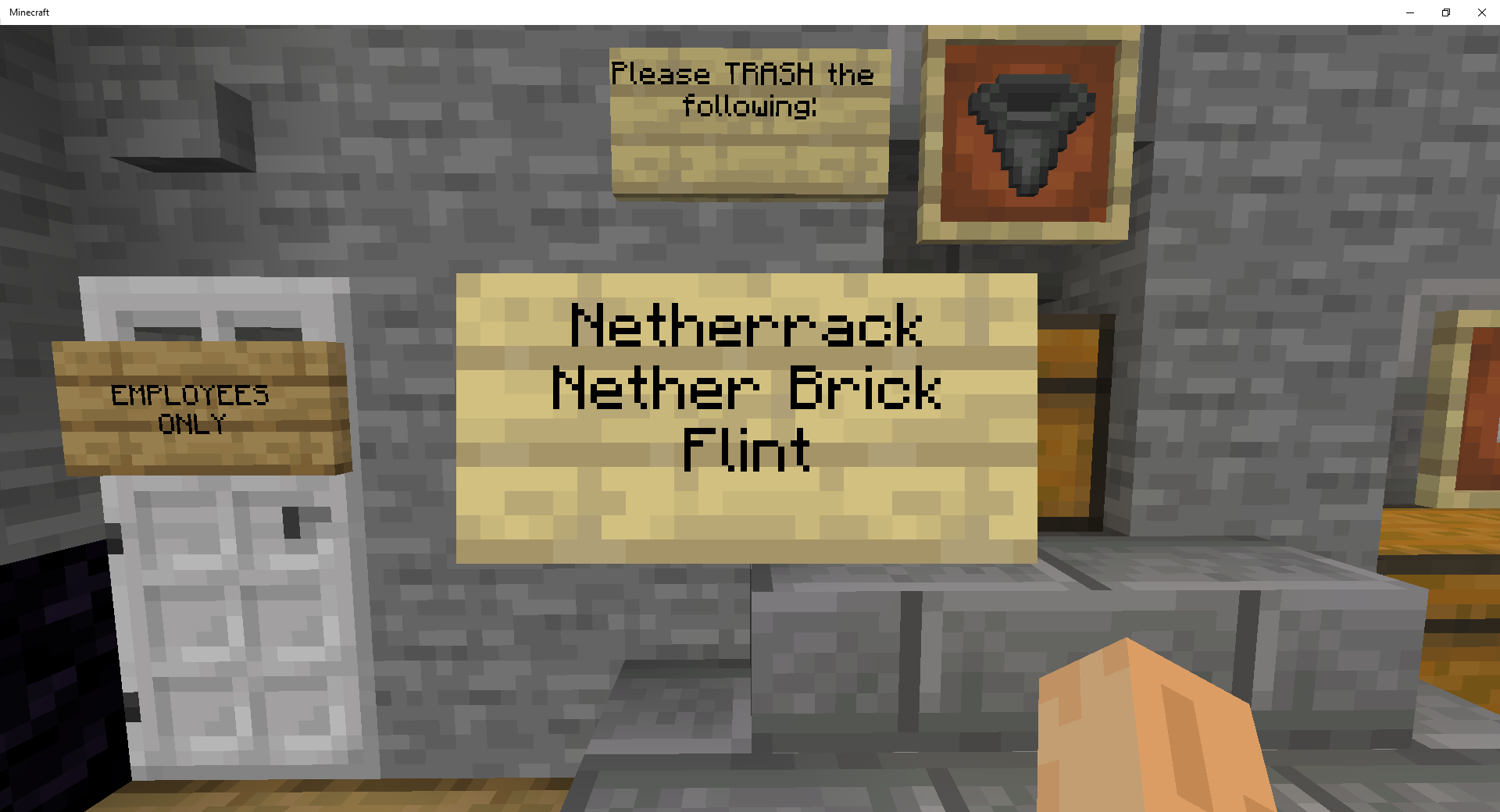
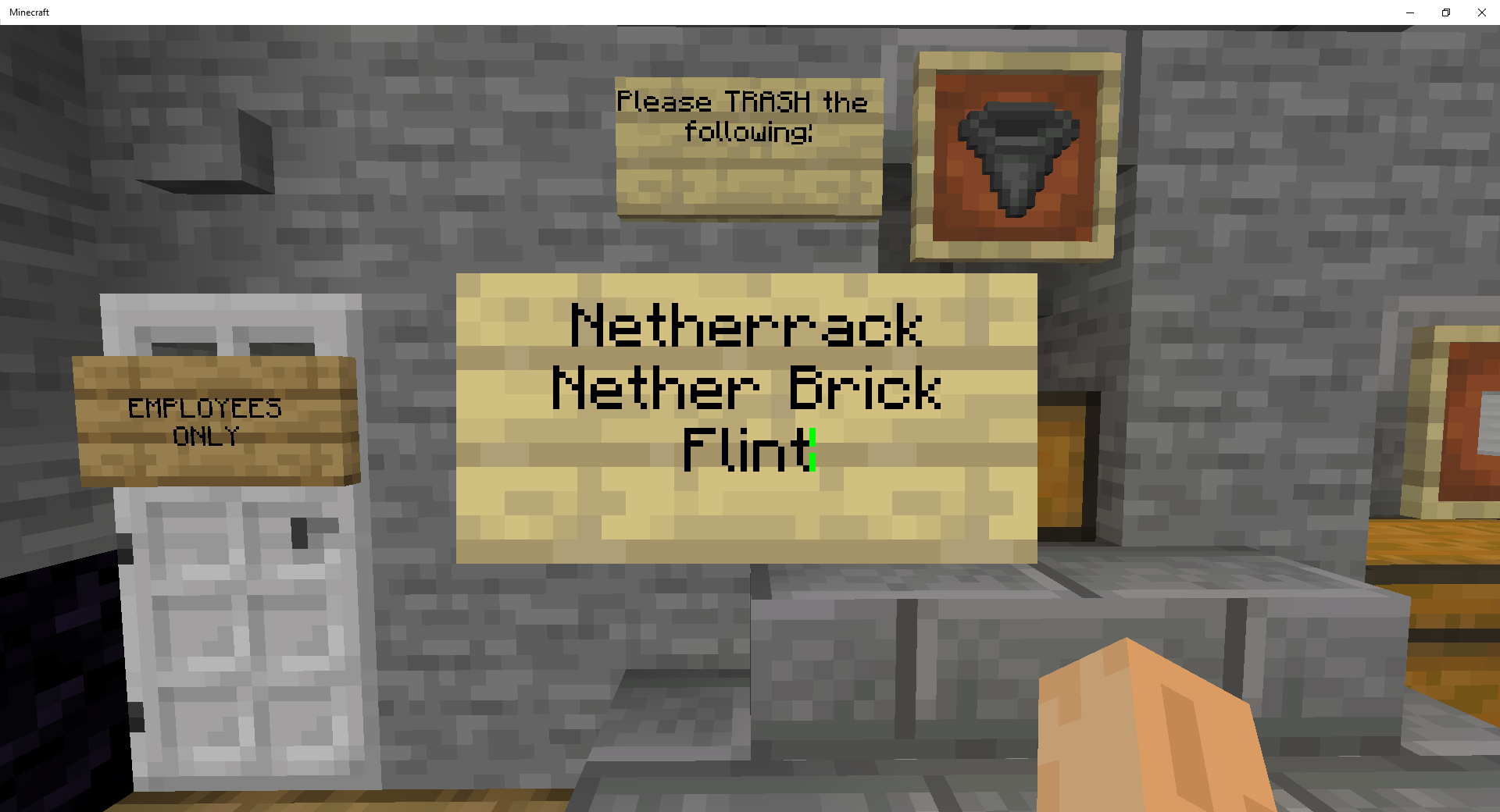
For the provided image the correctly formatted signs (centre-left and centre-right) were obtained by typing §r at the start of the sign.
Linked Issues
is duplicated by35
 BDS-16782Sign Text is Improperly WrappingDuplicate
 MCPE-140148Signs Formating WrongDuplicateMCPE-140178Signs brokenDuplicateMCPE-140237Signs don't let me space outDuplicateMCPE-140245signs won't allow new lines.DuplicateMCPE-140260Line Breaks are automatically removed from signs DuplicateMCPE-140281Sign Text ignoring newlines in-gameDuplicateMCPE-140700Sign text not changing linesDuplicateMCPE-140755Text edits with Return Key (line feed) not saving on books or signsDuplicateMCPE-141080Wooden signsDuplicateMCPE-141414Writing Sign Beginning With Non-Alpha-Numeric CharacterDuplicateMCPE-141729Book and Quill Ignoring New Line (pressing enter)DuplicateMCPE-142999Signage Error When Written in Korean and EnglishDuplicateMCPE-144664Signs not working right DuplicateMCPE-151420Book and Quill - Messes up listsDuplicateMCPE-151582Book and Quill writing DuplicateMCPE-152357Realms sign bugDuplicateMCPE-153357Signs disregarding if you pressed enter when there are more than 17 charactersDuplicateMCPE-153464Bedrock censoring too strictDuplicate
 REALMS-8889Line Breaks get removed when placing sign or editing book & quillDuplicateREALMS-8921SIgn text errorDuplicateREALMS-8924Sign text is automatically moved up on XboxDuplicateREALMS-8974Books and signs line breaks don't save properlyDuplicateREALMS-8981Text in both signs and books being moved once done being writtenDuplicateREALMS-9019Enter Key Not Working in Signs or BooksDuplicateREALMS-9031Line breaks entered in signs on realms do not properly enter.DuplicateREALMS-9117Book and Quill ignoring newlines in-gameDuplicateREALMS-9363Signs are very, very buggy in inconsistent waysDuplicateREALMS-9725Sign Formatting not applied when placedDuplicateREALMS-9789Sings not using spaces/newlines rightDuplicateREALMS-9842Sign formatting issueDuplicateREALMS-9882Signs and Books Losing Formatting When ClosingDuplicateREALMS-9968Signs' Columns don't work properly.DuplicateREALMS-10015Line Breaks are broken in book and quills.DuplicateREALMS-10046Words on signs not displayed as written Duplicate
relates to5
REALMS-3491Some normal words are censored or go blank in chat, signs, books, and when renaming.FixedREALMS-2514Text Formatting Censored On RealmsWorks As IntendedREALMS-3508Sometimes signs show up as “{ empty }”.FixedREALMS-7204Sign clipboard modifying after pasting 3-5 timesFixedREALMS-9223Edited text in a book disappearsAwaiting ResponseAttachments11


![[Mod] GoldenHelmet](../../../data/avatars/users/18951.svg)





Created Issue:
Text on signs may ignore space/newline formatting
Summary
Text written on signs can ignore spacing/newline formatting under certain conditions. This might relate to
MCPE-20759, but I am quite unsure on this, and I have encountered this only on Realms so far (thus reporting under REALMS).Reproduction steps
There is no clear situation under which the problem will occur, however when it does occur, the following has been observed of the affected signs:
- Newline(s)/space(s) is/are added before the affected text.
- There is no space between the text; for example, Waterloo will cause the bug to appear, but Water loo will not. Formatting symbols also count as text in this case.
- The text does not overflow onto the next line; for example, if the text starts out on line 2 but more typing causes it to go to line 3, the bug will not appear.
Video demonstrating the bug: https://youtu.be/pAyDxKMng0c
The bug has been checked to occur without any addons both server-side (Realms) and client-side. The bug may come and go without any clear explanation.
For the provided image the correctly formatted signs (centre-left and centre-right) were obtained by typing §r at the start of the line.
Attachments1
Summary
Text written on signs can ignore spacing/newline formatting under certain conditions. This might relate to
MCPE-20759, but I am quite unsure on this, and I have encountered this only on Realms so far (thus reporting under REALMS).Reproduction steps
There is no clear situation under which the problem will occur, however when it does occur, the following has been observed of the affected signs:
- Newline(s)/space(s) is/are added before the affected text.
- There is no space between the text; for example, Waterloo will cause the bug to appear, but Water loo will not. Formatting symbols also count as text in this case.
- The text does not overflow onto the next line; for example, if the text starts out on line 2 but more typing causes
it to go to line 3, the bug will not appear.Video demonstrating the bug: https://youtu.be/pAyDxKMng0c
The bug has been checked to occur without any addons both server-side (Realms) and client-side. The bug may come and go without any clear explanation.
For the provided image the correctly formatted signs (centre-left and centre-right) were obtained by typing §r at the start of the line.
Summary
Text written on signs can ignore spacing/newline formatting under certain conditions. This might relate to
MCPE-20759, but I am quite unsure on this, and I have encountered this only on Realms so far (thus reporting under REALMS).Reproduction steps
There is no clear situation under which the problem will occur, however when it does occur, all of the following has been observed of the affected signs:
- Newline(s)/space(s) is/are added before the affected text.
- There is no space between the text; for example, Waterloo will cause the bug to appear, but Water loo will not. Formatting symbols also count as text in this case.
- The text does not overflow onto the next line; for example, if the text starts out on line 2 but more typing causes the text to go to line 3, the bug will not appear.
Video demonstrating the bug: https://youtu.be/pAyDxKMng0c
The bug has been checked to occur without any addons both server-side (Realms) and client-side. The bug may come and go without any clear explanation.
For the provided image the correctly formatted signs (centre-left and centre-right) were obtained by typing §r at the start of the line.
Summary
Text written on signs can ignore spacing/newline formatting under certain conditions. This might relate to
MCPE-20759, but I am quite unsure on this, and I have encountered this only on Realms so far (thus reporting under REALMS).Reproduction steps
There is no clear situation under which the problem will occur, however when it does occur, all of the following has been observed of the affected signs:
- Newline(s)/space(s) is/are added before the affected text.
- There is no space between the text; for example, Waterloo will cause the bug to appear, but Water loo will not. Formatting symbols also count as text in this case.
- The text does not overflow onto the next line; for example, if the text starts out on line 2 but more typing causes the text to go to line 3, the bug will not appear.
Video demonstrating the bug: https://youtu.be/pAyDxKMng0c
The bug has been checked to occur without any addons both server-side (Realms) and client-side. The bug may come and go without any clear explanation.
For the provided image the correctly formatted signs (centre-left and centre-right) were obtained by typing §r at the start of the
line.Summary
Text written on signs can ignore spacing/newline formatting under certain conditions. This might relate to
MCPE-20759, but I am quite unsure on this, and I have encountered this only on Realms so far (thus reporting under REALMS).Reproduction steps
There is no clear situation under which the problem will occur, however when it does occur, all of the following has been observed of the affected signs:
- Newline(s)/space(s) is/are added before the affected text.
- There is no space between the text; for example, Waterloo will cause the bug to appear, but Water loo will not. Formatting symbols also count as text in this case.
- The text does not overflow onto the next line; for example, if the text starts out on line 2 but more typing causes the text to go to line 3, the bug will not appear.
Video demonstrating the bug: https://youtu.be/pAyDxKMng0c
The bug has been checked to occur without any addons both server-side (Realms) and client-side. The bug may come and go without any clear explanation.
For the provided image the correctly formatted signs (centre-left and centre-right) were obtained by typing §r at the start of the sign.
Summary
Text written on signs can ignore spacing/newline formatting under certain conditions. This might relate to
MCPE-20759, but I am quite unsure on this, and I have encountered this only on Realms so far (thus reporting under REALMS).Reproduction steps
There is no clear situation under which the problem will occur, however when it does occur, all of the following has been observed of the affected signs:
- Newline(s)/space(s) is/are added before the affected text.
- There is no space between the text; for example, Waterloo will cause the bug to appear, but Water loo will not. Formatting symbols also count as text in this case.
- The text does not overflow onto the next line; for example, if the text starts out on line 2 but more typing causes the text to go to line 3, the bug will not appear.
Video demonstrating the bug: https://youtu.be/pAyDxKMng0c
The bug has been checked to occur without any addons both server-side (Realms) and client-side. The bug may come and go without any clear explanation.
For the provided image the correctly formatted signs (centre-left and centre-right) were obtained by typing §r at the start of the sign.
Summary
Text written on signs can ignore spacing/newline formatting under certain conditions. This might relate to
MCPE-20759, but I am quite unsure on this, and I have encountered this only on Realms so far (thus reporting under REALMS).Reproduction steps
There is no clear situation under which the problem will occur, however when it does occur, all of the following has been observed of the affected signs:
- Newline(s)/space(s) is/are added before the affected text.
There is no space between the text; for example, Waterloo will cause the bug to appear, but Water loo will not. Formatting symbols also count as text in this case.- The text does not overflow onto the next line; for example, if the text starts out on line 2 but more typing causes the text to go to line 3, the bug will not appear.
Video demonstrating the bug: https://youtu.be/pAyDxKMng0c
The bug has been checked to occur without any addons both server-side (Realms) and client-side. The bug may come and go without any clear explanation.
For the provided image the correctly formatted signs (centre-left and centre-right) were obtained by typing §r at the start of the sign.
relates to
relates to
It's still happening in 1.17.32, but there's a key step: you have to cause the chunk to reload.
Steps to reproduce:
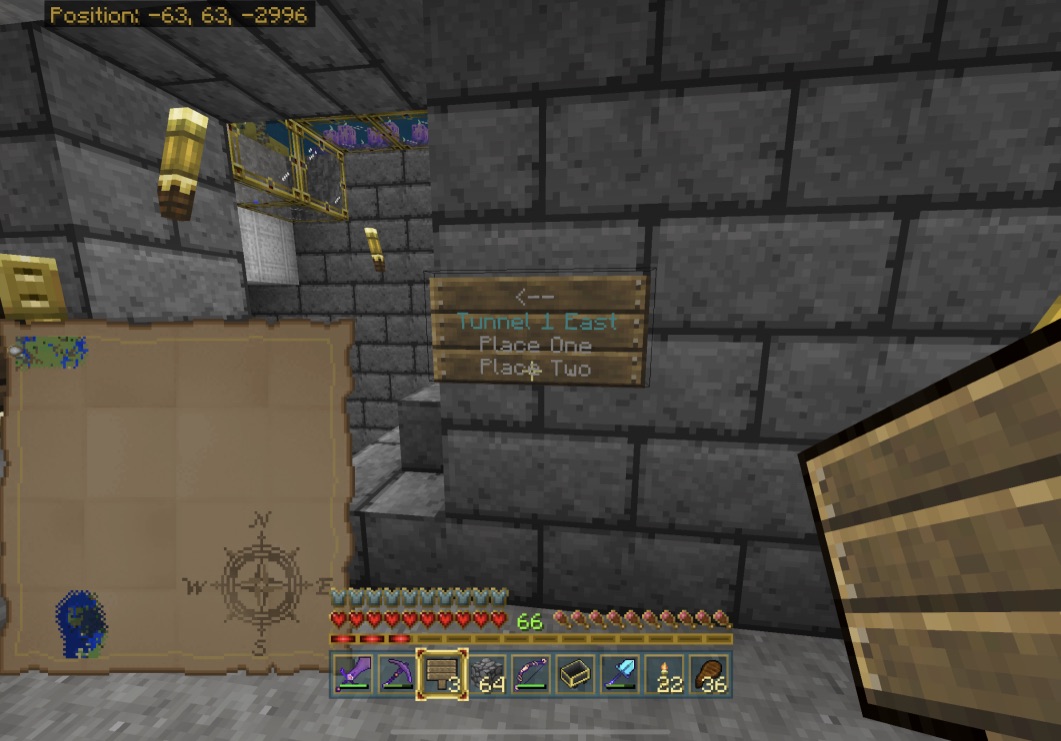
- Place a sign and enter text (see my exemplar text below). It appears as expected as you enter it (first screenshot).
- Exit the sign editor, confirm that the sign still appears as expected.
- Leave the area, and travel far enough away that the chunk where the sign is placed is no longer loaded. Traveling far enough away that the area around the sign doesn't render is usually far enough.
- Come back and observe the sign.
Expected results
The sign looks like it did when you left.
Actual results
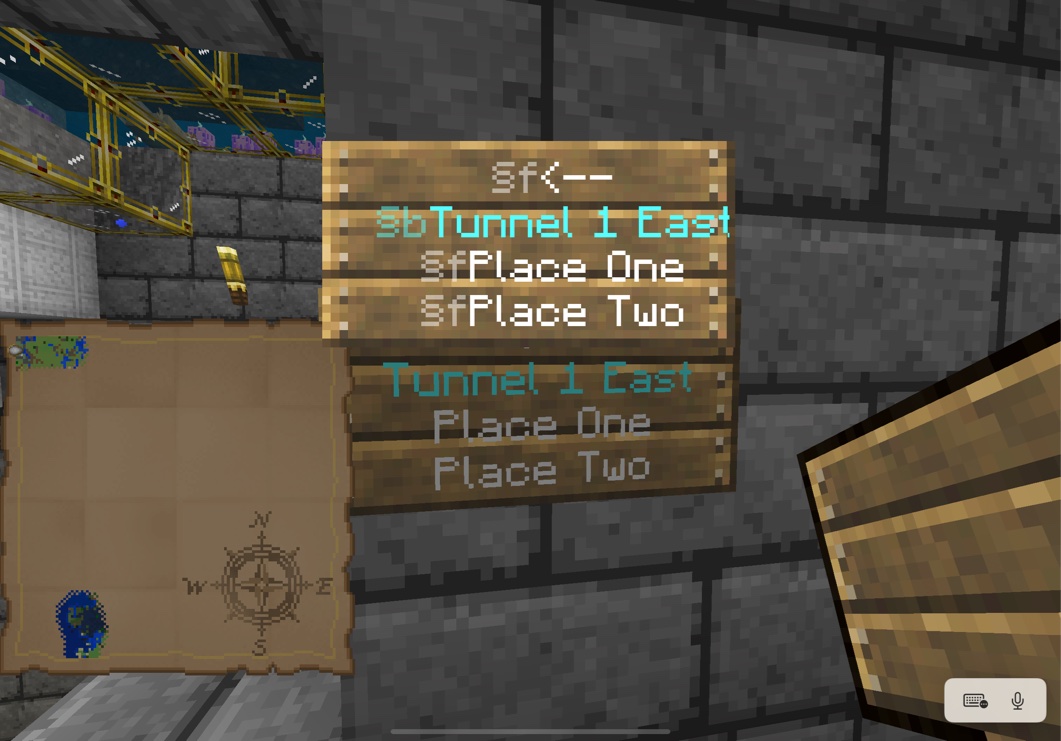
The sign is blank when you return:
Exemplar text
§f<--
§bTunnel 1 East
§fPlace One
§fPlace Two
is duplicated by
![[Mod] Greymagic27](../../../data/avatars/users/92875.png)
is duplicated by
![[Bot] Arisa](../../../data/avatars/users/43007.png)
is duplicated by
relates to
relates to
@andy escamilla: what you describe is not this bug. It sounds more like REALMS-2514 / REALMS-5898.
I am able to rename a full stack of nametags on either Windows 10 or iOS local singleplayer. I suspect that the issue here is specific to Realms and related to other bugs with text on Realms (e.g REALMS-2514, REALMS-3491, REALMS-3508, REALMS-5898, , REALMS-7204, REALMS-8889).
Are you able to rename nametags on local worlds, or in your realm using a name other than "Charlie"?
Realms have some special issues with text string parsing, and we're tracking what you describe on this ticket at REALMS-5898. Can you provide a video of this happening not on a Realm?

This partially relates to REALMS-5898
I'm not 100% that this issue is only on Realms, but I've only been able to replicate it on Realms, but even there, it's very spontaneous.
Basically, what is happening, is when I type things into a sign with a line break, it ignores it and compresses it all into one line. This also happens with books.
Another thing is that when I type certain things into a sign, it filters it out as if I'm using inappropriate language when I'm not.
(Attached below is the book line break bug as the other two files were too large to attach)
-Thank you for reading,
Arran
I cannot reproduce this in a local world. Can anyone else? If not, I will move it to the Realms project.
Robert Levandowski: thank you for mentioning the other tickets. I think you are likely correct that the fix to MCPE-130072 has caused this issue and REALMS-9214.
There is also a more fundamental and longstanding problem with string parsing on Realms captured by REALMS-2514, REALMS-3491, REALMS-3508, REALMS-5898, REALMS-7204, and REALMS-8889.
Text on placed signs disappears when you leave the vicinity of the sign and come back. It seems like this is tied to the chunk containing the sign being unloaded and reloaded.
I observed this problem on Realms, but a similar issue has been reported for BDS (BDS-15571). The issue may be related to multiple other issues with 1.17.3x: MCPE-143738, MCPE-143772, MCPE-143785, REALMS-5898 among others. It's possibly related to other text-handling issues seen with 1.17.3x, such as the (apparently resolved) issue where signs would lose formatting (§) and carriage-return characters.
I've observed this problem on the iOS and Xbox clients. It is consistently reproducible.
Steps to reproduce:
- Place a sign and enter text (see my exemplar text below). It appears as expected as you enter it.
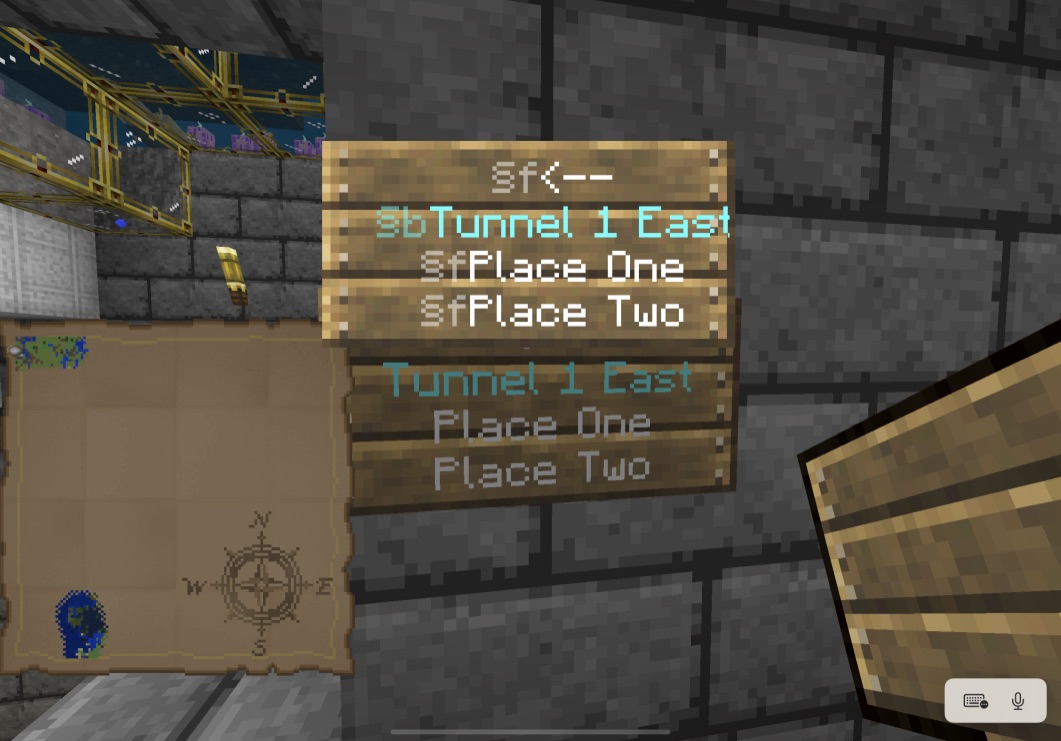
- Exit the sign editor, confirm that the sign still appears as expected.

- Leave the area, and travel far enough away that the chunk where the sign is placed is no longer loaded. Traveling far enough away that the area around the sign doesn't render is usually far enough.
- Come back and observe the sign.
Expected results
The sign looks like it did when you left.
Actual results
The sign is blank when you return: 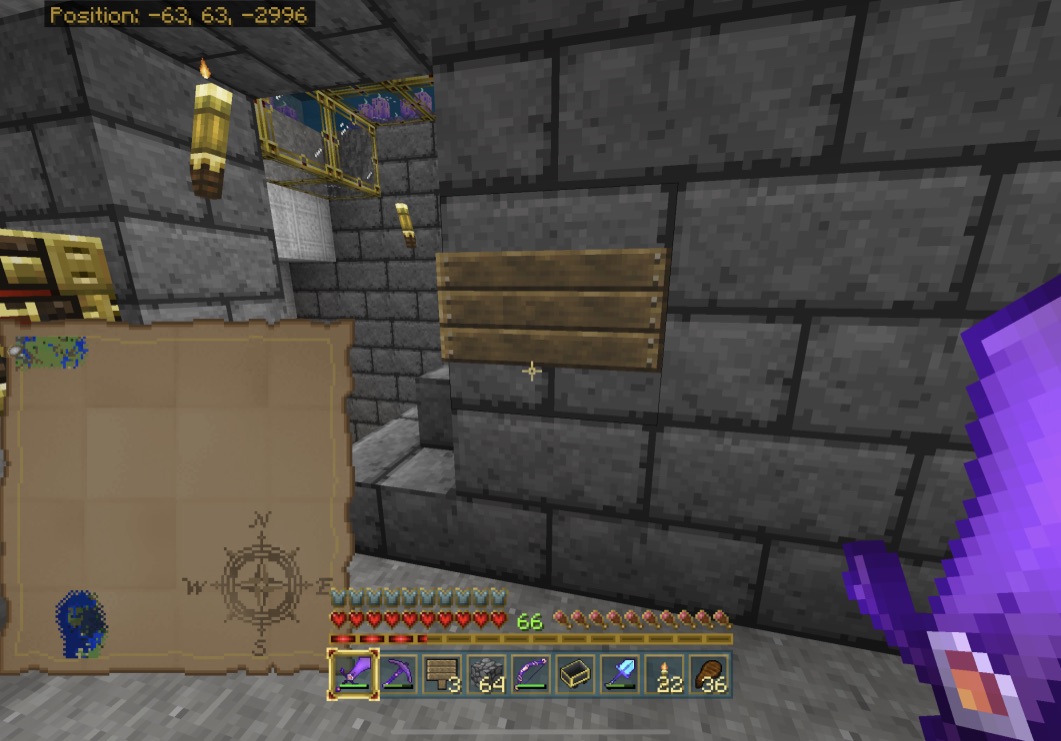
Exemplar text
§f<--
§bTunnel 1 East
§fPlace One
§fPlace Two
Thank you for your report!
We're tracking this issue in REALMS-5898, so this ticket is being resolved and linked as a duplicate.
If you would like to add a vote and any extra information to the main ticket it would be appreciated.
If you haven't already, you might like to make use of the search feature to see if the issue has already been mentioned.
Quick Links:
📓 Bug Tracker Guidelines – 💬 Community Support – 📧 Mojang Support
📓 Project Summary – ✍️ Feedback and Suggestions – 📖 Game Wiki – 📖 FAQs
– I am a bot. This action was performed automatically! The ticket was resolved by one of our moderators, and I left this message to give more information to you.
Thank you for your report!
We're tracking this issue in REALMS-5898, so this ticket is being resolved and linked as a duplicate.
If you would like to add a vote and any extra information to the main ticket it would be appreciated.
If you haven't already, you might like to make use of the search feature to see if the issue has already been mentioned.
Quick Links:
📓 Bug Tracker Guidelines – 💬 Community Support – 📧 Mojang Support (Technical Issues) – 📧 Microsoft Support (Account Issues)
📓 Project Summary – ✍️ Feedback and Suggestions – 📖 Game Wiki – 📖 FAQs
Thank you for your report!
We're tracking this issue in REALMS-5898, so this ticket is being resolved and linked as a duplicate.
If you would like to add a vote and any extra information to the main ticket it would be appreciated.
If you haven't already, you might like to make use of the search feature to see if the issue has already been mentioned.
Quick Links:
📓 Bug Tracker Guidelines – 💬 Community Support – 📧 Mojang Support (Technical Issues) – 📧 Microsoft Support (Account Issues)
📓 Project Summary – ✍️ Feedback and Suggestions – 📖 Game Wiki
– I am a bot. This action was performed automatically! The ticket was resolved by one of our moderators, and I left this message to give more information to you.
Thank you for your report!
We're tracking this issue in REALMS-5898, so this ticket is being resolved and linked as a duplicate.
If you would like to add a vote and any extra information to the main ticket it would be appreciated.
If you haven't already, you might like to make use of the search feature to see if the issue has already been mentioned.
Quick Links:
📓 Bug Tracker Guidelines – 💬 Community Support – 📧 Mojang Support (Technical Issues) – 📧 Microsoft Support (Account Issues)
📓 Project Summary – ✍️ Feedback and Suggestions – 📖 Game Wiki
– I am a bot. This action was performed automatically! The ticket was resolved by one of our moderators, and I left this message to give more information to you.
Thank you for your report!
We're tracking this issue in REALMS-5898, so this ticket is being resolved and linked as a duplicate.
If you would like to add a vote and any extra information to the main ticket it would be appreciated.
If you haven't already, you might like to make use of the search feature to see if the issue has already been mentioned.
Quick Links:
📓 Bug Tracker Guidelines – 💬 Community Support – 📧 Mojang Support (Technical Issues) – 📧 Microsoft Support (Account Issues)
📓 Project Summary – ✍️ Feedback and Suggestions – 📖 Game Wiki – 📖 FAQs
– I am a bot. This action was performed automatically! The ticket was resolved by one of our moderators, and I left this message to give more information to you.
I can confirm this in 1.17.
image-2021-08-30-18-31-45-953.png
Been having the same issue but with books.
The game keeps ignoring the spaces i put in there and just groups words together.
I cannot reproduce this in 1.17.32 using either example shown here. Is this still an issue?
It appears to me that signs are retaining their formatting in 1.17.32... until you move to another chunk and the text disappears entirely when you return. Since that's not exactly the issue reported here, I opened
MCPE-143812to track it. I found a similar (but not identical) report from a BDS user, hence using the MCPE project instead of REALMS.This is still reproducible with
Image also attached,
I still cannot reproduce using that text in a creative mode testing realm of which I am not the owner, accessed through Windows 10. But, I cannot reproduce any of the new 1.17.30 text bugs either (
REALMS-9191,REALMS-9231). I wonder if these are related to specific devices, or multiplayer, or add-ons?Reproduced with the following sign on a bedrock realm (multiplayer, win10):


My test environment was a survival (normal terrain) realm, Windows 10, not the owner, no add-ons (both realm and client-wise). The world is about 1.3GB and is almost two years old, though this issue has dated back earlier than when I reported.
Both
REALMS-9191andREALMS-9231are reproducible for me in the same world.I keep having this issue on and off. Some days it works and others it doesn’t, some days it writes nothing at all and I also have the issue with renaming things!
I think i found the problem. when players write in signs, the sign updates when ever any text is entered. while on my freind's realm, while reading to screenshot my signs to save them in case the signs messed up, i noticed the signs themselves going though the exact process agean, as if the client and server are lagging horribly. durring this process, i notice the sign ignores ALL LINE BREAKS AND ANYTIME YOU SWITCH TO A NEW LINE as if the server was reading the sign as a continuos line of text, and not a multi line text. This is what must be casuing the issue.
Steps to replicate:
1. open any realm.
2, place a sign and write the following: "Dear Dirary," enter "after walking" enter "for 2471" enter "days, nothing".
3, Wait until the sign updates (around 5-10 minutes).
4, Observe the sign reinputing your keystokes.
Expected Results:
Dear Dirary,
after walking
for 2471
days, nothing
Actual Result:
Dear Dirary,
After walking
for 2571 days,
nothing
Proposal soution: make the server code check for sign spaces by detecting "Enter" or controller equivlent move that text to the next line and modify any text below it
It's reproducing for me now as the owner of a realm. Here is a video of what Zach Guth is talking about: Relams server parses out line breaks.mp4
The reason it goes back-and-forth is that each time you type something the client updates its display, and it parses the line breaks correctly. Then a moment later the server parses the text incorrectly and sends the corrupted string data back to the the client. This is the same process with the other realms text bugs (MCPE-3491 and related), which have been misunderstood as censoring. My guess is that the realms server either uses a different unicode format than the client when it read/sends string data, or it is running string data parsing functions designed for a different unicode format that what the client uses.
@goldenhelmet when can we expect a fix for this?
I wish I could tell you. Mojang does not publish plans, prioritization notes, or timetables for fixing bugs.
I'm seeing this on a 1.18.12 Realms server consistently. It seems to be ignoring new lines completely.
Resolving this as CR as we can no longer reproduce this bug.
If this is still an issue please remake the bug report and include detailed reproduction steps, as well as a video showcasing the bug.
Quick Links:
📓 Bug Tracker Guidelines – 💬 Community Support – 📧 Mojang Support (Technical Issues) – 📧 Microsoft Support (Account Issues)
📓 Project Summary – ✍️ Feedback and Suggestions – 📖 Game Wiki