 Robert Levandowski
- macwhiz
- JIRAUSER483012
- America/New_York
- Yes
- No
 REALMS-3653
 MCPE-92410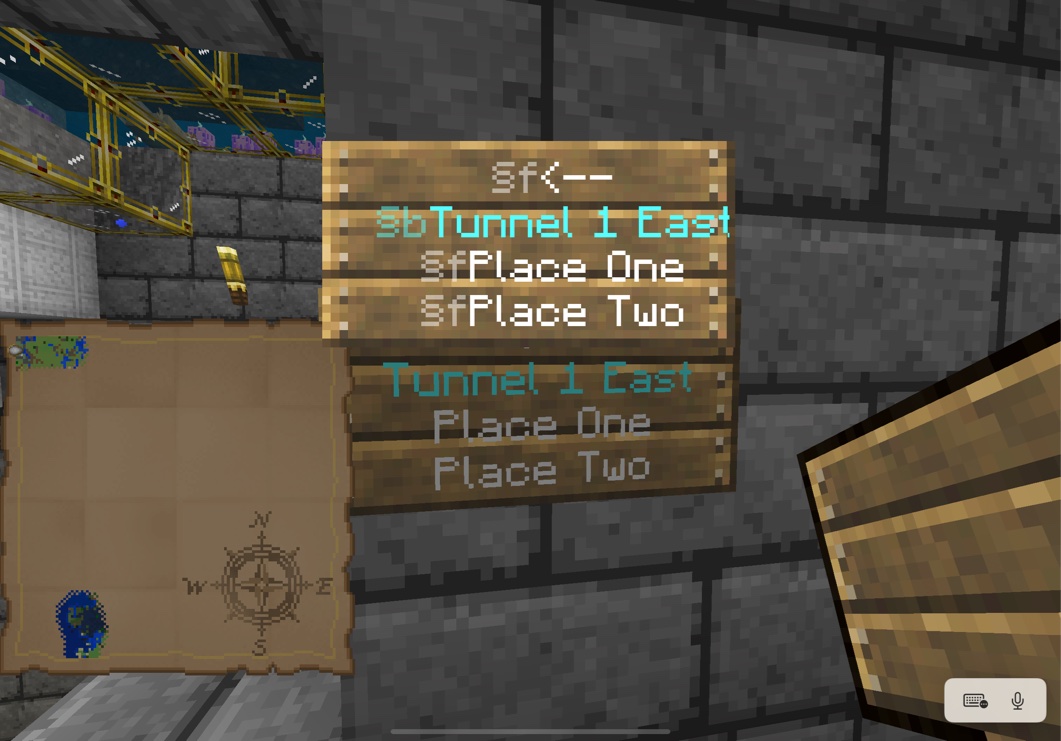
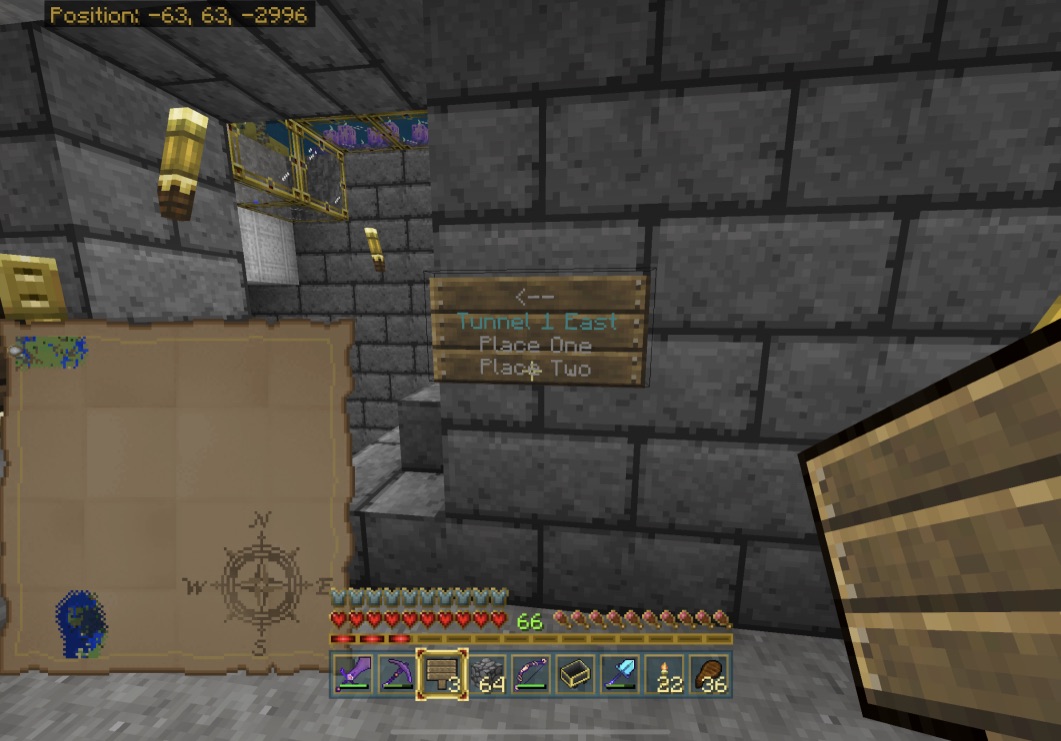


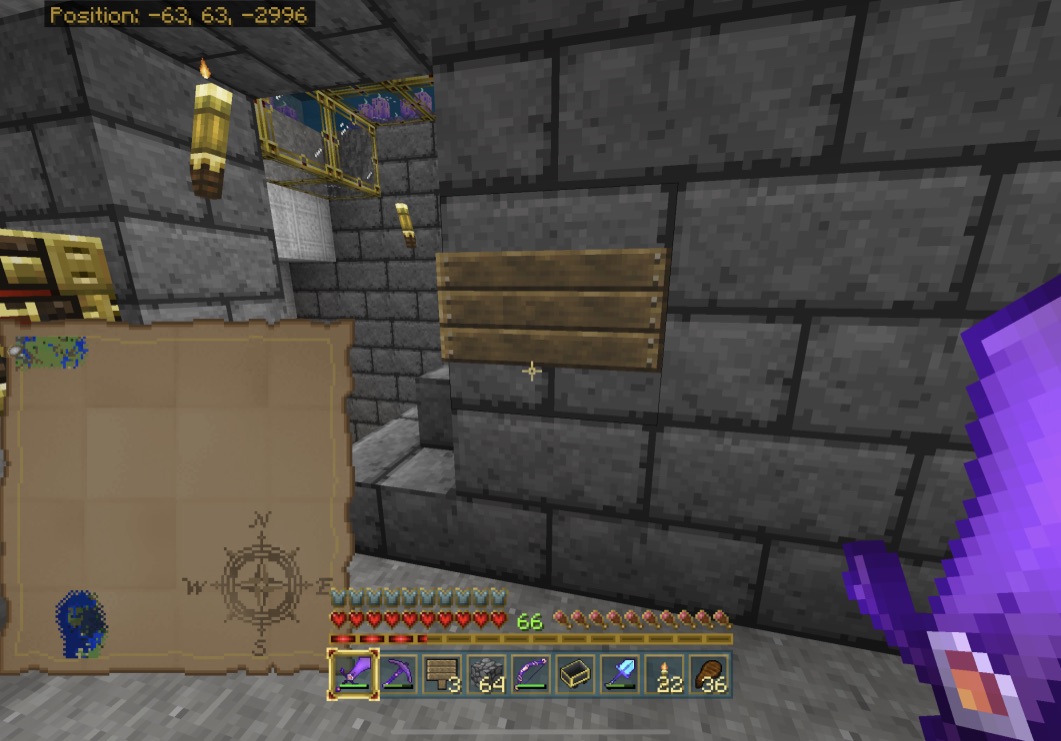
It's still happening in 1.17.32, but there's a key step: you have to cause the chunk to reload.
Steps to reproduce:
- Place a sign and enter text (see my exemplar text below). It appears as expected as you enter it (first screenshot).
- Exit the sign editor, confirm that the sign still appears as expected.
- Leave the area, and travel far enough away that the chunk where the sign is placed is no longer loaded. Traveling far enough away that the area around the sign doesn't render is usually far enough.
- Come back and observe the sign.
Expected results
The sign looks like it did when you left.
Actual results
The sign is blank when you return:
Exemplar text
§f<--
§bTunnel 1 East
§fPlace One
§fPlace Two
Text on placed signs disappears when you leave the vicinity of the sign and come back. It seems like this is tied to the chunk containing the sign being unloaded and reloaded.
I observed this problem on Realms, but a similar issue has been reported for BDS (
BDS-15571). The issue may be related to multiple other issues with 1.17.3x:MCPE-143738,MCPE-143772,MCPE-143785,REALMS-5898among others. It's possibly related to other text-handling issues seen with 1.17.3x, such as the (apparently resolved) issue where signs would lose formatting (§) and carriage-return characters.I've observed this problem on the iOS and Xbox clients. It is consistently reproducible.
Steps to reproduce:
- Place a sign and enter text (see my exemplar text below). It appears as expected as you enter it
(first screenshot).- Exit the sign editor, confirm that the sign still appears as expected.
- Leave the area, and travel far enough away that the chunk where the sign is placed is no longer loaded. Traveling far enough away that the area around the sign doesn't render is usually far enough.
- Come back and observe the sign.
Expected results
The sign looks like it did when you left.
Actual results
The sign is blank when you return:
Exemplar text
§f<--
§bTunnel 1 East
§fPlace One
§fPlace Two
Text on placed signs disappears when you leave the vicinity of the sign and come back. It seems like this is tied to the chunk containing the sign being unloaded and reloaded.
I observed this problem on Realms, but a similar issue has been reported for BDS (
BDS-15571). The issue may be related to multiple other issues with 1.17.3x:MCPE-143738,MCPE-143772,MCPE-143785,REALMS-5898among others. It's possibly related to other text-handling issues seen with 1.17.3x, such as the (apparently resolved) issue where signs would lose formatting (§) and carriage-return characters.I've observed this problem on the iOS and Xbox clients. It is consistently reproducible.
Steps to reproduce:
- Place a sign and enter text (see my exemplar text below). It appears as expected as you enter it.
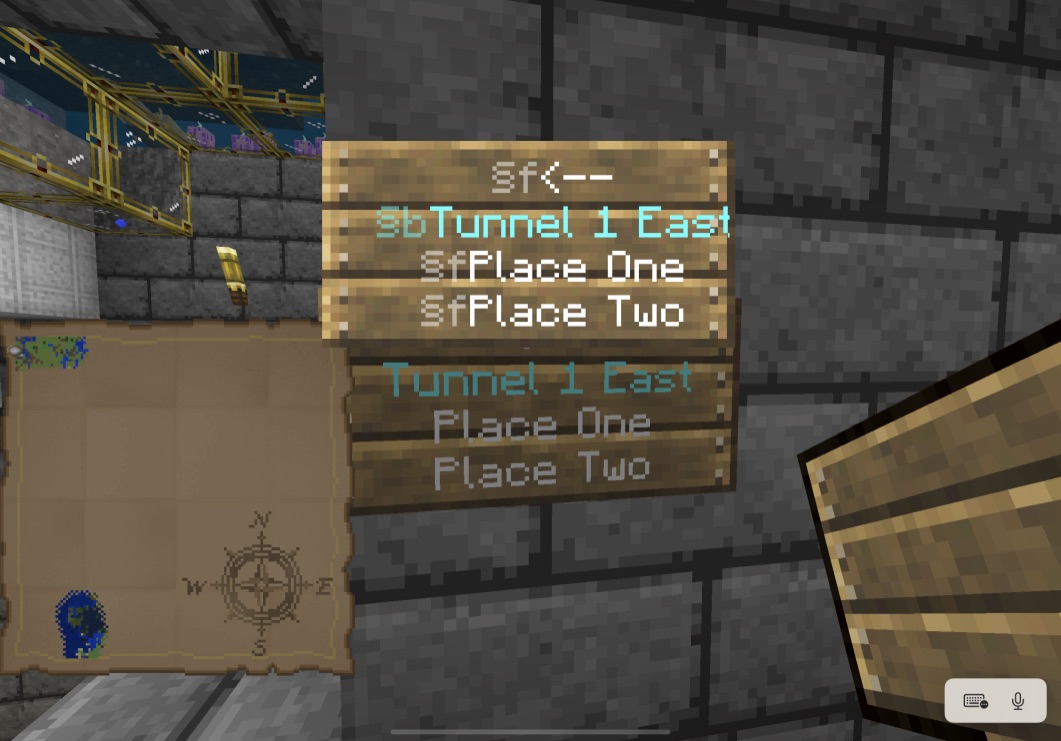
- Exit the sign editor, confirm that the sign still appears as expected.
- Leave the area, and travel far enough away that the chunk where the sign is placed is no longer loaded. Traveling far enough away that the area around the sign doesn't render is usually far enough.
- Come back and observe the sign.
Expected results
The sign looks like it did when you left.
Actual results
The sign is blank when you return:
Exemplar text
§f<--
§bTunnel 1 East
§fPlace One
§fPlace Two

@Robert Levandowski , in fact it is reproductible, but happens on random line breaks over the text. It is easier to verify on books & quills with many pages, because they would have more text.
By the way, now (1.17.40) we have another bug on top of that, making text in signs and books disappearing or not saving... refer to MCPE-146229, REALMS-9191, REALMS-9223 and REALMS-9231.
Problem seems much worse in Nether Update.
Note: Problem started with MCPE 1.16, but is equally bad, if not worse, under 1.16.1.
This bug might be related to (but definitely isn't a duplicate of)
MCPE-92410.To be clear, completely quitting does not fix the issue; it's a workaround for the issue.
A workaround that isn't required for other games published by Microsoft-owned studios, I might add... one would think that Mojang's parent company could assist with whatever code is needed to refresh the main menu networking code upon wake from sleep.
It seems like this behavior may have been tweaked. Now, it sometimes randomly discards other mats from your inventory. Really fun when you don't notice the game decided to drop your shulker box and it despawns before you go back to look for it. (Or this one time when a passing fox then picked it up and immediately ran through a nether portal...)
Observed here with fully updated iPad Pro 11" (2020).
If playing using internal speakers and the no-sound condition starts, putting on a pair of already-paired AirPods will result in sound in the AirPods. Taking the AirPods off may not restore sound from the internal speakers.
Can be reproduced consistently.
Step to Reproduce
Expected Results
Both fireworks launch and explode as expected, with the correct effects. The game continues to run normally.
Actual Results
The rocket crafted without glowstone works as expected and the game continues to run.
The rocket crafted with glowstone launches and explodes with the expected effect, but during the crackle animation, the game freezes. Either the underlying OS will detect the freeze and crash the game, or the user will need to manually force-quit the game.
At least in 1.16.40 (Xbox), the one exception is if the map stored in the shulker box is applicable to the currently-loaded chunk. That map will display its name when you hover over it; any other map in the box that has not yet been viewed by the user by transferring it to their inventory will appear as unknown.
Since Bedrock v1.16.100 was released, the lag has gotten much, much worse. I'm now playing on an Xbox Series X.
If you're on the realm by yourself, it's usually fine.
But if there's even one other player...
When riding a minecart, the cart now moves about 4 blocks, then pauses for a quarter second to half a second, and continues this indefinitely. It doesn't get better across chunk boundaries; it's constant. There's constant lag for mob updates. Other players update with a similar hitch, like they're only updating 4 times a second at best. Block drops are similarly slow.
As it stands, Realms is not fit for purpose as a product.
The problem is improved in 1.16.200 on Xbox, but still exists. With the game running from the internal SSD of an Xbox Series X, over a stable 300Mbps connection, travel in a minecart still "hitches" every two to five blocks. The pause is now momentary instead of one second or more, but it's still nowhere near as smooth as earlier versions (which themselves were prone to hitches). The problem still appears to scale depending on the number of players in the Realm.
The issue definitely isn't fixed in 1.16.210. If anything, it's worse, at least when playing on a Realm. Playing last night on an Xbox Series X, over a clean 300/30 Mbps Internet connection with open NAT, there was substantial lag of all the types previously reported. The game was far less playable than it was with 1.16.200 lately, and that's saying something.
Issue is worse in 1.16.210 release, at least when playing on a Realm.
The problem is even worse on 1.16.210.
With 1.16.200, the severity of the issue seemed to vary from day to day. Occasionally, logging out of the realm and then reconnecting a few minutes later (such as after a bathroom break) would improve the problem. Sometimes the improvement was brief, sometimes it was long-lasting.
Definitely a problem if you destroy and remake a multicolored sign that's next to another sign using the same color codes. The newly (re)placed sign will have text that's noticeably less luminant than the existing sign, even though it uses the exact same color codes.
The fact that you now have to consume glowing ink sacs to get the signs to visually match is one problem.
The fact that it's not at all clear how to even apply a glowing ink sac to a multicolored sign (e.g., the apparent need to dye it first) is another problem.
The combination of these two issues creates substantial user confusion and irritation.
When this happens and you are positive you haven't accidentally typed a string of characters that may be seen as a curse word, you can often work around the bug in the curse-word algorithm by slightly altering the sign. For instance, if you are using colored text via § codes, try using a different color, or adding a different color. I have found something as simple as changing -->
Yes, it’s still an issue. Has been with every version since reported. And the report is already in the requested format. Is anyone actually reading these things…?
Likewise seeing issue with application of any dye.
It's not just signs in Korean.
Carriage returns in signs are ignored or removed in certain circumstances.
STEPS TO REPRODUCE
§bTunnel 20 East
§3To Tunnel 12
EXPECTED RESULT
**The sign appears correctly, as it did immediately upon being placed, with the first line being white, the second line being cyan, and the third line being dark cyan.
ACTUAL RESULT
Upon returning, the sign appears as if the user had not entered any carriage returns. The sign contents wrap accordingly. As a result, the color codes are misinterpreted, with the beginnings of subsequent lines rendering in black (default color) as if the user had entered the text as displayed – the color codes are not at the beginnings of the lines as rendered, so the game renders the beginning of the line using the default color.
This issue may be related to
MCPE-142788, whereupon applying any dye to a sign causes the sign's text to disappear completely.There may be a deeper issue with signs, possibly related to 1.17.30's changes to text handling generally. I noticed in the release notes: "Unicode font now correctly highlights on Signs with glowing text (
MCPE-130072)"I also noticed a different behavior last night, that I suspect may be related to this issue. I'm wondering if both issues are bugs related to Unicode parsing and thus that bug fix. That other issue is that while a sign that contains color codes and carriage returns looks correct immediately upon placement, if one leaves and returns (causing the chunk to reload), the sign renders as if the user hadn't entered any carriage returns, messing up the layout and the coloring. (See
MCPE-143813).Also happens on Realms, and happens even with 1.17.32 (Xbox).
Since the last server side hotfix was deployed, our Realm has become unstable. At some point, the server fails to register event data: blocks break but without making the appropriate sound or dropping anything. Water stops flowing. Mobs stop moving. Once one quits, one may be unable to rejoin; typically, trying to do so hangs at the "Loading resources" prompt. When login is again possible, the world has been rolled back at least to the point where event data stopped registering, sometimes further. This occurs on both Xbox and iOS Bedrock clients. It's as if the Realms server hits a point where it can no longer synchronize world state data with the client.
I'm seeing similar results to @Drew Kaplan, except with cartography tables. I believe this is a different aspect of the same bug.
Since this appears to be an issue with delayed data synchronization generally, it makes me wonder if it's related to
REALMS-9078, where realms seem to occasionally stop synchronizing with clients.Steps to Reproduce:
Expected result:
**The map immediately reflects its new name in the hover-over tooltip text.
Actual result:
The map retains its original name, but if you check again after a brief delay (several seconds to a few minutes) it will show the correct, new name.
It appears to me that signs are retaining their formatting in 1.17.32... until you move to another chunk and the text disappears entirely when you return. Since that's not exactly the issue reported here, I opened
MCPE-143812to track it. I found a similar (but not identical) report from a BDS user, hence using the MCPE project instead of REALMS.I've seen this frequently. Often, text formatted a specific color will be censored, but will not be censored if left unformatted or if formatted with a different color. For example, I've frequently found
gets censored, but other variants, like
or
may not be censored. (Or the censorship may apply to some of the other variants, but not the first example. It seems random.) The other content of the sign may also impact whether or not this censorship occurs, so the individual examples above aren't directly reproducible.
It's as if the censorship mechanism isn't using a text comparison, but some sort of hash algorithm that has way too many collisions in its output space. Sometimes, adding or removing a single character to the sign will be enough to cause it to render without censorship. Most times, changing or omitting color codes will prevent unexpected censorship.
We found that the unplayable lag went away almost completely after we all stopped playing on the realm completely for 2-4 weeks. The realm worked without any undue lag, regardless of player load, for a few months thereafter (right up until 1.17.30, which broke Realms in so many other ways as well).
Since the problem persisted across server version upgrades, I don't think the issue was due to a memory leak / long uptime for the server instance. If so, I would've expected improvement after a server version upgrade.
It makes me wonder if the issue is related to specific server hardware instances; possibly, discontinuing use of the realm for several weeks causes it to be stopped and later migrated to another server when accessed again? That sort of thing happens with cloud services, and would explain the results we saw.
Under 1.17.3x, we're seeing some lag, but not as bad as when I originally reported this. Occasionally, block drops are delayed. This is particularly noticeable when mining deepslate coal; when doing so, blocks frequently disappear and then reappear instantly. Travel by minecart is generally smooth, with only minor "hitches" that are barely noticeable. (Before our break, minecart travel would routinely pause for half a second or more every few seconds, frequently resulting in minecart travel being slower than walking speed.)
This is slightly different, but still broken, in 1.17.40.
Signs containing only words now retain manually-entered line breaks as expected.
However, signs containing color formatting codes and/or non-word characters continue to behave as if the user didn't enter any carriage returns at all.
To reproduce:
Create a sign with the text:
Expected result:
The sign has four lines. The first, third, and fourth lines are white; the second is cyan. This was the behavior prior to 1.17.
Actual result:
The sign appears with the color formatting but without the user-entered line breaks. (In 1.17.30, the sign would appear without the line breaks and without the color formatting, as if the § character was simply omitted.)
Still occurring in 1.17.40. Text may not disappear immediately, but disappears once the chunk reloads (e.g., from traveling far enough away from the sign, or from all players logging out of the realm).
I did further testing last night and found that this isn't consistently reproducible. Sometimes it happens, sometimes it doesn't, and I haven't yet narrowed down any additional factors.
In either case, the sign text will disappear entirely when the chunk reloads (see
REALMS-9191).The net result is that signs are useless on Realms in 1.17. If you can get them to display text at all, never mind display them with the desired formatting, they will go blank the next time you leave the area or log out.
We saw this bug, but in at least one instance while playing on a Realm, the boat disappeared for its original user but NOT for another player on the realm. The other player could interact normally with the boat. When the other player broke the boat, picked it up, and then dropped it, the original player could interact with the dropped item again.
Still occurring in 1.18.2.
I've seen this happen intermittently since 18.0, particularly after ending a Realms play session on the iOS client and resuming later on Xbox or vice-versa. (It seems to happen more often after playing on iOS, but not exclusively so.)
When I end a play session, my habit is to:
Why do I do this? Because it's necessary for the Bedrock client to work properly.
On iOS, if one exits a game session and then starts a new one without first force-quitting the app, audio doesn't work (
MCPE-101027). On both platforms, if one exits a game session and allows the app to be backgrounded, the game loses network connectivity and Realms cannot be loaded. The workaround to these longstanding bugs is to forcibly quit the game app after each play session. This has become an ingrained habit over the years.When this bug triggers, there's a range of oddities that suggest database corruption in the Realm as a result of the bug:
Possibly related: