 WEB-4540
Grey, unclickable GO TO CHECKOUT
Tested on Microsoft Edge Version 92.0.891.1 (Official build) dev (64-bit) & iPadOS 14.6 (iPad 6th gen) Safari
Users are unable to complete a purchase of Minecraft Dungeons items within their cart due to the GO TO CHECKOUT appearing grey and is unclickable.
- Open an In-Private/Incognito Window (to avoid interface from extensions & cookies)
- Add any item to the cart.
- Click on Cart (to arrive at minecraftdungeons.net/cart/ )
- Click on GO TO CHECKOUT
- Sign in with a Microsoft Account, following any log in prompts shown
Expected result: a Green, clickable GO TO CHECKOUT button and continues purchase procedure.
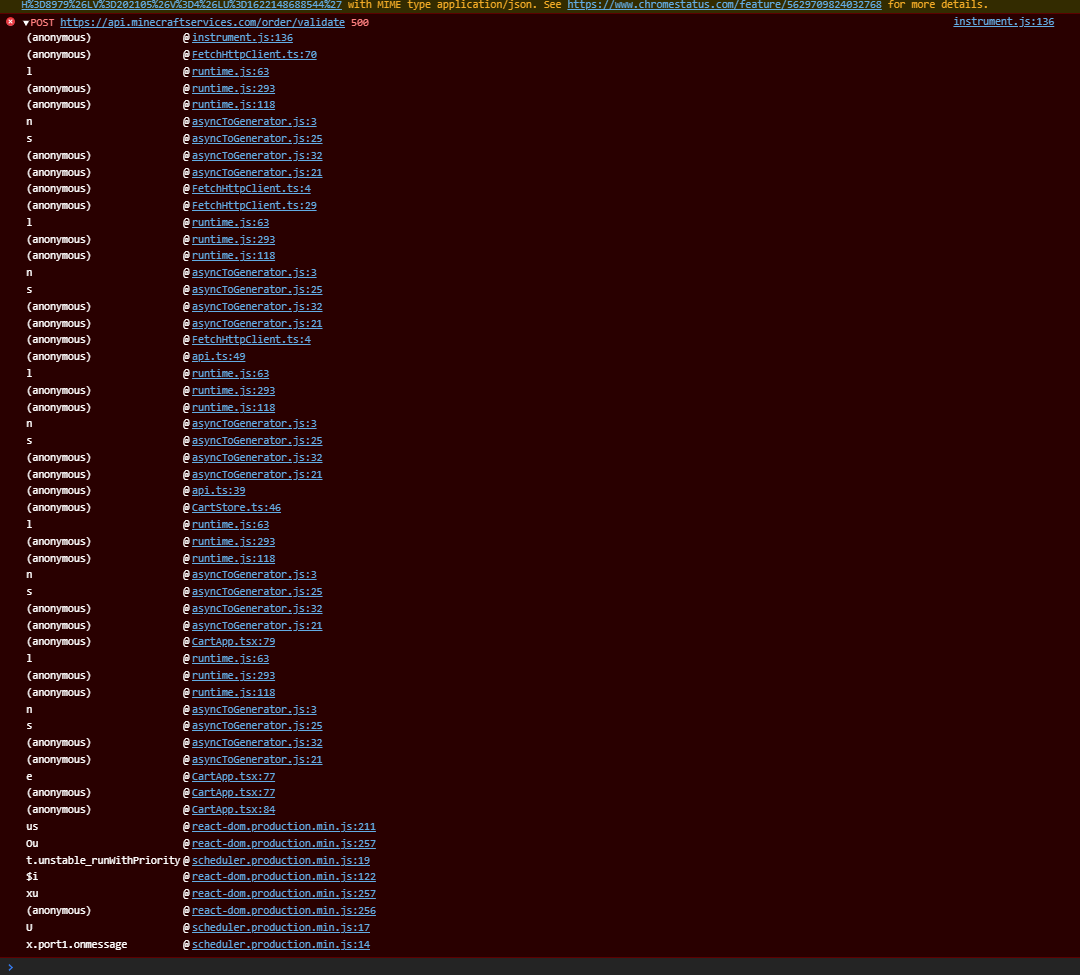
Actual Result: a Grey, unclickable GO TO CHECKOUT button that prevents continuation of purchase procedure. In the developer error console: instrument.js:136 POST https://api.minecraftservices.com/order/validate 500 is displayed.
Linked Issues
![[Mod] Raybeano99](../../../data/avatars/users/55518.png)
 Important
Created Issue:
Grey, unclickable GO TO CHECKOUT
Tested on Microsoft Edge Version 92.0.891.1 (Official build) dev (64-bit) & iPadOS 14.6 (iPad 6th gen) Safari
Users are unable to complete a purchase of Minecraft Dungeons items within their cart due to the GO TO CHECKOUT appearing grey and is unclickable.
- Open an In-Private/Incognito Window (to avoid interface from extensions & cookies)
- Add any item to the cart.
- Click on Cart (to arrive at minecraftdungeons.net/cart/ )
- Click on GO TO CHECKOUT
- Sign in with a Microsoft Account, following any log in prompts shown
Expected result: a Green, clickable GO TO CHECKOUT button and continues purchase procedure.
Actual Result: a Grey, unclickable GO TO CHECKOUT button that prevents continuation of purchase procedure. In the developer error console: {{instrument.js:136 POST https://api.minecraftservices.com/order/validate 500 }} is displayed.
Linked Issues
relates to1
TRASH-37243
Attachments1
 Normal
Tested on Microsoft Edge Version 92.0.891.1 (Official build) dev (64-bit) & iPadOS 14.6 (iPad 6th gen) Safari
Users are unable to complete a purchase of Minecraft Dungeons items within their cart due to the GO TO CHECKOUT appearing grey and is unclickable.
- Open an In-Private/Incognito Window (to avoid interface from extensions & cookies)
- Add any item to the cart.
- Click on Cart (to arrive at minecraftdungeons.net/cart/ )
- Click on GO TO CHECKOUT
- Sign in with a Microsoft Account, following any log in prompts shown
Expected result: a Green, clickable GO TO CHECKOUT button and continues purchase procedure.
Actual Result: a Grey, unclickable GO TO CHECKOUT button that prevents continuation of purchase procedure. In the developer error console:{{instrument.js:136 POSThttps://api.minecraftservices.com/order/validate500 }}is displayed.
Tested on Microsoft Edge Version 92.0.891.1 (Official build) dev (64-bit) & iPadOS 14.6 (iPad 6th gen) Safari
Users are unable to complete a purchase of Minecraft Dungeons items within their cart due to the GO TO CHECKOUT appearing grey and is unclickable.
- Open an In-Private/Incognito Window (to avoid interface from extensions & cookies)
- Add any item to the cart.
- Click on Cart (to arrive at minecraftdungeons.net/cart/ )
- Click on GO TO CHECKOUT
- Sign in with a Microsoft Account, following any log in prompts shown
Expected result: a Green, clickable GO TO CHECKOUT button and continues purchase procedure.
Actual Result: a Grey, unclickable GO TO CHECKOUT button that prevents continuation of purchase procedure. In the developer error console: instrument.js:136 POST https://api.minecraftservices.com/order/validate 500 is displayed.
![[Mod] Chandler](../../../data/assets/gravatar/triwonder81.png)
![[Mojang] Web Team](../../../data/avatars/users/10122.svg) [Mojang] Web Team
[Mojang] Web Teamis duplicated by
![[Mod] Greymagic27](../../../data/avatars/users/92875.png)

relates to
![[Mod] markderickson](../../../data/avatars/users/18946.svg)
Thank you for your report!
We're tracking this issue in WEB-4540, so this ticket is being resolved and linked as a duplicate.
If you would like to add a vote and any extra information to the main ticket it would be appreciated.
If you haven't already, you might like to make use of the search feature to see if the issue has already been mentioned.
Quick Links:
📓 Bug Tracker Guidelines – 💬 Community Support – 📧 Mojang Support
📓 Project Summary – ✍️ Feedback and Suggestions – 📖 Game Wiki
does noone care about this?
I've been in discussion with the reporter and neither they nor me can reproduce this. If you are reading this and are experiencing the same problem please feel free to open a new report.
We've actually identified what the cause for this was, and has since fixed it. Thanks for reporting!