 5ives
5ives
- 5ives
- 5ives
- Australia/Sydney
- Yes
- No
 MC-267
![[Mojang] Grum (Erik Broes)](../../../data/assets/gravatar/grum.png)
![[Mojang] Nathan Adams](../../../data/assets/gravatar/dinnerbone.png)

![[Mojang] elvendorke](../../../data/avatars/users/81677.png)
![[Mod] Sonicwave](../../../data/avatars/users/94627.png)

When you reach the other side of a nether portal the animation plays forever until you step out of it, even in creative
What I expected:
After reaching the end of the portal the animation shouldn't playWhat
actuallyhappened:
I reached the end of the portal and the animation started playing.To Reproduce:
1. Build a nether portal.
2. Enter it and wait 'till you get to the other side
3. The animation will start playing when it shouldn'tWhen you reach the other side of a nether portal the animation plays forever until you step out of it, even in creative.
What I expected:
After reaching the end of the portal the animation shouldn't playWhat happened:
I reached the end of the portal and the animation started playing.To Reproduce:
1. Build a nether portal.
2. Enter it and wait 'till you get to the other side
3. The animation will start playing when it shouldn't
When reaching the end of a nether portal the animation plays forver.
When you reach the other side of a nether portal the animation plays forever until you step out of it, even in creative. This can cause lag on lower end computers.
What I expected:
After reaching the end of the portal the animation shouldn't playWhat happened:
I reached the end of the portal and the animation started playing.To Reproduce:
1. Build a nether portal.
2. Enter it and wait 'till you get to the other side
3. The animation will start playing when it shouldn't
When reaching the end of a nether portal the animation plays forver until stepped out of.
When you reach the other side of a nether portal the animation plays forever until you step out of it, even in creative. This can cause lag on lower end computers.
What I expected:
After reaching the end of the portal the animation shouldn't playWhat happened:
I reached the end of the portal and the animation started playing.To Reproduce:
1. Build a nether portal.
2. Enter it and wait 'till you get to the other side
3. The animation will start playing when it shouldn't
When reaching theendof a nether portal the animation plays forver until stepped out of.When reaching the other side of a nether portal the animation plays forver until stepped out of.
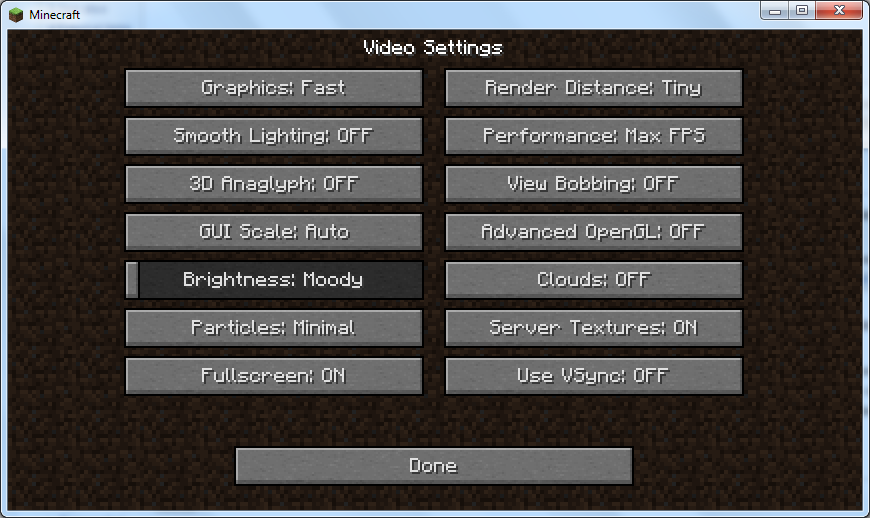
Toggling fullscreen with F11 doesn't update 'Fullscreen: OFF/ON' in Video Settings and assuming it was correct beforehand, displays an incorrect status until it is either toggled back with F11 or the status toggled to suit with the button.
What I expected:
When using F11 to toggle fullscreen the status 'Fullscreen: OFF/On should update.
What happened:
The status doesn't update and stays the sameTo reproduce:
1. Navigate to Video Settings
2. Hit F11
3. The status is incorrect (assuming it was correct beforehand).Screenshot:
Toggling fullscreen with F11 doesn't update 'Fullscreen: OFF/ON' in Video Settings and assuming it was correct beforehand, displays an incorrect status until it is either toggled back with F11 or the status toggled to suit with the button.
What I expected:
When using F11 to toggle fullscreen the status 'Fullscreen: OFF/On should update.
What happened:
The status doesn't update and stays the sameTo reproduce:
1. Navigate to Video Settings
2. Hit F11
3. The status is incorrect (assuming it was correct beforehand).Screenshot:
Toggling fullscreen with F11 doesn't update 'Fullscreen: OFF/ON' in Video Settings and assuming it was correct beforehand, displays an incorrect status until it is either toggled back with F11 or the status toggled to suit with the button.
What I expected:
When using F11 to toggle fullscreen the status 'Fullscreen: OFF/On should update.
What happened:
The status doesn't update and stays the sameTo reproduce:
1. Navigate to Video Settings
2. Hit F11
3. The status is incorrect (assuming it was correct beforehand).Screenshot:
Toggling fullscreen with F11 doesn't update 'Fullscreen: OFF/ON' in Video Settings and assuming it was correct beforehand, displays an incorrect status until it is either toggled back with F11 or the status toggled to suit with the button.
What I expected:
When using F11 to toggle fullscreen the status 'Fullscreen: OFF/On should update.
What happened:
The status doesn't update and stays the sameTo reproduce:
1. Navigate to Video Settings
2. Hit F11
3. The status is incorrect (assuming it was correct beforehand).Screenshot:
The fullscreen/windowed mode toggle status is inconistent when usingF11.The fullscreen/windowed mode toggle status is inconistent when using shortcuts.
The fullscreen/windowed mode toggle status is inconistent when usingshortcuts.The fullscreen/windowed mode toggle status is inconistent when using hotkeys.
Most text boxes reset when the window changes size or fullscreen mode is toggled.Most text boxes revert when the window changes size or fullscreen mode is toggled.
Changing text in most text boxes then toggling fullscreen or resizing the window will revert the text. Exceptions are naming (not renaming) a world, entering a seed and writing on a sign.
What I excepted:
When (for example) renaming a 'Flower' to 'Dandelion' fullscreen or resizing the window, the text should not revert.
What happened:
The text is reverted back to 'Flower'.To reproduce:
1. Press 't' tochat.
2. Type something but don't send it.
3. Toggle fullscreen or resize the window.
4. The text disappears, or reverts to nothing when it should remain.Changing text in most text boxes then toggling fullscreen or resizing the window will revert the text. Exceptions are naming (not renaming) a world, entering a seed and writing on a sign.
What I excepted:
When (for example) renaming a 'Flower' to 'Dandelion' fullscreen or resizing the window, the text should not revert.
What happened:
The text is reverted back to 'Flower'.To reproduce:
1. Press 't' to bring up the console.
2. Type something but don't send it.
3. Toggle fullscreen or resize the window.
4. The text disappears, or reverts to nothing when it should remain.
If the inventory is left open when a potion affect wears off the inventory remains pushed over as if the affect balloon was still there.
What I excepted:
When the affect wore off the inventory should have re-centered.
What happened:
The inventory remained pushed over.To reproduce:
1. Obtain a splash potion (Regeneration/Poisen II (0:16) are the quickest).
2. Open the inventory and wait for it to wear off.
3. The Inventory remains pushed over when it should re-center.
If the inventory is left open when a potion affect wears off the inventory remains pushed over as if the affect balloon was still there.
What I excepted:
When the affect wore off the inventory should have re-centered.
What happened:
The inventory remained pushed over until re-openefd.To reproduce:
1. Obtain a splash potion (Regeneration/Poisen II (0:16) are the quickest).
2. Open the inventory and wait for it to wear off.
3. The Inventory remains pushed over when it should re-center.
If the inventory is left open when a potion affect wears off the i
nventoryremains pushed over as if the affect balloon was still there.What I excepted:
When the affect wore off the inventory should have re-centered.
What happened:
The inventory remained pushed overuntil re-openefd.To reproduce:
1. Obtain a splash potion (Regeneration/Poisen II (0:16) are the quickest).
2. Open the inventory and wait for it to wear off.
3. The Inventory remains pushed over when it should re-center.If the inventory is left open when a potion affect wears off the it remains pushed over as if the affect balloon was still there until re-opened.
What I excepted:
When the affect wore off the inventory should have re-centered.
What happened:
The inventory remained pushed over.To reproduce:
1. Obtain a splash potion (Regeneration/Poisen II (0:16) are the quickest).
2. Open the inventory and wait for it to wear off.
3. The Inventory remains pushed over when it should re-center.
When setting your gamemode to the one your currently in the console outputs "Your game mode has been changed" when your still in the same gamemode.
What I excepted:
The console shouldn't have said anything or gave an error "You are already in that gamemode" or for consistency "Your gamemode has been updated" since it's still technically updating.
What happened:
The console outputs "Your game mode has been changed".To reproduce:
1. Enter '/gamemode creative' (or whichever gamemode you're in).
2. The console outputs "Your game mode has been changed" when it hasn't.
When saving a screenshot then clicking on it in the console, Minecraft treats it as a link to a website and opens for e.g. literally '2012-12-25_00.00.00.png' in your default web browser.
What I excepted:
When clicking on the screenshot it should either open in your default image viewer with the path or in your default browser with the path and the 'file:///' prefix.
What happened:
Your default browser opens with the file name of the screenshot as the URL.To reproduce:
1. Pres F2 to take a screenshot.
2. Press 't' to open the console.
3. Click on the name of the screenshot. E.g "Saved screenshot as 2012-12-25_00.00.00.png"
4. '2012-12-25_00.00.00.png' opens as a URL in your default browser.
Screenshots are treated asweblinks in the console.
Flickering at the top of glass paneswith a block on top.Flickering at the top/bottem of glass panes/iron bars.
To reproduce:
1. Place a glass pane (more visible when no blocks are adjacent).
2. Place a block on top.If there's a hole north or south of the block below the one the it's on flickering (glass panes or iron bars). If a block is placed on the top a glass pane flickering occurs at the bottom. The camera must be moving for flickering to occur. No blocks can be adjacent as it only occurs when in the + state.
To reproduce:
1. Place a glass pane and iron bars, make sure there aren't adjacent to any blocks.
2. Put a holes to the north and south of the block below the pane & bars.1. Place a glass pane (more visible when no blocks are adjacent).
2. Place a block on top.
If there's a hole north or south of the block below the one the it's on flickering (glass panes or iron bars). If a block is placed on the top a glass pane flickering occurs at the bottom. The camera must be moving for flickering to occur. No blocks can be adjacent as it only occurs when in the + state.
To reproduce:
1. Place a glass pane and iron bars, make sure there aren't adjacent to any blocks.
2. Put a holes to the north and south of the block below the pane & bars.1. Place a glass pane (more visible when no blocks are adjacent).
2. Place a block on top.If there's a hole north or south of the block below the one the it's on flickering (glass panes or iron bars). If a block is placed on the top a glass pane flickering occurs at the bottom. The camera must be moving for flickering to occur. No blocks can be adjacent as it only occurs when in the + state.
To reproduce:
1. Place a glass pane and iron bars, make sure there aren't adjacent to any blocks.
2. Put a holes to the north and south of the block below the pane & bars.
3. Place a block on top of the pane.
If there's a hole north or south of the block below the one the it's on flickering
(glass panes or iron bars). If a block is placed on the top a glass pane flickering occurs at the bottom. The camera must be moving for flickering to occur. No blocks can be adjacent as it only occurs when in the + state.To reproduce:
1. Place a glass pane and iron bars, make sure there aren't adjacent to any blocks.
2. Put a holes to the north and south of the block below the pane & bars.
3. Place a block on top of the pane.If there's a hole north or south of the block below the one the it's on flickering occurs at the bottom. If a block is placed on the top a glass pane flickering occurs at the bottom. The camera must be moving for flickering to occur. No blocks can be adjacent as it only occurs when in the + state.
To reproduce:
1. Place a glass pane and iron bars, make sure there aren't adjacent to any blocks.
2. Put a holes to the north and south of the block below the pane & bars.
3. Place a block on top of the pane.
Flickering at thetop/bottem of glass panes/iron bars.
Flickering at the bottem of glass panes/iron bars.Flickering at the bottom of glass panes/iron bars.
If there's a hole north or south of the block below the one the it's on flickering occurs at the bottom. If a block is placed on the top a glass pane flickering occurs at the bottom. The camera must be moving for flickering to occur. No blocks can be adjacent as it only occurs when in the + state.
To reproduce:
1. Place a glass pane and iron bars, make sure therearen't adjacent to any blocks.
2. Put a holesto the northandsouth of the block below the pane & bars.
3. Place a block on top of the pane.If there's a hole north or south of the block below the one the it's on flickering occurs at the bottom. If a block is placed on the top a glass pane flickering occurs at the bottom. The camera must be moving for flickering to occur. No blocks can be adjacent as it only occurs when in the + state.
To reproduce:
1. Place a glass pane and iron bars, make sure they aren't adjacent to any blocks.
2. Put a hole to the north or south of the block below the pane & bars.
3. Place a block on top of the pane.
If there's a hole north or south of the block below the one the it's on flickering occurs at the bottom. If a block is placed on the top a glass pane flickering occurs at the bottom. The camera must be moving for flickering to occur. No blocks can be adjacent as it only occurs when in the + state.
To reproduce:
1. Place a glass pane and iron bars, make sure they aren't adjacent to any blocks.
2.Puta hole to the north or south of the block below the pane & bars.
3. Place a block on top of the pane.If there's a hole north or south of the block below the one the it's on flickering occurs at the bottom. If a block is placed on the top a glass pane flickering occurs at the bottom. The camera must be moving for flickering to occur. No blocks can be adjacent as it only occurs when in the + state.
To reproduce:
1. Place a glass pane and iron bars, make sure they aren't adjacent to any blocks (including each other).
2. Make a hole to the north or south of the block below the pane & bars.
If there's a hole north or south of the block below the one the it's on flickering occurs at the bottom. If a block is placed on the top a glass pane flickering occurs at the bottom. The camera must be moving for flickering to occur. No blocks can be adjacent as it only occurs when in the + state.
To reproduce:
1. Place a glass pane and iron bars, make sure they aren't adjacent to any blocks (including each other).
2. Make a hole to the north or south of the block below the pane & bars.
3. Move the camera (look around).
Flickering at the bottom of glass panes/iron bars.Z-fighting at the bottom of glass panes/iron bars.
Particles don't show correctly when sprinting on blocks with different variations like wool, wood and biomedcolored grass.
This only happens on certain resolutions.
To reproduce:
1. Put armor on.
2. Make sure you're in survival.
3. Look at a map.
This only happens on certain resolutions.
To reproduce:
1. Put armor on.
2. Make sure you're in survival.
3. Look at a map.To reproduce:
1. Put armor on.
2. Make sure you're in survival.
3. Look at a map.Note: Resolution and GUI scale dependent.
The armor bar sometimes obstrucks the view of the very bottem of the map.
When immersed in lava the red overlay loses it's opacity from 32 downwards until there is no red left and it just looks slightly dim.
To reproduce:
1. Nerd hole down to the bedrock.
2. Place lava at y: 32.
3. Descend.When immersed in lava the red overlay loses it's opacity from 32 downwards until there is no red left and it just looks slightly dim.
To reproduce:
1. Nerd hole down to the bedrock.
2. Place lava at y: 32.
3. Wait for the lava to reach the bottom.
4. Descend.
Potion affect status doesn'talwaysshow If the inventory was open when it was cast upon the player.
What I expected:
To be unaffected while flying through flowing water.
What happened:
The water dragged me whichever way it was flowing.To reproduce:
1. Find or make some flowing water (much easier if the water body is at least2m deep).
2. While flying, lower into the water making sure not to touch the bottom.
3. The current drags you whichever way it's flowing when you should be unaffected.What I expected:
To be unaffected while flying through flowing water.
What happened:
The water dragged me whichever way it was flowing.To reproduce:
1. Find or make some flowing water (much easier if the water body is at least 3*2*2).
2. While flying, lower into the water making sure not to touch the bottom.
3. The current drags you whichever way it's flowing when you should be unaffected.
What I expected:
To be unaffected while flying through flowing water.
What happened:
The water dragged me whichever way it was flowing.To reproduce:
1. Find or make some flowing water (much easier if the water body is at least 3*2*2).
2. While flying, lower into the water making sure not to touch the bottom.
3. The current drags you whichever way it's flowing when you should be unaffected.Note: water only, not lava.
The nether portal sound sometimesstill playes after it is destroyed.The nether portal sound sometimes continues after it is destroyed.
The player is stood at theendof a portal if they flew thought it.The player is stood at the other side of a portal if they flew thought it.
Flying through a Portal in Creative turns off "Fly-Mode" on the other sideFlying through a Portal in Creative turns off "fly mode" on the other side
Sprinting onsnow (not blocks)use the block below for the particles.Sprinting on level 1 and 2 snow use the block below for the particles.
I expected:
White snow particles to fly up since the players feet are in the snow.
What happened:
The texture from the block below is used to make the particles which doesn't look right.To reproduce:
1. Place snow (not snow blocks) one or twice on top of any block besides a snow block.
2. Run across it.
Sorry, won't happen again! It doesn't look like I can delete it. I have other bugs to report, would it be appropriate to turn this one into a different bug report?
That's fair enough bit we now have F3+P (disable auto+pause).
Yes, thanks, updated. You're probably right too, never thought of that. Maybe the status should stay there but show 0:00 until re-opened.
I believe Ender Dragons can still grief too but I stoped testing that a couple of updates ago as I was being desensitized for when I actually go fight it (I would say 'she' but that's not technically true) in survival.
This doesn't always happen for me but I was able to reproduce it. Same behavior occurs whilst looking directly up and more frequently in water (up or down). This bug has been around since beta.
Items get stuck in half slabs too.
Edit: spelling and summarization
Still present in 1.4.3 (and 1.4.1 if that matters). EDIT: and 1.4.5 EDIT2: and 12w50a.
Hey, what, this is a different bug!
Edit: Thanks Do!
Yes, my bug is that flying is inconsistent through portals and
MC-348is that MC crashes when trying to enter a Nether portal and when the world is loaded again you are stuck in the obsidian from the portal, savvy?I happened in 1.3 for me...
This isn't a dupe, re-read this and
MC-1854.There shouldn't be any fog in liquid, in water it should be murky water.
No, this is still an issue. A re-open would be appreciated.
This is present in 12w50a.
Present in 1.5.1